Windows 10 How to Reduce Window Button Size in Windows 10 Through Registry Settings

nick12345

New Member
Joined
Mar 6, 2020
Messages
8
hi! can i reduce the size of the window buttons (such as close, minimize) at least a little? rummaged through all the functions, there is no such thing ... only to increase ... all the drivers are 100% all windows, video drivers and everywhere installed and updated to the throat.

ifound only forums where say that its possible somewhere in the "Windows registry" (?) to change the values of the digits "HKEY Windows ... heihg =" 130, but didn’t understand a atom about what, where ... it's so inconvenient for me that I returned to 7(

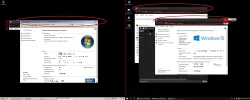
here is a picture of comparisons of Windows 7 and 10.. i hope you will understand what i mean...
 

Attachments

  • win.webp
    win.webp
    126.5 KB · Views: 105
  • win2.webp
    win2.webp
    12.1 KB · Views: 117
Solution
Looks like you can edit the Window metrics

Open regedit and go to this key
HKEY_CURRENT_USER\Control Panel\Desktop\WindowMetrics

Change CaptionHeight and CaptionWidth to -120 (smallest it will go) and logout and back in for it to change.

Neemobeer

Windows Forum Team
Staff member
Joined
Jul 4, 2015
Messages
8,998
Just seems like a terrible reason to go back to a now unsupported version of Windows. You may be able to change back to classic Windows in Windows 10 through the appearance settings but I'm not in front of a computer to test
 

nick12345

New Member
Joined
Mar 6, 2020
Messages
8
when i climbed there everywhere, the only thing i found there was a "high-contrast" theme, and still it had no effect on the size of these buttons(
this buttons are SOO HUGE that they are equal in size to the usual standard theme of 7 almost twice...
 

nick12345

New Member
Joined
Mar 6, 2020
Messages
8
i'm working with multimedia in a recording studio with a 26" 1080p monitor, and im 100% sure that for the sake of such a small moment i do NOT need to buy 8k/16k monitors ... (I hope??) ...
 

nick12345

New Member
Joined
Mar 6, 2020
Messages
8
okey, and if you working on studio mashine (not the tablet) it has to be a little parametrs to adjust your win like all other older windows do?
 

nick12345

New Member
Joined
Mar 6, 2020
Messages
8
in general, i see that il have to sit another year on 7.. until they return the window settings as in all other windows.. and by the way, i was checked they returned a lot of things from 7, for example, the control panel, windows performance settings, etc etc...and because my programs still support 7, i hope that then they will fix this drawback too... buttons for the blind((
 

Neemobeer

Windows Forum Team
Staff member
Joined
Jul 4, 2015
Messages
8,998
Looks like you can edit the Window metrics

Open regedit and go to this key
HKEY_CURRENT_USER\Control Panel\Desktop\WindowMetrics

Change CaptionHeight and CaptionWidth to -120 (smallest it will go) and logout and back in for it to change.
 

Solution

nick12345

New Member
Joined
Mar 6, 2020
Messages
8
oh..and can you pleease check to change this sizes?))) preferably with sceen pllls?) il just already installed again 7)))
 

davehc

Essential Member
Premium Supporter
Joined
May 1, 2008
Messages
5,554
I am not sure if it has been "phased out" It is still available, in full, through the settings. It is a matter of learning new habits.. I think (?) that all of the various choices in the Control panel are now replicated in the settings, unless they are considered redundant by Microsoft (Ahem).
I still use the Control panel in my early setups, but it is mainly a matter of old, and maybe bad habits,
 

Neemobeer

Windows Forum Team
Staff member
Joined
Jul 4, 2015
Messages
8,998
It's being phased out, but very slowly. Microsoft is bringing more of settings into the modern SystemSettings application.
 

Rapaaja

Active Member
Joined
Feb 18, 2019
Messages
280
Just seems like a terrible reason to go back to a now unsupported version of Windows. You may be able to change back to classic Windows in Windows 10 through the appearance settings but I'm not in front of a computer to tes


I Like Rapaaja
 

Back
Top