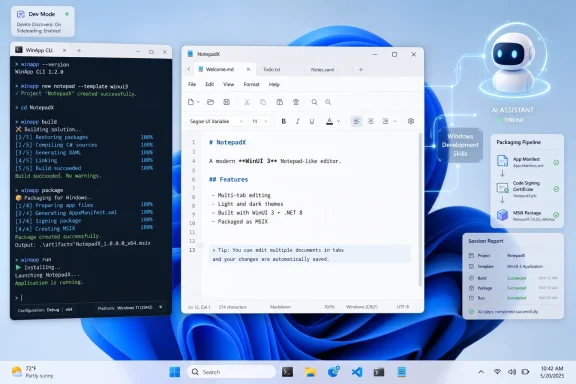
Paul Thurrott used Microsoft’s new Windows Development Skills preview with Anthropic Claude Code after Build 2026 to generate a native Windows 11 Notepad-style app using WinUI 3, the Windows App SDK, and the WinApp command-line tool in roughly 48 minutes. The result was not a miracle, but it was more important than a demo. Microsoft is trying to make native Windows development legible to AI agents, and that may matter more than yet another round of promises about revitalizing the Windows app ecosystem. The old problem was that Windows development had too many paths; the new wager is that agents can survive that maze if Microsoft gives them the right map.
The most interesting Windows developer story at Build 2026 was not that Microsoft has another tool with another Windows-branded name. It was that the company is quietly admitting the graphical developer experience is no longer enough. The WinApp CLI and Windows Development Skills are not primarily about nostalgia for command lines; they are about giving AI systems a predictable, scriptable surface where they can create, inspect, build, package, and repair native applications without waiting for a human to click through Visual Studio.
That distinction matters. For decades, Windows development has been anchored in IDEs, designers, property panes, project templates, and opaque wizardry. Those tools can be productive for people, but they are awkward terrain for agents. A language model can write C# and XAML, but it also needs to know whether the project actually builds, whether a WinUI API exists, whether a template is installed, whether the package identity is valid, and whether a runtime dependency is missing.
The CLI gives the agent something closer to an operating rail. It can run a command, read structured failure, adjust the code, and run again. That sounds banal until you compare it with the usual AI pair-programming loop: the model invents an API, the compiler complains, the human copies an error message back into the chat, and everyone pretends this is the future.
Windows Development Skills is Microsoft’s attempt to cut the human out of that failure loop without cutting the human out of control. In Thurrott’s experiment, Claude Code still asked for permission repeatedly, installed prerequisites only after approval, and iterated through errors visibly. But the point is clear: the AI was not merely chatting about Windows development. It was operating a Windows development workflow.
That history is why AI grounding matters. A generic coding assistant trained on years of Windows examples will see WPF, UWP, WinForms, WinUI 2, WinUI 3, C++/WinRT, XAML Islands, and Windows App SDK material all jumbled together. Some of that code is excellent in its own era and wrong in this one. Some APIs look plausible because they existed somewhere else in the Windows stack. Some patterns compile only if the project type, target framework, package model, and SDK version line up just so.
This is exactly where vibe coding often fails. The first prompt produces something impressive, the second prompt introduces a subtle architectural mismatch, and by the fifth prompt the user is debugging the assistant’s hallucinated understanding of the platform. For web apps, the ecosystem is broad enough and the tooling fast enough that these failures can often be patched around. For native Windows apps, a bad assumption about packaging, threading, XAML binding, or control availability can send the whole project sideways.
Microsoft’s pitch is that Windows Development Skills can keep the agent “in the WinUI 3 lane.” That phrase sounds like marketing, but it captures the technical need. The value is not that the agent knows what a button is. The value is that it knows which button, in which UI stack, under which project model, with which deployment path, and with which design conventions.
But Build 2026 makes the deeper motive harder to miss. A CLI is not merely a developer preference when agents are involved. It becomes the protocol by which software creation becomes automatable.
The same pattern is visible elsewhere in the industry. Google has been pushing Android development into AI-friendly flows. GitHub Copilot has evolved from autocomplete into a more agentic coding environment. Claude Code, OpenAI Codex-style workflows, and similar tools all work best when the world is accessible through commands, files, tests, and logs. The terminal is not back because humans miss green text. It is back because agents can act there.
That gives Microsoft a reason to revisit a long-standing weakness. Windows has extraordinary backward compatibility, but that compatibility has often made the developer story feel sprawling and inconsistent. Agents punish ambiguity. If Microsoft wants AI tools to generate native Windows software reliably, it needs a canonical path that is machine-readable, testable, and current.
The WinApp CLI is that path, or at least the beginning of one. Windows Development Skills then becomes the layer that tells the agent how to use the path intelligently.
The generated Notepad11 app landed somewhere in the middle. It supported multiple documents and tabs. It had most expected menu items. It built and ran on both x64 and Arm. It produced a recognizable WinUI 3 project with an MVVM structure, separate views and view models, XAML, C#, and code that was reportedly concise, if not always as readable as a human hobbyist might prefer.
That is impressive, but the imperfections are more revealing. Printing was absent, with the generated report noting a Windows App SDK limitation. Settings were missing. Font selection existed but did not persist. The menu and tab placement did not match Notepad, likely because getting that arrangement right in WinUI is harder than a screenshot makes it look.
This is the real state of AI app generation in 2026: capable enough to feel uncanny, brittle enough to require judgment, and fast enough to change what counts as a prototype. The app did not replace a developer. It compressed the distance between an idea and a working native codebase.
For Windows, that compression could be consequential. The platform does not suffer from a lack of people who have app ideas. It suffers from the friction between those ideas and the modern native Windows stack. If agents can absorb even part of that friction, Microsoft may finally have a practical answer to the “why not just build a web app?” question.
The difference is not cosmetic. A chatbot that writes code in a vacuum is guessing. An agent that runs the build, reads the compiler output, checks API availability, and modifies files is participating in the development loop. It can still be wrong, but it has contact with reality.
That contact with reality is especially important for Windows. The platform’s APIs are not a clean greenfield. They are layered across decades of compatibility commitments and product pivots. A model that guesses from memory may be worse than useless when the correct answer depends on whether a particular feature belongs to WPF, WinUI 3, UWP, the Windows SDK, the Windows App SDK, or a preview-only package.
Windows Development Skills attempts to replace guesswork with grounded behavior. It gives the agent structured knowledge about XAML, Fluent Design, MVVM, WinUI patterns, and the lifecycle tasks exposed through WinApp CLI. In practice, that means fewer detours into obsolete examples and fewer loops where the AI confidently uses an API from the wrong framework.
This is not the end of debugging. It is a change in who does the first hour of debugging. In Thurrott’s case, Claude Code spent much of the 48-minute run visibly working through failures until the app launched. That kind of autonomous repair is not glamorous, but it is exactly what makes agentic coding feel different from autocomplete.
Electron and web technologies won because they let teams target multiple platforms with familiar tools and one broadly shared skill set. Users may complain about memory use or inconsistent UI, but businesses care about reach, staffing, and maintenance. A beautiful WinUI app that only serves Windows has to justify itself against a browser-based product that ships everywhere.
AI does not erase that economics problem. If anything, it sharpens it. Developers will ask whether an agent can build them a Windows app, an Android app, an iOS app, and a web app from the same intent. Thurrott ends in exactly that place, wondering about a more general-purpose solution that can create cross-platform apps through Flutter or React Native.
That is the pressure Microsoft faces. Windows Development Skills may make native Windows development easier, but the market has already been trained to expect cross-platform reach. A better WinUI pipeline helps most when Windows-specific integration is the point: enterprise tools, device utilities, local AI apps, creative workflows, management consoles, diagnostics, accessibility software, and apps that benefit from deep OS behavior.
In other words, Microsoft’s opportunity is not to make every app native again. It is to make native Windows apps plausible again where native Windows actually matters.
The old model assumed a person drives the interface. The new model assumes a person may express intent while software agents orchestrate the steps. That requires apps to become more modular, more discoverable, and more explicit about what they can do. A photo editor should not only present buttons for background blur; it should expose background blur as an action that another system can request.
This is where native platforms still have leverage. Operating systems can define the permissions, identity, context menus, capability declarations, and trust boundaries that make agent-invoked actions safe. A browser can do much of this too, but the OS owns the local file system, installed apps, device hardware, shell integration, and enterprise policy surface.
Microsoft’s Windows 11 examples, such as AI actions in File Explorer that hand work to Photos or Paint, are early and modest. But the architectural direction is clear. The agentic future is not just “AI uses your apps by clicking around.” That is a transitional hack, like screen scraping. The more mature version is that apps expose their functions to the system, and the system brokers those functions for users and agents.
For developers, this means the application contract is changing. A good app is no longer only a polished window. It is a bundle of capabilities that can be surfaced through the shell, invoked by agents, automated through CLIs, and reasoned about by tooling. Windows Development Skills fits that world because it treats the app lifecycle itself as something agents can navigate.
Thurrott’s experience included repeated permission prompts before he allowed all edits for the session. That is fine for an enthusiast experiment on a personal machine. It is not a governance model for an enterprise. Organizations will need policy controls around which agents can run, which plugins they can install, what repositories they can modify, what secrets they can access, what commands they can execute, and how generated code is reviewed.
The same issue appears at runtime. If apps expose semantic actions for agents, those actions need permission boundaries. “Blur the background of this image” is low risk. “Export this customer database,” “send these files,” or “modify this registry setting” is not. Windows has decades of access-control machinery, but agent-mediated workflows will test whether those controls are understandable and enforceable at the level users actually experience.
There is also the supply-chain question. AI-generated code can be clean, but it can also reproduce stale patterns, insecure defaults, or dependency choices that nobody on the team fully understands. Grounding an agent in Microsoft’s documentation reduces one category of error. It does not replace code review, static analysis, threat modeling, or the boring discipline of knowing what is in your app.
The best version of this future gives administrators visibility and policy. The worst version gives every enthusiastic employee a local robot with a shell prompt and a corporate identity. Microsoft knows which version enterprises will pay for.
A first day that includes installing the right SDKs, choosing between project types, finding modern samples, understanding packaging, resolving template failures, and discovering which documentation is obsolete is a bad first day. A first day where an agent scaffolds the app, fixes its own initial mistakes, and leaves behind a working project is very different.
This is where Thurrott’s 48-minute Notepad clone matters. It was not production-ready, but it existed. It compiled. It ran. It had recognizable architecture. It provided a base from which a knowledgeable user could continue.
That base may be enough to change behavior. Hobbyists can test ideas. Internal IT teams can build small utilities. Developers from web or mobile backgrounds can explore WinUI without first becoming historians of Windows UI frameworks. Experienced Windows developers can offload boilerplate and focus on the parts where judgment matters.
The catch is that Microsoft must keep the tooling current. AI grounding is only as good as the ground. If Windows Development Skills drifts behind the SDK, or if examples become inconsistent, agents will inherit the confusion. The maintenance burden does not disappear; it moves from scattered documentation and human memory into a curated machine-facing layer.
That is a meaningful threshold. Software development contains many tasks that are too specific for generic templates and too tedious for experienced developers to enjoy. Agents are well suited to that middle ground. They can assemble structure, write repetitive code, wire up obvious bindings, generate first-pass UI, and run through build errors while the human decides what the app should actually become.
The Windows angle is that Microsoft is making the native path more agent-readable at the same time it is making Windows itself more agent-addressable. WinApp CLI, Windows Development Skills, App Actions, and Microsoft’s broader agent push are separate announcements only on the slide deck. Strategically, they point in the same direction: Windows as a platform where agents build apps, operate apps, and eventually coordinate app capabilities on behalf of users.
That does not guarantee developer enthusiasm. Microsoft has burned goodwill before by shifting app models, renaming frameworks, and leaving developers to wonder which future is the real one. The company now has to prove that WinUI 3, Windows App SDK, and the new agent tooling are not another transient layer in the stack.
Still, the timing is better than it has been in years. AI coding tools are changing developer habits anyway. If Microsoft can make native Windows development one of the paths of least resistance inside those tools, it does not need to win developers back with speeches. It can win them back with working projects.
Microsoft has spent much of the modern Windows era trying to reconcile its past with its future, and native app development has often been where that tension hurt the most. Windows Development Skills will not solve the ecosystem problem by itself, and vibe-coded apps will not magically become maintainable because a demo compiled. But if Microsoft can turn its sprawling native stack into a guided, agent-readable workflow, it may finally give Windows developers something they have needed for years: not another grand vision, but a shorter path from intent to a real app running on the desktop.
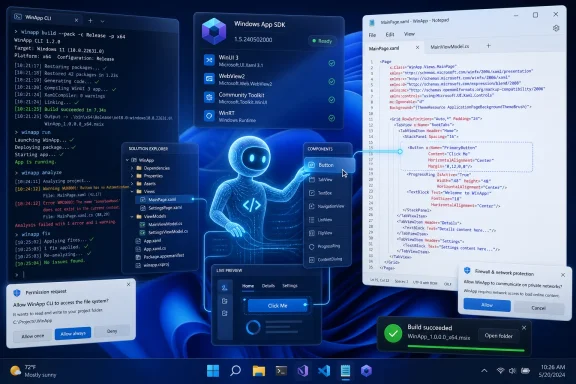 Microsoft Is Turning the Terminal Into an Agent Interface
The most interesting Windows developer story at Build 2026 was not that Microsoft has another tool with another Windows-branded name. It was that the company is quietly admitting the graphical developer experience is no longer enough. The WinApp CLI and Windows Development Skills are not primarily about nostalgia for command lines; they are about giving AI systems a predictable, scriptable surface where they can create, inspect, build, package, and repair native applications without waiting for a human to click through Visual Studio.That distinction matters. For decades, Windows development has been anchored in IDEs, designers, property panes, project templates, and opaque wizardry. Those tools can be productive for people, but they are awkward terrain for agents. A language model can write C# and XAML, but it also needs to know whether the project actually builds, whether a WinUI API exists, whether a template is installed, whether the package identity is valid, and whether a runtime dependency is missing.
The CLI gives the agent something closer to an operating rail. It can run a command, read structured failure, adjust the code, and run again. That sounds banal until you compare it with the usual AI pair-programming loop: the model invents an API, the compiler complains, the human copies an error message back into the chat, and everyone pretends this is the future.
Windows Development Skills is Microsoft’s attempt to cut the human out of that failure loop without cutting the human out of control. In Thurrott’s experiment, Claude Code still asked for permission repeatedly, installed prerequisites only after approval, and iterated through errors visibly. But the point is clear: the AI was not merely chatting about Windows development. It was operating a Windows development workflow.
The Old Windows App Problem Was Never Just the Code
Microsoft’s native app story has been complicated for so long that “WinUI 3 app” still needs a footnote in normal conversation. Win32 never died. WPF never vanished. UWP arrived with grand ambitions and left behind a residue of mistrust. The Windows App SDK was supposed to pull modern Windows APIs out of the operating system release cycle and make them usable from traditional desktop apps, but for many developers it also became one more acronym in a crowded drawer.That history is why AI grounding matters. A generic coding assistant trained on years of Windows examples will see WPF, UWP, WinForms, WinUI 2, WinUI 3, C++/WinRT, XAML Islands, and Windows App SDK material all jumbled together. Some of that code is excellent in its own era and wrong in this one. Some APIs look plausible because they existed somewhere else in the Windows stack. Some patterns compile only if the project type, target framework, package model, and SDK version line up just so.
This is exactly where vibe coding often fails. The first prompt produces something impressive, the second prompt introduces a subtle architectural mismatch, and by the fifth prompt the user is debugging the assistant’s hallucinated understanding of the platform. For web apps, the ecosystem is broad enough and the tooling fast enough that these failures can often be patched around. For native Windows apps, a bad assumption about packaging, threading, XAML binding, or control availability can send the whole project sideways.
Microsoft’s pitch is that Windows Development Skills can keep the agent “in the WinUI 3 lane.” That phrase sounds like marketing, but it captures the technical need. The value is not that the agent knows what a button is. The value is that it knows which button, in which UI stack, under which project model, with which deployment path, and with which design conventions.
WinApp CLI Looks Like Developer Tooling, But It Smells Like Infrastructure
When Microsoft announced the WinApp CLI in January 2026, it could be read as a convenience layer for developers outside Visual Studio. That is still true. Cross-platform teams, Electron developers, Flutter developers, and command-line-first programmers all benefit from a single tool that can handle Windows SDK setup, packaging, manifests, app identity, certificates, and build-related tasks.But Build 2026 makes the deeper motive harder to miss. A CLI is not merely a developer preference when agents are involved. It becomes the protocol by which software creation becomes automatable.
The same pattern is visible elsewhere in the industry. Google has been pushing Android development into AI-friendly flows. GitHub Copilot has evolved from autocomplete into a more agentic coding environment. Claude Code, OpenAI Codex-style workflows, and similar tools all work best when the world is accessible through commands, files, tests, and logs. The terminal is not back because humans miss green text. It is back because agents can act there.
That gives Microsoft a reason to revisit a long-standing weakness. Windows has extraordinary backward compatibility, but that compatibility has often made the developer story feel sprawling and inconsistent. Agents punish ambiguity. If Microsoft wants AI tools to generate native Windows software reliably, it needs a canonical path that is machine-readable, testable, and current.
The WinApp CLI is that path, or at least the beginning of one. Windows Development Skills then becomes the layer that tells the agent how to use the path intelligently.
Thurrott’s Notepad Clone Is a Better Test Than a Polished Demo
The choice to ask Claude Code for a Windows 11 Notepad clone was not trivial. Notepad is simple enough that everyone understands the target, but modern Notepad is not actually a toy. Tabs, menus, find and replace, file handling, font behavior, status information, and Windows 11 visual conventions all create enough surface area to expose whether the generated app is merely a scaffold or something closer to a real desktop application.The generated Notepad11 app landed somewhere in the middle. It supported multiple documents and tabs. It had most expected menu items. It built and ran on both x64 and Arm. It produced a recognizable WinUI 3 project with an MVVM structure, separate views and view models, XAML, C#, and code that was reportedly concise, if not always as readable as a human hobbyist might prefer.
That is impressive, but the imperfections are more revealing. Printing was absent, with the generated report noting a Windows App SDK limitation. Settings were missing. Font selection existed but did not persist. The menu and tab placement did not match Notepad, likely because getting that arrangement right in WinUI is harder than a screenshot makes it look.
This is the real state of AI app generation in 2026: capable enough to feel uncanny, brittle enough to require judgment, and fast enough to change what counts as a prototype. The app did not replace a developer. It compressed the distance between an idea and a working native codebase.
For Windows, that compression could be consequential. The platform does not suffer from a lack of people who have app ideas. It suffers from the friction between those ideas and the modern native Windows stack. If agents can absorb even part of that friction, Microsoft may finally have a practical answer to the “why not just build a web app?” question.
Vibe Coding Becomes Serious When It Stops Pretending Errors Are Surprises
The phrase vibe coding still annoys many professional developers because it sounds like software engineering without engineering. That criticism is fair when the process means prompting until something appears and then shipping the result without understanding it. But Thurrott’s experiment points to a more durable version of the idea: AI-driven iteration against real toolchains, with build output, structured constraints, and human supervision.The difference is not cosmetic. A chatbot that writes code in a vacuum is guessing. An agent that runs the build, reads the compiler output, checks API availability, and modifies files is participating in the development loop. It can still be wrong, but it has contact with reality.
That contact with reality is especially important for Windows. The platform’s APIs are not a clean greenfield. They are layered across decades of compatibility commitments and product pivots. A model that guesses from memory may be worse than useless when the correct answer depends on whether a particular feature belongs to WPF, WinUI 3, UWP, the Windows SDK, the Windows App SDK, or a preview-only package.
Windows Development Skills attempts to replace guesswork with grounded behavior. It gives the agent structured knowledge about XAML, Fluent Design, MVVM, WinUI patterns, and the lifecycle tasks exposed through WinApp CLI. In practice, that means fewer detours into obsolete examples and fewer loops where the AI confidently uses an API from the wrong framework.
This is not the end of debugging. It is a change in who does the first hour of debugging. In Thurrott’s case, Claude Code spent much of the 48-minute run visibly working through failures until the app launched. That kind of autonomous repair is not glamorous, but it is exactly what makes agentic coding feel different from autocomplete.
Native Windows Apps Need More Than Another Evangelism Cycle
Microsoft has spent years trying to persuade developers that native Windows apps still matter. The problem is that the argument has often been stronger than the payoff. Native apps can be faster, more integrated, more power-efficient, and more respectful of platform conventions. But building them has frequently felt harder than building a web app, and the distribution story has not always helped.Electron and web technologies won because they let teams target multiple platforms with familiar tools and one broadly shared skill set. Users may complain about memory use or inconsistent UI, but businesses care about reach, staffing, and maintenance. A beautiful WinUI app that only serves Windows has to justify itself against a browser-based product that ships everywhere.
AI does not erase that economics problem. If anything, it sharpens it. Developers will ask whether an agent can build them a Windows app, an Android app, an iOS app, and a web app from the same intent. Thurrott ends in exactly that place, wondering about a more general-purpose solution that can create cross-platform apps through Flutter or React Native.
That is the pressure Microsoft faces. Windows Development Skills may make native Windows development easier, but the market has already been trained to expect cross-platform reach. A better WinUI pipeline helps most when Windows-specific integration is the point: enterprise tools, device utilities, local AI apps, creative workflows, management consoles, diagnostics, accessibility software, and apps that benefit from deep OS behavior.
In other words, Microsoft’s opportunity is not to make every app native again. It is to make native Windows apps plausible again where native Windows actually matters.
Semantic Apps Are the Other Half of the Story
Thurrott’s larger observation about semantic apps may prove more important than the Notepad clone itself. Microsoft’s App Actions and Google’s Android AppFunctions are part of a broader shift: apps are being asked to expose capabilities in ways that agents can invoke without pretending to be users.The old model assumed a person drives the interface. The new model assumes a person may express intent while software agents orchestrate the steps. That requires apps to become more modular, more discoverable, and more explicit about what they can do. A photo editor should not only present buttons for background blur; it should expose background blur as an action that another system can request.
This is where native platforms still have leverage. Operating systems can define the permissions, identity, context menus, capability declarations, and trust boundaries that make agent-invoked actions safe. A browser can do much of this too, but the OS owns the local file system, installed apps, device hardware, shell integration, and enterprise policy surface.
Microsoft’s Windows 11 examples, such as AI actions in File Explorer that hand work to Photos or Paint, are early and modest. But the architectural direction is clear. The agentic future is not just “AI uses your apps by clicking around.” That is a transitional hack, like screen scraping. The more mature version is that apps expose their functions to the system, and the system brokers those functions for users and agents.
For developers, this means the application contract is changing. A good app is no longer only a polished window. It is a bundle of capabilities that can be surfaced through the shell, invoked by agents, automated through CLIs, and reasoned about by tooling. Windows Development Skills fits that world because it treats the app lifecycle itself as something agents can navigate.
The Security Model Will Decide Whether IT Trusts Any of This
For WindowsForum readers, the obvious excitement should be tempered by an equally obvious worry: agentic development is an enormous attack surface if handled casually. An AI coding agent that can install tools, edit files, enable Developer Mode, create certificates, package apps, and run commands is powerful. Power is useful; it is also what administrators spend their careers constraining.Thurrott’s experience included repeated permission prompts before he allowed all edits for the session. That is fine for an enthusiast experiment on a personal machine. It is not a governance model for an enterprise. Organizations will need policy controls around which agents can run, which plugins they can install, what repositories they can modify, what secrets they can access, what commands they can execute, and how generated code is reviewed.
The same issue appears at runtime. If apps expose semantic actions for agents, those actions need permission boundaries. “Blur the background of this image” is low risk. “Export this customer database,” “send these files,” or “modify this registry setting” is not. Windows has decades of access-control machinery, but agent-mediated workflows will test whether those controls are understandable and enforceable at the level users actually experience.
There is also the supply-chain question. AI-generated code can be clean, but it can also reproduce stale patterns, insecure defaults, or dependency choices that nobody on the team fully understands. Grounding an agent in Microsoft’s documentation reduces one category of error. It does not replace code review, static analysis, threat modeling, or the boring discipline of knowing what is in your app.
The best version of this future gives administrators visibility and policy. The worst version gives every enthusiastic employee a local robot with a shell prompt and a corporate identity. Microsoft knows which version enterprises will pay for.
The Windows App Ecosystem Finally Gets a Plausible On-Ramp
The most generous reading of Microsoft’s move is that it lowers the emotional cost of starting a native Windows app. That cost has always been underrated. Developers do not merely ask whether something is possible. They ask whether the first day will be miserable.A first day that includes installing the right SDKs, choosing between project types, finding modern samples, understanding packaging, resolving template failures, and discovering which documentation is obsolete is a bad first day. A first day where an agent scaffolds the app, fixes its own initial mistakes, and leaves behind a working project is very different.
This is where Thurrott’s 48-minute Notepad clone matters. It was not production-ready, but it existed. It compiled. It ran. It had recognizable architecture. It provided a base from which a knowledgeable user could continue.
That base may be enough to change behavior. Hobbyists can test ideas. Internal IT teams can build small utilities. Developers from web or mobile backgrounds can explore WinUI without first becoming historians of Windows UI frameworks. Experienced Windows developers can offload boilerplate and focus on the parts where judgment matters.
The catch is that Microsoft must keep the tooling current. AI grounding is only as good as the ground. If Windows Development Skills drifts behind the SDK, or if examples become inconsistent, agents will inherit the confusion. The maintenance burden does not disappear; it moves from scattered documentation and human memory into a curated machine-facing layer.
The Notepad Clone Points to a Narrower, More Useful AI Promise
The lesson from Thurrott’s experiment is not that anyone can now describe an app and instantly get a finished Windows product. That version of the story will sell demos and disappoint users. The better lesson is narrower and more useful: with the right platform-specific grounding, an AI agent can produce a credible native Windows starting point and survive enough of the toolchain to make the result real.That is a meaningful threshold. Software development contains many tasks that are too specific for generic templates and too tedious for experienced developers to enjoy. Agents are well suited to that middle ground. They can assemble structure, write repetitive code, wire up obvious bindings, generate first-pass UI, and run through build errors while the human decides what the app should actually become.
The Windows angle is that Microsoft is making the native path more agent-readable at the same time it is making Windows itself more agent-addressable. WinApp CLI, Windows Development Skills, App Actions, and Microsoft’s broader agent push are separate announcements only on the slide deck. Strategically, they point in the same direction: Windows as a platform where agents build apps, operate apps, and eventually coordinate app capabilities on behalf of users.
That does not guarantee developer enthusiasm. Microsoft has burned goodwill before by shifting app models, renaming frameworks, and leaving developers to wonder which future is the real one. The company now has to prove that WinUI 3, Windows App SDK, and the new agent tooling are not another transient layer in the stack.
Still, the timing is better than it has been in years. AI coding tools are changing developer habits anyway. If Microsoft can make native Windows development one of the paths of least resistance inside those tools, it does not need to win developers back with speeches. It can win them back with working projects.
The 48-Minute App Is a Warning Shot
A few concrete points stand out from this experiment, and they are more grounded than the usual conference-stage optimism.- Microsoft’s Windows Development Skills preview is best understood as an AI-agent grounding layer for WinUI 3 and Windows App SDK development, not as a normal end-user app builder.
- The WinApp CLI matters because agents need repeatable command-line access to setup, build, run, package, signing, and diagnostic workflows.
- Thurrott’s generated Notepad-style app was functional enough to validate the concept, but incomplete enough to show that human review and continued development remain essential.
- The biggest practical benefit may be reducing the first-day friction of native Windows development for hobbyists, internal-tool builders, and developers coming from other platforms.
- Enterprise adoption will depend on permission controls, auditability, code review, and clear boundaries around what coding agents can install, edit, execute, and publish.
- Microsoft’s larger bet is that Windows apps must become both easier for agents to create and easier for agents to operate through exposed app actions and semantic capabilities.
Microsoft has spent much of the modern Windows era trying to reconcile its past with its future, and native app development has often been where that tension hurt the most. Windows Development Skills will not solve the ecosystem problem by itself, and vibe-coded apps will not magically become maintainable because a demo compiled. But if Microsoft can turn its sprawling native stack into a guided, agent-readable workflow, it may finally give Windows developers something they have needed for years: not another grand vision, but a shorter path from intent to a real app running on the desktop.
References
- Primary source: thurrott.com
Published: Wed, 03 Jun 2026 14:56:41 GMT
And Now I've Vibe-Coded a Native Windows 11 App ⭐ - Thurrott.com
The Build 2026 keynote was overly-long, in keeping with tradition. But there was some good news for Windows developers too.www.thurrott.com - Official source: learn.microsoft.com
Windows App Development CLI (winapp CLI) - Windows apps | Microsoft Learn
The Windows App Development CLI (winapp CLI) is a command-line interface for managing Windows SDKs, packaging, generating app identity, manifests, certificates, and using build tools with any app framework.learn.microsoft.com - Official source: blogs.windows.com
Announcing winapp, the Windows App Development CLI
We are excited to announce the public preview of the Windows App Development CLI (winapp), a new open-source cblogs.windows.com - Official source: developer.microsoft.com
Developing Apps for Windows | Microsoft Developer
Create exceptional desktop experiences for Windows with the latest tools and frameworks.developer.microsoft.com - Related coverage: techrepublic.com
Microsoft Launches winapp to Simplify Windows App Development
Microsoft’s new winapp CLI simplifies Windows app development with one-command setup, faster testing, and easier packaging.www.techrepublic.com
- Official source: devblogs.microsoft.com
Windows App Development CLI v0.3: new run and ui commands, plus dotnet run support for packaged apps - #ifdef Windows
Whether you're building with WinUI, WPF, WinForms, C++, Electron, or Rust — the Windows App Development CLI is for you. It provides the tooling to package, run, add Windows SDK support, and more to any Windows app.devblogs.microsoft.com
- Related coverage: windowscentral.com
Microsoft just made a command line version of the Microsoft Store for Windows 11 — install and update your apps without a GUI | Windows Central
You can now find, install, and update Microsoft Store apps using a command prompt on Windows 10 and Windows 11 PCs. No GUI required.www.windowscentral.com - Related coverage: techradar.com
Windows 12 at Build 2026: What to expect | TechRadar
What Build 2026 signals about the future of the Windowswww.techradar.com