

HP's move to fold Pavilion, Envy, and Spectre into a single OmniBook family is the clearest signal yet that mainstream Windows laptops are being redesigned around battery endurance, on-device AI, and simplified buying choices—a change that matters directly to buyers in Thailand’s varied urban and regional markets. The OmniBook Quick Start guidance supplied by HP and the independent regional analysis together outline a straightforward upgrade path: pick the OmniBook tier that maps to your workload, verify the exact SKU for battery and NPU claims, and apply a few Thailand-specific setup and power-protection steps to get reliable, long-term value.
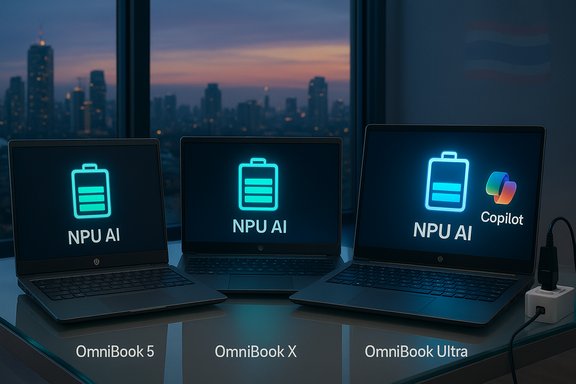
HP consolidated its consumer laptop families under the OmniBook umbrella to reduce buyer confusion and to emphasize a common set of modern capabilities: Windows 11 with Copilot+ readiness, hardware NPUs for local AI acceleration, OLED display options on many SKUs, and sustainability efforts across materials and certifications. This repositioning replaces the Pavilion, Envy, and Spectre names with a simpler tiered lineup designed to make the buyer decision more technical and less brand-driven. The OmniBook family is described in three headline tiers that map to common user needs:
Who should consider Ultra:
Quick setup checklist (15–30 minutes typical with a stable internet connection):
Important technical clarifications:
The OmniBook family is a pragmatic, modern answer for students, creators, and mobile professionals who want Windows 11 features and local AI acceleration without navigating a confusing set of model names. With careful SKU selection and a few regional precautions, an OmniBook can deliver a reliably productive experience across Thailand’s campuses, co-working spaces, and creative studios.
Source: HP HP OmniBook Quick Start Guide: Setup & Tips
 Background / Overview
HP consolidated its consumer laptop families under the OmniBook umbrella to reduce buyer confusion and to emphasize a common set of modern capabilities: Windows 11 with Copilot+ readiness, hardware NPUs for local AI acceleration, OLED display options on many SKUs, and sustainability efforts across materials and certifications. This repositioning replaces the Pavilion, Envy, and Spectre names with a simpler tiered lineup designed to make the buyer decision more technical and less brand-driven. The OmniBook family is described in three headline tiers that map to common user needs:- OmniBook 5 — value and long battery (replaces Pavilion).
- OmniBook X — balance of battery and creative features (replaces Envy).
- OmniBook Ultra — premium performance and highest NPU headroom (replaces Spectre).
HP OmniBook model breakdown: which one fits your needs
HP OmniBook 5 — everyday value and long runtime
The OmniBook 5 targets students, families, and general users who prioritise portability and battery life. Configurations include Snapdragon-based SKUs and efficient Intel/AMD variants with OLED display options on larger sizes. HP lists long local video-playback numbers (in some Snapdragon configs, HP cites as much as "up to 34 hours" of local playback under specific lab conditions), fast-charge support (approx. 50% in ~30 minutes in many SKUs), and mainstream CPU choices for everyday tasks. Verify the exact battery Wh and testing methodology on the SKU you buy. Why choose OmniBook 5:- Lightweight chassis suitable for day-long commutes.
- Long nominal battery life for classroom and café use.
- Good for browsing, Office, streaming, and light media editing.
HP OmniBook X — creators and mobile professionals
OmniBook X sits between mainstream value and premium performance, offering configurable CPU/NPU options and higher-end displays (including 3K OLED on premium SKUs). This is the flexible choice for remote workers and creators who need better color reproduction, more RAM options, and a stronger webcam/audio package for collaboration. HP positions X-series SKUs as capable of long battery life while supporting Copilot+ features thanks to on-device NPUs. Best uses:- Photo and light video editing with accurate displays.
- Frequent video calls and productivity workflows.
- Users who want a balance of endurance and higher display fidelity.
HP OmniBook Ultra — power users, editors, and gamers who need headroom
OmniBook Ultra represents HP’s premium offering: higher core counts, larger NPUs (HP and reviewers have referenced NPUs in the upper tens of TOPS on some Ultra SKUs), generous RAM and SSD options, and convertible Ultra Flip variants for stylus-driven creative work. These SKUs are aimed at heavy editing workloads, 3D modelling, and local AI acceleration tasks. Again: TOPS numbers are hardware ceilings, not application guarantees—software must call the NPU to benefit.Who should consider Ultra:
- Designers, video editors, and engineers who rely on local AI acceleration.
- Gamers who want high refresh displays plus better thermals and discrete GPU support on some SKUs.
- Professionals who need large local storage and higher memory configurations.
Switching to an OmniBook: an efficient setup guide
Windows 11- and HP-specific setup flows simplify migration from older HP laptops, but paying attention to a few regional details avoids common pitfalls.Quick setup checklist (15–30 minutes typical with a stable internet connection):
- Unbox, connect the charger to a surge protector (recommended in regions with occasional power fluctuation), and power on.
- Follow Windows 11 initial setup: set region (Thailand), time zone (Bangkok GMT+7), language packs (add Thai if required), and sign into your Microsoft account.
- Run Windows Update and HP Support Assistant to fetch firmware/drivers and HP utilities. HP Support Assistant helps automate many post-setup tasks.
- Configure privacy/security: enable Windows Hello (facial or fingerprint where available), privacy toggles for camera/mic, and set up OneDrive for file backups.
- Install essential apps (browsers, Office 365 or Google Workspace, Teams/Zoom, and any course- or work-specific software).
- If migrating data, use cloud transfer (OneDrive/Google Drive) or HP QuickDrop / external drive for large migrate jobs.
- Use a surge protector or UPS when working in areas with intermittent power; confirm your charger’s compatibility with Thailand’s 220V mains.
- Verify local warranty and service center availability for your specific SKU—stocking and spare-part timelines vary across major Thai cities.
Optimising battery, thermals and display for Thailand’s climate
Thailand’s tropical temperatures and humidity influence everyday laptop care—here’s what to do to keep an OmniBook healthy and performing:- Battery management:
- Use Battery Saver when unplugged for extended sessions.
- Avoid keeping the device at 100% plugged-in continuously; unplug after full charge for long-term battery health.
- Fast-charge figures (50% in ~30 minutes) are SKU-dependent and often measured when the device is idle; expect slower real-world charge times if you use the laptop while charging.
- Thermal hygiene:
- Keep vents unobstructed and avoid using the laptop on soft surfaces for long periods.
- Work in air-conditioned environments where possible; in open, hot settings prefer Snapdragon/ARM SKUs which often run cooler under light loads.
- Display and eye comfort:
- Reduce brightness where possible and use Night Light during evening sessions to reduce eye strain.
- For creators, choose OLED or wide-gamut SKUs and calibrate colour profiles in Windows or with a colorimeter for accurate editing.
Security and privacy: what OmniBook adds and what to configure
HP’s consumer devices consolidate protections that matter for public and hybrid work:- HP Wolf Security (where available) provides threat containment, secure browsing protections, and endpoint hardening on certain OmniBook SKUs. Check the product page for SKU-specific security bundles.
- Windows Security remains the baseline; enable BitLocker (or device encryption) when handling sensitive documents and enable automatic updates.
- Use strong, unique passwords and enable multifactor authentication for Microsoft accounts and corporate logins.
- Enable Windows Hello for local biometric unlock.
- Turn on automatic Windows Update and HP Support Assistant’s firmware checks.
- Configure webcam/microphone privacy toggles and use physical camera covers where extreme privacy is needed.
On-device AI, Copilot+, and the NPU caveat
One of the headline claims of the OmniBook family is on-device AI acceleration—hardware NPUs are meant to reduce latency and increase privacy for features like Copilot+ tasks, local transcription, and camera enhancements. HP and independent reports list NPUs in the “upper tens” of TOPS on premium SKUs, and Microsoft’s Copilot+ ecosystem expects a certain NPU floor on devices to enable local acceleration and responsiveness.Important technical clarifications:
- TOPS measures theoretical throughput (trillions of operations per second), not direct app performance. A higher TOPS figure indicates more hardware headroom but only benefits applications that are engineered to use the NPU.
- For everyday productivity (document drafting, email, browsing) AI features provide clear convenience gains. For heavy workloads (model training, large-scale local LLM inference), expect thermal and battery trade-offs.
Thailand-specific buying and aftercare advice
- Check local availability: stock and SKU variants can differ by region—battery Wh, charger power, and even display panels sometimes vary between markets. Confirm the model code before purchase.
- Service coverage: confirm HP service centers in Bangkok, Chiang Mai and other major cities; for students and remote workers, extended warranty or accidental damage protection reduces downtime risk.
- Power protection: use a quality surge protector or UPS in areas prone to power spikes; fast-charge and USB-C PD adapters can be region-specific—use only OEM or certified third-party adapters.
- Climate care: avoid leaving laptops in hot vehicles or exposed sunlight; store in dry, ventilated bags during the monsoon season and use silica gel pouches for long-term storage if humidity is a concern.
Recommended software and accessories
Essential apps:- Productivity: Microsoft 365 / Office 365 or Google Workspace.
- Communication: Microsoft Teams, Zoom, or Line for local preference.
- Backup: OneDrive (native Windows integration), Google Drive, or Dropbox.
- HP utilities: HP Support Assistant, HP QuickDrop, and HP Smart Print for efficient device maintenance and file transfers.
- USB-C hub with HDMI/DisplayPort for presentations and external monitors.
- External SSD for large media projects or backups.
- Certified surge protector or UPS for critical work.
- A good laptop bag with water resistance and padding for commuting.
Practical FAQ (short, actionable answers)
- Can I transfer settings from Pavilion/Envy/Spectre to OmniBook?
Use OneDrive or an external drive for files; HP QuickDrop and Windows Backup help migrate settings. Sign in to your Microsoft account during setup to restore many settings automatically. - Which OmniBook is best for Thai students?
OmniBook 5 for battery-first value, OmniBook X for a balance of creative features and endurance, OmniBook Ultra for heavy creative/engineering workloads. Verify software compatibility for ARM SKUs if your course requires specialized apps. - Are HP’s battery and TOPS claims trustworthy?
They are verifiable lab metrics and useful for comparison, but real-world mixed-use results are typically lower. Confirm the SKU’s battery Wh, read independent mixed-use reviews, and expect day-to-day runtimes below “up to” marketing numbers. - What about Windows 10 support?
Windows 10 reached end of support on October 14, 2025; buying a Windows 11 Copilot+-capable machine (like an OmniBook) is the practical security-forward choice. If you must delay, investigate Extended Security Updates (ESU) options.
Critical analysis — strengths, trade-offs and risks
Strengths- Cohesive product family: HP’s OmniBook naming simplifies choices and aligns feature sets across tiers, making SKU comparisons easier for buyers looking to match hardware to use cases.
- Battery and on-device AI focus: ARM Snapdragon SKUs and energy-efficient Intel/AMD options provide genuine user-facing battery improvements and faster, more private AI features for everyday tasks.
- Form-factor variety: Flip convertibles and 14–16" choices fit a broad set of workflows from note-taking to multimedia editing.
- Lab vs real-world gap: “Up to X hours” battery and TOPS headlines are optimistic lab figures. Expect substantially lower mixed-use results; always consult independent reviews for the SKU you intend to purchase.
- ARM compatibility: Windows on ARM has matured, but niche academic and legacy apps may still require x86; confirm application compatibility for mission-critical software.
- Driver/firmware maturity: New NPUs and hybrid platforms sometimes show teething issues at launch—allow for an initial patching period and verify driver updates after purchase.
- Regional SKU fragmentation: Battery size, chargers, and even wireless modules may differ by market—confirm the exact model number and region before purchasing.
- Any singular “hours of battery life” or exact TOPS number quoted in marketing material should be treated cautiously unless verified for your specific SKU and region. If a third-party claim cannot be traced to a specific HP SKU’s spec sheet or an independent lab test, it should be considered unverified. Always validate the precise SKU code, battery Wh, and the testing methodology used for the quoted number.
Final recommendation and buying checklist
Before you buy:- Confirm your use case: battery-first (OmniBook 5), balanced/professional (OmniBook X), or power/creative (OmniBook Ultra).
- Verify the exact SKU/model code and regional specifications (battery Wh, RAM soldered vs. upgradable, fast-charge claims).
- Read at least one independent mixed-use battery test and one detailed hands‑on review for that SKU.
- Confirm local HP warranty, service center coverage, and accessory/repair lead times in your city.
- Protect the device with a surge protector or UPS in regions with occasional voltage instability.
The OmniBook family is a pragmatic, modern answer for students, creators, and mobile professionals who want Windows 11 features and local AI acceleration without navigating a confusing set of model names. With careful SKU selection and a few regional precautions, an OmniBook can deliver a reliably productive experience across Thailand’s campuses, co-working spaces, and creative studios.
Source: HP HP OmniBook Quick Start Guide: Setup & Tips
