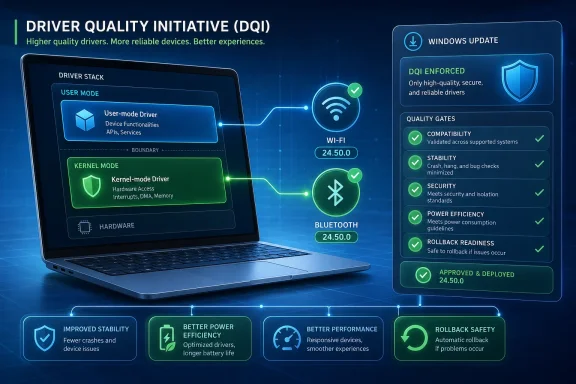
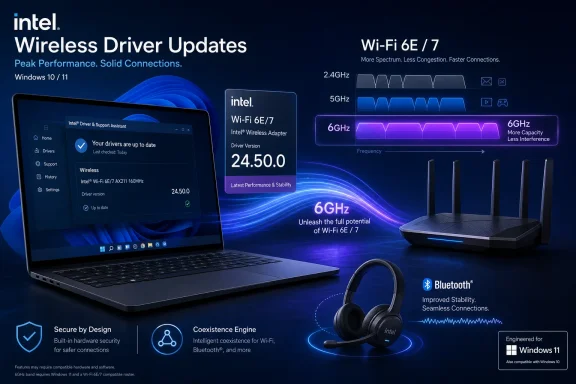
Intel released Wi-Fi driver 24.50.0 and Wireless Bluetooth driver 24.50.0 for Windows 10 and Windows 11 on June 30, 2026, adding support for newer Intel wireless adapters while promising better 6GHz performance, stronger Wi-Fi/Bluetooth coexistence, stability fixes, security updates, and alignment with Microsoft’s Windows ecosystem quality push. The release is not flashy in the way a new Windows feature is flashy, but it lands where many PC users actually feel the operating system: the moment a headset stutters, a laptop drops from 6GHz to 5GHz, or a wake-from-sleep reconnect fails. Intel is presenting this as a quality release, and that framing matters because Windows 11’s rough edges are increasingly being sanded not only by Microsoft, but by the silicon vendors whose drivers define the daily experience of modern PCs. The practical story is simple: if your Windows machine depends on Intel wireless hardware, this is the kind of update that deserves attention—but not blind deployment.
Driver releases are usually the least glamorous part of the Windows ecosystem, which is precisely why they matter. Windows 11 can gain new Start menu behavior, AI integrations, graphics recovery features, and storage cleanup changes, but for many users the perceived reliability of the machine still comes down to radios, audio, display drivers, and power management. A Wi-Fi stack that reconnects cleanly after sleep feels like a better operating system, even when the fix comes from Intel rather than Redmond.
Intel’s 24.50.0 wireless release arrives with a familiar but loaded phrase: functional and security updates, plus other possible fixes not listed in the public notes. That is vendor-speak for a maintenance release with enough under-the-hood work that the public changelog only tells part of the story. For home users, that can mean better connection stability or fewer unexplained Bluetooth oddities. For IT admins, it means the release should be treated as a real platform component rather than a cosmetic package.
The most interesting line is Intel’s claim that, starting with 24.50.0, its wireless Wi-Fi drivers integrate enhancements aligned with Microsoft’s Windows ecosystem quality initiative. That is not a detailed engineering disclosure, and Intel does not spell out exactly what Microsoft’s initiative requires in this context. But the phrasing suggests a coordinated quality push: less about one bug fix and more about making the driver behave better inside the expectations of modern Windows.
That distinction is important. A PC’s wireless adapter is no longer just a network card. It is part of the sleep/resume path, the Teams call path, the Bluetooth headset path, the docking workflow, the roaming workflow, and increasingly the high-bandwidth Wi-Fi 6E and Wi-Fi 7 path. When the driver is weak, Windows looks weak.
That makes this update less about a single speed bump and more about the long tail of modern wireless adoption. The 6GHz band is valuable precisely because it is cleaner and wider, but the experience can be fragile when any part of the chain is out of date. A user may own a Wi-Fi 7 laptop and a Wi-Fi 7 router yet still see inconsistent behavior because of regulatory constraints, roaming decisions, power management, or adapter firmware.
Intel’s release notes also mention updated regional regulatory compliance and support. That phrase sounds bureaucratic, but it is central to 6GHz networking. Wireless devices do not get to blast across spectrum just because the silicon can do it; drivers and firmware must respect local rules about channels, power levels, indoor use, and availability. As countries continue refining 6GHz policies, wireless driver updates become part performance work, part legal compliance work.
For Windows 11 users, this is why the operating system’s wireless experience often improves in increments rather than leaps. Microsoft can build the framework, but Intel, Qualcomm, MediaTek, Realtek, router vendors, and regional regulators all shape the final result. The 24.50.0 release is a reminder that the “Windows experience” is often an ecosystem negotiation masquerading as a download button.
Modern laptops make the issue harder, not easier. Thin chassis leave less room for antenna separation. Users expect Bluetooth keyboards, mice, earbuds, controllers, and phones to remain connected while the same machine pushes high-throughput Wi-Fi traffic. A corporate laptop may be on a video call, syncing OneDrive, connected to a Bluetooth headset, attached to a wireless mouse, and roaming between access points in the same hour.
Intel’s coexistence language suggests tuning in the contested space where Wi-Fi and Bluetooth compete. It does not necessarily mean every audio dropout disappears, and it certainly does not mean every headset vendor’s firmware suddenly behaves. But coexistence improvements are the sort of invisible driver work that can change a user’s impression of Windows from “flaky” to “finally normal.”
There is also a deployment caveat hiding in Intel’s Bluetooth notes for some older Wireless-AC systems. For PCs using Intel Wireless-AC 9560, 9462, or 9461, Intel says users upgrading from certain older 23.x Bluetooth versions to 24.50.0 should disconnect Bluetooth devices and unpair previously paired devices before upgrading, then pair them again afterward. That is the kind of detail that can turn a routine update into a help desk ticket if it is missed.
The supported-device list also highlights the awkwardness of driver modernization. Users often think in terms of laptop model names—XPS, ThinkPad, Surface, ROG, Latitude—but driver packages think in terms of adapters. Two machines sold in the same year can have different wireless modules depending on region, configuration, motherboard revision, or OEM supply decisions.
That is why the release matters to enthusiasts who maintain their own systems. Intel’s generic driver may be newer than what an OEM currently offers, but the OEM package may include platform-specific validation. On some laptops, especially business systems with enterprise management features or vendor-tuned power profiles, the safest path is still to test Intel’s driver before rolling it broadly.
The disappearance of support for some discontinued products in recent Intel wireless package lines is another reminder that “latest” does not always mean “for everyone.” Users with older AX200-class hardware, for example, have had to pay closer attention to which package line still applies. Intel’s support matrix is now part of the maintenance routine.
Intel’s driver note fits into the less visible half of that campaign. Microsoft can set certification requirements, publish driver models, harden update channels, and create ecosystem incentives, but the Windows PC remains a federation. The OS vendor does not own the radio silicon in your laptop, the firmware in your router, the headset stack in your earbuds, or the OEM image that shipped on day one.
That is why “aligned with Microsoft’s Windows ecosystem quality initiative” is more politically interesting than it first appears. It signals that Intel wants its driver work to be read as part of a broader Windows reliability narrative. Microsoft benefits if that narrative holds, because users rarely distinguish between a Windows bug and a driver bug when the symptom is a dropped connection.
The risk is that alignment language can become a substitute for specificity. Enthusiasts and admins would benefit from clearer public detail about what changed, what scenarios were targeted, and which known issues were resolved. Intel’s note that not every improvement may be listed is understandable from a security and vendor-functionality standpoint, but it also limits the ability of IT teams to map the release to their own pain points.
The best case is straightforward. Organizations with Intel Wi-Fi 6E or Wi-Fi 7 hardware may see better 6GHz behavior, improved stability, and cleaner Bluetooth coexistence. That could matter in dense offices where 6GHz access points are being deployed to relieve pressure on crowded 5GHz channels. It could also matter for hybrid workers whose home networks are more advanced than the networks some offices were using only a few years ago.
The worst case is also familiar. A driver that improves one adapter family can expose a problem on another. A Bluetooth update that stabilizes newer radios can force re-pairing on older Wireless-AC systems. A generic Intel package can get ahead of OEM validation, creating a support mismatch when a laptop vendor has not yet blessed the same bits for its platform.
That is not an argument against updating. It is an argument against treating driver updates like app updates. The wireless stack sits too close to authentication, productivity, remote management, and supportability. A bad browser update annoys users; a bad wireless rollout can strand them.
That fragmented delivery model is both a strength and a weakness. It allows urgent fixes to reach users outside the slowest OEM channels, but it also creates ambiguity about authority. If Intel publishes 24.50.0, an OEM ships 24.40.x, and Windows Update offers something older but “approved,” the average user has no obvious way to know which path is best.
For desktops with add-in Intel wireless modules, Intel’s package is often the cleanest route. For laptops, especially business laptops, the answer is more nuanced. OEMs sometimes pair wireless drivers with BIOS updates, power management assumptions, antenna configurations, or platform-specific validation that the generic package cannot fully represent.
This is where Windows still feels less appliance-like than macOS, ChromeOS, or iOS. The openness of the PC ecosystem gives users more hardware choice and longer upgrade paths, but it also creates a driver governance problem. Intel’s 24.50.0 release may be good news, but the route by which it should arrive on a given PC remains annoyingly contextual.
That does not mean users should panic, and Intel’s public notes do not frame this as an emergency fix. But security updates in connectivity drivers deserve respect. The attack surface of a modern laptop is not limited to the browser and the operating system kernel. Radios and their drivers are part of the perimeter.
For security-minded users, the right response is measured urgency. Install the update if your adapter is supported and you are comfortable using Intel’s generic package, or wait for your OEM if your machine is managed or known to be sensitive to vendor-tuned drivers. In either case, do not ignore the release indefinitely simply because the changelog also talks about performance.
This is especially true for machines that travel. A desktop connected to a trusted home network and rarely using Bluetooth faces a different risk profile from a laptop that moves between offices, hotels, airports, cafés, and conference centers. The more hostile the radio environment, the more important it is to keep wireless firmware and drivers current.
The first is assuming that Wi-Fi and Bluetooth are always updated together automatically. They are related on many Intel modules, but they are separate driver packages. A machine can have the new Wi-Fi driver and an older Bluetooth driver, or the reverse, depending on how updates were applied.
The second is ignoring the adapter generation. Intel’s naming is not always intuitive to normal users. AX211, AX210, BE200, BE201, and AC 9560 look like alphabet soup, but those strings determine whether the package applies and what behavior to expect.
The third is updating during a moment when wireless connectivity is mission-critical. A driver installer that briefly drops connectivity is not a problem on a quiet evening; it is a problem fifteen minutes before a video call or while connected to a remote session. The safest consumer advice is boring: download what you need first, plug in power, avoid doing it mid-call, and keep a rollback path in mind.
The Bluetooth re-pairing caveat for certain older AC adapters is the fourth trap. If your keyboard, mouse, or headset depends on Bluetooth and you are using one of the affected older Intel Wireless-AC parts, plan the upgrade rather than clicking through blindly. A wired mouse in a drawer remains one of the cheapest disaster-recovery tools in personal computing.
Those two languages rarely meet cleanly. Vendors tend to avoid listing every bug, partly because some fixes are too technical, some are security-sensitive, and some involve partner-specific behavior. Users want exact symptom matching before they risk changing a driver on a machine that mostly works.
This is why forums remain important. A release like 24.50.0 will generate real-world reports across different laptops, access points, headsets, and Windows builds faster than any official matrix can. The early pattern matters more than any single anecdote: if many AX211 users report cleaner 6GHz roaming, that is useful; if a cluster of AC 9560 users hit Bluetooth pairing problems, that is useful too.
The lesson is not to outsource judgment to comment threads. It is to recognize that Windows driver quality is observed at scale. Intel’s changelog is the starting point; the installed base supplies the stress test.
Intel’s BE-series adapters are part of that transition. Early adopters of Wi-Fi 7 have already learned that the router, client adapter, driver, Windows build, and region all matter. A performance improvement in the driver can be the difference between a feature existing on paper and actually feeling better than Wi-Fi 6E.
That makes releases like 24.50.0 strategically important for Intel. The company is not just supporting a component; it is defending the perception of its client platform at a time when PC buyers increasingly judge laptops by connectivity, battery life, conferencing quality, and resume behavior. The CPU brand may sell the laptop, but the radio experience helps determine whether the owner recommends it.
Microsoft has a similar interest. Windows 11’s next wave of feature work will not matter much if the platform feels unreliable around the edges. A faster shell cannot compensate for flaky wireless in a hybrid-work world. The OS experience is only as good as the drivers that wake up with it.
The cautious reading is that public driver notes are still too vague for precision deployment. “Improved stability” can mean everything or nothing until tested against a specific fleet. “Enhanced coexistence” sounds promising, but the value depends on the mix of adapters, Bluetooth devices, access points, Windows builds, and OEM images.
Both readings can be true. For an enthusiast with a supported adapter and a known 6GHz or Bluetooth annoyance, 24.50.0 is worth trying. For an enterprise admin, it belongs in a pilot ring with representative hardware before it lands across the fleet. For everyone else, it is a reminder that driver currency is part of PC maintenance, not an obscure hobby.
The broader point is that the Windows ecosystem’s quality story is no longer just about Microsoft fixing Windows. It is about Intel, OEMs, peripheral vendors, and Microsoft converging on the same reliability baseline. That work is dull, slow, and sometimes opaque. It is also exactly what makes a PC feel modern.
 Intel’s Quiet Driver Drop Says More Than the Changelog
Driver releases are usually the least glamorous part of the Windows ecosystem, which is precisely why they matter. Windows 11 can gain new Start menu behavior, AI integrations, graphics recovery features, and storage cleanup changes, but for many users the perceived reliability of the machine still comes down to radios, audio, display drivers, and power management. A Wi-Fi stack that reconnects cleanly after sleep feels like a better operating system, even when the fix comes from Intel rather than Redmond.Intel’s 24.50.0 wireless release arrives with a familiar but loaded phrase: functional and security updates, plus other possible fixes not listed in the public notes. That is vendor-speak for a maintenance release with enough under-the-hood work that the public changelog only tells part of the story. For home users, that can mean better connection stability or fewer unexplained Bluetooth oddities. For IT admins, it means the release should be treated as a real platform component rather than a cosmetic package.
The most interesting line is Intel’s claim that, starting with 24.50.0, its wireless Wi-Fi drivers integrate enhancements aligned with Microsoft’s Windows ecosystem quality initiative. That is not a detailed engineering disclosure, and Intel does not spell out exactly what Microsoft’s initiative requires in this context. But the phrasing suggests a coordinated quality push: less about one bug fix and more about making the driver behave better inside the expectations of modern Windows.
That distinction is important. A PC’s wireless adapter is no longer just a network card. It is part of the sleep/resume path, the Teams call path, the Bluetooth headset path, the docking workflow, the roaming workflow, and increasingly the high-bandwidth Wi-Fi 6E and Wi-Fi 7 path. When the driver is weak, Windows looks weak.
The 6GHz Promise Is Really a Windows 11 Promise
Intel says the Wi-Fi 24.50.0 release improves 6GHz performance. That is the headline most enthusiasts will notice, because 6GHz is where Wi-Fi 6E and Wi-Fi 7 are supposed to stretch their legs away from the congestion of 2.4GHz and 5GHz. In practice, 6GHz has also been the band where hardware capability, router firmware, country-specific rules, Windows support, and driver maturity all have to line up.That makes this update less about a single speed bump and more about the long tail of modern wireless adoption. The 6GHz band is valuable precisely because it is cleaner and wider, but the experience can be fragile when any part of the chain is out of date. A user may own a Wi-Fi 7 laptop and a Wi-Fi 7 router yet still see inconsistent behavior because of regulatory constraints, roaming decisions, power management, or adapter firmware.
Intel’s release notes also mention updated regional regulatory compliance and support. That phrase sounds bureaucratic, but it is central to 6GHz networking. Wireless devices do not get to blast across spectrum just because the silicon can do it; drivers and firmware must respect local rules about channels, power levels, indoor use, and availability. As countries continue refining 6GHz policies, wireless driver updates become part performance work, part legal compliance work.
For Windows 11 users, this is why the operating system’s wireless experience often improves in increments rather than leaps. Microsoft can build the framework, but Intel, Qualcomm, MediaTek, Realtek, router vendors, and regional regulators all shape the final result. The 24.50.0 release is a reminder that the “Windows experience” is often an ecosystem negotiation masquerading as a download button.
Bluetooth Stability Is the Boring Fix People Actually Notice
The Bluetooth half of the release may be even more consequential for everyday users. Intel says the new package improves Wi-Fi/Bluetooth coexistence and Bluetooth stability, which points to one of the oldest annoyances in mobile PCs: the radios have to share space, antennas, power budgets, and timing without ruining each other’s work. Anyone who has heard a headset crackle during a file transfer, watched a mouse lag during a video call, or seen earbuds reconnect unpredictably has experienced this problem in miniature.Modern laptops make the issue harder, not easier. Thin chassis leave less room for antenna separation. Users expect Bluetooth keyboards, mice, earbuds, controllers, and phones to remain connected while the same machine pushes high-throughput Wi-Fi traffic. A corporate laptop may be on a video call, syncing OneDrive, connected to a Bluetooth headset, attached to a wireless mouse, and roaming between access points in the same hour.
Intel’s coexistence language suggests tuning in the contested space where Wi-Fi and Bluetooth compete. It does not necessarily mean every audio dropout disappears, and it certainly does not mean every headset vendor’s firmware suddenly behaves. But coexistence improvements are the sort of invisible driver work that can change a user’s impression of Windows from “flaky” to “finally normal.”
There is also a deployment caveat hiding in Intel’s Bluetooth notes for some older Wireless-AC systems. For PCs using Intel Wireless-AC 9560, 9462, or 9461, Intel says users upgrading from certain older 23.x Bluetooth versions to 24.50.0 should disconnect Bluetooth devices and unpair previously paired devices before upgrading, then pair them again afterward. That is the kind of detail that can turn a routine update into a help desk ticket if it is missed.
New Adapter Support Keeps Intel’s Lineup Moving Forward
The 24.50.0 release also supports newer Intel wireless products, including Intel Wi-Fi 6 AX231 on the Wi-Fi side, while the broader supported lists include Intel Wi-Fi 7 BE213, BE211, BE202, BE201, and BE200; Intel Wi-Fi 6E AX411, AX211, and AX210; Intel Wi-Fi 6 AX231, AX203, AX201, and AX101; and older Intel Wireless-AC 9560, 9462, 9461, and 9260 adapters. That spread tells its own story. Intel is trying to maintain a driver line that spans the Wi-Fi 7 transition while still carrying a meaningful chunk of the Windows 10 and Windows 11 installed base.The supported-device list also highlights the awkwardness of driver modernization. Users often think in terms of laptop model names—XPS, ThinkPad, Surface, ROG, Latitude—but driver packages think in terms of adapters. Two machines sold in the same year can have different wireless modules depending on region, configuration, motherboard revision, or OEM supply decisions.
That is why the release matters to enthusiasts who maintain their own systems. Intel’s generic driver may be newer than what an OEM currently offers, but the OEM package may include platform-specific validation. On some laptops, especially business systems with enterprise management features or vendor-tuned power profiles, the safest path is still to test Intel’s driver before rolling it broadly.
The disappearance of support for some discontinued products in recent Intel wireless package lines is another reminder that “latest” does not always mean “for everyone.” Users with older AX200-class hardware, for example, have had to pay closer attention to which package line still applies. Intel’s support matrix is now part of the maintenance routine.
Microsoft’s Quality Push Depends on Companies It Does Not Control
Microsoft has spent the last few years trying to convince users that Windows 11 is becoming faster, more reliable, and less chaotic. Some of that is visible: performance work in File Explorer, refinements to Settings, better recovery behavior, and upcoming changes that reportedly address long-standing complaints such as web search integration in the Start menu. Some of it is defensive: fixing regressions, acknowledging storage bloat, and repairing components broken by earlier changes.Intel’s driver note fits into the less visible half of that campaign. Microsoft can set certification requirements, publish driver models, harden update channels, and create ecosystem incentives, but the Windows PC remains a federation. The OS vendor does not own the radio silicon in your laptop, the firmware in your router, the headset stack in your earbuds, or the OEM image that shipped on day one.
That is why “aligned with Microsoft’s Windows ecosystem quality initiative” is more politically interesting than it first appears. It signals that Intel wants its driver work to be read as part of a broader Windows reliability narrative. Microsoft benefits if that narrative holds, because users rarely distinguish between a Windows bug and a driver bug when the symptom is a dropped connection.
The risk is that alignment language can become a substitute for specificity. Enthusiasts and admins would benefit from clearer public detail about what changed, what scenarios were targeted, and which known issues were resolved. Intel’s note that not every improvement may be listed is understandable from a security and vendor-functionality standpoint, but it also limits the ability of IT teams to map the release to their own pain points.
The Enterprise Test Is Not Whether the Installer Runs
For administrators, the question is not simply whether 24.50.0 is newer. It is whether the update fixes known pain without introducing new behavior into a fleet that may rely on stable Wi-Fi roaming, VPN reconnection, Bluetooth peripherals, conferencing devices, and wake-from-sleep consistency. Wireless drivers are infrastructure, even when they ship as consumer-friendly EXE downloads.The best case is straightforward. Organizations with Intel Wi-Fi 6E or Wi-Fi 7 hardware may see better 6GHz behavior, improved stability, and cleaner Bluetooth coexistence. That could matter in dense offices where 6GHz access points are being deployed to relieve pressure on crowded 5GHz channels. It could also matter for hybrid workers whose home networks are more advanced than the networks some offices were using only a few years ago.
The worst case is also familiar. A driver that improves one adapter family can expose a problem on another. A Bluetooth update that stabilizes newer radios can force re-pairing on older Wireless-AC systems. A generic Intel package can get ahead of OEM validation, creating a support mismatch when a laptop vendor has not yet blessed the same bits for its platform.
That is not an argument against updating. It is an argument against treating driver updates like app updates. The wireless stack sits too close to authentication, productivity, remote management, and supportability. A bad browser update annoys users; a bad wireless rollout can strand them.
Windows Update, OEM Tools, and Intel’s Installer Still Pull in Different Directions
One of the persistent headaches of Windows maintenance is that users may receive drivers through multiple channels. Windows Update can deliver a driver. An OEM utility from Dell, Lenovo, HP, ASUS, MSI, or another vendor may offer another. Intel Driver & Support Assistant may offer a newer generic package. A motherboard vendor may bundle a custom version. Enthusiast forums may circulate direct links before OEM support pages catch up.That fragmented delivery model is both a strength and a weakness. It allows urgent fixes to reach users outside the slowest OEM channels, but it also creates ambiguity about authority. If Intel publishes 24.50.0, an OEM ships 24.40.x, and Windows Update offers something older but “approved,” the average user has no obvious way to know which path is best.
For desktops with add-in Intel wireless modules, Intel’s package is often the cleanest route. For laptops, especially business laptops, the answer is more nuanced. OEMs sometimes pair wireless drivers with BIOS updates, power management assumptions, antenna configurations, or platform-specific validation that the generic package cannot fully represent.
This is where Windows still feels less appliance-like than macOS, ChromeOS, or iOS. The openness of the PC ecosystem gives users more hardware choice and longer upgrade paths, but it also creates a driver governance problem. Intel’s 24.50.0 release may be good news, but the route by which it should arrive on a given PC remains annoyingly contextual.
Security Updates Make This More Than a Performance Patch
Intel’s release language includes security updates, which should move the driver out of the optional-curiosity category for many users. Wireless and Bluetooth stacks are exposed to untrusted environments by design. They parse radio traffic, interact with firmware, and often sit active in airports, offices, hotels, conference venues, and homes crowded with unknown devices.That does not mean users should panic, and Intel’s public notes do not frame this as an emergency fix. But security updates in connectivity drivers deserve respect. The attack surface of a modern laptop is not limited to the browser and the operating system kernel. Radios and their drivers are part of the perimeter.
For security-minded users, the right response is measured urgency. Install the update if your adapter is supported and you are comfortable using Intel’s generic package, or wait for your OEM if your machine is managed or known to be sensitive to vendor-tuned drivers. In either case, do not ignore the release indefinitely simply because the changelog also talks about performance.
This is especially true for machines that travel. A desktop connected to a trusted home network and rarely using Bluetooth faces a different risk profile from a laptop that moves between offices, hotels, airports, cafés, and conference centers. The more hostile the radio environment, the more important it is to keep wireless firmware and drivers current.
The Consumer Upgrade Path Is Simple Until It Is Not
For ordinary Windows users with supported Intel adapters, the update path is conceptually easy: check the installed adapter in Device Manager, confirm it appears in Intel’s support list, and install the relevant Wi-Fi and Bluetooth packages if appropriate. In practice, there are a few traps.The first is assuming that Wi-Fi and Bluetooth are always updated together automatically. They are related on many Intel modules, but they are separate driver packages. A machine can have the new Wi-Fi driver and an older Bluetooth driver, or the reverse, depending on how updates were applied.
The second is ignoring the adapter generation. Intel’s naming is not always intuitive to normal users. AX211, AX210, BE200, BE201, and AC 9560 look like alphabet soup, but those strings determine whether the package applies and what behavior to expect.
The third is updating during a moment when wireless connectivity is mission-critical. A driver installer that briefly drops connectivity is not a problem on a quiet evening; it is a problem fifteen minutes before a video call or while connected to a remote session. The safest consumer advice is boring: download what you need first, plug in power, avoid doing it mid-call, and keep a rollback path in mind.
The Bluetooth re-pairing caveat for certain older AC adapters is the fourth trap. If your keyboard, mouse, or headset depends on Bluetooth and you are using one of the affected older Intel Wireless-AC parts, plan the upgrade rather than clicking through blindly. A wired mouse in a drawer remains one of the cheapest disaster-recovery tools in personal computing.
Intel’s Release Notes Leave Room for the Problems Users Care About
There is a mismatch between the way vendors write release notes and the way users experience bugs. Intel says 24.50.0 improves 6GHz performance, coexistence, stability, regulatory support, and security. A user says: my earbuds stop working after sleep, my laptop takes too long to reconnect, my Wi-Fi icon disappears, my Teams microphone fails, or my 6GHz network vanishes.Those two languages rarely meet cleanly. Vendors tend to avoid listing every bug, partly because some fixes are too technical, some are security-sensitive, and some involve partner-specific behavior. Users want exact symptom matching before they risk changing a driver on a machine that mostly works.
This is why forums remain important. A release like 24.50.0 will generate real-world reports across different laptops, access points, headsets, and Windows builds faster than any official matrix can. The early pattern matters more than any single anecdote: if many AX211 users report cleaner 6GHz roaming, that is useful; if a cluster of AC 9560 users hit Bluetooth pairing problems, that is useful too.
The lesson is not to outsource judgment to comment threads. It is to recognize that Windows driver quality is observed at scale. Intel’s changelog is the starting point; the installed base supplies the stress test.
The Wi-Fi 7 Era Raises the Cost of Sloppy Driver Hygiene
Wi-Fi 7 brings more complexity into the driver story. Wider channels, multi-link operation, 6GHz behavior, new router firmware, and aggressive power management all increase the number of ways a technically capable device can deliver an underwhelming experience. The hardware box may say Wi-Fi 7, but the day-to-day result still depends on software maturity.Intel’s BE-series adapters are part of that transition. Early adopters of Wi-Fi 7 have already learned that the router, client adapter, driver, Windows build, and region all matter. A performance improvement in the driver can be the difference between a feature existing on paper and actually feeling better than Wi-Fi 6E.
That makes releases like 24.50.0 strategically important for Intel. The company is not just supporting a component; it is defending the perception of its client platform at a time when PC buyers increasingly judge laptops by connectivity, battery life, conferencing quality, and resume behavior. The CPU brand may sell the laptop, but the radio experience helps determine whether the owner recommends it.
Microsoft has a similar interest. Windows 11’s next wave of feature work will not matter much if the platform feels unreliable around the edges. A faster shell cannot compensate for flaky wireless in a hybrid-work world. The OS experience is only as good as the drivers that wake up with it.
The Sensible Reading of 24.50.0 Is Optimistic, Not Naive
This release looks like a meaningful maintenance update, not a miracle cure. The supported hardware list is broad, the stated improvements target real pain points, and the alignment with Microsoft’s quality initiative suggests that Intel is not treating wireless reliability as an afterthought. That is the optimistic reading.The cautious reading is that public driver notes are still too vague for precision deployment. “Improved stability” can mean everything or nothing until tested against a specific fleet. “Enhanced coexistence” sounds promising, but the value depends on the mix of adapters, Bluetooth devices, access points, Windows builds, and OEM images.
Both readings can be true. For an enthusiast with a supported adapter and a known 6GHz or Bluetooth annoyance, 24.50.0 is worth trying. For an enterprise admin, it belongs in a pilot ring with representative hardware before it lands across the fleet. For everyone else, it is a reminder that driver currency is part of PC maintenance, not an obscure hobby.
The broader point is that the Windows ecosystem’s quality story is no longer just about Microsoft fixing Windows. It is about Intel, OEMs, peripheral vendors, and Microsoft converging on the same reliability baseline. That work is dull, slow, and sometimes opaque. It is also exactly what makes a PC feel modern.
The Upgrade Is Worth Taking Seriously, Not Worshipping
Intel’s 24.50.0 wireless release gives Windows users a concrete update with practical implications, but the right response depends on hardware, risk tolerance, and support model. The most useful guidance is neither “install immediately” nor “never touch drivers unless forced.” It is to treat wireless and Bluetooth drivers as core platform software.- Users with Intel Wi-Fi 6E or Wi-Fi 7 adapters should pay attention because the release specifically targets 6GHz performance and modern coexistence behavior.
- Users with Intel Wireless-AC 9560, 9462, or 9461 hardware should read the Bluetooth upgrade notes carefully because some upgrade paths require unpairing and re-pairing Bluetooth devices.
- IT administrators should pilot the release on representative machines before broad deployment, especially where Wi-Fi roaming, VPN recovery, conferencing, and Bluetooth peripherals are business-critical.
- Enthusiasts using Intel’s generic packages should keep OEM driver availability in mind, particularly on laptops with vendor-specific power or platform tuning.
- Security-conscious users should not dismiss the release as merely a performance update, because Intel also describes the package as including security fixes.
- Anyone troubleshooting unexplained wireless or Bluetooth instability on supported Intel hardware now has a credible new baseline to test against.
References
- Primary source: Neowin
Published: Wed, 01 Jul 2026 11:16:00 GMT
Intel releases major new Wi-Fi and Bluetooth drivers for Windows 11 - Neowin
Intel has released a major new driver update for Bluetooth as well as Wi-Fi on Windows 11 25H2, 24H2, and more. www.neowin.net
- Related coverage: intel.com
Intel® Wireless Wi-Fi Drivers for Windows® 10 and Windows 11*
This download installs the Windows® 10 and Windows 11* Wi-Fi package drivers 23.90.0 for the Intel® Wi-Fi 7/Wi-Fi 6E/Wi-Fi 6 and Intel® 9000 series Wireless Adapters www.intel.com
- Related coverage: techspot.com
Intel PROSet/Wireless Network Adapter Software and Driver 24.50.0 Download | TechSpot
Download Intel PROSet/Wireless Network Adapter Software and Driver 24.50.0. OS support: Windows (all). Category: Networkingwww.techspot.com - Related coverage: downloadmirror.intel.com
- Related coverage: intel.co.jp
- Related coverage: intel.de
- Related coverage: windowsreport.com
Intel’s Releases Latest Wi-Fi Driver for Windows 10 and 11 With New Connectivity Features
Intel’s new Wi-Fi driver 24.20.0 for Windows 10 and 11 adds a new network toggle and stability improvements. windowsreport.com
- Related coverage: elevenforum.com
Latest Intel Wireless Bluetooth Driver for Windows 11 | Page 10 | Windows 11 Forum
Intel Wireless Bluetooth Drivers - Intel Wi-Fi 7, Wi-Fi 6E, Wi-Fi 6, and 9000 series Products WHQL version: 24.50.0 Release Date: June 30, 2026 Windows 10...www.elevenforum.com