

Microsoft added Roadmap ID 566700 on June 29, 2026, to bring IntelliFrame people labels to Microsoft Teams Rooms on Windows, with general availability planned for August 2026 in the worldwide commercial cloud. The feature identifies in-room meeting participants for remote attendees and surfaces hover-over contact cards, using enrolled voice and face profiles from intelligent cameras and cloud processing. It is limited to Teams Rooms on Windows systems licensed for Teams Rooms Pro, which makes this less a universal Teams upgrade than a premium-room identity feature. The real story is not the label itself; it is Microsoft’s continued effort to turn hybrid meeting rooms into managed, AI-aware identity endpoints.
The old compromise of hybrid work was that remote employees got a grid of named faces, while everyone in the physical room became “Conference Room 3.” That was never just a cosmetic problem. It affected meeting notes, speaker attribution, follow-up accountability, and the social texture of work.
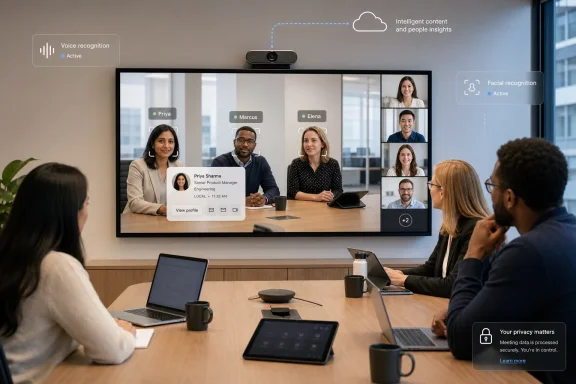
IntelliFrame people labels attack that asymmetry directly. Instead of showing a wide room feed and expecting remote participants to infer who is speaking, Teams can identify individuals in the room and attach names to them. The hover-over contact card pushes the experience further: the room stops being a blob of video and becomes a set of addressable colleagues.
That is a small interface change with a large organizational implication. Microsoft is treating the meeting room camera less like a webcam and more like a sensor array tied into the corporate directory. Once that is accepted, name labels are only the beginning.
For IT departments, this means the feature will not simply appear because users run Teams on a laptop or because a room has a camera attached. It depends on the Teams Rooms on Windows stack, compatible intelligent camera support, identity enrollment, and the Pro licensing tier. That bundle makes the feature powerful, but it also turns adoption into a procurement and governance decision.
This is Microsoft’s familiar enterprise pattern. The company introduces a collaboration feature as an experience improvement, but the practical gate is the managed Microsoft 365 environment around it. The result is a feature that looks human-centered on the surface and very much admin-centered underneath.
People labels solve the next problem: people in the room need to be knowable. In a small team meeting, everyone may already recognize one another. In a cross-functional call, an executive review, a customer meeting, or a large hybrid session, the person sitting beside the speaker may be obvious to local attendees and invisible to everyone else.
The move from “there are three people at the table” to “this is Priya, this is Marcus, and this is Elena” is the threshold where video intelligence becomes identity intelligence. That is why the use of voice and face profiles matters. Microsoft is not merely detecting faces; it is connecting recognized presence to organizational identity.
That is especially useful in meetings that include vendors, partner teams, recently reorganized departments, or large internal programs where names alone are not enough. A remote participant can identify the person in the room, understand their role, and follow up without interrupting the flow of the meeting. It makes the in-room participant as clickable as a remote attendee tile.
Microsoft’s broader collaboration strategy has long been to collapse context switching. Teams is not just chat and video; it is directory, calendar, files, calling, transcription, Copilot, and compliance wrapped into one work surface. IntelliFrame people labels extend that model into the camera feed itself.
Employees may reasonably ask who can enable recognition, whether participation is optional, how profiles are stored, and what happens when recognition is wrong. Administrators will need answers before rolling this out broadly. Legal, HR, and works council requirements may differ sharply by geography, especially in organizations operating across regions.
The feature also raises a subtler workplace question: does every meeting need more machine-readable identity? In many enterprise settings, the answer will be yes because attribution, accessibility, and remote inclusion matter. But the cultural acceptance of being recognized by the room will vary, and Microsoft’s success here depends on making consent and controls feel real rather than buried in admin documentation.
By attaching advanced recognition and contact-card experiences to Teams Rooms on Windows with Pro licensing, Microsoft reinforces the idea that Windows rooms are the flagship platform for richer meeting intelligence. That does not make Android rooms obsolete, but it does sharpen the platform split. If an organization wants the fullest identity-aware Teams room experience, Windows remains the safer bet.
This also gives hardware vendors a clearer incentive. Intelligent cameras are not just selling resolution and field of view; they are selling access to the meeting AI layer. The camera becomes part of the identity pipeline, and that makes certification, firmware quality, and room design more important than ever.
Admins should expect questions about profile setup and recognition accuracy. They should also test how labels behave in real rooms with glass walls, visitors, shared spaces, side conversations, and partially visible participants. Meeting-room AI is only as good as the messy physical environment it has to interpret.
There is also a support angle. When a name label is wrong or missing, users will not think in terms of camera pipelines, identity enrollment, or Teams Rooms policy. They will file a ticket saying Teams mislabeled someone in a meeting. IT will need a troubleshooting path that spans hardware, room configuration, account state, and user enrollment.
Near the close, the concrete takeaways are straightforward:
 Microsoft Wants the Conference Room to Stop Being Anonymous
The old compromise of hybrid work was that remote employees got a grid of named faces, while everyone in the physical room became “Conference Room 3.” That was never just a cosmetic problem. It affected meeting notes, speaker attribution, follow-up accountability, and the social texture of work.IntelliFrame people labels attack that asymmetry directly. Instead of showing a wide room feed and expecting remote participants to infer who is speaking, Teams can identify individuals in the room and attach names to them. The hover-over contact card pushes the experience further: the room stops being a blob of video and becomes a set of addressable colleagues.
That is a small interface change with a large organizational implication. Microsoft is treating the meeting room camera less like a webcam and more like a sensor array tied into the corporate directory. Once that is accepted, name labels are only the beginning.
The Feature Arrives as a Premium Room Capability, Not a Teams Freebie
The roadmap entry is explicit that this capability is available with Teams Rooms on Windows licensed for Teams Rooms Pro. That matters because Microsoft has been steadily dividing Teams Rooms into basic room participation on one side and higher-value intelligence, management, and automation on the other.For IT departments, this means the feature will not simply appear because users run Teams on a laptop or because a room has a camera attached. It depends on the Teams Rooms on Windows stack, compatible intelligent camera support, identity enrollment, and the Pro licensing tier. That bundle makes the feature powerful, but it also turns adoption into a procurement and governance decision.
This is Microsoft’s familiar enterprise pattern. The company introduces a collaboration feature as an experience improvement, but the practical gate is the managed Microsoft 365 environment around it. The result is a feature that looks human-centered on the surface and very much admin-centered underneath.
IntelliFrame Has Been Moving From Framing Bodies to Recognizing People
IntelliFrame began as a way to make room video less miserable. Instead of forcing remote participants to stare at a fisheye panorama or a distant table shot, Teams could crop, frame, and split in-room participants into more useful views. That solved a visual problem: people in the room became easier to see.People labels solve the next problem: people in the room need to be knowable. In a small team meeting, everyone may already recognize one another. In a cross-functional call, an executive review, a customer meeting, or a large hybrid session, the person sitting beside the speaker may be obvious to local attendees and invisible to everyone else.
The move from “there are three people at the table” to “this is Priya, this is Marcus, and this is Elena” is the threshold where video intelligence becomes identity intelligence. That is why the use of voice and face profiles matters. Microsoft is not merely detecting faces; it is connecting recognized presence to organizational identity.
The Hover Card Turns Recognition Into Workflow
The hover-over contact card may sound like interface polish, but it is the most revealing part of the feature. A label tells you who someone is. A contact card tells you how that person fits into the organization.That is especially useful in meetings that include vendors, partner teams, recently reorganized departments, or large internal programs where names alone are not enough. A remote participant can identify the person in the room, understand their role, and follow up without interrupting the flow of the meeting. It makes the in-room participant as clickable as a remote attendee tile.
Microsoft’s broader collaboration strategy has long been to collapse context switching. Teams is not just chat and video; it is directory, calendar, files, calling, transcription, Copilot, and compliance wrapped into one work surface. IntelliFrame people labels extend that model into the camera feed itself.
The Privacy Trade-Off Is No Longer Theoretical
The price of this convenience is that organizations must be comfortable with biometric-adjacent meeting infrastructure. Microsoft’s description points to voice and face profiles, which implies enrollment, recognition, and policy enforcement. Even when implemented with enterprise controls, this is not the same category as a better microphone or a sharper camera.Employees may reasonably ask who can enable recognition, whether participation is optional, how profiles are stored, and what happens when recognition is wrong. Administrators will need answers before rolling this out broadly. Legal, HR, and works council requirements may differ sharply by geography, especially in organizations operating across regions.
The feature also raises a subtler workplace question: does every meeting need more machine-readable identity? In many enterprise settings, the answer will be yes because attribution, accessibility, and remote inclusion matter. But the cultural acceptance of being recognized by the room will vary, and Microsoft’s success here depends on making consent and controls feel real rather than buried in admin documentation.
Windows Rooms Keep Their Strategic Edge
The roadmap specifically names Teams Rooms on Windows, even though Teams Rooms also exists on Android-based appliances. That distinction will be noticed by IT buyers. Microsoft has often positioned Windows-based rooms as the deeper, more extensible option for complex enterprise deployments, while Android room devices appeal through appliance-like simplicity.By attaching advanced recognition and contact-card experiences to Teams Rooms on Windows with Pro licensing, Microsoft reinforces the idea that Windows rooms are the flagship platform for richer meeting intelligence. That does not make Android rooms obsolete, but it does sharpen the platform split. If an organization wants the fullest identity-aware Teams room experience, Windows remains the safer bet.
This also gives hardware vendors a clearer incentive. Intelligent cameras are not just selling resolution and field of view; they are selling access to the meeting AI layer. The camera becomes part of the identity pipeline, and that makes certification, firmware quality, and room design more important than ever.
The Admin Work Starts Before August
The roadmap lists general availability for August 2026, but the serious preparation starts earlier. Organizations that already use Teams Rooms Pro and compatible intelligent cameras will still need to evaluate enrollment readiness, user communications, and room-by-room behavior. A feature like this can fail socially even when it works technically.Admins should expect questions about profile setup and recognition accuracy. They should also test how labels behave in real rooms with glass walls, visitors, shared spaces, side conversations, and partially visible participants. Meeting-room AI is only as good as the messy physical environment it has to interpret.
There is also a support angle. When a name label is wrong or missing, users will not think in terms of camera pipelines, identity enrollment, or Teams Rooms policy. They will file a ticket saying Teams mislabeled someone in a meeting. IT will need a troubleshooting path that spans hardware, room configuration, account state, and user enrollment.
The August Rollout Will Reward the Tenants That Already Did the Governance Work
The practical lesson is that IntelliFrame people labels are less a single feature launch than a maturity test for Teams Rooms deployments. Organizations with standardized rooms, Pro licensing, clear enrollment policies, and disciplined device management will be positioned to benefit quickly. Those with mixed hardware, ad hoc rooms, and unclear privacy practices will have a more complicated road.Near the close, the concrete takeaways are straightforward:
- Microsoft plans to make IntelliFrame people labels generally available in August 2026 for Teams Rooms on Windows in the worldwide commercial cloud.
- The feature identifies in-room participants for remote attendees and adds hover-over contact cards tied to organizational identity.
- Teams Rooms Pro licensing is required, making this a premium managed-room capability rather than a baseline Teams feature.
- Voice and face profiles are central to the experience, so consent, enrollment, and privacy governance must be addressed before broad rollout.
- Windows-based Teams Rooms continue to look like Microsoft’s lead platform for advanced room intelligence and identity-aware meeting features.
References
- Primary source: Microsoft 365 Roadmap
Published: 2026-06-29T23:02:39.0286478Z
Microsoft 365 Roadmap | Microsoft 365
The Microsoft 365 Roadmap lists updates that are currently planned for applicable subscribers. Check here for more information on the status of new features and updates.www.microsoft.com
- Official source: support.microsoft.com
Enhance hybrid meetings with Microsoft IntelliFrame for Teams Rooms | Microsoft Support
Use Microsoft IntelliFrame intelligent camera experience in Microsoft Teams Rooms conference rooms for an AI-driven improved hybrid meeting experience.support.microsoft.com - Official source: learn.microsoft.com
What is Microsoft Multi-Stream IntelliFrame and Intelligent Camera? - Microsoft Teams | Microsoft Learn
Learn how to set up and use the Microsoft Teams Multi-Stream IntelliFrame cameras for hybrid meetings.learn.microsoft.com - Related coverage: m365admin.handsontek.net
Multi-Stream IntelliFrame for Teams Rooms on Windows Cameras - M365 Admin
IntelliFrame enables multi-stream video, face recognition of in-room participants, active speaker recognition, attributed voice-based transcription, and panoramic video on Front-of-room (180-degree view) and Center-of-room (360-degree view) cameras, taking Teams Rooms on Windows cameras to the...m365admin.handsontek.net
