

The iOS 27 public beta is no longer merely “coming this month.” Apple made it available on July 13, 2026, correcting the timing in TechJuice’s July 3 report. The free test release is now available through Apple’s Beta Software Program for supported iPhones, ahead of iOS 27’s full release this fall.
Apple announced at WWDC on June 8 that a public beta would arrive in July. MacRumors reported the rollout on July 13, while Apple’s beta portal now lists iOS 27 as an available test release. Users do not need to install a developer beta or pay for an Apple Developer account to get it.
After enrolling an Apple Account in Apple’s Beta Software Program, open Settings > General > Software Update > Beta Updates, select iOS 27 Public Beta, then return to the Software Update screen to download and install it. The beta option may take time to appear after enrollment; restarting the phone can help.
Apple’s own beta-program guidance is blunt: pre-release software can contain errors, incomplete features, and compatibility problems. Back up the phone before proceeding, and avoid installing it on a business-critical or primary device. Restoring to the prior shipping version can require erasing the phone and restoring a backup created before beta installation.
That caveat matters for Windows users and administrators as much as for Apple-only households. A beta iPhone can introduce failures in authentication apps, mobile-device-management workflows, VPN clients, CarPlay, enterprise Wi-Fi profiles, or line-of-business applications. IT teams should treat it as an unmanaged test OS until they have validated their required apps and policies.
The report’s Apple Intelligence guidance needs an update. Per Apple, Apple Intelligence support in iOS 27 requires an iPhone 16 model or later, or an iPhone 15 Pro or iPhone 15 Pro Max. A standard iPhone 15 is compatible with iOS 27 but does not receive the Apple Intelligence feature set.
More significantly, the redesigned Siri AI is not a feature public-beta testers can assume they will receive immediately. Apple says Siri AI is in developer testing and will reach supported users as a beta later in 2026, initially in English. Apple has also said it will not initially ship Siri AI on iPhone and iPad in the European Union.
iOS 27 also includes new parental controls, performance work, broader Apple Intelligence changes, and further design refinements. But the public beta is still a test build, not the finished fall release.
For most users, the practical choice is to wait for the production update; for testers, use a spare supported iPhone and validate essential apps before relying on it.
Apple announced at WWDC on June 8 that a public beta would arrive in July. MacRumors reported the rollout on July 13, while Apple’s beta portal now lists iOS 27 as an available test release. Users do not need to install a developer beta or pay for an Apple Developer account to get it.
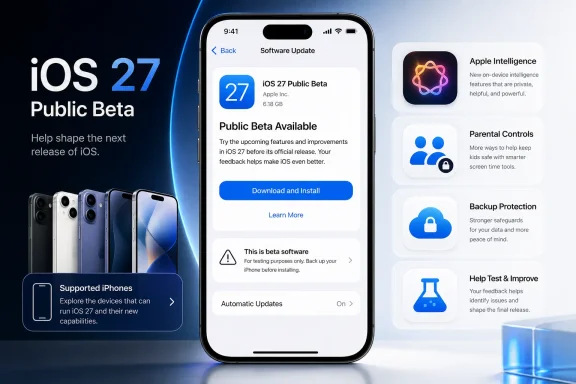 Installing the public beta
After enrolling an Apple Account in Apple’s Beta Software Program, open Settings > General > Software Update > Beta Updates, select iOS 27 Public Beta, then return to the Software Update screen to download and install it. The beta option may take time to appear after enrollment; restarting the phone can help.Apple’s own beta-program guidance is blunt: pre-release software can contain errors, incomplete features, and compatibility problems. Back up the phone before proceeding, and avoid installing it on a business-critical or primary device. Restoring to the prior shipping version can require erasing the phone and restoring a backup created before beta installation.
That caveat matters for Windows users and administrators as much as for Apple-only households. A beta iPhone can introduce failures in authentication apps, mobile-device-management workflows, VPN clients, CarPlay, enterprise Wi-Fi profiles, or line-of-business applications. IT teams should treat it as an unmanaged test OS until they have validated their required apps and policies.
Hardware and feature limits
iOS 27 supports the iPhone 11 series and later, plus the second-generation iPhone SE and newer. That part of the TechJuice report is broadly correct, although the supported-device list also includes the SE models rather than simply “iPhone 11 and newer.”The report’s Apple Intelligence guidance needs an update. Per Apple, Apple Intelligence support in iOS 27 requires an iPhone 16 model or later, or an iPhone 15 Pro or iPhone 15 Pro Max. A standard iPhone 15 is compatible with iOS 27 but does not receive the Apple Intelligence feature set.
More significantly, the redesigned Siri AI is not a feature public-beta testers can assume they will receive immediately. Apple says Siri AI is in developer testing and will reach supported users as a beta later in 2026, initially in English. Apple has also said it will not initially ship Siri AI on iPhone and iPad in the European Union.
iOS 27 also includes new parental controls, performance work, broader Apple Intelligence changes, and further design refinements. But the public beta is still a test build, not the finished fall release.
For most users, the practical choice is to wait for the production update; for testers, use a spare supported iPhone and validate essential apps before relying on it.
References
- Primary source: TechJuice
Published: 2026-07-03T14:26:38+00:00
iOS 27 Public Beta Coming This Month: How to Install It on Your iPhone
Apple is set to release the iOS 27 public beta this month. Here's how to install it, supported iPhones, Siri AI waitlist details, and new featureswww.techjuice.pk
- Related coverage: tomsguide.com
iOS 27 public beta is now live — 9 features you need to try first | Tom's Guide
iOS 27 public beta has just been released, and these are the 9 features you should endeavor to try as soon as it's installed.www.tomsguide.com - Related coverage: techradar.com
How to download the iOS 27 public beta — and 3 new things to try first | TechRadar
Grab the beta to get Siri's AI overhaulwww.techradar.com - Related coverage: macrumors.com
How to Install iOS 27 Public Beta on Your iPhone
Apple has made available the first public beta of iOS 27, bringing a more stable version of the software to a wider audience following lengthy testing by developers. Keep reading to learn how to prepare your device for the beta software and how to install it. Signing up to get the iOS 27 or...www.macrumors.com - Official source: developer.apple.com
Installing and using Apple beta software - Support - Apple Developer
Beta versions of Apple software are available to develop apps that take advantage of the latest platform features and to test existing apps for compatibility.developer.apple.com
- Related coverage: digitaltrends.com
How to install iOS 27 public beta on your iPhone? - Digital Trends
No developer account needed. iOS 27's public beta is here, and installing it takes just a few taps through Settings, plus a quick account signup.www.digitaltrends.com
