

A privacy guide published by Tech Business News on July 11, and updated July 18, points iPhone owners to an easily missed Apple setting that controls whether search queries from Safari, Siri and Spotlight can be retained to improve Apple Search.
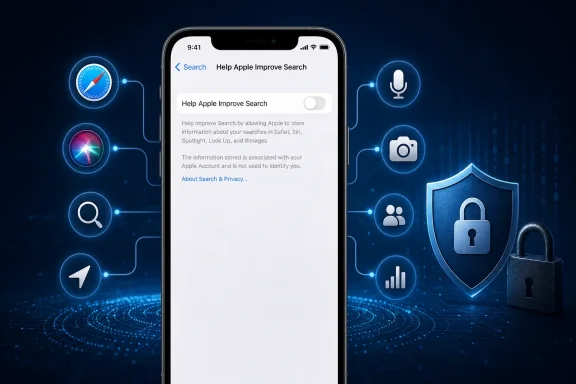
The switch is at Settings > Search > Help Apple Improve Search. Apple’s current Search & Privacy notice says disabling it stops Apple from storing search queries for its search-improvement program. Search itself continues to work.
The setting matters because Apple says search-related data sent to its systems can include queries, approximate location, selected suggestions, apps used, related device-usage information, interests and contextual information. Apple says that data is not linked to an Apple Account or email address, and uses a rotating device-generated identifier, but it can still be retained to improve results.
Tech Business News framed the setting as an iOS 26 privacy control hidden outside the usual Privacy & Security menus. Apple’s documentation does place it under Search, alongside controls for recent searches and related content.
The article correctly pushes back on the popular claim that every suspiciously relevant advert proves a phone is recording conversations. Ad networks can infer interests from browsing, searches, app activity, location, purchases, household devices, shared networks and account-linked activity. That can look uncomfortably precise without an app secretly recording audio.
That does not mean mobile privacy concerns are overblown. The Federal Trade Commission’s 2024 report on major social-media and video services described their data practices as “vast surveillance,” citing broad collection, retention and sharing of user and non-user data. Separately, the FTC has pursued location-data brokers over sales of mobile location information that could expose visits to health facilities, places of worship and domestic-violence shelters.
For Windows users who also use an iPhone or Android handset, that distinction is useful: the most consequential privacy exposure often comes from account telemetry, advertising profiles and permissive apps—not a Hollywood-style microphone hack.
The immediate fix is simple: turn off Apple’s search-improvement sharing if you do not want queries retained, then spend ten minutes removing permissions from apps that no longer need them.
The switch is at Settings > Search > Help Apple Improve Search. Apple’s current Search & Privacy notice says disabling it stops Apple from storing search queries for its search-improvement program. Search itself continues to work.
The setting matters because Apple says search-related data sent to its systems can include queries, approximate location, selected suggestions, apps used, related device-usage information, interests and contextual information. Apple says that data is not linked to an Apple Account or email address, and uses a rotating device-generated identifier, but it can still be retained to improve results.
Tech Business News framed the setting as an iOS 26 privacy control hidden outside the usual Privacy & Security menus. Apple’s documentation does place it under Search, alongside controls for recent searches and related content.
 The larger issue is data collection, not always microphone spying
The article correctly pushes back on the popular claim that every suspiciously relevant advert proves a phone is recording conversations. Ad networks can infer interests from browsing, searches, app activity, location, purchases, household devices, shared networks and account-linked activity. That can look uncomfortably precise without an app secretly recording audio.That does not mean mobile privacy concerns are overblown. The Federal Trade Commission’s 2024 report on major social-media and video services described their data practices as “vast surveillance,” citing broad collection, retention and sharing of user and non-user data. Separately, the FTC has pursued location-data brokers over sales of mobile location information that could expose visits to health facilities, places of worship and domestic-violence shelters.
For Windows users who also use an iPhone or Android handset, that distinction is useful: the most consequential privacy exposure often comes from account telemetry, advertising profiles and permissive apps—not a Hollywood-style microphone hack.
The short practical checklist
Start with the permissions and histories that can be changed without breaking everyday use:- On iPhone, disable Help Apple Improve Search and review Improve Siri & Dictation under Privacy & Security > Analytics & Improvements.
- Audit app access to location, microphone, camera, contacts, photos and Bluetooth. Use “While Using” or “Ask Next Time” rather than permanent background access where practical.
- Turn off Precise Location for apps that only need a general area.
- Enable App Privacy Report on iPhone, or review Android’s Privacy Dashboard, to spot recent use of sensitive permissions.
- Review Google or Apple account activity, signed-in devices and recovery details; delete stale accounts and apps rather than merely uninstalling them.
- Use unique passwords and multi-factor authentication, preferably passkeys or an authenticator app where available.
The immediate fix is simple: turn off Apple’s search-improvement sharing if you do not want queries retained, then spend ten minutes removing permissions from apps that no longer need them.
References
- Primary source: techbusinessnews.com.au
Published: 2026-07-11T09:49:43+00:00
Your Phone Is Spying on You — Here’s How to Stop It - Tech Business News
Your phone is spying, tracking your location, searches, app activity, contacts, photos, browsing habits, microphone use and advertising behaviourwww.techbusinessnews.com.au
