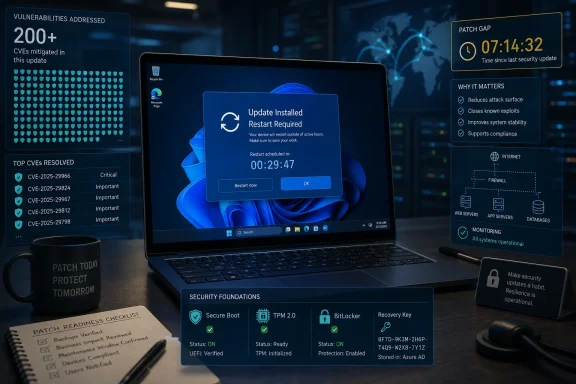
Microsoft’s June 2026 Patch Tuesday, released on June 9, delivers security fixes for roughly 200 disclosed vulnerabilities across Windows, Office, Azure, Exchange Online, Microsoft Graph, SQL Server, and related services, including 32 bugs Microsoft rated critical and a Talos Snort ruleset covering selected exploit attempts. The size of the release is the first message; the shape of it is the second. This is not a month defined by one celebrity zero-day, but by how many different Windows trust boundaries now matter at once. For administrators, the practical answer is uncomfortable but familiar: patch quickly, but prioritize like an attacker rather than like a spreadsheet.
The headline number is large enough to be numbing. Microsoft and vulnerability researchers are describing this as a roughly 200-vulnerability month, while Cisco Talos counts 206 issues in its Patch Tuesday analysis and says 32 carry Microsoft’s “critical” severity label. Those differences are not unusual in Patch Tuesday coverage, because vendors and researchers sometimes count product families, Chromium-adjacent fixes, republished advisories, or platform-specific entries differently.
The more important fact is not whether the final public tally is 200, 204, 206, or 211. It is that Microsoft’s June drop spreads high-impact vulnerabilities across the places enterprises least like to touch in a hurry: Remote Desktop Client, http.sys, Windows Graphics, Hyper-V, Active Directory, Kerberos KDC, Windows Deployment Services, DHCP, Outlook, Word, Office, AKS, Exchange Online, Graph, Copilot, and Azure networking components.
That range makes this month different from a routine “patch everything eventually” cycle. A desktop team looking only at Office misses server-side exposure. A server team looking only at internet-facing Windows Server misses client-side RDP and Outlook preview risk. A cloud team assuming Patch Tuesday is still mainly about laptops misses AKS node escape and Azure service-adjacent privilege issues.
The result is a Patch Tuesday that behaves less like a product update and more like a diagnostic of Microsoft’s current platform sprawl. Windows is no longer only the operating system under the keyboard. It is the client, the hypervisor, the identity fabric, the cloud connector, the browser-adjacent assistant, and the service endpoint.
Some of the critical bugs need a user to connect to a malicious service. Others require an authenticated attacker inside a guest VM. Some are local-code-execution paths through document or rendering components. Others involve network packets hitting server services. From an attacker’s perspective, those distinctions are everything.
Microsoft’s exploitability assessment is therefore more useful than the severity label alone. Talos highlights four critical vulnerabilities that Microsoft considers exploitation “more likely”: CVE-2026-42985 in Remote Desktop Client, CVE-2026-47291 in the Windows HTTP Protocol Stack, and CVE-2026-44803 plus CVE-2026-44812 in the Windows Graphics component. That is the first triage cluster most defenders should stare at.
The uncomfortable thing about that cluster is that it spans both server and client logic. http.sys is the classic infrastructure concern: if a Windows server is processing HTTP traffic through the vulnerable stack, malformed network input becomes the story. Remote Desktop Client and Windows Graphics push the risk back to endpoints, administrators, help desks, and anyone whose machine renders hostile content or connects to the wrong system.
This is why “critical” is a starting point, not a deployment order. The real question is whether the vulnerable component is exposed, reachable, commonly used, and likely to be exercised by users or adversaries before the patch window closes.
The scenario is not the old “attacker connects to your server” model. In several of these cases, the risk described by Talos involves a victim connecting with a vulnerable Remote Desktop Client to a malicious or attacker-controlled Remote Desktop Server. That flips the normal mental model for RDP defense.
For sysadmins, this matters because privileged users are heavy RDP users. Domain admins, help desk staff, MSP technicians, and infrastructure engineers routinely connect to machines they do not fully control. If an attacker can lure or redirect one of those users into connecting to a hostile RDP endpoint, the client becomes the target.
The immediate mitigation is patching, but the policy implication is broader. Organizations should treat outbound administrative protocols as sensitive, not just inbound listening ports. Jump boxes, privileged access workstations, connection brokering, and strict destination controls are not bureaucratic luxuries when the client itself periodically becomes exploitable.
RDP has always been a perimeter technology pretending to be an admin convenience. June’s Patch Tuesday simply underlines the pretense.
Http.sys sits beneath a range of Windows HTTP services and applications. When bugs appear there, administrators have to think beyond a single named application. The exposure question becomes architectural: what on the network is accepting HTTP traffic through Windows’ kernel-mode HTTP stack, and which of those systems are reachable from untrusted networks?
This is the kind of vulnerability that punishes incomplete inventories. A well-run server fleet can answer the question quickly. A sprawling enterprise with abandoned IIS boxes, appliance-like Windows servers, internal admin panels, legacy line-of-business apps, and half-documented test systems will spend the first patch day arguing with itself.
Talos also highlights CVE-2026-49160, an important-rated http.sys denial-of-service issue Microsoft considers more likely to be exploited. That pairing matters. Attackers do not always need code execution to create business pain, and defenders should not let the critical RCE consume all attention if denial-of-service against a key Windows HTTP endpoint would be operationally severe.
The server-side priority is therefore straightforward: identify http.sys exposure, patch internet-facing and partner-facing systems first, then move inward to high-value internal services. The hard part is not knowing what to do. The hard part is knowing what you have.
Graphics and font rendering bugs are dangerous because rendering is everywhere. Users do not think of opening a document, previewing content, viewing an image, or interacting with a graphical shell as a security boundary crossing. Attackers do.
The word “local” can also create false comfort. Local code execution vulnerabilities often become part of exploit chains, especially when combined with a browser, document, email, archive, or messaging foothold. An attacker does not need every bug to be remotely reachable if one bug gets content onto the machine and another turns parsing or rendering into code execution.
This is where endpoint patch speed still matters even in cloud-first organizations. A Windows laptop remains a high-value execution environment full of tokens, cached credentials, browser sessions, VPN clients, developer tools, and admin utilities. A graphics component bug may not sound as dramatic as an exposed server RCE, but it lives exactly where human behavior and attacker tradecraft meet.
Microsoft’s modern Windows security story leans heavily on isolation, memory protections, Smart App Control, Defender, and cloud-delivered intelligence. Those controls help, but they do not eliminate the need to patch rendering paths quickly. They reduce the odds of compromise; they do not repeal the laws of unsafe parsing.
The significance is not merely that Office has bugs. Office always has bugs. The significance is that preview-driven exploitation keeps weakening one of the user-awareness assumptions defenders like to make: that the user must actively open something obviously suspicious.
Preview pane vulnerabilities compress the distance between receipt and rendering. They also complicate training, because “don’t click the attachment” is not the same as “your client may parse hostile content as part of ordinary message handling.” Security awareness cannot compensate for a vulnerable rendering engine doing exactly what the application was designed to do.
This is particularly awkward for organizations still standardized on Outlook classic. The “new Outlook” transition has been messy enough that many enterprises remain cautious, and compatibility realities keep classic clients entrenched. June’s Office and Outlook bugs do not settle that debate, but they do remind administrators that legacy-rich clients carry legacy-rich attack surfaces.
The practical path is not panic-disabling preview panes across the enterprise as a substitute for patching. It is to patch Office promptly, prioritize high-risk user groups, harden attachment and content policies, and verify that mail security controls are not the only line of defense. If a preview path is exploitable, gateway filtering may reduce exposure, but endpoint remediation closes the hole.
Office remains one of Microsoft’s great productivity moats. It is also one of the most reliable ways hostile content gets a seat at the user’s desk.
That is the nightmare class for multi-tenant and high-consolidation environments. Even when exploitation requires guest access, the prize is the host. For enterprises running virtualization clusters, lab environments, VDI, or hosting platforms, guest-to-host risk is never a mere local problem.
Azure Kubernetes Service also appears in the critical list with CVE-2026-32193, a path traversal issue that Microsoft says could let an attacker running an untrusted container with host networking send crafted requests to a host-level service not intended for unauthenticated access. Talos describes the possible outcome as container breakout and control of the AKS worker node.
That AKS vulnerability is listed in the group Microsoft deemed unlikely to be exploited, but “unlikely” should not be read as “irrelevant.” Kubernetes environments often have messy trust assumptions, and the phrase “untrusted container configured with host network” is exactly the sort of configuration that security teams hope is rare and incident responders often discover is not rare enough.
The broader lesson is that Patch Tuesday now belongs to platform engineering as much as desktop operations. Windows Server hosts, Azure-connected workloads, Kubernetes nodes, and virtual infrastructure all sit inside the same monthly risk envelope. A patch process that stops at laptops and domain controllers is not a patch process; it is nostalgia.
Cloud has not abolished operating system maintenance. It has made the operating system harder to see.
But identity-layer vulnerabilities deserve special treatment because their business impact is disproportionate. A domain controller is not just another server. A Kerberos KDC is not just another authentication service. These systems decide who gets to be whom.
Attackers who already have a foothold often care less about initial access than privilege expansion, credential access, lateral movement, and persistence. Bugs in identity infrastructure therefore belong in the same mental category as domain admin credential theft: they may not be the first move, but they can become the move that makes recovery painful.
The June Patch Tuesday list also includes important-rated elevation-of-privilege issues Microsoft considers more likely to be exploited, including Windows DWM Core Library, NT OS Kernel, Microsoft Graphics Component, Winlogon, and Windows Collaborative Translation Framework. These are not as eye-catching as critical RCEs, but privilege escalation is how intrusions mature.
That is the strategic trap in any large Patch Tuesday. The most dramatic bug gets the memo. The most useful attacker chain may combine a less dramatic initial foothold with a more reliable privilege escalation issue and a credential path. Defenders who patch only the headline RCEs are optimizing for press releases, not intrusions.
This is the newer part of Patch Tuesday’s identity crisis. Customers still think of Patch Tuesday as the day they deploy Windows updates. Microsoft now ships advisories for a world where the affected “product” may be a service, an API, a cloud assistant, a managed database layer, or a tenant-exposed feature the customer cannot patch in the traditional sense.
That does not make the vulnerabilities less important. It changes the customer’s job. Instead of deploying an MSI or cumulative update, administrators may need to review service exposure, audit permissions, inspect tenant logs, validate conditional access, check whether a mitigation was applied by Microsoft, and communicate risk to business units that believe SaaS means “someone else’s problem.”
The Copilot and Graph entries are especially symbolically important. Microsoft has spent the last several years threading AI assistants and Microsoft Graph context through the productivity stack. That creates new value, but also new security questions about command execution, prompt-adjacent injection, authorization boundaries, and sensitive data exposure.
This is not an argument against Copilot or Graph. It is an argument against pretending that new interfaces escape old vulnerability classes. Command injection and improper authorization do not become harmless because the product is modern.
That caveat is important. Intrusion prevention signatures are not perfect knowledge. They are detections and blocks based on what is known, inferable, or observable at a point in time. Early rules can be valuable, but attackers adapt, proofs of concept evolve, and exploit traffic may not look like the first samples defenders imagined.
For organizations already using Snort or Cisco security appliances, the ruleset is still highly useful. It gives network defenders a way to watch for exploitation attempts while patch deployment works through maintenance windows, change controls, and business exceptions. In a month this broad, detection buys time.
But detection is not remediation. A blocked exploit attempt does not prove the vulnerability is harmless. A quiet sensor does not prove nobody is trying. A signature that covers “some of them” is not a blanket for the entire Patch Tuesday release.
The mature posture is layered: deploy the rules, patch the systems, verify exposure, monitor logs, and treat exceptions as temporary risk decisions rather than permanent operational facts. Snort helps defenders see the fight. It does not end the fight.
A better triage model starts with exposure. Systems reachable from the internet, partner networks, unmanaged client networks, or semi-trusted cloud workloads should move first. That puts http.sys-facing servers, Remote Desktop usage patterns, WDS/DHCP where applicable, and cloud-connected workloads high on the board.
The second axis is privilege. Domain controllers, Kerberos infrastructure, Hyper-V hosts, AKS worker nodes, admin workstations, and systems used by privileged personnel deserve accelerated treatment because compromise there creates leverage. A vulnerability on an ordinary kiosk is not the same event as a vulnerability on a jump host used by domain administrators.
The third axis is human behavior. Outlook, Word, Office rendering, Remote Desktop Client, graphics components, and media parsing all live close to users. If exploitation depends on convincing someone to open, preview, connect, or render, that does not make the bug theoretical. It means attackers get to use phishing, social engineering, and workflow pressure as part of the exploit path.
This is where many patch programs still fail. They sort by CVSS, then by asset group, then by who complains loudest. June’s release rewards teams that can instead sort by how attacks actually unfold.
Organizations should begin by validating Microsoft’s cumulative Windows updates across supported Windows 10, Windows 11, and Windows Server estates, paying particular attention to systems running exposed HTTP services, RDP clients used by administrators, virtualization hosts, and identity infrastructure. Office patching should not lag behind operating system patching, particularly where Outlook classic remains widely deployed.
Security teams should also make sure vulnerability scanners and EDR platforms have current content. If scanner plugins lag, asset owners may receive false reassurance. If EDR coverage is incomplete on servers, exploitation attempts may land in the quietest parts of the network.
Network defenders running Snort should update rulesets promptly and monitor for alerts tied to the June coverage. Alerts should be treated as possible exploitation attempts, but also as leads for asset validation: if a rule fires against a system no one knew was exposed, the asset inventory just failed a test.
Finally, cloud and SaaS administrators need their own workstream. AKS configurations, Microsoft 365 audit visibility, Graph permissions, Copilot exposure, Exchange Online controls, and Azure-related advisories should be reviewed through the lens of tenant risk, not merely endpoint patch compliance. Patch Tuesday is now a tenant governance event.
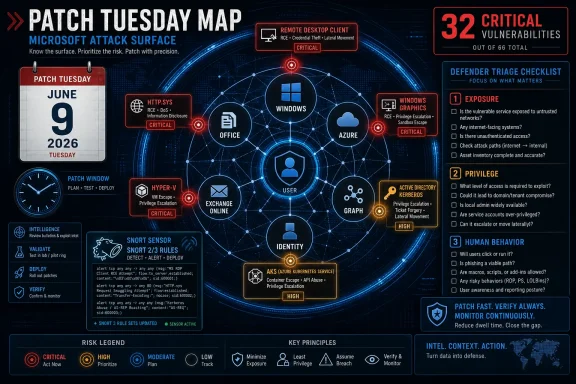 June’s Patch Tuesday Is a Map of Microsoft’s Attack Surface
The headline number is large enough to be numbing. Microsoft and vulnerability researchers are describing this as a roughly 200-vulnerability month, while Cisco Talos counts 206 issues in its Patch Tuesday analysis and says 32 carry Microsoft’s “critical” severity label. Those differences are not unusual in Patch Tuesday coverage, because vendors and researchers sometimes count product families, Chromium-adjacent fixes, republished advisories, or platform-specific entries differently.The more important fact is not whether the final public tally is 200, 204, 206, or 211. It is that Microsoft’s June drop spreads high-impact vulnerabilities across the places enterprises least like to touch in a hurry: Remote Desktop Client, http.sys, Windows Graphics, Hyper-V, Active Directory, Kerberos KDC, Windows Deployment Services, DHCP, Outlook, Word, Office, AKS, Exchange Online, Graph, Copilot, and Azure networking components.
That range makes this month different from a routine “patch everything eventually” cycle. A desktop team looking only at Office misses server-side exposure. A server team looking only at internet-facing Windows Server misses client-side RDP and Outlook preview risk. A cloud team assuming Patch Tuesday is still mainly about laptops misses AKS node escape and Azure service-adjacent privilege issues.
The result is a Patch Tuesday that behaves less like a product update and more like a diagnostic of Microsoft’s current platform sprawl. Windows is no longer only the operating system under the keyboard. It is the client, the hypervisor, the identity fabric, the cloud connector, the browser-adjacent assistant, and the service endpoint.
The Critical Count Hides the Real Triage Problem
Talos notes that 28 of Microsoft’s 32 critical entries are remote code execution vulnerabilities. That is the kind of ratio that should get attention, but it can also mislead. Not every RCE has the same blast radius, exploit path, or urgency in a real network.Some of the critical bugs need a user to connect to a malicious service. Others require an authenticated attacker inside a guest VM. Some are local-code-execution paths through document or rendering components. Others involve network packets hitting server services. From an attacker’s perspective, those distinctions are everything.
Microsoft’s exploitability assessment is therefore more useful than the severity label alone. Talos highlights four critical vulnerabilities that Microsoft considers exploitation “more likely”: CVE-2026-42985 in Remote Desktop Client, CVE-2026-47291 in the Windows HTTP Protocol Stack, and CVE-2026-44803 plus CVE-2026-44812 in the Windows Graphics component. That is the first triage cluster most defenders should stare at.
The uncomfortable thing about that cluster is that it spans both server and client logic. http.sys is the classic infrastructure concern: if a Windows server is processing HTTP traffic through the vulnerable stack, malformed network input becomes the story. Remote Desktop Client and Windows Graphics push the risk back to endpoints, administrators, help desks, and anyone whose machine renders hostile content or connects to the wrong system.
This is why “critical” is a starting point, not a deployment order. The real question is whether the vulnerable component is exposed, reachable, commonly used, and likely to be exercised by users or adversaries before the patch window closes.
Remote Desktop Again Shows Why Clients Are Part of the Perimeter
Remote Desktop is often discussed as an exposed service problem: block RDP from the internet, require VPN, enforce MFA, monitor brute force attempts. June’s update is a reminder that the client side of Remote Desktop is also a security boundary. Talos calls out multiple critical Remote Desktop Client RCEs, including CVE-2026-42985 as more likely to be exploited and several additional heap-based buffer overflow issues as less likely.The scenario is not the old “attacker connects to your server” model. In several of these cases, the risk described by Talos involves a victim connecting with a vulnerable Remote Desktop Client to a malicious or attacker-controlled Remote Desktop Server. That flips the normal mental model for RDP defense.
For sysadmins, this matters because privileged users are heavy RDP users. Domain admins, help desk staff, MSP technicians, and infrastructure engineers routinely connect to machines they do not fully control. If an attacker can lure or redirect one of those users into connecting to a hostile RDP endpoint, the client becomes the target.
The immediate mitigation is patching, but the policy implication is broader. Organizations should treat outbound administrative protocols as sensitive, not just inbound listening ports. Jump boxes, privileged access workstations, connection brokering, and strict destination controls are not bureaucratic luxuries when the client itself periodically becomes exploitable.
RDP has always been a perimeter technology pretending to be an admin convenience. June’s Patch Tuesday simply underlines the pretense.
Http.sys Is the Server Bug That Will Draw the Fastest Eyes
CVE-2026-47291, the critical Windows HTTP Protocol Stack vulnerability, is likely to attract attention because the conditions sound familiar and dangerous: an unauthenticated attacker sending a specially crafted packet to a target server using http.sys. That does not mean every Windows machine is instantly exposed, but it does mean defenders need to know which systems rely on the stack.Http.sys sits beneath a range of Windows HTTP services and applications. When bugs appear there, administrators have to think beyond a single named application. The exposure question becomes architectural: what on the network is accepting HTTP traffic through Windows’ kernel-mode HTTP stack, and which of those systems are reachable from untrusted networks?
This is the kind of vulnerability that punishes incomplete inventories. A well-run server fleet can answer the question quickly. A sprawling enterprise with abandoned IIS boxes, appliance-like Windows servers, internal admin panels, legacy line-of-business apps, and half-documented test systems will spend the first patch day arguing with itself.
Talos also highlights CVE-2026-49160, an important-rated http.sys denial-of-service issue Microsoft considers more likely to be exploited. That pairing matters. Attackers do not always need code execution to create business pain, and defenders should not let the critical RCE consume all attention if denial-of-service against a key Windows HTTP endpoint would be operationally severe.
The server-side priority is therefore straightforward: identify http.sys exposure, patch internet-facing and partner-facing systems first, then move inward to high-value internal services. The hard part is not knowing what to do. The hard part is knowing what you have.
Graphics Bugs Keep Turning Rendering Into Execution
The Windows Graphics component vulnerabilities, CVE-2026-44803 and CVE-2026-44812, sit in Microsoft’s “exploitation more likely” bucket and involve integer overflow or wraparound conditions in the Win32K graphics subsystem. Talos describes them as critical RCEs allowing malicious code execution locally. That combination should sound familiar to anyone who has watched Windows patch cycles over the last decade.Graphics and font rendering bugs are dangerous because rendering is everywhere. Users do not think of opening a document, previewing content, viewing an image, or interacting with a graphical shell as a security boundary crossing. Attackers do.
The word “local” can also create false comfort. Local code execution vulnerabilities often become part of exploit chains, especially when combined with a browser, document, email, archive, or messaging foothold. An attacker does not need every bug to be remotely reachable if one bug gets content onto the machine and another turns parsing or rendering into code execution.
This is where endpoint patch speed still matters even in cloud-first organizations. A Windows laptop remains a high-value execution environment full of tokens, cached credentials, browser sessions, VPN clients, developer tools, and admin utilities. A graphics component bug may not sound as dramatic as an exposed server RCE, but it lives exactly where human behavior and attacker tradecraft meet.
Microsoft’s modern Windows security story leans heavily on isolation, memory protections, Smart App Control, Defender, and cloud-delivered intelligence. Those controls help, but they do not eliminate the need to patch rendering paths quickly. They reduce the odds of compromise; they do not repeal the laws of unsafe parsing.
Office and Outlook Preview Keep the Old Email Threat Model Alive
Several of June’s critical Office-family vulnerabilities are especially relevant because Talos says Microsoft identifies the Outlook classic preview pane as an attack vector for CVE-2026-45456, CVE-2026-45458, and CVE-2026-47635. The underlying issue is type confusion in Microsoft Office, with email rendering in Outlook classic using Word functionality. That is a very Microsoft sentence, and also a very enterprise sentence.The significance is not merely that Office has bugs. Office always has bugs. The significance is that preview-driven exploitation keeps weakening one of the user-awareness assumptions defenders like to make: that the user must actively open something obviously suspicious.
Preview pane vulnerabilities compress the distance between receipt and rendering. They also complicate training, because “don’t click the attachment” is not the same as “your client may parse hostile content as part of ordinary message handling.” Security awareness cannot compensate for a vulnerable rendering engine doing exactly what the application was designed to do.
This is particularly awkward for organizations still standardized on Outlook classic. The “new Outlook” transition has been messy enough that many enterprises remain cautious, and compatibility realities keep classic clients entrenched. June’s Office and Outlook bugs do not settle that debate, but they do remind administrators that legacy-rich clients carry legacy-rich attack surfaces.
The practical path is not panic-disabling preview panes across the enterprise as a substitute for patching. It is to patch Office promptly, prioritize high-risk user groups, harden attachment and content policies, and verify that mail security controls are not the only line of defense. If a preview path is exploitable, gateway filtering may reduce exposure, but endpoint remediation closes the hole.
Office remains one of Microsoft’s great productivity moats. It is also one of the most reliable ways hostile content gets a seat at the user’s desk.
Hyper-V and AKS Push Patch Tuesday Into the Cloud Operating Model
June’s Hyper-V vulnerabilities are a reminder that virtualization is not magic separation; it is software enforcing a very valuable boundary. Talos lists CVE-2026-45607, CVE-2026-45641, and CVE-2026-47652 as critical Hyper-V RCE vulnerabilities involving out-of-bounds reads, where an authenticated attacker in a guest VM could send crafted file operation requests to hardware resources and potentially execute code on the host.That is the nightmare class for multi-tenant and high-consolidation environments. Even when exploitation requires guest access, the prize is the host. For enterprises running virtualization clusters, lab environments, VDI, or hosting platforms, guest-to-host risk is never a mere local problem.
Azure Kubernetes Service also appears in the critical list with CVE-2026-32193, a path traversal issue that Microsoft says could let an attacker running an untrusted container with host networking send crafted requests to a host-level service not intended for unauthenticated access. Talos describes the possible outcome as container breakout and control of the AKS worker node.
That AKS vulnerability is listed in the group Microsoft deemed unlikely to be exploited, but “unlikely” should not be read as “irrelevant.” Kubernetes environments often have messy trust assumptions, and the phrase “untrusted container configured with host network” is exactly the sort of configuration that security teams hope is rare and incident responders often discover is not rare enough.
The broader lesson is that Patch Tuesday now belongs to platform engineering as much as desktop operations. Windows Server hosts, Azure-connected workloads, Kubernetes nodes, and virtual infrastructure all sit inside the same monthly risk envelope. A patch process that stops at laptops and domain controllers is not a patch process; it is nostalgia.
Cloud has not abolished operating system maintenance. It has made the operating system harder to see.
Identity Bugs Are Low-Noise, High-Value Targets
Active Directory and Kerberos do not need to be internet-facing to matter. June includes a critical Active Directory Domain Services RCE, CVE-2026-45648, and a critical Kerberos KDC RCE, CVE-2026-47288, both in Talos’s “unlikely exploited” group. The caveats matter: the Active Directory issue requires an authorized attacker, and the Kerberos issue is described as requiring adjacent network positioning.But identity-layer vulnerabilities deserve special treatment because their business impact is disproportionate. A domain controller is not just another server. A Kerberos KDC is not just another authentication service. These systems decide who gets to be whom.
Attackers who already have a foothold often care less about initial access than privilege expansion, credential access, lateral movement, and persistence. Bugs in identity infrastructure therefore belong in the same mental category as domain admin credential theft: they may not be the first move, but they can become the move that makes recovery painful.
The June Patch Tuesday list also includes important-rated elevation-of-privilege issues Microsoft considers more likely to be exploited, including Windows DWM Core Library, NT OS Kernel, Microsoft Graphics Component, Winlogon, and Windows Collaborative Translation Framework. These are not as eye-catching as critical RCEs, but privilege escalation is how intrusions mature.
That is the strategic trap in any large Patch Tuesday. The most dramatic bug gets the memo. The most useful attacker chain may combine a less dramatic initial foothold with a more reliable privilege escalation issue and a credential path. Defenders who patch only the headline RCEs are optimizing for press releases, not intrusions.
Copilot, Graph, and Exchange Online Make SaaS Part of the Same Story
June’s critical list also reaches into Microsoft’s cloud and AI-adjacent services. Talos highlights critical issues in Copilot Chat for Microsoft Edge, Microsoft 365 Copilot, Microsoft Graph, Exchange Online, and Azure HorizonDB. Some involve information disclosure, others command injection or privilege elevation, and Microsoft’s exploitability status for some is described as unknown or not applicable.This is the newer part of Patch Tuesday’s identity crisis. Customers still think of Patch Tuesday as the day they deploy Windows updates. Microsoft now ships advisories for a world where the affected “product” may be a service, an API, a cloud assistant, a managed database layer, or a tenant-exposed feature the customer cannot patch in the traditional sense.
That does not make the vulnerabilities less important. It changes the customer’s job. Instead of deploying an MSI or cumulative update, administrators may need to review service exposure, audit permissions, inspect tenant logs, validate conditional access, check whether a mitigation was applied by Microsoft, and communicate risk to business units that believe SaaS means “someone else’s problem.”
The Copilot and Graph entries are especially symbolically important. Microsoft has spent the last several years threading AI assistants and Microsoft Graph context through the productivity stack. That creates new value, but also new security questions about command execution, prompt-adjacent injection, authorization boundaries, and sensitive data exposure.
This is not an argument against Copilot or Graph. It is an argument against pretending that new interfaces escape old vulnerability classes. Command injection and improper authorization do not become harmless because the product is modern.
Snort Rules Are a Sensor, Not a Seat Belt
Talos is releasing Snort coverage for selected June vulnerabilities, with Snort 2 rules in the 66572–66604 range and Snort 3 rules in the 301523–301532 range. Cisco Security Firewall customers are directed to update their SRU, while Snort Subscriber Ruleset users can obtain the latest rule pack through Snort. Talos also warns that additional rules may arrive later and current rules may change as more information emerges.That caveat is important. Intrusion prevention signatures are not perfect knowledge. They are detections and blocks based on what is known, inferable, or observable at a point in time. Early rules can be valuable, but attackers adapt, proofs of concept evolve, and exploit traffic may not look like the first samples defenders imagined.
For organizations already using Snort or Cisco security appliances, the ruleset is still highly useful. It gives network defenders a way to watch for exploitation attempts while patch deployment works through maintenance windows, change controls, and business exceptions. In a month this broad, detection buys time.
But detection is not remediation. A blocked exploit attempt does not prove the vulnerability is harmless. A quiet sensor does not prove nobody is trying. A signature that covers “some of them” is not a blanket for the entire Patch Tuesday release.
The mature posture is layered: deploy the rules, patch the systems, verify exposure, monitor logs, and treat exceptions as temporary risk decisions rather than permanent operational facts. Snort helps defenders see the fight. It does not end the fight.
The Patch Order Should Follow Exposure, Privilege, and Human Behavior
The natural administrative reaction to 200-plus vulnerabilities is to ask for a ranked list. That is understandable, but dangerous if the ranking is copied blindly from a severity column. An exposed Windows web server, an RDP-heavy admin workstation, a Hyper-V host, and an Outlook client used by finance do not carry the same risk just because their CVEs share a label.A better triage model starts with exposure. Systems reachable from the internet, partner networks, unmanaged client networks, or semi-trusted cloud workloads should move first. That puts http.sys-facing servers, Remote Desktop usage patterns, WDS/DHCP where applicable, and cloud-connected workloads high on the board.
The second axis is privilege. Domain controllers, Kerberos infrastructure, Hyper-V hosts, AKS worker nodes, admin workstations, and systems used by privileged personnel deserve accelerated treatment because compromise there creates leverage. A vulnerability on an ordinary kiosk is not the same event as a vulnerability on a jump host used by domain administrators.
The third axis is human behavior. Outlook, Word, Office rendering, Remote Desktop Client, graphics components, and media parsing all live close to users. If exploitation depends on convincing someone to open, preview, connect, or render, that does not make the bug theoretical. It means attackers get to use phishing, social engineering, and workflow pressure as part of the exploit path.
This is where many patch programs still fail. They sort by CVSS, then by asset group, then by who complains loudest. June’s release rewards teams that can instead sort by how attacks actually unfold.
The June Runbook Writes Itself, If the Inventory Exists
The practical work after this Patch Tuesday is not mysterious. It is the same set of disciplines defenders discuss every month and struggle to execute at scale. The difference in June is that the vulnerable surface is broad enough to expose every weak seam in the process.Organizations should begin by validating Microsoft’s cumulative Windows updates across supported Windows 10, Windows 11, and Windows Server estates, paying particular attention to systems running exposed HTTP services, RDP clients used by administrators, virtualization hosts, and identity infrastructure. Office patching should not lag behind operating system patching, particularly where Outlook classic remains widely deployed.
Security teams should also make sure vulnerability scanners and EDR platforms have current content. If scanner plugins lag, asset owners may receive false reassurance. If EDR coverage is incomplete on servers, exploitation attempts may land in the quietest parts of the network.
Network defenders running Snort should update rulesets promptly and monitor for alerts tied to the June coverage. Alerts should be treated as possible exploitation attempts, but also as leads for asset validation: if a rule fires against a system no one knew was exposed, the asset inventory just failed a test.
Finally, cloud and SaaS administrators need their own workstream. AKS configurations, Microsoft 365 audit visibility, Graph permissions, Copilot exposure, Exchange Online controls, and Azure-related advisories should be reviewed through the lens of tenant risk, not merely endpoint patch compliance. Patch Tuesday is now a tenant governance event.
The Parts of June’s Patch Tuesday That Should Change Tomorrow’s Meeting
This release is too large for a tidy moral, but it does offer a useful set of operational conclusions. The point is not that every organization should panic equally. The point is that every organization should know which parts of this month’s risk map overlap with its own architecture.- Microsoft’s June 2026 Patch Tuesday is unusually broad, with roughly 200 disclosed vulnerabilities and 32 critical entries spanning Windows, Office, Azure, identity, cloud services, and developer-adjacent infrastructure.
- The first practical priority should be the vulnerabilities Microsoft rates as more likely to be exploited, especially the Remote Desktop Client, http.sys, and Windows Graphics issues highlighted by Talos.
- Remote Desktop Client vulnerabilities deserve attention on administrator workstations because malicious or compromised RDP destinations can turn outbound admin behavior into an attack path.
- Office and Outlook classic preview-related vulnerabilities should be patched quickly because rendering hostile email content can reduce the usefulness of user-click training as a primary defense.
- Hyper-V, AKS, Active Directory, and Kerberos issues should be prioritized according to business criticality even when exploitation is described as less likely, because compromise of those layers can magnify an intrusion.
- Snort rules provide useful interim visibility and blocking for selected vulnerabilities, but they should support patching rather than replace it.
References
- Primary source: Cisco Talos Blog
Published: 2026-06-09T21:30:11.625237
Microsoft Patch Tuesday for June 2026 — Snort rules and prominent vulnerabilities
Microsoft Patch Tuesday details for June 2026. blog.talosintelligence.com
- Related coverage: absolute.com
Patch Tuesday June 2026: 211 Fixes, Critical CVEs | Absolute Security Blog
Microsoft Patch Tuesday June 2026 delivers 211 fixes and 37 critical vulnerabilities. Learn key risks, CVEs, and how to prioritize enterprise patching.www.absolute.com - Related coverage: computerweekly.com
Microsoft smashes record for biggest ever Patch Tuesday update | Computer Weekly
Microsoft has not only broken but obliterated the record for the largest ever Patch Tuesday drop, with its June 2026 update addressing approximately 200 flaws, and three zero-days.www.computerweekly.com - Security advisory: msrc.microsoft.com
Security Update Guide - Microsoft Security Response Center
 msrc.microsoft.com
- Related coverage: techradar.com
Microsoft confirms two major Defender security issues — so update now or face possible attack | TechRadar
CISA confirms two bugs being actively exploited in the wildwww.techradar.com - Official source: microsoft.com
Security Update Guide FAQs
Frequently asked questions on the Security Update Guidewww.microsoft.com
- Related coverage: bleepingcomputer.com
Microsoft June 2026 Patch Tuesday fixes 6 zero-days, 200 flaws
Today is Microsoft's June 2026 Patch Tuesday, with security updates for 200 flaws, including five publicly disclosed zero-day vulnerabilities and one actively exploited in attacks.www.bleepingcomputer.com - Related coverage: securityweek.com
Microsoft Patches 200 Vulnerabilities - SecurityWeek
Microsoft’s June 2026 Patch Tuesday updates fix roughly 200 vulnerabilities discovered in the company’s products.www.securityweek.com
- Related coverage: soc.cyber.wa.gov.au
- Related coverage: thehackernews.com
Microsoft Patches 138 Vulnerabilities, Including DNS and Netlogon RCE Flaws
Microsoft patched 138 flaws, including 30 Critical bugs, as AI discovery expands Patch Tuesday risk.thehackernews.com
- Official source: learn.microsoft.com
Security Advisories and Bulletins | Microsoft Learn
learn.microsoft.com - Related coverage: sra.io
- Related coverage: hivepro.com