

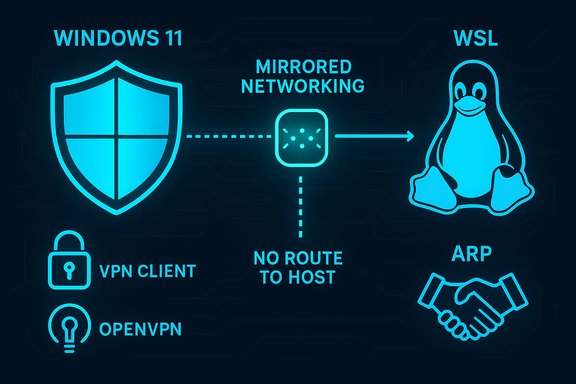
Microsoft’s October preview update KB5067036 has introduced a serious networking regression that blocks VPS and VPN-dependent connections from Windows Subsystem for Linux (WSL) when using mirrored networking, and the vendor’s limited public guidance has left many developers and administrators weighing whether to delay the update on production systems.
Background
Microsoft published KB5067036 on October 28, 2025 as a non‑security preview cumulative for Windows 11 version 24H2 and 25H2 (OS Builds 26100.7019 and 26200.7019). The package bundles a servicing‑stack update (SSU KB5067035), a broad set of quality fixes and new device‑gated Copilot+ features, and component updates for on‑device AI services. The preview model is a staged delivery intended for early validation in pilot rings before changes are folded into the normal cumulative channel. The public KB for KB5067036 explicitly lists three known issues that are most consequential for end users and administrators:- Mirror networking on Windows Subsystem for Linux might fail — WSL mirrored networking can show “No route to host” for destinations reachable from Windows host, affecting some third‑party VPNs (Cisco Secure Client, OpenVPN).
- Task Manager may continue running in the background after closing, producing orphaned taskmgr.exe instances that consume resources; Microsoft points to a later cumulative (KB5068861) as the resolution path.
- Password icon might be missing or invisible in lock‑screen sign‑in options, a UI rendering regression originating in the August preview wave (KB5064081) that Microsoft mitigates with Known Issue Rollback (KIR) and Group Policy for managed environments.
What the WSL mirror networking regression actually is
Symptom and scope
According to Microsoft’s published notes, after installing KB5067036 (or a later update on the same servicing path), WSL mirrored networking mode may fail to route traffic when the host is connected to certain VPNs. Affected users see “No route to host” errors inside WSL even though the Windows host can reach the same destinations successfully. The root technical observation in Microsoft’s advisory is that the VPN client’s virtual interface does not respond to ARP queries, which prevents the mirrored network bridge from resolving link‑layer addresses for WSL guests. Reported VPN clients include Cisco Secure Client (AnyConnect) and OpenVPN. This failure primarily affects users who rely on WSL’s mirrored networking mode to access corporate networks, jumpboxes, or VPS instances through the host’s VPN connection. In those scenarios, the WSL guest depends on the host’s virtual interface being reachable on the LAN/VPN; if ARP resolution fails, network flows from Linux processes fail even though Windows apps continue to operate normally. Microsoft’s advisory explicitly frames the issue as most relevant to enterprise and managed environments, not typical home consumer setups.Why VPS access via WSL can break
Mirrored networking in WSL links guest networking to the Windows network stack; WSL guests rely on the host’s virtual interfaces for ARP, DHCP, and route resolution. When a VPN client installs or modifies its virtual adapter, it must correctly answer ARP queries for the network segments in use. If the VPN client’s virtual NIC fails to respond to ARP for the mirrored interface, the WSL guest cannot obtain or resolve the MAC address for next‑hop gateways or remote endpoints — which manifests as “No route to host.” For workflows that use WSL to SSH into VPS hosts, tunnel traffic through corporate VPNs, or test client/server behaviour against remote cloud instances, that break is immediately disruptive. Microsoft’s KB describes precisely this ARP‑response failure as the proximate cause.Who is at risk
- Developers using WSL as their primary Linux environment who also connect through corporate VPNs to access VPS resources.
- CI systems and test agents running inside WSL that rely on host network visibility to reach remote servers.
- Remote‑work laptop users who pivot between home and corporate networks and use mirrored networking to run local tooling that interacts with VPN‑only services.
How Microsoft documented and mitigated the problem
Microsoft acknowledged the WSL mirror networking regression in the Known Issues section of KB5067036 and flagged the issue as under investigation. The company’s public remediation guidance is limited: the KB notes the behavior, explains the ARP response cause, lists affected VPN clients, and promises to share additional information when available. For managed environments Microsoft has also offered Known Issue Rollback (KIR) artifacts and Group Policy controls for other issues in the same servicing wave, and later servicing (for example, KB5072033 as a KIR carrier) is used to mitigate or temporarily disable problematic changes. That muted level of guidance — visibility of the problem without a detailed technical root‑cause, and no immediate hotfix or documented workaround for all customers — is why many admins and developers are treating KB5067036 as optional on production machines until Microsoft publishes a corrective cumulative or a KIR that addresses the WSL networking regression specifically. Community test reports and enterprise threads have advised staging the preview and monitoring Microsoft’s Release Health pages for updates.Related known issues: Task Manager and the lock‑screen password icon
While the WSL regression is the most operationally concerning for networked developers, KB5067036 also surfaced two other known issues that matter to Windows professionals.Task Manager continues running after closing
Many users reported that closing Task Manager with the Close (X) button does not fully terminate the process — subsequent opens show additional hidden instances of taskmgr.exe in the Details tab that continue to consume memory. Microsoft’s KB lists this as a known issue and points to a subsequent cumulative (KB5068861 as noted at the time) for remediation. Community testing measured orphaned instances consuming ~20–25MB each; when many accumulate the total memory and scheduling overhead becomes noticeable. Independent outlets documented the symptom and Microsoft’s acknowledgement. The practical mitigation is to avoid closing Task Manager with the Close button, use End task, or run a forced taskkill (taskkill /im taskmgr.exe /f) until the fix is applied.Invisible password icon on lock screen
The password icon’s rendering regression predates KB5067036 (traced to the August preview KB5064081) and continued to be mentioned in subsequent KBs. The symptom: the password sign‑in icon in Sign‑in options does not render visually, but its hitbox remains clickable — hovering and clicking the invisible placeholder opens the password box. Microsoft published KIR guidance and Group Policy deployment artifacts to temporarily disable the change causing the problem in managed environments. This is a visibility/usability regression (not an authentication failure), but it has accessibility and helpdesk cost implications.What organizations and developers should do now
Immediate checklist
- Treat KB5067036 as a preview — do not approve or auto‑deploy it to production fleets without testing. This package is optional and staged.
- Pilot on representative hardware and software configurations, including devices that use WSL mirrored networking and the VPN clients listed by Microsoft (Cisco Secure Client, OpenVPN). Validate end‑to‑end access to VPS hosts, corporate file shares and authentication flows.
- If you rely on WSL mirrored networking for production tools, defer this preview until Microsoft issues a corrective update or until you have an operational mitigation verified in your environment.
- For Task Manager problems, instruct support staff and power users to use End task or taskkill /im taskmgr.exe /f to remove orphaned instances rather than using the Close (X) button. Rebooting clears the accumulated instances as a short‑term fix.
- For the invisible password icon, deploy the Known Issue Rollback Group Policy provided by Microsoft (KIR package/Group Policy) in managed environments if the regression affects sign‑in workflows. Microsoft’s KB points to the specific Group Policy downloads and KIR entries for 24H2/25H2 devices.
Longer‑term operational steps
- Integrate WSL networking scenarios (mirrored mode + corporate VPN) into your update validation matrix. Tests that cover AI‑gated Copilot+ features are useful for pilot rings, but the networking tests are critical for developers and CI agents.
- Maintain rollback runbooks for optional previews. Because combined SSU+LCU packages can complicate uninstall semantics, keep image‑based rollback and restore points available for critical endpoints. Microsoft documents package uninstall steps and flags that SSU removal is nontrivial.
- Monitor the Windows release health dashboard and the update history pages for each OS branch — Microsoft updates Known Issues and posts KIR artifacts on those pages. Subscribe to Microsoft notifications for rapid awareness.
Technical analysis — why the regression matters beyond a single bug
Cross‑component coupling and the preview cadence
Modern Windows servicing bundles changes across UI, networking, and AI subsystems. That coupling increases the risk surface: a kernel‑level networking tweak can interact with third‑party VPN drivers, while UI grouping changes can affect process lifecycle paths. The preview channel is designed to find these edge cases before mass deployment, but real production workloads are heterogeneous — long‑lived upgrade paths, third‑party drivers, and organizational VPN stacks can produce stateful interactions that don’t show up in lab tests. The WSL mirror networking regression is a clear instance of this.The operational cost of “small” UI regressions
The invisible password icon is technically less severe (authentication still works), yet it increases helpdesk tickets and poses accessibility hurdles for users who depend on visual cues. Small regressions at critical UX surfaces (sign‑in, File Explorer, Task Manager) carry outsized operational costs because they delay users from completing frequent, time‑sensitive tasks. Microsoft’s repeated Known Issue entries across multiple KBs demonstrate how a small rendering bug can persist across servicing waves until a targeted fix is deployed.The vendor communication challenge
Microsoft’s KB entries do document the presence of the problem and, in some cases, provide Group Policy KIR packages, but they often lack precise timelines or detailed technical root‑cause descriptions. That limited transparency forces administrators to triage internally and rely on community reproductions for mitigation strategies. While Microsoft is following its standard disclosure path (Known Issues + KIR), the practical effect is slower organizational remediation and decision friction around whether to accept preview updates.Cross‑checks and verification of facts
- The KB entry for KB5067036 explicitly lists “Mirror networking on Windows Subsystem for Linux might fail” and names Cisco Secure Client and OpenVPN as reported affected clients; that authoritative claim is the primary verification for the WSL regression.
- Microsoft Learn’s AI components release table shows KB5067036 updated Image Search, Content Extraction, Semantic Analysis and Settings Model to version 1.2510.1152.0, confirming the Copilot+ component versioning included in the preview. This confirms the package’s AI payload for Copilot+ PCs.
- Independent technology outlets and community threads reproduced the Task Manager duplication symptom and reported that Microsoft’s KB acknowledged related issues in follow‑on notes; The Verge and Tom’s Guide published hands‑on accounts corroborating community reproductions and the vendor’s acknowledgement.
- Community and forum archives trace the sign‑in icon regression back to the August preview (KB5064081) and confirm Microsoft’s repeated Known Issue entries through the October–November servicing waves — this cross‑checks the persistence and scope of that UI regression.
Risk assessment and recommendations
- Risk level for developer productivity: High. For teams that depend on WSL mirrored networking to access remote servers or run development flows that traverse corporate VPNs, the regression can halt work. Test and stage aggressively.
- Risk level for managed fleets (IT operations): Moderate to high. The update is optional, but staged rollouts can introduce uneven behaviour across a fleet and complicate support. Use pilot rings and KIR Group Policy where appropriate.
- Risk level for consumer/home users: Low. Microsoft states the WSL VPN issue primarily affects enterprise scenarios. Home users who do not use mirrored networking with a corporate VPN are unlikely to be impacted.
- Do not broadly deploy KB5067036 to production unless you have completed verification on devices that mirror your production hardware, VPN clients, and WSL usage patterns.
- If you already installed the preview and see broken WSL networking, revert the device to the prior state if rollback is supported and immediate work continuity is required; otherwise escalate to Microsoft support and file Feedback Hub reproductions with Winver, repro steps and traces.
- Apply KIR Group Policy for the sign‑in icon regression in managed environments if that issue impedes sign‑in operations. Microsoft published the Group Policy download and KIR guidance in the KB notes.
Conclusion
KB5067036 bundles desirable fixes and Copilot+ AI component updates, but it also demonstrates the risk preview updates pose to complex, real‑world workflows. Microsoft’s own support page confirms the WSL mirror networking regression — an ARP‑response failure that can produce “No route to host” inside WSL when certain VPN clients are present — and the company is still investigating. The update also includes known UI regressions (Task Manager lifecycle, invisible password icon) that increase helpdesk burden and erode trust in preview releases. For organizations and developers who rely on WSL mirrored networking to reach VPS, corporate networks or VPN‑gated services, the prudent posture is to defer KB5067036 on production endpoints, validate the package in a representative pilot ring, and apply Microsoft’s documented mitigations (KIR Group Policy, Task Manager workarounds) until a targeted remediation is released. Monitor Microsoft’s Release Health and the KB entry for follow‑on fixes and the inclusion of any Known Issue Rollback artifacts that address the WSL networking failure.Source: Cyber Press https://cyberpress.org/microsoft-update-breaks-vps-access/
