

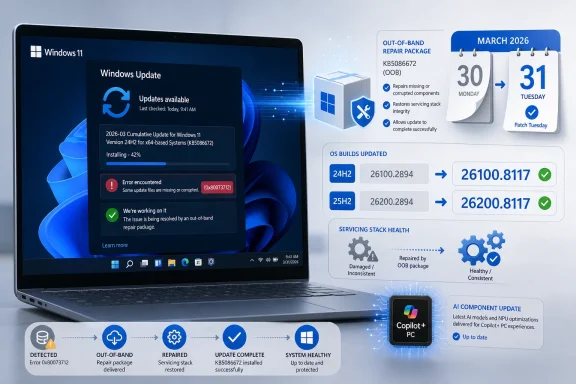
Microsoft released KB5086672 on March 31, 2026 for Windows 11 versions 24H2 and 25H2, moving systems to OS builds 26100.8117 and 26200.8117 to fix an installer failure that caused some devices to hit error 0x80073712 during the March 2026 preview update. If you were blocked on that preview path, this is the update to take; check Settings > Windows Update, install the offered cumulative update, and verify the build afterward with Settings > System > About or
KB5086672 is formally an out-of-band cumulative update, not a normal Patch Tuesday release and not just another optional preview with a few UI polish items tucked inside. It lands outside the ordinary cadence because Microsoft needed to repair a broken install route for the March 2026 preview update on Windows 11 24H2 and 25H2.
That distinction matters. A regular cumulative update fixes Windows; this one also fixes the path by which some users were trying to fix Windows. When the servicing stack, component store, or update package chain returns 0x80073712, the message to administrators is not “try again later” so much as “the payload relationship is not resolving cleanly on this machine.”
The practical instruction is straightforward. If a Windows 11 24H2 or 25H2 device failed the March 2026 preview update with 0x80073712, install KB5086672 instead of continuing to hammer the failed preview package. Once installed, Windows 11 24H2 should report build 26100.8117, while Windows 11 25H2 should report build 26200.8117.
For managed environments, the immediate move is more cautious: treat KB5086672 as a repair release with deployment urgency for affected rings, not as a feature-bearing preview that everyone must chase. The fix exists because Microsoft’s March preview channel needed a correction. That makes it relevant to pilot rings, IT validation machines, and enthusiasts who deliberately run preview updates, but it does not automatically make it a reason to disrupt stable production endpoints that were not exposed to the failure.
The sharp edge here is timing. March 10 was the ordinary monthly baseline, March 21 was already out-of-band, March 26 was the preview, and March 31 became the second out-of-band moment in the same late-month servicing arc. Even without inventing drama, that sequence tells administrators that the March branch for Windows 11 24H2 and 25H2 was more complicated than the usual security-update-plus-preview rhythm.
Preview updates are supposed to be the safer testing ground for next month’s non-security changes. They are optional, often deployed first by enthusiasts and IT teams trying to get ahead of user-impacting fixes. But when the preview update itself fails to install for some machines, the testing lane stops being merely optional and becomes operationally noisy.
That is why KB5086672 deserves more attention than a routine cumulative update. It is an admission, in update-package form, that the previous route was incomplete for affected devices. Microsoft did not just say “wait for April”; it shipped a repair package on March 31.
That wording is important because it avoids overclaiming. KB5086672 should not be treated as a universal cure for every Windows Update failure bearing that code. It addresses a specific failure path in the March 2026 preview update flow for Windows 11 24H2 and 25H2.
For WindowsForum readers, the temptation will be familiar: run DISM, run SFC, clear SoftwareDistribution, reboot twice, and try again. Those steps may still be useful in ordinary servicing corruption scenarios, but here the vendor has produced a package-level answer. If your failed install matches Microsoft’s described scenario, the cleaner answer is to move to KB5086672 rather than endlessly repairing the local image around a known broken preview path.
This is also where IT teams should be careful with help-desk scripts. A machine that failed the March preview with 0x80073712 is not necessarily a sick endpoint. It may simply be caught on the wrong side of an update dependency that Microsoft later corrected.
This is exactly why cumulative updates exist. The Windows servicing model is designed to collapse prior fixes into later packages so that admins do not have to install every previous update in sequence. KB5086672 uses that model to turn a messy month into a single deployable endpoint.
The catch is that “cumulative” does not mean “low stakes.” A cumulative package can contain a small targeted repair, a broad bundle of previous fixes, and a new build number all at once. KB5086672 does all three, which is why treating it as a mere preview replacement understates the administrative consequence.
For home users, the answer is simple: install it if Windows Update offers it, especially if the March preview failed. For sysadmins, the answer is to test it like a cumulative update but prioritize it like a servicing repair for machines already trapped by the March preview bug.
That distinction matters because Windows 11 updates increasingly mix ordinary platform maintenance with hardware-specific AI plumbing. A Copilot+ PC may receive component updates that a conventional x86 desktop never uses. For administrators, that means the same KB number can have slightly different practical meaning across the fleet.
The AI component version is still worth recording in asset and validation notes. If you manage Copilot+ PCs, KB5086672 moves those applicable components to 1.2603.377.0. If you do not, do not let the AI line distract from the central issue: Microsoft is repairing the March 2026 preview installation path.
In enthusiast circles, this split will likely fuel the usual suspicion that every Windows update is secretly an AI update. In this case, the better read is more mundane and more important. The AI payload is a sidecar; the servicing correction is the engine.
For individual users, the process is direct. Open Settings, go to Windows Update, check for updates, and install KB5086672 if offered. After the restart, confirm the OS build: 26100.8117 for Windows 11 24H2 or 26200.8117 for Windows 11 25H2.
For administrators, the better workflow is ring-based. Push KB5086672 first to devices that failed the March preview or to the same pilot group that would ordinarily validate preview updates. Watch for installation success, restart behavior, and post-update build reporting before widening deployment.
The bigger lesson is to avoid forcing optional preview updates deep into production unless there is a known fix inside that you need. Preview updates are valuable precisely because they expose issues early. KB5086672 is a reminder that sometimes the issue they expose is the update process itself.
That history is useful context, not proof that KB5086672 will misbehave. The point is that a failed update is rarely just a failed update for the person affected. It becomes lost time, uncertain system state, and a decision about whether to trust the next package that appears.
KB5086672 is therefore a trust-repair release as much as a code-repair release. Microsoft is telling affected users that the way forward is not to keep retrying the March preview indefinitely. The company has produced a replacement cumulative path that includes the earlier March fixes and the missing installation correction.
For enthusiasts, that is a reason to stop treating 0x80073712 as a personal machine mystery if the timing matches. For IT pros, it is a reason to update deployment notes and avoid conflating this issue with unrelated component-store corruption.
That verification step is not cosmetic. In a month with multiple March packages, build numbers are the only sane way to know where a machine actually ended up. “Installed successfully” in update history is useful, but the build number is the state administrators can inventory and compare.
On a single PC,
This is also the point where support teams should update user-facing guidance. If someone reports that the March preview failed with 0x80073712, the first response should not be a full rebuild checklist. It should be: install KB5086672, confirm the build, then troubleshoot only if the out-of-band repair also fails.
That flexibility is useful when it works. It lets Microsoft react quickly, stage fixes earlier, and avoid waiting weeks for the next planned release. But it also creates a more complex calendar for administrators who must explain which update matters, why it exists, and whether it belongs in production.
KB5086672 is a good example of the tradeoff. A rigid monthly model might have left affected users stuck until the next scheduled update. An elastic model allowed Microsoft to publish a targeted out-of-band repair. The cost is that admins now have another package to classify, test, and explain.
The answer is not to reject out-of-band updates. The answer is to demand clarity about their purpose. In this case, Microsoft’s purpose is clear enough: fix the March preview installation failure and consolidate the month’s earlier fixes into a new March 31 build.
That should keep everyone honest. There is no basis here to invent a wider disaster, assign blame to Copilot+ components, or pretend every 0x80073712 case is covered. The supported claim is narrower and sharper: the March preview path for Windows 11 24H2 and 25H2 had a real enough install problem that Microsoft pulled forward a repair.
For Windows enthusiasts, that means KB5086672 is worth installing if you were chasing the preview and got blocked. For sysadmins, it means the March 31 build is the new reference point for affected validation rings. For everyone else, it is a reminder that optional previews are still previews, even when delivered through the familiar machinery of Windows Update.
Microsoft’s modern Windows servicing model depends on confidence that each cumulative package can be both a destination and a rescue route. KB5086672 shows the strength and weakness of that model at once: the company can move quickly when the update chain breaks, but it also has to keep proving that the next package is safer than the one that failed.
winver. The important part is not merely the build number. Microsoft had to ship an out-of-band repair because the update mechanism itself became part of the problem.
 Microsoft Pulls the Fix Out of the Queue
KB5086672 is formally an out-of-band cumulative update, not a normal Patch Tuesday release and not just another optional preview with a few UI polish items tucked inside. It lands outside the ordinary cadence because Microsoft needed to repair a broken install route for the March 2026 preview update on Windows 11 24H2 and 25H2.That distinction matters. A regular cumulative update fixes Windows; this one also fixes the path by which some users were trying to fix Windows. When the servicing stack, component store, or update package chain returns 0x80073712, the message to administrators is not “try again later” so much as “the payload relationship is not resolving cleanly on this machine.”
The practical instruction is straightforward. If a Windows 11 24H2 or 25H2 device failed the March 2026 preview update with 0x80073712, install KB5086672 instead of continuing to hammer the failed preview package. Once installed, Windows 11 24H2 should report build 26100.8117, while Windows 11 25H2 should report build 26200.8117.
For managed environments, the immediate move is more cautious: treat KB5086672 as a repair release with deployment urgency for affected rings, not as a feature-bearing preview that everyone must chase. The fix exists because Microsoft’s March preview channel needed a correction. That makes it relevant to pilot rings, IT validation machines, and enthusiasts who deliberately run preview updates, but it does not automatically make it a reason to disrupt stable production endpoints that were not exposed to the failure.
The March Preview Path Is the Real Story
Microsoft says KB5086672 includes fixes from KB5079473, released March 10, KB5085516, released March 21, and KB5079391, released March 26. That packaging choice is the clearest signal that this is a cumulative reset point. Rather than asking users to reason through three recent packages and a failed preview install, Microsoft bundled the chain and added the missing installation fix.The sharp edge here is timing. March 10 was the ordinary monthly baseline, March 21 was already out-of-band, March 26 was the preview, and March 31 became the second out-of-band moment in the same late-month servicing arc. Even without inventing drama, that sequence tells administrators that the March branch for Windows 11 24H2 and 25H2 was more complicated than the usual security-update-plus-preview rhythm.
Preview updates are supposed to be the safer testing ground for next month’s non-security changes. They are optional, often deployed first by enthusiasts and IT teams trying to get ahead of user-impacting fixes. But when the preview update itself fails to install for some machines, the testing lane stops being merely optional and becomes operationally noisy.
That is why KB5086672 deserves more attention than a routine cumulative update. It is an admission, in update-package form, that the previous route was incomplete for affected devices. Microsoft did not just say “wait for April”; it shipped a repair package on March 31.
Error 0x80073712 Turns a Preview into a Servicing Problem
The error code Microsoft names, 0x80073712, has long been associated with missing or damaged files needed by Windows servicing. In ordinary user terms, it means Windows Update could not complete because the component state it expected was not available in the required form. The KB5086672 note is narrower than a general troubleshooting article, however: Microsoft specifically ties the fix to some devices installing the March 2026 preview update.That wording is important because it avoids overclaiming. KB5086672 should not be treated as a universal cure for every Windows Update failure bearing that code. It addresses a specific failure path in the March 2026 preview update flow for Windows 11 24H2 and 25H2.
For WindowsForum readers, the temptation will be familiar: run DISM, run SFC, clear SoftwareDistribution, reboot twice, and try again. Those steps may still be useful in ordinary servicing corruption scenarios, but here the vendor has produced a package-level answer. If your failed install matches Microsoft’s described scenario, the cleaner answer is to move to KB5086672 rather than endlessly repairing the local image around a known broken preview path.
This is also where IT teams should be careful with help-desk scripts. A machine that failed the March preview with 0x80073712 is not necessarily a sick endpoint. It may simply be caught on the wrong side of an update dependency that Microsoft later corrected.
The Cumulative Bundle Is a Reset Button, Not a Mystery Box
Because KB5086672 includes the fixes from March 10, March 21, and March 26, it functions as a consolidation point. That does not mean every prior package disappears from history, but it does mean administrators can reason about the target state more cleanly: after KB5086672, the relevant 24H2 and 25H2 devices should be on the March 31 out-of-band builds.This is exactly why cumulative updates exist. The Windows servicing model is designed to collapse prior fixes into later packages so that admins do not have to install every previous update in sequence. KB5086672 uses that model to turn a messy month into a single deployable endpoint.
The catch is that “cumulative” does not mean “low stakes.” A cumulative package can contain a small targeted repair, a broad bundle of previous fixes, and a new build number all at once. KB5086672 does all three, which is why treating it as a mere preview replacement understates the administrative consequence.
For home users, the answer is simple: install it if Windows Update offers it, especially if the March preview failed. For sysadmins, the answer is to test it like a cumulative update but prioritize it like a servicing repair for machines already trapped by the March preview bug.
Copilot+ PCs Get an AI Component Bump, But That Is Not the Main Event
KB5086672 also updates AI component versions to 1.2603.377.0. Microsoft’s note limits those AI components to Copilot+ PCs, which means most analysis should not pretend this is primarily an AI update wearing a servicing costume. The AI component bump is real, but the install fix is the reason this package exists.That distinction matters because Windows 11 updates increasingly mix ordinary platform maintenance with hardware-specific AI plumbing. A Copilot+ PC may receive component updates that a conventional x86 desktop never uses. For administrators, that means the same KB number can have slightly different practical meaning across the fleet.
The AI component version is still worth recording in asset and validation notes. If you manage Copilot+ PCs, KB5086672 moves those applicable components to 1.2603.377.0. If you do not, do not let the AI line distract from the central issue: Microsoft is repairing the March 2026 preview installation path.
In enthusiast circles, this split will likely fuel the usual suspicion that every Windows update is secretly an AI update. In this case, the better read is more mundane and more important. The AI payload is a sidecar; the servicing correction is the engine.
The Right Deployment Move Depends on Whether You Were in the Blast Radius
The most useful way to think about KB5086672 is by population. Devices that attempted the March 2026 preview update and failed with 0x80073712 are the obvious candidates. Devices that never touched the preview path may still receive the cumulative package through normal channels, but the urgency is different.For individual users, the process is direct. Open Settings, go to Windows Update, check for updates, and install KB5086672 if offered. After the restart, confirm the OS build: 26100.8117 for Windows 11 24H2 or 26200.8117 for Windows 11 25H2.
For administrators, the better workflow is ring-based. Push KB5086672 first to devices that failed the March preview or to the same pilot group that would ordinarily validate preview updates. Watch for installation success, restart behavior, and post-update build reporting before widening deployment.
The bigger lesson is to avoid forcing optional preview updates deep into production unless there is a known fix inside that you need. Preview updates are valuable precisely because they expose issues early. KB5086672 is a reminder that sometimes the issue they expose is the update process itself.
WindowsForum Has Seen This Movie Before
WindowsForum’s long-running update threads are full of familiar failure patterns: stuck installs, preview packages that refuse to apply, and error codes that send users down increasingly elaborate repair paths. The specific KB numbers change, but the rhythm is consistent. Windows Update failures become community troubleshooting events because the official error message rarely explains the operational cause in plain English.That history is useful context, not proof that KB5086672 will misbehave. The point is that a failed update is rarely just a failed update for the person affected. It becomes lost time, uncertain system state, and a decision about whether to trust the next package that appears.
KB5086672 is therefore a trust-repair release as much as a code-repair release. Microsoft is telling affected users that the way forward is not to keep retrying the March preview indefinitely. The company has produced a replacement cumulative path that includes the earlier March fixes and the missing installation correction.
For enthusiasts, that is a reason to stop treating 0x80073712 as a personal machine mystery if the timing matches. For IT pros, it is a reason to update deployment notes and avoid conflating this issue with unrelated component-store corruption.
The Builds Tell You Whether You Actually Landed
The cleanest verification is the OS build. Windows 11 24H2 should show 26100.8117 after KB5086672. Windows 11 25H2 should show 26200.8117.That verification step is not cosmetic. In a month with multiple March packages, build numbers are the only sane way to know where a machine actually ended up. “Installed successfully” in update history is useful, but the build number is the state administrators can inventory and compare.
On a single PC,
winver is enough. In a fleet, inventory tooling should be used to identify machines still below the March 31 out-of-band build, particularly those that were part of preview-validation rings. The goal is not to chase numbers for sport; it is to distinguish repaired endpoints from machines still stuck on the failed path.This is also the point where support teams should update user-facing guidance. If someone reports that the March preview failed with 0x80073712, the first response should not be a full rebuild checklist. It should be: install KB5086672, confirm the build, then troubleshoot only if the out-of-band repair also fails.
Microsoft’s Servicing Cadence Is Becoming More Elastic
KB5086672 sits in a broader pattern: Windows servicing is no longer a simple monthly event, especially for the newest Windows 11 branches. Security baselines, preview releases, hotpatches, and out-of-band packages increasingly overlap. WindowsForum readers following February’s KB5077212 hotpatch discussion have already seen how Microsoft is trying to make some updates smaller and less disruptive, while still preserving the cumulative model.That flexibility is useful when it works. It lets Microsoft react quickly, stage fixes earlier, and avoid waiting weeks for the next planned release. But it also creates a more complex calendar for administrators who must explain which update matters, why it exists, and whether it belongs in production.
KB5086672 is a good example of the tradeoff. A rigid monthly model might have left affected users stuck until the next scheduled update. An elastic model allowed Microsoft to publish a targeted out-of-band repair. The cost is that admins now have another package to classify, test, and explain.
The answer is not to reject out-of-band updates. The answer is to demand clarity about their purpose. In this case, Microsoft’s purpose is clear enough: fix the March preview installation failure and consolidate the month’s earlier fixes into a new March 31 build.
The March 31 Repair Narrows the Admin Playbook
KB5086672 reduces the number of reasonable next steps for affected systems, which is good news. When Microsoft ships a cumulative repair for a named install failure, the admin playbook should become narrower, not wider. The goal is to move machines onto the repaired build, verify success, and reserve heavier remediation for the minority that still fails.- Devices on Windows 11 24H2 that successfully install KB5086672 should report OS build 26100.8117.
- Devices on Windows 11 25H2 that successfully install KB5086672 should report OS build 26200.8117.
- Systems that hit 0x80073712 while installing the March 2026 preview update should be pointed at KB5086672 rather than repeatedly retrying the failed preview path.
- The update includes fixes from the March 10, March 21, and March 26 packages, so it should be treated as a cumulative consolidation point for that servicing sequence.
- The AI component update to version 1.2603.377.0 applies only to Copilot+ PCs, so it should not be mistaken for the primary reason this out-of-band release exists.
The Real Signal Is Microsoft’s Need to Repair the Installer Path
The thinness of the official facts is itself revealing. Microsoft does not describe a sweeping Windows defect, a security emergency, or a long list of new user-facing repairs. It identifies a specific installation failure for some devices taking the March 2026 preview update and ships an out-of-band cumulative package to address it.That should keep everyone honest. There is no basis here to invent a wider disaster, assign blame to Copilot+ components, or pretend every 0x80073712 case is covered. The supported claim is narrower and sharper: the March preview path for Windows 11 24H2 and 25H2 had a real enough install problem that Microsoft pulled forward a repair.
For Windows enthusiasts, that means KB5086672 is worth installing if you were chasing the preview and got blocked. For sysadmins, it means the March 31 build is the new reference point for affected validation rings. For everyone else, it is a reminder that optional previews are still previews, even when delivered through the familiar machinery of Windows Update.
Microsoft’s modern Windows servicing model depends on confidence that each cumulative package can be both a destination and a rescue route. KB5086672 shows the strength and weakness of that model at once: the company can move quickly when the update chain breaks, but it also has to keep proving that the next package is safer than the one that failed.
References
- Primary source: support.microsoft.com

