

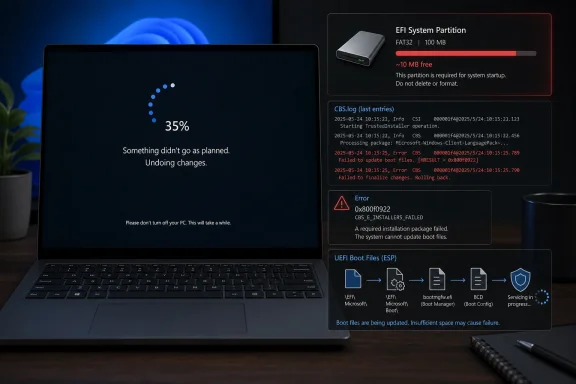
Microsoft confirmed on May 15, 2026, that the May 2026 Windows 11 security update KB5089549 can fail on some Windows 11 24H2 and 25H2 devices when the EFI System Partition has roughly 10MB or less free space. The failure typically arrives during the reboot phase, around 35–36 percent, then retreats into the familiar “Something didn’t go as planned. Undoing changes.” message. The bug is not a blue-screen catastrophe, but it is the kind of low-level servicing failure that corrodes trust because it turns a mandatory security update into a partition-management problem. Microsoft’s fix is available, but the episode exposes how fragile Windows servicing can become when decades of firmware, OEM habits, and update logic meet on a tiny slice of disk most users never knew existed.
The important detail is not that another Windows update failed. That happens often enough that many users have developed a grim ritual around Patch Tuesday: install, reboot, wait, watch the percentage crawl, hope the machine returns intact. The important detail is where this one failed.
The EFI System Partition, or ESP, is not the C: drive. It is not the place where users save downloads, games, Teams recordings, or forgotten ISO files. It is the small FAT-formatted boot partition used by UEFI systems to store boot files and related firmware-facing components, usually hidden from File Explorer and insulated from normal cleanup tools.
That means the user-facing symptom is misleading. Someone can have hundreds of gigabytes free on their Windows volume and still hit an update failure because the boot partition has run out of usable space. Windows Update then looks broken, but the underlying dispute is between servicing code and a partition that was designed to be small, quiet, and boring.
The May update apparently needed to touch boot-related files and perform a space check. On affected machines, that check found too little room, particularly where 10MB or less remained free on the ESP. The installation had already progressed far enough to require a reboot, which is why the rollback appears late in the process rather than as an up-front warning before the user commits to downtime.
In this case, Microsoft has at least documented the failure path. The company says affected devices can log entries indicating insufficient free space on the EFI System Partition, including messages about the space check and boot-file servicing. That is useful for administrators reading CBS logs; it is nearly useless for ordinary users staring at a rollback screen.
This is the gap Microsoft still struggles to close. Windows has become better at silent remediation, at rolling back known-bad changes, and at preventing certain upgrade paths through safeguard holds. But when the servicing stack hits a condition like this, the user is often told only that something failed, not that a hidden boot partition is too full.
A better Windows would not require a user to learn the architecture of UEFI booting to understand why a security update cannot install. It would detect the condition before the reboot, surface a plain-language explanation, and offer an automated repair path appropriate to the device. Instead, Microsoft is leaning on a mixture of registry guidance, Known Issue Rollback, and enterprise Group Policy plumbing.
That history matters. Many PCs ship with layouts created by OEM imaging systems, not by a pristine Microsoft lab install. Some vendors add files under their own directories. Some users later install Linux, third-party encryption tools, boot managers, or firmware update utilities. Some machines have been upgraded across multiple Windows generations without ever revisiting whether their hidden partitions still make sense.
A few megabytes may sound trivial in 2026, but the ESP lives in a different economy from the rest of the disk. A 100MB or 260MB boot partition can be perfectly adequate for years, then suddenly become a constraint when a servicing operation needs temporary room, padding, or new boot files. Windows may own the update, but it does not always own the partition history.
That is why the “10MB free” threshold is so revealing. Microsoft is not saying every ESP smaller than a given size is broken. It is saying this specific update path can fail when the free space margin is extremely thin. The immediate fix may be small, but the broader lesson is that hidden system partitions are now part of the Windows reliability surface.
That is a plausible fix for a narrow servicing problem. It is also exactly the sort of guidance that makes seasoned administrators pause before forwarding it to everyone. Registry edits can be safe when precise, but they are still registry edits, and the setting touches boot-file servicing behavior rather than an application preference.
The deeper issue is that this workaround asks users to adjust Windows’ assumptions around reserved space rather than directly solving the partition’s cramped condition. If the ESP is crowded because of third-party or OEM files, the registry change may let this update install, but it does not necessarily leave the machine in a healthier state for the next firmware, boot, or recovery-related update.
For enthusiasts, the temptation will be to mount the ESP manually, inspect it, and delete whatever looks expendable. That is dangerous advice in the wrong hands. Removing the wrong boot files can make a system unbootable, and even experienced users should image the machine before performing surgery on hidden partitions.
For enterprise administrators, the calculation is different. They can inventory affected devices, inspect logs, deploy a supported workaround, and decide whether long-term remediation means resizing partitions during a maintenance window. But even in managed environments, partition resizing at scale is a serious operational move, not a casual help-desk script.
That is the good news. If a home user is affected, a restart may be enough to pick up the rollback mitigation and allow the device to move past the failure. The system may fix itself faster than the user can find a forum thread explaining the ESP.
The enterprise path is more deliberate. Managed devices may require administrators to download and configure a special Group Policy tied to the issue. That is reasonable in principle because enterprises want control over what changes are applied to fleets, but it also means the people under the most pressure to patch quickly inherit additional deployment work.
KIR is a clever safety net, but it is still a safety net. It does not erase the fact that a security update reached production with a failure mode involving a hidden boot partition. It also does not fully satisfy administrators who need to know whether the mitigation merely avoids the immediate servicing problem or whether a future update will return to the same cramped ESP and fail again.
Microsoft says a fuller resolution will arrive in a future Windows update. That phrasing is important. The current state is mitigated, not necessarily cured. For IT teams, that distinction determines whether this becomes a closed incident or an item on the next fleet-health review.
This is the modern Windows dilemma in miniature. Microsoft has pushed Windows toward a cumulative servicing model for good reasons: fewer fragmented patch states, more predictable baselines, and a stronger security posture across a vast install base. But cumulative updates also concentrate risk. One servicing failure can delay an entire bundle of security fixes.
For home users, the advice remains boring but necessary: do not permanently avoid the update because of headlines. Restart the device, let Windows receive the KIR mitigation, and try again. If the same rollback occurs, check Windows Update history for 0x800f0922 and consider Microsoft’s documented workaround or professional assistance.
For administrators, the answer is not to panic-pause the entire fleet unless telemetry justifies it. The better response is to identify whether KB5089549 is failing, collect error codes, inspect CBS logs on representative devices, and determine whether the ESP-space condition is present. If it is, the organization can choose between KIR deployment, the registry workaround, or a longer-term partition remediation plan.
The worst response is improvisation. Randomly deleting files from the ESP, applying untested disk tools across managed endpoints, or repeatedly forcing the same update without understanding the failure mode can turn a failed patch into a boot incident. A machine that rolls back is annoying; a machine that no longer boots is a ticket queue disaster.
Windows is unusually difficult to service because Windows runs on almost everything. It spans clean installs, OEM images, corporate gold masters, encrypted laptops, gaming rigs, dual-boot hobby machines, old firmware, new firmware, and security products that wedge themselves deep into the boot path. No single update pipeline can make that diversity disappear.
But Microsoft cannot hide behind that complexity forever. If the company wants users to accept faster updates, more cloud-connected servicing, more security hardening, and more automatic remediation, then it must make failures more intelligible. The burden cannot always fall on users to decode a hexadecimal error and discover that the hidden partition has less free space than a smartphone photo.
The company has improved in some areas. Known Issue Rollback is genuinely useful. Release health dashboards are more transparent than the old days of vague forum replies and mystery hotfixes. But transparency after failure is not the same as prevention, and prevention is what users increasingly expect from a platform that insists updates are non-negotiable.
The PC ecosystem also loves inheritance. A device may begin with a vendor image, receive years of feature updates, accumulate firmware tools, pick up recovery changes, and later be enrolled into a corporate management platform. Every layer assumes the previous layer left enough room. Eventually, a security update becomes the moment that proves the assumption wrong.
That does not absolve Microsoft, because Windows Update is the component users see and Microsoft is the party shipping the patch. But it does explain why a hidden-partition issue can appear unevenly. Two users running the same Windows build may have very different ESP contents because their machines came from different vendors or lived different lives.
This is where enterprise hardware standards matter. Organizations that standardize partition layouts, validate OEM images, and test cumulative updates against representative hardware rings are better positioned than those that accept whatever factory layout arrives. Windows servicing reliability is not only about Microsoft’s code; it is also about the physical and logical estate that code must traverse.
There is a product lesson here. Hidden partitions should not require hidden knowledge. If Windows knows the ESP is too full, it should be able to say so clearly before the reboot phase. If Windows can identify third-party or OEM files contributing to the problem, it should be able to separate Microsoft-owned boot content from everything else in a diagnostic view.
A future Windows update may resolve this particular condition, but the class of problem will remain. Secure Boot changes, recovery environment updates, BitLocker interactions, firmware transitions, and boot-manager servicing all touch territory that normal disk-cleanup workflows ignore. As Windows security hardening moves closer to firmware and boot integrity, the ESP becomes more important, not less.
That argues for better tooling. Windows already has extensive health checks, troubleshooters, and telemetry-driven safeguards. It should also have a first-party, user-safe way to evaluate hidden system partition health, flag risky layouts, and recommend supported remediation before a monthly update fails halfway through a reboot.
 The Update Failed Where Users Cannot See
The important detail is not that another Windows update failed. That happens often enough that many users have developed a grim ritual around Patch Tuesday: install, reboot, wait, watch the percentage crawl, hope the machine returns intact. The important detail is where this one failed.The EFI System Partition, or ESP, is not the C: drive. It is not the place where users save downloads, games, Teams recordings, or forgotten ISO files. It is the small FAT-formatted boot partition used by UEFI systems to store boot files and related firmware-facing components, usually hidden from File Explorer and insulated from normal cleanup tools.
That means the user-facing symptom is misleading. Someone can have hundreds of gigabytes free on their Windows volume and still hit an update failure because the boot partition has run out of usable space. Windows Update then looks broken, but the underlying dispute is between servicing code and a partition that was designed to be small, quiet, and boring.
The May update apparently needed to touch boot-related files and perform a space check. On affected machines, that check found too little room, particularly where 10MB or less remained free on the ESP. The installation had already progressed far enough to require a reboot, which is why the rollback appears late in the process rather than as an up-front warning before the user commits to downtime.
Microsoft’s 35 Percent Problem Is Really a Design Problem
The 35–36 percent mark has become a kind of folk symbol for Windows update anxiety. Users remember percentages more than error codes, and “stuck at 35 percent” is easier to repeat than 0x800f0922. But the number itself is less interesting than the experience it represents: a black-box transition where Windows stops explaining and starts undoing.In this case, Microsoft has at least documented the failure path. The company says affected devices can log entries indicating insufficient free space on the EFI System Partition, including messages about the space check and boot-file servicing. That is useful for administrators reading CBS logs; it is nearly useless for ordinary users staring at a rollback screen.
This is the gap Microsoft still struggles to close. Windows has become better at silent remediation, at rolling back known-bad changes, and at preventing certain upgrade paths through safeguard holds. But when the servicing stack hits a condition like this, the user is often told only that something failed, not that a hidden boot partition is too full.
A better Windows would not require a user to learn the architecture of UEFI booting to understand why a security update cannot install. It would detect the condition before the reboot, surface a plain-language explanation, and offer an automated repair path appropriate to the device. Instead, Microsoft is leaning on a mixture of registry guidance, Known Issue Rollback, and enterprise Group Policy plumbing.
The ESP Was Supposed to Be Boring
The EFI System Partition is one of those pieces of PC infrastructure that works best when nobody discusses it. On a modern GPT-formatted disk, it sits near the front of the drive and holds files that firmware uses to start Windows. It can also accumulate OEM utilities, boot managers, diagnostics, recovery components, and leftovers from multi-boot experiments.That history matters. Many PCs ship with layouts created by OEM imaging systems, not by a pristine Microsoft lab install. Some vendors add files under their own directories. Some users later install Linux, third-party encryption tools, boot managers, or firmware update utilities. Some machines have been upgraded across multiple Windows generations without ever revisiting whether their hidden partitions still make sense.
A few megabytes may sound trivial in 2026, but the ESP lives in a different economy from the rest of the disk. A 100MB or 260MB boot partition can be perfectly adequate for years, then suddenly become a constraint when a servicing operation needs temporary room, padding, or new boot files. Windows may own the update, but it does not always own the partition history.
That is why the “10MB free” threshold is so revealing. Microsoft is not saying every ESP smaller than a given size is broken. It is saying this specific update path can fail when the free space margin is extremely thin. The immediate fix may be small, but the broader lesson is that hidden system partitions are now part of the Windows reliability surface.
The Registry Fix Is a Workaround, Not a Strategy
Microsoft’s first workaround is to modify an ESP-related registry setting so the update can proceed. The command adds anEspPaddingPercent value under the Boot File Servicing control path and sets it to zero. After a restart, affected users can retry the update.That is a plausible fix for a narrow servicing problem. It is also exactly the sort of guidance that makes seasoned administrators pause before forwarding it to everyone. Registry edits can be safe when precise, but they are still registry edits, and the setting touches boot-file servicing behavior rather than an application preference.
The deeper issue is that this workaround asks users to adjust Windows’ assumptions around reserved space rather than directly solving the partition’s cramped condition. If the ESP is crowded because of third-party or OEM files, the registry change may let this update install, but it does not necessarily leave the machine in a healthier state for the next firmware, boot, or recovery-related update.
For enthusiasts, the temptation will be to mount the ESP manually, inspect it, and delete whatever looks expendable. That is dangerous advice in the wrong hands. Removing the wrong boot files can make a system unbootable, and even experienced users should image the machine before performing surgery on hidden partitions.
For enterprise administrators, the calculation is different. They can inventory affected devices, inspect logs, deploy a supported workaround, and decide whether long-term remediation means resizing partitions during a maintenance window. But even in managed environments, partition resizing at scale is a serious operational move, not a casual help-desk script.
Known Issue Rollback Shows Microsoft’s Strength and Weakness
Microsoft’s second mitigation is Known Issue Rollback, or KIR, which has become one of the company’s most important tools for surviving the cumulative-update era. KIR lets Microsoft disable a problematic non-security change without requiring every affected machine to uninstall the whole update. For consumer and unmanaged business devices, the mitigation is designed to propagate automatically.That is the good news. If a home user is affected, a restart may be enough to pick up the rollback mitigation and allow the device to move past the failure. The system may fix itself faster than the user can find a forum thread explaining the ESP.
The enterprise path is more deliberate. Managed devices may require administrators to download and configure a special Group Policy tied to the issue. That is reasonable in principle because enterprises want control over what changes are applied to fleets, but it also means the people under the most pressure to patch quickly inherit additional deployment work.
KIR is a clever safety net, but it is still a safety net. It does not erase the fact that a security update reached production with a failure mode involving a hidden boot partition. It also does not fully satisfy administrators who need to know whether the mitigation merely avoids the immediate servicing problem or whether a future update will return to the same cramped ESP and fail again.
Microsoft says a fuller resolution will arrive in a future Windows update. That phrasing is important. The current state is mitigated, not necessarily cured. For IT teams, that distinction determines whether this becomes a closed incident or an item on the next fleet-health review.
Patch Tuesday Has Become a Risk Trade
The timing is uncomfortable because the May 2026 release is not a cosmetic update. It is a security update, and reports around the release describe a large batch of fixes landing across Microsoft’s ecosystem. Users are being asked to patch because not patching is risky, while some machines are being blocked by a boot-partition edge case that most owners cannot diagnose.This is the modern Windows dilemma in miniature. Microsoft has pushed Windows toward a cumulative servicing model for good reasons: fewer fragmented patch states, more predictable baselines, and a stronger security posture across a vast install base. But cumulative updates also concentrate risk. One servicing failure can delay an entire bundle of security fixes.
For home users, the advice remains boring but necessary: do not permanently avoid the update because of headlines. Restart the device, let Windows receive the KIR mitigation, and try again. If the same rollback occurs, check Windows Update history for 0x800f0922 and consider Microsoft’s documented workaround or professional assistance.
For administrators, the answer is not to panic-pause the entire fleet unless telemetry justifies it. The better response is to identify whether KB5089549 is failing, collect error codes, inspect CBS logs on representative devices, and determine whether the ESP-space condition is present. If it is, the organization can choose between KIR deployment, the registry workaround, or a longer-term partition remediation plan.
The worst response is improvisation. Randomly deleting files from the ESP, applying untested disk tools across managed endpoints, or repeatedly forcing the same update without understanding the failure mode can turn a failed patch into a boot incident. A machine that rolls back is annoying; a machine that no longer boots is a ticket queue disaster.
Microsoft’s Quality Message Met the Real World
The irony is hard to miss. Microsoft has been talking publicly about improving Windows quality, reliability, and update confidence, and then a monthly security update immediately produces another visible servicing snag. That does not mean the company’s quality work is fake. It does mean the real test of Windows quality is not the blog post; it is the reboot.Windows is unusually difficult to service because Windows runs on almost everything. It spans clean installs, OEM images, corporate gold masters, encrypted laptops, gaming rigs, dual-boot hobby machines, old firmware, new firmware, and security products that wedge themselves deep into the boot path. No single update pipeline can make that diversity disappear.
But Microsoft cannot hide behind that complexity forever. If the company wants users to accept faster updates, more cloud-connected servicing, more security hardening, and more automatic remediation, then it must make failures more intelligible. The burden cannot always fall on users to decode a hexadecimal error and discover that the hidden partition has less free space than a smartphone photo.
The company has improved in some areas. Known Issue Rollback is genuinely useful. Release health dashboards are more transparent than the old days of vague forum replies and mystery hotfixes. But transparency after failure is not the same as prevention, and prevention is what users increasingly expect from a platform that insists updates are non-negotiable.
OEMs and Old Partition Layouts Deserve Some Blame Too
It would be too easy to frame this as purely a Microsoft mistake. OEMs have long treated system partitions as convenient storage for their own boot-related folders and utilities. Some of those additions are legitimate; some are clutter. Either way, they consume room in a partition whose size was often chosen years before today’s servicing assumptions.The PC ecosystem also loves inheritance. A device may begin with a vendor image, receive years of feature updates, accumulate firmware tools, pick up recovery changes, and later be enrolled into a corporate management platform. Every layer assumes the previous layer left enough room. Eventually, a security update becomes the moment that proves the assumption wrong.
That does not absolve Microsoft, because Windows Update is the component users see and Microsoft is the party shipping the patch. But it does explain why a hidden-partition issue can appear unevenly. Two users running the same Windows build may have very different ESP contents because their machines came from different vendors or lived different lives.
This is where enterprise hardware standards matter. Organizations that standardize partition layouts, validate OEM images, and test cumulative updates against representative hardware rings are better positioned than those that accept whatever factory layout arrives. Windows servicing reliability is not only about Microsoft’s code; it is also about the physical and logical estate that code must traverse.
The Fix Users Want Is Not the Fix They Got
The fix users want is simple: Windows should make enough room and install the update. The fix Microsoft has offered is more conditional: use KIR, restart, and if necessary adjust a registry setting so the servicing operation can proceed. That may be technically reasonable, but it feels unsatisfying because the system created a problem in a place users are not equipped to maintain.There is a product lesson here. Hidden partitions should not require hidden knowledge. If Windows knows the ESP is too full, it should be able to say so clearly before the reboot phase. If Windows can identify third-party or OEM files contributing to the problem, it should be able to separate Microsoft-owned boot content from everything else in a diagnostic view.
A future Windows update may resolve this particular condition, but the class of problem will remain. Secure Boot changes, recovery environment updates, BitLocker interactions, firmware transitions, and boot-manager servicing all touch territory that normal disk-cleanup workflows ignore. As Windows security hardening moves closer to firmware and boot integrity, the ESP becomes more important, not less.
That argues for better tooling. Windows already has extensive health checks, troubleshooters, and telemetry-driven safeguards. It should also have a first-party, user-safe way to evaluate hidden system partition health, flag risky layouts, and recommend supported remediation before a monthly update fails halfway through a reboot.
The Patch That Turned 10MB Into a Trust Issue
The practical story is narrow, but the trust story is broad. KB5089549 can fail on Windows 11 24H2 and 25H2 systems with very low free space on the EFI System Partition, and Microsoft has mitigations in motion. The bigger issue is that Windows still too often transforms low-level maintenance assumptions into user-facing uncertainty.- The affected update is the May 2026 Windows 11 security update KB5089549 for Windows 11 versions 24H2 and 25H2.
- The failure is associated with error 0x800f0922 and often appears during reboot servicing at roughly 35–36 percent.
- The specific trigger is limited free space on the EFI System Partition, especially when the partition has about 10MB or less available.
- Microsoft’s consumer mitigation is Known Issue Rollback, which should propagate automatically to consumer and unmanaged business devices, with a restart helping it apply sooner.
- Enterprise-managed devices may need administrators to deploy and configure the special Known Issue Rollback Group Policy.
- Users should avoid manually deleting files from the EFI System Partition unless they have a verified backup and know exactly what they are changing.
References
- Primary source: Techloy
Published: Mon, 18 May 2026 15:12:41 GMT
Microsoft Users May Not Be Able to Install the Latest Update: Here's Why and How to Fix It
The problem seems to emerge from a tiny partition on your drive called the EFI System Partition. www.techloy.com
- Related coverage: windowslatest.com
Microsoft confirms Windows 11 KB5089549 issues due to low storage, says it's rolling out an emergency patch to fix install errors
Microsoft confirmed that it's aware of an issue where Windows 11 KB5089549 fails to install due to errors such as 0x800f0922. www.windowslatest.com
- Related coverage: windowscentral.com
Microsoft fixes annoying BitLocker lockout — but only for Windows 11, leaving Windows 10 stuck | Windows Central
Windows 11 25H2 users get a BitLocker bug fix, while Windows 10 remains stuck with recovery headaches until Microsoft rolls out a broader solution.www.windowscentral.com - Related coverage: bleepingcomputer.com
Microsoft confirms Windows 11 security update install issues
Microsoft has confirmed that the May 2026 Windows 11 security update (KB5089549) fails to install on some systems and triggers 0x800f0922 errors.www.bleepingcomputer.com
- Official source: learn.microsoft.com
Windows 11 - release information | Microsoft Learn
Learn release information for Windows 11 releaseslearn.microsoft.com - Official source: support.microsoft.com
KB5083826: Safe OS Dynamic Update for Windows 11, versions 24H2 and 25H2: April 14, 2026 | Microsoft Support
KB5083826: Safe OS Dynamic Update for Windows 11, versions 24H2 and 25H2: April 14, 2026support.microsoft.com
- Related coverage: tomshardware.com
Microsoft rushes out emergency Windows 11 patch after botched update breaks Recovery — restores USB keyboard and mouse input inside WinRE for Windows 11 versions 24H2 and 25H2 | Tom's Hardware
KB5070773 fixes a WinRE bug introduced by October’s cumulative update.www.tomshardware.com - Related coverage: techradar.com
Microsoft admits Windows 11 update is nuking system drives, albeit there's a 'limited number of reports' of these disasters | TechRadar
Boot failure — two dreaded words we all never want to hearwww.techradar.com
