

Microsoft’s May 12, 2026 Windows 11 security update KB5089549 fixes a BitLocker recovery problem caused by April boot-file changes, but Microsoft added a May 15 warning that some PCs with cramped EFI System Partitions may fail installation with error 0x800f0922. That is the most Windows update sentence imaginable: the patch repairs a boot-trust problem, then trips over the hidden boot plumbing it needs to touch.
The immediate advice — restart Windows and let Known Issue Rollback land — is not wrong. It is also not the whole story. KB5089549 is less a routine Patch Tuesday footnote than a stress test for Microsoft’s attempt to modernize Secure Boot trust before certificate expirations begin hitting Windows devices in June 2026.
The bug KB5089549 is meant to cure was alarming because it sat at the intersection of two things ordinary users rarely think about until they fail: BitLocker and Secure Boot. After April’s Windows 11 security update, some systems with particular TPM validation settings, including invalid PCR7 configurations, could enter BitLocker Recovery after boot files were updated. For anyone who has never seen that screen, it is a cold splash of enterprise-grade reality: Windows is asking for proof that you are allowed back into your own drive.
Microsoft has described the population as limited, and that matters. This was not a universal Windows 11 meltdown. But “limited” has a different emotional meaning when the affected machine is a student laptop, a remote employee’s only PC, or a small-business workstation whose BitLocker recovery key lives in a Microsoft account nobody remembers using.
KB5089549 addresses that boot-file reliability problem for Windows 11 version 24H2 and 25H2, moving systems to OS builds 26100.8457 and 26200.8457. It also includes the latest security fixes and the prior optional-preview quality changes. In normal Patch Tuesday terms, that would make it an easy recommendation: install the cumulative update, move on, and enjoy not being surprised by BitLocker at boot.
But this update is not touching the wallpaper engine or fixing an app crash in a corner of Settings. It is working around the same boot trust chain that Windows depends on before the operating system has really begun. That means the margin for error is thinner, the rollback path is uglier, and the difference between “patched” and “temporarily unusable” can be a few megabytes on a partition most users never knew existed.
The error code is 0x800f0922. That code has appeared in different Windows servicing contexts over the years, which is one reason users often find stale or mismatched advice when they search for it. In this case, the relevant detail is not a broken VPN connection or a generic servicing stack complaint; it is the amount of usable room on the EFI System Partition, the small FAT-formatted system partition that contains boot components used by UEFI firmware.
This is where the update story becomes less about Windows Update as an app and more about Windows as an accumulated artifact of OEM decisions, firmware behavior, dual-boot experiments, recovery tools, and years of servicing assumptions. Microsoft can ship a cumulative update. It cannot magically guarantee that every vendor-built ESP has enough clean space, that old boot files were removed sensibly, or that third-party boot components are parked where Windows expects them not to be.
The CBS logs Microsoft points administrators toward reportedly show the shape of the failure: insufficient free space, boot-file servicing failures, and space consumed by third-party or OEM files outside Microsoft boot directories. That is a precise technical diagnosis, but it is a poor consumer experience. The person staring at “undoing changes” is not thinking about ESP padding percentages; they are thinking Windows has once again failed to explain itself in plain English.
Known Issue Rollback, or KIR, is Microsoft’s way of disabling a problematic non-security change without requiring every affected device to wait for a full replacement update. For consumer devices and unmanaged business PCs, the mitigation can be delivered automatically. A restart helps apply it more quickly because some policy and servicing changes need a reboot boundary before Windows behaves differently.
That distinction matters. Microsoft is not saying a reboot conjures disk space onto the EFI partition. It is saying the particular change that triggers the installation failure can be rolled back for affected systems, and the restart can accelerate that mitigation. For managed enterprise devices, administrators may need to deploy a special Group Policy package matching Windows 11 24H2 and 25H2 to apply the rollback in their environment.
There is also a registry workaround, but Microsoft’s own warning should be taken seriously. The workaround involves changing an ESP-related registry value so the update can install despite the space check. That may be reasonable for an administrator with a tested recovery path, current backups, and a fleet-management reason to move quickly. It is not the sort of thing most home users should copy from a forum post at midnight.
The better consumer instruction is conservative: restart, let Windows Update try again after the mitigation has had time to arrive, and do not start editing the registry unless you understand exactly what recovery options you have. That may be less satisfying than a one-command fix, but the boot chain is not the place to cosplay as a deployment engineer.
Secure Boot is supposed to make sure a device starts only trusted boot software. That trust is anchored in certificates. When those certificates age out, devices need updated trust material so they can keep booting securely as Microsoft retires old signing chains and moves to newer ones.
For years, that problem was easy to ignore because the expiration date lived far enough in the future to feel theoretical. It is no longer theoretical. Microsoft’s May update expands the set of devices eligible to automatically receive new Secure Boot certificates, using what it describes as high-confidence targeting data and a controlled rollout.
That language is doing a lot of work. Microsoft is trying to avoid bricking or disrupting machines whose firmware, boot configuration, or BitLocker policy may react badly to boot trust changes. Rather than indiscriminately forcing the certificate transition, it is using telemetry and staged eligibility to decide which systems look safe enough to receive the new material automatically.
That is sensible engineering. It is also an admission that the Windows hardware estate is messy. Secure Boot is standardized in principle, but its lived reality includes different firmware implementations, OEM partition layouts, years of imaging practices, and local security policies that may have seemed reasonable until the boot manager changed underneath them.
The whole point of binding BitLocker to TPM measurements is to detect that the early boot environment is not the same as it was. If firmware settings, boot files, Secure Boot state, or validation profiles change in a way BitLocker considers meaningful, recovery is the designed safety behavior. It is inconvenient precisely because it is supposed to protect the encrypted volume from silent tampering.
The problem is that Windows servicing now has to update components that BitLocker may treat as part of the trust boundary. A well-behaved update should coordinate those changes so BitLocker does not panic. April’s issue showed how fragile that coordination can be when certain TPM validation settings, PCR7 states, and Secure Boot certificate transitions line up badly.
For enterprise IT, the lesson is not “turn off BitLocker.” It is that BitLocker recovery preparedness has to be treated as a patch-management prerequisite, not an afterthought. Recovery keys must be escrowed, tested, and accessible before boot-chain updates are pushed broadly. If the first time an organization validates key recovery is after a Patch Tuesday reboot, the update did not create the governance problem; it revealed it.
For home users, the practical advice is simpler but still urgent. If Device Encryption or BitLocker is enabled, know where the recovery key lives before installing major updates that touch Secure Boot or boot files. On many consumer systems, that means the Microsoft account associated with the device. On work or school systems, it may mean Entra ID, Active Directory, or an IT help desk.
For x64 and Arm64 systems, Microsoft’s documentation describes package ordering that includes an earlier checkpoint cumulative update before the May package. The company recommends either placing all required MSU files in one folder and letting DISM resolve the right installation sequence, or installing each file individually in the documented order. That is manageable for experienced admins, but it is another trapdoor for anyone who still thinks downloading a single update file is the simple path.
This is part of the larger servicing evolution in Windows 11. Microsoft has been trying to make cumulative updates smaller and more efficient, and checkpoint cumulative updates are one piece of that strategy. The tradeoff is that the servicing model becomes more abstract. The operating system knows how to compose the right chain; humans manually handling packages have to learn the choreography.
There is nothing inherently wrong with that. Enterprise software is complicated, and Windows has to serve online consumer PCs, WSUS-managed fleets, offline images, virtual desktops, kiosks, lab machines, and OEM recovery environments. But Microsoft should not underestimate the support burden created when a security update is simultaneously a boot-trust fix, a Secure Boot certificate staging vehicle, a cumulative security release, and a multi-package manual deployment object.
The more roles a single KB plays, the more difficult it becomes to explain what went wrong. A user says “the update failed.” An admin hears “the EFI partition is too small.” A security engineer hears “the Secure Boot certificate transition is blocked.” Microsoft hears “Known Issue Rollback can mitigate the offending change.” All of them may be right, and that is precisely why this class of update feels so brittle.
That means knowing which machines have BitLocker enabled, where keys are escrowed, whether Secure Boot is on, whether PCR7 binding is healthy, how large the EFI System Partition is, how much free space remains there, whether OEM or third-party files are consuming that space, and which devices have already received newer Secure Boot certificates. Those details are rarely the first line of a patch readiness report. This month, they are the report.
Microsoft’s staged rollout approach is designed to reduce the blast radius, but it cannot replace local inventory. A device that looks ordinary in asset management can hide a cramped ESP or a strange firmware history. A laptop reimaged three years ago may carry partition decisions from an older deployment standard. A dual-boot or recovery-agent configuration may have left files where Windows servicing now has to negotiate around them.
This is where administrators should resist both extremes. Panic-pausing all security updates until the certificate transition is over would be reckless, especially when KB5089549 includes security fixes and repairs a BitLocker recovery issue. Blindly forcing the update across every device without preflight checks is not much better.
The sane path is rings, telemetry, and recovery readiness. Pilot on representative hardware, watch for 0x800f0922 and BitLocker recovery prompts, validate ESP space on models known to be tight, and ensure help desks have a script for users who see recovery screens. The organizations that fare best will not be the ones with the cleverest registry workaround; they will be the ones that already know where the bodies are buried.
But boot-chain updates are not like ordinary quality fixes. If File Explorer crashes, the user can usually relaunch it. If an app compatibility change breaks printing, the machine still boots. If the update path through Secure Boot, BitLocker, UEFI firmware, and the EFI partition misfires, the failure happens before most of Windows’ recovery-friendly abstractions can help.
That is why the “restart Windows” advice reads differently here. It is not the old IT incantation. It is the endpoint of a modern servicing pipeline that can detect a known problem, deliver a rollback policy, and require a reboot to switch behavior. The mechanism is sophisticated; the user-facing message is still caveman simple.
Microsoft’s challenge is to close that gap. Windows cannot expose every ESP detail to consumers without terrifying them, but it can do better than a generic undoing-changes message. If the system knows the EFI partition is too full, Windows Update should say so in language normal people can act on. If a device is at risk of BitLocker recovery because of boot trust changes, Windows should surface recovery-key readiness before the reboot, not after the lockout.
The Windows ecosystem is about to spend the next stretch proving whether its security foundations can be renewed without making ordinary users feel locked out of their own hardware. Microsoft’s layered mitigations, staged certificate rollout, and KIR machinery are the right tools for that job, but tools are not outcomes. The next few updates will show whether Windows can make the transition from 2011-era Secure Boot trust to the next chain of confidence without turning every reboot into a small act of faith.
Source: Forbes ‘Update Fails To Install’—Microsoft Says Restart Windows
The immediate advice — restart Windows and let Known Issue Rollback land — is not wrong. It is also not the whole story. KB5089549 is less a routine Patch Tuesday footnote than a stress test for Microsoft’s attempt to modernize Secure Boot trust before certificate expirations begin hitting Windows devices in June 2026.
 Microsoft Fixed the Lockout, Then Found the Floorboards Were Rotten
The bug KB5089549 is meant to cure was alarming because it sat at the intersection of two things ordinary users rarely think about until they fail: BitLocker and Secure Boot. After April’s Windows 11 security update, some systems with particular TPM validation settings, including invalid PCR7 configurations, could enter BitLocker Recovery after boot files were updated. For anyone who has never seen that screen, it is a cold splash of enterprise-grade reality: Windows is asking for proof that you are allowed back into your own drive.Microsoft has described the population as limited, and that matters. This was not a universal Windows 11 meltdown. But “limited” has a different emotional meaning when the affected machine is a student laptop, a remote employee’s only PC, or a small-business workstation whose BitLocker recovery key lives in a Microsoft account nobody remembers using.
KB5089549 addresses that boot-file reliability problem for Windows 11 version 24H2 and 25H2, moving systems to OS builds 26100.8457 and 26200.8457. It also includes the latest security fixes and the prior optional-preview quality changes. In normal Patch Tuesday terms, that would make it an easy recommendation: install the cumulative update, move on, and enjoy not being surprised by BitLocker at boot.
But this update is not touching the wallpaper engine or fixing an app crash in a corner of Settings. It is working around the same boot trust chain that Windows depends on before the operating system has really begun. That means the margin for error is thinner, the rollback path is uglier, and the difference between “patched” and “temporarily unusable” can be a few megabytes on a partition most users never knew existed.
The EFI Partition Is Suddenly Everyone’s Problem
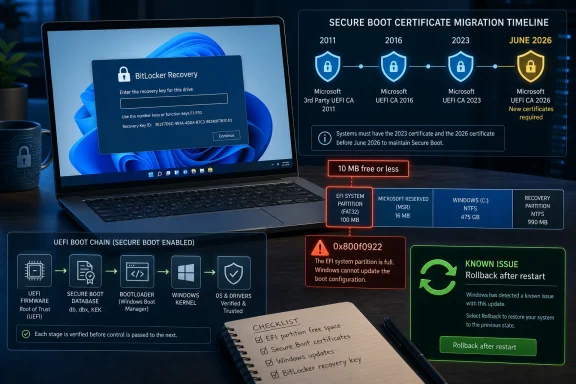
The new known issue is specific enough to be useful and broad enough to be annoying. Microsoft says KB5089549 can fail to complete on devices with limited free space on the EFI System Partition, especially when that partition has 10 MB or less available. The visible symptom is familiar: Windows Update appears to install, the machine restarts, progress reaches around 35 or 36 percent, and then Windows announces that something did not go as planned and starts undoing changes.The error code is 0x800f0922. That code has appeared in different Windows servicing contexts over the years, which is one reason users often find stale or mismatched advice when they search for it. In this case, the relevant detail is not a broken VPN connection or a generic servicing stack complaint; it is the amount of usable room on the EFI System Partition, the small FAT-formatted system partition that contains boot components used by UEFI firmware.
This is where the update story becomes less about Windows Update as an app and more about Windows as an accumulated artifact of OEM decisions, firmware behavior, dual-boot experiments, recovery tools, and years of servicing assumptions. Microsoft can ship a cumulative update. It cannot magically guarantee that every vendor-built ESP has enough clean space, that old boot files were removed sensibly, or that third-party boot components are parked where Windows expects them not to be.
The CBS logs Microsoft points administrators toward reportedly show the shape of the failure: insufficient free space, boot-file servicing failures, and space consumed by third-party or OEM files outside Microsoft boot directories. That is a precise technical diagnosis, but it is a poor consumer experience. The person staring at “undoing changes” is not thinking about ESP padding percentages; they are thinking Windows has once again failed to explain itself in plain English.
Restarting Is Not a Meme When Rollback Is the Fix
The Forbes headline-ready version of Microsoft’s advice is that users should restart Windows. That sounds absurdly familiar because restarting Windows is the punchline to decades of PC troubleshooting. In this case, however, the restart advice is tied to a real Windows servicing mechanism: Known Issue Rollback.Known Issue Rollback, or KIR, is Microsoft’s way of disabling a problematic non-security change without requiring every affected device to wait for a full replacement update. For consumer devices and unmanaged business PCs, the mitigation can be delivered automatically. A restart helps apply it more quickly because some policy and servicing changes need a reboot boundary before Windows behaves differently.
That distinction matters. Microsoft is not saying a reboot conjures disk space onto the EFI partition. It is saying the particular change that triggers the installation failure can be rolled back for affected systems, and the restart can accelerate that mitigation. For managed enterprise devices, administrators may need to deploy a special Group Policy package matching Windows 11 24H2 and 25H2 to apply the rollback in their environment.
There is also a registry workaround, but Microsoft’s own warning should be taken seriously. The workaround involves changing an ESP-related registry value so the update can install despite the space check. That may be reasonable for an administrator with a tested recovery path, current backups, and a fleet-management reason to move quickly. It is not the sort of thing most home users should copy from a forum post at midnight.
The better consumer instruction is conservative: restart, let Windows Update try again after the mitigation has had time to arrive, and do not start editing the registry unless you understand exactly what recovery options you have. That may be less satisfying than a one-command fix, but the boot chain is not the place to cosplay as a deployment engineer.
Secure Boot’s 2011 Hangover Has Finally Reached the Calendar
The real reason this update matters is not the install failure by itself. It is the calendar. Microsoft has been preparing Windows devices for the replacement of Secure Boot certificates originally issued in 2011, with expirations beginning in June 2026 for certificates used across much of the Windows ecosystem.Secure Boot is supposed to make sure a device starts only trusted boot software. That trust is anchored in certificates. When those certificates age out, devices need updated trust material so they can keep booting securely as Microsoft retires old signing chains and moves to newer ones.
For years, that problem was easy to ignore because the expiration date lived far enough in the future to feel theoretical. It is no longer theoretical. Microsoft’s May update expands the set of devices eligible to automatically receive new Secure Boot certificates, using what it describes as high-confidence targeting data and a controlled rollout.
That language is doing a lot of work. Microsoft is trying to avoid bricking or disrupting machines whose firmware, boot configuration, or BitLocker policy may react badly to boot trust changes. Rather than indiscriminately forcing the certificate transition, it is using telemetry and staged eligibility to decide which systems look safe enough to receive the new material automatically.
That is sensible engineering. It is also an admission that the Windows hardware estate is messy. Secure Boot is standardized in principle, but its lived reality includes different firmware implementations, OEM partition layouts, years of imaging practices, and local security policies that may have seemed reasonable until the boot manager changed underneath them.
BitLocker Is Doing Its Job, Which Is Why Users Blame It
BitLocker often gets cast as the villain in these incidents because it is the screen users see. The drive is locked, the recovery key is demanded, and the owner of the PC feels accused by their own machine. But BitLocker is not malfunctioning simply because it asks for recovery when boot measurements change.The whole point of binding BitLocker to TPM measurements is to detect that the early boot environment is not the same as it was. If firmware settings, boot files, Secure Boot state, or validation profiles change in a way BitLocker considers meaningful, recovery is the designed safety behavior. It is inconvenient precisely because it is supposed to protect the encrypted volume from silent tampering.
The problem is that Windows servicing now has to update components that BitLocker may treat as part of the trust boundary. A well-behaved update should coordinate those changes so BitLocker does not panic. April’s issue showed how fragile that coordination can be when certain TPM validation settings, PCR7 states, and Secure Boot certificate transitions line up badly.
For enterprise IT, the lesson is not “turn off BitLocker.” It is that BitLocker recovery preparedness has to be treated as a patch-management prerequisite, not an afterthought. Recovery keys must be escrowed, tested, and accessible before boot-chain updates are pushed broadly. If the first time an organization validates key recovery is after a Patch Tuesday reboot, the update did not create the governance problem; it revealed it.
For home users, the practical advice is simpler but still urgent. If Device Encryption or BitLocker is enabled, know where the recovery key lives before installing major updates that touch Secure Boot or boot files. On many consumer systems, that means the Microsoft account associated with the device. On work or school systems, it may mean Entra ID, Active Directory, or an IT help desk.
The Manual Installer Story Is Messier Than It Should Be
KB5089549 also continues a recent Microsoft pattern that deserves more scrutiny: standalone update packages can include multiple MSU files that must be handled in a particular order. Windows Update does that orchestration automatically. Administrators using the Microsoft Update Catalog or offline servicing workflows need to pay attention.For x64 and Arm64 systems, Microsoft’s documentation describes package ordering that includes an earlier checkpoint cumulative update before the May package. The company recommends either placing all required MSU files in one folder and letting DISM resolve the right installation sequence, or installing each file individually in the documented order. That is manageable for experienced admins, but it is another trapdoor for anyone who still thinks downloading a single update file is the simple path.
This is part of the larger servicing evolution in Windows 11. Microsoft has been trying to make cumulative updates smaller and more efficient, and checkpoint cumulative updates are one piece of that strategy. The tradeoff is that the servicing model becomes more abstract. The operating system knows how to compose the right chain; humans manually handling packages have to learn the choreography.
There is nothing inherently wrong with that. Enterprise software is complicated, and Windows has to serve online consumer PCs, WSUS-managed fleets, offline images, virtual desktops, kiosks, lab machines, and OEM recovery environments. But Microsoft should not underestimate the support burden created when a security update is simultaneously a boot-trust fix, a Secure Boot certificate staging vehicle, a cumulative security release, and a multi-package manual deployment object.
The more roles a single KB plays, the more difficult it becomes to explain what went wrong. A user says “the update failed.” An admin hears “the EFI partition is too small.” A security engineer hears “the Secure Boot certificate transition is blocked.” Microsoft hears “Known Issue Rollback can mitigate the offending change.” All of them may be right, and that is precisely why this class of update feels so brittle.
The Enterprise Risk Is Not the Error Code, It Is the Unknown Inventory
For managed environments, KB5089549 should trigger a familiar but uncomfortable question: do you actually know the boot state of your fleet? Not the Windows version. Not the compliance percentage in a dashboard. The boot state.That means knowing which machines have BitLocker enabled, where keys are escrowed, whether Secure Boot is on, whether PCR7 binding is healthy, how large the EFI System Partition is, how much free space remains there, whether OEM or third-party files are consuming that space, and which devices have already received newer Secure Boot certificates. Those details are rarely the first line of a patch readiness report. This month, they are the report.
Microsoft’s staged rollout approach is designed to reduce the blast radius, but it cannot replace local inventory. A device that looks ordinary in asset management can hide a cramped ESP or a strange firmware history. A laptop reimaged three years ago may carry partition decisions from an older deployment standard. A dual-boot or recovery-agent configuration may have left files where Windows servicing now has to negotiate around them.
This is where administrators should resist both extremes. Panic-pausing all security updates until the certificate transition is over would be reckless, especially when KB5089549 includes security fixes and repairs a BitLocker recovery issue. Blindly forcing the update across every device without preflight checks is not much better.
The sane path is rings, telemetry, and recovery readiness. Pilot on representative hardware, watch for 0x800f0922 and BitLocker recovery prompts, validate ESP space on models known to be tight, and ensure help desks have a script for users who see recovery screens. The organizations that fare best will not be the ones with the cleverest registry workaround; they will be the ones that already know where the bodies are buried.
Windows Update Is Better Than It Was, But the Trust Chain Is Less Forgiving
It is tempting to read this as another indictment of Windows Update. That is only partly fair. Microsoft’s update stack is much better at rollback, staged deployment, health holds, and automated mitigation than it was in the Windows 7 and early Windows 10 eras. Known Issue Rollback is genuinely useful, and the ability to defuse a bad change without forcing every affected system through a full new cumulative update is a real improvement.But boot-chain updates are not like ordinary quality fixes. If File Explorer crashes, the user can usually relaunch it. If an app compatibility change breaks printing, the machine still boots. If the update path through Secure Boot, BitLocker, UEFI firmware, and the EFI partition misfires, the failure happens before most of Windows’ recovery-friendly abstractions can help.
That is why the “restart Windows” advice reads differently here. It is not the old IT incantation. It is the endpoint of a modern servicing pipeline that can detect a known problem, deliver a rollback policy, and require a reboot to switch behavior. The mechanism is sophisticated; the user-facing message is still caveman simple.
Microsoft’s challenge is to close that gap. Windows cannot expose every ESP detail to consumers without terrifying them, but it can do better than a generic undoing-changes message. If the system knows the EFI partition is too full, Windows Update should say so in language normal people can act on. If a device is at risk of BitLocker recovery because of boot trust changes, Windows should surface recovery-key readiness before the reboot, not after the lockout.
The May Patch Turns Boot Hygiene Into Patch Hygiene
The practical reading of KB5089549 is not that users should avoid it. The update fixes a real BitLocker recovery problem, carries security fixes, and advances Microsoft’s Secure Boot certificate migration before the June 2026 deadline begins to bite. The practical reading is that Windows maintenance has entered a phase where boot hygiene is patch hygiene.- Users affected by the 0x800f0922 failure should restart and allow Microsoft’s Known Issue Rollback mitigation to apply before attempting risky manual fixes.
- Home users should confirm where their BitLocker or Device Encryption recovery key is stored before installing updates that touch boot files or Secure Boot state.
- Administrators should inventory EFI System Partition free space, Secure Boot status, PCR7 binding health, and BitLocker recovery-key escrow before broad deployment.
- Manual installers should follow Microsoft’s MSU ordering guidance or use DISM with all required packages in one folder rather than assuming one downloaded file tells the whole story.
- The Secure Boot certificate transition is no longer a distant platform-maintenance project; it is now part of live Windows update risk management.
The Windows ecosystem is about to spend the next stretch proving whether its security foundations can be renewed without making ordinary users feel locked out of their own hardware. Microsoft’s layered mitigations, staged certificate rollout, and KIR machinery are the right tools for that job, but tools are not outcomes. The next few updates will show whether Windows can make the transition from 2011-era Secure Boot trust to the next chain of confidence without turning every reboot into a small act of faith.
Source: Forbes ‘Update Fails To Install’—Microsoft Says Restart Windows
