

Microsoft began rolling out KB5089573 on May 26, 2026, as an optional Windows 11 24H2 and 25H2 preview update that introduces performance work tied to Low Latency Profile, a scheduler behavior meant to make launches, flyouts, Search, Start, and Action Center feel faster. The headline promise is simple: Windows will briefly let the CPU sprint when a user action is most likely to be noticed. The harder truth is more interesting: Microsoft is not making Windows 11 lighter so much as teaching it to hide latency more aggressively. That may be the right fix for today’s hardware, but it also says plenty about how heavy the Windows shell has become.
For years, Windows 11 criticism has had a strangely tactile quality. Users complain less about benchmark scores than about the half-second hesitations: Start taking a beat to open, context menus arriving in layers, Search feeling as if it has to negotiate with half the operating system before showing a box.
KB5089573 is Microsoft’s first broad sign that it is treating those complaints as product defects rather than forum grumbling. In the official language, the update “accelerates app launch and core shell experiences” including Start, Search, and Action Center. In the reporting around the feature, the mechanism has a name: Low Latency Profile, or LLP.
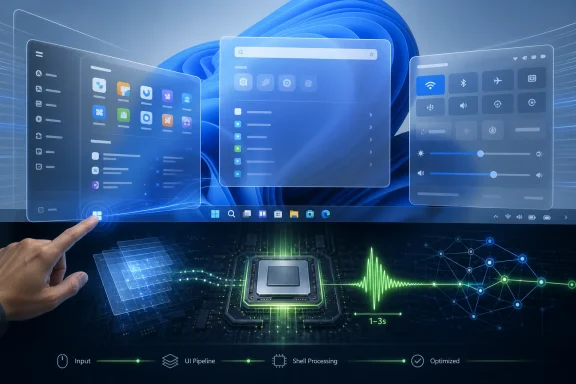
The premise is not exotic. When Windows detects a foreground interaction that should feel immediate, it can push the processor toward higher clocks for a brief burst, reportedly one to three seconds, then allow it to settle back. Instead of waiting for normal power-management ramp behavior to catch up, Windows borrows responsiveness at the moment the user is watching.
That matters because modern PC performance is not just about raw throughput. A laptop that can compile code, transcode video, or run a game well can still feel oddly sluggish if the shell misses the first few hundred milliseconds after a click. Microsoft is aiming at that perception gap.
Windows 11’s latency problem lives in the visible seams of the operating system. Start, Search, Quick Settings, Action Center, context menus, File Explorer surfaces, and bundled apps all sit at the intersection of UI frameworks, background services, indexing, cloud hooks, policy checks, and visual effects. A delay there feels worse than a delay in a background task because it happens immediately after the user asks for something.
LLP is Microsoft’s way of saying that the first moments after an interaction deserve special treatment. This is not the same thing as permanently running the CPU hotter. It is a short scheduling and frequency-management nudge, designed to spend a little more power at precisely the moment a user is most likely to judge the system.
That distinction explains why Microsoft has pushed back against the idea that this is a “cheat.” Smartphones have long used bursty responsiveness tricks. macOS and Linux also make decisions that favor foreground interactivity. The controversy is not that Windows is doing something unprecedented; it is that Windows 11 has taken long enough to need such a visible correction.
K2 appears to be less a product name than a program of repairs. KB5089573 includes the performance work, but it also brings smaller changes around Windows Hello latency, NPU visibility in Task Manager, Search behavior, File Explorer reliability, USB device handling, sign-in screens, and other pieces of plumbing. That is the real story: Microsoft is trying to improve the parts of Windows that users touch constantly and administrators hear about when they break.
The company has been here before. Windows releases often go through an arc in which the first version makes architectural or design bets, then later updates claw back performance and reliability. Windows 11’s problem is that it arrived in an era when users compare every interface pause not just with Windows 10, but with phones, tablets, Chromebooks, and Apple Silicon Macs.
That comparison is not always fair, but it is unavoidable. A Windows PC may be vastly more flexible than a locked-down device, yet flexibility does not excuse a slow Start menu. K2 is Microsoft acknowledging that “powerful” and “responsive” are not synonyms.
But installing the update does not guarantee the performance feature lights up immediately. Microsoft is using a controlled rollout, the same staggered feature-delivery model that has become a defining part of modern Windows servicing. Two PCs can have the same cumulative update installed and still differ in which features are active.
That split reality is maddening for enthusiasts and useful for Microsoft. It lets the company watch telemetry, pause rollout if something misbehaves, and avoid flipping every switch across the entire Windows installed base at once. It also makes Windows feel less like a product with versions and more like a service with hidden eligibility rules.
For IT pros, that is both familiar and uncomfortable. Controlled rollout reduces blast radius, but it complicates validation. A help desk cannot simply ask whether KB5089573 is installed and assume LLP is active. In the Windows-as-a-service era, the patch number is increasingly only part of the truth.
The practical steps are straightforward for an enthusiast: download ViveTool from its project page, extract it to a known folder such as
That does not mean the method is reckless for everyone. Windows enthusiasts have used ViveTool for years to test staged Windows features, and the command can usually be reversed. But it is not the same as clicking a supported Settings toggle. If this is your production workstation, a domain-joined laptop, or a machine with strict battery and thermal constraints, patience may be the more professional choice.
The absence of a visible LLP toggle is revealing. Microsoft apparently wants this to become an invisible part of Windows behavior, not a mode users manage. That may be sensible; most people should not need to understand CPU burst policy to open Start faster. But it also means power users will keep reaching for unofficial tools whenever the official rollout feels opaque.
Start is no longer just a launcher. Search is not just local search. Context menus have compatibility paths. Widgets, cloud suggestions, recommendations, account services, indexing, security checks, and UI composition all compete for attention. When any of those pieces hesitates, the whole experience feels heavier than the hardware deserves.
Low Latency Profile does not erase that complexity. It masks some of its most visible consequences. A faster ramp to peak frequency can make Windows feel more responsive, but it does not prove the underlying shell has been simplified.
That said, masking latency is not inherently bad engineering. Operating systems are full of carefully managed illusions: prefetching, caching, speculative loading, animation timing, thread priority boosts, and power-state heuristics. The best platforms feel instant because they spend resources before the user notices they are spending them. LLP belongs to that tradition.
The question is whether Microsoft uses this as a bridge or a crutch. If K2 continues with deeper shell cleanup, reduced background contention, and better reliability, LLP will look like one useful layer in a larger repair effort. If not, it will look like a turbo button bolted onto bloat.
That is plausible, but it is workload-dependent. A plugged-in desktop with a capable cooler will experience LLP differently from a thin fanless tablet, a corporate ultraportable on battery saver, or a handheld gaming PC already juggling thermal limits. The same policy that makes Start feel instant on one machine could be barely noticeable on another.
The interesting detail is that Microsoft is also making changes around sensors, HID input, USB reliability, and standby behavior in the same update family. That suggests the company knows responsiveness and power hygiene cannot be separated. A system that wakes quickly but drains in a bag is not polished; it is merely fast in the wrong direction.
Administrators should watch for measurable side effects rather than assume doom or salvation. Battery reports, thermal behavior, fan curves, and user-perceived responsiveness all matter here. The feature’s success will depend less on one synthetic benchmark than on whether employees stop complaining that new Windows laptops feel slower than their specs.
A fleet manager wants predictability. If half the pilot group receives the active behavior and half merely receives the code, comparison becomes messy. If a user hears that Windows 11 has become faster but their machine does not feel different after installing the same KB, the distinction between “installed” and “enabled” becomes an internal communications problem.
There is also the supportability angle. ViveTool may be fine in a lab, but it has no place as a standard enterprise enablement method unless an organization has knowingly accepted the risk. Production rollout should wait for Microsoft’s normal channels, policy documentation, and telemetry-backed confidence.
Still, enterprises should not ignore the update. User-perceived performance is a real business issue. Slow shell interactions create frustration, reduce trust in IT-managed devices, and become part of the argument against OS migrations. If Microsoft can make Windows 11 feel meaningfully snappier without destabilizing power behavior, that is not cosmetic; it is operational.
This is how Windows is likely to evolve from here. The old model of waiting for a named version to fix a major pain point is giving way to a system where features, reliability changes, and UI behavior arrive in waves. That is more agile, but it also makes the operating system harder to narrate. Users want to know whether they have the fast version of Windows; Microsoft increasingly answers with “it depends.”
The upside is that meaningful fixes can reach users sooner. If LLP works, Microsoft does not need to hold it for a grand 25H2 launch moment. It can ship the bits, stage the enablement, and broaden the audience as confidence grows.
The downside is that Windows becomes harder to audit casually. Build numbers, KBs, rollout flags, Insider channels, enablement packages, and hidden feature IDs all blur together. For enthusiasts, that is a hobby. For administrators, it is friction.
That is the strange power of latency work. Users rarely praise a system for opening a menu correctly; they only notice when it fails. The best outcome for LLP is that people stop thinking about it at all. Start opens, Search appears, apps launch, and the PC feels less like it is waking up after every click.
There will be edge cases. Some users will report no change because the feature is not enabled yet, their hardware was already responsive, or their bottleneck lies elsewhere. Others may notice improvements in shell surfaces before app launches, depending on which portions of the rollout are active. Still others will focus on the symbolism: Windows 11 needed a CPU kick to do what older Windows versions seemed to do effortlessly.
That symbolism is not fair in every technical detail, but it is fair as a product critique. Microsoft chose to make Windows 11 richer, cloudier, and more visually layered. Now it has to make that choice feel free.
 Microsoft Chooses the Stopwatch Over the Scale
For years, Windows 11 criticism has had a strangely tactile quality. Users complain less about benchmark scores than about the half-second hesitations: Start taking a beat to open, context menus arriving in layers, Search feeling as if it has to negotiate with half the operating system before showing a box.KB5089573 is Microsoft’s first broad sign that it is treating those complaints as product defects rather than forum grumbling. In the official language, the update “accelerates app launch and core shell experiences” including Start, Search, and Action Center. In the reporting around the feature, the mechanism has a name: Low Latency Profile, or LLP.
The premise is not exotic. When Windows detects a foreground interaction that should feel immediate, it can push the processor toward higher clocks for a brief burst, reportedly one to three seconds, then allow it to settle back. Instead of waiting for normal power-management ramp behavior to catch up, Windows borrows responsiveness at the moment the user is watching.
That matters because modern PC performance is not just about raw throughput. A laptop that can compile code, transcode video, or run a game well can still feel oddly sluggish if the shell misses the first few hundred milliseconds after a click. Microsoft is aiming at that perception gap.
Low Latency Profile Is a Small Trick With a Big Psychological Target
The reported gains are eye-catching: up to 70 percent faster flyouts and up to 40 percent faster app launches in some scenarios. Those numbers should be read carefully, because “up to” figures usually describe best cases rather than the machine under your desk. Still, the target is real.Windows 11’s latency problem lives in the visible seams of the operating system. Start, Search, Quick Settings, Action Center, context menus, File Explorer surfaces, and bundled apps all sit at the intersection of UI frameworks, background services, indexing, cloud hooks, policy checks, and visual effects. A delay there feels worse than a delay in a background task because it happens immediately after the user asks for something.
LLP is Microsoft’s way of saying that the first moments after an interaction deserve special treatment. This is not the same thing as permanently running the CPU hotter. It is a short scheduling and frequency-management nudge, designed to spend a little more power at precisely the moment a user is most likely to judge the system.
That distinction explains why Microsoft has pushed back against the idea that this is a “cheat.” Smartphones have long used bursty responsiveness tricks. macOS and Linux also make decisions that favor foreground interactivity. The controversy is not that Windows is doing something unprecedented; it is that Windows 11 has taken long enough to need such a visible correction.
K2 Is Microsoft’s Admission That Polish Became a Platform Issue
The Low Latency Profile work is being associated with Windows K2, a broader internal effort to address Windows 11’s reputation for rough edges, sluggishness, and reliability misses. That framing matters. Microsoft is not shipping a single magic patch; it is trying to create the impression of an operating system being tuned back into shape.K2 appears to be less a product name than a program of repairs. KB5089573 includes the performance work, but it also brings smaller changes around Windows Hello latency, NPU visibility in Task Manager, Search behavior, File Explorer reliability, USB device handling, sign-in screens, and other pieces of plumbing. That is the real story: Microsoft is trying to improve the parts of Windows that users touch constantly and administrators hear about when they break.
The company has been here before. Windows releases often go through an arc in which the first version makes architectural or design bets, then later updates claw back performance and reliability. Windows 11’s problem is that it arrived in an era when users compare every interface pause not just with Windows 10, but with phones, tablets, Chromebooks, and Apple Silicon Macs.
That comparison is not always fair, but it is unavoidable. A Windows PC may be vastly more flexible than a locked-down device, yet flexibility does not excuse a slow Start menu. K2 is Microsoft acknowledging that “powerful” and “responsive” are not synonyms.
The Optional Update Is Also a Controlled Experiment
KB5089573 is available through Windows Update as an optional preview release, which means it is not yet the default Patch Tuesday experience for everyone. Users looking for it can check Settings, Windows Update, Advanced options, and Optional updates. Once installed, Windows 11 24H2 should move to build 26100.8524, while 25H2 should move to build 26200.8524.But installing the update does not guarantee the performance feature lights up immediately. Microsoft is using a controlled rollout, the same staggered feature-delivery model that has become a defining part of modern Windows servicing. Two PCs can have the same cumulative update installed and still differ in which features are active.
That split reality is maddening for enthusiasts and useful for Microsoft. It lets the company watch telemetry, pause rollout if something misbehaves, and avoid flipping every switch across the entire Windows installed base at once. It also makes Windows feel less like a product with versions and more like a service with hidden eligibility rules.
For IT pros, that is both familiar and uncomfortable. Controlled rollout reduces blast radius, but it complicates validation. A help desk cannot simply ask whether KB5089573 is installed and assume LLP is active. In the Windows-as-a-service era, the patch number is increasingly only part of the truth.
ViveTool Turns the Rollout Into an Enthusiast Decision
As usual, the community has found the switch before Microsoft has exposed a friendly one. Reports indicate that users who have installed KB5089573 can force-enable the Low Latency Profile feature with ViveTool using feature ID 58989092, followed by a restart. That is not an official consumer path, and it should be treated accordingly.The practical steps are straightforward for an enthusiast: download ViveTool from its project page, extract it to a known folder such as
C:\ViveTool, open an elevated Command Prompt, change to that directory, run the enable command, and reboot. The more important step is understanding the bargain. You are opting into a hidden rollout state Microsoft may still be measuring, adjusting, or withholding from some systems for a reason.That does not mean the method is reckless for everyone. Windows enthusiasts have used ViveTool for years to test staged Windows features, and the command can usually be reversed. But it is not the same as clicking a supported Settings toggle. If this is your production workstation, a domain-joined laptop, or a machine with strict battery and thermal constraints, patience may be the more professional choice.
The absence of a visible LLP toggle is revealing. Microsoft apparently wants this to become an invisible part of Windows behavior, not a mode users manage. That may be sensible; most people should not need to understand CPU burst policy to open Start faster. But it also means power users will keep reaching for unofficial tools whenever the official rollout feels opaque.
Faster Menus Do Not Make Windows Lean
The obvious critique is that Microsoft should not need to boost CPU clocks to make a menu open quickly. That complaint has a point. Windows 11’s shell is more visually modern than its predecessors, but it has often felt as if modernity arrived with extra layers, not less work.Start is no longer just a launcher. Search is not just local search. Context menus have compatibility paths. Widgets, cloud suggestions, recommendations, account services, indexing, security checks, and UI composition all compete for attention. When any of those pieces hesitates, the whole experience feels heavier than the hardware deserves.
Low Latency Profile does not erase that complexity. It masks some of its most visible consequences. A faster ramp to peak frequency can make Windows feel more responsive, but it does not prove the underlying shell has been simplified.
That said, masking latency is not inherently bad engineering. Operating systems are full of carefully managed illusions: prefetching, caching, speculative loading, animation timing, thread priority boosts, and power-state heuristics. The best platforms feel instant because they spend resources before the user notices they are spending them. LLP belongs to that tradition.
The question is whether Microsoft uses this as a bridge or a crutch. If K2 continues with deeper shell cleanup, reduced background contention, and better reliability, LLP will look like one useful layer in a larger repair effort. If not, it will look like a turbo button bolted onto bloat.
Battery Life and Thermals Are the Tests Microsoft Cannot Hand-Wave
A short CPU burst is not the same as sustained high-power operation, but laptop users are right to ask what the trade-off is. Every boost costs something: heat, battery, fan noise, or power budget that might otherwise be used elsewhere. The promise is that finishing the task faster can return the processor to lower power sooner, making the net cost small or even favorable in some cases.That is plausible, but it is workload-dependent. A plugged-in desktop with a capable cooler will experience LLP differently from a thin fanless tablet, a corporate ultraportable on battery saver, or a handheld gaming PC already juggling thermal limits. The same policy that makes Start feel instant on one machine could be barely noticeable on another.
The interesting detail is that Microsoft is also making changes around sensors, HID input, USB reliability, and standby behavior in the same update family. That suggests the company knows responsiveness and power hygiene cannot be separated. A system that wakes quickly but drains in a bag is not polished; it is merely fast in the wrong direction.
Administrators should watch for measurable side effects rather than assume doom or salvation. Battery reports, thermal behavior, fan curves, and user-perceived responsiveness all matter here. The feature’s success will depend less on one synthetic benchmark than on whether employees stop complaining that new Windows laptops feel slower than their specs.
Enterprise IT Will Care Less About the Trick Than the Rollout Model
For managed environments, the Low Latency Profile itself may be less concerning than the delivery machinery around it. Optional preview updates are not where most enterprises want to discover behavior changes. Controlled Feature Rollout adds another variable, especially when a feature affects perceived performance and user support tickets.A fleet manager wants predictability. If half the pilot group receives the active behavior and half merely receives the code, comparison becomes messy. If a user hears that Windows 11 has become faster but their machine does not feel different after installing the same KB, the distinction between “installed” and “enabled” becomes an internal communications problem.
There is also the supportability angle. ViveTool may be fine in a lab, but it has no place as a standard enterprise enablement method unless an organization has knowingly accepted the risk. Production rollout should wait for Microsoft’s normal channels, policy documentation, and telemetry-backed confidence.
Still, enterprises should not ignore the update. User-perceived performance is a real business issue. Slow shell interactions create frustration, reduce trust in IT-managed devices, and become part of the argument against OS migrations. If Microsoft can make Windows 11 feel meaningfully snappier without destabilizing power behavior, that is not cosmetic; it is operational.
Windows 11 25H2 Makes This More Than a Patch Story
The timing matters because Windows 11 25H2 is now part of the rollout conversation alongside 24H2. Microsoft appears to be aligning performance work across both versions rather than treating it as a far-off next-generation promise. That gives K2 a practical shape: improvements arriving through monthly servicing, not only through annual marketing.This is how Windows is likely to evolve from here. The old model of waiting for a named version to fix a major pain point is giving way to a system where features, reliability changes, and UI behavior arrive in waves. That is more agile, but it also makes the operating system harder to narrate. Users want to know whether they have the fast version of Windows; Microsoft increasingly answers with “it depends.”
The upside is that meaningful fixes can reach users sooner. If LLP works, Microsoft does not need to hold it for a grand 25H2 launch moment. It can ship the bits, stage the enablement, and broaden the audience as confidence grows.
The downside is that Windows becomes harder to audit casually. Build numbers, KBs, rollout flags, Insider channels, enablement packages, and hidden feature IDs all blur together. For enthusiasts, that is a hobby. For administrators, it is friction.
The Numbers Are Promising, but the Feeling Will Decide
The reported 70 percent and 40 percent figures are useful because they show Microsoft is aiming at human-scale delays, not obscure benchmark wins. A 70 percent improvement to a flyout that was already fast may be invisible. A 70 percent improvement to one that routinely felt sticky could change how the entire OS is perceived.That is the strange power of latency work. Users rarely praise a system for opening a menu correctly; they only notice when it fails. The best outcome for LLP is that people stop thinking about it at all. Start opens, Search appears, apps launch, and the PC feels less like it is waking up after every click.
There will be edge cases. Some users will report no change because the feature is not enabled yet, their hardware was already responsive, or their bottleneck lies elsewhere. Others may notice improvements in shell surfaces before app launches, depending on which portions of the rollout are active. Still others will focus on the symbolism: Windows 11 needed a CPU kick to do what older Windows versions seemed to do effortlessly.
That symbolism is not fair in every technical detail, but it is fair as a product critique. Microsoft chose to make Windows 11 richer, cloudier, and more visually layered. Now it has to make that choice feel free.
The KB5089573 Lesson Is That Responsiveness Is a Feature
The immediate advice is simple, but it comes with the usual Windows caveats.- KB5089573 is an optional preview update for Windows 11 24H2 and 25H2, not a mandatory security update for every machine today.
- The update contains performance work associated with Low Latency Profile, but Microsoft’s controlled rollout means the feature may not activate immediately on every eligible PC.
- Enthusiasts can reportedly force-enable the relevant feature with ViveTool and feature ID 58989092 after installing the update, but that remains an unofficial path.
- The most visible improvements should appear in app launches and shell surfaces such as Start, Search, Action Center, flyouts, and context menus.
- Businesses should test the update in pilot rings and watch battery, thermals, and support feedback before treating the feature as a fleet-wide cure.
- The larger K2 effort matters more than any single CPU burst, because Windows 11 needs sustained polish rather than one dramatic performance headline.
References
- Primary source: TechSpot
Published: Thu, 28 May 2026 11:15:00 GMT
- Related coverage: windowscentral.com
Windows 11's latest OS update is packing serious performance gains
Windows 11 update KB5089573 is now generally available as Microsoft's non-security preview update for May, and is packing genuinely notable performance improvements. www.windowscentral.com
- Related coverage: windowslatest.com

Microsoft's Windows 11 CPU boost is rolling out, and here's how to enable it right now
Windows 11’s hidden Low Latency Profile boosts CPU responsiveness for smoother UI and faster app launches. Here’s how to enable it now. www.windowslatest.com
- Related coverage: games.gg

Windows 11 Low Latency Profile: Up to 70% Faster Load Times
Microsoft's rumored Windows 11 Low Latency Profile promises up to 70% faster interface loads and 40% quicker app launches by briefly maxing out your CPU.games.gg
- Related coverage: notebookcheck.net

Windows 11 update KB5089573: Shared audio & partition fix
Microsoft's KB5089573 preview adds Shared Audio and NPU tracking to Windows 11, while flagging an EFI partition install failure on older OEM hardware. www.notebookcheck.net
- Related coverage: technobezz.com
Windows 11 KB5089573 update speeds up system flyouts by 70 percent and app launches by 40 percent
Windows 11's KB5089573 update boosts system flyouts by 70% and app launches by 40% under a new performance initiative. www.technobezz.com
- Related coverage: winbuzzer.com
- Related coverage: digitbin.com

Windows 11 Low Latency Profile: Faster App Launches in June 2026
Windows 11 Low Latency Profile boosts CPU to max frequency for 1 to 3 seconds when you launch apps or open the Start menu. It rolls out in June 2026. www.digitbin.com
- Related coverage: techgear-guide.com
Windows 11に「Low Latency Profile」——アプリ起動が最大40%、スタートメニューが最大70%高速化か
MicrosoftがWindows 11向けに開発中の「Low Latency Profile」は、CPUクロックを1〜3秒間最大化することでEdge・Outlookの起動を最大40%、スタートメニュー等のUIを最大70%高速化する可能性があると報じられています。 techgear-guide.com
- Related coverage: computerbase.de
Optionales Mai-Update: Windows 11 lässt Apps mit CPU-Boost schneller starten
Mit dem optionalen Mai-Update erhält Windows 11 Neuerungen wie den CPU-Boost für schnellere App-Starts sowie Multi-Kamera-Unterstützung.www.computerbase.de
- Related coverage: xenospectrum.com
Windows 11の最新アップデートKB5089573で最大70%高速化されるCPUブースト機能が導入 | XenoSpectrum
MicrosoftはWindows 11のプレビューアップデート(KB5089573)にて、UI操作時にCPUクロックを瞬間的に最大化する新機能「Low Latency Profile」を導入した。「Race to Sleep」の設計思想のもと、OSの体感速度を劇的に向上させるこの技術のメカニズムから、一部ゲーム環境への影響、そしてネイティブUI化に向けた今後の展望までを詳しく解説。 xenospectrum.com
- Related coverage: techradar.com
- Related coverage: tomshardware.com
Microsoft staunchly defends its new 'Low Latency Profile' for Windows 11 after community backlash — says every other OS already boosts CPU speeds for quicker load times
The quest to fix Windows 11 is a bumpy one.www.tomshardware.com
- Related coverage: pcgamer.com
'Let Windows cook': Microsoft defends new Low Latency mode and asks you 'see it yourself'
The new mode is reportedly snappier.www.pcgamer.com
- Related coverage: cincodias.elpais.com

