

Microsoft’s May 26, 2026 preview update for Windows 11 versions 25H2 and 24H2, KB5089573, advances systems to OS builds 26200.8524 and 26100.8524 while documenting a separate May security update failure tied to cramped EFI System Partitions. The headline is not just another cumulative preview; it is a reminder that Windows servicing still depends on small, easily ignored boot partitions created years before today’s update model. Microsoft can patch around the problem with rollback policy and registry switches, but the episode exposes a messier truth for IT: firmware-era assumptions are now part of Windows update reliability.
KB5089573 is, formally, a non-security preview update. It belongs to the familiar late-month Windows cadence: optional quality fixes, feature refinements, and staging for changes that may later reach the broader Patch Tuesday audience. For Windows 11 25H2 and 24H2, Microsoft lists the release as applying to all editions, with OS builds moving to 26200.8524 and 26100.8524 respectively.
The interesting part is that the known issue attached to this preview update points backward to KB5089549, the May 2026 security update. Microsoft says some devices can fail to complete installation with error code 0x800f0922 when the EFI System Partition, or ESP, has very little free space. The danger zone is especially clear: devices with 10 MB or less available on the ESP are the ones Microsoft calls out.
That makes this less a conventional bug report than a servicing postmortem in public. The update may get through its early phases, only to collapse during restart at around 35 to 36 percent, roll back, and present the user with the grimly familiar “Something didn’t go as planned. Undoing changes.” For anyone who has spent a morning staring at a failed cumulative update, those words are less an error message than a ritual.
The twist is where the failure lives. Users tend to think of Windows Update as consuming space on C:, fighting with WinSxS, temporary files, drivers, and recovery partitions. Here the constraint is the ESP, a small FAT-formatted boot partition that ordinary users rarely see and many administrators do not inventory until something breaks.
That invisibility is precisely why this failure matters. Microsoft’s log examples point to insufficient ESP space, failed servicing of boot files, and space consumed by third-party or OEM files outside Microsoft boot directories. In plain English: Windows needs to place or update boot-related files, but the boot partition has been packed too tightly, sometimes by files Microsoft did not put there.
The result is a failure mode that feels disproportionate. A cumulative update can download, stage, and appear to install normally. Then, during the reboot phase, Windows discovers that the small boot partition cannot absorb what the servicing process requires, and the whole operation unwinds.
This is not a new class of pain for Windows administrators. ESP sizing has been a quiet land mine for years, especially on older devices, cloned images, vendor-customized deployments, and systems that have been through multiple feature upgrades. But KB5089573’s documentation is unusually direct about the trigger: 10 MB or less available space can be enough to derail the update.
The issue also illustrates how Windows servicing has sprawled beyond the files users can see. Updating Windows is no longer just about replacing binaries under the operating system directory. It can involve boot components, recovery behavior, Secure Boot state, servicing stack mechanics, and increasingly the choreography of staged updates across restart boundaries.
As emergency guidance, it is practical. As a product signal, it is awkward. Telling customers to modify a low-level servicing behavior in the registry is the kind of advice that belongs in the “yes, but only if you know why” category. Microsoft includes the standard warning about registry edits causing serious system problems, and in this case the warning is not boilerplate.
The registry workaround may be attractive for individual machines, lab systems, or urgent break/fix work. It is much less attractive as a fleet-wide first move. A cramped ESP is not merely an update obstacle; it is a symptom of a device whose boot partition may have been undersized, polluted by vendor files, or altered by years of imaging and upgrade history.
Administrators should resist the temptation to treat
That distinction matters because the ESP sits in the blast radius of boot reliability. A failed desktop app update is annoying. A damaged or overfilled boot partition is the sort of thing that turns a routine patch window into hands-on recovery.
KIR is one of Microsoft’s more important modern servicing mechanisms because it lets the company disable problematic non-security changes without requiring every affected user to install a new update immediately. For consumers and unmanaged machines, that mitigation can happen quietly. For enterprise-managed devices, administrators usually need a special Group Policy to apply the rollback.
That split is the real story for IT departments. Microsoft’s consumer-facing Windows increasingly assumes that the cloud can correct course after a bad change ships. Managed environments, by design, often block or mediate that cloud-assisted agility. The same controls that give enterprises predictability can also make them slower to receive mitigations unless administrators actively deploy them.
In this case, Microsoft provides a Group Policy package for Windows 11 25H2 and 24H2 associated with KB5089549. The policy temporarily disables the change that causes the issue, and affected devices must be restarted. That is a manageable process, but it is still a process: download, validate, import, scope, deploy, reboot, and confirm.
This is where Windows servicing becomes less about patches and more about governance. Organizations that treat monthly updates as a simple approve-and-forget exercise are increasingly out of step with the platform. Modern Windows servicing requires watching release health notes, understanding rollback channels, and knowing whether a given estate is consumer-like, cloud-managed, co-managed, WSUS-bound, or locked down behind change-control walls.
KIR is a safety net, but it is not a substitute for operational visibility. It can reverse a bad change, but it does not inventory your ESP free space, interpret CBS logs, or tell you which OEM images are carrying boot-partition clutter.
Microsoft’s documentation for this case gives administrators something more useful than the code alone: the phase of failure and the log signatures. The update fails around 35 to 36 percent during restart, rolls back, and may leave CBS.log entries mentioning insufficient free space,
That specificity changes the troubleshooting flow. If a Windows 11 24H2 or 25H2 device fails KB5089549 with 0x800f0922 after apparently progressing into the reboot stage, the ESP should move up the suspect list. The next step should not be another blind retry, a generic Windows Update troubleshooter run, or a ritual clearing of SoftwareDistribution before checking the boot partition.
The hard part is that inspecting the ESP is not as user-friendly as checking free space on C:. Administrators can mount the partition with disk tools or scripts, but doing so at scale requires care. The partition is intentionally hidden because casual modification is dangerous. Yet hidden does not mean irrelevant, and this issue makes the case for including ESP health in fleet readiness checks.
The broader lesson is that Windows error codes are rarely enough. The failure phase, rollback behavior, CBS log entries, and device history matter. A code without context is a symptom; a code with the right logs becomes a diagnosis.
Windows boot infrastructure is entering a more active maintenance period. Secure Boot certificate updates, boot file servicing, UEFI behavior, recovery partitions, and update reliability are not separate silos in practice. They all converge around whether a machine can start securely after servicing changes are applied.
Microsoft’s preview update also includes Secure Boot-related improvements, including additional targeting data to increase coverage of devices eligible to receive new Secure Boot certificates. The company says devices receive the new certificates only after demonstrating sufficient successful update signals, emphasizing a controlled and phased rollout.
That phrasing is classic modern Microsoft: cautious, telemetry-driven, and dependent on staged eligibility. It also means administrators should not assume every compatible device will receive boot-trust updates at the same time. The same fleet can contain machines at different states of readiness based on hardware, firmware, update history, and Microsoft’s rollout signals.
This makes the ESP issue more than a one-off annoyance. If a device cannot reliably service boot files because its ESP is too small or too full, it may be a poor candidate for the next wave of boot-chain maintenance. The June 2026 certificate horizon makes now a bad time to discover that old imaging decisions left no room in the partition that firmware depends on.
That is a lot of work packed into a single optional update. Some changes are user-facing, such as Shared Audio and Magnifier behavior. Others are administrator-adjacent, such as Task Manager’s improved view of NPU activity or Store error reporting when downloads fail because Windows Update group policies are enabled.
The NPU additions are particularly telling. Microsoft is still building the instrumentation layer around AI PCs, not merely shipping AI-branded features. If Task Manager can expose NPU usage and memory more clearly, administrators and power users get a better chance of understanding what those chips are doing outside marketing slides.
Yet the known issue will dominate attention because update reliability is the foundation beneath every feature. A better Search box or smoother Magnifier experience does not matter to the machine that rolls back at 36 percent. The Windows servicing bargain is simple: users tolerate the churn of monthly updates because they expect the system to emerge healthier on the other side.
This is the tension Microsoft keeps facing with Windows 11’s continuous innovation model. The operating system is no longer waiting for old-style service packs or even major feature releases to evolve. It is constantly receiving small behavioral changes, feature toggles, and subsystem updates. That keeps Windows competitive, but it also means the update pipeline must absorb more complexity more often.
That points to a sensible triage model. First, identify devices failing KB5089549 or subsequent servicing with 0x800f0922 at the reboot stage. Second, inspect CBS logs for the specific space and boot file servicing messages Microsoft describes. Third, check ESP capacity and free space on affected models, images, or hardware cohorts. Fourth, decide whether the registry workaround, KIR policy, ESP cleanup, or a more structural remediation is the right answer.
The temptation will be to deploy the KIR policy broadly and move on. In some environments, that may be the correct immediate mitigation, especially if patch compliance is slipping and the affected change is safe to defer. But KIR is deliberately temporary. Microsoft says a resolution is in progress and will be included in a future Windows update, which means the underlying servicing path will return in corrected form.
That future update may still require healthy boot partitions. If an ESP is functionally full, the administrator has not solved the device; they have deferred the confrontation. The right long-term question is whether the organization has a standard for ESP sizing and hygiene across Windows 11 hardware.
This is especially important for estates built from layered history: Windows 10-era images upgraded to Windows 11, devices migrated from BIOS to UEFI assumptions, vendor factory partitions preserved across redeployments, and machines that have collected recovery tools, encryption components, or boot managers over time. The boot partition remembers decisions the asset database often forgets.
But good documentation does not erase the user experience. A failed update that rolls back during reboot is still a high-friction event. It consumes time, may trigger help desk tickets, and can leave users distrustful of subsequent update prompts. In managed environments, it can distort compliance reporting and complicate maintenance windows.
The issue also reveals the uncomfortable asymmetry between Microsoft’s servicing machinery and the customer’s control plane. Microsoft can use telemetry to detect patterns, issue KIR mitigations, and adjust rollout behavior. Administrators, however, may need to discover old partition problems with scripts, logs, and hardware sampling after the failure has already appeared.
That asymmetry is not unique to Microsoft, but it is particularly visible in Windows because the ecosystem is so varied. A Windows 11 fleet can include premium Copilot+ PCs, five-year-old business laptops, OEM-customized desktops, virtual machines, and upgraded consumer devices. The same cumulative update has to traverse all of them.
The more Windows servicing touches firmware-adjacent components, the more those differences matter. Hardware uniformity is not merely a support convenience; it becomes a patch reliability factor.
KB5089573 is a useful example. Even if an organization does not deploy this preview broadly, its release notes matter because they surface a May security update problem and Microsoft’s mitigation path. The preview page becomes part of the operational picture for devices that may already be failing KB5089549.
For Windows enthusiasts, the lesson is slightly different. If your PC fails with 0x800f0922 and rolls back around the mid-30 percent mark, do not assume the update is simply “bad” in the generic sense. The ESP may be the bottleneck. That does not mean everyone should immediately mount and prune the boot partition, but it does mean the usual advice to free space on C: may miss the point.
For administrators, optional preview updates deserve at least review, even when deployment policy says no. The notes can contain exactly the kind of known-issue guidance that prevents a small patch problem from becoming a support wave.
This is one of the paradoxes of Windows servicing in 2026. The updates are cumulative and increasingly automated, but understanding them still rewards close reading. The release note is not paperwork; it is part of the product.
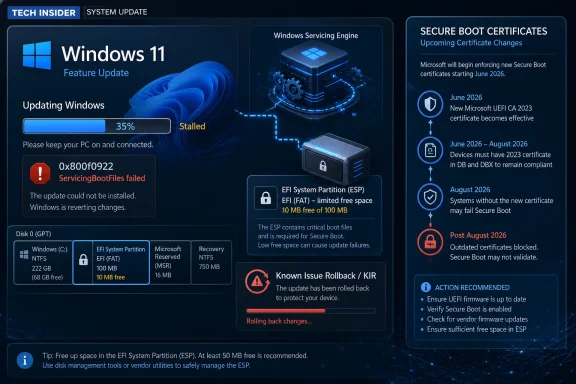 A Preview Update Arrives With a Boot-Partition Warning Label
KB5089573 is, formally, a non-security preview update. It belongs to the familiar late-month Windows cadence: optional quality fixes, feature refinements, and staging for changes that may later reach the broader Patch Tuesday audience. For Windows 11 25H2 and 24H2, Microsoft lists the release as applying to all editions, with OS builds moving to 26200.8524 and 26100.8524 respectively.The interesting part is that the known issue attached to this preview update points backward to KB5089549, the May 2026 security update. Microsoft says some devices can fail to complete installation with error code 0x800f0922 when the EFI System Partition, or ESP, has very little free space. The danger zone is especially clear: devices with 10 MB or less available on the ESP are the ones Microsoft calls out.
That makes this less a conventional bug report than a servicing postmortem in public. The update may get through its early phases, only to collapse during restart at around 35 to 36 percent, roll back, and present the user with the grimly familiar “Something didn’t go as planned. Undoing changes.” For anyone who has spent a morning staring at a failed cumulative update, those words are less an error message than a ritual.
The twist is where the failure lives. Users tend to think of Windows Update as consuming space on C:, fighting with WinSxS, temporary files, drivers, and recovery partitions. Here the constraint is the ESP, a small FAT-formatted boot partition that ordinary users rarely see and many administrators do not inventory until something breaks.
The EFI System Partition Has Become a Servicing Dependency
The ESP is not glamorous real estate. It contains boot managers, boot loaders, and related files used by UEFI firmware to start the operating system. On a clean, modern Windows install, it is usually created automatically, hidden from File Explorer, and left alone unless a boot repair, disk migration, dual-boot setup, or OEM tooling incident drags it into view.That invisibility is precisely why this failure matters. Microsoft’s log examples point to insufficient ESP space, failed servicing of boot files, and space consumed by third-party or OEM files outside Microsoft boot directories. In plain English: Windows needs to place or update boot-related files, but the boot partition has been packed too tightly, sometimes by files Microsoft did not put there.
The result is a failure mode that feels disproportionate. A cumulative update can download, stage, and appear to install normally. Then, during the reboot phase, Windows discovers that the small boot partition cannot absorb what the servicing process requires, and the whole operation unwinds.
This is not a new class of pain for Windows administrators. ESP sizing has been a quiet land mine for years, especially on older devices, cloned images, vendor-customized deployments, and systems that have been through multiple feature upgrades. But KB5089573’s documentation is unusually direct about the trigger: 10 MB or less available space can be enough to derail the update.
The issue also illustrates how Windows servicing has sprawled beyond the files users can see. Updating Windows is no longer just about replacing binaries under the operating system directory. It can involve boot components, recovery behavior, Secure Boot state, servicing stack mechanics, and increasingly the choreography of staged updates across restart boundaries.
Microsoft’s Registry Workaround Is Useful, But It Is Not Comforting
Microsoft’s first workaround is a registry change: add anEspPaddingPercent value under HKLM\SYSTEM\CurrentControlSet\Control\Bfsvc and set it to zero, then restart and retry the update. The name suggests the relevant boot file servicing component is reserving or enforcing a padding calculation for free space on the ESP. Reducing that padding requirement may let the update proceed on devices that are otherwise blocked.As emergency guidance, it is practical. As a product signal, it is awkward. Telling customers to modify a low-level servicing behavior in the registry is the kind of advice that belongs in the “yes, but only if you know why” category. Microsoft includes the standard warning about registry edits causing serious system problems, and in this case the warning is not boilerplate.
The registry workaround may be attractive for individual machines, lab systems, or urgent break/fix work. It is much less attractive as a fleet-wide first move. A cramped ESP is not merely an update obstacle; it is a symptom of a device whose boot partition may have been undersized, polluted by vendor files, or altered by years of imaging and upgrade history.
Administrators should resist the temptation to treat
EspPaddingPercent as a magic incantation. It may get KB5089549 across the line, but it does not necessarily answer why the ESP had so little space in the first place. If third-party or OEM files are consuming the partition, the long-term fix may involve cleanup, repartitioning, reimaging, or vendor-specific remediation rather than simply relaxing the servicing check.That distinction matters because the ESP sits in the blast radius of boot reliability. A failed desktop app update is annoying. A damaged or overfilled boot partition is the sort of thing that turns a routine patch window into hands-on recovery.
Known Issue Rollback Shows Microsoft’s Real Update Strategy
The second workaround is more revealing. Microsoft says the issue is mitigated using Known Issue Rollback, or KIR, and that the resolution has already propagated automatically to consumer devices and non-managed business devices. Restarting may help it apply faster.KIR is one of Microsoft’s more important modern servicing mechanisms because it lets the company disable problematic non-security changes without requiring every affected user to install a new update immediately. For consumers and unmanaged machines, that mitigation can happen quietly. For enterprise-managed devices, administrators usually need a special Group Policy to apply the rollback.
That split is the real story for IT departments. Microsoft’s consumer-facing Windows increasingly assumes that the cloud can correct course after a bad change ships. Managed environments, by design, often block or mediate that cloud-assisted agility. The same controls that give enterprises predictability can also make them slower to receive mitigations unless administrators actively deploy them.
In this case, Microsoft provides a Group Policy package for Windows 11 25H2 and 24H2 associated with KB5089549. The policy temporarily disables the change that causes the issue, and affected devices must be restarted. That is a manageable process, but it is still a process: download, validate, import, scope, deploy, reboot, and confirm.
This is where Windows servicing becomes less about patches and more about governance. Organizations that treat monthly updates as a simple approve-and-forget exercise are increasingly out of step with the platform. Modern Windows servicing requires watching release health notes, understanding rollback channels, and knowing whether a given estate is consumer-like, cloud-managed, co-managed, WSUS-bound, or locked down behind change-control walls.
KIR is a safety net, but it is not a substitute for operational visibility. It can reverse a bad change, but it does not inventory your ESP free space, interpret CBS logs, or tell you which OEM images are carrying boot-partition clutter.
The Error Code Is Familiar Because It Means Too Many Things
Error 0x800f0922 has a long history of showing up in Windows update failures, and that history is part of the problem. It has been associated with servicing failures, reserved partition problems, .NET installation issues, connectivity to update infrastructure, and other conditions depending on context. Users searching the code often find a swamp of half-relevant advice.Microsoft’s documentation for this case gives administrators something more useful than the code alone: the phase of failure and the log signatures. The update fails around 35 to 36 percent during restart, rolls back, and may leave CBS.log entries mentioning insufficient free space,
ServicingBootFiles failed, error 0x70, and third-party or OEM files outside Microsoft boot directories.That specificity changes the troubleshooting flow. If a Windows 11 24H2 or 25H2 device fails KB5089549 with 0x800f0922 after apparently progressing into the reboot stage, the ESP should move up the suspect list. The next step should not be another blind retry, a generic Windows Update troubleshooter run, or a ritual clearing of SoftwareDistribution before checking the boot partition.
The hard part is that inspecting the ESP is not as user-friendly as checking free space on C:. Administrators can mount the partition with disk tools or scripts, but doing so at scale requires care. The partition is intentionally hidden because casual modification is dangerous. Yet hidden does not mean irrelevant, and this issue makes the case for including ESP health in fleet readiness checks.
The broader lesson is that Windows error codes are rarely enough. The failure phase, rollback behavior, CBS log entries, and device history matter. A code without context is a symptom; a code with the right logs becomes a diagnosis.
Secure Boot Timing Raises the Stakes
KB5089573 also arrives with a separate warning that Secure Boot certificates used by most Windows devices are set to expire starting in June 2026, and Microsoft recommends reviewing guidance and taking action to update certificates in advance. That warning is not the same issue as the ESP failure, but the proximity is impossible to ignore.Windows boot infrastructure is entering a more active maintenance period. Secure Boot certificate updates, boot file servicing, UEFI behavior, recovery partitions, and update reliability are not separate silos in practice. They all converge around whether a machine can start securely after servicing changes are applied.
Microsoft’s preview update also includes Secure Boot-related improvements, including additional targeting data to increase coverage of devices eligible to receive new Secure Boot certificates. The company says devices receive the new certificates only after demonstrating sufficient successful update signals, emphasizing a controlled and phased rollout.
That phrasing is classic modern Microsoft: cautious, telemetry-driven, and dependent on staged eligibility. It also means administrators should not assume every compatible device will receive boot-trust updates at the same time. The same fleet can contain machines at different states of readiness based on hardware, firmware, update history, and Microsoft’s rollout signals.
This makes the ESP issue more than a one-off annoyance. If a device cannot reliably service boot files because its ESP is too small or too full, it may be a poor candidate for the next wave of boot-chain maintenance. The June 2026 certificate horizon makes now a bad time to discover that old imaging decisions left no room in the partition that firmware depends on.
The Feature List Is Real, But the Servicing Story Overshadows It
Like many Windows 11 preview updates, KB5089573 contains a broad collection of improvements. Microsoft lists Shared Audio using Bluetooth LE Audio broadcast technology, Magnifier enhancements, Task Manager visibility into NPU usage, Windows Hello refinements, Search improvements, Storage settings polish, USB reliability work, sensor and HID power improvements, font rendering changes, Task Scheduler persistence, desktop shortcut reliability, Store download improvements, and general reliability fixes.That is a lot of work packed into a single optional update. Some changes are user-facing, such as Shared Audio and Magnifier behavior. Others are administrator-adjacent, such as Task Manager’s improved view of NPU activity or Store error reporting when downloads fail because Windows Update group policies are enabled.
The NPU additions are particularly telling. Microsoft is still building the instrumentation layer around AI PCs, not merely shipping AI-branded features. If Task Manager can expose NPU usage and memory more clearly, administrators and power users get a better chance of understanding what those chips are doing outside marketing slides.
Yet the known issue will dominate attention because update reliability is the foundation beneath every feature. A better Search box or smoother Magnifier experience does not matter to the machine that rolls back at 36 percent. The Windows servicing bargain is simple: users tolerate the churn of monthly updates because they expect the system to emerge healthier on the other side.
This is the tension Microsoft keeps facing with Windows 11’s continuous innovation model. The operating system is no longer waiting for old-style service packs or even major feature releases to evolve. It is constantly receiving small behavioral changes, feature toggles, and subsystem updates. That keeps Windows competitive, but it also means the update pipeline must absorb more complexity more often.
Enterprises Should Treat the ESP as Inventory, Not Trivia
For enterprise IT, the practical response is not panic; it is inventory. The devices most likely to be affected are not random in the purest sense. They are systems with limited free ESP space, especially 10 MB or less, and possibly devices where OEM or third-party files have accumulated outside Microsoft boot directories.That points to a sensible triage model. First, identify devices failing KB5089549 or subsequent servicing with 0x800f0922 at the reboot stage. Second, inspect CBS logs for the specific space and boot file servicing messages Microsoft describes. Third, check ESP capacity and free space on affected models, images, or hardware cohorts. Fourth, decide whether the registry workaround, KIR policy, ESP cleanup, or a more structural remediation is the right answer.
The temptation will be to deploy the KIR policy broadly and move on. In some environments, that may be the correct immediate mitigation, especially if patch compliance is slipping and the affected change is safe to defer. But KIR is deliberately temporary. Microsoft says a resolution is in progress and will be included in a future Windows update, which means the underlying servicing path will return in corrected form.
That future update may still require healthy boot partitions. If an ESP is functionally full, the administrator has not solved the device; they have deferred the confrontation. The right long-term question is whether the organization has a standard for ESP sizing and hygiene across Windows 11 hardware.
This is especially important for estates built from layered history: Windows 10-era images upgraded to Windows 11, devices migrated from BIOS to UEFI assumptions, vendor factory partitions preserved across redeployments, and machines that have collected recovery tools, encryption components, or boot managers over time. The boot partition remembers decisions the asset database often forgets.
Microsoft’s Documentation Is Better Than the Underlying Experience
Credit where due: Microsoft’s published known issue is specific enough to be actionable. It identifies the affected update, the error code, the stage of failure, the approximate progress percentage, the user-facing rollback message, the log entries, the ESP free-space condition, and two mitigation paths. Compared with vague “some devices may fail to install” advisories, this is useful documentation.But good documentation does not erase the user experience. A failed update that rolls back during reboot is still a high-friction event. It consumes time, may trigger help desk tickets, and can leave users distrustful of subsequent update prompts. In managed environments, it can distort compliance reporting and complicate maintenance windows.
The issue also reveals the uncomfortable asymmetry between Microsoft’s servicing machinery and the customer’s control plane. Microsoft can use telemetry to detect patterns, issue KIR mitigations, and adjust rollout behavior. Administrators, however, may need to discover old partition problems with scripts, logs, and hardware sampling after the failure has already appeared.
That asymmetry is not unique to Microsoft, but it is particularly visible in Windows because the ecosystem is so varied. A Windows 11 fleet can include premium Copilot+ PCs, five-year-old business laptops, OEM-customized desktops, virtual machines, and upgraded consumer devices. The same cumulative update has to traverse all of them.
The more Windows servicing touches firmware-adjacent components, the more those differences matter. Hardware uniformity is not merely a support convenience; it becomes a patch reliability factor.
Preview Updates Are No Longer Just for the Curious
There was a time when optional preview updates could be dismissed as something only enthusiasts and impatient administrators installed. That is less true now. Preview releases are also early warning systems. They reveal known issues, document mitigations, and show the direction of the next cumulative update wave.KB5089573 is a useful example. Even if an organization does not deploy this preview broadly, its release notes matter because they surface a May security update problem and Microsoft’s mitigation path. The preview page becomes part of the operational picture for devices that may already be failing KB5089549.
For Windows enthusiasts, the lesson is slightly different. If your PC fails with 0x800f0922 and rolls back around the mid-30 percent mark, do not assume the update is simply “bad” in the generic sense. The ESP may be the bottleneck. That does not mean everyone should immediately mount and prune the boot partition, but it does mean the usual advice to free space on C: may miss the point.
For administrators, optional preview updates deserve at least review, even when deployment policy says no. The notes can contain exactly the kind of known-issue guidance that prevents a small patch problem from becoming a support wave.
This is one of the paradoxes of Windows servicing in 2026. The updates are cumulative and increasingly automated, but understanding them still rewards close reading. The release note is not paperwork; it is part of the product.
The 10 MB Warning That Should Change Patch Readiness
The useful takeaway from KB5089573 is not that every Windows 11 device is in danger. It is that a hidden partition with single-digit megabytes of free space can be the difference between a clean security update and a rollback. That should alter how serious administrators define update readiness.- Devices failing KB5089549 with 0x800f0922 during restart should be checked for EFI System Partition free space before generic Windows Update repair steps consume more time.
- Microsoft’s registry workaround may help affected machines install the update, but it should be treated as a targeted mitigation rather than a substitute for understanding why the ESP is full.
- Consumer and unmanaged business devices may receive the Known Issue Rollback automatically, while enterprise-managed devices need administrators to deploy the matching Group Policy and restart affected systems.
- CBS.log entries mentioning insufficient space,
ServicingBootFiles failed, error0x70, or third-party and OEM files outside Microsoft boot directories are the strongest clues that this is the ESP issue. - The Secure Boot certificate timeline makes boot-partition health more urgent, because Windows servicing is entering a period where firmware-adjacent maintenance will matter more, not less.
- Optional preview update notes should be monitored even by organizations that do not deploy previews, because they often contain the clearest public record of mitigations for current production problems.
References
- Primary source: Microsoft Support
Published: Tue, 26 May 2026 22:56:39 Z
May 26, 2026—KB5089573 (OS Builds 26200.8524 and 26100.8524) Preview - Microsoft Support
 support.microsoft.com
