

Microsoft has published KB5089864, an automatic Windows Update package that brings Phi Silica AI component version 1.2603.373.0 to AMD-powered Copilot+ PCs running Windows 11 version 26H1, replacing the earlier KB5083515 release after the latest cumulative update is installed. The update is small in presentation and large in implication. Microsoft is no longer treating on-device AI as a feature you install once and forget; it is turning local models into serviced Windows components. For AMD Copilot+ PC owners, that means the NPU is becoming part of the Windows maintenance contract, not merely a spec-sheet flourish.
The most important thing about KB5089864 is not the version number, though Microsoft’s component-versioning machinery matters. It is the packaging. Phi Silica is delivered through Windows Update, appears in Update history, and has prerequisite and replacement logic just like the driver-adjacent and platform-adjacent updates administrators already track.
That is a quiet but consequential shift. A language model that once sounded like an app-layer novelty is now being serviced as infrastructure. Microsoft is saying, in effect, that the AI layer belongs beside the graphics stack, the runtime libraries, the inbox app dependencies, and the device-specific enablement packages that make Windows behave like Windows on a given machine.
For years, Windows updates were judged by security fixes, kernel changes, browser patches, and compatibility repairs. KB5089864 adds another axis: the health and behavior of an on-device model that Windows features and third-party applications may increasingly assume is present. If that sounds like a subtle distinction, imagine a future support ticket where the problem is not “Windows is out of date” or “the GPU driver is stale,” but “the local language model component is behind the supported baseline.”
That future is not theoretical. Phi Silica is exposed through Windows AI APIs, and Microsoft’s developer messaging is explicit that applications can call into these local models rather than ship their own. Once developers start taking that bargain, Microsoft becomes the steward not only of APIs but of the model payloads those APIs depend on.
AMD’s Ryzen AI systems rely on an NPU architecture that must be fed, scheduled, and optimized differently from competing silicon. Phi Silica may be Microsoft-developed, but the model’s practical performance lives at the intersection of Windows, the NPU runtime, firmware, drivers, memory bandwidth, and thermal behavior. A model update for AMD devices is therefore not just “the same AI, but for another chip.” It is a platform-specific tuning event.
That is the real story behind the phrase “AMD-powered systems.” Microsoft is building an update matrix for AI components that resembles the old Windows driver ecosystem, except the payload is now a local model rather than a display adapter package or audio codec. The promise is straightforward: users get the same class of Windows AI experiences across Copilot+ PCs. The operational reality is messier: each silicon family needs its own care and feeding.
This is where AMD benefits and gets constrained at the same time. On one hand, a serviced Microsoft model gives AMD Copilot+ PCs a clearer software story than the early AI PC era’s scattered demos and vendor utilities. On the other hand, AMD’s AI credibility on Windows is now partly dependent on Microsoft’s cadence, Microsoft’s APIs, and Microsoft’s willingness to keep optimizing the stack after the launch-window marketing fades.
Phi Silica gives the NPU a more concrete role. Summarization, rewriting, short-form generation, text understanding, and accessibility-adjacent language features are exactly the sort of workloads that should not require a round trip to a cloud service every time. They are frequent, latency-sensitive, and often tied to personal or work content that users may not want transmitted elsewhere.
That does not mean local AI is automatically private in the full philosophical sense. Windows still has telemetry settings, app permissions, enterprise controls, cloud-connected Copilot features, and account-based services layered around the machine. But running the inference itself on the device changes the trust equation. The model can process text locally, the NPU can do useful work without waking the entire system into a power-hungry state, and developers can build features that do not begin with “send this prompt to a remote endpoint.”
For Windows enthusiasts, this is where the Copilot+ PC idea starts to become more than branding. A local model integrated into the OS, updated through Windows Update, and callable through supported APIs is a real platform primitive. It is still early, still constrained, and still unevenly distributed across hardware. But it is real in a way that a taskbar button was not.
For most Windows 11 users, 26H1 is not the update they are waiting for. Many existing PCs will continue along the 24H2, 25H2, or future 26H2 path, depending on Microsoft’s rollout plan and hardware eligibility. But KB5089864 shows that Microsoft is already servicing AI components inside 26H1 as a living branch, not simply staging it as a future abstraction.
That has consequences for administrators. If you manage mixed Windows estates, the version number alone is no longer enough to understand capability. A Windows 11 machine might be on a supported build but lack Copilot+ hardware. A Copilot+ PC might have an eligible NPU but be on a different platform release. An AMD Copilot+ PC might need a specific Phi Silica package that a Qualcomm system does not. The old “what Windows version are you on?” question is becoming inadequate.
This is the return of hardware-specific Windows in a more polished form. Microsoft spent much of the Windows 10 era trying to flatten the platform into one continuously serviced OS. Copilot+ PCs push in the opposite direction. They make Windows more conditional: conditional on NPU class, silicon vendor, region, model availability, SDK access, and component version.
That local layer is not meant to replace the biggest frontier models. Phi Silica is a small language model, optimized for device constraints. It is not trying to be a universal chatbot with the entire internet’s worth of reasoning capacity. Its job is to make Windows and Windows apps feel smarter without turning every minor language task into a cloud transaction.
This distinction matters because the economics of AI are brutal. Cloud inference costs money, consumes datacenter capacity, introduces latency, and raises data-governance questions. A local model cannot solve every problem, but it can absorb a vast number of routine ones. Rewrite this paragraph. Summarize this note. Extract the gist. Format this text. Help an app understand a short instruction. These are not glamorous tasks, but they are exactly the tasks that make software feel meaningfully assisted.
The strategic move is to split AI work by gravity. Heavy reasoning, broad knowledge retrieval, and enterprise-orchestrated workflows may still go to the cloud. Repetitive, personal, low-latency language operations move to the NPU. Microsoft’s challenge is making that split invisible enough for users and predictable enough for developers.
That is a powerful shortcut. Windows developers have long suffered when platform capabilities arrived fragmented across hardware vendors and SDK experiments. If Microsoft can provide a supported local language model that behaves consistently enough across Copilot+ PCs, small teams can add useful AI features without becoming machine-learning infrastructure companies.
But the shortcut has strings. Developers inherit Microsoft’s hardware requirements, regional limitations, access controls, moderation behavior, model-update cadence, and API lifecycle. An app that depends on Phi Silica is not merely depending on Windows; it is depending on a particular class of Windows device with a particular AI component installed and available.
That may be acceptable for some applications and unacceptable for others. A productivity tool that uses Phi Silica to summarize local notes can gracefully degrade on older PCs. A line-of-business app that standardizes a workflow around local text generation may need stricter fleet guarantees. A developer chasing the broadest install base may still prefer cloud APIs or local models that run on CPU and GPU, albeit with less elegant performance.
The long-term question is whether Phi Silica becomes a baseline developers can trust or a premium-path enhancement they must treat as optional. KB5089864 nudges the answer toward baseline, but the market is not there yet. Too many PCs lack the hardware. Too many Windows versions sit outside the 26H1 path. Too many enterprise environments need clearer controls before treating local generative AI as ordinary application plumbing.
Update history used to answer familiar questions. Was the monthly cumulative update installed? Did a driver arrive? Did a .NET patch fail? Now it may also answer whether a machine has the expected local AI model. That is useful for support, compliance, troubleshooting, and developer diagnostics.
There is a catch. Consumer-facing Update history is not the same as enterprise-grade inventory. IT teams will want these AI components exposed cleanly through management tooling, reporting APIs, update compliance dashboards, and policy controls. If Microsoft expects organizations to deploy applications that use local AI, administrators will need to know exactly which models are present, which versions are approved, and whether updates can be deferred, expedited, or blocked.
This will be especially important because AI behavior changes are not always perceived like ordinary bug fixes. A model update can improve summarization quality, reduce hallucinations, alter refusal behavior, change latency, or affect the tone and structure of generated output. Even if Microsoft describes a package blandly as “improvements,” organizations may want to validate the effect before broad deployment.
That is not paranoia; it is operational maturity. Enterprises already test browser updates because rendering changes can break workflows. They test Office updates because macros, add-ins, and document behavior matter. If a local language model becomes part of business processes, it deserves the same discipline.
But privacy is not a magic property bestowed by the word “local.” The application calling the model still matters. The surrounding telemetry still matters. The user interface still matters. A local model can process a prompt privately while the app using the output syncs documents to the cloud, logs activity, or sends related context elsewhere. On-device inference narrows the risk; it does not abolish it.
Microsoft’s responsible-AI materials acknowledge, in their corporate way, that AI components need transparency around capabilities, limitations, and intended use. That will matter more as Phi Silica moves from developer demo to everyday substrate. Users should be able to understand when an AI action runs locally, when it reaches a cloud service, and when the distinction affects data handling.
This is also a chance for Microsoft to fix one of the great annoyances of the Copilot era: ambiguity. Too often, Windows users have been shown AI-branded features without a clear account of where computation happens, what is stored, and what is optional. Phi Silica gives Microsoft a better story. The company should not bury it under the same vague “AI-powered” label that has been stretched across everything from spellchecking to remote model orchestration.
That may be the right compromise for Windows. Most OS-level AI does not need the theatrical range of a frontier chatbot. It needs to understand a user’s selection, condense a paragraph, propose a clearer sentence, extract structured information, or help an app respond to a predictable instruction. Those jobs reward speed and availability more than encyclopedic ambition.
This is why Microsoft’s small-model strategy is more credible inside Windows than it sometimes appears in the broader AI market. In the cloud, small models compete against larger models on capability. On the PC, they compete against doing nothing, waiting for a network round trip, or making every developer build a bespoke ML pipeline. That is a much friendlier battlefield.
The irony is that the most successful AI in Windows may be the least visible. If Phi Silica works, users will not marvel at a model name. They will notice that accessibility descriptions arrive faster, writing tools respond instantly, local apps gain useful language features, and battery life does not collapse under routine inference. The model disappears into the experience, which is exactly what an OS component is supposed to do.
For IT departments, the update raises a denser set of questions. Can the component be inventoried reliably across AMD Copilot+ PCs? Does it arrive through the same update channels as other Windows content? How does it behave with WSUS, Microsoft Intune, Windows Autopatch, or tightly managed update rings? Can model updates be paused independently from security updates? What happens when an application requires a newer Phi Silica component than the fleet baseline?
Those questions are not objections to local AI. They are the price of making it real. The minute a model becomes a dependency, it joins the world of change management. The minute it can influence business content, it joins the world of governance. The minute users rely on it, it joins the world of support escalation.
Microsoft’s advantage is that Windows already has the bones of a servicing ecosystem. Its disadvantage is that AI model behavior does not fit neatly into existing mental categories. A security patch has a clear urgency. A feature update has a clear user-facing scope. A model improvement may sit somewhere in between: not obviously critical, not merely cosmetic, and potentially meaningful to application behavior.
KB5089864 is the kind of update that makes the Copilot+ PC category more plausible. It shows Microsoft iterating on the local AI layer through normal Windows mechanisms. It also shows that the company understands silicon-specific enablement is unavoidable. A Copilot+ PC is not a static certification; it is a serviced relationship among Windows, hardware, models, and apps.
Still, Microsoft has to be careful. If AI component updates become opaque, inconsistent, or confusingly tied to narrow OS branches, users will see fragmentation rather than progress. If developers cannot count on availability, they will treat Windows AI APIs as optional garnish. If enterprises cannot govern the stack, they will disable or ignore it.
The company’s best path is boring in the best sense: document the components clearly, service them predictably, expose them cleanly to management tools, and make failures diagnosable. AI may be exciting, but Windows succeeds when the exciting thing becomes dependable infrastructure.
Microsoft’s AI PC strategy will not be judged by whether it can publish another impressive model card or stage another Copilot demo. It will be judged by whether updates like KB5089864 become routine, reliable, and boring enough that developers build on them and administrators trust them. If that happens, the NPU will stop being a marketing acronym and become part of the Windows contract: local intelligence, serviced like the rest of the platform, improving one quiet component update at a time.
Source: Microsoft Support KB5089864: Phi Silica AI component update (version 1.2603.373.0) for AMD-powered systems - Microsoft Support
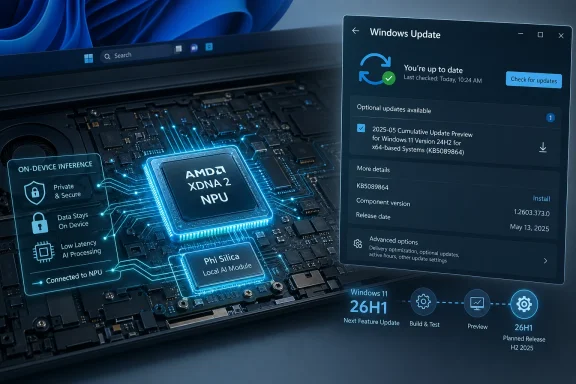 Microsoft Turns the Local Model Into a Windows Component
The most important thing about KB5089864 is not the version number, though Microsoft’s component-versioning machinery matters. It is the packaging. Phi Silica is delivered through Windows Update, appears in Update history, and has prerequisite and replacement logic just like the driver-adjacent and platform-adjacent updates administrators already track.That is a quiet but consequential shift. A language model that once sounded like an app-layer novelty is now being serviced as infrastructure. Microsoft is saying, in effect, that the AI layer belongs beside the graphics stack, the runtime libraries, the inbox app dependencies, and the device-specific enablement packages that make Windows behave like Windows on a given machine.
For years, Windows updates were judged by security fixes, kernel changes, browser patches, and compatibility repairs. KB5089864 adds another axis: the health and behavior of an on-device model that Windows features and third-party applications may increasingly assume is present. If that sounds like a subtle distinction, imagine a future support ticket where the problem is not “Windows is out of date” or “the GPU driver is stale,” but “the local language model component is behind the supported baseline.”
That future is not theoretical. Phi Silica is exposed through Windows AI APIs, and Microsoft’s developer messaging is explicit that applications can call into these local models rather than ship their own. Once developers start taking that bargain, Microsoft becomes the steward not only of APIs but of the model payloads those APIs depend on.
AMD Gets Its Own AI Maintenance Lane
KB5089864 is specifically framed for AMD-powered systems. That matters because Copilot+ PCs are not a single hardware platform wearing different badges. Qualcomm, AMD, and Intel devices all arrive with different CPU architectures, NPU designs, drivers, power envelopes, and model-execution paths. The Copilot+ PC logo tries to make that complexity disappear for buyers, but Windows Update cannot afford the illusion.AMD’s Ryzen AI systems rely on an NPU architecture that must be fed, scheduled, and optimized differently from competing silicon. Phi Silica may be Microsoft-developed, but the model’s practical performance lives at the intersection of Windows, the NPU runtime, firmware, drivers, memory bandwidth, and thermal behavior. A model update for AMD devices is therefore not just “the same AI, but for another chip.” It is a platform-specific tuning event.
That is the real story behind the phrase “AMD-powered systems.” Microsoft is building an update matrix for AI components that resembles the old Windows driver ecosystem, except the payload is now a local model rather than a display adapter package or audio codec. The promise is straightforward: users get the same class of Windows AI experiences across Copilot+ PCs. The operational reality is messier: each silicon family needs its own care and feeding.
This is where AMD benefits and gets constrained at the same time. On one hand, a serviced Microsoft model gives AMD Copilot+ PCs a clearer software story than the early AI PC era’s scattered demos and vendor utilities. On the other hand, AMD’s AI credibility on Windows is now partly dependent on Microsoft’s cadence, Microsoft’s APIs, and Microsoft’s willingness to keep optimizing the stack after the launch-window marketing fades.
The NPU Finally Has a Job Windows Can Explain
The PC industry has spent the last two years telling buyers that NPUs matter. The trouble was that most people could not point to many everyday tasks where the NPU obviously changed the machine. Battery-life claims and trillion-operations-per-second numbers are useful to marketing departments, but they are not user experiences.Phi Silica gives the NPU a more concrete role. Summarization, rewriting, short-form generation, text understanding, and accessibility-adjacent language features are exactly the sort of workloads that should not require a round trip to a cloud service every time. They are frequent, latency-sensitive, and often tied to personal or work content that users may not want transmitted elsewhere.
That does not mean local AI is automatically private in the full philosophical sense. Windows still has telemetry settings, app permissions, enterprise controls, cloud-connected Copilot features, and account-based services layered around the machine. But running the inference itself on the device changes the trust equation. The model can process text locally, the NPU can do useful work without waking the entire system into a power-hungry state, and developers can build features that do not begin with “send this prompt to a remote endpoint.”
For Windows enthusiasts, this is where the Copilot+ PC idea starts to become more than branding. A local model integrated into the OS, updated through Windows Update, and callable through supported APIs is a real platform primitive. It is still early, still constrained, and still unevenly distributed across hardware. But it is real in a way that a taskbar button was not.
26H1 Makes the Story Stranger Than the Update
KB5089864 targets Windows 11 version 26H1, which is itself an unusual release in the Windows timeline. Microsoft has treated 26H1 less like a broad consumer feature update and more like a platform branch tied to new hardware enablement. That makes this AI component update feel both forward-looking and oddly narrow.For most Windows 11 users, 26H1 is not the update they are waiting for. Many existing PCs will continue along the 24H2, 25H2, or future 26H2 path, depending on Microsoft’s rollout plan and hardware eligibility. But KB5089864 shows that Microsoft is already servicing AI components inside 26H1 as a living branch, not simply staging it as a future abstraction.
That has consequences for administrators. If you manage mixed Windows estates, the version number alone is no longer enough to understand capability. A Windows 11 machine might be on a supported build but lack Copilot+ hardware. A Copilot+ PC might have an eligible NPU but be on a different platform release. An AMD Copilot+ PC might need a specific Phi Silica package that a Qualcomm system does not. The old “what Windows version are you on?” question is becoming inadequate.
This is the return of hardware-specific Windows in a more polished form. Microsoft spent much of the Windows 10 era trying to flatten the platform into one continuously serviced OS. Copilot+ PCs push in the opposite direction. They make Windows more conditional: conditional on NPU class, silicon vendor, region, model availability, SDK access, and component version.
The Cloud Is Still There, but the Center of Gravity Moves
Microsoft is not abandoning cloud AI. Nobody looking at the company’s Azure strategy, Copilot licensing model, or developer tooling could believe that. What KB5089864 represents is more subtle: the local machine is being asked to handle the first layer of intelligence.That local layer is not meant to replace the biggest frontier models. Phi Silica is a small language model, optimized for device constraints. It is not trying to be a universal chatbot with the entire internet’s worth of reasoning capacity. Its job is to make Windows and Windows apps feel smarter without turning every minor language task into a cloud transaction.
This distinction matters because the economics of AI are brutal. Cloud inference costs money, consumes datacenter capacity, introduces latency, and raises data-governance questions. A local model cannot solve every problem, but it can absorb a vast number of routine ones. Rewrite this paragraph. Summarize this note. Extract the gist. Format this text. Help an app understand a short instruction. These are not glamorous tasks, but they are exactly the tasks that make software feel meaningfully assisted.
The strategic move is to split AI work by gravity. Heavy reasoning, broad knowledge retrieval, and enterprise-orchestrated workflows may still go to the cloud. Repetitive, personal, low-latency language operations move to the NPU. Microsoft’s challenge is making that split invisible enough for users and predictable enough for developers.
Developers Are Being Offered a Shortcut With Strings Attached
The Windows AI APIs are the developer-facing half of the Phi Silica story. Microsoft is offering app makers a tempting proposition: do not source a model, optimize it, package it, update it, and figure out silicon-specific acceleration yourself. Call the Windows-provided model instead.That is a powerful shortcut. Windows developers have long suffered when platform capabilities arrived fragmented across hardware vendors and SDK experiments. If Microsoft can provide a supported local language model that behaves consistently enough across Copilot+ PCs, small teams can add useful AI features without becoming machine-learning infrastructure companies.
But the shortcut has strings. Developers inherit Microsoft’s hardware requirements, regional limitations, access controls, moderation behavior, model-update cadence, and API lifecycle. An app that depends on Phi Silica is not merely depending on Windows; it is depending on a particular class of Windows device with a particular AI component installed and available.
That may be acceptable for some applications and unacceptable for others. A productivity tool that uses Phi Silica to summarize local notes can gracefully degrade on older PCs. A line-of-business app that standardizes a workflow around local text generation may need stricter fleet guarantees. A developer chasing the broadest install base may still prefer cloud APIs or local models that run on CPU and GPU, albeit with less elegant performance.
The long-term question is whether Phi Silica becomes a baseline developers can trust or a premium-path enhancement they must treat as optional. KB5089864 nudges the answer toward baseline, but the market is not there yet. Too many PCs lack the hardware. Too many Windows versions sit outside the 26H1 path. Too many enterprise environments need clearer controls before treating local generative AI as ordinary application plumbing.
Update History Becomes an AI Audit Trail
Microsoft’s instruction for users is simple: go to Settings, open Windows Update, check Update history, and look for the April 2026 Phi Silica version 1.2603.373.0 entry for AMD-powered systems. That may sound like routine housekeeping, but it hints at a new audit surface.Update history used to answer familiar questions. Was the monthly cumulative update installed? Did a driver arrive? Did a .NET patch fail? Now it may also answer whether a machine has the expected local AI model. That is useful for support, compliance, troubleshooting, and developer diagnostics.
There is a catch. Consumer-facing Update history is not the same as enterprise-grade inventory. IT teams will want these AI components exposed cleanly through management tooling, reporting APIs, update compliance dashboards, and policy controls. If Microsoft expects organizations to deploy applications that use local AI, administrators will need to know exactly which models are present, which versions are approved, and whether updates can be deferred, expedited, or blocked.
This will be especially important because AI behavior changes are not always perceived like ordinary bug fixes. A model update can improve summarization quality, reduce hallucinations, alter refusal behavior, change latency, or affect the tone and structure of generated output. Even if Microsoft describes a package blandly as “improvements,” organizations may want to validate the effect before broad deployment.
That is not paranoia; it is operational maturity. Enterprises already test browser updates because rendering changes can break workflows. They test Office updates because macros, add-ins, and document behavior matter. If a local language model becomes part of business processes, it deserves the same discipline.
The Privacy Pitch Is Stronger On-Device, but Not Self-Executing
Local AI gives Microsoft its cleanest privacy argument in years. If a model can summarize or rewrite text on the device, the most sensitive part of the workflow does not need to leave the PC. For regulated industries, remote workers, students, journalists, lawyers, and anyone handling confidential material, that is not a small benefit.But privacy is not a magic property bestowed by the word “local.” The application calling the model still matters. The surrounding telemetry still matters. The user interface still matters. A local model can process a prompt privately while the app using the output syncs documents to the cloud, logs activity, or sends related context elsewhere. On-device inference narrows the risk; it does not abolish it.
Microsoft’s responsible-AI materials acknowledge, in their corporate way, that AI components need transparency around capabilities, limitations, and intended use. That will matter more as Phi Silica moves from developer demo to everyday substrate. Users should be able to understand when an AI action runs locally, when it reaches a cloud service, and when the distinction affects data handling.
This is also a chance for Microsoft to fix one of the great annoyances of the Copilot era: ambiguity. Too often, Windows users have been shown AI-branded features without a clear account of where computation happens, what is stored, and what is optional. Phi Silica gives Microsoft a better story. The company should not bury it under the same vague “AI-powered” label that has been stretched across everything from spellchecking to remote model orchestration.
Small Models Will Win the Boring Work
The AI industry loves scale, but operating systems love repeatability. Phi Silica’s significance is that it accepts the operating system’s terms. It is compact enough to run locally, optimized enough for an NPU, and narrow enough to be useful without pretending to be omniscient.That may be the right compromise for Windows. Most OS-level AI does not need the theatrical range of a frontier chatbot. It needs to understand a user’s selection, condense a paragraph, propose a clearer sentence, extract structured information, or help an app respond to a predictable instruction. Those jobs reward speed and availability more than encyclopedic ambition.
This is why Microsoft’s small-model strategy is more credible inside Windows than it sometimes appears in the broader AI market. In the cloud, small models compete against larger models on capability. On the PC, they compete against doing nothing, waiting for a network round trip, or making every developer build a bespoke ML pipeline. That is a much friendlier battlefield.
The irony is that the most successful AI in Windows may be the least visible. If Phi Silica works, users will not marvel at a model name. They will notice that accessibility descriptions arrive faster, writing tools respond instantly, local apps gain useful language features, and battery life does not collapse under routine inference. The model disappears into the experience, which is exactly what an OS component is supposed to do.
Enterprises Will Ask the Questions Consumers Skip
For home users, KB5089864 is likely to be uneventful. It downloads automatically, updates a component, and shows up in history. If all goes well, the user never thinks about it again.For IT departments, the update raises a denser set of questions. Can the component be inventoried reliably across AMD Copilot+ PCs? Does it arrive through the same update channels as other Windows content? How does it behave with WSUS, Microsoft Intune, Windows Autopatch, or tightly managed update rings? Can model updates be paused independently from security updates? What happens when an application requires a newer Phi Silica component than the fleet baseline?
Those questions are not objections to local AI. They are the price of making it real. The minute a model becomes a dependency, it joins the world of change management. The minute it can influence business content, it joins the world of governance. The minute users rely on it, it joins the world of support escalation.
Microsoft’s advantage is that Windows already has the bones of a servicing ecosystem. Its disadvantage is that AI model behavior does not fit neatly into existing mental categories. A security patch has a clear urgency. A feature update has a clear user-facing scope. A model improvement may sit somewhere in between: not obviously critical, not merely cosmetic, and potentially meaningful to application behavior.
The Copilot+ PC Bet Depends on Servicing, Not Launch Demos
The first wave of Copilot+ PC marketing focused on experiences. Recall, Cocreator, Live Captions, Studio Effects, and a parade of demos were meant to convince buyers that AI hardware was worth paying for. But platform success is rarely decided at launch. It is decided by whether the machines keep gaining capabilities after the reviews are published.KB5089864 is the kind of update that makes the Copilot+ PC category more plausible. It shows Microsoft iterating on the local AI layer through normal Windows mechanisms. It also shows that the company understands silicon-specific enablement is unavoidable. A Copilot+ PC is not a static certification; it is a serviced relationship among Windows, hardware, models, and apps.
Still, Microsoft has to be careful. If AI component updates become opaque, inconsistent, or confusingly tied to narrow OS branches, users will see fragmentation rather than progress. If developers cannot count on availability, they will treat Windows AI APIs as optional garnish. If enterprises cannot govern the stack, they will disable or ignore it.
The company’s best path is boring in the best sense: document the components clearly, service them predictably, expose them cleanly to management tools, and make failures diagnosable. AI may be exciting, but Windows succeeds when the exciting thing becomes dependable infrastructure.
The AMD Phi Silica Update Shows Where Windows Is Heading
KB5089864 is a narrow update, but it points to a broad operating-system transition. The concrete facts are simple enough, and they matter precisely because they are operational rather than theatrical.- KB5089864 installs Phi Silica AI component version 1.2603.373.0 on eligible AMD-powered Copilot+ PCs running Windows 11 version 26H1.
- The update is delivered automatically through Windows Update and requires the latest cumulative update for Windows 11 version 26H1.
- The package replaces KB5083515, making Phi Silica part of an ongoing component-servicing chain rather than a one-off model drop.
- Users can verify installation in Windows Update history by looking for the April 2026 Phi Silica entry for AMD-powered systems.
- The update reinforces Microsoft’s strategy of exposing local NPU-backed language intelligence to Windows features and applications through Windows AI APIs.
- The practical impact will be largest where developers and IT departments treat the local model as a managed platform dependency, not merely as an AI demo.
Microsoft’s AI PC strategy will not be judged by whether it can publish another impressive model card or stage another Copilot demo. It will be judged by whether updates like KB5089864 become routine, reliable, and boring enough that developers build on them and administrators trust them. If that happens, the NPU will stop being a marketing acronym and become part of the Windows contract: local intelligence, serviced like the rest of the platform, improving one quiet component update at a time.
Source: Microsoft Support KB5089864: Phi Silica AI component update (version 1.2603.373.0) for AMD-powered systems - Microsoft Support
