

Microsoft has published KB5089865, an April 2026 Phi Silica AI component update for Intel-powered Copilot+ PCs running Windows 11 version 26H1, delivering version 1.2603.373.0 through Windows Update after the latest cumulative update is installed. The update is small on the surface and large in implication. Microsoft is no longer treating local AI as an optional app feature bolted onto Windows; it is turning model servicing into part of the operating system’s normal maintenance rhythm.
That matters because Phi Silica is not another downloadable chatbot. It is Microsoft’s NPU-tuned small language model for Windows itself, exposed to both system experiences and developers through Windows AI APIs. KB5089865 is therefore less interesting as a patch note than as a signal: the AI PC is becoming a serviced platform, and the model is now one of the components IT has to understand, inventory, trust, and occasionally troubleshoot.
For years, Windows updates were mostly about the pieces administrators already knew how to categorize: kernel fixes, driver updates, browser components, .NET servicing, Defender intelligence, and the monthly cumulative update. KB5089865 adds a newer class of payload to that mental map. The operating system now has AI components that receive their own versioned updates, tied to specific processor families and shipped through the same Windows Update machinery users already know.
That is not merely a packaging decision. When Microsoft ships Phi Silica as a Windows AI component, it is saying that local language intelligence is no longer a developer experiment or a Store app convenience. It is infrastructure. The model becomes something Windows can depend on, apps can call, and OEMs can assume is present on qualifying hardware.
The KB is also processor-specific. This one is for Intel-powered systems, while parallel component updates exist for other silicon families. That is the reality of the Copilot+ PC era: the user-facing promise may be “Windows AI,” but the implementation lives close to the NPU, the driver stack, the execution provider, and the model package optimized for a particular hardware path.
For enthusiasts, that means a new class of update history entries to scrutinize. For administrators, it means a new class of dependency. For developers, it means the local model is becoming stable enough to target but still specific enough that careful capability detection remains mandatory.
That distinction matters. The cloud version of AI is easy to understand: rent a frontier model, pay by the token, accept latency and data-governance questions, and hope the service remains available. The Windows version Microsoft is building with Phi Silica is different. It says some language tasks are common enough, small enough, and privacy-sensitive enough that the operating system should provide a local model as a reusable primitive.
This is why Phi Silica keeps appearing in Microsoft’s developer story. The Windows AI APIs allow apps to call local capabilities without each developer bundling a model, building an inference stack, negotiating NPU access, and inventing their own moderation and availability logic. That is the kind of abstraction Windows has historically been good at when it works: turn specialized hardware into a platform feature.
The tradeoff is obvious. Phi Silica is not a general-purpose replacement for the biggest cloud models, and Microsoft does not pretend it is. Its significance is not that it can beat a frontier model in an open-ended reasoning benchmark. Its significance is that it can make ordinary language features feel instantaneous, private, and cheap enough to become ambient.
An update like KB5089865 is one brick in the work of making that ecosystem less awkward. Intel-powered Copilot+ PCs need the same first-party AI components if Microsoft wants developers to believe that “Copilot+ PC” is a meaningful target rather than a compatibility maze. A local model API is only attractive when the developer can assume the platform will service the model reliably across supported devices.
This does not erase fragmentation. It formalizes it. The update history entry depends on processor type, and the model is gated to Copilot+ PCs rather than ordinary Windows 11 machines. That means the installed base remains split between PCs that can run these Windows AI experiences locally and PCs that cannot.
But platform transitions always look like this at first. DirectX, TPM requirements, hardware video decode, virtualization-based security, and modern standby all produced their own compatibility arguments. The difference here is that Microsoft is trying to make AI acceleration a core purchasing reason for new PCs, not just an invisible performance feature.
That is what mature platform components need. If an app depends on the local language model, developers need to know which capabilities exist. If a help desk is troubleshooting why a feature works on one Copilot+ PC and fails on another, update history needs to show whether the required AI component is installed. If Microsoft changes model behavior, performance, or safety handling, there has to be a way to refer to the component beyond “the AI thing.”
The KB says the update replaces KB5083514, which is another quiet but important detail. Replacement chains are how Windows turns individual patches into a maintainable servicing story. AI models may sound exotic, but in the Windows Update system they are becoming another component with supersedence, prerequisites, and inventory.
This is exactly what enterprise IT should want, even if the result looks messy at first. The alternative is worse: opaque model downloads, app-specific AI runtimes, unmanaged Store dependencies, and no consistent way to know what local model is running on which machine.
There is a logic to that. Local AI is not just a model file. It depends on the Windows AI APIs, NPU drivers, execution providers, app permissions, responsible AI controls, and the shell or application features that call into it. Updating the model while leaving the platform underneath stale would invite subtle bugs and inconsistent behavior.
The risk is that AI features become another reason Windows clients must stay aggressively current. Many organizations already struggle with monthly cumulative updates, firmware updates, driver rings, and application compatibility testing. Adding AI components to that stack means the Copilot+ PC fleet will need its own operational discipline.
That does not mean every organization should block the update. It means they should stop thinking of local AI as a consumer flourish. If Windows features and business apps begin to depend on Phi Silica, then model servicing belongs in the same conversation as endpoint management, compliance, and support readiness.
But privacy is not a magic property that appears because the NPU is involved. The app calling the model still matters. The data it stores matters. The logs it creates matter. The user interface around consent and disclosure matters. A local model reduces one major risk — transmission to a remote inference service — but it does not eliminate all risks associated with AI-assisted processing.
Microsoft’s responsible AI framing acknowledges this by treating the model as a platform component with intended uses, limitations, and developer guidance. That is the right direction. Local AI has to be governable, not just fast.
The coming test is whether Windows makes that governance visible enough. Users should be able to understand when an app is using local AI, administrators should be able to manage access, and developers should have a clear contract for what the model does and does not promise. If those pieces lag behind the model rollout, “on-device” will become a marketing phrase rather than a trust model.
Windows AI APIs change the economics. They let developers target a capability exposed by the operating system rather than reinventing the model stack. For a WinUI app, an Electron app with a native bridge, or a productivity tool that wants offline summarization, that is a powerful abstraction.
The catch is availability. Phi Silica requires a Copilot+ PC with suitable NPU support, and Microsoft’s own documentation has treated some of these APIs as gated, previewed, or limited-access depending on channel and release. Responsible developers therefore cannot simply assume the model exists. They have to detect support, degrade gracefully, and offer a non-AI or cloud-backed fallback where appropriate.
That is not a flaw unique to Phi Silica. It is the shape of every hardware-accelerated platform transition. The first wave rewards developers who build adaptable experiences rather than all-or-nothing features.
There are obvious benefits. Microsoft can patch performance issues, improve model behavior, update safety systems, and tune hardware-specific execution without requiring every app developer to ship their own package. Users benefit from smaller app downloads and more consistent behavior. Developers benefit from a maintained platform.
There are also uncomfortable questions. How should organizations validate model behavior before broad deployment? Can a model update subtly change outputs in workflows that users rely on? Will Microsoft document meaningful changes, or will many AI component updates arrive with the classic Windows phrasing of “improvements”? The KB5089865 text is concise to the point of opacity, and that is not ideal for a component that may influence application behavior.
Windows administrators have long learned to live with sparse release notes, but AI raises the stakes. A graphics driver update that changes performance is one thing. A local language model update that changes how a summarization feature phrases sensitive content is another. Microsoft will need better change communication as these components become more central.
Phi Silica helps close that gap because it is the kind of feature that only makes sense when the OS owns the local AI path. If every app had to bring its own model, the NPU would remain an enthusiast benchmark. If Windows provides the model and the API, the NPU becomes a shared system resource.
That is the same move that made GPUs mainstream beyond games. Hardware acceleration mattered most when developers could assume common APIs, drivers matured, and the operating system made the capability ordinary. Microsoft is trying to do that for NPUs, and Phi Silica is one of the first visible pieces.
The question is whether the software will arrive quickly enough to justify the hardware cycle. KB5089865 suggests Microsoft is doing the unglamorous servicing work. Now the ecosystem needs compelling applications that make local AI feel necessary rather than merely available.
KB5089865 provides part of that answer by appearing in Windows Update history as a recognizable AI component update. That is a start. It gives administrators a visible artifact and a version number.
But visibility is not the same as manageability. Organizations will want policy controls for Windows AI features, documentation of data boundaries, clear regional availability, and predictable servicing behavior across Windows Update for Business, Intune, Autopatch, and traditional management stacks. They will also want clarity around WSUS and offline servicing scenarios, because not every managed fleet lives on direct Windows Update.
The local nature of Phi Silica may make it easier for some organizations to approve AI features, but approval will not be automatic. In conservative environments, a locally serviced language model is still a language model. It will need governance.
That is precisely why it is important. Platforms become real when the boring parts arrive: versioning, replacement, prerequisites, update history, hardware targeting, and routine delivery. The AI PC does not mature because of one keynote demo. It matures when its model stack is serviced like Windows itself.
There is still plenty to criticize. Microsoft’s release notes need more substance. Copilot+ availability remains confusing for ordinary buyers. Developers still face hardware gating and API maturity questions. Administrators need clearer policy and deployment guidance.
But the direction is now visible. Windows is becoming a system where AI models are not just apps, not just cloud endpoints, and not just OEM demos. They are components.
Source: Microsoft Support KB5089865: Phi Silica AI component update (version 1.2603.373.0) for Intel-powered systems - Microsoft Support
That matters because Phi Silica is not another downloadable chatbot. It is Microsoft’s NPU-tuned small language model for Windows itself, exposed to both system experiences and developers through Windows AI APIs. KB5089865 is therefore less interesting as a patch note than as a signal: the AI PC is becoming a serviced platform, and the model is now one of the components IT has to understand, inventory, trust, and occasionally troubleshoot.
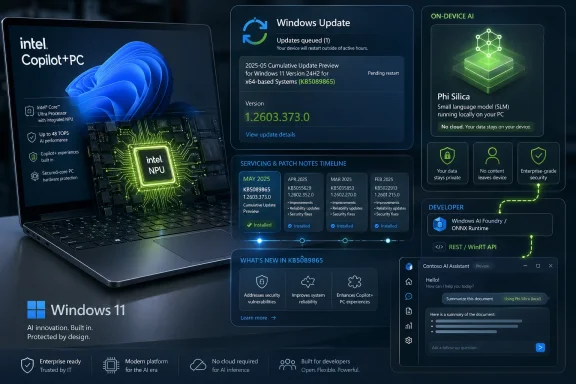 Microsoft Moves the Model Into the Patch Stream
For years, Windows updates were mostly about the pieces administrators already knew how to categorize: kernel fixes, driver updates, browser components, .NET servicing, Defender intelligence, and the monthly cumulative update. KB5089865 adds a newer class of payload to that mental map. The operating system now has AI components that receive their own versioned updates, tied to specific processor families and shipped through the same Windows Update machinery users already know.That is not merely a packaging decision. When Microsoft ships Phi Silica as a Windows AI component, it is saying that local language intelligence is no longer a developer experiment or a Store app convenience. It is infrastructure. The model becomes something Windows can depend on, apps can call, and OEMs can assume is present on qualifying hardware.
The KB is also processor-specific. This one is for Intel-powered systems, while parallel component updates exist for other silicon families. That is the reality of the Copilot+ PC era: the user-facing promise may be “Windows AI,” but the implementation lives close to the NPU, the driver stack, the execution provider, and the model package optimized for a particular hardware path.
For enthusiasts, that means a new class of update history entries to scrutinize. For administrators, it means a new class of dependency. For developers, it means the local model is becoming stable enough to target but still specific enough that careful capability detection remains mandatory.
Phi Silica Is Windows’ Local AI Wedge
Phi Silica’s job is narrower and more practical than the marketing around AI PCs sometimes suggests. It is a compact, Transformer-based language model optimized to run on a Copilot+ PC’s Neural Processing Unit, handling tasks such as summarization, rewriting, text understanding, and short-form generation without sending every prompt to a cloud service.That distinction matters. The cloud version of AI is easy to understand: rent a frontier model, pay by the token, accept latency and data-governance questions, and hope the service remains available. The Windows version Microsoft is building with Phi Silica is different. It says some language tasks are common enough, small enough, and privacy-sensitive enough that the operating system should provide a local model as a reusable primitive.
This is why Phi Silica keeps appearing in Microsoft’s developer story. The Windows AI APIs allow apps to call local capabilities without each developer bundling a model, building an inference stack, negotiating NPU access, and inventing their own moderation and availability logic. That is the kind of abstraction Windows has historically been good at when it works: turn specialized hardware into a platform feature.
The tradeoff is obvious. Phi Silica is not a general-purpose replacement for the biggest cloud models, and Microsoft does not pretend it is. Its significance is not that it can beat a frontier model in an open-ended reasoning benchmark. Its significance is that it can make ordinary language features feel instantaneous, private, and cheap enough to become ambient.
Intel Copilot+ PCs Finally Become First-Class AI Citizens
The Intel specificity of KB5089865 is part of the story. Copilot+ PCs started as a deeply Qualcomm-shaped launch, with Snapdragon X systems carrying the first wave of Windows AI expectations. Intel and AMD systems followed, but the staggered rollout created a familiar Windows ecosystem problem: the feature brand was unified, while the underlying hardware and software readiness was not.An update like KB5089865 is one brick in the work of making that ecosystem less awkward. Intel-powered Copilot+ PCs need the same first-party AI components if Microsoft wants developers to believe that “Copilot+ PC” is a meaningful target rather than a compatibility maze. A local model API is only attractive when the developer can assume the platform will service the model reliably across supported devices.
This does not erase fragmentation. It formalizes it. The update history entry depends on processor type, and the model is gated to Copilot+ PCs rather than ordinary Windows 11 machines. That means the installed base remains split between PCs that can run these Windows AI experiences locally and PCs that cannot.
But platform transitions always look like this at first. DirectX, TPM requirements, hardware video decode, virtualization-based security, and modern standby all produced their own compatibility arguments. The difference here is that Microsoft is trying to make AI acceleration a core purchasing reason for new PCs, not just an invisible performance feature.
The Version Number Is Boring, Which Is Exactly the Point
Version 1.2603.373.0 will not mean much to most users. It is not a catchy Windows release, not a feature pack, and not a consumer-facing app version. Its importance is administrative: it gives Phi Silica an identifiable servicing state.That is what mature platform components need. If an app depends on the local language model, developers need to know which capabilities exist. If a help desk is troubleshooting why a feature works on one Copilot+ PC and fails on another, update history needs to show whether the required AI component is installed. If Microsoft changes model behavior, performance, or safety handling, there has to be a way to refer to the component beyond “the AI thing.”
The KB says the update replaces KB5083514, which is another quiet but important detail. Replacement chains are how Windows turns individual patches into a maintainable servicing story. AI models may sound exotic, but in the Windows Update system they are becoming another component with supersedence, prerequisites, and inventory.
This is exactly what enterprise IT should want, even if the result looks messy at first. The alternative is worse: opaque model downloads, app-specific AI runtimes, unmanaged Store dependencies, and no consistent way to know what local model is running on which machine.
The Prerequisite Tells Administrators Where Microsoft Is Drawing the Line
KB5089865 requires the latest cumulative update for Windows 11 version 26H1. That requirement is not surprising, but it is revealing. Microsoft is tying AI component servicing to the current OS servicing baseline, which gives the company a cleaner support matrix and gives administrators less room to run old platform code with new model packages.There is a logic to that. Local AI is not just a model file. It depends on the Windows AI APIs, NPU drivers, execution providers, app permissions, responsible AI controls, and the shell or application features that call into it. Updating the model while leaving the platform underneath stale would invite subtle bugs and inconsistent behavior.
The risk is that AI features become another reason Windows clients must stay aggressively current. Many organizations already struggle with monthly cumulative updates, firmware updates, driver rings, and application compatibility testing. Adding AI components to that stack means the Copilot+ PC fleet will need its own operational discipline.
That does not mean every organization should block the update. It means they should stop thinking of local AI as a consumer flourish. If Windows features and business apps begin to depend on Phi Silica, then model servicing belongs in the same conversation as endpoint management, compliance, and support readiness.
The Privacy Argument Is Stronger Locally, but Not Automatic
The best argument for Phi Silica is privacy. A local model can summarize, rewrite, classify, or generate text without the prompt leaving the device. For regulated environments, sensitive workflows, and offline scenarios, that is a meaningful architectural advantage over cloud-first AI.But privacy is not a magic property that appears because the NPU is involved. The app calling the model still matters. The data it stores matters. The logs it creates matter. The user interface around consent and disclosure matters. A local model reduces one major risk — transmission to a remote inference service — but it does not eliminate all risks associated with AI-assisted processing.
Microsoft’s responsible AI framing acknowledges this by treating the model as a platform component with intended uses, limitations, and developer guidance. That is the right direction. Local AI has to be governable, not just fast.
The coming test is whether Windows makes that governance visible enough. Users should be able to understand when an app is using local AI, administrators should be able to manage access, and developers should have a clear contract for what the model does and does not promise. If those pieces lag behind the model rollout, “on-device” will become a marketing phrase rather than a trust model.
Developers Get an API, Not a Science Project
The most practical benefit of Phi Silica is that it lowers the barrier to adding local language features to Windows applications. Without a system component, a developer who wants local AI has to choose a model, package it, optimize it, test it across hardware, handle acceleration, and update it over time. That is a lot to ask for a feature that may only summarize notes or rewrite a paragraph.Windows AI APIs change the economics. They let developers target a capability exposed by the operating system rather than reinventing the model stack. For a WinUI app, an Electron app with a native bridge, or a productivity tool that wants offline summarization, that is a powerful abstraction.
The catch is availability. Phi Silica requires a Copilot+ PC with suitable NPU support, and Microsoft’s own documentation has treated some of these APIs as gated, previewed, or limited-access depending on channel and release. Responsible developers therefore cannot simply assume the model exists. They have to detect support, degrade gracefully, and offer a non-AI or cloud-backed fallback where appropriate.
That is not a flaw unique to Phi Silica. It is the shape of every hardware-accelerated platform transition. The first wave rewards developers who build adaptable experiences rather than all-or-nothing features.
Windows Update Becomes the AI Supply Chain
The deeper story behind KB5089865 is supply chain control. In the cloud, Microsoft can update a model behind an endpoint and customers may never know precisely when behavior changed. On the PC, the model is present on the device, versioned, and serviced through Windows Update. That creates more transparency, but it also creates more responsibility.There are obvious benefits. Microsoft can patch performance issues, improve model behavior, update safety systems, and tune hardware-specific execution without requiring every app developer to ship their own package. Users benefit from smaller app downloads and more consistent behavior. Developers benefit from a maintained platform.
There are also uncomfortable questions. How should organizations validate model behavior before broad deployment? Can a model update subtly change outputs in workflows that users rely on? Will Microsoft document meaningful changes, or will many AI component updates arrive with the classic Windows phrasing of “improvements”? The KB5089865 text is concise to the point of opacity, and that is not ideal for a component that may influence application behavior.
Windows administrators have long learned to live with sparse release notes, but AI raises the stakes. A graphics driver update that changes performance is one thing. A local language model update that changes how a summarization feature phrases sensitive content is another. Microsoft will need better change communication as these components become more central.
The AI PC Pitch Is Becoming Less Theoretical
For much of the Copilot+ PC launch cycle, the NPU felt underused. Buyers were told they needed new silicon for the future of Windows, but many day-to-day workflows still looked like ordinary Windows 11 with a few AI-branded extras. That gap created skepticism, especially among power users who could run local models on GPUs or access better models in the cloud.Phi Silica helps close that gap because it is the kind of feature that only makes sense when the OS owns the local AI path. If every app had to bring its own model, the NPU would remain an enthusiast benchmark. If Windows provides the model and the API, the NPU becomes a shared system resource.
That is the same move that made GPUs mainstream beyond games. Hardware acceleration mattered most when developers could assume common APIs, drivers matured, and the operating system made the capability ordinary. Microsoft is trying to do that for NPUs, and Phi Silica is one of the first visible pieces.
The question is whether the software will arrive quickly enough to justify the hardware cycle. KB5089865 suggests Microsoft is doing the unglamorous servicing work. Now the ecosystem needs compelling applications that make local AI feel necessary rather than merely available.
Enterprise IT Will Care About Control More Than Demos
Consumer demos sell Copilot+ PCs with rewritten emails, image tools, live captions, and faster local responses. Enterprise IT will judge the platform differently. It will ask how these features are updated, how they are audited, how they are disabled, how they interact with data policies, and how support teams confirm the installed component state.KB5089865 provides part of that answer by appearing in Windows Update history as a recognizable AI component update. That is a start. It gives administrators a visible artifact and a version number.
But visibility is not the same as manageability. Organizations will want policy controls for Windows AI features, documentation of data boundaries, clear regional availability, and predictable servicing behavior across Windows Update for Business, Intune, Autopatch, and traditional management stacks. They will also want clarity around WSUS and offline servicing scenarios, because not every managed fleet lives on direct Windows Update.
The local nature of Phi Silica may make it easier for some organizations to approve AI features, but approval will not be automatic. In conservative environments, a locally serviced language model is still a language model. It will need governance.
A Small KB With a Large Platform Shadow
KB5089865 is easy to miss because it looks like housekeeping. It installs automatically. It targets a narrow device class. It has a version number only an administrator could love. There is no splashy feature name attached to it.That is precisely why it is important. Platforms become real when the boring parts arrive: versioning, replacement, prerequisites, update history, hardware targeting, and routine delivery. The AI PC does not mature because of one keynote demo. It matures when its model stack is serviced like Windows itself.
There is still plenty to criticize. Microsoft’s release notes need more substance. Copilot+ availability remains confusing for ordinary buyers. Developers still face hardware gating and API maturity questions. Administrators need clearer policy and deployment guidance.
But the direction is now visible. Windows is becoming a system where AI models are not just apps, not just cloud endpoints, and not just OEM demos. They are components.
The KB5089865 Signal Intel Copilot+ Owners Should Not Ignore
This update is not something most users need to chase manually, but it is worth understanding what it represents. If you administer, develop for, or simply experiment with Copilot+ PCs, KB5089865 is a sign that the Windows AI layer is entering normal servicing channels.- KB5089865 delivers Phi Silica version 1.2603.373.0 for Intel-powered Copilot+ PCs running Windows 11 version 26H1.
- The update requires the latest cumulative update for Windows 11 version 26H1 before it can be installed.
- The component is delivered automatically through Windows Update and should appear in Settings under Windows Update update history.
- Phi Silica is Microsoft’s local NPU-optimized small language model for Windows AI features and developer APIs.
- The update replaces the earlier KB5083514 package, making it part of a continuing AI component servicing chain.
- The practical value is less about one visible feature and more about keeping the local Windows AI platform current.
Source: Microsoft Support KB5089865: Phi Silica AI component update (version 1.2603.373.0) for Intel-powered systems - Microsoft Support
