
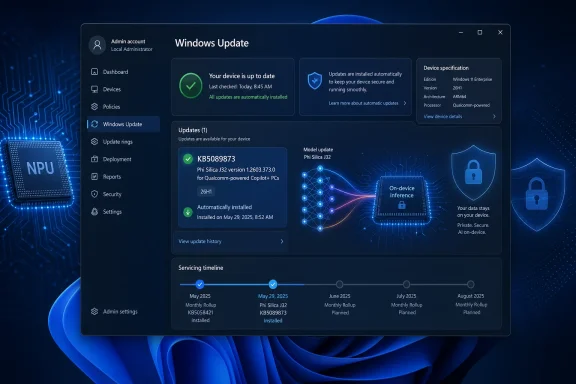
Microsoft has published KB5089873, a Phi Silica J32 AI component update version 1.2603.373.0 for Qualcomm-powered Copilot+ PCs running Windows 11 version 26H1, delivered automatically through Windows Update after the latest cumulative update is installed. The smallness of the package name undersells the significance of the move. Microsoft is no longer treating local AI models as optional developer toys or hidden feature payloads; it is servicing them like platform components. That is the real story: Windows Update is becoming the distribution rail for the AI runtime layer of Windows.
For decades, Windows servicing has mostly meant patching the operating system, drivers, .NET components, browsers, and the odd inbox app dependency. KB5089873 belongs to a different category. It updates a local Transformer-based language model that runs on the neural processing unit inside Qualcomm-powered Copilot+ PCs.
That may sound like a narrow maintenance release, and in immediate practical terms it is. The support article says the update includes improvements to the Phi Silica AI component for Windows 11 version 26H1, requires the latest cumulative update, and installs automatically from Windows Update. It also replaces the earlier KB5083516 release.
But the interesting part is not the changelog, which is sparse. The interesting part is the object being serviced. Microsoft is shipping an on-device AI model as a versioned Windows component, with a KB number, processor targeting, update history visibility, and prerequisite logic. That is Windows becoming a model-hosting platform, not merely an operating system that can call cloud AI services.
Phi Silica is not Copilot in the consumer chatbot sense. It is Microsoft’s NPU-tuned small language model for Copilot+ PCs, exposed to apps through Windows AI APIs and the Windows App SDK. That distinction matters, because it shifts AI from being a destination app into infrastructure that developers can call without each app bundling its own model, runtime, and hardware-specific optimization stack.
The naming also says more than it appears to. “Phi Silica J32” is not the consumer-facing brand; it is the kind of internal component label that appears when platform plumbing becomes visible to administrators. The update history entry is expected to read “2026-04 Phi Silica J32 version 1.2603.373.0 for Qualcomm-powered systems (KB5089873).” That is the language of servicing, not marketing.
This matters for IT because the AI PC story is now splitting into silicon-specific maintenance tracks. A Qualcomm Copilot+ PC, an AMD Ryzen AI Copilot+ PC, and an Intel Core Ultra Copilot+ PC may all present themselves as Windows 11 machines with NPUs, but the model, execution provider, firmware, driver, and OS relationships are not identical. Microsoft can abstract much of that for developers, but servicing still has to land on real hardware.
For users, the result should be boring by design. If the right Windows 11 26H1 cumulative update is present, Windows Update installs the Phi Silica component update automatically. If the device is in scope, it appears in update history. If it is not a Qualcomm-powered Copilot+ PC, this particular KB is not meant for it.
That boringness is the point. Microsoft wants local AI capabilities to feel like DirectX, Media Foundation, or the Windows Runtime: something that is present, versioned, and maintained below the app layer. Once that happens, developers stop asking whether they can assume a model exists and start asking what they can safely build on top of it.
That makes KB5089873 part of a larger hardware-platform story. Windows 11 26H1 is not simply “the next Windows version” in the old consumer rhythm. It is tied to next-generation silicon enablement, and this Phi Silica update rides that same channel.
This is a meaningful break from the way many Windows users still think about version numbers. In the Windows 10 era, version labels were largely calendar milestones for feature updates. In the Copilot+ era, a version label can also mark a hardware enablement boundary. That is especially important when the feature in question is not a Start menu tweak but a model designed to run on a specific class of NPU.
The risk is confusion. A user may see “Windows 11” and assume all Windows 11 machines are eligible for all AI components. An admin may see “Copilot+ PC” and assume that all Copilot+ PCs receive the same AI payloads at the same time. KB5089873 quietly says otherwise: eligibility depends on OS version, cumulative update state, processor family, and device class.
This does not make Microsoft’s approach wrong. It may be the only realistic way to ship performant local AI across a fragmented PC ecosystem. But it does mean the old simplicity of Windows Update as one broad pipe for one broad Windows population is giving way to a more conditional model. The PC is becoming more like the phone: hardware generation, accelerator capability, and OS branch all determine the features you actually get.
That is a strategic choice. Developers can already ship their own ONNX models, call cloud APIs, or lean on browser-based AI features. But those options fragment the experience. They create duplicated downloads, inconsistent moderation behavior, unpredictable performance, and a support burden that rises sharply when a model must run across a zoo of GPUs, CPUs, NPUs, and driver stacks.
A system-provided model changes the economics. If Windows supplies an NPU-tuned language model and a stable API surface, an app can add summarization, rewriting, text extraction, or local prompt handling without becoming an AI infrastructure company. This is especially attractive for small developers and enterprise software teams that want AI-enhanced workflows but do not want to manage model distribution.
The obvious tradeoff is dependency. When an app relies on Phi Silica, it relies on Microsoft’s model availability, Microsoft’s API gating, Microsoft’s content moderation design, Microsoft’s regional restrictions, and Microsoft’s servicing cadence. The model is local, but the platform control is not.
That is why KB5089873 matters even without a juicy bug list. Each update to Phi Silica can potentially affect latency, output behavior, compatibility, safety filtering, and app assumptions. A local model is still software. It changes. And once applications begin treating it as a platform service, model updates become operational events.
On Copilot+ PCs, Phi Silica runs locally and is optimized for the NPU, reducing dependence on cloud round trips and lowering power consumption compared with CPU-bound inference. That gives Microsoft a story that aligns with the PC’s traditional strengths: privacy, offline access, responsiveness, and ownership of local compute.
This is the strongest version of the AI PC pitch. Not “your laptop has a chatbot,” but “your laptop has a local inference layer that apps can use without sending every task to a remote server.” For enterprises, that is potentially more interesting than consumer Copilot demos. Sensitive documents, internal tickets, meeting notes, and field data are exactly the kinds of workloads where local processing has appeal.
Still, local does not automatically mean safe, private, or enterprise-ready. An on-device model can reduce data movement, but apps still decide what they feed into it, what they store, what they display, and whether they combine local inference with cloud services. Microsoft can provide responsible AI guidance and API-level controls, but governance does not vanish just because the model runs on an NPU.
The bigger point is that the NPU is becoming a managed resource. In the old world, an accelerator was valuable when specific apps knew how to use it. In Microsoft’s desired world, Windows itself brokers access to AI capabilities, and developers consume them through supported APIs. That is a much more scalable route to making NPU hardware matter.
Traditional software patches are not always transparent, but their effects are often easier to reason about. A file version changes. A crash is fixed. A vulnerability is closed. A driver gains support for a device ID. With model updates, “improvements” can mean many things at once: better responses, different responses, stricter refusals, reduced hallucination in one area, worse formatting in another, or faster generation under specific workloads.
For consumers, this may not matter much. If a built-in Windows feature becomes faster or more reliable, the update has done its job. For developers and enterprises, however, nondeterministic behavior is part of the risk profile. If an app depends on local summarization or text transformation, a model update can alter user-visible behavior even when the API contract remains intact.
Microsoft is not alone here. The entire AI industry is still learning how to communicate model changes in a way that is useful without becoming a research paper for every minor release. But Windows has a particular burden because it is a platform of record for businesses. Admins are accustomed to KB articles that may be terse, but they still expect enough information to assess impact.
This is where Microsoft will eventually need a more mature model-release vocabulary. “Improves the Phi Silica AI component” may be sufficient for an automatic update today. It will be less sufficient when line-of-business applications rely on Windows AI APIs for production workflows.
That is an appealing proposition. A developer can imagine adding a local “summarize this note,” “rewrite this message,” or “extract meaning from this content” feature without paying per-token cloud bills or designing a model deployment system. For many Windows apps, that is the difference between shipping an AI feature and leaving it on the roadmap forever.
But the limitations are just as real. Phi Silica availability is tied to Copilot+ hardware, Windows version requirements, regional constraints, SDK maturity, and in some cases limited-access feature policies. Apps must detect support gracefully rather than assuming every Windows 11 user has the same AI substrate.
This is where Microsoft’s platform strategy will either succeed or stall. If developers can reliably check capability, call a stable API, and trust Windows Update to keep models healthy, Phi Silica becomes a default building block. If eligibility, access tokens, preview SDKs, and silicon-specific quirks remain too visible, developers will keep treating local AI as an optional enhancement rather than a core part of the app.
The incentives are moving in Microsoft’s favor. Cloud AI is powerful, but it is not free. It introduces latency, privacy questions, availability dependencies, and vendor cost exposure. A built-in local model does not replace frontier cloud models, but it can absorb the everyday tasks that never needed a datacenter in the first place.
That creates two competing instincts. The first is to welcome automatic servicing because local AI models need updates, and stale models are not a virtue. The second is to demand control because output behavior matters, especially in regulated environments.
Windows Update has long been a trust contract between Microsoft and administrators. Patch Tuesday may be painful, but the basic categories are understood. AI component servicing adds a softer, more behavioral layer to that contract. The question is not only “does the machine boot?” or “is the vulnerability fixed?” but also “did the model’s behavior change in a way that affects business process?”
This is not a reason to panic. Phi Silica is not autonomously approving invoices or rewriting policy documents unless an organization builds or deploys software that lets it do so. But IT leaders should not dismiss AI component updates as cosmetic. The more Windows apps call local AI APIs, the more these components become part of the enterprise application stack.
The practical answer is policy and testing. Organizations that adopt Copilot+ PCs should inventory which apps use Windows AI APIs, maintain representative test devices, and watch AI component update history alongside conventional OS patches. The model may run locally, but it still deserves lifecycle management.
That stack is hard to explain in retail language. A shopper hears that a laptop has an NPU. A developer hears that Phi Silica requires specific Windows AI APIs. An admin hears that a component update applies only to Qualcomm-powered systems running Windows 11 26H1 with the latest cumulative update. All three descriptions are true, but they live at different altitudes.
Microsoft’s challenge is to hide the complexity without pretending it does not exist. Apple has an advantage here because it controls more of the hardware-software matrix. Microsoft must coordinate with Qualcomm, Intel, AMD, OEMs, driver vendors, enterprise management tools, and the Windows developer ecosystem. The benefit is scale and choice; the cost is conditionality.
Servicing is the mechanism that makes that complexity survivable. If AI components can be updated independently, Microsoft can improve capabilities without waiting for a full OS release. If the update system can target processor families cleanly, it can tune model delivery to the hardware. If developers can code to APIs rather than silicon, they can participate without becoming hardware specialists.
That is the optimistic reading. The pessimistic one is that Windows AI will become another maze of version checks, hardware caveats, and half-available features. KB5089873 is too small to settle that argument, but it is evidence that Microsoft is building the rails for the optimistic version.
Phi Silica gives Microsoft a way to make that difference available to ordinary Windows apps. A note-taking app can summarize locally. A productivity tool can rewrite locally. A document workflow can classify or transform text without immediately invoking a remote model. In theory, that means faster interactions and fewer unnecessary trips across the network.
But privacy benefits are only credible if the platform behavior is predictable. Users and admins need to know when a task is local, when it is cloud-backed, and when an app is mixing the two. The danger is not that local AI exists; the danger is that “AI” becomes an undifferentiated label that hides where data actually goes.
This is why system-provided AI components should be visible in update history and documented as components. KB5089873’s presence in Settings may seem like a small administrative detail, but visibility is part of trust. If Windows is going to carry local models, users should be able to see that those models exist and that they are being serviced.
Microsoft should go further over time. The company needs clearer user-facing and admin-facing language around local model usage, app access, and data boundaries. Phi Silica can strengthen the privacy case for Copilot+ PCs, but only if Microsoft resists the temptation to blur local and cloud AI into one glossy marketing surface.
The update is narrow. It targets Qualcomm-powered systems. It applies to Copilot+ PCs. It requires Windows 11 version 26H1 and the latest cumulative update. It installs automatically. It replaces a previous Phi Silica component update.
The platform implication is broad. Microsoft is turning AI models into serviced OS-adjacent components, and Phi Silica is the clearest example of that effort on Windows clients. Once a model has a KB number and a version history, it is no longer merely a demo from a keynote. It is part of the machine’s maintained software inventory.
That has competitive consequences. If Windows can provide reliable local AI APIs across a broad hardware base, it gives developers a reason to build Windows-specific AI features again. If Microsoft fumbles the complexity, developers may default to web apps and cloud APIs, leaving the NPU as an underused marketing chip.
The stakes are especially high for Qualcomm. Snapdragon Copilot+ PCs need more than battery life and compatibility improvements to justify their role in the Windows ecosystem. They need workloads that feel native to their strengths. Phi Silica updates like KB5089873 are one way Microsoft keeps saying: this hardware class is not a side quest; it is where Windows AI is being operationalized first.
For Windows enthusiasts, this is another sign that the operating system is changing beneath the familiar shell. For sysadmins, it is a reminder that update history will increasingly include components whose impact is behavioral rather than purely mechanical. For developers, it is a nudge to start treating Windows AI APIs as a platform surface worth watching, even if production adoption still requires caution.
The concrete facts are simple enough:
Source: Microsoft Support KB5089873: Phi Silica J32 AI component update (version 1.2603.373.0) for Qualcomm-powered systems - Microsoft Support
 Microsoft Turns the Model Into a Windows Component
For decades, Windows servicing has mostly meant patching the operating system, drivers, .NET components, browsers, and the odd inbox app dependency. KB5089873 belongs to a different category. It updates a local Transformer-based language model that runs on the neural processing unit inside Qualcomm-powered Copilot+ PCs.That may sound like a narrow maintenance release, and in immediate practical terms it is. The support article says the update includes improvements to the Phi Silica AI component for Windows 11 version 26H1, requires the latest cumulative update, and installs automatically from Windows Update. It also replaces the earlier KB5083516 release.
But the interesting part is not the changelog, which is sparse. The interesting part is the object being serviced. Microsoft is shipping an on-device AI model as a versioned Windows component, with a KB number, processor targeting, update history visibility, and prerequisite logic. That is Windows becoming a model-hosting platform, not merely an operating system that can call cloud AI services.
Phi Silica is not Copilot in the consumer chatbot sense. It is Microsoft’s NPU-tuned small language model for Copilot+ PCs, exposed to apps through Windows AI APIs and the Windows App SDK. That distinction matters, because it shifts AI from being a destination app into infrastructure that developers can call without each app bundling its own model, runtime, and hardware-specific optimization stack.
Qualcomm Gets the First Fully Visible Servicing Lane
KB5089873 is explicitly for Qualcomm-powered systems, which means Snapdragon-based Copilot+ PCs are again the clearest test bed for Microsoft’s local AI strategy. That should not surprise anyone who watched the first Copilot+ PC wave. Qualcomm’s Snapdragon X systems gave Microsoft a relatively controlled NPU target at launch, with ARM64 silicon, aggressive battery-life claims, and hardware that could meet the 40-plus TOPS bar Microsoft uses for Copilot+ branding.The naming also says more than it appears to. “Phi Silica J32” is not the consumer-facing brand; it is the kind of internal component label that appears when platform plumbing becomes visible to administrators. The update history entry is expected to read “2026-04 Phi Silica J32 version 1.2603.373.0 for Qualcomm-powered systems (KB5089873).” That is the language of servicing, not marketing.
This matters for IT because the AI PC story is now splitting into silicon-specific maintenance tracks. A Qualcomm Copilot+ PC, an AMD Ryzen AI Copilot+ PC, and an Intel Core Ultra Copilot+ PC may all present themselves as Windows 11 machines with NPUs, but the model, execution provider, firmware, driver, and OS relationships are not identical. Microsoft can abstract much of that for developers, but servicing still has to land on real hardware.
For users, the result should be boring by design. If the right Windows 11 26H1 cumulative update is present, Windows Update installs the Phi Silica component update automatically. If the device is in scope, it appears in update history. If it is not a Qualcomm-powered Copilot+ PC, this particular KB is not meant for it.
That boringness is the point. Microsoft wants local AI capabilities to feel like DirectX, Media Foundation, or the Windows Runtime: something that is present, versioned, and maintained below the app layer. Once that happens, developers stop asking whether they can assume a model exists and start asking what they can safely build on top of it.
The 26H1 Requirement Signals a Platform Fork, Not a Routine Patch Gate
The prerequisite is easy to read past: Windows 11 version 26H1, with the latest cumulative update installed. Yet that condition is one of the more consequential details in the support note. Microsoft has described Windows 11 version 26H1 as a hardware-optimized release rather than a conventional broad feature update for every existing PC.That makes KB5089873 part of a larger hardware-platform story. Windows 11 26H1 is not simply “the next Windows version” in the old consumer rhythm. It is tied to next-generation silicon enablement, and this Phi Silica update rides that same channel.
This is a meaningful break from the way many Windows users still think about version numbers. In the Windows 10 era, version labels were largely calendar milestones for feature updates. In the Copilot+ era, a version label can also mark a hardware enablement boundary. That is especially important when the feature in question is not a Start menu tweak but a model designed to run on a specific class of NPU.
The risk is confusion. A user may see “Windows 11” and assume all Windows 11 machines are eligible for all AI components. An admin may see “Copilot+ PC” and assume that all Copilot+ PCs receive the same AI payloads at the same time. KB5089873 quietly says otherwise: eligibility depends on OS version, cumulative update state, processor family, and device class.
This does not make Microsoft’s approach wrong. It may be the only realistic way to ship performant local AI across a fragmented PC ecosystem. But it does mean the old simplicity of Windows Update as one broad pipe for one broad Windows population is giving way to a more conditional model. The PC is becoming more like the phone: hardware generation, accelerator capability, and OS branch all determine the features you actually get.
Phi Silica Is Microsoft’s Bet That Local AI Needs a Default Model
The PC industry has spent the last two years selling NPUs before most users had a reason to care about them. Microsoft’s answer is to make Windows itself provide the reason. Phi Silica is not just another small language model in a crowded research landscape; it is the built-in local model Microsoft wants developers to target through Windows APIs.That is a strategic choice. Developers can already ship their own ONNX models, call cloud APIs, or lean on browser-based AI features. But those options fragment the experience. They create duplicated downloads, inconsistent moderation behavior, unpredictable performance, and a support burden that rises sharply when a model must run across a zoo of GPUs, CPUs, NPUs, and driver stacks.
A system-provided model changes the economics. If Windows supplies an NPU-tuned language model and a stable API surface, an app can add summarization, rewriting, text extraction, or local prompt handling without becoming an AI infrastructure company. This is especially attractive for small developers and enterprise software teams that want AI-enhanced workflows but do not want to manage model distribution.
The obvious tradeoff is dependency. When an app relies on Phi Silica, it relies on Microsoft’s model availability, Microsoft’s API gating, Microsoft’s content moderation design, Microsoft’s regional restrictions, and Microsoft’s servicing cadence. The model is local, but the platform control is not.
That is why KB5089873 matters even without a juicy bug list. Each update to Phi Silica can potentially affect latency, output behavior, compatibility, safety filtering, and app assumptions. A local model is still software. It changes. And once applications begin treating it as a platform service, model updates become operational events.
The NPU Finally Becomes More Than a Spec Sheet Number
The NPU has been marketed with a simplicity that hides the hard part. TOPS figures are easy to print on a box; useful local AI experiences are harder to deliver. Phi Silica is one of Microsoft’s clearest attempts to turn NPU hardware into a Windows software contract.On Copilot+ PCs, Phi Silica runs locally and is optimized for the NPU, reducing dependence on cloud round trips and lowering power consumption compared with CPU-bound inference. That gives Microsoft a story that aligns with the PC’s traditional strengths: privacy, offline access, responsiveness, and ownership of local compute.
This is the strongest version of the AI PC pitch. Not “your laptop has a chatbot,” but “your laptop has a local inference layer that apps can use without sending every task to a remote server.” For enterprises, that is potentially more interesting than consumer Copilot demos. Sensitive documents, internal tickets, meeting notes, and field data are exactly the kinds of workloads where local processing has appeal.
Still, local does not automatically mean safe, private, or enterprise-ready. An on-device model can reduce data movement, but apps still decide what they feed into it, what they store, what they display, and whether they combine local inference with cloud services. Microsoft can provide responsible AI guidance and API-level controls, but governance does not vanish just because the model runs on an NPU.
The bigger point is that the NPU is becoming a managed resource. In the old world, an accelerator was valuable when specific apps knew how to use it. In Microsoft’s desired world, Windows itself brokers access to AI capabilities, and developers consume them through supported APIs. That is a much more scalable route to making NPU hardware matter.
The Sparse Changelog Is a Feature and a Frustration
KB5089873 says the update includes improvements. It does not enumerate model quality changes, benchmark deltas, safety tuning, latency adjustments, memory behavior, or known issues. That kind of minimalism is common in Windows servicing, but it becomes more awkward when the component being updated is an AI model.Traditional software patches are not always transparent, but their effects are often easier to reason about. A file version changes. A crash is fixed. A vulnerability is closed. A driver gains support for a device ID. With model updates, “improvements” can mean many things at once: better responses, different responses, stricter refusals, reduced hallucination in one area, worse formatting in another, or faster generation under specific workloads.
For consumers, this may not matter much. If a built-in Windows feature becomes faster or more reliable, the update has done its job. For developers and enterprises, however, nondeterministic behavior is part of the risk profile. If an app depends on local summarization or text transformation, a model update can alter user-visible behavior even when the API contract remains intact.
Microsoft is not alone here. The entire AI industry is still learning how to communicate model changes in a way that is useful without becoming a research paper for every minor release. But Windows has a particular burden because it is a platform of record for businesses. Admins are accustomed to KB articles that may be terse, but they still expect enough information to assess impact.
This is where Microsoft will eventually need a more mature model-release vocabulary. “Improves the Phi Silica AI component” may be sufficient for an automatic update today. It will be less sufficient when line-of-business applications rely on Windows AI APIs for production workflows.
Developers Get an Easier Door, but Not a Free Pass
The Windows AI APIs are the connective tissue in this story. Microsoft’s documentation positions Phi Silica as accessible through the Windows App SDK, with capabilities such as text generation, summarization, rewriting, and formatting text into tables. The model is local, tuned for Copilot+ PCs, and designed to spare developers from building their own NPU optimization stack.That is an appealing proposition. A developer can imagine adding a local “summarize this note,” “rewrite this message,” or “extract meaning from this content” feature without paying per-token cloud bills or designing a model deployment system. For many Windows apps, that is the difference between shipping an AI feature and leaving it on the roadmap forever.
But the limitations are just as real. Phi Silica availability is tied to Copilot+ hardware, Windows version requirements, regional constraints, SDK maturity, and in some cases limited-access feature policies. Apps must detect support gracefully rather than assuming every Windows 11 user has the same AI substrate.
This is where Microsoft’s platform strategy will either succeed or stall. If developers can reliably check capability, call a stable API, and trust Windows Update to keep models healthy, Phi Silica becomes a default building block. If eligibility, access tokens, preview SDKs, and silicon-specific quirks remain too visible, developers will keep treating local AI as an optional enhancement rather than a core part of the app.
The incentives are moving in Microsoft’s favor. Cloud AI is powerful, but it is not free. It introduces latency, privacy questions, availability dependencies, and vendor cost exposure. A built-in local model does not replace frontier cloud models, but it can absorb the everyday tasks that never needed a datacenter in the first place.
Enterprise IT Will See Both Control and Drift
For IT departments, KB5089873 is a small preview of a larger management problem. AI components are going to arrive through normal update channels, but their business impact will not always look like normal patching. A model update might change how a helpdesk tool summarizes tickets, how a legal-review app rewrites clauses, or how an accessibility tool describes content.That creates two competing instincts. The first is to welcome automatic servicing because local AI models need updates, and stale models are not a virtue. The second is to demand control because output behavior matters, especially in regulated environments.
Windows Update has long been a trust contract between Microsoft and administrators. Patch Tuesday may be painful, but the basic categories are understood. AI component servicing adds a softer, more behavioral layer to that contract. The question is not only “does the machine boot?” or “is the vulnerability fixed?” but also “did the model’s behavior change in a way that affects business process?”
This is not a reason to panic. Phi Silica is not autonomously approving invoices or rewriting policy documents unless an organization builds or deploys software that lets it do so. But IT leaders should not dismiss AI component updates as cosmetic. The more Windows apps call local AI APIs, the more these components become part of the enterprise application stack.
The practical answer is policy and testing. Organizations that adopt Copilot+ PCs should inventory which apps use Windows AI APIs, maintain representative test devices, and watch AI component update history alongside conventional OS patches. The model may run locally, but it still deserves lifecycle management.
The AI PC Is Becoming a Serviced Stack
KB5089873 also illustrates why the phrase “AI PC” is both useful and incomplete. The hardware is only one layer. The actual product is a serviced stack that includes silicon, firmware, drivers, Windows builds, AI models, execution providers, SDKs, app permissions, and cloud-adjacent policy controls.That stack is hard to explain in retail language. A shopper hears that a laptop has an NPU. A developer hears that Phi Silica requires specific Windows AI APIs. An admin hears that a component update applies only to Qualcomm-powered systems running Windows 11 26H1 with the latest cumulative update. All three descriptions are true, but they live at different altitudes.
Microsoft’s challenge is to hide the complexity without pretending it does not exist. Apple has an advantage here because it controls more of the hardware-software matrix. Microsoft must coordinate with Qualcomm, Intel, AMD, OEMs, driver vendors, enterprise management tools, and the Windows developer ecosystem. The benefit is scale and choice; the cost is conditionality.
Servicing is the mechanism that makes that complexity survivable. If AI components can be updated independently, Microsoft can improve capabilities without waiting for a full OS release. If the update system can target processor families cleanly, it can tune model delivery to the hardware. If developers can code to APIs rather than silicon, they can participate without becoming hardware specialists.
That is the optimistic reading. The pessimistic one is that Windows AI will become another maze of version checks, hardware caveats, and half-available features. KB5089873 is too small to settle that argument, but it is evidence that Microsoft is building the rails for the optimistic version.
The Privacy Pitch Depends on the Platform Being Boring
Local inference is one of the few AI claims that users can understand without a benchmark chart. If the model runs on the PC, less data needs to leave the PC. That is not a complete privacy guarantee, but it is a meaningful architectural difference from cloud-only AI.Phi Silica gives Microsoft a way to make that difference available to ordinary Windows apps. A note-taking app can summarize locally. A productivity tool can rewrite locally. A document workflow can classify or transform text without immediately invoking a remote model. In theory, that means faster interactions and fewer unnecessary trips across the network.
But privacy benefits are only credible if the platform behavior is predictable. Users and admins need to know when a task is local, when it is cloud-backed, and when an app is mixing the two. The danger is not that local AI exists; the danger is that “AI” becomes an undifferentiated label that hides where data actually goes.
This is why system-provided AI components should be visible in update history and documented as components. KB5089873’s presence in Settings may seem like a small administrative detail, but visibility is part of trust. If Windows is going to carry local models, users should be able to see that those models exist and that they are being serviced.
Microsoft should go further over time. The company needs clearer user-facing and admin-facing language around local model usage, app access, and data boundaries. Phi Silica can strengthen the privacy case for Copilot+ PCs, but only if Microsoft resists the temptation to blur local and cloud AI into one glossy marketing surface.
A Small KB Article Carries a Big Platform Bet
There is a temptation to overread every Windows KB article as a milestone. Most are not. But KB5089873 sits at the intersection of several strategic shifts: Windows on ARM, Copilot+ hardware, local AI models, NPU acceleration, Windows App SDK APIs, and silicon-specific servicing.The update is narrow. It targets Qualcomm-powered systems. It applies to Copilot+ PCs. It requires Windows 11 version 26H1 and the latest cumulative update. It installs automatically. It replaces a previous Phi Silica component update.
The platform implication is broad. Microsoft is turning AI models into serviced OS-adjacent components, and Phi Silica is the clearest example of that effort on Windows clients. Once a model has a KB number and a version history, it is no longer merely a demo from a keynote. It is part of the machine’s maintained software inventory.
That has competitive consequences. If Windows can provide reliable local AI APIs across a broad hardware base, it gives developers a reason to build Windows-specific AI features again. If Microsoft fumbles the complexity, developers may default to web apps and cloud APIs, leaving the NPU as an underused marketing chip.
The stakes are especially high for Qualcomm. Snapdragon Copilot+ PCs need more than battery life and compatibility improvements to justify their role in the Windows ecosystem. They need workloads that feel native to their strengths. Phi Silica updates like KB5089873 are one way Microsoft keeps saying: this hardware class is not a side quest; it is where Windows AI is being operationalized first.
The Real Payload Is the Precedent
KB5089873 does not require most users to take action, and that is exactly why it is easy to miss. Yet its details sketch the future of Windows maintenance more clearly than many larger feature announcements. The AI layer is becoming modular, targeted, versioned, and silently updated.For Windows enthusiasts, this is another sign that the operating system is changing beneath the familiar shell. For sysadmins, it is a reminder that update history will increasingly include components whose impact is behavioral rather than purely mechanical. For developers, it is a nudge to start treating Windows AI APIs as a platform surface worth watching, even if production adoption still requires caution.
The concrete facts are simple enough:
- KB5089873 updates the Phi Silica J32 AI component to version 1.2603.373.0 on Qualcomm-powered Copilot+ PCs.
- The update applies to Windows 11 version 26H1 systems that already have the latest cumulative update installed.
- Windows Update downloads and installs the component automatically on eligible devices.
- The update replaces the earlier KB5083516 Phi Silica component release.
- Users can verify installation through Settings, Windows Update, and Update history.
- The update’s importance lies less in its visible changes than in Microsoft’s decision to service local AI models as Windows platform components.
Source: Microsoft Support KB5089873: Phi Silica J32 AI component update (version 1.2603.373.0) for Qualcomm-powered systems - Microsoft Support
