

Microsoft’s June 23, 2026 KB5095093 preview cumulative update for Windows 11 24H2 and 25H2 does not prove a universal Patch Tuesday switch-on for Shared Audio, but it does move Bluetooth LE Audio from demo territory toward serviced, retail Windows behavior. The practical verdict is this: enthusiasts and IT pilots with known-compatible 24H2 or 25H2 hardware should begin testing now, while broad deployment should wait until the next servicing wave confirms driver, firmware, and headset reliability at scale. Shared Audio is becoming real, but it is not yet becoming universal.
The important change in KB5095093 is not merely that Windows 11 gains another Bluetooth-related line item. The important change is that Microsoft is now using cumulative updates to harden the same LE Audio foundation that Shared Audio depends on.
KB5095093 includes Bluetooth audio stability fixes and LE Audio reliability improvements for Windows 11 versions 24H2 and 25H2. Microsoft says the update reduces the time it takes for LE Audio accessories to start playing audio while the microphone is in use, and improves reliability after disconnect and reconnect events.
That sounds mundane until you remember what usually kills a Windows audio feature in the real world. It is not the splashy pairing screen. It is the meeting that starts with silence, the headset that comes back from a phone handoff in the wrong state, the microphone path that forces audio into an old compromise mode, and the help desk ticket that says only, “Bluetooth is broken again.”
Shared Audio needs the boring parts to work. Two listeners, one PC, LE Audio devices, fast reconnection, stable voice behavior, and predictable accessory state are not separate stories. They are the retail viability test.
The reason is eligibility, not ambition. Microsoft says LE Audio support on Windows 11 generally started entering the market in 2024, with select 2023 models also supported. That is a hardware-and-driver reality, not a marketing slogan.
A PC can be Bluetooth LE capable and still not be a usable LE Audio endpoint for Windows 11’s newer audio features. That distinction matters because “Bluetooth LE” often appears in spec sheets as a low-power radio capability, while LE Audio requires the right combination of radio, firmware, Windows support, drivers, and compatible accessories.
The safest June posture is a controlled pilot. Use real machines, real headsets, real meeting apps, and real suspend/resume cycles. Treat the cumulative update as a signal that Microsoft is tightening the stack, not as proof that every Bluetooth 5.x laptop in the building has suddenly become Shared Audio-ready.
In March 2026, Microsoft added the kind of details that separate a novelty from a usable feature. Per-listener volume sliders and a taskbar indicator turned Shared Audio from “look what Windows can do” into something closer to “two people might actually use this on a train, in a classroom, or at a desk.”
Those additions matter because Shared Audio is inherently social. When two people listen from one PC, the operating system has to expose state clearly. One listener may need lower volume. Another may disconnect. The user needs to know whether shared playback is active without digging through a settings maze.
KB5095093 lands in that same arc, but lower in the stack. It is not the glamorous Shared Audio announcement; it is the stability work that makes the announcement less fragile. Faster LE Audio playback start while the microphone is active and better reconnect reliability are exactly the kind of improvements that make shared listening and modern Bluetooth calling feel less experimental.
The missing piece is the eligibility matrix users actually need. Microsoft has been clear enough to say LE Audio support started reaching the Windows 11 market in 2024, with some 2023 devices included. It has also left enough ambiguity that buyers and admins cannot assume support from “Bluetooth LE” alone.
That puts Windows users in an awkward middle. The operating system may be current, the headphones may be modern, and the PC may advertise low-energy Bluetooth, yet Shared Audio still may not appear or behave reliably. The culprit may be firmware, driver exposure, accessory support, OEM validation, or phased feature availability.
For IT departments, that means procurement language has to get sharper. “Bluetooth LE capable” is not sufficient. The useful question is whether the PC platform supports Bluetooth LE Audio in Windows 11 24H2 or 25H2 and whether the OEM has validated the accessory class you intend to use.
For enthusiasts, the lesson is less bureaucratic but just as important. If the toggle is missing, do not assume Windows Update failed. Your machine may simply sit outside the supported LE Audio population, even if the radio stack looks modern on paper.
LE Audio is Microsoft’s path out of that mess, but the path is incremental. Shared Audio is the visible consumer-friendly feature. Reliability while using the microphone is the professional-grade requirement.
KB5095093’s LE Audio fixes point directly at that pain. Reducing the time before LE Audio accessories begin playing while the microphone is active addresses a scenario that users experience as lag, silence, or uncertainty. Improving reliability after disconnect and reconnect addresses the increasingly common reality that headsets move between laptops, phones, tablets, and meeting rooms all day.
That is why the June update matters even to people who never plan to share a movie with a second listener. Shared Audio may be the poster feature, but the same stack underpins better behavior for calls, meetings, accessibility devices, and everyday Bluetooth audio.
But LE Audio cannot remain an AI-PC halo feature if it is going to matter. Bluetooth audio is a mainstream expectation, and Windows 11’s credibility here depends on whether the improvements show up across ordinary retail systems that people actually own or buy through normal business channels.
That is why the 2024-and-select-2023 hardware window is so important. It implies a broader market transition rather than a feature forever confined to a few showcase laptops. At the same time, it makes clear that older Windows 11 PCs will not necessarily age into support just because the OS is patched.
Microsoft’s messaging needs to walk a narrow line. If it overpromises, users will blame Windows when the option is missing. If it underexplains, OEMs and accessory makers get to hide behind vague Bluetooth branding. The June 2026 servicing work is encouraging, but the next phase needs cleaner compatibility language.
The harder part is validating whether a particular PC belongs in the supported population. Start with Windows 11 24H2 or 25H2, because KB5095093 targets those versions. Then confirm that the PC vendor documents LE Audio support for that model, not merely Bluetooth LE support in general.
Next, update the Bluetooth, audio, and chipset drivers through the OEM’s servicing channel as well as Windows Update. LE Audio sits at the intersection of OS support and platform firmware, which is precisely where generic driver assumptions go to die.
Finally, test with the actual accessories you plan to use. A headset that works perfectly for classic Bluetooth audio may not expose the LE Audio behavior Windows needs for Shared Audio or improved microphone scenarios. A device that pairs cleanly may still fail the more important test: reconnecting predictably after sleep, phone handoff, or microphone use.
KB5095093 was released on June 23, 2026, as a preview cumulative update for Windows 11 24H2 and 25H2. Its Bluetooth and LE Audio improvements are production-quality servicing work, but the verified record does not establish that every stable Windows 11 user received Shared Audio through the June Patch Tuesday security release.
That distinction matters because Windows feature delivery is now layered. Some changes arrive in preview cumulative updates. Some are controlled feature rollouts. Some require compatible hardware. Some depend on OEM drivers. Some become broadly visible only after Microsoft decides the telemetry is good enough.
For admins, that means KB numbers matter. If you are testing Shared Audio readiness, record whether the machine is on KB5095093 or a later cumulative update that contains the same fixes. Do not simply write “June update” in your deployment notes and expect the next technician to know what you meant.
For enthusiasts, it means patience and precision. If your system is fully updated but the Shared Audio experience is not present, that is not necessarily a bug. It may be staged rollout behavior, unsupported hardware, missing firmware, or accessory limitations.
The bigger opportunity is standardizing modern Bluetooth behavior in environments where wired headsets have remained the safe default. Conference rooms, hot desks, training labs, accessibility programs, and hybrid work setups all suffer when Bluetooth audio is unpredictable. If LE Audio becomes reliable enough, Windows finally has a better answer than “try unpairing it.”
Shared Audio also has accessibility implications, especially as Windows 11’s hearing-device story matures. But here again, the practical answer depends on hardware. Microsoft’s own guidance makes clear that Windows 11 LE Audio support is tied to supported PCs and devices, not merely to the presence of a Bluetooth radio.
That makes pilot selection crucial. The best test group is not the executive team with whatever laptops they happen to own. It is a narrow set of identical or near-identical machines, known firmware, known headsets or hearing devices, and repeatable scenarios: Teams or Zoom calls, media playback, sleep and resume, phone handoff, and dual-listener sessions where available.
If that sounds less exciting than “Windows can share audio now,” good. That is what mature platform adoption looks like.
After that, the predictable steps still matter. Install KB5095093 or a later cumulative update carrying the same Bluetooth fixes. Update OEM Bluetooth and audio drivers. Update headset firmware through the vendor’s app when available. Remove and re-pair accessories after major Bluetooth stack changes, especially if the device was previously paired in classic mode.
Then test the failure modes Microsoft is actively improving. Start playback while the microphone is active. Disconnect and reconnect the accessory. Move the headset to a phone and back. Resume the PC from sleep. If Shared Audio is present, test independent volume behavior and confirm the taskbar indicator makes sense to nontechnical users.
The lesson from WindowsForum’s own ongoing discussion around KB5095093 and Shared Audio is that these are not isolated annoyances. AirPods, LE Audio accessories, mute sync, call stability, and reconnect behavior all sit in the same messy territory where Windows, firmware, and accessory ecosystems overlap. That is why this servicing wave deserves closer attention than a typical Bluetooth bug-fix note.
If you are an enthusiast with compatible hardware, this is the moment to test because the stack is clearly moving. If you are an admin, this is the moment to build a compatibility table, not to rewrite your headset standard. If you are buying new Windows 11 laptops, this is the moment to ask vendors explicit LE Audio questions before purchase orders lock you into another hardware cycle.
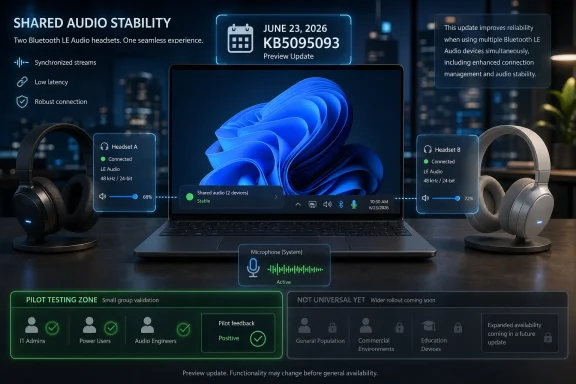 Microsoft Is Servicing the Audio Stack, Not Just Showcasing It
The important change in KB5095093 is not merely that Windows 11 gains another Bluetooth-related line item. The important change is that Microsoft is now using cumulative updates to harden the same LE Audio foundation that Shared Audio depends on.KB5095093 includes Bluetooth audio stability fixes and LE Audio reliability improvements for Windows 11 versions 24H2 and 25H2. Microsoft says the update reduces the time it takes for LE Audio accessories to start playing audio while the microphone is in use, and improves reliability after disconnect and reconnect events.
That sounds mundane until you remember what usually kills a Windows audio feature in the real world. It is not the splashy pairing screen. It is the meeting that starts with silence, the headset that comes back from a phone handoff in the wrong state, the microphone path that forces audio into an old compromise mode, and the help desk ticket that says only, “Bluetooth is broken again.”
Shared Audio needs the boring parts to work. Two listeners, one PC, LE Audio devices, fast reconnection, stable voice behavior, and predictable accessory state are not separate stories. They are the retail viability test.
The June Decision Is Pilot Now, Standardize Later
For WindowsForum readers, the actionable answer is straightforward. If you control a small pool of Windows 11 24H2 or 25H2 systems with documented LE Audio support, install KB5095093 on test machines and validate Shared Audio-adjacent behavior now. If you manage fleets, classrooms, conferencing spaces, or accessibility deployments, do not treat June 2026 as the moment to write LE Audio into standard operating procedure.The reason is eligibility, not ambition. Microsoft says LE Audio support on Windows 11 generally started entering the market in 2024, with select 2023 models also supported. That is a hardware-and-driver reality, not a marketing slogan.
A PC can be Bluetooth LE capable and still not be a usable LE Audio endpoint for Windows 11’s newer audio features. That distinction matters because “Bluetooth LE” often appears in spec sheets as a low-power radio capability, while LE Audio requires the right combination of radio, firmware, Windows support, drivers, and compatible accessories.
The safest June posture is a controlled pilot. Use real machines, real headsets, real meeting apps, and real suspend/resume cycles. Treat the cumulative update as a signal that Microsoft is tightening the stack, not as proof that every Bluetooth 5.x laptop in the building has suddenly become Shared Audio-ready.
Shared Audio’s Preview Phase Was the Trailer; KB5095093 Is the Production Rehearsal
Microsoft first previewed Shared Audio on Windows 11 Copilot+ PCs in October 2025. That preview established the headline feature: one Windows 11 PC could share audio to two compatible Bluetooth LE Audio devices.In March 2026, Microsoft added the kind of details that separate a novelty from a usable feature. Per-listener volume sliders and a taskbar indicator turned Shared Audio from “look what Windows can do” into something closer to “two people might actually use this on a train, in a classroom, or at a desk.”
Those additions matter because Shared Audio is inherently social. When two people listen from one PC, the operating system has to expose state clearly. One listener may need lower volume. Another may disconnect. The user needs to know whether shared playback is active without digging through a settings maze.
KB5095093 lands in that same arc, but lower in the stack. It is not the glamorous Shared Audio announcement; it is the stability work that makes the announcement less fragile. Faster LE Audio playback start while the microphone is active and better reconnect reliability are exactly the kind of improvements that make shared listening and modern Bluetooth calling feel less experimental.
The Compatibility Trap Is Where Early Coverage Still Comes Up Short
The coverage gap around Shared Audio is not that people have failed to describe the feature. The basics are easy: pair compatible accessories, use a supported Windows 11 PC, and share playback to two listeners when the feature is available.The missing piece is the eligibility matrix users actually need. Microsoft has been clear enough to say LE Audio support started reaching the Windows 11 market in 2024, with some 2023 devices included. It has also left enough ambiguity that buyers and admins cannot assume support from “Bluetooth LE” alone.
That puts Windows users in an awkward middle. The operating system may be current, the headphones may be modern, and the PC may advertise low-energy Bluetooth, yet Shared Audio still may not appear or behave reliably. The culprit may be firmware, driver exposure, accessory support, OEM validation, or phased feature availability.
For IT departments, that means procurement language has to get sharper. “Bluetooth LE capable” is not sufficient. The useful question is whether the PC platform supports Bluetooth LE Audio in Windows 11 24H2 or 25H2 and whether the OEM has validated the accessory class you intend to use.
For enthusiasts, the lesson is less bureaucratic but just as important. If the toggle is missing, do not assume Windows Update failed. Your machine may simply sit outside the supported LE Audio population, even if the radio stack looks modern on paper.
The Real Upgrade Is Stereo, Microphones, and Fewer Bad Hand-Offs
Bluetooth audio on Windows has carried a reputation problem for years because the worst moments happen under pressure. Headphones sound fine until the microphone turns on. A call starts and fidelity falls. A device reconnects after sleep or after being used with a phone, and the PC no longer behaves like the primary audio host.LE Audio is Microsoft’s path out of that mess, but the path is incremental. Shared Audio is the visible consumer-friendly feature. Reliability while using the microphone is the professional-grade requirement.
KB5095093’s LE Audio fixes point directly at that pain. Reducing the time before LE Audio accessories begin playing while the microphone is active addresses a scenario that users experience as lag, silence, or uncertainty. Improving reliability after disconnect and reconnect addresses the increasingly common reality that headsets move between laptops, phones, tablets, and meeting rooms all day.
That is why the June update matters even to people who never plan to share a movie with a second listener. Shared Audio may be the poster feature, but the same stack underpins better behavior for calls, meetings, accessibility devices, and everyday Bluetooth audio.
Copilot+ Branding Helped the Launch, but It Cannot Define the Feature Forever
Shared Audio’s preview debut on Copilot+ PCs made sense as a launch strategy. Microsoft could start with a smaller, newer hardware base and avoid promising support across the chaotic Windows ecosystem on day one.But LE Audio cannot remain an AI-PC halo feature if it is going to matter. Bluetooth audio is a mainstream expectation, and Windows 11’s credibility here depends on whether the improvements show up across ordinary retail systems that people actually own or buy through normal business channels.
That is why the 2024-and-select-2023 hardware window is so important. It implies a broader market transition rather than a feature forever confined to a few showcase laptops. At the same time, it makes clear that older Windows 11 PCs will not necessarily age into support just because the OS is patched.
Microsoft’s messaging needs to walk a narrow line. If it overpromises, users will blame Windows when the option is missing. If it underexplains, OEMs and accessory makers get to hide behind vague Bluetooth branding. The June 2026 servicing work is encouraging, but the next phase needs cleaner compatibility language.
The Settings Path Is Simple; The Prerequisites Are Not
The user-facing procedure, when the feature is available, should be simple: update Windows 11, pair compatible Bluetooth LE Audio devices, open the system audio controls, and use the Shared Audio entry exposed through Windows 11’s audio experience. Microsoft’s recent preview work also points to taskbar visibility and independent volume control as the model users should expect.The harder part is validating whether a particular PC belongs in the supported population. Start with Windows 11 24H2 or 25H2, because KB5095093 targets those versions. Then confirm that the PC vendor documents LE Audio support for that model, not merely Bluetooth LE support in general.
Next, update the Bluetooth, audio, and chipset drivers through the OEM’s servicing channel as well as Windows Update. LE Audio sits at the intersection of OS support and platform firmware, which is precisely where generic driver assumptions go to die.
Finally, test with the actual accessories you plan to use. A headset that works perfectly for classic Bluetooth audio may not expose the LE Audio behavior Windows needs for Shared Audio or improved microphone scenarios. A device that pairs cleanly may still fail the more important test: reconnecting predictably after sleep, phone handoff, or microphone use.
June’s Patch Tuesday Story Is More Complicated Than a Single Switch
The user question around June 2026 is understandable: did Patch Tuesday make Shared Audio mainstream? The honest answer is that the direction is mainstream, but the evidence does not support a single universal switch-on claim.KB5095093 was released on June 23, 2026, as a preview cumulative update for Windows 11 24H2 and 25H2. Its Bluetooth and LE Audio improvements are production-quality servicing work, but the verified record does not establish that every stable Windows 11 user received Shared Audio through the June Patch Tuesday security release.
That distinction matters because Windows feature delivery is now layered. Some changes arrive in preview cumulative updates. Some are controlled feature rollouts. Some require compatible hardware. Some depend on OEM drivers. Some become broadly visible only after Microsoft decides the telemetry is good enough.
For admins, that means KB numbers matter. If you are testing Shared Audio readiness, record whether the machine is on KB5095093 or a later cumulative update that contains the same fixes. Do not simply write “June update” in your deployment notes and expect the next technician to know what you meant.
For enthusiasts, it means patience and precision. If your system is fully updated but the Shared Audio experience is not present, that is not necessarily a bug. It may be staged rollout behavior, unsupported hardware, missing firmware, or accessory limitations.
Why This Matters More in Offices Than on Airplanes
The obvious Shared Audio demo is two people watching or listening from one laptop. That is useful, but it undersells the enterprise angle.The bigger opportunity is standardizing modern Bluetooth behavior in environments where wired headsets have remained the safe default. Conference rooms, hot desks, training labs, accessibility programs, and hybrid work setups all suffer when Bluetooth audio is unpredictable. If LE Audio becomes reliable enough, Windows finally has a better answer than “try unpairing it.”
Shared Audio also has accessibility implications, especially as Windows 11’s hearing-device story matures. But here again, the practical answer depends on hardware. Microsoft’s own guidance makes clear that Windows 11 LE Audio support is tied to supported PCs and devices, not merely to the presence of a Bluetooth radio.
That makes pilot selection crucial. The best test group is not the executive team with whatever laptops they happen to own. It is a narrow set of identical or near-identical machines, known firmware, known headsets or hearing devices, and repeatable scenarios: Teams or Zoom calls, media playback, sleep and resume, phone handoff, and dual-listener sessions where available.
If that sounds less exciting than “Windows can share audio now,” good. That is what mature platform adoption looks like.
The Troubleshooting Playbook Starts Before the First Pairing Attempt
Troubleshooting LE Audio in Windows 11 should begin with inventory, not superstition. The first question is whether the PC model is documented for Windows 11 LE Audio support. The second is whether the headset, earbuds, speaker, or hearing device supports the required LE Audio behavior.After that, the predictable steps still matter. Install KB5095093 or a later cumulative update carrying the same Bluetooth fixes. Update OEM Bluetooth and audio drivers. Update headset firmware through the vendor’s app when available. Remove and re-pair accessories after major Bluetooth stack changes, especially if the device was previously paired in classic mode.
Then test the failure modes Microsoft is actively improving. Start playback while the microphone is active. Disconnect and reconnect the accessory. Move the headset to a phone and back. Resume the PC from sleep. If Shared Audio is present, test independent volume behavior and confirm the taskbar indicator makes sense to nontechnical users.
The lesson from WindowsForum’s own ongoing discussion around KB5095093 and Shared Audio is that these are not isolated annoyances. AirPods, LE Audio accessories, mute sync, call stability, and reconnect behavior all sit in the same messy territory where Windows, firmware, and accessory ecosystems overlap. That is why this servicing wave deserves closer attention than a typical Bluetooth bug-fix note.
The Sensible June 2026 Plan Is Narrow, Measured, and Useful
The correct response to KB5095093 is neither hype nor dismissal. It is targeted validation.If you are an enthusiast with compatible hardware, this is the moment to test because the stack is clearly moving. If you are an admin, this is the moment to build a compatibility table, not to rewrite your headset standard. If you are buying new Windows 11 laptops, this is the moment to ask vendors explicit LE Audio questions before purchase orders lock you into another hardware cycle.
The Signal From KB5095093 Is Clear Enough to Act On
KB5095093 does not make every Windows 11 PC a Shared Audio PC, and it does not erase the need for compatible hardware, firmware, drivers, and accessories. It does, however, change the decision from “wait until this leaves preview” to “pilot carefully where the hardware is already credible.”- KB5095093 for Windows 11 24H2 and 25H2 was released on June 23, 2026, and includes Bluetooth audio stability fixes plus LE Audio reliability improvements.
- The most practical LE Audio fixes reduce startup delay when the microphone is active and improve behavior after disconnect and reconnect events.
- Shared Audio began as an October 2025 Copilot+ PC preview and gained per-listener volume sliders plus a taskbar indicator in March 2026.
- LE Audio support began entering the Windows 11 market broadly in 2024, with select 2023 models also supported, but it is not universal.
- A Bluetooth LE-capable PC is not automatically a Windows 11 LE Audio-capable PC, so model-level OEM validation matters.
- The right June 2026 move is to pilot on known-compatible 24H2 or 25H2 hardware and wait for the next servicing wave before broad standardization.
References
- Primary source: support.microsoft.com
Uso de dispositivos auditivos con tu PC Windows 11 | Microsoft Support
Dispositivos de audio Bluetooth LE, ajuste del dispositivo auditivo, ajuste de los valores preestablecidos de audio y volumen de sonido ambiental.support.microsoft.com - Independent coverage: blogs.windows.com
Extending Bluetooth® LE Audio on Windows 11 with shared audio (preview)
[Updated 3/05] Shared audioblogs.windows.com - Primary source: WindowsForum
Windows 11 KB5095093 Bluetooth Fix: AirPods, LE Audio, Mute Sync, Calls | Windows Forum
Microsoft released Windows 11 KB5095093 on June 23, 2026, as an optional preview update for Windows 11 versions 24H2 and 25H2, and its most consequential...windowsforum.com
