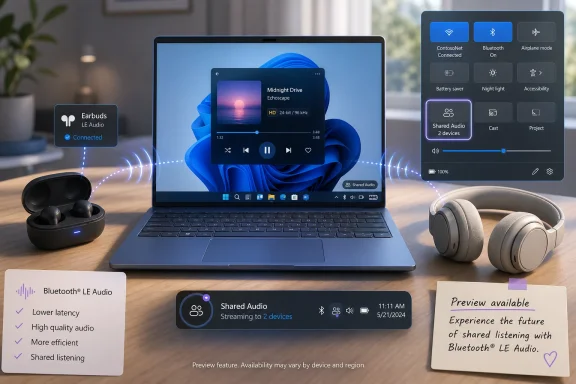
Microsoft is rolling out Shared Audio in Windows 11 through the May 26, 2026 KB5089573 preview update, letting two people listen to the same PC at once through separate compatible Bluetooth LE Audio headphones, earbuds, speakers, or hearing devices. The feature is easy to describe because Apple users have had a version of this social-listening trick for years. It is harder to deliver on Windows because the PC ecosystem is not a single ecosystem at all, but a negotiation among silicon, radios, drivers, firmware, accessories, and Microsoft’s own staggered feature rollout machinery.
That makes Shared Audio both a charming quality-of-life improvement and a useful stress test for modern Windows. It shows Microsoft trying to make the PC feel less like a tangle of endpoints and more like a coherent consumer device. It also shows why, even in 2026, “Windows now supports it” often means “your particular Windows machine might support it, if the rest of the stack agrees.”
The pitch is simple: open Quick Settings, choose Shared audio, select two supported paired devices, and start sharing the same audio stream. Two people can watch a film on a plane, listen to music while studying, or follow a video without passing one set of earbuds back and forth. For a feature that depends on fairly modern wireless plumbing, the user story is refreshingly human.
Windows has long been awkward at this. Users could sometimes work around the limitation with virtual audio cables, mixer software, wired splitters, vendor utilities, or app-specific output routing, but Windows itself did not provide a mainstream Bluetooth button that said, in effect, “play this on both headsets.” The absence became more glaring as laptops lost ports, phones normalized earbuds, and tablets made shared media feel effortless.
Shared Audio is Microsoft’s answer, but it is not merely a duplicate-output toggle. It is built on Bluetooth LE Audio broadcast technology, which is why the new button appears only when the underlying PC and accessories can handle the job. That distinction matters, because it separates this from the old dream of “just send the same sound to two Bluetooth devices.” Microsoft is not brute-forcing classic Bluetooth into something it was never especially good at doing.
The update arrives as part of KB5089573 for Windows 11 versions 24H2 and 25H2, moving supported systems to OS builds 26100.8524 and 26200.8524. Microsoft is treating it as a gradual rollout, which means two users on the same build may not see the same feature on the same day. That is irritating, but it is also now the normal grammar of Windows feature delivery.
Windows cannot copy that magic directly because Windows is not a product in the same way an iPhone is a product. It is a platform that has to tolerate years of Bluetooth adapters, OEM firmware decisions, Realtek and Intel driver branches, Qualcomm and MediaTek radios, assistive devices, gaming headsets, and bargain earbuds with optimistic spec sheets. Microsoft can add the button; it cannot make every Bluetooth chip already in the field behave like a new one.
That is why the Shared Audio story should not be judged solely by whether it matches Apple’s elegance on day one. The more important question is whether Microsoft has found a standards-based path that can scale beyond one vendor’s accessory garden. If it has, this may become one of those features that seems late, then boring, then indispensable.
There is also a philosophical difference. Apple’s audio sharing has been a consumer ecosystem feature first. Windows’ implementation, because it leans on Bluetooth LE Audio broadcast behavior, gestures toward a broader world: hearing devices, shared listening in public spaces, workplace accessibility, and lower-latency audio profiles. The consumer use case gets the headline, but the infrastructure could matter more than the demo.
Classic Bluetooth audio has always carried compromises. Anyone who has watched Windows turn a nice pair of headphones into a tinny headset during a call understands the pain. The system had to juggle media playback, microphone capture, bandwidth limits, and old profiles that were designed for a different era of mobile audio.
LE Audio is the industry’s attempt to get out of that corner. It can support better behavior when microphones are involved, more efficient transport, lower-latency modes, and broadcast-style listening. Shared Audio is one visible result of that deeper transition.
That is why this feature is more than a convenience toggle. Microsoft is using a friendly scenario to move users and hardware vendors toward the modern Bluetooth stack. When the operating system gives people a reason to care about LE Audio, it also gives OEMs and accessory makers a reason to stop treating support as a buried spec-sheet checkbox.
Microsoft’s own support guidance has been careful on this point. Windows PCs with Bluetooth LE Audio support began appearing more commonly in 2024, though some 2023 models support it. That leaves a vast installed base of Windows 11 machines that may be modern enough to run the operating system but not modern enough to participate in this particular audio future.
The user-facing check is partial. In Settings, under Bluetooth and devices, some systems show an option to use LE Audio when available. If the setting is missing, the PC likely does not support Bluetooth LE Audio in the way Windows needs. But even if that toggle is present, Shared Audio may still require broadcast support that is not exposed through a clean diagnostic screen.
That diagnostic gap is going to generate forum threads. Users will ask why their expensive laptop cannot do what a cheaper new machine can. They will ask why their Bluetooth 5.x adapter is not enough. They will ask why one set of earbuds appears and another does not. In many cases, the truthful answer will be a deeply unsatisfying mix of controller capability, driver support, firmware, accessory profiles, and Microsoft’s staged rollout switch.
From Microsoft’s perspective, staged rollout reduces risk. If a new Bluetooth feature triggers reliability problems on a subset of systems, the company can slow or stop exposure before the failure becomes universal. That is reasonable engineering, especially for a feature dependent on OEM drivers and accessories.
From the user’s perspective, it blurs the line between “not yet,” “not supported,” and “broken.” Windows already suffers from enough conditional UI, hidden eligibility rules, and A/B-tested experiences. Shared Audio adds another small example: the feature is real, the update is installed, but the button may still be missing for reasons the interface does not explain.
This is where Microsoft should do better. If a system lacks broadcast support, say so. If the PC supports LE Audio but the connected earbuds do not, say that. If the rollout has not reached the device, say that too. Silence is not a diagnostic tool; it is an invitation to reinstall drivers and blame the wrong component.
This matters because laptops are still social machines in small ways. People watch sports highlights together, review family videos, study course lectures, preview edits, and catch up on streaming shows. The PC industry has spent years improving displays, hinges, battery life, and webcams, but audio sharing remained clumsy.
The feature also makes Windows tablets and 2-in-1s feel less compromised as entertainment devices. A Surface, Lenovo Yoga, HP Spectre, or ASUS convertible is easier to sell as a living-room and travel companion when it can handle the same casual scenario users already expect from phones. That expectation gap is where platform polish lives.
There will be limitations. Latency-sensitive users will want to know how well the two headsets stay synchronized. Gamers will ask whether the low-latency profile changes the experience materially. Audiophiles will want control and transparency. But for the mainstream scenario — two people listening to the same thing without disturbing everyone else — “good enough and built in” is a major upgrade.
That matters in classrooms, hybrid meetings, training sessions, and family settings where one listener may need a different volume or device type. Windows Latest observed that Windows 11 can expose individual volume control for each connected headset in a shared setup, which is exactly the kind of detail that turns a feature from a parlor trick into a practical tool. Shared listening is not shared comfort if one person’s safe volume is another person’s whisper.
There is a broader accessibility point here. The best accessibility features often begin by solving a specific need and then become useful to everyone. Captions, high-contrast modes, speech recognition, and focus tools all followed versions of that path. Shared Audio may travel in the other direction: marketed as a consumer convenience, but quietly valuable for users whose audio needs differ from the default.
Microsoft should lean into that. The company’s accessibility work is strongest when it treats inclusion as a design constraint, not a compliance banner. If Shared Audio matures with clear device compatibility, per-listener controls, reliable reconnection, and predictable latency, it could become one of the more meaningful Bluetooth improvements Windows has shipped in years.
The enterprise question is less “Should we enable this?” than “How do we explain it?” If a fleet includes 2022 laptops, 2024 laptops, mixed Bluetooth drivers, and multiple headset vendors, Shared Audio will not behave consistently. Some devices will show the tile. Some will not. Some headsets will qualify. Some will remain invisible.
That creates procurement implications. If organizations care about modern Bluetooth audio, they will need to ask more precise questions when buying PCs and peripherals. “Bluetooth 5.3” is not enough. “Supports Bluetooth LE Audio” may still not be enough. Broadcast audio capability and Windows driver support become part of the real-world checklist.
There is also a training and policy dimension. In shared offices, call centers, schools, and regulated environments, audio routing can intersect with privacy and compliance. A feature that makes it easier to share sound also makes it easier to share sound unintentionally. Microsoft’s interface will need to make the active shared state obvious, and administrators may eventually want policy controls if the feature becomes common.
This is a welcome shift from the more exhausting parts of the Windows 11 era. For years, Windows news has been dominated by hardware requirements, account nudges, Copilot placement, Start menu changes, update anxiety, and ads or recommendations appearing where users did not ask for them. A feature like Shared Audio is different. It solves a recognizable problem.
That does not make the update uncomplicated. Preview updates are still optional, staged, and sometimes best avoided on production machines unless a fix or feature is specifically needed. Enterprises will wait for broader validation. Enthusiasts will jump in early and map the compatibility landscape for everyone else.
Still, the direction is encouraging. Windows 11 does not become better only through AI features or redesigned surfaces. It becomes better when long-standing “why can’t it just do this?” moments disappear. Shared Audio is exactly that kind of small, overdue repair.
That problem is now arriving at the Windows UI layer. A user may own a PC with Bluetooth, a headset with Bluetooth, and a fully updated copy of Windows 11, yet still lack Shared Audio. To an ordinary person, that sounds absurd. To anyone familiar with Bluetooth profiles, it sounds predictable.
Microsoft, OEMs, and accessory makers need clearer labels. A laptop product page should not make buyers reverse-engineer whether LE Audio broadcast support is present. Earbuds should not bury LE Audio support in firmware notes or regional spec variations. Windows should not rely on a missing Quick Settings tile as the primary signal that the chain is incomplete.
There is precedent for doing better. Wi-Fi branding eventually learned to communicate generational differences more clearly. USB, despite its own naming sins, at least increasingly uses logos and speed markers. Bluetooth audio needs the same consumer-facing honesty, especially as Auracast-style broadcast listening becomes more common in public and personal devices.
A platform feature is not valuable merely because it is possible. It is valuable because it is discoverable, stable, supported, and understandable. Most people do not want to build an audio pipeline to watch a movie with someone. They want the button.
The same logic applies to IT. A built-in Windows feature can be documented, managed, and supported in a way a random audio-routing workaround cannot. If Shared Audio behaves reliably, it reduces the need for users to install utilities that hook deeply into the audio stack. That is a security and manageability improvement as much as a convenience win.
There is still room for advanced routing features in Windows. Microsoft could do far more with per-app outputs, virtual devices, and mixer-level controls. But Shared Audio is not trying to turn Windows into a studio console. It is trying to make one common human scenario native.
That visibility can change behavior. Users who never cared about LE Audio may start checking for it before buying earbuds. Reviewers may start testing it. OEMs may start exposing it more clearly. Accessory makers may stop treating Windows support as an afterthought behind phone-first features.
This is how platform transitions often happen. The underlying technology arrives first, unevenly and quietly. Then a simple feature gives the technology a reason to matter. Over time, the absence of support becomes a product weakness.
Microsoft should exploit that pressure carefully. If it overpromises, users will blame Windows for hardware that was never capable. If it underexplains, the feature will feel random. The right move is to make Windows unusually clear about the chain of requirements: OS build, rollout status, PC radio, driver, LE Audio support, broadcast support, and accessory compatibility.
Older machines may still run Windows 11 perfectly well while missing this feature entirely. USB Bluetooth adapters may or may not solve the problem, depending on controller support and drivers. Headphones that work beautifully for ordinary stereo playback may not appear in the Shared Audio panel.
The likely result is a period of confusion followed by a gradual settling of the market. Compatibility lists will circulate. Enthusiast forums will identify which laptops and earbuds behave. OEM support pages will become more explicit because customers will ask.
That is not ideal, but it is not unusual. Wi-Fi 6E, HDR, Windows Hello, Precision Touchpads, modern standby, and advanced webcam features all went through versions of this. The PC’s superpower is variety; its tax is unevenness.
Shared Audio acknowledges that PCs are frequently shared in little moments. Two students at a library. A parent and child on a flight. A technician and trainee watching a procedure. A couple finishing an episode without waking anyone else. These are not enterprise transformation scenarios, but they are real use cases.
Good operating systems understand those moments. They reduce friction not because the friction is catastrophic, but because it is needlessly persistent. Windows has accumulated many such rough edges over decades. Removing one is worth noticing.
It is also worth noting that Microsoft is doing this through an open standard rather than a proprietary Windows-only headset ecosystem. That gives the feature a better long-term chance, even if the early experience is messier than Apple’s. Standards-based progress is rarely cinematic, but it tends to age well.
That matters because sharing audio is situational. Users do not want to configure it once in Control Panel and hope it survives. They want to turn it on when another person sits down, and turn it off when the shared session ends. A taskbar indicator when sharing is active also helps prevent the mode from becoming invisible.
The new panel’s job is harder than it seems. It must show only supported devices without making unsupported ones feel mysteriously broken. It must handle pairing state, connection state, volume, and the transition back to ordinary audio. It must do this in a flyout that users expect to be fast.
If Microsoft gets that flow right, Shared Audio will feel native. If it gets it wrong, the feature will become another Windows setting people know exists but avoid using. The difference will be measured not in technical support for LE Audio, but in whether the second listener can join before the movie starts.
If the tile is missing, patience may be warranted because the rollout is staged. But patience will not add missing hardware support. At some point, a missing tile on a fully updated system is evidence that the PC or its drivers are not eligible.
That is the hardest message for Microsoft to communicate. Windows users are accustomed to software updates adding features to existing machines. Shared Audio is a software feature riding on hardware capabilities that were not universal when many Windows 11 PCs were sold. The update can expose the capability; it cannot conjure the radio path.
For buyers, the lesson is clearer: if Bluetooth audio matters, buy machines and accessories that explicitly support LE Audio and modern broadcast features. The days when “has Bluetooth” was a meaningful audio spec are over.
That makes Shared Audio both a charming quality-of-life improvement and a useful stress test for modern Windows. It shows Microsoft trying to make the PC feel less like a tangle of endpoints and more like a coherent consumer device. It also shows why, even in 2026, “Windows now supports it” often means “your particular Windows machine might support it, if the rest of the stack agrees.”
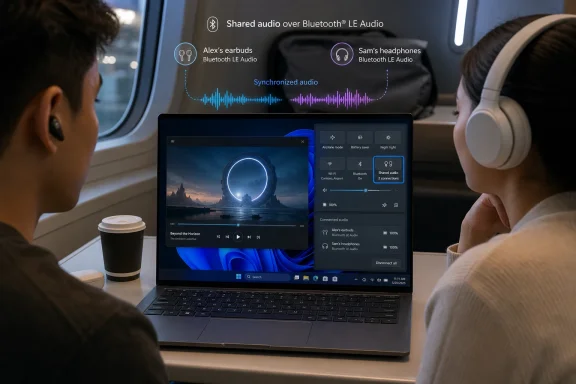 Microsoft Finally Turns the PC Into a Two-Headphone Device
The pitch is simple: open Quick Settings, choose Shared audio, select two supported paired devices, and start sharing the same audio stream. Two people can watch a film on a plane, listen to music while studying, or follow a video without passing one set of earbuds back and forth. For a feature that depends on fairly modern wireless plumbing, the user story is refreshingly human.Windows has long been awkward at this. Users could sometimes work around the limitation with virtual audio cables, mixer software, wired splitters, vendor utilities, or app-specific output routing, but Windows itself did not provide a mainstream Bluetooth button that said, in effect, “play this on both headsets.” The absence became more glaring as laptops lost ports, phones normalized earbuds, and tablets made shared media feel effortless.
Shared Audio is Microsoft’s answer, but it is not merely a duplicate-output toggle. It is built on Bluetooth LE Audio broadcast technology, which is why the new button appears only when the underlying PC and accessories can handle the job. That distinction matters, because it separates this from the old dream of “just send the same sound to two Bluetooth devices.” Microsoft is not brute-forcing classic Bluetooth into something it was never especially good at doing.
The update arrives as part of KB5089573 for Windows 11 versions 24H2 and 25H2, moving supported systems to OS builds 26100.8524 and 26200.8524. Microsoft is treating it as a gradual rollout, which means two users on the same build may not see the same feature on the same day. That is irritating, but it is also now the normal grammar of Windows feature delivery.
The Apple Comparison Is Obvious, but It Is Also Incomplete
The easiest shorthand is “AirPods-style audio sharing for Windows,” and that comparison is not wrong. Apple’s version works because Apple controls the phone, the operating system, the earbuds, much of the pairing experience, and the marketing story. When a friend brings compatible AirPods near an iPhone, the experience feels like the hardware was designed to anticipate the social moment.Windows cannot copy that magic directly because Windows is not a product in the same way an iPhone is a product. It is a platform that has to tolerate years of Bluetooth adapters, OEM firmware decisions, Realtek and Intel driver branches, Qualcomm and MediaTek radios, assistive devices, gaming headsets, and bargain earbuds with optimistic spec sheets. Microsoft can add the button; it cannot make every Bluetooth chip already in the field behave like a new one.
That is why the Shared Audio story should not be judged solely by whether it matches Apple’s elegance on day one. The more important question is whether Microsoft has found a standards-based path that can scale beyond one vendor’s accessory garden. If it has, this may become one of those features that seems late, then boring, then indispensable.
There is also a philosophical difference. Apple’s audio sharing has been a consumer ecosystem feature first. Windows’ implementation, because it leans on Bluetooth LE Audio broadcast behavior, gestures toward a broader world: hearing devices, shared listening in public spaces, workplace accessibility, and lower-latency audio profiles. The consumer use case gets the headline, but the infrastructure could matter more than the demo.
Bluetooth LE Audio Is the Real Feature Hiding Under the Button
Bluetooth LE Audio is not just a branding exercise for newer earbuds. It is a rework of how Bluetooth audio can be transported, with the LC3 codec and support for more flexible unicast and broadcast scenarios. In practical terms, it is the technology family that lets the PC send audio in ways classic Bluetooth was not built to handle cleanly.Classic Bluetooth audio has always carried compromises. Anyone who has watched Windows turn a nice pair of headphones into a tinny headset during a call understands the pain. The system had to juggle media playback, microphone capture, bandwidth limits, and old profiles that were designed for a different era of mobile audio.
LE Audio is the industry’s attempt to get out of that corner. It can support better behavior when microphones are involved, more efficient transport, lower-latency modes, and broadcast-style listening. Shared Audio is one visible result of that deeper transition.
That is why this feature is more than a convenience toggle. Microsoft is using a friendly scenario to move users and hardware vendors toward the modern Bluetooth stack. When the operating system gives people a reason to care about LE Audio, it also gives OEMs and accessory makers a reason to stop treating support as a buried spec-sheet checkbox.
The Catch Is That “Bluetooth LE” Is Not Enough
The most important caveat is also the least satisfying: a PC can advertise Bluetooth Low Energy and still not support the specific LE Audio behavior needed for Shared Audio. Users are likely to discover this through absence. If the Shared audio tile does not appear in Quick Settings after the rollout reaches them, the likely explanations are unsupported hardware, unsupported accessories, missing drivers, or a feature rollout that has not yet landed.Microsoft’s own support guidance has been careful on this point. Windows PCs with Bluetooth LE Audio support began appearing more commonly in 2024, though some 2023 models support it. That leaves a vast installed base of Windows 11 machines that may be modern enough to run the operating system but not modern enough to participate in this particular audio future.
The user-facing check is partial. In Settings, under Bluetooth and devices, some systems show an option to use LE Audio when available. If the setting is missing, the PC likely does not support Bluetooth LE Audio in the way Windows needs. But even if that toggle is present, Shared Audio may still require broadcast support that is not exposed through a clean diagnostic screen.
That diagnostic gap is going to generate forum threads. Users will ask why their expensive laptop cannot do what a cheaper new machine can. They will ask why their Bluetooth 5.x adapter is not enough. They will ask why one set of earbuds appears and another does not. In many cases, the truthful answer will be a deeply unsatisfying mix of controller capability, driver support, firmware, accessory profiles, and Microsoft’s staged rollout switch.
The Rollout Model Makes Discovery Messier Than the Feature
Microsoft says Shared Audio is rolling out gradually. That language has become familiar enough to feel harmless, but it has real consequences for troubleshooting. A user on build 26200.8524 may read that the feature exists, open Quick Settings, and find nothing. Another user on the same build may see it immediately.From Microsoft’s perspective, staged rollout reduces risk. If a new Bluetooth feature triggers reliability problems on a subset of systems, the company can slow or stop exposure before the failure becomes universal. That is reasonable engineering, especially for a feature dependent on OEM drivers and accessories.
From the user’s perspective, it blurs the line between “not yet,” “not supported,” and “broken.” Windows already suffers from enough conditional UI, hidden eligibility rules, and A/B-tested experiences. Shared Audio adds another small example: the feature is real, the update is installed, but the button may still be missing for reasons the interface does not explain.
This is where Microsoft should do better. If a system lacks broadcast support, say so. If the PC supports LE Audio but the connected earbuds do not, say that. If the rollout has not reached the device, say that too. Silence is not a diagnostic tool; it is an invitation to reinstall drivers and blame the wrong component.
For Consumers, the Killer App Is Travel
The most obvious win is travel. Two people sharing one laptop on a plane, train, dorm room bed, or hotel desk should not need a wired splitter in 2026. Shared Audio turns a Windows laptop into something closer to a shared screen rather than a single-listener device.This matters because laptops are still social machines in small ways. People watch sports highlights together, review family videos, study course lectures, preview edits, and catch up on streaming shows. The PC industry has spent years improving displays, hinges, battery life, and webcams, but audio sharing remained clumsy.
The feature also makes Windows tablets and 2-in-1s feel less compromised as entertainment devices. A Surface, Lenovo Yoga, HP Spectre, or ASUS convertible is easier to sell as a living-room and travel companion when it can handle the same casual scenario users already expect from phones. That expectation gap is where platform polish lives.
There will be limitations. Latency-sensitive users will want to know how well the two headsets stay synchronized. Gamers will ask whether the low-latency profile changes the experience materially. Audiophiles will want control and transparency. But for the mainstream scenario — two people listening to the same thing without disturbing everyone else — “good enough and built in” is a major upgrade.
For Accessibility, the Headline Feature Has a Quieter Second Life
Microsoft’s inclusion of hearing devices in the Shared Audio story is not incidental. LE Audio and broadcast audio have long been discussed as important technologies for assistive listening. A PC that can share audio with compatible hearing devices is not just more convenient; it can be more inclusive.That matters in classrooms, hybrid meetings, training sessions, and family settings where one listener may need a different volume or device type. Windows Latest observed that Windows 11 can expose individual volume control for each connected headset in a shared setup, which is exactly the kind of detail that turns a feature from a parlor trick into a practical tool. Shared listening is not shared comfort if one person’s safe volume is another person’s whisper.
There is a broader accessibility point here. The best accessibility features often begin by solving a specific need and then become useful to everyone. Captions, high-contrast modes, speech recognition, and focus tools all followed versions of that path. Shared Audio may travel in the other direction: marketed as a consumer convenience, but quietly valuable for users whose audio needs differ from the default.
Microsoft should lean into that. The company’s accessibility work is strongest when it treats inclusion as a design constraint, not a compliance banner. If Shared Audio matures with clear device compatibility, per-listener controls, reliable reconnection, and predictable latency, it could become one of the more meaningful Bluetooth improvements Windows has shipped in years.
Enterprise IT Will See a Small Feature With a Large Support Tail
For sysadmins, Shared Audio is unlikely to become a top-line deployment priority. No one is approving a Windows 11 migration because two employees can listen to the same training video on separate earbuds. But small user-facing features have a way of becoming support tickets, especially when compatibility is uneven.The enterprise question is less “Should we enable this?” than “How do we explain it?” If a fleet includes 2022 laptops, 2024 laptops, mixed Bluetooth drivers, and multiple headset vendors, Shared Audio will not behave consistently. Some devices will show the tile. Some will not. Some headsets will qualify. Some will remain invisible.
That creates procurement implications. If organizations care about modern Bluetooth audio, they will need to ask more precise questions when buying PCs and peripherals. “Bluetooth 5.3” is not enough. “Supports Bluetooth LE Audio” may still not be enough. Broadcast audio capability and Windows driver support become part of the real-world checklist.
There is also a training and policy dimension. In shared offices, call centers, schools, and regulated environments, audio routing can intersect with privacy and compliance. A feature that makes it easier to share sound also makes it easier to share sound unintentionally. Microsoft’s interface will need to make the active shared state obvious, and administrators may eventually want policy controls if the feature becomes common.
The Update Around It Says Microsoft Is Still Sanding Windows 11’s Edges
KB5089573 is not only a Shared Audio release. The preview update also includes other Windows 11 improvements, including Task Manager visibility for NPU activity, camera-sharing capabilities for multiple apps, setup refinements, performance improvements, and Windows Hello changes. That context matters because Shared Audio is part of a broader pattern: Microsoft is working on the operating system’s everyday friction points.This is a welcome shift from the more exhausting parts of the Windows 11 era. For years, Windows news has been dominated by hardware requirements, account nudges, Copilot placement, Start menu changes, update anxiety, and ads or recommendations appearing where users did not ask for them. A feature like Shared Audio is different. It solves a recognizable problem.
That does not make the update uncomplicated. Preview updates are still optional, staged, and sometimes best avoided on production machines unless a fix or feature is specifically needed. Enterprises will wait for broader validation. Enthusiasts will jump in early and map the compatibility landscape for everyone else.
Still, the direction is encouraging. Windows 11 does not become better only through AI features or redesigned surfaces. It becomes better when long-standing “why can’t it just do this?” moments disappear. Shared Audio is exactly that kind of small, overdue repair.
The PC Ecosystem Needs Better Compatibility Labels
The biggest risk for Shared Audio is not that the feature fails. It is that users cannot tell why it fails. Bluetooth branding has always been unusually bad at communicating capability. Version numbers suggest progress, but optional features do most of the real work.That problem is now arriving at the Windows UI layer. A user may own a PC with Bluetooth, a headset with Bluetooth, and a fully updated copy of Windows 11, yet still lack Shared Audio. To an ordinary person, that sounds absurd. To anyone familiar with Bluetooth profiles, it sounds predictable.
Microsoft, OEMs, and accessory makers need clearer labels. A laptop product page should not make buyers reverse-engineer whether LE Audio broadcast support is present. Earbuds should not bury LE Audio support in firmware notes or regional spec variations. Windows should not rely on a missing Quick Settings tile as the primary signal that the chain is incomplete.
There is precedent for doing better. Wi-Fi branding eventually learned to communicate generational differences more clearly. USB, despite its own naming sins, at least increasingly uses logos and speed markers. Bluetooth audio needs the same consumer-facing honesty, especially as Auracast-style broadcast listening becomes more common in public and personal devices.
The Old Windows Audio Workarounds Are Not Coming Back Into Fashion
Some power users will shrug at Shared Audio because Windows has always had ways to do strange audio routing if one is willing to suffer. Virtual mixers, DAWs, OBS monitoring, third-party audio drivers, and device mirroring utilities can accomplish impressive things. But that misses the point.A platform feature is not valuable merely because it is possible. It is valuable because it is discoverable, stable, supported, and understandable. Most people do not want to build an audio pipeline to watch a movie with someone. They want the button.
The same logic applies to IT. A built-in Windows feature can be documented, managed, and supported in a way a random audio-routing workaround cannot. If Shared Audio behaves reliably, it reduces the need for users to install utilities that hook deeply into the audio stack. That is a security and manageability improvement as much as a convenience win.
There is still room for advanced routing features in Windows. Microsoft could do far more with per-app outputs, virtual devices, and mixer-level controls. But Shared Audio is not trying to turn Windows into a studio console. It is trying to make one common human scenario native.
Microsoft’s Bluetooth Story Is Becoming a Platform Story
Bluetooth LE Audio has been creeping into Windows for years, but Shared Audio makes the transition visible. A hidden codec improvement is appreciated by specialists. A tile that lets two people listen together is understood by everyone.That visibility can change behavior. Users who never cared about LE Audio may start checking for it before buying earbuds. Reviewers may start testing it. OEMs may start exposing it more clearly. Accessory makers may stop treating Windows support as an afterthought behind phone-first features.
This is how platform transitions often happen. The underlying technology arrives first, unevenly and quietly. Then a simple feature gives the technology a reason to matter. Over time, the absence of support becomes a product weakness.
Microsoft should exploit that pressure carefully. If it overpromises, users will blame Windows for hardware that was never capable. If it underexplains, the feature will feel random. The right move is to make Windows unusually clear about the chain of requirements: OS build, rollout status, PC radio, driver, LE Audio support, broadcast support, and accessory compatibility.
The First Wave Will Belong to Newer, Better-Documented PCs
In practice, Shared Audio will be best on newer premium laptops, Copilot+ PCs, and systems whose OEMs have invested in current Bluetooth drivers. That is not a moral judgment; it is how hardware-dependent Windows features usually arrive. The first wave is cleanest where Microsoft, silicon vendors, and OEMs are already aligned.Older machines may still run Windows 11 perfectly well while missing this feature entirely. USB Bluetooth adapters may or may not solve the problem, depending on controller support and drivers. Headphones that work beautifully for ordinary stereo playback may not appear in the Shared Audio panel.
The likely result is a period of confusion followed by a gradual settling of the market. Compatibility lists will circulate. Enthusiast forums will identify which laptops and earbuds behave. OEM support pages will become more explicit because customers will ask.
That is not ideal, but it is not unusual. Wi-Fi 6E, HDR, Windows Hello, Precision Touchpads, modern standby, and advanced webcam features all went through versions of this. The PC’s superpower is variety; its tax is unevenness.
The Shared Audio Button Makes Windows Feel Less Solitary
There is a small cultural point in all of this. PCs have often been designed as solitary devices, even when they are used socially. The keyboard faces one person. The account belongs to one person. The audio output traditionally serves one listener or one room.Shared Audio acknowledges that PCs are frequently shared in little moments. Two students at a library. A parent and child on a flight. A technician and trainee watching a procedure. A couple finishing an episode without waking anyone else. These are not enterprise transformation scenarios, but they are real use cases.
Good operating systems understand those moments. They reduce friction not because the friction is catastrophic, but because it is needlessly persistent. Windows has accumulated many such rough edges over decades. Removing one is worth noticing.
It is also worth noting that Microsoft is doing this through an open standard rather than a proprietary Windows-only headset ecosystem. That gives the feature a better long-term chance, even if the early experience is messier than Apple’s. Standards-based progress is rarely cinematic, but it tends to age well.
The Quick Settings Tile Carries More Weight Than It Looks
The actual interface placement is smart. Quick Settings is where users already go for Wi-Fi, Bluetooth, brightness, volume, and output selection. Putting Shared Audio there frames it as a momentary mode rather than a buried device-management ritual.That matters because sharing audio is situational. Users do not want to configure it once in Control Panel and hope it survives. They want to turn it on when another person sits down, and turn it off when the shared session ends. A taskbar indicator when sharing is active also helps prevent the mode from becoming invisible.
The new panel’s job is harder than it seems. It must show only supported devices without making unsupported ones feel mysteriously broken. It must handle pairing state, connection state, volume, and the transition back to ordinary audio. It must do this in a flyout that users expect to be fast.
If Microsoft gets that flow right, Shared Audio will feel native. If it gets it wrong, the feature will become another Windows setting people know exists but avoid using. The difference will be measured not in technical support for LE Audio, but in whether the second listener can join before the movie starts.
Windows Users Should Expect a Feature, Not a Miracle
The practical advice is straightforward, even if the compatibility picture is not. Users need Windows 11 with the relevant update, a PC that supports Bluetooth LE Audio and broadcast audio, and two compatible LE Audio devices. They should look for the LE Audio setting under Bluetooth device settings and the Shared audio tile in Quick Settings.If the tile is missing, patience may be warranted because the rollout is staged. But patience will not add missing hardware support. At some point, a missing tile on a fully updated system is evidence that the PC or its drivers are not eligible.
That is the hardest message for Microsoft to communicate. Windows users are accustomed to software updates adding features to existing machines. Shared Audio is a software feature riding on hardware capabilities that were not universal when many Windows 11 PCs were sold. The update can expose the capability; it cannot conjure the radio path.
For buyers, the lesson is clearer: if Bluetooth audio matters, buy machines and accessories that explicitly support LE Audio and modern broadcast features. The days when “has Bluetooth” was a meaningful audio spec are over.
The First Practical Read on Microsoft’s Two-Headphone Future
Shared Audio is not a revolution, but it is a revealing upgrade: a small consumer feature that depends on a serious platform transition.- Windows 11 Shared Audio arrives through KB5089573 for versions 24H2 and 25H2, with OS builds 26100.8524 and 26200.8524 identified in Microsoft’s release materials.
- The feature lets two people listen to the same PC audio through separate compatible Bluetooth LE Audio devices.
- The Quick Settings tile may not appear immediately because Microsoft is using a gradual rollout and because unsupported hardware will not qualify.
- A PC needs more than generic Bluetooth LE support; it also needs the right LE Audio and broadcast audio capabilities, along with compatible drivers.
- Two compatible headsets, earbuds, speakers, or hearing devices are required, and ordinary Bluetooth playback support does not guarantee Shared Audio support.
- The feature’s long-term value depends as much on clearer compatibility signaling from Microsoft and OEMs as on the underlying audio technology.
References
- Primary source: Windows Latest
Published: Thu, 28 May 2026 03:30:54 GMT
Microsoft brings AirPods-style audio sharing to Windows 11, letting two people listen on one PC with their own headphones
Microsoft told us that Windows 11 is rolling out Shared Audio, a Bluetooth LE Audio feature that lets two pairs of headphones work together. www.windowslatest.com
- Official source: support.microsoft.com
Configuring Bluetooth LE Audio quality settings on Windows 11 | Microsoft Support
Configuring Bluetooth LE Audio quality settings on Windows 11support.microsoft.com - Official source: learn.microsoft.com
Bluetooth Low Energy (LE) Audio - Windows drivers | Microsoft Learn
This article provides an overview of Bluetooth LE Audio introduced in Windows 11 version 22H2 (KB5026446).learn.microsoft.com - Related coverage: pureinfotech.com
KB5094126 (build 26200.8655) for Windows 11 drops as part of the June 2026 update - Pureinfotech
KB5094126 (build 26200.8655) for Windows 11 brings Shared Audio, NPU tracking in Task Manager, and faster app launch improvements for 25H2 and 24H2. pureinfotech.com
- Related coverage: notebookcheck.org
Actualización KB5089573 de Windows 11: Corrección del audio compartido y la partición - NotebookCheck.org News
El avance KB5089573 de Microsoft añade audio compartido y seguimiento de NPU a Windows 11, al tiempo que señala un fallo de instalación de la partición EFI en hardware OEM antiguo. www.notebookcheck.org
- Related coverage: pcworld.com
Windows 11 gets multi-device Bluetooth audio, but hold on | PCWorld
A Windows Insider Preview Build adds a multi-device Bluetooth option, but only for a few compatible laptops right now.www.pcworld.com
- Related coverage: techradar.com
Windows 11 is finally getting a handy Bluetooth headphone sharing feature for some – here's how it works | TechRadar
A nifty addition for watching a movie with a friend on the same laptopwww.techradar.com - Related coverage: windows101tricks.com
Windows 11 KB5095093 Released With New Point-in-Time Restore Feature for 25H2
Microsoft has released Windows 11 KB5095093 preview update for 25H2 and 24H2. The update introduces Point-in-Time Restore, Start menu improvements, Windows Update enhancements, and bug fixes.windows101tricks.com - Related coverage: pcgamer.com
Windows 11 insiders can now share Bluetooth LE audio over two pairs of headphones, so now you and your bestie can both sob over K-Pop Demon Hunters on the plane | PC Gamer
This is what it sounds like.www.pcgamer.com - Related coverage: windowscentral.com
Windows 11 Shared Audio: Supported PCs and Requirements | Windows Central
Microsoft is expanding its "Shared audio" preview to more hardware, yet the strict Bluetooth LE requirements leave many users in the dark.www.windowscentral.com - Related coverage: tomshardware.com
Microsoft announces super wideband stereo mode for Bluetooth LE devices — audio no longer downgrades to mono when microphone is used | Tom's Hardware
You will need a Bluetooth LE audio headset to use this feature.www.tomshardware.com - Related coverage: bluetooth.com