

Microsoft has published KB5096134, an automatic Windows Update package for Windows 11 versions 24H2 and 25H2 that updates the AMD Vitis AI Execution Provider to version 2.2605.2.0 for supported AMD AI hardware and requires the latest cumulative update first. The support note is short, but the implication is not: Windows is no longer treating local AI acceleration as a driver-side curiosity. It is becoming a serviced component of the operating system, with all the convenience, opacity, and administrative tension that phrase implies.
KB5096134 is not a glamorous update. It does not promise a new Copilot panel, a redesigned Settings page, or a benchmark-friendly feature that PC makers can splash across a launch deck. It updates an execution provider, the layer that lets ONNX Runtime and Windows machine learning hand AI inference work to the right hardware backend.
That sounds small until you remember where Windows is heading. Microsoft, AMD, Intel, Qualcomm, and the PC industry at large have spent the past two years telling users that neural processing units are not just another spec-sheet flourish. They are supposed to become part of the normal Windows application platform, as mundane as GPU acceleration became for video playback, browser compositing, and desktop effects.
KB5096134 is evidence of that platform shift in miniature. Microsoft is not asking users to download a developer SDK, hunt through AMD’s site, or manually install a runtime stack. The update arrives through Windows Update, appears in Update history as a “Windows Runtime ML AMD NPU Execution Provider Update,” and replaces the earlier KB5089169 package.
That means the AI runtime layer is being handled less like an optional enthusiast component and more like a Windows inbox dependency. For ordinary users, that is probably the right direction. For administrators, developers, and anyone trying to keep a fleet predictable, it also means another moving part has entered the patch cadence.
In this case, the provider is AMD’s Vitis AI Execution Provider. Vitis AI is AMD’s stack for accelerated inference across platforms that include Ryzen AI processors, AMD adaptable SoCs, and Alveo data center acceleration cards. On Windows PCs, the practical consumer-facing angle is Ryzen AI: laptops and desktops with AMD silicon that includes an NPU capable of accelerating supported AI workloads locally.
That is a very different world from the first wave of “AI on Windows,” which often meant cloud-backed features, GPU-dependent creator tools, or demos that worked only under carefully constrained conditions. The AI PC pitch depends on the operating system being able to discover local accelerators, expose them through stable APIs, and keep the underlying runtime components current enough that developers can rely on them.
KB5096134 does not make an unsupported PC magically AI-capable. It does not install an NPU where there is none, and it does not mean every ONNX model will suddenly sprint on AMD hardware. What it does is service one of the plumbing layers that lets Windows and applications use AMD acceleration where the hardware, model, driver, and runtime all line up.
That distinction matters because the industry has been unusually sloppy with the term “AI PC.” A sticker on the palm rest is marketing. A functioning, serviced inference stack is infrastructure.
That absence is typical, but it is still consequential. When a cumulative update modifies File Explorer or fixes a printing regression, administrators usually have at least a fighting chance of mapping the update note to a known pain point. With AI execution providers, the blast radius is harder to infer. A change might improve one application’s inference latency, fix a failure on a specific Ryzen AI generation, alter model partitioning behavior, or simply align the Windows component with a newer AMD runtime.
The practical result is that users may receive an AI acceleration update without any visible change at all. That is not necessarily a problem. The best platform updates often disappear into the background. But for a new class of system component, silence can make troubleshooting harder.
If an app that uses Windows ML or ONNX Runtime changes behavior after KB5096134, the average user will not think to check “Windows Runtime ML AMD NPU Execution Provider Update” in Update history. Even many IT departments will not immediately connect an AI provider package with application-level model performance unless they are already tracking the local inference stack.
Microsoft’s documentation gives the minimum needed to identify the package. It does not yet provide the sort of operational narrative that enterprises will eventually demand if AI acceleration becomes a dependency for business software.
That is convenient, and convenience matters. One reason Windows won the developer platform wars of earlier eras was not that its driver model was elegant in every respect, but that enough of the necessary pieces eventually showed up through channels users and OEMs already understood. Local AI will need the same boring reliability if it is going to escape the demo booth.
Developers do not want to ship three hardware-specific inference stacks with every application. Users do not want to learn whether their AI feature needs AMD Ryzen AI Software, an ONNX Runtime build, a Vitis AI package, a display driver branch, or a firmware revision. Administrators do not want five vendors’ updaters racing each other on corporate laptops.
So Microsoft is doing the obvious Windows thing: pulling the runtime surface into its servicing orbit. That gives Redmond a way to normalize local AI support across OEM images, clean installs, and annual Windows releases. It also lets Microsoft align component updates with Windows 11 24H2 and 25H2 rather than leaving the AI stack entirely to hardware vendor installers.
The trade-off is that Windows Update becomes more than a security and OS quality channel. It becomes a delivery mechanism for AI capability drift. A machine on Monday and the same machine on Wednesday may expose subtly different behavior to applications that lean on local inference, even if the user did not install a new app or driver in the traditional sense.
For home users, that is acceptable if the result is “things get faster and crash less.” For controlled environments, it raises the old Windows question in a new form: how do you keep the platform modern without letting it become unpredictable?
Windows 11 24H2 was the release that made the “AI PC” era feel less like a slogan and more like a system architecture. Windows 11 25H2, now the current annual feature release, continues that direction with the same broad servicing foundation for many devices. Microsoft’s KB language reflects that reality: the execution provider is not being described as a general Windows add-on for every supported Windows 11 machine, but as an AI component update for specific modern releases.
That is likely to frustrate some users with capable-looking hardware on older builds. But it is also consistent with how Microsoft tends to establish new platform layers. The company can only make strong assumptions about API availability, component layout, security posture, and hardware abstraction when it narrows the OS baseline.
The prerequisite also means KB5096134 is not a substitute for being current on cumulative updates. If a machine is behind on Windows servicing, the AI component update is gated. That may be annoying for enthusiasts who want the newest runtime without taking the newest cumulative patch, but it is predictable from Microsoft’s perspective. The company wants the AI stack to sit on a known Windows foundation.
For administrators, the message is simple: AI runtime servicing is now coupled to OS servicing. Treating AI components as isolated optional packages may no longer match how Windows actually maintains them.
A serviced Vitis AI Execution Provider is part of that case. It tells developers that AMD acceleration is not just a vendor-specific science project; it is part of the Windows runtime machinery. If an application targets ONNX Runtime or Windows ML, the presence of a maintained AMD provider becomes a reason to trust the path.
This is especially important because AI acceleration is more fragmented than GPU acceleration was at a comparable stage. GPUs converged around graphics APIs, compute APIs, and well-understood driver models over decades. NPUs are arriving into consumer PCs with competing vendor stacks, changing model formats, evolving operator support, and fast-moving framework expectations.
Execution providers are one answer to that fragmentation. They do not eliminate hardware differences, but they give the operating system and runtime a way to broker them. AMD needs that abstraction as much as Microsoft does, because very few developers want to hand-tune mainstream Windows applications separately for every NPU family.
The success of Ryzen AI on Windows will not be measured only by peak TOPS figures. It will be measured by whether real applications can find the hardware, use it reliably, and keep working after Patch Tuesday. KB5096134 is the unglamorous kind of update that helps decide that outcome.
The KB gives one user-facing verification path: Settings, Windows Update, Update history. That is fine for an individual laptop. It is not a management strategy for thousands of endpoints. Enterprises will want inventory signals through their normal device management tooling, and they will want clearer component version reporting than a human-readable Update history line.
This is not a complaint unique to KB5096134. It is a structural issue with the AI PC transition. Windows is gaining a new class of acceleration components that sit somewhere between drivers, runtimes, and OS features. They are neither as visible as applications nor as familiar as display or network drivers.
Security teams will also take interest. Any component that parses model graphs, brokers execution, or interfaces with hardware acceleration becomes part of the attack surface, even if it is not exposed like a network service. Keeping that component updated is good security hygiene, but administrators will still need to understand what changed and how quickly they must deploy it.
Microsoft can get away with sparse documentation while AI workloads remain mostly consumer features and developer experiments. If local inference becomes a mainstream enterprise dependency, “includes improvements” will not be enough.
The unsettling part is that the runtime floor is moving. An application that performs well with one provider version may behave differently with another. Model partitioning can change. Operator support can expand. Bugs can vanish. New bugs can appear. Performance can improve on one hardware generation while regressing on another.
This is why serious AI application development on Windows needs more than “does it run on my machine?” testing. Developers targeting local inference should test across Windows 11 release versions, cumulative update states, hardware generations, and provider versions. That sounds excessive until an app’s marquee feature depends on sub-second inference and a customer’s laptop suddenly routes work differently.
The answer is not to avoid system providers. Bundling everything inside the application creates its own update and security nightmare. The answer is to treat local AI acceleration as a platform dependency that needs capability detection, graceful fallback, and telemetry.
A well-built Windows AI app should not assume the AMD provider exists just because the CPU brand says AMD. It should enumerate available providers, test supported devices, handle CPU or DirectML fallback where appropriate, and surface meaningful diagnostics when acceleration is unavailable. The Windows AI stack is becoming more capable, but it is not becoming magically uniform.
That invisibility is both the goal and the risk. If Windows can update AI acceleration components quietly, the user experience improves without the usual driver-update theater. But when the system is opaque, users have little vocabulary for what went wrong. “The AI feature stopped working” is not a precise bug report.
The near-term reality is that many Windows AI features will remain uneven. Some workloads will use the NPU. Some will use the GPU. Some will fall back to the CPU. Some will still go to the cloud. The marketing category “AI PC” hides a lot of routing decisions that happen below the interface.
KB5096134 does not solve that fragmentation. It makes one important route on AMD systems more serviceable. That is progress, but it also underscores how much of the AI PC experience depends on plumbing the user never sees.
The best outcome is boring: Windows installs the update, supported apps get more reliable acceleration, battery life is a little better under certain workloads, and nobody thinks about it. The worst outcome is also familiar: a silent component update changes behavior, documentation is thin, and the burden of explanation falls on forum threads, sysadmins, and developers.
That is how earlier platform transitions matured. Graphics acceleration became normal only when drivers, APIs, and operating systems settled into an update rhythm. Wi-Fi became boring only after firmware, drivers, roaming behavior, and security protocols stopped feeling like separate hobbies. Local AI will follow the same path if it becomes a real PC feature rather than a premium demo.
Microsoft’s choice to distribute this AMD provider update automatically is therefore a bet on centralization. The company wants Windows Update to be the place where the AI substrate stays current. AMD benefits because its hardware path remains present and maintained on supported Windows releases. Developers benefit if they can depend on the platform being there.
The cost is that everyone inherits Windows Update’s politics. Users worry about surprise changes. Administrators worry about rings, deferrals, reporting, and rollback. Developers worry about testing against a component they do not ship. Microsoft gets the responsibility of explaining enough without drowning users in low-level runtime detail.
That bargain may be unavoidable. If every NPU vendor maintained its own parallel updater and every app bundled its own inference stack, the Windows AI ecosystem would become unmanageable quickly. A centrally serviced model is cleaner. It just needs better transparency as the stakes rise.
Once a component has a servicing track, it becomes something organizations can ask about. Which devices have it? Which devices are eligible? Which apps depend on it? Does it arrive during normal update windows? Can it be paused, deferred, or rolled back? What happens when a cumulative update prerequisite is missing?
Those are mundane questions, but they are exactly the questions that separate platform features from experiments. A feature that cannot be inventoried or maintained at scale will struggle in business environments no matter how impressive the demo looks.
There is also a competitive dimension. If Microsoft can create a consistent update model for AI providers across AMD, Intel, Qualcomm, and other hardware paths, Windows becomes a more attractive target for local AI developers. If each hardware path behaves differently under servicing, developers will gravitate toward the lowest common denominator or avoid local acceleration except for niche workloads.
KB5096134 is therefore not merely an AMD note. It is a small signal about Microsoft’s intended shape for the Windows AI ecosystem: hardware-specific acceleration, abstracted through common runtime layers, serviced through the OS channel, and tied to current Windows releases.
KB5096134 lands squarely in that foundation layer. It is a maintenance update for an AMD execution provider, but it is also a sign of how Microsoft wants the AI PC to work in practice. The hardware vendor builds the acceleration stack. The runtime abstracts it. Windows Update services it. Applications consume it through supported APIs.
That is the right architecture if Microsoft wants local AI to become normal. It is also an architecture that demands trust. Users need trust that automatic updates will not break features they cannot diagnose. Enterprises need trust that they can see and govern the component state. Developers need trust that the provider layer will improve without becoming a compatibility lottery.
The next phase of the AI PC will not be won by slogans about TOPS or by another round of taskbar icon reshuffling. It will be won by the vendors that make local inference boring, dependable, and observable. KB5096134 is a small AMD-flavored brick in that wall, and if Microsoft keeps laying these bricks through Windows Update, the AI PC may eventually become less of a product category and more of an ordinary assumption about what a modern Windows machine can do.
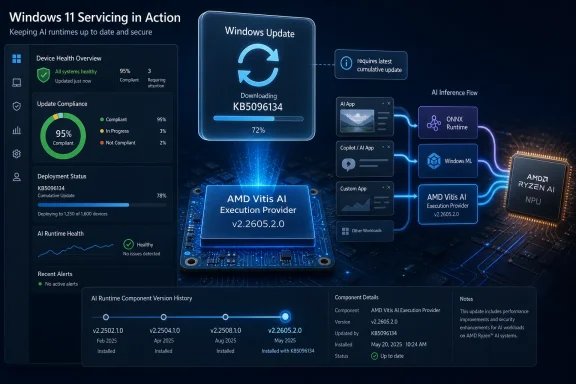 Microsoft Moves AI Acceleration Into the Windows Servicing Machine
KB5096134 is not a glamorous update. It does not promise a new Copilot panel, a redesigned Settings page, or a benchmark-friendly feature that PC makers can splash across a launch deck. It updates an execution provider, the layer that lets ONNX Runtime and Windows machine learning hand AI inference work to the right hardware backend.That sounds small until you remember where Windows is heading. Microsoft, AMD, Intel, Qualcomm, and the PC industry at large have spent the past two years telling users that neural processing units are not just another spec-sheet flourish. They are supposed to become part of the normal Windows application platform, as mundane as GPU acceleration became for video playback, browser compositing, and desktop effects.
KB5096134 is evidence of that platform shift in miniature. Microsoft is not asking users to download a developer SDK, hunt through AMD’s site, or manually install a runtime stack. The update arrives through Windows Update, appears in Update history as a “Windows Runtime ML AMD NPU Execution Provider Update,” and replaces the earlier KB5089169 package.
That means the AI runtime layer is being handled less like an optional enthusiast component and more like a Windows inbox dependency. For ordinary users, that is probably the right direction. For administrators, developers, and anyone trying to keep a fleet predictable, it also means another moving part has entered the patch cadence.
The Execution Provider Is the Boring Layer That Makes the AI PC Real
The phrase execution provider is easy to skip over, but it is the heart of the story. ONNX Runtime uses execution providers to route machine learning workloads to different hardware acceleration paths. Instead of every application needing to know the quirks of every NPU, GPU, or accelerator stack, the runtime can delegate supported parts of a model to the provider best suited to run them.In this case, the provider is AMD’s Vitis AI Execution Provider. Vitis AI is AMD’s stack for accelerated inference across platforms that include Ryzen AI processors, AMD adaptable SoCs, and Alveo data center acceleration cards. On Windows PCs, the practical consumer-facing angle is Ryzen AI: laptops and desktops with AMD silicon that includes an NPU capable of accelerating supported AI workloads locally.
That is a very different world from the first wave of “AI on Windows,” which often meant cloud-backed features, GPU-dependent creator tools, or demos that worked only under carefully constrained conditions. The AI PC pitch depends on the operating system being able to discover local accelerators, expose them through stable APIs, and keep the underlying runtime components current enough that developers can rely on them.
KB5096134 does not make an unsupported PC magically AI-capable. It does not install an NPU where there is none, and it does not mean every ONNX model will suddenly sprint on AMD hardware. What it does is service one of the plumbing layers that lets Windows and applications use AMD acceleration where the hardware, model, driver, and runtime all line up.
That distinction matters because the industry has been unusually sloppy with the term “AI PC.” A sticker on the palm rest is marketing. A functioning, serviced inference stack is infrastructure.
The Small KB Article Says More by What It Leaves Out
Microsoft’s support entry for KB5096134 is terse even by update-documentation standards. It identifies the component, says it includes improvements, lists Windows 11 24H2 and 25H2 as supported, requires the latest cumulative update, and notes automatic delivery through Windows Update. It does not enumerate performance changes, model compatibility fixes, reliability improvements, security changes, or hardware-specific behavior.That absence is typical, but it is still consequential. When a cumulative update modifies File Explorer or fixes a printing regression, administrators usually have at least a fighting chance of mapping the update note to a known pain point. With AI execution providers, the blast radius is harder to infer. A change might improve one application’s inference latency, fix a failure on a specific Ryzen AI generation, alter model partitioning behavior, or simply align the Windows component with a newer AMD runtime.
The practical result is that users may receive an AI acceleration update without any visible change at all. That is not necessarily a problem. The best platform updates often disappear into the background. But for a new class of system component, silence can make troubleshooting harder.
If an app that uses Windows ML or ONNX Runtime changes behavior after KB5096134, the average user will not think to check “Windows Runtime ML AMD NPU Execution Provider Update” in Update history. Even many IT departments will not immediately connect an AI provider package with application-level model performance unless they are already tracking the local inference stack.
Microsoft’s documentation gives the minimum needed to identify the package. It does not yet provide the sort of operational narrative that enterprises will eventually demand if AI acceleration becomes a dependency for business software.
Windows Update Is Becoming the Distribution Channel for AI Runtimes
The most important line in the KB is not the version number. It is the delivery method. KB5096134 is downloaded and installed automatically from Windows Update.That is convenient, and convenience matters. One reason Windows won the developer platform wars of earlier eras was not that its driver model was elegant in every respect, but that enough of the necessary pieces eventually showed up through channels users and OEMs already understood. Local AI will need the same boring reliability if it is going to escape the demo booth.
Developers do not want to ship three hardware-specific inference stacks with every application. Users do not want to learn whether their AI feature needs AMD Ryzen AI Software, an ONNX Runtime build, a Vitis AI package, a display driver branch, or a firmware revision. Administrators do not want five vendors’ updaters racing each other on corporate laptops.
So Microsoft is doing the obvious Windows thing: pulling the runtime surface into its servicing orbit. That gives Redmond a way to normalize local AI support across OEM images, clean installs, and annual Windows releases. It also lets Microsoft align component updates with Windows 11 24H2 and 25H2 rather than leaving the AI stack entirely to hardware vendor installers.
The trade-off is that Windows Update becomes more than a security and OS quality channel. It becomes a delivery mechanism for AI capability drift. A machine on Monday and the same machine on Wednesday may expose subtly different behavior to applications that lean on local inference, even if the user did not install a new app or driver in the traditional sense.
For home users, that is acceptable if the result is “things get faster and crash less.” For controlled environments, it raises the old Windows question in a new form: how do you keep the platform modern without letting it become unpredictable?
The 24H2 and 25H2 Requirement Draws the Platform Boundary
KB5096134 applies to Windows 11 version 24H2 and Windows 11 version 25H2, and it requires the latest cumulative update for those releases. That boundary is important because it places Microsoft’s current AI component servicing work firmly in the newer Windows 11 platform generation.Windows 11 24H2 was the release that made the “AI PC” era feel less like a slogan and more like a system architecture. Windows 11 25H2, now the current annual feature release, continues that direction with the same broad servicing foundation for many devices. Microsoft’s KB language reflects that reality: the execution provider is not being described as a general Windows add-on for every supported Windows 11 machine, but as an AI component update for specific modern releases.
That is likely to frustrate some users with capable-looking hardware on older builds. But it is also consistent with how Microsoft tends to establish new platform layers. The company can only make strong assumptions about API availability, component layout, security posture, and hardware abstraction when it narrows the OS baseline.
The prerequisite also means KB5096134 is not a substitute for being current on cumulative updates. If a machine is behind on Windows servicing, the AI component update is gated. That may be annoying for enthusiasts who want the newest runtime without taking the newest cumulative patch, but it is predictable from Microsoft’s perspective. The company wants the AI stack to sit on a known Windows foundation.
For administrators, the message is simple: AI runtime servicing is now coupled to OS servicing. Treating AI components as isolated optional packages may no longer match how Windows actually maintains them.
AMD Gets a Deeper Seat at the Windows AI Table
The update also shows AMD’s role in the Windows AI story becoming more concrete. Qualcomm has had much of the public attention because Copilot+ PCs arrived first on Snapdragon X systems. Intel has pushed Core Ultra and its NPU roadmap hard. AMD, meanwhile, has had to make the case that Ryzen AI is not merely present, but usable through the same Windows developer pathways.A serviced Vitis AI Execution Provider is part of that case. It tells developers that AMD acceleration is not just a vendor-specific science project; it is part of the Windows runtime machinery. If an application targets ONNX Runtime or Windows ML, the presence of a maintained AMD provider becomes a reason to trust the path.
This is especially important because AI acceleration is more fragmented than GPU acceleration was at a comparable stage. GPUs converged around graphics APIs, compute APIs, and well-understood driver models over decades. NPUs are arriving into consumer PCs with competing vendor stacks, changing model formats, evolving operator support, and fast-moving framework expectations.
Execution providers are one answer to that fragmentation. They do not eliminate hardware differences, but they give the operating system and runtime a way to broker them. AMD needs that abstraction as much as Microsoft does, because very few developers want to hand-tune mainstream Windows applications separately for every NPU family.
The success of Ryzen AI on Windows will not be measured only by peak TOPS figures. It will be measured by whether real applications can find the hardware, use it reliably, and keep working after Patch Tuesday. KB5096134 is the unglamorous kind of update that helps decide that outcome.
The Enterprise Problem Is Not Installation but Observability
Automatic installation sounds like a win until something depends on the component. Then the hard part becomes visibility. IT teams need to know which machines received the update, which hardware it affects, which applications use the provider, and whether the change altered performance or reliability.The KB gives one user-facing verification path: Settings, Windows Update, Update history. That is fine for an individual laptop. It is not a management strategy for thousands of endpoints. Enterprises will want inventory signals through their normal device management tooling, and they will want clearer component version reporting than a human-readable Update history line.
This is not a complaint unique to KB5096134. It is a structural issue with the AI PC transition. Windows is gaining a new class of acceleration components that sit somewhere between drivers, runtimes, and OS features. They are neither as visible as applications nor as familiar as display or network drivers.
Security teams will also take interest. Any component that parses model graphs, brokers execution, or interfaces with hardware acceleration becomes part of the attack surface, even if it is not exposed like a network service. Keeping that component updated is good security hygiene, but administrators will still need to understand what changed and how quickly they must deploy it.
Microsoft can get away with sparse documentation while AI workloads remain mostly consumer features and developer experiments. If local inference becomes a mainstream enterprise dependency, “includes improvements” will not be enough.
Developers Are Being Asked to Trust a Moving Floor
For Windows developers, KB5096134 is both encouraging and unsettling. The encouraging part is obvious: a system-managed AMD execution provider lowers friction. If users receive the provider through Windows Update, applications have a better chance of finding acceleration without bundling vendor packages or sending users through setup guides.The unsettling part is that the runtime floor is moving. An application that performs well with one provider version may behave differently with another. Model partitioning can change. Operator support can expand. Bugs can vanish. New bugs can appear. Performance can improve on one hardware generation while regressing on another.
This is why serious AI application development on Windows needs more than “does it run on my machine?” testing. Developers targeting local inference should test across Windows 11 release versions, cumulative update states, hardware generations, and provider versions. That sounds excessive until an app’s marquee feature depends on sub-second inference and a customer’s laptop suddenly routes work differently.
The answer is not to avoid system providers. Bundling everything inside the application creates its own update and security nightmare. The answer is to treat local AI acceleration as a platform dependency that needs capability detection, graceful fallback, and telemetry.
A well-built Windows AI app should not assume the AMD provider exists just because the CPU brand says AMD. It should enumerate available providers, test supported devices, handle CPU or DirectML fallback where appropriate, and surface meaningful diagnostics when acceleration is unavailable. The Windows AI stack is becoming more capable, but it is not becoming magically uniform.
Users Will Notice the Feature, Not the Runtime
Most users will never search for KB5096134. They will notice whether a camera effect runs smoothly, whether an image tool responds instantly, whether a summarization feature stays on-device, or whether a creative app drains the battery less aggressively. The execution provider is invisible until it fails.That invisibility is both the goal and the risk. If Windows can update AI acceleration components quietly, the user experience improves without the usual driver-update theater. But when the system is opaque, users have little vocabulary for what went wrong. “The AI feature stopped working” is not a precise bug report.
The near-term reality is that many Windows AI features will remain uneven. Some workloads will use the NPU. Some will use the GPU. Some will fall back to the CPU. Some will still go to the cloud. The marketing category “AI PC” hides a lot of routing decisions that happen below the interface.
KB5096134 does not solve that fragmentation. It makes one important route on AMD systems more serviceable. That is progress, but it also underscores how much of the AI PC experience depends on plumbing the user never sees.
The best outcome is boring: Windows installs the update, supported apps get more reliable acceleration, battery life is a little better under certain workloads, and nobody thinks about it. The worst outcome is also familiar: a silent component update changes behavior, documentation is thin, and the burden of explanation falls on forum threads, sysadmins, and developers.
The AI PC Is Becoming a Patch Management Story
The PC industry has tried to sell AI hardware as a revolution in capability. KB5096134 suggests the more durable story may be maintenance. The machines that matter will not be the ones with the loudest launch claims, but the ones whose AI stack can be updated, measured, and trusted over a normal device lifecycle.That is how earlier platform transitions matured. Graphics acceleration became normal only when drivers, APIs, and operating systems settled into an update rhythm. Wi-Fi became boring only after firmware, drivers, roaming behavior, and security protocols stopped feeling like separate hobbies. Local AI will follow the same path if it becomes a real PC feature rather than a premium demo.
Microsoft’s choice to distribute this AMD provider update automatically is therefore a bet on centralization. The company wants Windows Update to be the place where the AI substrate stays current. AMD benefits because its hardware path remains present and maintained on supported Windows releases. Developers benefit if they can depend on the platform being there.
The cost is that everyone inherits Windows Update’s politics. Users worry about surprise changes. Administrators worry about rings, deferrals, reporting, and rollback. Developers worry about testing against a component they do not ship. Microsoft gets the responsibility of explaining enough without drowning users in low-level runtime detail.
That bargain may be unavoidable. If every NPU vendor maintained its own parallel updater and every app bundled its own inference stack, the Windows AI ecosystem would become unmanageable quickly. A centrally serviced model is cleaner. It just needs better transparency as the stakes rise.
The Version Number Is Less Important Than the Servicing Pattern
Version 2.2605.2.0 will matter to engineers debugging a specific issue. For most Windows users and administrators, the more important fact is that the provider has a version at all, that Microsoft is publishing it as a KB, and that it replaces a previous KB. That is the outline of a servicing track.Once a component has a servicing track, it becomes something organizations can ask about. Which devices have it? Which devices are eligible? Which apps depend on it? Does it arrive during normal update windows? Can it be paused, deferred, or rolled back? What happens when a cumulative update prerequisite is missing?
Those are mundane questions, but they are exactly the questions that separate platform features from experiments. A feature that cannot be inventoried or maintained at scale will struggle in business environments no matter how impressive the demo looks.
There is also a competitive dimension. If Microsoft can create a consistent update model for AI providers across AMD, Intel, Qualcomm, and other hardware paths, Windows becomes a more attractive target for local AI developers. If each hardware path behaves differently under servicing, developers will gravitate toward the lowest common denominator or avoid local acceleration except for niche workloads.
KB5096134 is therefore not merely an AMD note. It is a small signal about Microsoft’s intended shape for the Windows AI ecosystem: hardware-specific acceleration, abstracted through common runtime layers, serviced through the OS channel, and tied to current Windows releases.
The Fine Print Windows Admins Should Actually Read
The immediate action here is not dramatic. Most users on eligible systems will simply receive the update. But the KB does carry a few concrete operational clues worth pulling out because they define what this update is and is not.- KB5096134 updates the AMD Vitis AI Execution Provider to version 2.2605.2.0 on supported Windows 11 version 24H2 and 25H2 systems.
- The update is delivered automatically through Windows Update rather than as a manual SDK or standalone AMD package for ordinary users.
- The device must already have the latest cumulative update for Windows 11 24H2 or 25H2 before this AI component update applies.
- The installed update should appear in Windows Update history as “Windows Runtime ML AMD NPU Execution Provider Update (KB5096134).”
- The package replaces KB5089169, which means administrators tracking AI component baselines should treat this as a superseding update rather than a one-off addition.
- The update does not, by itself, guarantee that every AI workload will use AMD acceleration; applications still need compatible models, runtime paths, hardware support, and sensible fallback behavior.
Microsoft’s AI Ambition Now Depends on Boring Updates
There is a temptation to judge the Windows AI push by its most visible features: Recall, Copilot integrations, Studio Effects, Click to Do, local language models, and whatever OEMs choose to highlight in store displays. Those features matter, but they are not the foundation. The foundation is whether Windows can make heterogeneous AI hardware usable without forcing users and developers to become runtime archaeologists.KB5096134 lands squarely in that foundation layer. It is a maintenance update for an AMD execution provider, but it is also a sign of how Microsoft wants the AI PC to work in practice. The hardware vendor builds the acceleration stack. The runtime abstracts it. Windows Update services it. Applications consume it through supported APIs.
That is the right architecture if Microsoft wants local AI to become normal. It is also an architecture that demands trust. Users need trust that automatic updates will not break features they cannot diagnose. Enterprises need trust that they can see and govern the component state. Developers need trust that the provider layer will improve without becoming a compatibility lottery.
The next phase of the AI PC will not be won by slogans about TOPS or by another round of taskbar icon reshuffling. It will be won by the vendors that make local inference boring, dependable, and observable. KB5096134 is a small AMD-flavored brick in that wall, and if Microsoft keeps laying these bricks through Windows Update, the AI PC may eventually become less of a product category and more of an ordinary assumption about what a modern Windows machine can do.
References
- Primary source: Microsoft Support
Published: Tue, 26 May 2026 21:02:29 Z
- Related coverage: windowscentral.com
Microsoft confirms Windows 11 May update is failing with error 0x800f0922
Microsoft confirms that the Windows 11 May 2026 update fails with error 0x800f0922 on some computers, but a rollback and a fix are already available. www.windowscentral.com
- Official source: learn.microsoft.com

Windows 11 - release information
Learn release information for Windows 11 releaseslearn.microsoft.com - Related coverage: onnxruntime.ai
AMD - Vitis AI
Instructions to execute ONNX Runtime on AMD devices with the Vitis AI execution provideronnxruntime.ai
- Related coverage: runtime.onnx.org.cn
AMD - Vitis AI | onnxruntime - ONNX 运行时
runtime.onnx.org.cn
- Related coverage: tomshardware.com

Microsoft to force updates to Windows 11 25H2 for PCs with older Windows 11 OS versions — 'intelligent' update system uses machine learning to determine when a device is ready
Microsoft forces 25H2 rollout ahead of 24H2 end-of-supportwww.tomshardware.com

- Related coverage: amd.github.io
AMD - Vitis AI
Instructions to execute ONNX Runtime on AMD devices with the Vitis AI execution provideramd.github.io
- Official source: opensource.microsoft.com

ONNX Runtime release 1.8.1 previews support for accelerated training on AMD GPUs with the AMD ROCm™ Open Software Platform | Microsoft Open Source Blog
This post was co-authored by Jeff Daily, a Principal Member of Technical Staff, Deep Learning Software for AMD. ONNX Runtime is an open-source project that is designed to accelerate machine learning across a wide range of frameworks, operating systems, and hardware platforms. opensource.microsoft.com
- Official source: microsoft.com
- Related coverage: docs.amd.com
AMD Technical Information Portal
docs.amd.com
- Related coverage: cyber.gov.au
