

Microsoft has published KB5096137, an automatic Windows Update package for Windows 11 version 26H1 devices that updates the Qualcomm QNN Execution Provider AI component to version 2.2605.2.0 and replaces April’s KB5089618 package. That sounds like a niche runtime patch, and in one sense it is. But it also shows how Windows is becoming less a monolithic operating system release and more a serviced stack of hardware-specific AI plumbing. For Snapdragon-class Windows PCs, the interesting action is increasingly happening below the app and above the silicon.
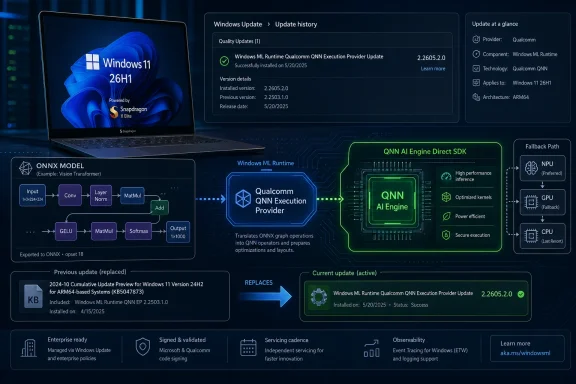
KB5096137 is not the kind of update that gets a keynote demo. It does not promise a redesigned Start menu, a new Copilot surface, or a visible setting that users can toggle after reboot. Its proof of installation lives in Settings, under Windows Update history, where it appears as the Windows ML Runtime Qualcomm QNN Execution Provider Update.
That placement is the story. Microsoft is treating local AI acceleration as a serviced Windows component, not merely as something bundled with an app, a driver package, or a developer SDK. The update applies to Windows 11 version 26H1 and requires the latest cumulative update for that release, reinforcing that this is part of the normal servicing chain rather than a one-off developer download.
The component being updated is the Qualcomm QNN Execution Provider, an ONNX Runtime execution provider that lets compatible models run through Qualcomm’s AI acceleration stack. In plain English, it is a bridge: an ONNX model comes in, the provider builds a graph using Qualcomm’s QNN SDK, and supported accelerator backends do the work.
That bridge matters because the AI PC pitch collapses if every developer must hand-wire every model to every neural processor. Windows needs abstraction layers that are stable enough for app developers, efficient enough for silicon vendors, and serviceable enough for Microsoft. KB5096137 is a small update to one of those layers, but the layer itself is strategic.
That makes KB5096137 more targeted than the average Windows patch. It is not a sign that every Windows 11 user is suddenly getting a Qualcomm AI runtime. It is a sign that Microsoft is maintaining a hardware-specific 26H1 lane for systems whose value proposition depends heavily on local acceleration.
For IT admins, this distinction is important. A Windows Update entry with a KB number can look universal, especially when it appears in Microsoft Support in the same format as broader operating system updates. But KB5096137’s practical audience is narrower: Windows 11 26H1 devices with the Qualcomm stack that can use this execution provider.
The upside of this model is focus. Microsoft can move a component such as the QNN provider without waiting for a full Windows feature release and without pretending that Intel, AMD, and Qualcomm systems all need the same AI runtime packages at the same time. The downside is fragmentation, or at least the appearance of it. Windows is still Windows, but the AI substrate underneath it is becoming more conditional.
The Qualcomm QNN Execution Provider is one of those meeting points. It allows ONNX Runtime workloads, and Windows machine-learning scenarios built on ONNX Runtime, to target Qualcomm chipsets through the Qualcomm AI Engine Direct SDK. That does not magically make every model fast, compatible, or NPU-bound. It does, however, give Windows a supported path for dispatching certain workloads to the right Qualcomm backend when the model and system stack line up.
This is why the update’s wording is careful. Microsoft says the package includes improvements to the Qualcomm QNN Execution Provider AI component. It does not claim a headline performance uplift, a new user-facing feature, or expanded hardware support. The company is servicing an enabling layer, not announcing a product.
That caution is appropriate. AI acceleration on client PCs is not a single switch. Model format, operator support, quantization, memory layout, driver maturity, runtime version, and backend availability all shape whether a workload actually lands on an accelerator. The execution provider is necessary plumbing, not a guarantee that every local AI app will suddenly feel transformed.
Still, plumbing is what platforms are made of. Developers do not build durable ecosystems on demo paths alone. They build them when the boring pieces get patched, versioned, documented, and distributed through channels that ordinary machines already trust.
That approach has obvious advantages. It keeps the AI runtime aligned with the Windows servicing baseline. It gives admins a familiar audit trail. It reduces the chance that a user installs an app expecting NPU acceleration only to discover that some opaque vendor component is stale or missing.
It also gives Microsoft leverage over the AI PC experience. If Windows Update can refresh execution providers, model-related components, and other AI runtime pieces independently, Microsoft can iterate faster than the old model of waiting for an annual OS release or relying on OEM support pages. The AI PC becomes less like a fixed appliance and more like a rolling software platform.
But this also creates a new class of operational dependency. If a machine-learning feature depends on an execution provider update, then update health becomes part of application reliability. A failed Windows Update, a deferred policy, or a lagging cumulative update can become the reason an AI feature behaves differently across otherwise similar devices.
That is familiar territory for sysadmins, but the subject matter is new. For years, update compliance often meant security posture and application compatibility. Now it may also mean whether a local model runs on the NPU, the GPU, or the CPU — and whether the user sees acceptable latency, battery life, and thermals.
That replacement relationship is useful because it shows momentum. This is not a dormant component tossed into Windows once and forgotten. The QNN provider is being revised as the Windows 11 26H1 hardware lane matures.
The public documentation is sparse, which is normal for this kind of component update but still frustrating. Microsoft does not list detailed fixes, benchmark changes, operator additions, or app-visible behavior changes in the KB text. For most users, the practical instruction is simply to install the latest cumulative update, let Windows Update do its job, and verify the entry in update history.
That minimalism leaves admins and developers reading between the lines. A replacement update can mean bug fixes, compatibility improvements, performance tuning, security hardening, or alignment with a newer Qualcomm runtime. Without a changelog, the safest interpretation is conservative: KB5096137 is a maintenance update for a critical AI acceleration component, not a feature announcement.
Still, maintenance matters more than it used to. In the pre-AI PC era, a small runtime patch might only interest developers. In the 26H1 era, a runtime patch can affect camera effects, summarization tools, transcription features, image workflows, third-party AI apps, and whatever OEM utilities are quietly leaning on the same acceleration stack.
The reason is simple: silicon capability is invisible until software can reach it. A neural processor with impressive TOPS figures does not help a developer who cannot reliably map a production model to the accelerator. Nor does it help a user if the app falls back to CPU execution, drains the battery, and behaves like any ordinary laptop workload.
ONNX Runtime gives Qualcomm a way to participate in a broader framework rather than asking every Windows developer to write directly to Qualcomm-specific APIs. The QNN provider keeps Qualcomm’s hardware in the conversation when developers target ONNX Runtime as a deployment layer. That is exactly the kind of middle ground Windows needs if AI PCs are to become a real software category rather than a marketing badge.
KB5096137 therefore reflects a larger bargain. Microsoft gets a serviceable AI component inside Windows. Qualcomm gets a supported path into Windows ML scenarios. Developers get one less vendor-specific cliff to fall off, at least in theory.
The theory still has to survive practice. Developers will judge this stack by model coverage, debugging clarity, packaging friction, and whether performance claims reproduce outside demos. Users will judge it by whether local AI features are faster, quieter, and more private than cloud-backed alternatives. Admins will judge it by whether the stack can be inventoried, updated, and trusted.
Its impact is indirect, which makes it both easy to miss and easy to overstate. If an application uses ONNX Runtime and can take advantage of the Qualcomm QNN provider, this update may improve the underlying path that gets work onto supported Qualcomm acceleration hardware. If an app does not use that path, or if a model is not compatible, the update may make no visible difference at all.
That distinction matters because AI PC discourse has become overloaded with promises. The existence of an NPU does not guarantee every AI workload uses it. The existence of an execution provider does not guarantee every ONNX model runs efficiently on it. The existence of a Windows Update package does not guarantee a user-visible performance change.
But indirect does not mean unimportant. Many of the most important platform improvements are invisible until enough software assumes they are present. USB, graphics acceleration, media codecs, printer class drivers, and security baselines all went through versions of this story. At first they were components; eventually they became expectations.
Local AI acceleration is trying to make the same transition. KB5096137 is one marker on that road: not a destination, but evidence that Microsoft is building a servicing model around the expectation that AI runtime components will evolve continuously.
Because KB5096137 requires the latest cumulative update for Windows 11 26H1, the AI component is tied to baseline OS currency. That is administratively sensible, but it means organizations cannot treat local AI runtime updates as wholly separate from operating system maintenance. Defer the cumulative update too aggressively and the AI component update may not apply.
The update history entry is also useful. It gives support desks and endpoint teams a concrete place to verify whether the package is present. That matters when troubleshooting an app that behaves differently across two Snapdragon systems that appear identical to the user.
The harder problem is documentation depth. Enterprises like predictable changelogs, especially for components that can affect business applications. Microsoft’s support note gives installation mechanics and component identity, but it does not provide the kind of granular behavioral detail that would let an admin decide whether to fast-track or ring-test based on known fixes.
That leaves organizations with a familiar Windows strategy: pilot on a small hardware cohort, monitor app behavior, then broaden deployment through normal update rings. The difference is that the tested surface now includes local AI acceleration. Compatibility testing can no longer stop at whether the app opens and prints.
That is useful, but it also raises a versioning problem. Applications that depend on specific execution provider behavior need to be clear about minimum runtime expectations. Silent fallback to CPU execution may preserve functionality, but it can also mask performance regressions and produce a user experience that looks broken rather than merely unaccelerated.
Good Windows AI applications will need better diagnostics. They should know which execution providers are available, whether a model was actually assigned to the intended backend, and when fallback occurred. In a world of mixed Intel, AMD, Qualcomm, NPU, GPU, and CPU paths, “it runs” is no longer enough information.
This is especially true for apps that market privacy or offline capability. Running locally is one claim; running locally and efficiently on the intended accelerator is another. Users may not care which provider name appears in a log, but they will care if the laptop gets hot, the battery drops, or a feature takes long enough to feel cloud-dependent anyway.
Microsoft and Qualcomm can help by making the runtime path more transparent. Developers need documentation, tooling, and predictable behavior. Admins need inventory and policy visibility. Users need stable outcomes, not acronyms.
AI components are starting to look like the next driver model. They sit close to hardware, but they are not merely hardware drivers. They expose capabilities to runtimes, frameworks, and applications. They need to track silicon, SDKs, operating system releases, and developer expectations at once.
That is why KB5096137 should not be dismissed as “just” a Qualcomm package. It represents the normalization of AI runtime servicing. Today the component is the Qualcomm QNN Execution Provider for Windows 11 26H1. Tomorrow the same pattern may apply across other silicon vendors, model runtimes, and Windows AI services.
The comparison to drivers also reveals the risk. Driver updates can fix real problems, but they can also introduce regressions. They can be essential and opaque at the same time. They can be distributed automatically while still affecting workloads that enterprises consider mission-critical.
The same governance questions now apply to AI runtime pieces. Who owns compatibility when an app, model, execution provider, driver, and OS cumulative update interact badly? How much detail will Microsoft publish? How quickly will Qualcomm and Microsoft respond when a model path breaks? These are not theoretical questions once businesses start deploying local AI workflows.
That separation is necessary if Microsoft wants to compete in AI software. Model runtimes move faster than traditional Windows features. Silicon vendor SDKs move faster than enterprise desktop refresh cycles. Developer frameworks move faster still.
A rigid annual Windows feature schedule cannot absorb that pace. A serviced component model can. It lets Microsoft ship smaller, targeted updates to the machine-learning substrate while keeping the visible OS comparatively stable.
The trade-off is that Windows becomes harder to describe. Two PCs may both run Windows 11, but their local AI capabilities may differ based on OS version, hardware class, cumulative update state, runtime component versions, and vendor backend support. This is not entirely new — graphics and security features have long varied by hardware — but AI makes the differences more central to the product pitch.
For enthusiasts, that complexity is interesting. For enterprises, it is another matrix. For mainstream users, it is invisible until something does or does not work.
KB5096137 will not make an unsupported PC into an AI workstation, and it will not turn every ONNX workload into a perfectly accelerated Snapdragon showcase. But it does show the route Microsoft, Qualcomm, and the broader Windows ecosystem are taking: frequent, componentized updates to the layers that connect models to hardware. The next phase of Windows AI will not be won only in chat interfaces or Copilot branding; it will be won in the quiet reliability of runtime components that most users never see, and that developers eventually stop having to think about.
 Microsoft’s AI PC Strategy Is Now Hiding in Update History
KB5096137 is not the kind of update that gets a keynote demo. It does not promise a redesigned Start menu, a new Copilot surface, or a visible setting that users can toggle after reboot. Its proof of installation lives in Settings, under Windows Update history, where it appears as the Windows ML Runtime Qualcomm QNN Execution Provider Update.That placement is the story. Microsoft is treating local AI acceleration as a serviced Windows component, not merely as something bundled with an app, a driver package, or a developer SDK. The update applies to Windows 11 version 26H1 and requires the latest cumulative update for that release, reinforcing that this is part of the normal servicing chain rather than a one-off developer download.
The component being updated is the Qualcomm QNN Execution Provider, an ONNX Runtime execution provider that lets compatible models run through Qualcomm’s AI acceleration stack. In plain English, it is a bridge: an ONNX model comes in, the provider builds a graph using Qualcomm’s QNN SDK, and supported accelerator backends do the work.
That bridge matters because the AI PC pitch collapses if every developer must hand-wire every model to every neural processor. Windows needs abstraction layers that are stable enough for app developers, efficient enough for silicon vendors, and serviceable enough for Microsoft. KB5096137 is a small update to one of those layers, but the layer itself is strategic.
26H1 Is Not a Normal Windows Feature Update, and That Matters
Windows 11 version 26H1 has been easy to misunderstand because its name looks like the usual semiannual Windows branding. In practice, it is a scoped platform release for new hardware rather than a broad feature update for the installed base. Microsoft’s own release messaging has positioned 26H1 as a release for new devices, not a destination that existing 24H2 or 25H2 PCs should expect to receive through Windows Update.That makes KB5096137 more targeted than the average Windows patch. It is not a sign that every Windows 11 user is suddenly getting a Qualcomm AI runtime. It is a sign that Microsoft is maintaining a hardware-specific 26H1 lane for systems whose value proposition depends heavily on local acceleration.
For IT admins, this distinction is important. A Windows Update entry with a KB number can look universal, especially when it appears in Microsoft Support in the same format as broader operating system updates. But KB5096137’s practical audience is narrower: Windows 11 26H1 devices with the Qualcomm stack that can use this execution provider.
The upside of this model is focus. Microsoft can move a component such as the QNN provider without waiting for a full Windows feature release and without pretending that Intel, AMD, and Qualcomm systems all need the same AI runtime packages at the same time. The downside is fragmentation, or at least the appearance of it. Windows is still Windows, but the AI substrate underneath it is becoming more conditional.
The Execution Provider Is the Boring Part Developers Actually Need
ONNX Runtime’s execution provider model exists to solve a basic portability problem. Developers want to ship models without rewriting their applications for every accelerator. Hardware vendors want their chips used efficiently. Operating systems want a common place where app intent can meet silicon capability.The Qualcomm QNN Execution Provider is one of those meeting points. It allows ONNX Runtime workloads, and Windows machine-learning scenarios built on ONNX Runtime, to target Qualcomm chipsets through the Qualcomm AI Engine Direct SDK. That does not magically make every model fast, compatible, or NPU-bound. It does, however, give Windows a supported path for dispatching certain workloads to the right Qualcomm backend when the model and system stack line up.
This is why the update’s wording is careful. Microsoft says the package includes improvements to the Qualcomm QNN Execution Provider AI component. It does not claim a headline performance uplift, a new user-facing feature, or expanded hardware support. The company is servicing an enabling layer, not announcing a product.
That caution is appropriate. AI acceleration on client PCs is not a single switch. Model format, operator support, quantization, memory layout, driver maturity, runtime version, and backend availability all shape whether a workload actually lands on an accelerator. The execution provider is necessary plumbing, not a guarantee that every local AI app will suddenly feel transformed.
Still, plumbing is what platforms are made of. Developers do not build durable ecosystems on demo paths alone. They build them when the boring pieces get patched, versioned, documented, and distributed through channels that ordinary machines already trust.
Windows Update Becomes the AI Runtime Distributor
The most consequential line in KB5096137 may be the least dramatic: the update is downloaded and installed automatically from Windows Update. That makes Microsoft, not an app store listing or a vendor SDK installer, the distribution mechanism for this runtime component on supported systems.That approach has obvious advantages. It keeps the AI runtime aligned with the Windows servicing baseline. It gives admins a familiar audit trail. It reduces the chance that a user installs an app expecting NPU acceleration only to discover that some opaque vendor component is stale or missing.
It also gives Microsoft leverage over the AI PC experience. If Windows Update can refresh execution providers, model-related components, and other AI runtime pieces independently, Microsoft can iterate faster than the old model of waiting for an annual OS release or relying on OEM support pages. The AI PC becomes less like a fixed appliance and more like a rolling software platform.
But this also creates a new class of operational dependency. If a machine-learning feature depends on an execution provider update, then update health becomes part of application reliability. A failed Windows Update, a deferred policy, or a lagging cumulative update can become the reason an AI feature behaves differently across otherwise similar devices.
That is familiar territory for sysadmins, but the subject matter is new. For years, update compliance often meant security posture and application compatibility. Now it may also mean whether a local model runs on the NPU, the GPU, or the CPU — and whether the user sees acceptable latency, battery life, and thermals.
Replacement Updates Tell Us This Stack Is Moving Quickly
KB5096137 replaces KB5089618, which updated the same Qualcomm QNN Execution Provider component to version 2.2604.2.0. The new package moves the component to 2.2605.2.0. The version numbers suggest a monthly cadence aligned with the 2605 naming pattern, though Microsoft does not spell out every internal change in the public support note.That replacement relationship is useful because it shows momentum. This is not a dormant component tossed into Windows once and forgotten. The QNN provider is being revised as the Windows 11 26H1 hardware lane matures.
The public documentation is sparse, which is normal for this kind of component update but still frustrating. Microsoft does not list detailed fixes, benchmark changes, operator additions, or app-visible behavior changes in the KB text. For most users, the practical instruction is simply to install the latest cumulative update, let Windows Update do its job, and verify the entry in update history.
That minimalism leaves admins and developers reading between the lines. A replacement update can mean bug fixes, compatibility improvements, performance tuning, security hardening, or alignment with a newer Qualcomm runtime. Without a changelog, the safest interpretation is conservative: KB5096137 is a maintenance update for a critical AI acceleration component, not a feature announcement.
Still, maintenance matters more than it used to. In the pre-AI PC era, a small runtime patch might only interest developers. In the 26H1 era, a runtime patch can affect camera effects, summarization tools, transcription features, image workflows, third-party AI apps, and whatever OEM utilities are quietly leaning on the same acceleration stack.
Qualcomm’s Windows Bet Needs Runtime Discipline, Not Just Silicon
Qualcomm’s Windows ambitions have always required more than fast chips. Snapdragon systems need native apps, strong emulation, driver maturity, power efficiency, enterprise manageability, and a credible developer path for accelerated workloads. The QNN Execution Provider sits squarely in that last category.The reason is simple: silicon capability is invisible until software can reach it. A neural processor with impressive TOPS figures does not help a developer who cannot reliably map a production model to the accelerator. Nor does it help a user if the app falls back to CPU execution, drains the battery, and behaves like any ordinary laptop workload.
ONNX Runtime gives Qualcomm a way to participate in a broader framework rather than asking every Windows developer to write directly to Qualcomm-specific APIs. The QNN provider keeps Qualcomm’s hardware in the conversation when developers target ONNX Runtime as a deployment layer. That is exactly the kind of middle ground Windows needs if AI PCs are to become a real software category rather than a marketing badge.
KB5096137 therefore reflects a larger bargain. Microsoft gets a serviceable AI component inside Windows. Qualcomm gets a supported path into Windows ML scenarios. Developers get one less vendor-specific cliff to fall off, at least in theory.
The theory still has to survive practice. Developers will judge this stack by model coverage, debugging clarity, packaging friction, and whether performance claims reproduce outside demos. Users will judge it by whether local AI features are faster, quieter, and more private than cloud-backed alternatives. Admins will judge it by whether the stack can be inventoried, updated, and trusted.
The User-Facing Impact Is Real but Indirect
Most Windows users will never knowingly interact with the Qualcomm QNN Execution Provider. They will not launch it. They will not configure it. They will not see a new taskbar icon appear after KB5096137 installs.Its impact is indirect, which makes it both easy to miss and easy to overstate. If an application uses ONNX Runtime and can take advantage of the Qualcomm QNN provider, this update may improve the underlying path that gets work onto supported Qualcomm acceleration hardware. If an app does not use that path, or if a model is not compatible, the update may make no visible difference at all.
That distinction matters because AI PC discourse has become overloaded with promises. The existence of an NPU does not guarantee every AI workload uses it. The existence of an execution provider does not guarantee every ONNX model runs efficiently on it. The existence of a Windows Update package does not guarantee a user-visible performance change.
But indirect does not mean unimportant. Many of the most important platform improvements are invisible until enough software assumes they are present. USB, graphics acceleration, media codecs, printer class drivers, and security baselines all went through versions of this story. At first they were components; eventually they became expectations.
Local AI acceleration is trying to make the same transition. KB5096137 is one marker on that road: not a destination, but evidence that Microsoft is building a servicing model around the expectation that AI runtime components will evolve continuously.
Enterprise IT Gets a New Compatibility Surface
For enterprise administrators, the practical concern is not whether KB5096137 sounds exciting. It is whether this class of update changes testing, compliance, and support expectations for new Windows-on-Arm fleets. The answer is yes, though probably not in the dramatic way some patch-watchers might assume.Because KB5096137 requires the latest cumulative update for Windows 11 26H1, the AI component is tied to baseline OS currency. That is administratively sensible, but it means organizations cannot treat local AI runtime updates as wholly separate from operating system maintenance. Defer the cumulative update too aggressively and the AI component update may not apply.
The update history entry is also useful. It gives support desks and endpoint teams a concrete place to verify whether the package is present. That matters when troubleshooting an app that behaves differently across two Snapdragon systems that appear identical to the user.
The harder problem is documentation depth. Enterprises like predictable changelogs, especially for components that can affect business applications. Microsoft’s support note gives installation mechanics and component identity, but it does not provide the kind of granular behavioral detail that would let an admin decide whether to fast-track or ring-test based on known fixes.
That leaves organizations with a familiar Windows strategy: pilot on a small hardware cohort, monitor app behavior, then broaden deployment through normal update rings. The difference is that the tested surface now includes local AI acceleration. Compatibility testing can no longer stop at whether the app opens and prints.
Developers Should Read This as a Platform Signal
For developers, KB5096137 is less a specific call to action than a signal about where Microsoft wants the Windows AI stack to land. If runtime components are serviced through Windows Update, developers can start to assume that supported devices may receive AI backend improvements outside their own application release cycle.That is useful, but it also raises a versioning problem. Applications that depend on specific execution provider behavior need to be clear about minimum runtime expectations. Silent fallback to CPU execution may preserve functionality, but it can also mask performance regressions and produce a user experience that looks broken rather than merely unaccelerated.
Good Windows AI applications will need better diagnostics. They should know which execution providers are available, whether a model was actually assigned to the intended backend, and when fallback occurred. In a world of mixed Intel, AMD, Qualcomm, NPU, GPU, and CPU paths, “it runs” is no longer enough information.
This is especially true for apps that market privacy or offline capability. Running locally is one claim; running locally and efficiently on the intended accelerator is another. Users may not care which provider name appears in a log, but they will care if the laptop gets hot, the battery drops, or a feature takes long enough to feel cloud-dependent anyway.
Microsoft and Qualcomm can help by making the runtime path more transparent. Developers need documentation, tooling, and predictable behavior. Admins need inventory and policy visibility. Users need stable outcomes, not acronyms.
The AI Component Model Is Windows’ New Driver Model
There is a historical echo here. For decades, Windows hardware support revolved around drivers: graphics drivers, audio drivers, storage drivers, network drivers, chipset packages. Over time, Microsoft pushed more of that ecosystem into Windows Update because driver chaos was bad for users and worse for platform trust.AI components are starting to look like the next driver model. They sit close to hardware, but they are not merely hardware drivers. They expose capabilities to runtimes, frameworks, and applications. They need to track silicon, SDKs, operating system releases, and developer expectations at once.
That is why KB5096137 should not be dismissed as “just” a Qualcomm package. It represents the normalization of AI runtime servicing. Today the component is the Qualcomm QNN Execution Provider for Windows 11 26H1. Tomorrow the same pattern may apply across other silicon vendors, model runtimes, and Windows AI services.
The comparison to drivers also reveals the risk. Driver updates can fix real problems, but they can also introduce regressions. They can be essential and opaque at the same time. They can be distributed automatically while still affecting workloads that enterprises consider mission-critical.
The same governance questions now apply to AI runtime pieces. Who owns compatibility when an app, model, execution provider, driver, and OS cumulative update interact badly? How much detail will Microsoft publish? How quickly will Qualcomm and Microsoft respond when a model path breaks? These are not theoretical questions once businesses start deploying local AI workflows.
Microsoft Is Separating the AI Platform from the Windows Feature Cycle
The deeper architectural move is that Microsoft is decoupling AI platform evolution from Windows feature branding. Windows 11 26H1 may be a scoped release, but its AI components can still be updated month by month. The component version can move from 2.2604.2.0 to 2.2605.2.0 without waiting for a “26H2 moment.”That separation is necessary if Microsoft wants to compete in AI software. Model runtimes move faster than traditional Windows features. Silicon vendor SDKs move faster than enterprise desktop refresh cycles. Developer frameworks move faster still.
A rigid annual Windows feature schedule cannot absorb that pace. A serviced component model can. It lets Microsoft ship smaller, targeted updates to the machine-learning substrate while keeping the visible OS comparatively stable.
The trade-off is that Windows becomes harder to describe. Two PCs may both run Windows 11, but their local AI capabilities may differ based on OS version, hardware class, cumulative update state, runtime component versions, and vendor backend support. This is not entirely new — graphics and security features have long varied by hardware — but AI makes the differences more central to the product pitch.
For enthusiasts, that complexity is interesting. For enterprises, it is another matrix. For mainstream users, it is invisible until something does or does not work.
The Small KB That Exposes the Shape of the AI PC
The concrete facts of KB5096137 are straightforward, but their implications are broader than the support note lets on. This is the kind of update that will be easy to ignore until the surrounding ecosystem depends on it.- KB5096137 updates the Qualcomm QNN Execution Provider AI component for Windows 11 version 26H1 to version 2.2605.2.0.
- The package is delivered automatically through Windows Update and requires the latest cumulative update for Windows 11 version 26H1.
- The update replaces KB5089618, which carried the earlier 2.2604.2.0 version of the same component.
- Users and admins can verify installation in Settings under Windows Update history.
- The update is most relevant to Windows machine-learning scenarios that use ONNX Runtime on supported Qualcomm hardware.
- The visible impact will depend on whether applications and models actually use the Qualcomm QNN execution path.
KB5096137 will not make an unsupported PC into an AI workstation, and it will not turn every ONNX workload into a perfectly accelerated Snapdragon showcase. But it does show the route Microsoft, Qualcomm, and the broader Windows ecosystem are taking: frequent, componentized updates to the layers that connect models to hardware. The next phase of Windows AI will not be won only in chat interfaces or Copilot branding; it will be won in the quiet reliability of runtime components that most users never see, and that developers eventually stop having to think about.
References
- Primary source: Microsoft Support
Published: Tue, 26 May 2026 21:02:44 Z
KB5096137: Qualcomm QNN Execution Provider update (2.2605.2.0) - Microsoft Support
 support.microsoft.com
- Related coverage: qualcomm.com
Qualcomm launches the first ONNX Runtime Plugin Execution Provider
The Qualcomm Plugin Execution Provider (EP) for ONNX Runtime lets ONNX developers access system optimizations without waiting for ONNX Releases and boost your AI deployment workloads across Qualcomm platforms.www.qualcomm.com
- Related coverage: onnxruntime.ai
- Official source: learn.microsoft.com

Windows 11, version 26H1 known issues and notifications
View announcements and review known issues and fixes for Windows 11, version 26H1learn.microsoft.com - Related coverage: windowscentral.com
- Related coverage: runtime.onnx.org.cn
Qualcomm - QNN | onnxruntime - ONNX 运行时
runtime.onnx.org.cn
- Related coverage: windowsforum.com

KB5089618 Update for Windows 11 26H1 Qualcomm QNN Execution Provider
Microsoft has published KB5089618, a Windows Update package for the Qualcomm QNN Execution Provider, bringing the Windows ML Runtime Qualcomm QNN Execution Provider component to version 2.2604.2.0 on devices running Windows 11, version 26H1. While the support note is brief, the update is part of... windowsforum.com
- Related coverage: docs.qualcomm.com
