

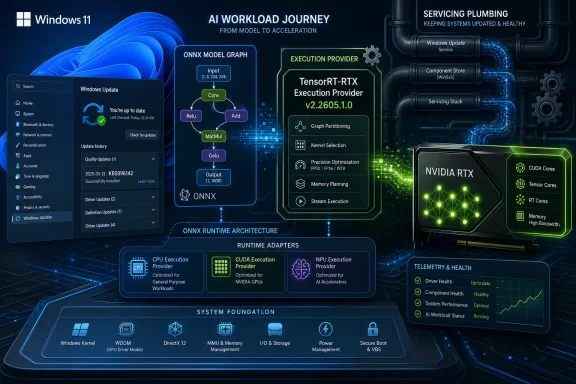
Microsoft has published KB5096142, an automatic Windows Update package that updates the Nvidia TensorRT-RTX Execution Provider to version 2.2605.1.0 for Windows 11 version 24H2 and Windows 11 version 25H2 systems with the latest cumulative update installed. The update is small in presentation but large in strategic meaning: Microsoft is treating local AI acceleration as a Windows-serviced component, not merely as something app developers or GPU vendors bolt on after the fact. For users, the visible change may be only a line in Update history. For developers and administrators, it is another sign that Windows’ AI stack is becoming part of the operating system’s regular maintenance contract.
KB5096142 is not a flashy feature drop. It does not add a Copilot button, change the Start menu, or promise a new consumer-facing AI experience. It updates an execution provider: the layer that lets ONNX Runtime and Windows ML route model inference work to Nvidia RTX GPUs through Nvidia’s TensorRT for RTX runtime.
That distinction matters because the execution provider is where the abstract promise of “AI on the PC” becomes silicon-specific behavior. An ONNX model is portable in theory, but performance depends on how well the runtime can translate that model into something the hardware can execute efficiently. The TensorRT-RTX provider is Microsoft and Nvidia’s answer for a particular class of Windows machines: client PCs with RTX graphics hardware that can accelerate local inference workloads.
The update applies to Windows 11 24H2 and Windows 11 25H2, which places it firmly in Microsoft’s newer Windows AI architecture rather than the older Windows 10-era DirectML story. Microsoft’s documentation around Windows ML has been increasingly clear that hardware-optimized execution providers are part of the 24H2-and-newer platform. KB5096142 reinforces that boundary.
This is the quiet operating-systemification of AI acceleration. Instead of every application bundling its own inference stack, vendor libraries, GPU plugins, and update logic, Windows is becoming a broker for those components. The operating system does not just run the app; it helps decide how the model reaches the CPU, GPU, or NPU underneath it.
That is a deliberately unglamorous user experience. There is no wizard, no driver-style control panel, and no gaming-oriented branding. Microsoft is presenting the execution provider as a managed runtime component, closer to a servicing package than a consumer app.
The prerequisite is also telling. Systems must have the latest cumulative update for Windows 11 24H2 or 25H2 installed. That keeps the execution provider tied to the baseline OS servicing state, which reduces the number of combinations Microsoft, Nvidia, and app developers have to reason about. It also means that organizations delaying cumulative updates may indirectly delay updates to the AI acceleration layer.
This is not new in Windows servicing terms, but it is new in the context of AI. For years, GPU acceleration on Windows has been associated with display drivers, CUDA toolkits, game-ready packages, and application-specific dependencies. KB5096142 points to a different model: the inference plumbing can be revised by Windows Update itself.
An execution provider is a runtime adapter. It gives ONNX Runtime a way to hand suitable portions of a model to a specialized backend. In this case, that backend is Nvidia’s TensorRT for RTX runtime, which can generate and run RTX-optimized inference engines locally on the GPU.
That local word is doing a lot of work. Microsoft’s Windows AI pitch is no longer only about cloud-backed assistants. It is also about giving applications a supported way to run models on the user’s own machine, with lower latency, lower cloud cost, and potentially stronger privacy properties. The execution provider is one of the mechanisms that makes that pitch viable.
The practical impact will vary sharply by workload. A small CPU-bound model may see little reason to involve an RTX GPU. A video, image, language, or generative-AI pipeline that can exploit GPU parallelism may care a great deal. The point of the Windows ML model is that applications can ask the platform for acceleration rather than carrying every hardware-specific answer themselves.
This matters because the PC market is fragmenting again at the silicon level. Copilot+ PCs pushed NPUs into the marketing spotlight, but the installed base of capable discrete GPUs remains enormous. Intel, AMD, Qualcomm, and Nvidia all have their own acceleration paths, libraries, and performance claims. Without a common layer, developers face a familiar trap: either target the lowest common denominator or build a matrix of vendor-specific packages.
Execution providers are Microsoft’s way to preserve the ONNX abstraction while still letting silicon vendors compete below it. A developer can use ONNX Runtime APIs while the system supplies the provider appropriate to the device. That does not erase compatibility testing, but it changes who owns part of the update problem.
KB5096142 is therefore not just a Nvidia-specific housekeeping item. It is a concrete example of Microsoft’s intended Windows AI supply chain. The app brings or references a model. Windows ML provides the runtime surface. Execution providers connect that runtime to the best available hardware. Windows Update keeps those providers current.
That shift is not an abandonment of portability. It is an acknowledgment that the highest-performance path for modern inference often runs through vendor-specific libraries. Nvidia has TensorRT, Qualcomm has its AI Engine tooling, Intel has OpenVINO, and AMD has its own inference acceleration routes. Microsoft’s challenge is to make those paths available without forcing every app developer to become a deployment engineer for every chip vendor.
The TensorRT-RTX provider shows how that compromise works. Windows can still present a unified runtime story, while Nvidia’s own optimization machinery does the work of turning suitable ONNX models into efficient RTX execution. The result is neither a pure Microsoft abstraction nor a pure Nvidia developer kit. It is a layered bargain.
There are risks in that bargain. Specialized execution providers can create subtle differences in model behavior, supported operators, performance characteristics, and failure modes. An app that works well on one provider may need fallback logic on another. But the alternative — every serious AI app bundling its own hardware matrix — is worse for users and developers alike.
For developers, that is a serious advantage. If the execution provider improves, the app may get faster or more compatible without shipping a new build. If Microsoft and Nvidia fix a runtime defect, that fix can propagate through Windows servicing rather than through a dozen application updaters.
For administrators, however, automatic delivery introduces a governance question. AI execution providers are not cosmetic. They can affect how applications run models, what hardware is used, and potentially how much GPU memory, power, and thermal headroom an app consumes. In managed environments, that makes them part of the operational baseline.
The prerequisite on the latest cumulative update adds another layer. If an enterprise controls Windows Update cadence tightly, it may control this AI component indirectly. That is good for stability, but it also means app behavior may differ between devices based on servicing state, even when the application version is identical.
This is not just about developers writing explicitly Nvidia-branded software. The more interesting scenario is an app that uses Windows ML and ONNX Runtime without asking the user to install a separate Nvidia inference package. On compatible hardware, Windows can make the provider available. The user sees the application; the runtime does the routing.
That gives Nvidia a strong position in the Windows AI PC race even as NPUs receive much of the official platform branding. NPUs are important for efficient, sustained, battery-friendly inference. Discrete RTX GPUs remain powerful options for throughput-heavy workloads, especially on desktops, gaming laptops, creator systems, and workstations.
The AI PC is not one device category. It is a set of hardware capabilities spread unevenly across the Windows installed base. KB5096142 is a reminder that Microsoft cannot define that market with NPUs alone. It needs the GPU vendors, and for high-end local inference on Windows, Nvidia remains unavoidable.
Models still need to be tested across providers. Operator support still matters. Quantization choices, memory usage, batching behavior, and fallback paths still shape real-world performance. A model that performs beautifully through TensorRT-RTX on a high-end desktop GPU may behave differently on an Intel NPU, a Qualcomm NPU, an AMD GPU, or the CPU fallback path.
What Windows ML can do is provide a more rational deployment framework. Instead of treating each hardware backend as a one-off integration, developers can build around ONNX Runtime and let Windows acquire compatible providers. That is a meaningful improvement over the plugin sprawl that often accompanies cross-hardware acceleration.
The best developers will still expose sensible diagnostics. Users and admins need to know whether a workload is running on CPU, GPU, or NPU, especially when troubleshooting performance or battery drain. A runtime that is invisible when it works should not be opaque when it fails.
KB5096142 replaces the previously released KB5089168, which means this is not a one-off experiment. Microsoft is maintaining a chain of AI component updates, with versioned packages and replacement relationships. That is exactly how mature Windows components behave.
The practical troubleshooting path is simple. If an RTX-equipped Windows 11 24H2 or 25H2 system is expected to use Nvidia’s TensorRT-RTX execution provider, first confirm the latest cumulative update is installed. Then check Windows Update history for the KB5096142 entry. If an app exposes runtime diagnostics, compare what the app reports with what Windows says is installed.
Users should not expect a game-like performance boost across the entire system. This update matters when an application uses Windows ML or ONNX Runtime in a way that can take advantage of the Nvidia provider. The effect is application-specific, model-specific, and hardware-specific.
Windows Update delivery helps by putting the provider into the normal servicing stream. It also complicates change management because the component can update independently of the application that uses it. A business app using local inference may behave differently after a monthly update even if the app itself has not changed.
That is not an argument against the model. It is an argument for treating AI runtime components as first-class dependencies. Admins should document which Windows build, cumulative update, GPU driver, and execution provider version are present on machines that run important AI workloads. The update history entry is a start, but serious environments will want inventory and telemetry.
Security teams will also take note. Local inference can reduce exposure to cloud services by keeping data on-device, but it also expands the amount of privileged, performance-sensitive runtime code on endpoints. Execution providers need the same seriousness organizations already apply to browsers, drivers, runtimes, and endpoint agents.
Most Windows users will not replace their PCs overnight. Many machines that are poor Copilot+ candidates still have strong GPUs. A desktop with an RTX card may be a better local inference machine for some workloads than a thin laptop with a modest NPU. Microsoft needs Windows AI to scale across that messiness.
KB5096142 fits that more pragmatic view. It is not about one blessed accelerator. It is about Windows recognizing that different inference workloads belong on different hardware. NPUs matter. GPUs matter. CPUs still matter. The operating system’s job is increasingly to arbitrate between them.
That arbitration will not always be perfect. Power, latency, memory pressure, thermals, driver versions, and model structure all influence the right choice. But a Windows-managed execution provider ecosystem gives Microsoft a fighting chance to make those choices less chaotic for developers and less visible to users.
KB5096142 is one of those quiet platform moves. It says that Nvidia RTX acceleration for ONNX inference is not just an SDK download or a developer blog topic. It is a Windows-serviced component with a KB number, a version, prerequisites, replacement information, and an Update history entry.
That is how infrastructure enters the mainstream. First it is a specialist tool. Then it becomes a dependency. Eventually it becomes something the platform updates because too many applications rely on it to leave it unmanaged.
The same pattern played out with graphics APIs, browser engines, media codecs, and security runtimes. AI inference is now moving through that cycle at Windows speed. The rough edges are still visible, but the direction is clear.
 Microsoft Moves AI Acceleration Into the Plumbing
KB5096142 is not a flashy feature drop. It does not add a Copilot button, change the Start menu, or promise a new consumer-facing AI experience. It updates an execution provider: the layer that lets ONNX Runtime and Windows ML route model inference work to Nvidia RTX GPUs through Nvidia’s TensorRT for RTX runtime.That distinction matters because the execution provider is where the abstract promise of “AI on the PC” becomes silicon-specific behavior. An ONNX model is portable in theory, but performance depends on how well the runtime can translate that model into something the hardware can execute efficiently. The TensorRT-RTX provider is Microsoft and Nvidia’s answer for a particular class of Windows machines: client PCs with RTX graphics hardware that can accelerate local inference workloads.
The update applies to Windows 11 24H2 and Windows 11 25H2, which places it firmly in Microsoft’s newer Windows AI architecture rather than the older Windows 10-era DirectML story. Microsoft’s documentation around Windows ML has been increasingly clear that hardware-optimized execution providers are part of the 24H2-and-newer platform. KB5096142 reinforces that boundary.
This is the quiet operating-systemification of AI acceleration. Instead of every application bundling its own inference stack, vendor libraries, GPU plugins, and update logic, Windows is becoming a broker for those components. The operating system does not just run the app; it helps decide how the model reaches the CPU, GPU, or NPU underneath it.
The Update History Line Is the User Interface
For most users, KB5096142 will be encountered only if they go looking for it. Microsoft says the update downloads and installs automatically through Windows Update. To verify installation, users can open Settings, go to Windows Update, then Update history, where the entry should appear as “Windows ML Runtime Nvidia TensorRT-RTX Execution Provider Update (KB5096142).”That is a deliberately unglamorous user experience. There is no wizard, no driver-style control panel, and no gaming-oriented branding. Microsoft is presenting the execution provider as a managed runtime component, closer to a servicing package than a consumer app.
The prerequisite is also telling. Systems must have the latest cumulative update for Windows 11 24H2 or 25H2 installed. That keeps the execution provider tied to the baseline OS servicing state, which reduces the number of combinations Microsoft, Nvidia, and app developers have to reason about. It also means that organizations delaying cumulative updates may indirectly delay updates to the AI acceleration layer.
This is not new in Windows servicing terms, but it is new in the context of AI. For years, GPU acceleration on Windows has been associated with display drivers, CUDA toolkits, game-ready packages, and application-specific dependencies. KB5096142 points to a different model: the inference plumbing can be revised by Windows Update itself.
TensorRT-RTX Is Not Just Another Driver
It would be easy to misread KB5096142 as a GPU driver update. It is not. Nvidia display drivers remain separate, and they still carry the burden of kernel-mode graphics support, gaming optimizations, CUDA support, and hardware enablement. TensorRT-RTX sits higher in the stack, in the territory where applications, ONNX Runtime, Windows ML, and silicon-specific acceleration meet.An execution provider is a runtime adapter. It gives ONNX Runtime a way to hand suitable portions of a model to a specialized backend. In this case, that backend is Nvidia’s TensorRT for RTX runtime, which can generate and run RTX-optimized inference engines locally on the GPU.
That local word is doing a lot of work. Microsoft’s Windows AI pitch is no longer only about cloud-backed assistants. It is also about giving applications a supported way to run models on the user’s own machine, with lower latency, lower cloud cost, and potentially stronger privacy properties. The execution provider is one of the mechanisms that makes that pitch viable.
The practical impact will vary sharply by workload. A small CPU-bound model may see little reason to involve an RTX GPU. A video, image, language, or generative-AI pipeline that can exploit GPU parallelism may care a great deal. The point of the Windows ML model is that applications can ask the platform for acceleration rather than carrying every hardware-specific answer themselves.
Windows ML Is Becoming the Dispatch Layer for the AI PC
The broader story is Windows ML. Microsoft now describes Windows ML as a unified local inferencing framework for Windows, powered by ONNX Runtime, with acceleration across CPUs, GPUs, and NPUs. That framing positions Windows ML as the dispatch layer for the AI PC era.This matters because the PC market is fragmenting again at the silicon level. Copilot+ PCs pushed NPUs into the marketing spotlight, but the installed base of capable discrete GPUs remains enormous. Intel, AMD, Qualcomm, and Nvidia all have their own acceleration paths, libraries, and performance claims. Without a common layer, developers face a familiar trap: either target the lowest common denominator or build a matrix of vendor-specific packages.
Execution providers are Microsoft’s way to preserve the ONNX abstraction while still letting silicon vendors compete below it. A developer can use ONNX Runtime APIs while the system supplies the provider appropriate to the device. That does not erase compatibility testing, but it changes who owns part of the update problem.
KB5096142 is therefore not just a Nvidia-specific housekeeping item. It is a concrete example of Microsoft’s intended Windows AI supply chain. The app brings or references a model. Windows ML provides the runtime surface. Execution providers connect that runtime to the best available hardware. Windows Update keeps those providers current.
The Old DirectML Story Is Giving Way to a More Vendor-Specific One
DirectML was Microsoft’s broad answer to machine-learning acceleration across DirectX 12-capable hardware. It was valuable because it offered a common GPU abstraction in the Windows ecosystem. But the newer Windows ML model is more explicit about specialized execution providers for specific silicon stacks.That shift is not an abandonment of portability. It is an acknowledgment that the highest-performance path for modern inference often runs through vendor-specific libraries. Nvidia has TensorRT, Qualcomm has its AI Engine tooling, Intel has OpenVINO, and AMD has its own inference acceleration routes. Microsoft’s challenge is to make those paths available without forcing every app developer to become a deployment engineer for every chip vendor.
The TensorRT-RTX provider shows how that compromise works. Windows can still present a unified runtime story, while Nvidia’s own optimization machinery does the work of turning suitable ONNX models into efficient RTX execution. The result is neither a pure Microsoft abstraction nor a pure Nvidia developer kit. It is a layered bargain.
There are risks in that bargain. Specialized execution providers can create subtle differences in model behavior, supported operators, performance characteristics, and failure modes. An app that works well on one provider may need fallback logic on another. But the alternative — every serious AI app bundling its own hardware matrix — is worse for users and developers alike.
Automatic Delivery Solves One Problem and Creates Another
Automatic installation through Windows Update is the most user-friendly part of KB5096142. It means users do not need to know what an execution provider is. It also means apps can benefit from performance improvements, compatibility fixes, and new operator support without waiting for the user to install a separate SDK component.For developers, that is a serious advantage. If the execution provider improves, the app may get faster or more compatible without shipping a new build. If Microsoft and Nvidia fix a runtime defect, that fix can propagate through Windows servicing rather than through a dozen application updaters.
For administrators, however, automatic delivery introduces a governance question. AI execution providers are not cosmetic. They can affect how applications run models, what hardware is used, and potentially how much GPU memory, power, and thermal headroom an app consumes. In managed environments, that makes them part of the operational baseline.
The prerequisite on the latest cumulative update adds another layer. If an enterprise controls Windows Update cadence tightly, it may control this AI component indirectly. That is good for stability, but it also means app behavior may differ between devices based on servicing state, even when the application version is identical.
Nvidia Gains a Native Windows Distribution Channel
From Nvidia’s perspective, the significance is obvious. RTX GPUs already dominate many creator, enthusiast, workstation, and AI-adjacent Windows PCs. TensorRT has long been central to Nvidia’s inference story. With TensorRT-RTX surfaced through Windows ML execution providers, Nvidia’s local AI stack becomes more reachable to ordinary Windows applications.This is not just about developers writing explicitly Nvidia-branded software. The more interesting scenario is an app that uses Windows ML and ONNX Runtime without asking the user to install a separate Nvidia inference package. On compatible hardware, Windows can make the provider available. The user sees the application; the runtime does the routing.
That gives Nvidia a strong position in the Windows AI PC race even as NPUs receive much of the official platform branding. NPUs are important for efficient, sustained, battery-friendly inference. Discrete RTX GPUs remain powerful options for throughput-heavy workloads, especially on desktops, gaming laptops, creator systems, and workstations.
The AI PC is not one device category. It is a set of hardware capabilities spread unevenly across the Windows installed base. KB5096142 is a reminder that Microsoft cannot define that market with NPUs alone. It needs the GPU vendors, and for high-end local inference on Windows, Nvidia remains unavoidable.
App Developers Get a Better Default, Not a Free Pass
For developers, the promise of Windows-managed execution providers is straightforward: smaller apps, fewer bundled dependencies, and a better chance of using the right accelerator on the user’s machine. That promise is real, but it does not remove the hard parts of AI application development.Models still need to be tested across providers. Operator support still matters. Quantization choices, memory usage, batching behavior, and fallback paths still shape real-world performance. A model that performs beautifully through TensorRT-RTX on a high-end desktop GPU may behave differently on an Intel NPU, a Qualcomm NPU, an AMD GPU, or the CPU fallback path.
What Windows ML can do is provide a more rational deployment framework. Instead of treating each hardware backend as a one-off integration, developers can build around ONNX Runtime and let Windows acquire compatible providers. That is a meaningful improvement over the plugin sprawl that often accompanies cross-hardware acceleration.
The best developers will still expose sensible diagnostics. Users and admins need to know whether a workload is running on CPU, GPU, or NPU, especially when troubleshooting performance or battery drain. A runtime that is invisible when it works should not be opaque when it fails.
For Enthusiasts, This Is a New Thing to Check After Patch Tuesday
Windows enthusiasts will recognize the pattern. A small support article appears. The update arrives automatically. A new entry shows up in Update history. The visible surface is tiny, but it may explain why a local AI feature suddenly behaves differently after servicing.KB5096142 replaces the previously released KB5089168, which means this is not a one-off experiment. Microsoft is maintaining a chain of AI component updates, with versioned packages and replacement relationships. That is exactly how mature Windows components behave.
The practical troubleshooting path is simple. If an RTX-equipped Windows 11 24H2 or 25H2 system is expected to use Nvidia’s TensorRT-RTX execution provider, first confirm the latest cumulative update is installed. Then check Windows Update history for the KB5096142 entry. If an app exposes runtime diagnostics, compare what the app reports with what Windows says is installed.
Users should not expect a game-like performance boost across the entire system. This update matters when an application uses Windows ML or ONNX Runtime in a way that can take advantage of the Nvidia provider. The effect is application-specific, model-specific, and hardware-specific.
Enterprise IT Will Care About Repeatability More Than Raw Speed
In enterprise environments, the interesting question is not whether KB5096142 makes a benchmark faster. It is whether the organization can predict and reproduce behavior across fleets. AI acceleration is useful only if it does not become a support lottery.Windows Update delivery helps by putting the provider into the normal servicing stream. It also complicates change management because the component can update independently of the application that uses it. A business app using local inference may behave differently after a monthly update even if the app itself has not changed.
That is not an argument against the model. It is an argument for treating AI runtime components as first-class dependencies. Admins should document which Windows build, cumulative update, GPU driver, and execution provider version are present on machines that run important AI workloads. The update history entry is a start, but serious environments will want inventory and telemetry.
Security teams will also take note. Local inference can reduce exposure to cloud services by keeping data on-device, but it also expands the amount of privileged, performance-sensitive runtime code on endpoints. Execution providers need the same seriousness organizations already apply to browsers, drivers, runtimes, and endpoint agents.
The Copilot+ Narrative Was Too Narrow
Microsoft’s public AI PC story has often centered on Copilot+ PCs and NPUs. That made sense as a marketing wedge: NPUs are new, measurable, and tied to a fresh class of Windows hardware. But it was always too narrow as a platform story.Most Windows users will not replace their PCs overnight. Many machines that are poor Copilot+ candidates still have strong GPUs. A desktop with an RTX card may be a better local inference machine for some workloads than a thin laptop with a modest NPU. Microsoft needs Windows AI to scale across that messiness.
KB5096142 fits that more pragmatic view. It is not about one blessed accelerator. It is about Windows recognizing that different inference workloads belong on different hardware. NPUs matter. GPUs matter. CPUs still matter. The operating system’s job is increasingly to arbitrate between them.
That arbitration will not always be perfect. Power, latency, memory pressure, thermals, driver versions, and model structure all influence the right choice. But a Windows-managed execution provider ecosystem gives Microsoft a fighting chance to make those choices less chaotic for developers and less visible to users.
A Small KB Number Sketches the Next Windows Platform
There is a tendency to judge Windows AI by its most visible consumer features. That is understandable but incomplete. The platform story is being written in quieter places: runtime packages, execution providers, SDK versions, update channels, and hardware compatibility tables.KB5096142 is one of those quiet platform moves. It says that Nvidia RTX acceleration for ONNX inference is not just an SDK download or a developer blog topic. It is a Windows-serviced component with a KB number, a version, prerequisites, replacement information, and an Update history entry.
That is how infrastructure enters the mainstream. First it is a specialist tool. Then it becomes a dependency. Eventually it becomes something the platform updates because too many applications rely on it to leave it unmanaged.
The same pattern played out with graphics APIs, browser engines, media codecs, and security runtimes. AI inference is now moving through that cycle at Windows speed. The rough edges are still visible, but the direction is clear.
The KB5096142 Signal Buried in Settings
The concrete takeaways are modest on the surface, but they point to a broader Windows AI operating model. KB5096142 is best understood not as a user-facing feature but as maintenance for the acceleration layer that future user-facing features will depend on.- KB5096142 updates the Nvidia TensorRT-RTX Execution Provider to version 2.2605.1.0 on supported Windows 11 24H2 and 25H2 systems.
- The package is delivered automatically through Windows Update and requires the latest cumulative update for the supported Windows version.
- Users can confirm installation in Settings under Windows Update and Update history.
- The update replaces KB5089168, showing that Microsoft is maintaining a versioned servicing chain for Windows AI components.
- The impact depends on applications that use Windows ML or ONNX Runtime in a way that can route inference work to Nvidia RTX hardware.
- Administrators should treat execution provider versions as part of the AI workload baseline, alongside OS build, cumulative update level, GPU driver, and application version.
References
- Primary source: Microsoft Support
Published: Tue, 26 May 2026 21:02:36 Z

