

Microsoft has released KB5096569, a May 2026 Windows Update package for AMD-powered Copilot+ PCs that updates the Windows 11 Image Processing AI component to version 1.2605.856.0 on supported 24H2 and 25H2 systems with the latest cumulative update installed. It is a small entry in Microsoft’s support catalog, but it says something larger about where Windows servicing is headed. The operating system is no longer just a monthly cumulative update plus drivers; it is becoming a stack of separately serviced AI components, each tied to silicon, feature gates, and Windows release cadence. For users, the update may arrive quietly, but for IT teams it is another reminder that “Windows 11” now means different things depending on the NPU inside the laptop.
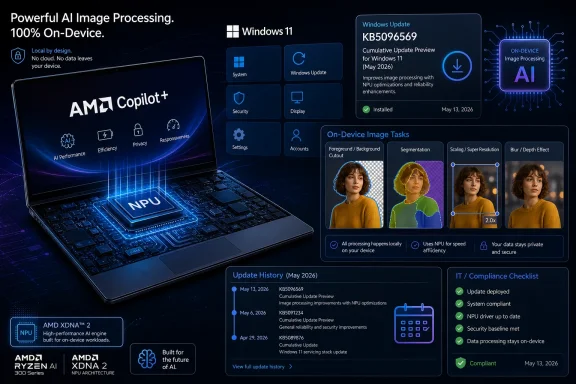
KB5096569 is not a flashy feature drop. Microsoft’s description frames it as an update to the Image Processing AI component for AMD-powered Copilot+ PCs, covering machine-learning models and runtime pieces used for tasks such as scaling, segmentation, foreground and background extraction, and visual analysis. That is deeply unglamorous language, but it is also the language of a platform being assembled beneath the surface.
The important phrase is not “image processing.” It is component update. Microsoft is increasingly treating AI capabilities in Windows as modular assets that can be updated outside the old mental model of a single monolithic Windows release. A Copilot+ PC is not merely a Windows 11 PC with a faster processor; it is a Windows 11 PC with a local inference substrate that Microsoft expects to keep tuning.
That is why KB5096569 applies only to Copilot+ PCs and only to AMD-powered systems. The same version number, 1.2605.856.0, has appeared across related Copilot+ AI component updates for other silicon families, but Microsoft still packages and labels these updates by platform. The user sees one Windows brand. Administrators see a matrix.
This is the quiet bargain of on-device AI. Microsoft wants users to experience fast image analysis, editing, accessibility, and enhancement workflows without thinking about model files or runtime dependencies. But to get there, the company has to service those model and runtime dependencies with the same seriousness it applies to drivers, security patches, and app frameworks.
AMD and Intel have since moved into the Copilot+ lane, and KB5096569 is evidence of the less glamorous work required to make that shift real. It is one thing to say that Windows AI features support multiple architectures. It is another to maintain separate packages that know how to run image-related AI workloads against the hardware and software stack available on each platform.
AMD-powered Copilot+ PCs bring the NPU into a more conventional x86 Windows environment. For buyers and businesses that were wary of Arm application compatibility, that matters. An AMD Copilot+ system can look and behave like a familiar Windows laptop while still qualifying for the newer AI experiences Microsoft is building around dedicated neural processing hardware.
But that familiarity can obscure the operational difference. A non-Copilot+ AMD laptop and an AMD Copilot+ laptop may both run Windows 11 24H2 or 25H2, both receive cumulative updates, and both show the same broad Windows branding. Only one class is eligible for KB5096569, because only one class has the required local AI hardware and Copilot+ feature stack.
The absence of detail is frustrating, but it is also revealing. Microsoft is not presenting this as a user-facing feature announcement. It is presenting it as maintenance of an AI plumbing layer that other Windows features and apps consume.
That creates a transparency problem. If an image segmentation model changes behavior, a user may notice only that a background blur, object extraction, accessibility description, or AI editing operation works slightly differently. The update history entry will say “2026-05 Image Processing version 1.2605.856.0 for AMD-powered systems,” not “fixed edge detection around hair in Photos” or “improved foreground extraction in Click to Do.”
Traditional Windows updates already struggle with changelog clarity. AI component updates add a new ambiguity: the thing being updated may be probabilistic rather than deterministic. A patch can alter results without producing a simple before-and-after bug list. For a consumer, that may be acceptable. For a managed environment testing accessibility workflows, imaging pipelines, or user training materials, it is less comforting.
On-device processing is valuable. It can reduce round trips to cloud services, improve responsiveness, preserve battery life when hardware acceleration works properly, and keep sensitive visual data away from remote servers. For image understanding in particular, local execution is not a luxury. Screenshots, photos, webcam frames, and document images can contain the most private material on a PC.
Yet local AI does not eliminate trust questions. It relocates them. Instead of asking whether an image was sent to a cloud endpoint, users and administrators must ask which local model processed it, which app invoked that model, which policy controls apply, and whether the component was updated consistently across the fleet.
KB5096569 sits precisely in that tension. It supports the privacy-friendly story that image data can be processed on device. It also expands the amount of opaque AI infrastructure installed and updated under Windows Update. The more Microsoft leans on local models, the more the Windows servicing layer becomes part of the AI trust boundary.
An image processing component can affect the quality of automatic enhancement. It can alter how a subject is separated from a background. It can influence visual analysis used by accessibility or productivity features. These are not merely performance optimizations; they are judgments encoded into models and inference pipelines.
That does not mean every AI component update is risky. Most are likely routine refinements: compatibility fixes, better runtime reliability, improved performance on specific NPUs, and alignment with newer Windows features. But the testing burden does not vanish because Microsoft uses the word “AI.” If anything, it grows because outputs may be harder to compare.
For IT departments, the phrase “downloaded and installed automatically from Windows Update” is doing a lot of work. In unmanaged consumer scenarios, automatic installation is the right default. In enterprises, it raises the familiar question of how much control organizations actually have over AI component drift when endpoints receive updates through Windows Update, Windows Update for Business, Autopatch, Intune policy, or vendor images.
This is where users can get confused. A laptop may be sold as a Copilot+ PC, yet a particular feature may not appear until several pieces line up. Another machine may have an NPU but not meet Copilot+ requirements. A third may be on the right Windows version but missing a component update. The marketing term is simple; the servicing reality is not.
Microsoft’s Copilot+ baseline has generally centered on a high-performance NPU, 16GB of RAM, and modern Windows 11 builds capable of exposing the local AI feature set. But the practical experience is more conditional than the sticker suggests. Some features arrived first on Qualcomm systems and later expanded to AMD and Intel. Some are tied to specific Windows versions. Some depend on app updates.
KB5096569 therefore functions like a readiness checkpoint. If it appears in update history on an AMD-powered Copilot+ PC, the device has at least received this particular image-processing layer. If it does not appear, the explanation could be mundane: the device is not Copilot+, the latest cumulative update is missing, rollout has not reached the machine, or update management policy is blocking it.
That creates a split identity for Windows releases. The annual version number still matters for support lifecycle, enablement, and compatibility baselines. But more of the visible product is now delivered through cumulative updates, app updates, and component packages. Windows 11 24H2 and 25H2 may share AI component versions even when their broader OS versioning differs.
For enthusiasts, that can be exciting. It means features and improvements can land faster. For administrators, it can feel like chasing moving targets. A fleet inventory that says “Windows 11 24H2” is no longer enough to describe the user experience. The question becomes which AI components are present, at which versions, and on which silicon.
The same pattern is visible in Microsoft’s wider Copilot+ rollout. Click to Do, Recall, semantic Windows search, Photos features, Paint features, and AI-assisted settings experiences all sit at different points in the OS-app-component triangle. KB5096569 is one tile in that mosaic, but the mosaic is the story.
Most consumers will never check this. They should not have to. If a Copilot+ feature works, the component stack is invisible; if it fails, update history becomes one of many diagnostic breadcrumbs.
For administrators and support desks, however, that breadcrumb matters. When a user says an AI image feature behaves differently on one AMD Copilot+ laptop than another, the update history entry becomes part of the triage path. Is the cumulative update current? Is KB5096569 installed? Is the corresponding app current? Is the device actually using the NPU? Has the OEM driver package changed?
The catch is that Microsoft has not yet made AI component inventory feel as mature as traditional Windows update inventory. Enterprises can manage what they can see, query, report, and correlate. If AI components become operationally important, IT teams will need clean ways to audit them at scale, not just tell users to click through Settings.
That is normal for software. It is also a useful antidote to the idea that Copilot+ features are finished capabilities baked into the machine. A Copilot+ PC is more like a console with a continuously updated runtime than a laptop with a fixed feature sheet. The hardware enables the class of experience; the software determines what the experience actually becomes.
The version number, 1.2605.856.0, suggests a May 2026 component generation aligned with other AI component updates. Microsoft appears to be keeping related AI packages in step across CPU vendors where possible, while still separating delivery by hardware platform. That is a reasonable engineering compromise, but it adds bookkeeping.
The question for Microsoft is how much of this bookkeeping should remain hidden. Hide too much, and power users and enterprises cannot diagnose problems. Expose too much, and ordinary users are confronted with a soup of AI components whose names sound interchangeable. Windows has lived this tension for decades with drivers. AI components are about to inherit it.
Consider foreground and background extraction. A user sees a clean cutout, a better blur, or a useful editing action. Underneath, the system has made a segmentation decision. If that decision improves, the feature feels more polished. If it gets worse around hair, glass, shadows, hands, or low-contrast objects, the feature feels cheap.
Scaling is similar. Users may not care which model or runtime performs the operation, but they care whether an image looks sharp, whether a game or app benefits from super resolution, or whether the process drains battery. Visual analysis also sits behind accessibility and productivity scenarios where local image understanding can reduce friction for users who rely on assistive workflows.
That is why component updates deserve attention even when the KB article reads like a placeholder. Microsoft’s AI story will be judged less by keynote demos than by cumulative competence. Each unremarkable package either strengthens or weakens the sense that Windows can run local AI reliably.
Local processing can reduce exposure, but it does not answer every governance question. If an app can invoke local image analysis, policy should determine when that is allowed. If a model changes, organizations may need to know whether regulated workflows are affected. If AI-generated or AI-assisted edits alter content, auditability may matter.
The privacy advantage of on-device AI is strongest when paired with clear controls. Microsoft has already had to be more explicit about controls around Recall, including default behavior and managed-device policy. Image processing may seem less controversial, but it still touches user content. The fact that data remains local should be the beginning of the conversation, not the end.
There is also a communications challenge. Microsoft tends to describe these components in broad, reassuring terms: fast, low-latency, private, AI-assisted. Those are benefits, not operational details. As AI becomes a platform dependency, administrators will press for the same kind of documentation they expect from security baselines and management policies.
But that promise depends on predictability. If Copilot+ features arrive unevenly across Qualcomm, AMD, and Intel systems, buyers will learn to treat the badge with caution. If updates are automatic but poorly explained, support teams will struggle to separate expected rollout behavior from broken configuration. If AI features vary by region, language, app version, and silicon, the procurement conversation gets messy.
KB5096569 is not evidence of failure. In fact, it is evidence that Microsoft is maintaining the AMD side of the stack. The concern is that maintenance itself has become part of the product. A Copilot+ PC is only as coherent as the update pipeline that keeps its AI components aligned with Windows and with Microsoft’s apps.
That is where Microsoft has an opportunity. The company could turn these KB articles into genuinely useful release notes: what improved, which features might benefit, which known issues exist, which policies affect availability, and how enterprises can verify deployment. Even a modest increase in specificity would help.
AI components are different in technology but familiar in management burden. They depend on silicon capabilities. They may be tuned per vendor. They interact with OS features and apps. They can improve performance dramatically when aligned and create confusing gaps when misaligned.
The difference is that Microsoft wants AI to feel like a core Windows capability, not an optional peripheral. That raises the bar. If a webcam effect fails, users may blame the app. If a Copilot+ image action fails, they will blame Windows. If a local AI model produces inconsistent results across two ostensibly similar laptops, they will blame the Copilot+ brand.
KB5096569 therefore belongs to a bigger transition. Microsoft is trying to abstract the NPU the way Windows abstracts the GPU, but the user-facing claims are broader. The company is not merely promising acceleration. It is promising intelligence, privacy, and a new interaction model. Those promises are harder to debug.
But WindowsForum readers should treat this as a signal. If you administer AMD Copilot+ PCs, this is now part of your update vocabulary. If you troubleshoot Copilot+ features, Update history matters. If you evaluate devices, the presence of the right AI component versions should become part of the baseline alongside BIOS, driver, and cumulative update levels.
The update also shows how quickly Windows’ AI substrate is becoming normalized. A year ago, many Copilot+ discussions were about whether the category would matter at all. Now the maintenance stream is already producing replacement packages and versioned AI components per silicon vendor. That is how platforms become real: not through launch-day spectacle, but through the recurring paperwork of servicing.
The danger is that Microsoft may underestimate how much explanation this new layer requires. Enthusiasts will dig through KBs. Enterprises will ask vendors. Ordinary users will not know what changed, only that a feature appeared, disappeared, improved, or behaved differently. If Microsoft wants trust, it needs to make the invisible stack legible without making it overwhelming.
 Microsoft Is Turning AI Features Into Serviced Windows Components
KB5096569 is not a flashy feature drop. Microsoft’s description frames it as an update to the Image Processing AI component for AMD-powered Copilot+ PCs, covering machine-learning models and runtime pieces used for tasks such as scaling, segmentation, foreground and background extraction, and visual analysis. That is deeply unglamorous language, but it is also the language of a platform being assembled beneath the surface.The important phrase is not “image processing.” It is component update. Microsoft is increasingly treating AI capabilities in Windows as modular assets that can be updated outside the old mental model of a single monolithic Windows release. A Copilot+ PC is not merely a Windows 11 PC with a faster processor; it is a Windows 11 PC with a local inference substrate that Microsoft expects to keep tuning.
That is why KB5096569 applies only to Copilot+ PCs and only to AMD-powered systems. The same version number, 1.2605.856.0, has appeared across related Copilot+ AI component updates for other silicon families, but Microsoft still packages and labels these updates by platform. The user sees one Windows brand. Administrators see a matrix.
This is the quiet bargain of on-device AI. Microsoft wants users to experience fast image analysis, editing, accessibility, and enhancement workflows without thinking about model files or runtime dependencies. But to get there, the company has to service those model and runtime dependencies with the same seriousness it applies to drivers, security patches, and app frameworks.
The AMD Angle Matters Because Copilot+ Is No Longer Just a Qualcomm Story
When Copilot+ PCs first arrived, the public story leaned heavily on Qualcomm’s Snapdragon X platform. That made sense: Arm-based Copilot+ hardware was first out of the gate, and Microsoft used those machines to sell the idea of local AI performance, long battery life, and a new generation of Windows experiences. But the PC market was never going to reorganize around one silicon vendor.AMD and Intel have since moved into the Copilot+ lane, and KB5096569 is evidence of the less glamorous work required to make that shift real. It is one thing to say that Windows AI features support multiple architectures. It is another to maintain separate packages that know how to run image-related AI workloads against the hardware and software stack available on each platform.
AMD-powered Copilot+ PCs bring the NPU into a more conventional x86 Windows environment. For buyers and businesses that were wary of Arm application compatibility, that matters. An AMD Copilot+ system can look and behave like a familiar Windows laptop while still qualifying for the newer AI experiences Microsoft is building around dedicated neural processing hardware.
But that familiarity can obscure the operational difference. A non-Copilot+ AMD laptop and an AMD Copilot+ laptop may both run Windows 11 24H2 or 25H2, both receive cumulative updates, and both show the same broad Windows branding. Only one class is eligible for KB5096569, because only one class has the required local AI hardware and Copilot+ feature stack.
The Support Article Is Sparse Because the Real Product Is the Pipeline
Microsoft’s support note for KB5096569 does not provide a long changelog. It says the update includes improvements to the Image Processing AI component for Windows 11 version 24H2 and Windows 11 version 25H2, requires the latest cumulative update, installs automatically from Windows Update, and replaces an earlier update, KB5090936. That is not much for anyone hoping to learn whether a specific image feature became faster, more accurate, or less buggy.The absence of detail is frustrating, but it is also revealing. Microsoft is not presenting this as a user-facing feature announcement. It is presenting it as maintenance of an AI plumbing layer that other Windows features and apps consume.
That creates a transparency problem. If an image segmentation model changes behavior, a user may notice only that a background blur, object extraction, accessibility description, or AI editing operation works slightly differently. The update history entry will say “2026-05 Image Processing version 1.2605.856.0 for AMD-powered systems,” not “fixed edge detection around hair in Photos” or “improved foreground extraction in Click to Do.”
Traditional Windows updates already struggle with changelog clarity. AI component updates add a new ambiguity: the thing being updated may be probabilistic rather than deterministic. A patch can alter results without producing a simple before-and-after bug list. For a consumer, that may be acceptable. For a managed environment testing accessibility workflows, imaging pipelines, or user training materials, it is less comforting.
The Local-AI Promise Depends on a Servicing Model Users Never Asked For
Microsoft’s pitch for these components is sensible. The Image Processing AI component runs on dedicated AI hardware, supports low-latency work, and keeps image data on the device. That is exactly the case Microsoft needs to make after years of cloud-first AI messaging and after privacy debates around features such as Recall.On-device processing is valuable. It can reduce round trips to cloud services, improve responsiveness, preserve battery life when hardware acceleration works properly, and keep sensitive visual data away from remote servers. For image understanding in particular, local execution is not a luxury. Screenshots, photos, webcam frames, and document images can contain the most private material on a PC.
Yet local AI does not eliminate trust questions. It relocates them. Instead of asking whether an image was sent to a cloud endpoint, users and administrators must ask which local model processed it, which app invoked that model, which policy controls apply, and whether the component was updated consistently across the fleet.
KB5096569 sits precisely in that tension. It supports the privacy-friendly story that image data can be processed on device. It also expands the amount of opaque AI infrastructure installed and updated under Windows Update. The more Microsoft leans on local models, the more the Windows servicing layer becomes part of the AI trust boundary.
Windows Update Is Becoming the Delivery Channel for Model Behavior
Windows Update has always carried more than security fixes. It delivers drivers, servicing stack updates, .NET updates, firmware in some cases, Store-adjacent components, and feature enablement packages. But AI model and runtime components raise the stakes because they shape user-facing behavior in ways that may not look like conventional software changes.An image processing component can affect the quality of automatic enhancement. It can alter how a subject is separated from a background. It can influence visual analysis used by accessibility or productivity features. These are not merely performance optimizations; they are judgments encoded into models and inference pipelines.
That does not mean every AI component update is risky. Most are likely routine refinements: compatibility fixes, better runtime reliability, improved performance on specific NPUs, and alignment with newer Windows features. But the testing burden does not vanish because Microsoft uses the word “AI.” If anything, it grows because outputs may be harder to compare.
For IT departments, the phrase “downloaded and installed automatically from Windows Update” is doing a lot of work. In unmanaged consumer scenarios, automatic installation is the right default. In enterprises, it raises the familiar question of how much control organizations actually have over AI component drift when endpoints receive updates through Windows Update, Windows Update for Business, Autopatch, Intune policy, or vendor images.
The Prerequisite Is a Reminder That Feature Readiness Is Layered
KB5096569 requires the latest cumulative update for Windows 11 version 24H2 or 25H2. That prerequisite matters because Copilot+ features are not enabled by hardware alone. They depend on a layered stack: Windows release, cumulative update level, device class, NPU capability, vendor-specific enablement, AI components, Store apps, and sometimes region or language rollout gates.This is where users can get confused. A laptop may be sold as a Copilot+ PC, yet a particular feature may not appear until several pieces line up. Another machine may have an NPU but not meet Copilot+ requirements. A third may be on the right Windows version but missing a component update. The marketing term is simple; the servicing reality is not.
Microsoft’s Copilot+ baseline has generally centered on a high-performance NPU, 16GB of RAM, and modern Windows 11 builds capable of exposing the local AI feature set. But the practical experience is more conditional than the sticker suggests. Some features arrived first on Qualcomm systems and later expanded to AMD and Intel. Some are tied to specific Windows versions. Some depend on app updates.
KB5096569 therefore functions like a readiness checkpoint. If it appears in update history on an AMD-powered Copilot+ PC, the device has at least received this particular image-processing layer. If it does not appear, the explanation could be mundane: the device is not Copilot+, the latest cumulative update is missing, rollout has not reached the machine, or update management policy is blocking it.
The 24H2 and 25H2 Target Tells Us Microsoft Is Building Across Releases
The update applies to Windows 11 version 24H2 and Windows 11 version 25H2. That dual targeting is notable because Microsoft’s AI work has become intertwined with Windows’ annual release rhythm and its continuous delivery habit. The company wants Windows 11 25H2 to carry forward the Copilot+ platform without making every AI capability wait for a once-a-year monolith.That creates a split identity for Windows releases. The annual version number still matters for support lifecycle, enablement, and compatibility baselines. But more of the visible product is now delivered through cumulative updates, app updates, and component packages. Windows 11 24H2 and 25H2 may share AI component versions even when their broader OS versioning differs.
For enthusiasts, that can be exciting. It means features and improvements can land faster. For administrators, it can feel like chasing moving targets. A fleet inventory that says “Windows 11 24H2” is no longer enough to describe the user experience. The question becomes which AI components are present, at which versions, and on which silicon.
The same pattern is visible in Microsoft’s wider Copilot+ rollout. Click to Do, Recall, semantic Windows search, Photos features, Paint features, and AI-assisted settings experiences all sit at different points in the OS-app-component triangle. KB5096569 is one tile in that mosaic, but the mosaic is the story.
The Update History Entry Is Now an Admin Clue, Not a Consumer Destination
Microsoft tells users to check Settings, Windows Update, and Update history to confirm whether KB5096569 is installed. After installation, the entry should identify the May 2026 Image Processing version 1.2605.856.0 package for AMD-powered systems. That is useful, but it is also a very Windows way of exposing a modern AI dependency.Most consumers will never check this. They should not have to. If a Copilot+ feature works, the component stack is invisible; if it fails, update history becomes one of many diagnostic breadcrumbs.
For administrators and support desks, however, that breadcrumb matters. When a user says an AI image feature behaves differently on one AMD Copilot+ laptop than another, the update history entry becomes part of the triage path. Is the cumulative update current? Is KB5096569 installed? Is the corresponding app current? Is the device actually using the NPU? Has the OEM driver package changed?
The catch is that Microsoft has not yet made AI component inventory feel as mature as traditional Windows update inventory. Enterprises can manage what they can see, query, report, and correlate. If AI components become operationally important, IT teams will need clean ways to audit them at scale, not just tell users to click through Settings.
The Replacement of KB5090936 Shows the Stack Is Already Moving
KB5096569 replaces KB5090936. That detail is easy to skim past, but it is one of the most important lines in the support note. The Image Processing AI component is not a static prerequisite installed once at purchase. It is already moving through successive revisions.That is normal for software. It is also a useful antidote to the idea that Copilot+ features are finished capabilities baked into the machine. A Copilot+ PC is more like a console with a continuously updated runtime than a laptop with a fixed feature sheet. The hardware enables the class of experience; the software determines what the experience actually becomes.
The version number, 1.2605.856.0, suggests a May 2026 component generation aligned with other AI component updates. Microsoft appears to be keeping related AI packages in step across CPU vendors where possible, while still separating delivery by hardware platform. That is a reasonable engineering compromise, but it adds bookkeeping.
The question for Microsoft is how much of this bookkeeping should remain hidden. Hide too much, and power users and enterprises cannot diagnose problems. Expose too much, and ordinary users are confronted with a soup of AI components whose names sound interchangeable. Windows has lived this tension for decades with drivers. AI components are about to inherit it.
Image Processing Is the Quiet Layer Behind Flashier Copilot+ Demos
Image Processing AI does not have the marketing shine of Recall, Click to Do, Cocreator, or Image Creator. But those marquee experiences rely on underlying capabilities such as recognizing visual elements, separating foreground from background, transforming image content, or preparing inputs for other models. The boring layer is often the layer that determines whether the flashy demo feels magical or brittle.Consider foreground and background extraction. A user sees a clean cutout, a better blur, or a useful editing action. Underneath, the system has made a segmentation decision. If that decision improves, the feature feels more polished. If it gets worse around hair, glass, shadows, hands, or low-contrast objects, the feature feels cheap.
Scaling is similar. Users may not care which model or runtime performs the operation, but they care whether an image looks sharp, whether a game or app benefits from super resolution, or whether the process drains battery. Visual analysis also sits behind accessibility and productivity scenarios where local image understanding can reduce friction for users who rely on assistive workflows.
That is why component updates deserve attention even when the KB article reads like a placeholder. Microsoft’s AI story will be judged less by keynote demos than by cumulative competence. Each unremarkable package either strengthens or weakens the sense that Windows can run local AI reliably.
Privacy Messaging Gets Stronger, but Accountability Must Follow
Microsoft emphasizes that the component keeps image data on the device. That is the right message for the current moment. Users have become more aware of where AI systems send their data, and enterprises are acutely sensitive to screenshots, documents, customer records, and internal images leaving managed hardware.Local processing can reduce exposure, but it does not answer every governance question. If an app can invoke local image analysis, policy should determine when that is allowed. If a model changes, organizations may need to know whether regulated workflows are affected. If AI-generated or AI-assisted edits alter content, auditability may matter.
The privacy advantage of on-device AI is strongest when paired with clear controls. Microsoft has already had to be more explicit about controls around Recall, including default behavior and managed-device policy. Image processing may seem less controversial, but it still touches user content. The fact that data remains local should be the beginning of the conversation, not the end.
There is also a communications challenge. Microsoft tends to describe these components in broad, reassuring terms: fast, low-latency, private, AI-assisted. Those are benefits, not operational details. As AI becomes a platform dependency, administrators will press for the same kind of documentation they expect from security baselines and management policies.
AMD Copilot+ PCs Need Predictability More Than Hype
AMD’s role in Copilot+ PCs is important because it gives buyers a route into Microsoft’s AI PC category without leaving the x86 software ecosystem. For businesses, that may be the most attractive path. The machine can run the familiar Windows application estate while still satisfying Microsoft’s new AI hardware baseline.But that promise depends on predictability. If Copilot+ features arrive unevenly across Qualcomm, AMD, and Intel systems, buyers will learn to treat the badge with caution. If updates are automatic but poorly explained, support teams will struggle to separate expected rollout behavior from broken configuration. If AI features vary by region, language, app version, and silicon, the procurement conversation gets messy.
KB5096569 is not evidence of failure. In fact, it is evidence that Microsoft is maintaining the AMD side of the stack. The concern is that maintenance itself has become part of the product. A Copilot+ PC is only as coherent as the update pipeline that keeps its AI components aligned with Windows and with Microsoft’s apps.
That is where Microsoft has an opportunity. The company could turn these KB articles into genuinely useful release notes: what improved, which features might benefit, which known issues exist, which policies affect availability, and how enterprises can verify deployment. Even a modest increase in specificity would help.
The AI PC Era Is Bringing Back the Driver Problem in New Clothes
Windows veterans have seen this movie before. Hardware-specific enablement creates power and complexity. GPU drivers, audio stacks, touchpad utilities, firmware updates, chipset packages, and OEM control panels have all shaped the Windows experience in ways the OS alone cannot fully abstract.AI components are different in technology but familiar in management burden. They depend on silicon capabilities. They may be tuned per vendor. They interact with OS features and apps. They can improve performance dramatically when aligned and create confusing gaps when misaligned.
The difference is that Microsoft wants AI to feel like a core Windows capability, not an optional peripheral. That raises the bar. If a webcam effect fails, users may blame the app. If a Copilot+ image action fails, they will blame Windows. If a local AI model produces inconsistent results across two ostensibly similar laptops, they will blame the Copilot+ brand.
KB5096569 therefore belongs to a bigger transition. Microsoft is trying to abstract the NPU the way Windows abstracts the GPU, but the user-facing claims are broader. The company is not merely promising acceleration. It is promising intelligence, privacy, and a new interaction model. Those promises are harder to debug.
The May 2026 Package Is Small, but the Operational Lesson Is Not
For most eligible systems, KB5096569 should simply arrive. There is no manual installer path highlighted in the support text, no elaborate setup, and no user action beyond staying current on cumulative updates. That is the right consumer posture. The less users have to think about AI runtimes, the better.But WindowsForum readers should treat this as a signal. If you administer AMD Copilot+ PCs, this is now part of your update vocabulary. If you troubleshoot Copilot+ features, Update history matters. If you evaluate devices, the presence of the right AI component versions should become part of the baseline alongside BIOS, driver, and cumulative update levels.
The update also shows how quickly Windows’ AI substrate is becoming normalized. A year ago, many Copilot+ discussions were about whether the category would matter at all. Now the maintenance stream is already producing replacement packages and versioned AI components per silicon vendor. That is how platforms become real: not through launch-day spectacle, but through the recurring paperwork of servicing.
The danger is that Microsoft may underestimate how much explanation this new layer requires. Enthusiasts will dig through KBs. Enterprises will ask vendors. Ordinary users will not know what changed, only that a feature appeared, disappeared, improved, or behaved differently. If Microsoft wants trust, it needs to make the invisible stack legible without making it overwhelming.
What AMD Copilot+ Owners Should Notice in This Particular Update
KB5096569 is not a reason to panic, postpone, or hunt for a standalone download. It is a routine but meaningful update in Microsoft’s broader shift toward componentized local AI on Windows. The practical reading is straightforward, even if the platform implications are not.- KB5096569 applies only to AMD-powered Copilot+ PCs, not to every AMD Windows 11 system.
- The update moves the Image Processing AI component to version 1.2605.856.0 for Windows 11 version 24H2 and version 25H2.
- The device must already have the latest cumulative update for its supported Windows 11 version before this component update applies.
- The package installs automatically through Windows Update and should appear in Update history after installation.
- The update replaces KB5090936, showing that Microsoft is already revising this AI component over time.
- The component supports local image understanding and processing tasks used by Windows features and apps, including scaling, segmentation, foreground and background extraction, and visual analysis.
References
- Primary source: Microsoft Support
Published: Tue, 26 May 2026 21:03:03 Z
- Related coverage: windowsforum.com

KB5096571 Updates Intel Copilot+ Image Processing AI (v1.2605.856.0) for 24H2/25H2
Microsoft published KB5096571 on May 26, 2026, as an automatic Windows Update for Intel-powered Copilot+ PCs, moving the Windows 11 Image Processing AI component to version 1.2605.856.0 on supported version 24H2 and 25H2 systems with the latest cumulative update installed. The KB is small... windowsforum.com
- Related coverage: deskmodder.de

Windows 11 24H2 Updates für "Image Transform AI", "Image Processing AI" und "Phi Silica AI" für Copilot+ PCs wurden bereitgestellt
Mal kurz zur Information: Microsoft hat neben dem optionalen Update Mai als KB5058499 für alle noch zusätzlich Updates für Copilot+ PCs bereitgestellt. Dabei handelt es sich um die Updates für „Image Transform AI“ und „Phi Silica AI“ Für diejenigen, die…www.deskmodder.de - Related coverage: na.ingrammicro.com
- Official source: techcommunity.microsoft.com
- Official source: news.microsoft.com

