

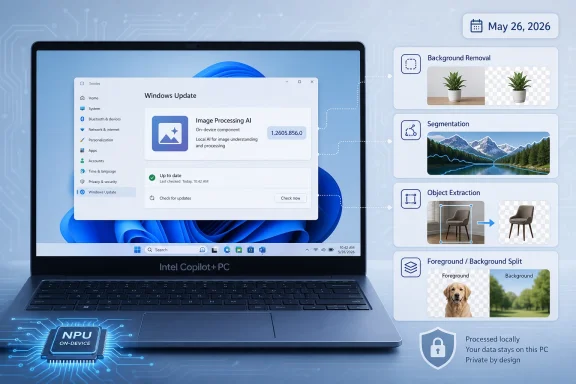
Microsoft published KB5096571 on May 26, 2026, as an automatic Windows Update that moves the Image Processing AI component for Intel-powered Copilot+ PCs to version 1.2605.856.0 on Windows 11 versions 24H2 and 25H2. The update is narrow, quiet, and easy to miss. It is also a useful marker for where Windows is going: away from monolithic feature drops and toward a serviced stack of local AI models, runtimes, and hardware-specific components. For Intel Copilot+ PC owners, this is less a flashy new feature than another brick in Microsoft’s new AI operating-system architecture.
KB5096571 is not the kind of update that sells a PC. It does not arrive with a new Start menu, a redesigned taskbar, or a marquee Copilot button moment. Microsoft describes it instead as an Image Processing AI component update for Intel-powered systems, applicable only to Copilot+ PCs, and tied to Windows 11 version 24H2 and version 25H2.
That specificity matters. Windows is no longer merely receiving operating-system updates, app updates, driver updates, and Store updates. On Copilot+ PCs, it is also receiving componentized AI model updates that sit somewhere between system plumbing and user-facing functionality.
The Image Processing AI component supports on-device image understanding and processing across Windows features and apps. Microsoft’s own framing includes scaling, segmentation, foreground and background extraction, visual analysis, enhancement, accessibility, and AI-assisted image editing. That list reads like a technical inventory, but in practice it maps to the everyday effects Microsoft wants users to notice: cleaner edits, smarter search, better object handling, faster image transformations, and fewer round trips to the cloud.
KB5096571’s version number, 1.2605.856.0, is the real headline for administrators and enthusiasts. It shows Microsoft treating local AI capability as a living layer of Windows, revised independently and delivered automatically through Windows Update. That is a very different model from the old “wait for the next Windows release” cadence.
KB5096571 shows the next phase of that strategy. The NPU is not just hardware that Windows detects at purchase time. It is now a servicing target, with Microsoft shipping AI components that depend on the platform underneath them.
That is why this update is explicitly for Intel-powered Copilot+ PCs. Qualcomm and AMD systems have their own parallel packages and KB articles for similar components. To the user, Microsoft wants all of this to feel like “Windows AI.” To the servicing stack, it is a matrix of model versions, execution providers, silicon vendors, Windows builds, and feature availability.
This is the practical reality behind the Copilot+ PC brand. A local image model is only as useful as the runtime that loads it, the execution provider that talks efficiently to the NPU, the app API that exposes it, and the Windows feature that consumes it. When any of those layers changes, Microsoft needs a way to update it without waiting for a full OS feature release.
For IT pros, this makes the AI PC less like a traditional endpoint and more like a managed inference appliance. The device still runs Office, browsers, line-of-business apps, and endpoint security agents. But it also carries a growing library of local models and acceleration components whose versions may increasingly matter for supportability, compatibility, privacy reviews, and help-desk troubleshooting.
This is why the component is important even if Microsoft does not attach a dramatic changelog to KB5096571. Many of Windows’ newer AI experiences depend on the system being able to identify objects, isolate subjects, upscale images, describe visual content, or prepare an image for another model. Those are not decorative features. They are foundational operations.
A user may encounter them as a button that removes a background, improves a photo, searches for an image using plain language, or helps an accessibility workflow describe screen content. A developer may encounter them through Windows AI APIs that promise ready-to-use local models. An administrator may encounter them when two nominally identical Copilot+ PCs produce different behavior because one has a newer model component installed.
That last scenario is where KB5096571 becomes more than trivia. If Windows AI components are updated automatically and separately from headline Windows releases, version drift becomes part of the endpoint-management conversation. The old question was “What Windows build are you on?” The new question may become “What AI component versions are installed?”
That gives Redmond a useful control point. If a device is behind on cumulative updates, Microsoft does not have to guarantee that the newest local AI component will install or behave properly. The AI layer can assume a reasonably current OS foundation, reducing the number of combinations Microsoft must validate.
It also pressures organizations to keep Copilot+ PCs current if they want predictable AI functionality. This is especially relevant for businesses that bought AI PCs with the expectation that local inference would mature over time. The hardware is only half the promise. The other half is the update pipeline.
For unmanaged consumer devices, the story is simple: the update downloads and installs automatically from Windows Update. For managed fleets, the story is more complicated. Organizations using Windows Update for Business, Intune, WSUS, third-party patching, or layered update deferrals will need to understand whether AI components appear in their normal reporting, whether they are governed by existing policies, and how they interact with update rings.
Microsoft’s instruction for checking installation is consumer-friendly: open Settings, go to Windows Update, then Update history. That is fine for one laptop on a kitchen table. It is not sufficient for a fleet of 5,000 endpoints, where administrators will want inventory, compliance state, rollback expectations, and clear documentation of what changed.
But automatic AI servicing carries a governance cost. Machine-learning components are not ordinary bug-fix DLLs, even when they are packaged through familiar channels. They can change output quality, edge-case behavior, model performance, resource consumption, and application compatibility in ways that are harder to describe than a traditional security patch.
Microsoft’s release notes for this class of updates often remain sparse. The company says the component receives improvements, but it generally does not provide a granular engineering changelog that explains whether a model became more accurate, faster, smaller, less prone to a class of errors, or simply better aligned with a dependent Windows feature. That may be normal for consumer AI products, but Windows is also an enterprise platform.
This is where the tension sits. Microsoft wants local AI to feel seamlessly integrated into Windows, but enterprises want changes to be explainable. If a background image extractor starts behaving differently in an accessibility tool, a design workflow, or a regulated application, “the component was improved” is not a satisfying root-cause analysis.
There is also a security and privacy dimension. Microsoft’s local AI argument depends heavily on the idea that sensitive data can stay on the device. That is an important advantage over cloud-only AI workflows, especially for screenshots, photos, documents, and screen content. But local processing does not eliminate the need for oversight. It shifts the review from network transmission to model behavior, local storage, access controls, and which apps are allowed to invoke system AI capabilities.
For buyers, Intel systems offer a familiar compatibility story. For Microsoft, they create a chance to bring Copilot+ features into the kinds of machines businesses already know how to deploy. For Intel, they keep the company in the center of the PC conversation at a moment when AI acceleration has become the new performance battleground.
The tradeoff is complexity. Qualcomm, AMD, and Intel do not expose identical AI stacks under the hood. Windows has to mediate between silicon-specific acceleration and common application-level features. The user wants the “remove background” or “describe image” experience to work the same way; the system may be taking a very different path depending on which processor is inside.
KB5096571 is part of that mediation layer. It is a reminder that Microsoft’s promise of a consistent Copilot+ experience depends on a lot of vendor-specific maintenance. If those updates are timely and reliable, users see a platform. If they are delayed, inconsistent, or poorly documented, users see fragmentation.
This means Windows versions are no longer just about shell changes or kernel improvements. They are increasingly about which AI components and APIs can be assumed to exist. That is a subtle but important change in how developers and IT departments should think about Windows compatibility.
In older Windows eras, a business might standardize on a release primarily for stability, security support, and application compatibility. Those factors still matter. But with Copilot+ PCs, the OS version also gates access to local AI models and hardware-accelerated experiences.
That creates a two-track Windows world. Standard Windows 11 PCs continue to receive the usual OS and app improvements, while Copilot+ PCs receive an additional layer of model-backed functionality. The risk for Microsoft is that “Windows 11” becomes too broad a label to describe the real user experience. The opportunity is that Copilot+ hardware becomes more useful after purchase, as the AI stack matures.
The operating system is moving toward a model where AI improvements are ambient. Photos gets better. Paint gets more capable. Search becomes more semantic. Accessibility features gain richer image understanding. Developers get APIs that call local models without bundling the entire AI stack themselves.
That is the best-case version of the story. The user does not care which package delivered the change. They care that the feature is fast, private, and reliable.
The problem is that invisible infrastructure can still break visible workflows. If a model update changes the way foreground extraction handles hair, glass, handwriting, low-light photos, medical imagery, product photos, or scanned documents, users may experience it as either an improvement or a regression. Machine-learning quality is often probabilistic, and regressions can be domain-specific rather than universal.
Microsoft therefore needs to balance convenience with transparency. A bare KB entry is enough to identify that something changed. It is not always enough to explain what administrators and developers should test after the change lands.
That is a sensible platform play. Most Windows developers do not want to become AI infrastructure teams. They want an API that works, respects local privacy expectations, and performs well on supported hardware. If Microsoft can provide that, it makes Windows more attractive as a client AI platform.
KB5096571 fits this strategy because it updates a component that multiple features and apps may rely on. A single serviced Image Processing component can benefit first-party Windows experiences and, over time, third-party apps that call the supported APIs. This is the same platform logic that made system codecs, DirectX components, and web runtimes important in earlier eras.
But the model supply chain also makes developers dependent on Microsoft’s cadence and compatibility promises. If an app’s output quality depends on a system AI component, the developer may not fully control that behavior across machines or over time. That can be acceptable for assistive and creative features. It becomes more delicate for professional workflows where repeatability matters.
Microsoft will need to make clear which AI APIs are experimental, which are stable, what compatibility guarantees exist, and how developers should handle missing or outdated components. Otherwise, the same abstraction that makes local AI easy to adopt could make it difficult to support.
Those questions are boring only until a help desk is flooded with reports that an AI-assisted feature stopped working after a patch cycle. Then version numbers like 1.2605.856.0 become the difference between guessing and troubleshooting.
The most immediate practical advice is simple: treat AI component versions as part of endpoint state. If an organization is deploying Intel Copilot+ PCs, it should be able to identify which devices have the latest cumulative update, which have the relevant AI component package, and whether the expected AI features are present. Manual checks in Settings are not enough for serious fleet management.
There is also a policy angle. Some organizations will embrace local AI because data remains on the device. Others will be cautious because features such as screen analysis, image understanding, and semantic indexing can touch sensitive material even without cloud transmission. The fact that processing is local is a privacy advantage, not a universal approval slip.
The enterprises that handle this well will not simply block everything or enable everything. They will define which Copilot+ features are allowed, what data classes are acceptable, which users need them, and how update cadence is monitored. KB5096571 is a small update, but it belongs to a category that will demand real governance.
What improved? Accuracy? Latency? Power use? Compatibility with a specific Intel NPU path? Behavior in Microsoft Photos? Support for a newer Windows AI API? A fix for a model-loading issue? A dependency required by a forthcoming feature? The KB does not say.
This is not unique to KB5096571. AI component servicing is still young, and Microsoft appears to be building the public documentation system as the stack evolves. The company has already created release-history pages that list AI components and their versions, which is a meaningful step toward transparency. But version tables are not the same as release notes.
For consumer users, that may be acceptable. For developers and enterprises, it is not enough. If Microsoft wants Windows to be the trusted local AI platform for serious work, it needs to describe AI updates with more operational clarity. Not every model tweak requires a research paper, but administrators need to know whether an update is expected to change user-visible behavior.
The irony is that Microsoft already knows how to do this in other parts of Windows. Security updates, known issues, safeguard holds, release health dashboards, and cumulative update notes are imperfect but mature. AI components now need a similar documentation culture before they become too important to explain retroactively.
That is the right ambition. The PC remains the place where people handle private documents, personal photos, confidential business material, creative work, and messy everyday computing. Local AI makes the most sense when it is close to that data, responsive without a network dependency, and constrained by local permissions.
But the operating system has to earn trust every time it expands its ability to interpret user content. Image understanding is powerful because it lets software see more of what the user sees. That is useful for accessibility, search, editing, and automation. It is also sensitive by nature.
Microsoft’s answer is to emphasize on-device processing, dedicated AI hardware, and Windows-controlled model distribution. KB5096571 is one of the maintenance events behind that answer. It does not prove the whole strategy, but it shows the machinery now in motion.
That sounds obvious, but Copilot+ branding has created confusion. Not every AI PC is a Copilot+ PC. Not every Intel machine with an NPU qualifies. Not every Windows 11 system will receive these components. Microsoft’s local AI stack is tied to specific hardware and OS requirements, and KB5096571 follows that pattern.
The update is also a reminder that Copilot+ PCs should be judged over time, not only on launch-day feature lists. Microsoft is using Windows Update to revise the AI substrate beneath the user experience. That could make supported systems better after purchase, but it also means the value proposition depends on continued servicing discipline.
Intel systems, in particular, will be watched closely because they represent the bridge between the experimental first wave of Copilot+ PCs and the enterprise-friendly mainstream. If Intel Copilot+ machines receive timely, stable AI component updates, Microsoft’s category pitch gets stronger. If they lag or behave inconsistently, the Copilot+ label becomes harder to defend.
That modularity has advantages. It lets Microsoft update models and runtime layers faster. It lets silicon-specific packages target Intel, AMD, and Qualcomm systems without forcing every machine through the same path. It also gives Microsoft a way to support new app APIs and Windows features as the AI stack matures.
The cost is cognitive load. Windows Update history is becoming a place where users may see entries that look more like machine-learning platform components than traditional OS patches. Enthusiasts may welcome that visibility. Many ordinary users will ignore it. Administrators cannot afford to.
The broader implication is that Windows feature readiness will increasingly depend on a chain of components. A future AI feature may require the right Windows build, the right cumulative update, the right Store app version, the right driver, the right firmware, the right execution provider, and the right model package. That is manageable, but only if Microsoft provides clear diagnostics and reporting.
 Microsoft’s Small KB Tells a Bigger Windows Story
KB5096571 is not the kind of update that sells a PC. It does not arrive with a new Start menu, a redesigned taskbar, or a marquee Copilot button moment. Microsoft describes it instead as an Image Processing AI component update for Intel-powered systems, applicable only to Copilot+ PCs, and tied to Windows 11 version 24H2 and version 25H2.That specificity matters. Windows is no longer merely receiving operating-system updates, app updates, driver updates, and Store updates. On Copilot+ PCs, it is also receiving componentized AI model updates that sit somewhere between system plumbing and user-facing functionality.
The Image Processing AI component supports on-device image understanding and processing across Windows features and apps. Microsoft’s own framing includes scaling, segmentation, foreground and background extraction, visual analysis, enhancement, accessibility, and AI-assisted image editing. That list reads like a technical inventory, but in practice it maps to the everyday effects Microsoft wants users to notice: cleaner edits, smarter search, better object handling, faster image transformations, and fewer round trips to the cloud.
KB5096571’s version number, 1.2605.856.0, is the real headline for administrators and enthusiasts. It shows Microsoft treating local AI capability as a living layer of Windows, revised independently and delivered automatically through Windows Update. That is a very different model from the old “wait for the next Windows release” cadence.
The NPU Is Becoming a Servicing Target, Not Just a Spec Sheet Trophy
When Copilot+ PCs first arrived, the neural processing unit was marketed mostly as a performance credential. The magic number was 40 TOPS or better, a threshold intended to separate ordinary AI-capable PCs from machines designed to run Microsoft’s local AI experiences. Intel’s qualifying machines joined Qualcomm and AMD systems in that new class, with silicon-specific execution paths underneath the same Windows branding.KB5096571 shows the next phase of that strategy. The NPU is not just hardware that Windows detects at purchase time. It is now a servicing target, with Microsoft shipping AI components that depend on the platform underneath them.
That is why this update is explicitly for Intel-powered Copilot+ PCs. Qualcomm and AMD systems have their own parallel packages and KB articles for similar components. To the user, Microsoft wants all of this to feel like “Windows AI.” To the servicing stack, it is a matrix of model versions, execution providers, silicon vendors, Windows builds, and feature availability.
This is the practical reality behind the Copilot+ PC brand. A local image model is only as useful as the runtime that loads it, the execution provider that talks efficiently to the NPU, the app API that exposes it, and the Windows feature that consumes it. When any of those layers changes, Microsoft needs a way to update it without waiting for a full OS feature release.
For IT pros, this makes the AI PC less like a traditional endpoint and more like a managed inference appliance. The device still runs Office, browsers, line-of-business apps, and endpoint security agents. But it also carries a growing library of local models and acceleration components whose versions may increasingly matter for supportability, compatibility, privacy reviews, and help-desk troubleshooting.
Image Processing Is Where Local AI Stops Being Abstract
The phrase “AI component update” sounds like a background maintenance event. Image processing, however, is one of the areas where local AI becomes visible quickly. Segmentation and foreground extraction can change how Photos, Paint, accessibility tools, screen analysis, and third-party Windows apps behave when they need to understand what is inside an image.This is why the component is important even if Microsoft does not attach a dramatic changelog to KB5096571. Many of Windows’ newer AI experiences depend on the system being able to identify objects, isolate subjects, upscale images, describe visual content, or prepare an image for another model. Those are not decorative features. They are foundational operations.
A user may encounter them as a button that removes a background, improves a photo, searches for an image using plain language, or helps an accessibility workflow describe screen content. A developer may encounter them through Windows AI APIs that promise ready-to-use local models. An administrator may encounter them when two nominally identical Copilot+ PCs produce different behavior because one has a newer model component installed.
That last scenario is where KB5096571 becomes more than trivia. If Windows AI components are updated automatically and separately from headline Windows releases, version drift becomes part of the endpoint-management conversation. The old question was “What Windows build are you on?” The new question may become “What AI component versions are installed?”
The Update’s Requirements Reveal Microsoft’s Control Points
KB5096571 requires the latest cumulative update for Windows 11 version 24H2 or Windows 11 version 25H2. That requirement is not surprising, but it is revealing. Microsoft is tying AI component delivery to the broader health of the Windows servicing baseline.That gives Redmond a useful control point. If a device is behind on cumulative updates, Microsoft does not have to guarantee that the newest local AI component will install or behave properly. The AI layer can assume a reasonably current OS foundation, reducing the number of combinations Microsoft must validate.
It also pressures organizations to keep Copilot+ PCs current if they want predictable AI functionality. This is especially relevant for businesses that bought AI PCs with the expectation that local inference would mature over time. The hardware is only half the promise. The other half is the update pipeline.
For unmanaged consumer devices, the story is simple: the update downloads and installs automatically from Windows Update. For managed fleets, the story is more complicated. Organizations using Windows Update for Business, Intune, WSUS, third-party patching, or layered update deferrals will need to understand whether AI components appear in their normal reporting, whether they are governed by existing policies, and how they interact with update rings.
Microsoft’s instruction for checking installation is consumer-friendly: open Settings, go to Windows Update, then Update history. That is fine for one laptop on a kitchen table. It is not sufficient for a fleet of 5,000 endpoints, where administrators will want inventory, compliance state, rollback expectations, and clear documentation of what changed.
Silent AI Updates Are Convenient Until They Need an Audit Trail
The automatic nature of KB5096571 is the right default for most users. Local AI features should improve without requiring people to hunt down model packages. If Microsoft had made every Copilot+ component a manual download, the ecosystem would fragment immediately.But automatic AI servicing carries a governance cost. Machine-learning components are not ordinary bug-fix DLLs, even when they are packaged through familiar channels. They can change output quality, edge-case behavior, model performance, resource consumption, and application compatibility in ways that are harder to describe than a traditional security patch.
Microsoft’s release notes for this class of updates often remain sparse. The company says the component receives improvements, but it generally does not provide a granular engineering changelog that explains whether a model became more accurate, faster, smaller, less prone to a class of errors, or simply better aligned with a dependent Windows feature. That may be normal for consumer AI products, but Windows is also an enterprise platform.
This is where the tension sits. Microsoft wants local AI to feel seamlessly integrated into Windows, but enterprises want changes to be explainable. If a background image extractor starts behaving differently in an accessibility tool, a design workflow, or a regulated application, “the component was improved” is not a satisfying root-cause analysis.
There is also a security and privacy dimension. Microsoft’s local AI argument depends heavily on the idea that sensitive data can stay on the device. That is an important advantage over cloud-only AI workflows, especially for screenshots, photos, documents, and screen content. But local processing does not eliminate the need for oversight. It shifts the review from network transmission to model behavior, local storage, access controls, and which apps are allowed to invoke system AI capabilities.
Intel’s Copilot+ Moment Is About Catching Up and Differentiating
The Intel label on KB5096571 is not incidental. Qualcomm’s Snapdragon X platform gave Microsoft a clean launch vehicle for the first Copilot+ PCs, but the Windows market still revolves heavily around x86 compatibility, enterprise purchasing habits, and Intel’s enormous OEM footprint. Intel-powered Copilot+ PCs are therefore crucial to turning the AI PC from a category experiment into a mainstream Windows baseline.For buyers, Intel systems offer a familiar compatibility story. For Microsoft, they create a chance to bring Copilot+ features into the kinds of machines businesses already know how to deploy. For Intel, they keep the company in the center of the PC conversation at a moment when AI acceleration has become the new performance battleground.
The tradeoff is complexity. Qualcomm, AMD, and Intel do not expose identical AI stacks under the hood. Windows has to mediate between silicon-specific acceleration and common application-level features. The user wants the “remove background” or “describe image” experience to work the same way; the system may be taking a very different path depending on which processor is inside.
KB5096571 is part of that mediation layer. It is a reminder that Microsoft’s promise of a consistent Copilot+ experience depends on a lot of vendor-specific maintenance. If those updates are timely and reliable, users see a platform. If they are delayed, inconsistent, or poorly documented, users see fragmentation.
Windows 24H2 and 25H2 Are Becoming AI Baselines
The update applies to Windows 11 version 24H2 and version 25H2, and that pairing is worth noticing. Version 24H2 was the first major Windows 11 release to serve as the broad foundation for Copilot+ PC experiences. Version 25H2 continues the shift toward AI-specific Windows capabilities, including more features that depend on local models and semantic understanding.This means Windows versions are no longer just about shell changes or kernel improvements. They are increasingly about which AI components and APIs can be assumed to exist. That is a subtle but important change in how developers and IT departments should think about Windows compatibility.
In older Windows eras, a business might standardize on a release primarily for stability, security support, and application compatibility. Those factors still matter. But with Copilot+ PCs, the OS version also gates access to local AI models and hardware-accelerated experiences.
That creates a two-track Windows world. Standard Windows 11 PCs continue to receive the usual OS and app improvements, while Copilot+ PCs receive an additional layer of model-backed functionality. The risk for Microsoft is that “Windows 11” becomes too broad a label to describe the real user experience. The opportunity is that Copilot+ hardware becomes more useful after purchase, as the AI stack matures.
The User-Facing Change May Be Invisible by Design
Most Intel Copilot+ PC owners will not notice KB5096571 installing. They may never read the KB article. They may only discover it if they check Update history and see the May 2026 Image Processing entry. That invisibility is not a failure; it is how Microsoft wants this class of update to work.The operating system is moving toward a model where AI improvements are ambient. Photos gets better. Paint gets more capable. Search becomes more semantic. Accessibility features gain richer image understanding. Developers get APIs that call local models without bundling the entire AI stack themselves.
That is the best-case version of the story. The user does not care which package delivered the change. They care that the feature is fast, private, and reliable.
The problem is that invisible infrastructure can still break visible workflows. If a model update changes the way foreground extraction handles hair, glass, handwriting, low-light photos, medical imagery, product photos, or scanned documents, users may experience it as either an improvement or a regression. Machine-learning quality is often probabilistic, and regressions can be domain-specific rather than universal.
Microsoft therefore needs to balance convenience with transparency. A bare KB entry is enough to identify that something changed. It is not always enough to explain what administrators and developers should test after the change lands.
Developers Are Being Invited Into Microsoft’s Model Supply Chain
One of the more important parts of Microsoft’s Windows AI strategy is that the company does not want every developer to ship and maintain their own local model stack. Through Windows AI APIs and Microsoft Foundry on Windows, Microsoft is positioning itself as the supplier of ready-to-use local models for common tasks: image description, foreground extraction, object erasing, object extraction, super resolution, OCR, semantic search, and local language-model scenarios.That is a sensible platform play. Most Windows developers do not want to become AI infrastructure teams. They want an API that works, respects local privacy expectations, and performs well on supported hardware. If Microsoft can provide that, it makes Windows more attractive as a client AI platform.
KB5096571 fits this strategy because it updates a component that multiple features and apps may rely on. A single serviced Image Processing component can benefit first-party Windows experiences and, over time, third-party apps that call the supported APIs. This is the same platform logic that made system codecs, DirectX components, and web runtimes important in earlier eras.
But the model supply chain also makes developers dependent on Microsoft’s cadence and compatibility promises. If an app’s output quality depends on a system AI component, the developer may not fully control that behavior across machines or over time. That can be acceptable for assistive and creative features. It becomes more delicate for professional workflows where repeatability matters.
Microsoft will need to make clear which AI APIs are experimental, which are stable, what compatibility guarantees exist, and how developers should handle missing or outdated components. Otherwise, the same abstraction that makes local AI easy to adopt could make it difficult to support.
Enterprise IT Will Ask the Boring Questions Because the Boring Questions Matter
For sysadmins, KB5096571 raises familiar questions in unfamiliar clothing. How is the update approved? How is it inventoried? Can it be deferred? Is it included in compliance reports? Does it appear in Update history consistently? What happens if it fails? Is there a known uninstall path? Does it alter disk footprint? Does it interact with driver versions or firmware updates?Those questions are boring only until a help desk is flooded with reports that an AI-assisted feature stopped working after a patch cycle. Then version numbers like 1.2605.856.0 become the difference between guessing and troubleshooting.
The most immediate practical advice is simple: treat AI component versions as part of endpoint state. If an organization is deploying Intel Copilot+ PCs, it should be able to identify which devices have the latest cumulative update, which have the relevant AI component package, and whether the expected AI features are present. Manual checks in Settings are not enough for serious fleet management.
There is also a policy angle. Some organizations will embrace local AI because data remains on the device. Others will be cautious because features such as screen analysis, image understanding, and semantic indexing can touch sensitive material even without cloud transmission. The fact that processing is local is a privacy advantage, not a universal approval slip.
The enterprises that handle this well will not simply block everything or enable everything. They will define which Copilot+ features are allowed, what data classes are acceptable, which users need them, and how update cadence is monitored. KB5096571 is a small update, but it belongs to a category that will demand real governance.
Microsoft’s Changelog Problem Has Not Gone Away
The weakest part of KB5096571 is not the update itself. It is the thinness of the public explanation. Microsoft says the update includes improvements to the Image Processing AI component for Windows 11 24H2 and 25H2. That is accurate, but it leaves almost all practical questions unanswered.What improved? Accuracy? Latency? Power use? Compatibility with a specific Intel NPU path? Behavior in Microsoft Photos? Support for a newer Windows AI API? A fix for a model-loading issue? A dependency required by a forthcoming feature? The KB does not say.
This is not unique to KB5096571. AI component servicing is still young, and Microsoft appears to be building the public documentation system as the stack evolves. The company has already created release-history pages that list AI components and their versions, which is a meaningful step toward transparency. But version tables are not the same as release notes.
For consumer users, that may be acceptable. For developers and enterprises, it is not enough. If Microsoft wants Windows to be the trusted local AI platform for serious work, it needs to describe AI updates with more operational clarity. Not every model tweak requires a research paper, but administrators need to know whether an update is expected to change user-visible behavior.
The irony is that Microsoft already knows how to do this in other parts of Windows. Security updates, known issues, safeguard holds, release health dashboards, and cumulative update notes are imperfect but mature. AI components now need a similar documentation culture before they become too important to explain retroactively.
The Real Test Is Whether Local AI Feels Like Windows, Not a Bundle of Models
The promise of Copilot+ PCs is that AI becomes a native Windows capability rather than a collection of cloud services and vendor demos. KB5096571 is exactly the sort of update that must succeed for that promise to hold. If local image processing is fast, reliable, and quietly improved, users will experience it as part of the operating system.That is the right ambition. The PC remains the place where people handle private documents, personal photos, confidential business material, creative work, and messy everyday computing. Local AI makes the most sense when it is close to that data, responsive without a network dependency, and constrained by local permissions.
But the operating system has to earn trust every time it expands its ability to interpret user content. Image understanding is powerful because it lets software see more of what the user sees. That is useful for accessibility, search, editing, and automation. It is also sensitive by nature.
Microsoft’s answer is to emphasize on-device processing, dedicated AI hardware, and Windows-controlled model distribution. KB5096571 is one of the maintenance events behind that answer. It does not prove the whole strategy, but it shows the machinery now in motion.
The Version Number Is the Message for Intel Copilot+ Owners
For enthusiasts, the most concrete thing to check is whether the update appears in Windows Update history. The expected listing should show the May 2026 Image Processing update associated with KB5096571 and version 1.2605.856.0. If it does not appear, the first condition to verify is whether the system is actually an Intel-powered Copilot+ PC running Windows 11 24H2 or 25H2 with the latest cumulative update installed.That sounds obvious, but Copilot+ branding has created confusion. Not every AI PC is a Copilot+ PC. Not every Intel machine with an NPU qualifies. Not every Windows 11 system will receive these components. Microsoft’s local AI stack is tied to specific hardware and OS requirements, and KB5096571 follows that pattern.
The update is also a reminder that Copilot+ PCs should be judged over time, not only on launch-day feature lists. Microsoft is using Windows Update to revise the AI substrate beneath the user experience. That could make supported systems better after purchase, but it also means the value proposition depends on continued servicing discipline.
Intel systems, in particular, will be watched closely because they represent the bridge between the experimental first wave of Copilot+ PCs and the enterprise-friendly mainstream. If Intel Copilot+ machines receive timely, stable AI component updates, Microsoft’s category pitch gets stronger. If they lag or behave inconsistently, the Copilot+ label becomes harder to defend.
The May 2026 AI Servicing Wave Leaves a Trail Worth Following
KB5096571 should not be read in isolation. Microsoft has been publishing a growing set of AI component updates for Copilot+ PCs, including Image Processing, Image Transform, Phi Silica, Execution Provider, Image Search, Semantic Analysis, Content Extraction, and Settings Model components. The pattern is clear: Windows AI is being split into separately serviced pieces.That modularity has advantages. It lets Microsoft update models and runtime layers faster. It lets silicon-specific packages target Intel, AMD, and Qualcomm systems without forcing every machine through the same path. It also gives Microsoft a way to support new app APIs and Windows features as the AI stack matures.
The cost is cognitive load. Windows Update history is becoming a place where users may see entries that look more like machine-learning platform components than traditional OS patches. Enthusiasts may welcome that visibility. Many ordinary users will ignore it. Administrators cannot afford to.
The broader implication is that Windows feature readiness will increasingly depend on a chain of components. A future AI feature may require the right Windows build, the right cumulative update, the right Store app version, the right driver, the right firmware, the right execution provider, and the right model package. That is manageable, but only if Microsoft provides clear diagnostics and reporting.
The Practical Read for WindowsForum Readers
KB5096571 is not a panic patch, and it is not a feature extravaganza. It is a maintenance update for a specific AI component on a specific class of Intel Windows machines. Its importance lies in what it reveals about the servicing model Microsoft is building around Copilot+ PCs.- KB5096571 applies only to Intel-powered Copilot+ PCs running Windows 11 version 24H2 or version 25H2.
- The update moves the Image Processing AI component to version 1.2605.856.0 and is delivered automatically through Windows Update.
- The component supports local image-understanding tasks such as scaling, segmentation, foreground and background extraction, visual analysis, and AI-assisted image workflows.
- Devices need the latest cumulative update for Windows 11 24H2 or 25H2 before this component update is expected to install.
- Users can confirm installation through Settings, Windows Update, and Update history, while organizations should treat the component version as part of managed endpoint inventory.
- The sparse changelog is the main weakness, because AI model and runtime changes can affect behavior in ways that traditional patch notes do not fully capture.
References
- Primary source: Microsoft Support
Published: Tue, 26 May 2026 21:02:55 Z
- Related coverage: windowsforum.com
KB5096571 Updates Intel Copilot+ Image Processing AI (v1.2605.856.0) for 24H2/25H2
Microsoft published KB5096571 on May 26, 2026, as an automatic Windows Update for Intel-powered Copilot+ PCs, moving the Windows 11 Image Processing AI component to version 1.2605.856.0 on supported version 24H2 and 25H2 systems with the latest cumulative update installed. The KB is small... windowsforum.com
- Related coverage: windowslatest.com
Windows 11 AI components are getting their own changelogs (release history), as Microsoft plans model updates
Windows Latest today found a new support document called "Release information for AI components." This lists all AI model updates. www.windowslatest.com
- Official source: learn.microsoft.com
Release information for AI components | Microsoft Learn
Release information for AI componentslearn.microsoft.com - Official source: microsoft.com
- Related coverage: download.intel.com
Intel Core Ultra Extends AI PCs to the Enterprise with New Intel vPro...
PDF documentdownload.intel.com

- Related coverage: na.ingrammicro.com
