

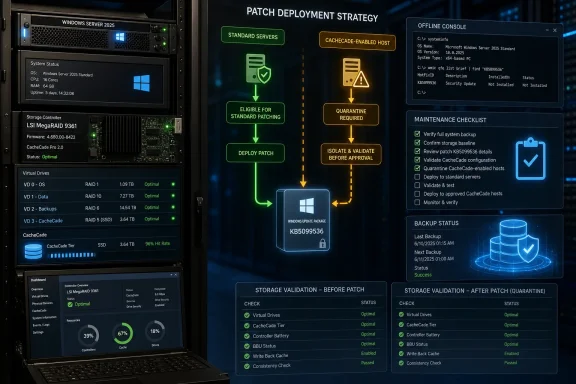
Windows Server 2025 administrators should not halt KB5099536 across the board, but physical servers using LSI MegaRAID 9361-class controllers with CacheCade enabled deserve a separate deployment ring. Until the reported post-update recovery loops are reproduced or ruled out, those hosts should either remain on hold or receive the July update only during a maintenance window that includes offline boot and storage validation.
KB5099536, released July 14, 2026, moves Windows Server 2025 to OS Build 26100.33158. Microsoft has not confirmed a CacheCade or MegaRAID defect, but a configuration-specific field report published one day later is credible enough to change how administrators plan their August rollout.
The warning comes from a July 15 community report involving two Windows Server 2025 systems equipped with LSI 9361 controllers and CacheCade enabled. According to the reporter, both servers failed to return normally after Patch Tuesday, CacheCade volumes appeared to be missing, and the controller showed virtual drives as “Optimal access blocked.”
That is an operationally serious symptom set, but it is not yet a diagnosis. Two affected servers under one administrator could share firmware, drivers, storage topology, operational procedures, or another variable unrelated to KB5099536.
There is no verified evidence that every MegaRAID 9361 deployment is affected, that CacheCade itself is the trigger, or that Microsoft’s cumulative update directly altered the controller state. The available report also does not establish whether the failure occurs during update installation, the first reboot, storage initialization, or Windows recovery.
Microsoft’s Windows Server 2025 release-health information currently lists a different known issue for KB5099536: missing WSUS synchronization error details after KB5070881 or later. Microsoft has not added MegaRAID, CacheCade, missing volumes, or recovery loops to the published known issues.
The correct response is therefore not panic and not dismissal. It is configuration-aware containment.
That does not make them immune to update problems. It simply means the July 15 report provides no specific evidence for placing those systems on hold.
Administrators should continue normal post-patch checks, including reboot completion, storage visibility, service startup, event logging, and application availability. The goal is to avoid turning one narrow report into an unsupported organization-wide freeze.
A delay should be bounded rather than indefinite. Record which machines are being held, why they match the reported profile, and what evidence will allow deployment to resume.
Useful release conditions include a successful test on representative hardware, clarification from Microsoft or Broadcom, or enough uneventful production deployments on comparable systems to reduce uncertainty. Waiting without defined exit criteria merely shifts the same decision into August.
A practical validation sequence is:
That distinction matters during troubleshooting. Repeatedly launching Windows recovery or rolling back the cumulative update may not help if the controller is not presenting the expected virtual drive to the operating system.
Administrators encountering the reported symptoms should first preserve evidence and establish whether the storage configuration is still visible. Avoid making speculative controller changes simply to force a boot, particularly when the meaning and reversibility of those changes are uncertain.
The phrase “Optimal access blocked” is important because it indicates that the virtual drive’s reported condition deserves investigation outside Windows. It does not, by itself, identify whether the update, controller software, CacheCade state, or another dependency caused the block.
Any affected organization should capture the exact timeline: when KB5099536 installed, what appeared during the restart, what the controller reported, whether CacheCade volumes were present, and whether removing or rolling back the update changed the result. That level of detail is what can turn an isolated anecdote into a reproducible compatibility issue.
The absence of a CacheCade advisory on July 19 therefore means the problem is unconfirmed, not disproven. It also means administrators should avoid describing KB5099536 as definitively defective on LSI hardware.
This middle ground is familiar to teams that manage older or specialized storage stacks. A monthly cumulative update may be broadly reliable while still exposing a narrow interaction involving a particular controller, acceleration configuration, or boot topology.
WindowsForum’s previous coverage of August 2025 recovery failures and emergency out-of-band fixes offers a useful operational lesson: recovery availability should be tested, not assumed. That history does not demonstrate any connection to the current CacheCade report, but it reinforces the value of validating the recovery path before a storage-sensitive rollout.
Search hardware inventories, management records, and controller configuration documentation for the reported combination. Where records are incomplete, inspect the physical hosts selected for the July and August pilot groups rather than assuming their storage configurations are interchangeable.
Once identified, place those systems in a dedicated exception group. Document whether each server will be delayed or validated under supervision, along with its maintenance owner and recovery prerequisites.
Organizations with several identical hosts should patch one representative machine first, but similarity must include the storage path—not merely the server model or Windows build. A test machine without CacheCade does not meaningfully validate a production machine whose boot virtual drive depends on it.
Administrators should also monitor Microsoft’s Windows Server 2025 release-health page, the KB5099536 support entry, and vendor communications through the August cycle. A Microsoft acknowledgment, a Broadcom finding, or additional reports with matching hardware could materially change the risk assessment.
The evidence available today supports a narrow precaution rather than a broad patch embargo. Keep normal Windows Server 2025 deployment moving where the reported profile does not apply, but ring-fence MegaRAID 9361-class CacheCade hosts until they can demonstrate two things under controlled conditions: the controller still presents the expected storage, and Windows Server 2025 can complete the updated boot path without entering recovery.
KB5099536, released July 14, 2026, moves Windows Server 2025 to OS Build 26100.33158. Microsoft has not confirmed a CacheCade or MegaRAID defect, but a configuration-specific field report published one day later is credible enough to change how administrators plan their August rollout.
 One Report Is Enough to Change the Pilot Ring
The warning comes from a July 15 community report involving two Windows Server 2025 systems equipped with LSI 9361 controllers and CacheCade enabled. According to the reporter, both servers failed to return normally after Patch Tuesday, CacheCade volumes appeared to be missing, and the controller showed virtual drives as “Optimal access blocked.”That is an operationally serious symptom set, but it is not yet a diagnosis. Two affected servers under one administrator could share firmware, drivers, storage topology, operational procedures, or another variable unrelated to KB5099536.
There is no verified evidence that every MegaRAID 9361 deployment is affected, that CacheCade itself is the trigger, or that Microsoft’s cumulative update directly altered the controller state. The available report also does not establish whether the failure occurs during update installation, the first reboot, storage initialization, or Windows recovery.
Microsoft’s Windows Server 2025 release-health information currently lists a different known issue for KB5099536: missing WSUS synchronization error details after KB5070881 or later. Microsoft has not added MegaRAID, CacheCade, missing volumes, or recovery loops to the published known issues.
The correct response is therefore not panic and not dismissal. It is configuration-aware containment.
Split the August Rollout into Three Paths
The August 2026 Patch Tuesday release is scheduled for August 11, giving administrators several weeks to identify matching hardware and test KB5099536 before the next production deployment wave. The decision should be based on storage configuration rather than treating every Windows Server 2025 machine as equally exposed.Patch normally outside the reported hardware profile
Virtual machines, systems using other storage controllers, and Windows Server 2025 hosts without CacheCade do not currently match the reported configuration. They can remain in the standard pilot and production rings unless local testing identifies another reason to pause.That does not make them immune to update problems. It simply means the July 15 report provides no specific evidence for placing those systems on hold.
Administrators should continue normal post-patch checks, including reboot completion, storage visibility, service startup, event logging, and application availability. The goal is to avoid turning one narrow report into an unsupported organization-wide freeze.
Delay physical hosts that closely match the report
A temporary hold is reasonable for production servers that combine Windows Server 2025, LSI MegaRAID 9361-class hardware, and CacheCade. The case for delaying becomes stronger when a server lacks redundancy, provides boot storage through the controller, cannot be quickly restored, or has no equivalent test system.A delay should be bounded rather than indefinite. Record which machines are being held, why they match the reported profile, and what evidence will allow deployment to resume.
Useful release conditions include a successful test on representative hardware, clarification from Microsoft or Broadcom, or enough uneventful production deployments on comparable systems to reduce uncertainty. Waiting without defined exit criteria merely shifts the same decision into August.
Patch only with offline boot-and-storage validation
Organizations that cannot defer KB5099536 should treat installation as a storage maintenance event, not a routine Windows reboot. Schedule hands-on or remote-console coverage and reserve enough downtime to inspect the controller before allowing workloads back into service.A practical validation sequence is:
- Identify whether the server uses an LSI MegaRAID 9361-class controller and whether CacheCade is enabled.
- Record the pre-update state of the controller, virtual drives, CacheCade volumes, and Windows-visible storage.
- Confirm that current backups are usable and that recovery does not depend solely on storage presented by the controller being tested.
- Ensure administrators can reach the machine outside Windows through its available management console.
- Install KB5099536 during an approved maintenance window and observe the complete restart rather than relying only on centralized update status.
- During startup, verify that the expected controller configuration and virtual drives remain present and accessible.
- After Windows starts, confirm that all expected disks and volumes are visible before starting dependent applications.
- Reboot a second time if that forms part of the organization’s normal storage validation, then confirm that the result is repeatable.
- Keep the host out of production if CacheCade volumes disappear, virtual drives report blocked access, or Windows enters recovery unexpectedly.
Recovery Loops May Hide the Real Failure Domain
A server entering Windows recovery after patching naturally points suspicion toward the cumulative update. On a system whose boot path depends on a hardware RAID controller, however, recovery may be the visible consequence of storage becoming unavailable rather than the original fault.That distinction matters during troubleshooting. Repeatedly launching Windows recovery or rolling back the cumulative update may not help if the controller is not presenting the expected virtual drive to the operating system.
Administrators encountering the reported symptoms should first preserve evidence and establish whether the storage configuration is still visible. Avoid making speculative controller changes simply to force a boot, particularly when the meaning and reversibility of those changes are uncertain.
The phrase “Optimal access blocked” is important because it indicates that the virtual drive’s reported condition deserves investigation outside Windows. It does not, by itself, identify whether the update, controller software, CacheCade state, or another dependency caused the block.
Any affected organization should capture the exact timeline: when KB5099536 installed, what appeared during the restart, what the controller reported, whether CacheCade volumes were present, and whether removing or rolling back the update changed the result. That level of detail is what can turn an isolated anecdote into a reproducible compatibility issue.
Microsoft’s Known-Issue List Is Not a Compatibility Guarantee
Release-health dashboards are essential, but they lag emerging field problems by design. Microsoft must collect reports, find a common cause, reproduce the behavior, and determine its scope before publishing a known issue.The absence of a CacheCade advisory on July 19 therefore means the problem is unconfirmed, not disproven. It also means administrators should avoid describing KB5099536 as definitively defective on LSI hardware.
This middle ground is familiar to teams that manage older or specialized storage stacks. A monthly cumulative update may be broadly reliable while still exposing a narrow interaction involving a particular controller, acceleration configuration, or boot topology.
WindowsForum’s previous coverage of August 2025 recovery failures and emergency out-of-band fixes offers a useful operational lesson: recovery availability should be tested, not assumed. That history does not demonstrate any connection to the current CacheCade report, but it reinforces the value of validating the recovery path before a storage-sensitive rollout.
August Planning Starts with Hardware Inventory
The immediate task is to find matching servers before August 11. Update-management groups organized only by operating-system version or business unit may place an LSI CacheCade host in the same ring as ordinary Windows Server 2025 virtual machines, concealing the relevant distinction.Search hardware inventories, management records, and controller configuration documentation for the reported combination. Where records are incomplete, inspect the physical hosts selected for the July and August pilot groups rather than assuming their storage configurations are interchangeable.
Once identified, place those systems in a dedicated exception group. Document whether each server will be delayed or validated under supervision, along with its maintenance owner and recovery prerequisites.
Organizations with several identical hosts should patch one representative machine first, but similarity must include the storage path—not merely the server model or Windows build. A test machine without CacheCade does not meaningfully validate a production machine whose boot virtual drive depends on it.
Administrators should also monitor Microsoft’s Windows Server 2025 release-health page, the KB5099536 support entry, and vendor communications through the August cycle. A Microsoft acknowledgment, a Broadcom finding, or additional reports with matching hardware could materially change the risk assessment.
The evidence available today supports a narrow precaution rather than a broad patch embargo. Keep normal Windows Server 2025 deployment moving where the reported profile does not apply, but ring-fence MegaRAID 9361-class CacheCade hosts until they can demonstrate two things under controlled conditions: the controller still presents the expected storage, and Windows Server 2025 can complete the updated boot path without entering recovery.
References
- Primary source: learn.microsoft.com
Windows Server 2025 known issues and notifications | Microsoft Learn
View announcements and review known issues and fixes for Windows Server 2025learn.microsoft.com - Independent coverage: support.microsoft.com
Windows Server 2025 update history | Microsoft Support
Windows Server 2025 update historysupport.microsoft.com - Primary source: WindowsForum
Windows August 2025 Updates: Recovery Failures, WSUS Errors, and SSD Issues | Windows Forum
Microsoft has temporarily paused the roll‑out of recent Windows updates after a cascade of high‑impact problems—including broken recovery tools, WSUS...windowsforum.com

