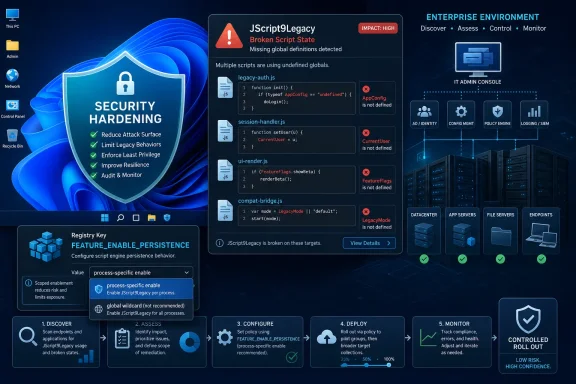
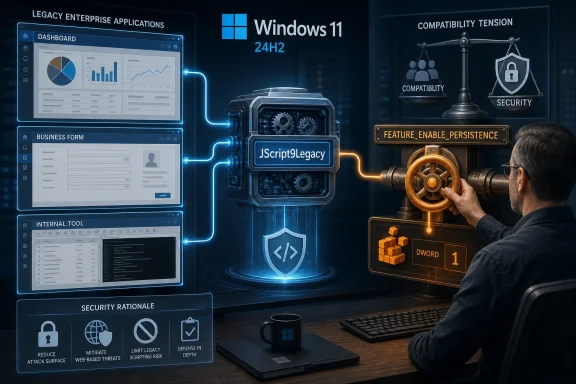
Microsoft published KB5105752 on June 18, 2026, warning that JScript globals, polyfills, and execution context loaded across multiple scripts may not persist on Windows 11 24H2, Windows 11 25H2, and Windows Server 2025 unless administrators enable a registry-controlled compatibility feature. The headline sounds narrow, almost archaeological, but the implications are bigger than one scripting DLL. This is Microsoft’s modern Windows bargain in miniature: harden the platform by default, then hand enterprises a switch when the old world breaks. The trouble is that the old world still runs payroll tools, installers, intranet apps, build systems, and bits of automation nobody has touched since Internet Explorer was a going concern.
The affected behavior lives in a place most users never knowingly visit: the legacy JScript engine used by Windows scripting hosts and old application components. Microsoft says the change begins with Windows 11 version 24H2, where the newer
Under the older behavior, functions and objects created by one script could remain available to later scripts in the same broader execution flow. That meant developers, vendors, and administrators could assemble functionality piecemeal: load a helper file, load a polyfill, load a business script, and assume the global namespace would still contain everything previously defined. Microsoft’s support note says the newer engine does not preserve that execution context by default, so definitions created in one script can be discarded when that script completes.
This is the kind of compatibility break that rarely announces itself cleanly. A script does not necessarily fail at launch. It may run until a later file calls a function that no longer exists, or until a polyfill silently fails to patch the environment the next component expects. The resulting error might look like a missing symbol, a runtime exception, or a vendor application suddenly “not supporting Windows 11 24H2,” even though the underlying issue is a changed assumption about script state.
The affected products are not fringe Insider builds. Microsoft lists Windows 11 version 24H2, Windows 11 version 25H2, and Windows Server 2025 as in scope. That makes this a client and server concern, and it places the issue directly in the path of organizations standardizing on the current Windows platform.
To turn it on, administrators must create a Feature Control registry key under the Internet Explorer policy branch:
That choice matters. The registry path’s Internet Explorer heritage is not accidental; JScript’s legacy is tightly bound to Active Scripting, COM hosts, and the long tail of Windows automation. Even as Microsoft Edge, PowerShell, .NET, and WebView2 define the modern platform, old JScript still appears in deployment utilities, embedded scripting features, accounting packages, Classic ASP-era systems, and vendor tooling that treats Windows as an automation substrate rather than a browser platform.
Microsoft’s default stance is therefore understandable. If the old engine behavior was part of the attack surface, restoring it globally would blunt the security gain. The company is essentially saying: we will not make the older persistence model the default again, but we will let you opt in where business reality requires it.
That is a sensible engineering compromise and an operational headache. It turns a bug fix into a discovery project. Administrators now need to identify which executable hosts are affected, decide whether the specific process deserves the compatibility setting, and document why that exception exists before the next audit or incident review asks awkward questions.
The most important sentence in Microsoft’s support note is not the registry command. It is the statement that the old engine automatically retained global definitions and context, while the new one does not by default. Persistent global state can be convenient, but convenience is not neutral in a scripting engine. Shared state across script boundaries makes execution harder to reason about, harder to isolate, and easier to abuse when an attacker can influence one part of the chain.
That does not mean every broken script was insecure. Plenty of legitimate code used the old behavior because it was there, documented by habit if not by modern design. Enterprise software is full of these assumptions: load order, global helper functions, ambient permissions, inherited COM state, path lookup behavior, relaxed parsing, and silent fallbacks. They are not malicious. They are just old.
But Microsoft is no longer building Windows for the benefit of every old assumption. Windows 11 24H2 has increasingly represented a security and platform reset: not a dramatic rewrite, but a line where Microsoft is more willing to let legacy behavior become opt-in. The JScript persistence change belongs to that category. It is not flashy, but it is a revealing example of how Windows hardening now arrives: quietly, per subsystem, with a registry valve for the businesses that cannot move fast enough.
That is why Microsoft’s per-process registry model is important. The value name can be a target process, which implies the affected boundary is not merely “JScript on the machine,” but the executable hosting the scripting engine. If a line-of-business application hosts JScript internally, the administrator may have to enable persistence for that application’s process rather than for
This also complicates troubleshooting. A script that works when collapsed into one file might fail when split into separate files. A polyfill that appears to execute successfully might not affect the subsequent script that depends on it. A vendor support team may reproduce the problem only on Windows 11 24H2 or Server 2025, while the same package behaves normally on older Windows 11 builds.
For sysadmins, the practical symptom is “something old broke after the upgrade.” The actual root cause may be three layers down: a JScript host, a changed DLL, and a global execution context that no longer survives between script loads. That is precisely the sort of problem that burns time because every individual component appears plausible until the chain is reconstructed.
Feature Control keys have long been a mechanism for toggling application-specific behavior in components that grew out of IE and MSHTML-era plumbing. They are ugly, precise, and deeply Windows. In this case, that old machinery gives Microsoft a way to restore persistence only where needed rather than flipping the behavior for the entire system.
That is the right technical lever, even if it looks ridiculous in 2026. It lets a shop enable compatibility for a known vendor executable while leaving the hardened default elsewhere. It also gives software vendors a clear mitigation to document for customers who cannot immediately refactor scripts.
The problem is governance. Registry compatibility switches have a way of becoming permanent architecture. A helpdesk fix becomes a deployment baseline; a deployment baseline becomes a gold image; a gold image becomes “how we do Windows 11.” Five years later, nobody remembers why
In a crisis, IT teams will use it. If an upgrade wave is blocked, a vendor is slow to respond, or a critical internal tool fails during a cutover weekend, enabling persistence globally may look like the least risky option. From a business-continuity perspective, it might be. Users do not care that a legacy scripting engine is now more elegantly isolated if the warehouse cannot print labels or the month-end close cannot run.
But the wildcard undermines the security intent of the change. Microsoft replaced the older behavior to address vulnerabilities and improve security; restoring persistence everywhere reintroduces at least some of the old assumptions across the machine. The better answer is process-specific targeting, coupled with a plan to remove the exception when the affected application is patched or retired.
This is where enterprise discipline matters. The registry switch should be treated like a firewall exception, not a preference setting. It should have an owner, a justification, a scope, and a review date. If that sounds bureaucratic, remember that legacy scripting engines are exactly the kind of quiet dependency that attackers love and auditors hate.
Polyfills make the issue especially sharp. A polyfill exists to patch missing functionality into an environment so later code can act as if the feature was native. If that patch disappears after the polyfill script finishes, everything downstream becomes a gamble. Code that once depended on “load polyfills first” may now need to be packaged differently or executed inside a context that deliberately persists.
This is not the same as telling every organization to rewrite old JScript overnight. That would be fantasy. The installed base includes systems whose original developers have retired, vendors that no longer exist, and applications whose replacement cost dwarfs the annoyance of a registry setting. But vendors still shipping JScript-dependent tools in 2026 should be on notice: the compatibility ground is moving.
The best near-term vendor response is transparent documentation. If a product is affected, say which executable hosts JScript, whether the February 24, 2026 or later Windows update is required, and whether the per-process
Server environments also tend to accumulate older automation because servers live longer than client devices and because “if it works, don’t touch it” is often rational. A JScript-based task created for Windows Server 2012 R2 may have been copied forward through multiple upgrade cycles without anyone revalidating its assumptions. Server 2025 is the kind of platform transition that exposes those accumulated debts.
The registry mitigation is available, but the server context raises the stakes for scoping. Enabling persistence for all processes on a workstation is broad. Enabling it globally on a server that hosts multiple applications, administrative tools, or user-accessible workloads is broader still. The safer path is to identify the exact host process and constrain the exception accordingly.
This is also a reminder that Windows Server modernization is not just about the kernel, containers, Azure Arc, or identity integration. It is about the ancient glue code that keeps environments running. Microsoft can harden the platform, but organizations still have to inventory the scripts and application components that ride on top of it.
The frustrating part is not that Microsoft changed something old. The frustrating part is the operational asymmetry. Microsoft can make a platform-hardening decision once; enterprises have to discover every place that decision intersects with their local reality. That discovery often happens only after deployment, because legacy dependencies rarely advertise themselves in asset inventories.
Still, the alternative is worse. If Windows can never change any behavior that old software depends on, it becomes permanently hostage to decades of accumulated assumptions. That is not a security model. It is a museum with network access.
The right criticism is narrower: Microsoft should make these compatibility boundaries easier to test, easier to detect, and easier to report before broad rollout. A support note published in June 2026 for behavior introduced with Windows 11 24H2 and mitigated by updates from February 2026 is useful, but it arrives after many administrators have already fought the symptom under some other name. For a platform with this much legacy surface area, documentation is not merely support. It is part of the deployment mechanism.
Start by reproducing the failure on a patched Windows 11 24H2, 25H2, or Server 2025 system without the persistence feature enabled. Then test the narrowest possible process-specific value. If the application works only with the wildcard, that is a clue that the hosting model is poorly understood or that multiple executables are involved. Either way, the wildcard should be treated as temporary unless the risk has been formally accepted.
Administrators should also search for script chains that load helper files, polyfills, or shared libraries in separate execution steps. Those are prime candidates for this issue. Where code is owned internally, the better fix is often to consolidate execution or refactor dependencies so that globals are not assumed to survive between scripts. Where code is vendor-owned, customers should ask for a supported statement rather than silently carrying a registry exception forever.
Security teams, meanwhile, should resist the reflex to block the workaround outright. Business-critical legacy systems do not disappear because a security default changed. The useful posture is to narrow, monitor, and sunset exceptions. That is less satisfying than a clean prohibition, but far more likely to survive contact with production.
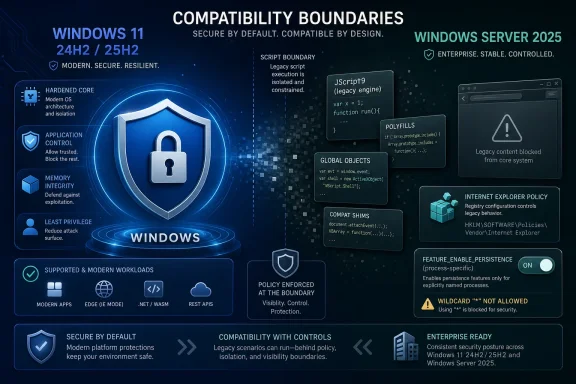 Microsoft Has Turned a Scripting Quirk Into a Compatibility Boundary
The affected behavior lives in a place most users never knowingly visit: the legacy JScript engine used by Windows scripting hosts and old application components. Microsoft says the change begins with Windows 11 version 24H2, where the newer jscript9legacy.dll replaces the older jscript9.dll path for JScript execution in order to address vulnerabilities and improve security. That is not a cosmetic rename. It changes how some scripts experience the lifetime of their global definitions.Under the older behavior, functions and objects created by one script could remain available to later scripts in the same broader execution flow. That meant developers, vendors, and administrators could assemble functionality piecemeal: load a helper file, load a polyfill, load a business script, and assume the global namespace would still contain everything previously defined. Microsoft’s support note says the newer engine does not preserve that execution context by default, so definitions created in one script can be discarded when that script completes.
This is the kind of compatibility break that rarely announces itself cleanly. A script does not necessarily fail at launch. It may run until a later file calls a function that no longer exists, or until a polyfill silently fails to patch the environment the next component expects. The resulting error might look like a missing symbol, a runtime exception, or a vendor application suddenly “not supporting Windows 11 24H2,” even though the underlying issue is a changed assumption about script state.
The affected products are not fringe Insider builds. Microsoft lists Windows 11 version 24H2, Windows 11 version 25H2, and Windows Server 2025 as in scope. That makes this a client and server concern, and it places the issue directly in the path of organizations standardizing on the current Windows platform.
The Fix Exists, But Microsoft Deliberately Left It Off
Microsoft says the issue is addressed in Windows updates released on and after February 24, 2026, including KB5077241 for Windows 11 24H2 and 25H2. But “addressed” is doing careful work here. The compatibility behavior is present after the update, but it is disabled by default.To turn it on, administrators must create a Feature Control registry key under the Internet Explorer policy branch:
HKLM\Software\Policies\Microsoft\Internet Explorer\Main\FeatureControl\FEATURE_ENABLE_PERSISTENCE. They can then create DWORD values set to 1 for specific process names, or use * to enable persistence for all processes. In plain English, Microsoft has added a back-compat escape hatch, but it expects IT to choose where that escape hatch opens.That choice matters. The registry path’s Internet Explorer heritage is not accidental; JScript’s legacy is tightly bound to Active Scripting, COM hosts, and the long tail of Windows automation. Even as Microsoft Edge, PowerShell, .NET, and WebView2 define the modern platform, old JScript still appears in deployment utilities, embedded scripting features, accounting packages, Classic ASP-era systems, and vendor tooling that treats Windows as an automation substrate rather than a browser platform.
Microsoft’s default stance is therefore understandable. If the old engine behavior was part of the attack surface, restoring it globally would blunt the security gain. The company is essentially saying: we will not make the older persistence model the default again, but we will let you opt in where business reality requires it.
That is a sensible engineering compromise and an operational headache. It turns a bug fix into a discovery project. Administrators now need to identify which executable hosts are affected, decide whether the specific process deserves the compatibility setting, and document why that exception exists before the next audit or incident review asks awkward questions.
The Security Story Is Stronger Than the Compatibility Story
Microsoft’s stated cause is straightforward:jscript9legacy.dll is a newer DLL used for JScript code, replacing older behavior to address vulnerabilities and improve security starting in Windows 11 24H2. The broader direction is consistent with years of Windows hardening. Legacy scripting engines are powerful, deeply integrated, and historically attractive to attackers because they sit at the intersection of document handling, automation, and user context.The most important sentence in Microsoft’s support note is not the registry command. It is the statement that the old engine automatically retained global definitions and context, while the new one does not by default. Persistent global state can be convenient, but convenience is not neutral in a scripting engine. Shared state across script boundaries makes execution harder to reason about, harder to isolate, and easier to abuse when an attacker can influence one part of the chain.
That does not mean every broken script was insecure. Plenty of legitimate code used the old behavior because it was there, documented by habit if not by modern design. Enterprise software is full of these assumptions: load order, global helper functions, ambient permissions, inherited COM state, path lookup behavior, relaxed parsing, and silent fallbacks. They are not malicious. They are just old.
But Microsoft is no longer building Windows for the benefit of every old assumption. Windows 11 24H2 has increasingly represented a security and platform reset: not a dramatic rewrite, but a line where Microsoft is more willing to let legacy behavior become opt-in. The JScript persistence change belongs to that category. It is not flashy, but it is a revealing example of how Windows hardening now arrives: quietly, per subsystem, with a registry valve for the businesses that cannot move fast enough.
The Breakage Will Be Hardest to See in the Places IT Trusts Least
The obvious candidates for trouble are old.js or .wsf files run through Windows Script Host. But the more interesting risk is in products that embed JScript without making that fact obvious to the administrator. Some applications use scripting engines for customization, reporting, installers, macro-like workflows, template logic, or internal glue. The user sees a vendor UI; underneath, a host process may be loading multiple JScript fragments and assuming shared globals survive.That is why Microsoft’s per-process registry model is important. The value name can be a target process, which implies the affected boundary is not merely “JScript on the machine,” but the executable hosting the scripting engine. If a line-of-business application hosts JScript internally, the administrator may have to enable persistence for that application’s process rather than for
wscript.exe or cscript.exe.This also complicates troubleshooting. A script that works when collapsed into one file might fail when split into separate files. A polyfill that appears to execute successfully might not affect the subsequent script that depends on it. A vendor support team may reproduce the problem only on Windows 11 24H2 or Server 2025, while the same package behaves normally on older Windows 11 builds.
For sysadmins, the practical symptom is “something old broke after the upgrade.” The actual root cause may be three layers down: a JScript host, a changed DLL, and a global execution context that no longer survives between script loads. That is precisely the sort of problem that burns time because every individual component appears plausible until the chain is reconstructed.
The Internet Explorer Registry Path Is a Reminder, Not a Mistake
It is tempting to smirk at a 2026 Windows 11 and Server 2025 fix that still lives under an Internet Explorer policy branch. But that path tells the truth about Windows better than a marketing slide ever could. Internet Explorer is dead as a consumer browser, but its scripting infrastructure, compatibility controls, and enterprise policy footprint remain fossilized into the operating system.Feature Control keys have long been a mechanism for toggling application-specific behavior in components that grew out of IE and MSHTML-era plumbing. They are ugly, precise, and deeply Windows. In this case, that old machinery gives Microsoft a way to restore persistence only where needed rather than flipping the behavior for the entire system.
That is the right technical lever, even if it looks ridiculous in 2026. It lets a shop enable compatibility for a known vendor executable while leaving the hardened default elsewhere. It also gives software vendors a clear mitigation to document for customers who cannot immediately refactor scripts.
The problem is governance. Registry compatibility switches have a way of becoming permanent architecture. A helpdesk fix becomes a deployment baseline; a deployment baseline becomes a gold image; a gold image becomes “how we do Windows 11.” Five years later, nobody remembers why
FEATURE_ENABLE_PERSISTENCE is enabled for everything, only that removing it breaks something in the finance department.The Wildcard Is the Temptation Microsoft Should Have Made Uncomfortable
Microsoft’s instructions allow administrators to enable persistence for all processes by creating a wildcard value and setting it to1. That is useful for triage and potentially dangerous as a long-term policy. The wildcard is the compatibility equivalent of turning the lights back on in the whole building because one room went dark.In a crisis, IT teams will use it. If an upgrade wave is blocked, a vendor is slow to respond, or a critical internal tool fails during a cutover weekend, enabling persistence globally may look like the least risky option. From a business-continuity perspective, it might be. Users do not care that a legacy scripting engine is now more elegantly isolated if the warehouse cannot print labels or the month-end close cannot run.
But the wildcard undermines the security intent of the change. Microsoft replaced the older behavior to address vulnerabilities and improve security; restoring persistence everywhere reintroduces at least some of the old assumptions across the machine. The better answer is process-specific targeting, coupled with a plan to remove the exception when the affected application is patched or retired.
This is where enterprise discipline matters. The registry switch should be treated like a firewall exception, not a preference setting. It should have an owner, a justification, a scope, and a review date. If that sounds bureaucratic, remember that legacy scripting engines are exactly the kind of quiet dependency that attackers love and auditors hate.
Developers Inherited the Global Namespace; Now They Have to Give It Back
For developers and software vendors, the lesson is not merely “set this registry key.” The deeper lesson is that ambient global state is a bad contract with the platform. If one script needs functions from another, the dependency should be explicit, bundled, or loaded into a shared context intentionally controlled by the host. Relying on the operating system to keep globals alive across script executions was always a fragile design, even if it worked for years.Polyfills make the issue especially sharp. A polyfill exists to patch missing functionality into an environment so later code can act as if the feature was native. If that patch disappears after the polyfill script finishes, everything downstream becomes a gamble. Code that once depended on “load polyfills first” may now need to be packaged differently or executed inside a context that deliberately persists.
This is not the same as telling every organization to rewrite old JScript overnight. That would be fantasy. The installed base includes systems whose original developers have retired, vendors that no longer exist, and applications whose replacement cost dwarfs the annoyance of a registry setting. But vendors still shipping JScript-dependent tools in 2026 should be on notice: the compatibility ground is moving.
The best near-term vendor response is transparent documentation. If a product is affected, say which executable hosts JScript, whether the February 24, 2026 or later Windows update is required, and whether the per-process
FEATURE_ENABLE_PERSISTENCE value is supported. The worst response is vague guidance to “disable security features” or “avoid Windows 11 24H2,” because that pushes customers into broader risk without explaining the trade-off.Windows Server 2025 Makes This More Than a Desktop Nuisance
The inclusion of Windows Server 2025 changes the severity of the story. Desktop compatibility bugs are painful, but server-side scripting dependencies can sit inside scheduled tasks, management consoles, provisioning systems, legacy web applications, and administrative workflows. A broken script on a workstation annoys a user. A broken script on a server can interrupt operations.Server environments also tend to accumulate older automation because servers live longer than client devices and because “if it works, don’t touch it” is often rational. A JScript-based task created for Windows Server 2012 R2 may have been copied forward through multiple upgrade cycles without anyone revalidating its assumptions. Server 2025 is the kind of platform transition that exposes those accumulated debts.
The registry mitigation is available, but the server context raises the stakes for scoping. Enabling persistence for all processes on a workstation is broad. Enabling it globally on a server that hosts multiple applications, administrative tools, or user-accessible workloads is broader still. The safer path is to identify the exact host process and constrain the exception accordingly.
This is also a reminder that Windows Server modernization is not just about the kernel, containers, Azure Arc, or identity integration. It is about the ancient glue code that keeps environments running. Microsoft can harden the platform, but organizations still have to inventory the scripts and application components that ride on top of it.
24H2 Keeps Teaching the Same Lesson in Different Dialects
Windows 11 24H2 has become the version where many organizations discovered that “supported Windows 11” and “same Windows behavior” are not the same thing. Microsoft shipped a newer platform base, tightened some defaults, moved forward on security, and left certain legacy edges rougher than customers expected. The JScript persistence issue fits that pattern perfectly.The frustrating part is not that Microsoft changed something old. The frustrating part is the operational asymmetry. Microsoft can make a platform-hardening decision once; enterprises have to discover every place that decision intersects with their local reality. That discovery often happens only after deployment, because legacy dependencies rarely advertise themselves in asset inventories.
Still, the alternative is worse. If Windows can never change any behavior that old software depends on, it becomes permanently hostage to decades of accumulated assumptions. That is not a security model. It is a museum with network access.
The right criticism is narrower: Microsoft should make these compatibility boundaries easier to test, easier to detect, and easier to report before broad rollout. A support note published in June 2026 for behavior introduced with Windows 11 24H2 and mitigated by updates from February 2026 is useful, but it arrives after many administrators have already fought the symptom under some other name. For a platform with this much legacy surface area, documentation is not merely support. It is part of the deployment mechanism.
The Real Migration Plan Is Smaller Than a Rewrite and Bigger Than a Registry Key
The immediate mitigation is simple enough to describe: install the relevant Windows updates, create the Feature Control key, and enable persistence for the affected process or, if absolutely necessary, all processes. But a durable migration plan should be more deliberate. The registry setting should buy time, not define the future.Start by reproducing the failure on a patched Windows 11 24H2, 25H2, or Server 2025 system without the persistence feature enabled. Then test the narrowest possible process-specific value. If the application works only with the wildcard, that is a clue that the hosting model is poorly understood or that multiple executables are involved. Either way, the wildcard should be treated as temporary unless the risk has been formally accepted.
Administrators should also search for script chains that load helper files, polyfills, or shared libraries in separate execution steps. Those are prime candidates for this issue. Where code is owned internally, the better fix is often to consolidate execution or refactor dependencies so that globals are not assumed to survive between scripts. Where code is vendor-owned, customers should ask for a supported statement rather than silently carrying a registry exception forever.
Security teams, meanwhile, should resist the reflex to block the workaround outright. Business-critical legacy systems do not disappear because a security default changed. The useful posture is to narrow, monitor, and sunset exceptions. That is less satisfying than a clean prohibition, but far more likely to survive contact with production.
The Registry Switch Is the Story IT Needs to Tell Itself Clearly
Microsoft’s support note is short, but the operational message is concrete: Windows has changed a default in a legacy scripting path, and administrators now own the compatibility decision. The organizations that handle this well will be the ones that resist both extremes. They will neither panic and freeze Windows 11 upgrades indefinitely, nor spray the wildcard setting across every machine and call it done.- Windows 11 24H2 and later use
jscript9legacy.dllin a way that does not preserve JScript execution context by default across separate script executions. - Scripts that depend on globals, helper functions, or polyfills loaded from earlier scripts may fail even if they worked on older Windows versions.
- Microsoft says the compatibility feature is available after Windows updates released on and after February 24, 2026, but it remains disabled unless administrators enable it.
- The safest registry mitigation is process-specific, because the wildcard option restores persistence for all processes and weakens the security intent of the new default.
- Windows Server 2025 being affected means administrators should audit scheduled tasks, legacy management tools, and server-hosted applications rather than treating this as a desktop-only problem.
- The registry setting should be tracked as a temporary compatibility exception wherever possible, not absorbed into the permanent Windows baseline without review.
References
- Primary source: Microsoft Support
Published: Thu, 18 Jun 2026 23:46:45 Z
- Related coverage: techspot.com
Microsoft replaces legacy JavaScript engine to improve security in Windows 11 | TechSpot
Microsoft officially retired JScript years ago, along with proper support for the original Internet Explorer browser. However, the JScript engine still lingers in modern Windows installations, posing...www.techspot.com - Official source: learn.microsoft.com
JScript Runtime error in Windows 11 24H2 - Microsoft Q&A
Hi team, We have been facing issues with Windows 11 24H2 Upgrade with our JScript code. As we observed the reason being is the Jscript.DLL, We get to know that old Jcript.DLL is being replaced with new Jscript9Legacy.DLL for remediation of…learn.microsoft.com - Related coverage: windowsreport.com
Microsoft Replaces JScript with JScript9Legacy for Better Security in Windows 11
Windows 11 24H2 replaces the outdated JScript engine with safer, modern JScript9Legacy to boost security and compatibility. windowsreport.com
- Related coverage: windowsforum.com
Microsoft Activates JScript9Legacy in Windows 11 24H2 for Enhanced Security and Performance | Windows Forum
In a significant step forward for the Windows platform, Microsoft has officially activated the new JScript9Legacy scripting engine as the default in Windows...windowsforum.com - Related coverage: betanews.com
Microsoft enables JScript9Legacy scripting engine to improve Windows 11 security - BetaNews
Microsoft has announced that it is moving away from Jscript in Windows 11 24H2 to make scripting more secure, and boost Windows 11 security overall.betanews.com

- Related coverage: stackoverflow.com
Windows 11 update Classic ASP Incompatibility – VBScript/JScript Mix Causes IActiveScript::SetScriptState Exception - Stack Overflow
After updating to Windows 11 on June 2, 2025, I'm experiencing major issues with legacy Classic ASP applications on IIS that make use of both VBScript and JScript on the server side.
json library
E...stackoverflow.com
- Official source: techcommunity.microsoft.com
Why only Windows 11 23H2 is available? Not the 24H2 | Microsoft Community Hub
I tried to upgrade my Windows 10 PC but the upgrade assistant only offers 23H2 not the latest 24H2. Why?  techcommunity.microsoft.com