

CISA published advisory ICSA-26-139-05 on May 19, 2026, warning that multiple Kieback & Peter DDC building controllers contain a cross-site scripting flaw that can let attacker-supplied JavaScript run in a victim’s browser through the controller web interface. The bug is not a cinematic “take over the building from the Internet” moment by itself, but it is exactly the kind of weakness that turns a supposedly closed operational technology network into a place where browser trust, stale firmware, and forgotten web portals collide. The advisory’s real message is blunt: some building controllers can be patched, some cannot, and the ones that cannot must be treated as untrusted legacy infrastructure.
The uncomfortable part of this advisory is not that a web interface has an XSS vulnerability. Cross-site scripting is one of the oldest classes of web security failure, familiar to anyone who has administered a forum, a helpdesk portal, or a forgotten intranet application. The uncomfortable part is where this web interface lives: inside building automation equipment that may be responsible for heating, ventilation, air conditioning, energy control, and facility operations.
Kieback & Peter’s DDC controllers are designed for building automation environments, not for casual exposure to the public Internet. That distinction matters, but it does not make the vulnerability irrelevant. Modern facilities are full of management laptops, contractor VPNs, remote monitoring arrangements, shared service accounts, and browser-based dashboards that blur the old line between “inside” and “outside.”
An XSS flaw gives an attacker a way to make the victim’s browser execute JavaScript in the context of the affected controller’s web portal. If the victim is already authenticated, the browser may carry session context, credentials, cookies, or access privileges that the attacker does not directly possess. In a normal enterprise web app, that is bad. In a building controller, it is a reminder that the browser has quietly become part of the control plane.
That is the broader story here. OT security often talks about firewalls, zones, and segmentation as if packets are the only meaningful unit of risk. But the browser is a bridge, and JavaScript is cargo. If a user with legitimate access can be lured into the wrong interaction, a vulnerability in a controller’s web UI can become a lever against systems that were never meant to face hostile content.
That is the easy half of the advisory, at least on paper. It gives administrators something familiar to do: identify affected models, check firmware, schedule maintenance, test the update, deploy it, and verify the result. Even then, “easy” is relative in building automation. Controllers are often maintained by facilities teams, vendors, or integrators rather than the same patch-management machinery that handles Windows clients and servers.
The harder half concerns the DDC4002, DDC4100, DDC4200, DDC4200-L, and DDC4400. Those controllers are end-of-maintenance, so the vendor is not offering a normal firmware fix. Instead, the recommendation is operational containment: keep them in a strictly separated OT environment, restrict access to trusted individuals, disable the web portal if it is not required, and educate users to reach the service only through trusted links.
That split is the practical heart of the issue. Security advisories often pretend that remediation is a software state: vulnerable before, fixed after. OT environments do not always work that way. Sometimes remediation is an architecture, a maintenance contract, a firewall rule, a procurement decision, and a conversation with the facilities department about why a controller that still “works” has become a liability.
That is especially true for web interfaces. A DDC controller installed years ago may have been placed behind a perimeter, reachable only from a management workstation or a facility network. Since then, the site may have added remote access, building analytics, cloud dashboards, contractor support channels, or emergency maintenance procedures. The controller did not move, but the network around it did.
The vendor’s advice to disable the web portal when it is not required is therefore more than housekeeping. It is a test of operational dependency. If the portal is genuinely unnecessary, leaving it enabled is needless attack surface. If the portal is necessary, then the organization has to admit that an unsupported embedded web application is part of its daily operating model.
That admission should trigger a replacement discussion, not merely a firewall change. Segmentation is valuable, but it is not a fountain of youth. A controller that cannot receive security fixes may be tolerable for a bounded period in a tightly managed environment, but it should not become a permanent exception simply because nobody wants to disturb a working building system.
Closed to whom? Closed from the Internet? Closed from the corporate LAN? Closed from guest Wi-Fi? Closed from vendor VPN access? Closed from a technician’s laptop that also reads email and browses the web? The answer often varies depending on who is asked, and that uncertainty is where vulnerabilities become incidents.
A cross-site scripting flaw is particularly good at exploiting fuzzy boundaries because it does not necessarily require the attacker to talk directly to the controller from the open Internet. The victim’s browser may be the courier. If a facilities engineer, integrator, or administrator can reach the controller and can also be induced to open attacker-controlled content, the neat perimeter diagram starts to look less neat.
This does not mean every affected controller is one phishing email away from disaster. XSS impact depends on authentication state, web UI design, privileges, browser behavior, network reachability, and what sensitive actions the portal permits. But it does mean that “not Internet-facing” should be treated as a condition to verify, monitor, and preserve — not a magical sentence that closes the ticket.
That is why the remediation conversation should not stop at the controller firmware. If the management path runs through Windows, then browser hardening, endpoint protection, credential hygiene, and least-privilege access all matter. A patched controller behind a sloppy workstation is not a mature security posture; neither is a well-managed workstation that can browse freely while logged into fragile OT portals.
Organizations should pay close attention to which Windows devices can reach the DDC web portals. They should also look at whether those devices are general-purpose workstations or dedicated administration endpoints. A machine used for building control should not be treated like an ordinary office PC if it has privileged access to OT devices.
There is also a mundane but important browser question. Users should not be encouraged to access controller portals through links in emails, chat messages, ticket comments, or vendor documents unless the organization has a controlled process for validating those links. The vendor’s advice to use only trusted links sounds basic, but in an XSS scenario it maps directly to the attack path.
But it would also be a mistake to undersell it. Building automation systems sit at the intersection of cybersecurity, physical operations, energy management, and tenant comfort. A weakness that seems ordinary in a web application can have unusual consequences when the application is attached to operational equipment and maintained outside normal IT rhythms.
The severity of this issue therefore depends less on the abstract label XSS than on the deployment. A supported DDC520 in a segmented network with updated firmware and limited admin access is one kind of risk. An end-of-maintenance DDC4200 reachable from a broad internal network through a shared facilities workstation is another. A controller exposed through a poorly governed remote-access path is worse again.
This is why asset inventory remains the unglamorous center of OT security. You cannot make a good decision about this advisory unless you know which models are installed, which firmware they run, which networks can reach them, who logs into them, whether the web portal is enabled, and whether replacement is already overdue.
The problem is not that administrators have never heard of segmentation. The problem is that segmentation erodes under operational pressure. A vendor needs remote access for maintenance. A facilities team wants dashboards from the corporate network. A merger brings inconsistent network diagrams. A temporary firewall rule becomes permanent. A building management workstation gains email because users need to coordinate repairs.
Each exception may be rational in isolation. Together, they create the practical exposure that advisories warn against. OT systems do not usually become reachable because someone set out to make them insecure; they become reachable because convenience, uptime, and organizational ambiguity gradually redraw the perimeter.
This is why the end-of-maintenance devices are the most important part of the advisory. A supported product gives IT and facilities teams a technical action. Unsupported products demand governance. Someone has to own the risk, fund the replacement, or document why the organization is willing to operate a web-managed controller that will not receive fixes.
For sysadmins, the immediate question is whether these controllers appear in vulnerability management at all. Many scanners are tuned for enterprise endpoints and servers, not OT devices that may be sensitive to aggressive probing. That creates a visibility gap where the most important data may come from procurement records, integrator documentation, network discovery, and manual verification.
For security teams, the question is whether the building automation zone is genuinely segmented or merely assumed to be. Firewall rules should be reviewed from the perspective of who can initiate sessions to the controller web portals. Remote-access pathways should be documented. Administrative access should be named, logged, and limited to the smallest practical group.
For facilities teams, the question is whether “still working” is an adequate lifecycle standard. In a mechanical sense, an old controller may continue to do its job. In a security sense, end-of-maintenance means the device is accumulating risk every time a new vulnerability class, browser behavior, or access pattern changes the environment around it.
For supported controllers, firmware updates should be treated as change-managed OT maintenance, not casual software patching. That means coordinating with facilities operations, confirming rollback procedures, checking vendor guidance, and testing where possible before deployment. The target versions are clear: 1.23.5 or newer for the supported DDC4000e-family models listed in the advisory, and 1.24.2 or newer for the DDC520.
For unsupported controllers, the work is less satisfying but arguably more urgent. Put them in strictly separated OT zones. Restrict web access to trusted users and trusted management hosts. Disable the web portal if it is not operationally required. Block direct Internet exposure. Treat every exception as temporary and documented.
The user-awareness recommendation is also worth taking seriously, but it should not become a substitute for technical control. Telling users to click only trusted links is sensible; relying on that advice as the main protection is not. A mature response reduces the number of users who can reach the portal, reduces the number of paths to the portal, and reduces the need to use the portal at all.
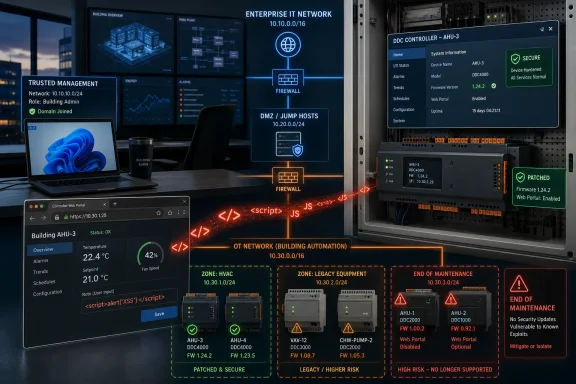 A Browser Bug Becomes a Building Problem
The uncomfortable part of this advisory is not that a web interface has an XSS vulnerability. Cross-site scripting is one of the oldest classes of web security failure, familiar to anyone who has administered a forum, a helpdesk portal, or a forgotten intranet application. The uncomfortable part is where this web interface lives: inside building automation equipment that may be responsible for heating, ventilation, air conditioning, energy control, and facility operations.Kieback & Peter’s DDC controllers are designed for building automation environments, not for casual exposure to the public Internet. That distinction matters, but it does not make the vulnerability irrelevant. Modern facilities are full of management laptops, contractor VPNs, remote monitoring arrangements, shared service accounts, and browser-based dashboards that blur the old line between “inside” and “outside.”
An XSS flaw gives an attacker a way to make the victim’s browser execute JavaScript in the context of the affected controller’s web portal. If the victim is already authenticated, the browser may carry session context, credentials, cookies, or access privileges that the attacker does not directly possess. In a normal enterprise web app, that is bad. In a building controller, it is a reminder that the browser has quietly become part of the control plane.
That is the broader story here. OT security often talks about firewalls, zones, and segmentation as if packets are the only meaningful unit of risk. But the browser is a bridge, and JavaScript is cargo. If a user with legitimate access can be lured into the wrong interaction, a vulnerability in a controller’s web UI can become a lever against systems that were never meant to face hostile content.
The Patch Line Divides the Fleet
The advisory draws a hard line between supported and end-of-maintenance devices. For the DDC520, DDC4002e, DDC4200e, DDC4400e, DDC4020e, and DDC4040e controllers, Kieback & Peter’s answer is firmware. The DDC4002e, DDC4200e, DDC4400e, DDC4020e, and DDC4040e should be updated to version 1.23.5 or newer, while the DDC520 should move to version 1.24.2 or newer.That is the easy half of the advisory, at least on paper. It gives administrators something familiar to do: identify affected models, check firmware, schedule maintenance, test the update, deploy it, and verify the result. Even then, “easy” is relative in building automation. Controllers are often maintained by facilities teams, vendors, or integrators rather than the same patch-management machinery that handles Windows clients and servers.
The harder half concerns the DDC4002, DDC4100, DDC4200, DDC4200-L, and DDC4400. Those controllers are end-of-maintenance, so the vendor is not offering a normal firmware fix. Instead, the recommendation is operational containment: keep them in a strictly separated OT environment, restrict access to trusted individuals, disable the web portal if it is not required, and educate users to reach the service only through trusted links.
That split is the practical heart of the issue. Security advisories often pretend that remediation is a software state: vulnerable before, fixed after. OT environments do not always work that way. Sometimes remediation is an architecture, a maintenance contract, a firewall rule, a procurement decision, and a conversation with the facilities department about why a controller that still “works” has become a liability.
End-of-Maintenance Is Not a Footnote
End-of-maintenance status changes the economics of a vulnerability. A supported controller can be ugly, inconvenient, or expensive to patch, but there is at least a vendor-supported path forward. An unsupported controller turns every future bug into a compensating-control exercise, and compensating controls tend to age badly.That is especially true for web interfaces. A DDC controller installed years ago may have been placed behind a perimeter, reachable only from a management workstation or a facility network. Since then, the site may have added remote access, building analytics, cloud dashboards, contractor support channels, or emergency maintenance procedures. The controller did not move, but the network around it did.
The vendor’s advice to disable the web portal when it is not required is therefore more than housekeeping. It is a test of operational dependency. If the portal is genuinely unnecessary, leaving it enabled is needless attack surface. If the portal is necessary, then the organization has to admit that an unsupported embedded web application is part of its daily operating model.
That admission should trigger a replacement discussion, not merely a firewall change. Segmentation is valuable, but it is not a fountain of youth. A controller that cannot receive security fixes may be tolerable for a bounded period in a tightly managed environment, but it should not become a permanent exception simply because nobody wants to disturb a working building system.
“Closed Network” Is a Design Assumption, Not a Defense
Kieback & Peter’s mitigation language emphasizes closed building automation networks, OT zones, firewalls, and defense in depth. That is sensible advice, and in industrial-control security it is practically table stakes. But the phrase “closed network” deserves suspicion whenever it appears in 2026.Closed to whom? Closed from the Internet? Closed from the corporate LAN? Closed from guest Wi-Fi? Closed from vendor VPN access? Closed from a technician’s laptop that also reads email and browses the web? The answer often varies depending on who is asked, and that uncertainty is where vulnerabilities become incidents.
A cross-site scripting flaw is particularly good at exploiting fuzzy boundaries because it does not necessarily require the attacker to talk directly to the controller from the open Internet. The victim’s browser may be the courier. If a facilities engineer, integrator, or administrator can reach the controller and can also be induced to open attacker-controlled content, the neat perimeter diagram starts to look less neat.
This does not mean every affected controller is one phishing email away from disaster. XSS impact depends on authentication state, web UI design, privileges, browser behavior, network reachability, and what sensitive actions the portal permits. But it does mean that “not Internet-facing” should be treated as a condition to verify, monitor, and preserve — not a magical sentence that closes the ticket.
The Windows Angle Is the Workstation Nobody Mentions
For WindowsForum readers, the device name may be unfamiliar, but the operational pattern is not. Many building automation portals are administered from Windows laptops and desktops, often by facilities staff, contractors, or shared operations teams. Those endpoints become the human-machine interface, the documentation store, the VPN launcher, the browser session, and sometimes the weakest link in the chain.That is why the remediation conversation should not stop at the controller firmware. If the management path runs through Windows, then browser hardening, endpoint protection, credential hygiene, and least-privilege access all matter. A patched controller behind a sloppy workstation is not a mature security posture; neither is a well-managed workstation that can browse freely while logged into fragile OT portals.
Organizations should pay close attention to which Windows devices can reach the DDC web portals. They should also look at whether those devices are general-purpose workstations or dedicated administration endpoints. A machine used for building control should not be treated like an ordinary office PC if it has privileged access to OT devices.
There is also a mundane but important browser question. Users should not be encouraged to access controller portals through links in emails, chat messages, ticket comments, or vendor documents unless the organization has a controlled process for validating those links. The vendor’s advice to use only trusted links sounds basic, but in an XSS scenario it maps directly to the attack path.
The Risk Is Modest Until the Environment Makes It Severe
It would be easy to oversell this advisory. Cross-site scripting is not the same thing as unauthenticated remote code execution on a controller. The attacker’s JavaScript runs in a victim’s browser, not automatically inside the controller’s firmware. User interaction and reachability matter.But it would also be a mistake to undersell it. Building automation systems sit at the intersection of cybersecurity, physical operations, energy management, and tenant comfort. A weakness that seems ordinary in a web application can have unusual consequences when the application is attached to operational equipment and maintained outside normal IT rhythms.
The severity of this issue therefore depends less on the abstract label XSS than on the deployment. A supported DDC520 in a segmented network with updated firmware and limited admin access is one kind of risk. An end-of-maintenance DDC4200 reachable from a broad internal network through a shared facilities workstation is another. A controller exposed through a poorly governed remote-access path is worse again.
This is why asset inventory remains the unglamorous center of OT security. You cannot make a good decision about this advisory unless you know which models are installed, which firmware they run, which networks can reach them, who logs into them, whether the web portal is enabled, and whether replacement is already overdue.
The Old Perimeter Model Keeps Producing New Exceptions
The advisory’s emphasis on defense in depth is correct, but it also reveals a recurring weakness in OT security messaging. Vendors and agencies often tell customers not to expose devices directly to untrusted networks, especially the Internet. That is necessary advice, but it is not sufficient for the environments many organizations actually operate.The problem is not that administrators have never heard of segmentation. The problem is that segmentation erodes under operational pressure. A vendor needs remote access for maintenance. A facilities team wants dashboards from the corporate network. A merger brings inconsistent network diagrams. A temporary firewall rule becomes permanent. A building management workstation gains email because users need to coordinate repairs.
Each exception may be rational in isolation. Together, they create the practical exposure that advisories warn against. OT systems do not usually become reachable because someone set out to make them insecure; they become reachable because convenience, uptime, and organizational ambiguity gradually redraw the perimeter.
This is why the end-of-maintenance devices are the most important part of the advisory. A supported product gives IT and facilities teams a technical action. Unsupported products demand governance. Someone has to own the risk, fund the replacement, or document why the organization is willing to operate a web-managed controller that will not receive fixes.
Facility Security Is Now an IT Governance Problem
One of the quiet lessons of advisories like this is that facilities technology can no longer be managed as a parallel universe. Building controllers may not run Windows, join Entra ID, or appear in the same dashboard as servers and laptops, but they still depend on identity, browsers, networks, remote access, and patch decisions. Those are IT governance concerns.For sysadmins, the immediate question is whether these controllers appear in vulnerability management at all. Many scanners are tuned for enterprise endpoints and servers, not OT devices that may be sensitive to aggressive probing. That creates a visibility gap where the most important data may come from procurement records, integrator documentation, network discovery, and manual verification.
For security teams, the question is whether the building automation zone is genuinely segmented or merely assumed to be. Firewall rules should be reviewed from the perspective of who can initiate sessions to the controller web portals. Remote-access pathways should be documented. Administrative access should be named, logged, and limited to the smallest practical group.
For facilities teams, the question is whether “still working” is an adequate lifecycle standard. In a mechanical sense, an old controller may continue to do its job. In a security sense, end-of-maintenance means the device is accumulating risk every time a new vulnerability class, browser behavior, or access pattern changes the environment around it.
The Real Remediation Is Boring, Which Is Why It Matters
The practical response should begin with inventory. Organizations need to identify whether they run DDC4002, DDC4100, DDC4200, DDC4200-L, DDC4400, DDC520, DDC4002e, DDC4200e, DDC4400e, DDC4020e, or DDC4040e controllers. They then need to separate that list into supported devices that can be updated and end-of-maintenance devices that require containment or replacement planning.For supported controllers, firmware updates should be treated as change-managed OT maintenance, not casual software patching. That means coordinating with facilities operations, confirming rollback procedures, checking vendor guidance, and testing where possible before deployment. The target versions are clear: 1.23.5 or newer for the supported DDC4000e-family models listed in the advisory, and 1.24.2 or newer for the DDC520.
For unsupported controllers, the work is less satisfying but arguably more urgent. Put them in strictly separated OT zones. Restrict web access to trusted users and trusted management hosts. Disable the web portal if it is not operationally required. Block direct Internet exposure. Treat every exception as temporary and documented.
The user-awareness recommendation is also worth taking seriously, but it should not become a substitute for technical control. Telling users to click only trusted links is sensible; relying on that advice as the main protection is not. A mature response reduces the number of users who can reach the portal, reduces the number of paths to the portal, and reduces the need to use the portal at all.
The DDC Advisory Leaves Administrators With a Short, Sharp Checklist
This advisory is not a panic button, but it is a useful forcing function. It asks organizations to prove that their building automation network is actually segmented, that their controller firmware is current where updates exist, and that unsupported devices are not being protected by optimism. The most concrete actions are simple enough to state, even if they are not always simple to execute.- Organizations should identify every affected Kieback & Peter DDC controller model and record its firmware version, network location, and operational owner.
- Supported DDC4002e, DDC4200e, DDC4400e, DDC4020e, and DDC4040e controllers should be updated to firmware 1.23.5 or newer.
- Supported DDC520 controllers should be updated to firmware 1.24.2 or newer.
- End-of-maintenance DDC4002, DDC4100, DDC4200, DDC4200-L, and DDC4400 controllers should be isolated in strictly separated OT environments and placed on a replacement roadmap.
- Web portal access should be disabled where it is unnecessary and limited to trusted users and trusted management systems where it remains required.
- Windows endpoints used to administer these controllers should be treated as privileged OT access workstations, not ordinary browsing machines.
References
- Primary source: CISA
Published: 2026-05-19T12:00:00+00:00

Kieback & Peter DDC Building Controllers | CISA
www.cisa.gov
- Related coverage: cvedetails.com
- Related coverage: moj.gov.gr
- Related coverage: johnsoncontrols.com
- Related coverage: rockwellautomation.com
Security Advisories | Rockwell Automation | IN
 www.rockwellautomation.com
