

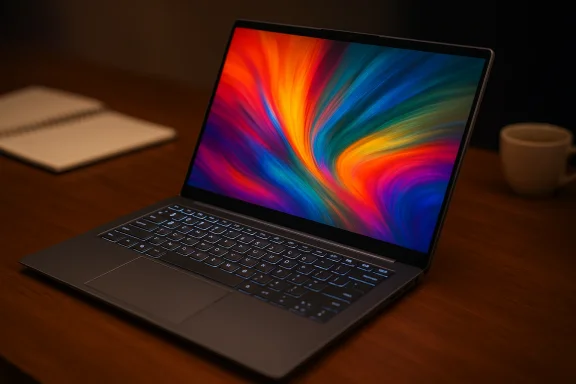
Lenovo’s Yoga Slim 9 14 is more than just a looker: its premium design is matched by solid build quality and one of the best keyboards and trackpads in the 14-inch Windows laptop class, but those strengths sit beside important trade-offs that buyers should understand before they spend at the top end of the market.
The Yoga Slim family has long been Lenovo’s showcase for premium thin-and-light Windows laptops, balancing sleek industrial design with high-end displays and the latest Intel silicon. The Yoga Slim 9 14 sits at the premium tip of that lineup: a 14-inch clamshell built around OLED panels, Intel Core Ultra-class processors in recent generations, and a focus on fit-and-finish that aims to rival the very best Ultrabooks. In practice, the Yoga Slim 9 14 tries to satisfy two overlapping audiences: mobile professionals who value portability and battery life, and creative users who demand color-accurate OLED displays.
This feature takes a close look at the Yoga Slim 9 14’s strengths — design, build quality, and input experience — then analyzes performance, display choices, battery behavior, ports and expandability, thermal realities, and long-term ownership considerations. The goal is a balanced, practical view so you can decide whether the Yoga Slim 9 14 matches your needs.
That said, the Slim 9 is a carefully tuned compromise: it prioritizes slenderness and refinement over maximum sustained performance and easy upgradeability. If your workflow includes long rendering jobs, demanding 3D workloads, or a need for frequent internal upgrades, a thicker workstation or a modular business laptop will serve you better. For travelers, executives, writers, and creative professionals who value color-accurate displays and a tactile typing experience, the Yoga Slim 9 14 remains one of the best-designed options in the premium Ultrabook space — provided you choose the right configuration for your priorities.
Source: facebook.com
 Background
The Yoga Slim family has long been Lenovo’s showcase for premium thin-and-light Windows laptops, balancing sleek industrial design with high-end displays and the latest Intel silicon. The Yoga Slim 9 14 sits at the premium tip of that lineup: a 14-inch clamshell built around OLED panels, Intel Core Ultra-class processors in recent generations, and a focus on fit-and-finish that aims to rival the very best Ultrabooks. In practice, the Yoga Slim 9 14 tries to satisfy two overlapping audiences: mobile professionals who value portability and battery life, and creative users who demand color-accurate OLED displays.This feature takes a close look at the Yoga Slim 9 14’s strengths — design, build quality, and input experience — then analyzes performance, display choices, battery behavior, ports and expandability, thermal realities, and long-term ownership considerations. The goal is a balanced, practical view so you can decide whether the Yoga Slim 9 14 matches your needs.
Design and build: a premium statement that’s engineered, not gimmicky
The Yoga Slim 9 14 is unmistakably premium from the moment you pick it up. Lenovo blends refined materials and restrained styling to deliver a laptop that looks modern without feeling derivative.Materials and fit
- The chassis uses a combination of anodized aluminum and precision-milled surfaces, with a glass-covered lid on some finishes that gives a muted sheen rather than a mirror-bright effect.
- Panel seams are tight and consistent; hinges operate with controlled friction that holds the display firmly at any angle within the laptop’s clamshell range.
- Measured thickness and footprint place the Slim 9 in the thin-and-light category without making structural rigidity a casualty: this is a laptop that feels solid while remaining portable.
Exterior finishes and practical details
Lenovo offers tasteful colorways and understated accents that avoid the loud “gamer” look. Practical touches — such as grippy rubber feet, a flush fingerprint reader on the power button in many SKUs, and recessed port cutouts — make the Slim 9 feel considered. If you travel frequently, the unit’s slim profile and protective lid finish reduce scratches and scuffs compared with soft-touch coatings that wear quickly.Keyboard and trackpad: class-leading input that elevates daily use
One of the clearest strengths many users notice right away is the Yoga Slim 9 14’s typing and pointing experience. Where ultra-thin designs often compromise on key travel or trackpad responsiveness, the Slim 9 finds a satisfying balance.Keyboard: travel, layout, and tactile feedback
- Keys use a low-profile scissor mechanism tuned for comfortable travel and a crisp bottoming feel, which helps with accuracy during long typing sessions.
- The keycap profile and spacing are deliberate: standard-size keys, an intuitive layout, and good spacing for touch typists.
- Backlighting is evenly distributed and offers multiple brightness levels, enhancing usability in dim environments.
Trackpad: precision and surface feel
- The large glass trackpad runs Windows Precision drivers and supports smooth, consistent multi-finger gestures.
- Cursor control is precise across the entire trackpad surface, with a satisfying, low-profile click mechanism that avoids noisy or mushy feedback.
- Palm rejection and gesture recognition are reliable for day-to-day workflows, including multi-window navigation and touch gestures for creative tools.
Display: OLED excellence with important configuration choices
One of the Yoga Slim 9 14’s headline features is its OLED display options. Lenovo positions this machine for people who care about color fidelity, contrast, and the “pop” that OLED brings to images and video.Panel options and visual quality
- The Slim 9 is available with 14-inch OLED panels in both high-resolution and ultra-high-resolution configurations, commonly offering a 16:10 aspect ratio that increases vertical workspace.
- Typical configurations include a 2.8K (around 2880×1800) OLED at 90–120Hz and higher-tier 4K (3840×2400) OLED options with faster refresh rates on select SKUs.
- Panels deliver deep blacks, wide color gamut coverage (commonly quoted in manufacturer specs as near 100% DCI-P3), and strong contrast typical of OLED. Dolby Vision and HDR support appear on higher-tier screens.
Trade-offs: brightness, HDR, and OLED quirks
- OLED panels can vary by SKU in peak brightness. Some units target a 400-nit continuous brightness with higher short-term peaks for HDR content, while premium SKUs report higher peak numbers. For outdoor use in bright sunlight, the effectiveness depends heavily on the specific panel option.
- OLED displays may show minor banding or unevenness in very low-brightness scenes in some panels, and there is a long-term risk of image retention if static UI elements are left at high brightness for prolonged periods. These are mitigatable: software measures such as pixel-shifting, variable refresh rates, and sensible brightness management reduce the practical risk for most users.
Performance: modern Intel silicon, capable but thermally constrained
Lenovo equips recent Yoga Slim 9 14 SKUs with Intel’s Core Ultra-class processors and integrated Intel Arc graphics on certain models. These chips represent a step forward for efficiency and media performance, but the Slim 9’s thin profile imposes real limits.CPU and GPU behavior
- Benchmarks for similarly configured laptops show strong single-threaded performance for the latest Core Ultra parts, with multi-core output good for office productivity, web development, and light content creation.
- Integrated graphics have improved and can handle GPU-accelerated tasks, playback of high-resolution video, and casual gaming at modest settings. They are not a substitute for a discrete GPU if you need sustained 3D rendering or high-frame-rate gaming.
Thermal realities and sustained performance
- The Slim 9’s thin chassis prioritizes portability, which naturally limits thermal headroom. In short bursts and bursty creative workloads, the laptop can deliver solid performance. Under sustained full-load CPU stress or heavy multi-threaded rendering, thermally induced frequency reduction will occur to keep temperatures and fan noise under control.
- Lenovo’s thermal tuning reflects a choice: favor quieter operation and surface temperatures over maximum sustained throughput. For most business users and creative pros working on short-to-medium tasks, this trade-off is acceptable; for power users who run long rendering jobs, a larger, thicker machine with active cooling will be a better fit.
Battery life: excellent in efficiency scenarios, variable with OLED and workload
Battery behavior is one area where configuration and real-world usage diverge.- With efficiency-focused workloads (web, documents, streaming), the Yoga Slim 9 14 typically posts competitive battery life thanks to the power efficiency of recent Core Ultra chips and power-managed OLED panels.
- Higher-resolution 4K OLED screens and sustained heavy workloads (compilation, multi-hour editing, gaming) significantly shorten runtimes. The OLED “always on” nature of color-rich content is a larger battery draw than equivalent IPS panels in many cases.
- Lenovo’s power-management modes and software optimizations help, but expect battery life to vary widely by display and configuration.
Ports, expandability, and I/O
The Yoga Slim 9 14 carries a typical modern thin-and-light port selection, but thinness forces compromises.- Expect two Thunderbolt/USB-C ports (supporting charging and external displays in most SKUs), a 3.5mm audio jack, and sometimes an additional USB-A or microSD slot depending on the configuration and market.
- There’s limited internal expandability: RAM is usually soldered (LPDDR5), and SSDs can be either soldered or in an M.2 slot depending on the specific SKU and region. This means buyers should carefully choose memory and storage at purchase, as aftermarket upgrades may be restricted or impossible.
Audio, webcam, and real-world media experience
Lenovo outfits the Slim 9 with a stereo speaker setup and modern webcam solutions, but with caveats.- Audio tuning typically emphasizes clarity over bass weight; Dolby Atmos support on some SKUs helps create a wider virtual soundstage but will not replace a dedicated external speaker for serious media work.
- Webcam quality varies: modern AI-assisted camera features like background blur or auto-framing are helpful, but physical sensor quality and placement remain the limiting factors. Some higher-tier Lenovo models experiment with under-display or high-resolution cameras; confirm the exact model if advanced camera capabilities are critical.
Software, security, and ecosystem
Lenovo includes a modest software stack — firmware utilities, power management, and occasional bundled apps — that supports the hardware without overwhelming the user.- Security features such as fingerprint readers and Windows Hello support are common on business-focused SKUs.
- Lenovo’s software suite lets you tune thermal profiles, update firmware, and selectively enable power modes. These tools are useful but should be reviewed and configured to avoid unnecessary background activity.
Strengths: what the Yoga Slim 9 14 does very well
- Premium build and materials: This laptop looks and feels like a high-end product, with consistent manufacturing quality and durable finishes.
- Keyboard and trackpad: Exceptional input experience for a thin laptop — comfortable travel, low fatigue, and a precise glass trackpad.
- OLED display options: Best-in-class contrast, strong color reproduction, and modern aspect ratios that suit creative and media-centric work.
- Portability: Thin, light, and easy to carry without feeling fragile.
- Modern connectivity: Thunderbolt/USB-C ports with display and charging support align with contemporary workflows.
Risks and trade-offs: where buyers should exercise caution
- Configuration variability: Model numbers and regional SKUs vary; display, RAM, and storage options differ and can materially change real-world experience. Verify the exact SKU before purchase.
- Thermal and sustained performance: Thinness limits sustained heavy workloads. If you run prolonged multi-threaded jobs or depend on maximum GPU throughput, a more thermally capable chassis will deliver better results.
- Battery variability: OLED and higher-resolution panels reduce runtime compared with lower-res or IPS options. If all-day unplugged use is a priority, choose configurations and brightness profiles carefully.
- Repairability and upgrades: Soldered RAM and constrained internal access limit future upgrades. Buyers who want to upgrade memory or swap storage should confirm the serviceability of the SKU.
- Price premium: The Yoga Slim 9 sits at the higher end of the market; you pay not just for specs, but for materials, display quality, and the input experience. Equivalent raw performance can be found in less expensive machines if premium feel is not important to you.
Who should buy the Yoga Slim 9 14?
- Mobile professionals who prioritize a premium chassis, excellent keyboard and trackpad, and a stunning OLED screen for presentations and media.
- Creatives who need accurate color and contrast in a portable package and who accept the thermal trade-offs for thinness.
- Buyers who appreciate design and materials and are willing to pay a premium for a laptop that feels special.
- Power users who need sustained multi-core performance or discrete GPUs for prolonged rendering or 3D work.
- Users who require lots of ports and easy in-field repairability.
- Budget-conscious buyers who prefer raw performance per dollar over premium materials.
Practical buying checklist: pick the right configuration
Before you buy, run through this checklist to match the laptop to your needs:- Confirm the exact SKU and regional model number; check the display option (2.8K vs 4K OLED) and typical/peak brightness figures.
- Choose RAM and storage carefully; many Slim 9 SKUs use soldered LPDDR5, so buy the capacity you’ll need for the laptop’s life.
- Decide between battery life and display fidelity: higher-res OLED panels look spectacular but reduce runtime.
- If you require heavy GPU work, prioritize a machine with a discrete GPU or a thicker chassis designed for sustained performance.
- Factor in docking or hub needs if you rely on many wired peripherals.
Long-term ownership and support considerations
Lenovo’s global support infrastructure is mature, and warranty options typically include on-site service in many regions. That said, extended warranties and accidental damage protection can be wise investments for ultra-premium thin-and-light hardware, especially for travelers. Also consider:- Software and firmware updates: keep drivers and firmware current to benefit from display, thermal, and security fixes.
- Use sensible display settings and avoid leaving static bright UI elements at maximum brightness for long periods to reduce OLED burn-in risk.
- For heavy use, maintain a cooling mindset: avoid blocked vents on soft surfaces and consider a laptop cooling pad during extended sessions.
Conclusion
The Lenovo Yoga Slim 9 14 makes a compelling case for buyers who put premium design, build quality, and the daily comfort of superior keyboard and trackpad above all else. Its OLED display options and refined materials set it apart as a truly luxurious 14-inch device that excels in productivity and media consumption.That said, the Slim 9 is a carefully tuned compromise: it prioritizes slenderness and refinement over maximum sustained performance and easy upgradeability. If your workflow includes long rendering jobs, demanding 3D workloads, or a need for frequent internal upgrades, a thicker workstation or a modular business laptop will serve you better. For travelers, executives, writers, and creative professionals who value color-accurate displays and a tactile typing experience, the Yoga Slim 9 14 remains one of the best-designed options in the premium Ultrabook space — provided you choose the right configuration for your priorities.
Source: facebook.com
