

LG has quietly reversed course: after a December webOS update that pinned Microsoft’s Copilot to many LG TVs and triggered a storm of user anger, owners can now — at least in some cases — remove the Copilot shortcut entirely, following a firmware rollout that includes software version 33.30.92.
In mid‑December, owners of recent LG smart TVs discovered a Copilot tile waiting on their home screen after a routine over‑the‑air webOS update. For many, the new icon behaved like a system component: it could be hidden or moved but not uninstalled through the normal app management UI. The discovery exploded on Reddit and across tech press, and users framed the change as a forced addition of an AI feature to hardware they had already bought, not something they’d chosen to install.
LG’s position — as reported to journalists — was that the tile was not a native, deeply embedded app but a shortcut to a web version of Microsoft Copilot that opens in the TV’s browser, and that microphone access and other capabilities require user consent. Facing a wave of public backlash, the company told The Verge it would “respect consumer choice” and add an option to delete the shortcut in a future webOS update. That pledge did not include a timetable.
What followed was a rapid and familiar tech‑consumer debate: is this a harmless convenience feature or an overreach? Critics pointed not just to the convenience of Copilot but to broader issues — how vendors push software onto sold devices, where the lines of user consent and preinstalled features lie, and what privacy obligations hardware makers shoulder when they bolt cloud services to living‑room devices. Coverage framed the event as a test case for the new reality of “AI TV.”
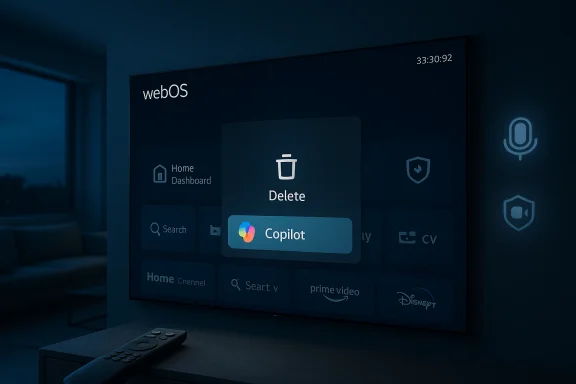
According to a hands‑on report published on a tech site, after installing the 33.30.92 update the author found the Copilot shortcut could now be deleted from the home rihidden — exactly the capability LG had promised after the December backlash. The reported removal flow matches the intuitive remote‑press pattern webOS users expect: select the Copilot tile on the home screen, long‑press the select/OK button to open the quick menu, and choose the trash/bin icon to delete the shortcut. The site also described the usual precautionary confirmation step before deletion.
Important verification note: while the promise to make the Copilot shortcut deletable was publicized by LG and widely reported in December, independent confirmation that the 33.30.92 rollout universally enables deletion across all models and regions is limited. LG’s official changelogs for 33.30.92 emphasize bug fixes and model‑specific improvements; they do not explicitly list “Copilot deletion” as a headline item in every regional support entry. That means the practical availability of a delete option may vary by model, region, or staged rollout schedule. Readers should check their TV’s Settings → Support → Software Update and confirm the exact build number before assuming the option is present. ([theverge.com](LG forced a Copilot web app onto its TVs but will let you delete it are deleting Copilot (practical steps)
If your TV has received the update and includes the delete option, here is the reported sequence to remove the Copilot shortcut. This walkthrough mirrors the experience described by the reporter who updated to 33.30.92; because LG has not published a universal “how to” for this specific change at the time of reporting, treat the steps as practical guidance rather than a manufacturer‑issued script.
Two strengths stand out:
But there are a few lines vendors must respect:
This is not just an LG problem. It is a market‑wide question about how hardware platforms evolve after the sale. If we want smart devices that enhance daily life without surprising users, the default must be consent, transparency, and reversibility — not the other way around.
In the short term: if you’ve been annoyed by an unremovable Copilot icon, check for updates, confirm your build number (33.30.92 or later), and try the long‑press delete flow. If the option is not yet present, hide the tile, review voice and privacy settings, and consider network controls as a temporary stopgap. And if you’re a TV buyer, add “update policies and in‑OS control” to the checklist alongside picture quality and latency: software behavior now shapes the ownership experience as much as hardware does.
—
Source: Pocket-lint LG TV owners are no longer stuck with a mandatory AI app
 Background / Overview
In mid‑December, owners of recent LG smart TVs discovered a Copilot tile waiting on their home screen after a routine over‑the‑air webOS update. For many, the new icon behaved like a system component: it could be hidden or moved but not uninstalled through the normal app management UI. The discovery exploded on Reddit and across tech press, and users framed the change as a forced addition of an AI feature to hardware they had already bought, not something they’d chosen to install.LG’s position — as reported to journalists — was that the tile was not a native, deeply embedded app but a shortcut to a web version of Microsoft Copilot that opens in the TV’s browser, and that microphone access and other capabilities require user consent. Facing a wave of public backlash, the company told The Verge it would “respect consumer choice” and add an option to delete the shortcut in a future webOS update. That pledge did not include a timetable.
What followed was a rapid and familiar tech‑consumer debate: is this a harmless convenience feature or an overreach? Critics pointed not just to the convenience of Copilot but to broader issues — how vendors push software onto sold devices, where the lines of user consent and preinstalled features lie, and what privacy obligations hardware makers shoulder when they bolt cloud services to living‑room devices. Coverage framed the event as a test case for the new reality of “AI TV.”
What changed: the 33.30.92 rollout and the delete option
In February, LG began rolling out a webOS firmware wave that carries the build identifier 33.30.92 to a range of 2025 TV models. LG’s support pages and regional product pages list 33.30.92 as a progressive firmware update with a mix of bug fixes and feature updates; owners in multiple regions reported receiving it in early February.According to a hands‑on report published on a tech site, after installing the 33.30.92 update the author found the Copilot shortcut could now be deleted from the home rihidden — exactly the capability LG had promised after the December backlash. The reported removal flow matches the intuitive remote‑press pattern webOS users expect: select the Copilot tile on the home screen, long‑press the select/OK button to open the quick menu, and choose the trash/bin icon to delete the shortcut. The site also described the usual precautionary confirmation step before deletion.
Important verification note: while the promise to make the Copilot shortcut deletable was publicized by LG and widely reported in December, independent confirmation that the 33.30.92 rollout universally enables deletion across all models and regions is limited. LG’s official changelogs for 33.30.92 emphasize bug fixes and model‑specific improvements; they do not explicitly list “Copilot deletion” as a headline item in every regional support entry. That means the practical availability of a delete option may vary by model, region, or staged rollout schedule. Readers should check their TV’s Settings → Support → Software Update and confirm the exact build number before assuming the option is present. ([theverge.com](LG forced a Copilot web app onto its TVs but will let you delete it are deleting Copilot (practical steps)
If your TV has received the update and includes the delete option, here is the reported sequence to remove the Copilot shortcut. This walkthrough mirrors the experience described by the reporter who updated to 33.30.92; because LG has not published a universal “how to” for this specific change at the time of reporting, treat the steps as practical guidance rather than a manufacturer‑issued script.
- Open Settings → Support → Software Update → Check for updates. If an update is available, install it and restart the TV to apply the new firmware. Confirm the firmware version in Settings → General → About this TV or a similarly labeled menu; look for 33.30.92 or a newer build.
- Return to the Home screen and highlight the Copilot tile in your app shortcuts.
- Press and hold the select/OK button on your remote to open the tile’s quick actions menu.
- Choose the trash bin icon (Delete). If you prefer not to remove it, the other option is the “hide” (eye icon with a slash) choice.
- Confirm the deletion when prompted. The shortcut should disappear from the home ribbon; if it remains or reappears after reboot, the feature may be locked by your region’s rollout.
Why this matters: device ownership, consent, and the new update economics
This episode matters for three overlapping reasons: user sovereignty over purchased hardware, privacy and data‑flow concerns when cloud AI is attached to TVs, and the business model implications of remote‑pushed software.1) Ownership versus control
Consumers reasonably expect that once they purchase a device, they control what runs on it. But smart devices are now thin clients tied to cloud services and firmware ecosystems. Pushing a new service via firmware without an opt‑out option tilts that balance away from the user. The backlash against LG’s Copilot shortcut shows the gulf between manufacturers’ perception of value (preinstall convenience) and buyers’ expectation of choice. LG’s concession to add a delete option is a partial salutary recognition of that expectation — but it’s reactive. Critics argue that proactive opt‑in is the better standard.2) Privacy and telemetry
Smart TVs are sensors in the living room: microphones, cameras, content‑recognition features, and automatic content‑recognition services can surface sensitive metadata about viewing habits. Even if Copilot on LG TVs is merely a web shortcut, its presence promotes a cloud AI service that could be granted microphone access if the user consents; the possibility of enabling content recognition or Live Plus features by default can raise privacy flags. LG repeatedly emphasized that microphone features require explicit user consent, but the episode underscored how default settings and opaque rollouts can create privacy creep even without malicious intent.3) Firmware as a channel for distribution and monetization
Television vendors are increasingly monetizing the interface: home‑screen placements are valuable real estate for services, recommendations, and now conversational AI. Preinstalling third‑party shortcuts may be a delivery technique for strategic partnerships (e.g., Microsoft and OEMs), but it also expands the vectors for promoting services without explicit consumer buy‑in. As smart‑TV software becomes a business channel — not unlike preinstalled apps on phones — regulators, consumer advocates, and vocal users will push for clearer controls around what vendors can push to devices after sale.Strengths in LG’s response — and why they’re not enough
LG’s decision to allow deletion, once implemented, is the right one for user choice. The company moved from silence to an explicit promise to add a delete option, and the subsequent firmware wave that reportedly included that capability aligns with the principle of reversibility: if a manufacturer adds software post‑sale, users should be able to remove it.Two strengths stand out:
- Responsiveness to community feedback. LG heard a viral Reddit thread and mainstream coverage and publicly committed to change. That kind of responsiveness matters for brand trust.
- Technical minimalism of the Copilot implementation. The fact that Copilot is a web shortcut rather than a tightly integrated system app limits the immediate technical exposure: microphone privileges and deep system hooks require explicit consent, according to LG. That reduces some of the worst‑case privacy scenarios.
- Reactive, not proactive. The change was made only after public outcry. Proactive processes — such as clear opt‑in policies, in‑OS update notes emphasizing the change, or a prompt at first boot after an update — would have avoided the PR lapse.
- Transparency gaps in rollout notes. LG’s formal changelogs for 33.30.92 focus on generic fixes; they don’t list the Copilot deletion capability in most regional notes. That makes it hard for owners to know whether the feature is present for them without checking in the TV’s menus.
- Platform precedent. If OEMs treat firmware channels as a place to plant service icons, other companies may follow suit. The precedent is potentially worse than a single non‑removable tile: it could lead to an arms race of persistent shortcuts and bloatware across devices.
Risks and regulatory angles
This incident sits at the intersection of consumer protection, privacy law, and platform control. Regulators have taken an interest in preinstalled software and default settings in the past (mobile app stores, telemarketing, advertising preferences), and similar logic could extend to smart TVs.- Unfair commercial practices. Authorities that enforce unfair commercial practices could argue that forcing software onto already‑sold devices without clear notice and opt‑out options is misleading or coercive.
- Privacy and consent enforcement. If a preinstalled service triggers default data collection (e.g., Live Plus content recognition) during an update, privacy regulators could claim there was insufficient consent. LG has said microphone access is explicit‑consent only; that helps, but it doesn’t resolve telemetry or passive metadns.
- Warranty and software update obligations. The right to receive security updates is often framed as part of product support. But vendors must balance the responsibility to update against the right to refrain from pushing non‑security, third‑party service integrations onto user devices.
Practical advice for LG TV owners
- Verify the firmware version: Settings → Support → Software Update → Check for updates, and confirm the installed build in About. Regional rolls may lag.
- If you want to remove the Copilot shortcut and your TV shows the option, use the long‑press select/OK method on the home screen tile and choose Delete (trash icon). If that option isn’t present, select Hide to minimize visibility while awaiting a broader firmware rollout.
- If you’re concerned about microphone use or automated content recognition, review and turn off voice or Live Plus settings in the TV’s privacy or general settings menus. Turning off or disabling microphone access and automatic content‑recognition features helps reduce some of the telemetry surface area.
- For network‑level control, consumers can block unwanted third‑party endpoints at the router or DNS level. Tools such as Pi‑hole were recommended by community members early in the controversy as a workaround to prevent a web shortcut from loading content. That’s a blunt instrument but effective for privacy‑minded users until OEMs sort out better in‑OS controls.
The bigger picture: AI everywhere, and the lines we should demand
This Copilot episode is an early but instructive data point in the broader industry trend of embedding AI assistants across consumer devices. From phones to TVs to productivity suites, major players are integrating conversational AI into interfaces people already use. That’s a natural evolution — and it can deliver real value when executed with respect for user choice, privacy, and clarity.But there are a few lines vendors must respect:
- Opt‑in for non‑security features. If a new cloud service is arriving via firmware and changes the product experience (not just security fixes), users should receive a clear opt‑in prompt.
- Explicit, contextual consent for sensors. Microphone and camera access must remain gated by explicit, contextual consent dialogs; burying consent in settings menus is no longer acceptable.
- Changelog transparency. Update notes should list any third‑party service placements or notable UX changes so users know what to expect.
- Easy reversibility. If a service is added post‑sale, there must be a straightforward way to remove it without technical contortions.
Final analysis and takeaways
LG’s decision to allow deletion of the Copilot shortcut is a win for consumer choice, but the incident exposed a brittle approach to software rollouts on consumer hardware. That brittleness creates reputational risk, regulatory exposure, and erosion of user trust in the platform. The rollout of webOS 33.30.92 — which multiple owners and community threads list as the build now appearing on many 2025 models — appears to have delivered the promised delete option for at least some users, but public confirmation remains patchy and model/region dependent. Owners should verify their own firmware, and vendors should publish clearer, model‑specific notes.This is not just an LG problem. It is a market‑wide question about how hardware platforms evolve after the sale. If we want smart devices that enhance daily life without surprising users, the default must be consent, transparency, and reversibility — not the other way around.
In the short term: if you’ve been annoyed by an unremovable Copilot icon, check for updates, confirm your build number (33.30.92 or later), and try the long‑press delete flow. If the option is not yet present, hide the tile, review voice and privacy settings, and consider network controls as a temporary stopgap. And if you’re a TV buyer, add “update policies and in‑OS control” to the checklist alongside picture quality and latency: software behavior now shapes the ownership experience as much as hardware does.
—
Source: Pocket-lint LG TV owners are no longer stuck with a mandatory AI app
