LG’s reversal on the Copilot shortcut is a rare but telling victory for consumer pushback: after days of viral complaints that a Microsoft Copilot icon had been pushed to many webOS TVs without a clear uninstall path, LG says it will add an option to let owners delete the Copilot shortcut — while insisting the tile is only a browser-based shortcut and that microphone use requires explicit consent.
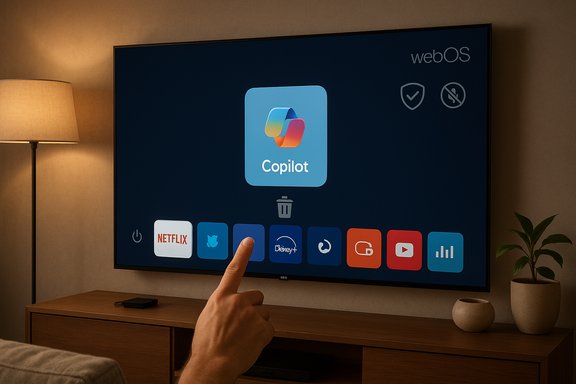
The controversy began when owners of LG webOS televisions noticed a new Copilot tile on their home screens following a recent over‑the‑air webOS update. Screenshots and high‑traffic forum posts made it clear the tile behaved differently from ordinary apps: users could hide it in the UI but not uninstall it through the standard app manager, and several reported the tile reappeared after a factory reset — behavior consistent with a system‑level or firmware‑baked package rather than a removable content store app. Microsoft and TV OEMs had publicly signaled this direction earlier: Samsung and LG both promoted Copilot integration for 2025 TVs as part of a broader “AI TV” push, and Microsoft published guidance for Copilot on Samsung’s Tizen-based sets. On Samsung devices Copilot was rolled out as a built-in assistant in select 2025 models; LG’s webOS roadmap also flagged Copilot and other AI features for its 2025 lineup. What created the uproar in mid‑December was the delivery mechanism — a firmware push that placed the Copilot tile in ways many owners felt they didn’t consent to or control.
Regulators are responding in real time: state attorneys general have filed lawsuits and sought temporary orders, and federal interest in smart‑TV software provision is evident. For consumers, the immediate path is simple: take pragmatic steps to reduce exposure (hide the tile, disable ACR/voice features, avoid account sign‑in, or run an external streamer) while demanding transparency about what data flows where. For vendors, the lesson is equally straightforward: ship convenience, but never at the cost of clear, persistent consumer consent and meaningful uninstallability.
This episode will be watched closely by privacy advocates, policymakers, and mainstream buyers alike because it sits at the intersection of AI adoption, software‑as‑service economics, and longstanding expectations about device ownership. How LG implements the promised delete option — and how candidly it discloses Copilot’s telemetry and consent mechanics — will determine whether this becomes a one‑off controversy or a structural inflection point for how AI companions are deployed in the home.
Source: channelnews.com.au LG Has Change Of Heart Over Copilot App On Their Spy Enabled WebOS TV’s – channelnews
 Background / Overview
The controversy began when owners of LG webOS televisions noticed a new Copilot tile on their home screens following a recent over‑the‑air webOS update. Screenshots and high‑traffic forum posts made it clear the tile behaved differently from ordinary apps: users could hide it in the UI but not uninstall it through the standard app manager, and several reported the tile reappeared after a factory reset — behavior consistent with a system‑level or firmware‑baked package rather than a removable content store app. Microsoft and TV OEMs had publicly signaled this direction earlier: Samsung and LG both promoted Copilot integration for 2025 TVs as part of a broader “AI TV” push, and Microsoft published guidance for Copilot on Samsung’s Tizen-based sets. On Samsung devices Copilot was rolled out as a built-in assistant in select 2025 models; LG’s webOS roadmap also flagged Copilot and other AI features for its 2025 lineup. What created the uproar in mid‑December was the delivery mechanism — a firmware push that placed the Copilot tile in ways many owners felt they didn’t consent to or control. What LG announced (and why the message matters)
LG’s public response — relayed to multiple outlets by spokesperson Chris De Maria — contained two key claims: the Copilot entry is a shortcut that opens the Microsoft Copilot web app in the TV’s browser, and features such as microphone input are only activated with the customer’s explicit consent. Crucially, LG also said it “respects consumer choice and will take steps to allow users to delete the shortcut icon if they wish,” but did not provide a firm timeline for when that deletion option would arrive. That clarification addresses two separate complaints: first, that Copilot was a deeply embedded native application (LG insists it is not), and second, that the company had no intention of returning user control (LG now promises to add a delete option). Both clarifications are material — the former affects technical risk modeling (what data flows where), while the latter affects trust and regulatory exposure.How the implementation matters technically
Web shortcut vs. native app
- A web shortcut is effectively a pinned link that opens a remote web interface inside the TV’s browser shell. Processing and model inference happen in Microsoft’s cloud; the TV is a thin client that streams UI and sends user input to servers.
- A native app would run code on the TV, could include local binaries, and might integrate more deeply with system services and sensors.
Why some tiles look “undeletable”
Embedded devices often use two mechanisms that make a tile effectively permanent:- Installing the component as a privileged system package outside the user sandbox, which can be disabled or hidden but not fully uninstalled via normal user flows.
- Baking the component into the firmware image delivered by FOTA (firmware‑over‑the‑air), so a factory reset restores the firmware image (and the tile) automatically.
The privacy angle: ACR, Live Plus, voice data and legal scrutiny
The Copilot shortcut conversation coincides with a much larger privacy fight around smart TVs and their telemetry stacks. Central to that fight is Automated Content Recognition (ACR) — a class of features that can fingerprint or analyze what’s playing on screen to deliver personalized recommendations or advertising. LG markets its ACR tooling under names like Live Plus, and critics have long warned that ACR, combined with other telemetry, creates an expansive profile of users’ viewing behavior and household context. In mid‑December, the Texas Attorney General filed lawsuits against five major TV manufacturers — Sony, Samsung, LG, Hisense and TCL — alleging those companies unlawfully collected personal data using ACR and other mechanisms, and that these practices were deployed without adequate disclosure or consent. The Texas filings describe ACR systems that can capture viewscreen imagery multiple times per second, transmit it in real time, and use it for advertising or profiling — allegations that dramatically raise the stakes for any added AI assistant or system feature that heightens context capture. Texas later secured a temporary restraining order against Hisense for specific ACR practices. Taken together, these developments show why a seemingly small UI decision — pinning a Copilot shortcut to the home screen as a system tile — can cascade into broader regulatory and consumer‑rights scrutiny. Regulators are already investigating whether TV telemetry practices are transparent, opt‑in, and compliant with consumer protection laws; forced or opaque integrations risk adding claims of deceptive practices and “dark patterns.”What this means for data flows and sensor use
Even if Copilot is a web shortcut, the privacy calculus depends on at least three axes:- What telemetry the TV sends to LG (firmware logs, ACR fingerprints, usage signals).
- What Copilot prompts and voice data are sent to Microsoft if users interact with the shortcut or sign into a Microsoft account.
- Whether any microphone, camera, or on‑screen capture can be activated without clear, persistent opt‑in.
Consumer practical steps right now
For readers who own affected LG webOS TVs and want to reduce exposure while the vendor follows through on deletion options, the following mitigations are practical, ordered from low to high friction:- Hide the Copilot tile: Home → Edit/App mode → select Copilot → Hide. This removes visual prominence but does not uninstall the component.
- Disable Live Plus / ACR and ad personalization: Settings → General → System / Privacy → find Live Plus or Content Recognition and toggle off. This reduces automatic screen‑fingerprinting telemetry.
- Turn off voice recognition features unless needed: Settings → Privacy / Voice Recognition → Off. Avoid linking a Microsoft account on the TV to limit persistent account‑tied telemetry.
- Use an external streaming stick (Apple TV, Roku, Fire TV, Nvidia Shield) as your primary interface and treat the LG set as a “dumb” display. This is the most reliable route to avoid OEM smart‑stack telemetry.
- Place the TV on a segmented guest VLAN, or use router‑level DNS blocking or Pi‑hole rules for known telemetry domains — technically effective but may break updates and services. Advanced users only.
- As a last resort, keep the TV offline — this disables streaming and updates but blocks outbound telemetry entirely.
Industry and regulatory implications
- Forced or hard‑to‑opt‑out placements of partner services on selling hardware are already attracting regulatory attention. The Texas lawsuits and the temporary restraining order against Hisense are clear signals that state authorities are willing to pursue enforcement if they believe consumers were misled or defaulted into surveillance.
- Deploying Copilot as a web shortcut is commercially efficient for LG and Microsoft, but it does not absolve either company from responsibility for deployment defaults, consent flows, and prescriptive disclosures. Regulators will look at the whole chain: firmware defaults, privacy UX, telemetry retention, and whether customers can meaningfully opt out.
- The U.S. International Trade Commission and other federal bodies are paying closer attention to smart‑TV supply chains and the software stacks that bring third‑party services to mass devices. That broader attention increases the legal and reputational risk for vendors that make intrusive defaults a business tactic.
Assessment: strengths, weaknesses and the risk profile
Notable strengths of LG’s response
- The company immediately clarified the technical nature of the Copilot tile (web shortcut vs native app), which reduces speculative technical fear about unknown local code running on devices.
- LG committed to adding a delete option, which acknowledges the core consumer grievance: loss of post‑purchase control.
Persistent weaknesses and red flags
- No firm timeline for remediation was provided, leaving affected users and regulators waiting.
- The presence of a system‑pushed shortcut that reinstates after a factory reset suggests the company’s update and packaging practices treat partner services as privileged system components, a practice that is likely to face sustained consumer resistance.
- LG’s claim about “explicit consent” for microphone activation needs clearer operational definition and engineering documentation (for example: is consent per session, persistent, revocable, and transparently logged?. Absent that, skepticism will remain.
Risk profile
- Reputational risk: negative press and viral community backlash can depress brand sentiment for otherwise well‑regarded hardware.
- Regulatory and legal risk: the Texas lawsuits and other investigations signal that vendor practices around ACR, defaults and post‑sale software changes are likely targets for enforcement and litigation. If regulators find misleading consent flows or dark patterns, penalties and injunctive relief are possible.
- Operational risk: pushing system‑level changes via firmware without clear opt‑out or rollback paths invites user remediation (network isolation, external streamers) that undermines the very adoption metrics the company seeks to improve.
What LG, Microsoft and OEMs should do next (concise checklist)
- Ship a delete/uninstall option for the Copilot shortcut with a firm and public timeline.
- Publish a clear technical and privacy notice describing what telemetry is generated when the shortcut is present, what is sent to Microsoft, retention windows, and third‑party sharing. Make it accessible and machine‑readable.
- Default to privacy‑minimal settings for any new feature delivered post‑sale (ACR off, ad personalization off) and require an active opt‑in with a clear, one‑screen summary.
- Provide a firmware rollback path and detailed update notes so independent auditors can verify what an OTA update changes.
- Improve consent UX so microphone and other sensor permissions are explicit, revocable, and persistent across updates.
Closing analysis
The Copilot‑on‑LG episode is not just about a single shortcut tile; it’s a case study in how modern connected devices erode a buyer’s expectation of post‑purchase software control when manufacturers monetize visibility and telemetry. LG’s about‑face — promising a delete option — is an important acknowledgement that consumers expect choice. Yet the underlying technical and business choices that allowed a non‑removable shortcut to ship in the first place remain a systemic problem across the smart‑TV industry.Regulators are responding in real time: state attorneys general have filed lawsuits and sought temporary orders, and federal interest in smart‑TV software provision is evident. For consumers, the immediate path is simple: take pragmatic steps to reduce exposure (hide the tile, disable ACR/voice features, avoid account sign‑in, or run an external streamer) while demanding transparency about what data flows where. For vendors, the lesson is equally straightforward: ship convenience, but never at the cost of clear, persistent consumer consent and meaningful uninstallability.
This episode will be watched closely by privacy advocates, policymakers, and mainstream buyers alike because it sits at the intersection of AI adoption, software‑as‑service economics, and longstanding expectations about device ownership. How LG implements the promised delete option — and how candidly it discloses Copilot’s telemetry and consent mechanics — will determine whether this becomes a one‑off controversy or a structural inflection point for how AI companions are deployed in the home.
Source: channelnews.com.au LG Has Change Of Heart Over Copilot App On Their Spy Enabled WebOS TV’s – channelnews