

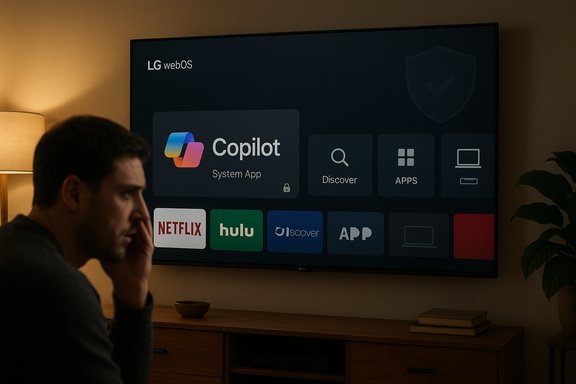
Microsoft’s Copilot has quietly started appearing on some LG webOS televisions after a recent over‑the‑air firmware push — and for many owners the new Copilot tile behaves like a system component that can be hidden but not uninstalled, touching off a sharp debate about device control, privacy, and the business of smart‑TV software.
At CES 2025 Microsoft announced that its conversational assistant, Copilot, would be integrated into smart‑TV platforms from major OEMs including Samsung and LG as part of a wider push to bring generative and conversational AI to the living room. Vendors framed the integration as a way to simplify content discovery, provide contextual information while watching, and add voice‑driven search and recommendations to TV home screens. Coverage of those product announcements documented vendor intent but noted that early demonstrations were light on implementation details. Microsoft and Samsung later published rollout details for Copilot on selected 2025 Samsung TVs and smart monitors, describing a voice‑powered interface surfaced from the homescreen and optional sign‑in for personalization. LG’s public product messaging focused on an “AI” section in webOS and a rebranded AI Remote, and LG has been updating its platform (webOS Hub / webOS 25) with new AI features and wider third‑party support. Those vendor materials confirm that delivering new assistants by firmware update is an intended distribution path for modern smart TVs. However, the present controversy concerns not the announcement but the mechanics of distribution: owners report receiving a routine webOS FOTA (firmware‑over‑the‑air) update that added a visible Copilot app tile to their home screens — and in many cases that tile cannot be removed via the normal app manager. Multiple community reports show the Copilot entry offering only “hide” or “disable,” not “uninstall,” and several owners say a factory reset returns the tile — behavior consistent with a privileged or firmware‑baked package.
For owners who value control and privacy, practical mitigations (hiding the tile, disabling ACR, blocking network access, or using an external streamer) can help in the short term. For vendors, the path forward is clear: restore transparent opt‑out and removal pathways, publish detailed privacy and telemetry documentation for the feature, and treat consent as a core part of the modern smart‑TV user experience. Failure to do so risks not only consumer trust but also regulatory attention and long‑term damage to brand credibility.
The Copilot on TVs story is a reminder that software updates are now as consequential as hardware purchases; when an update changes the software identity of a device you own, the expectations of agency and transparency should follow.
Source: Neowin https://www.neowin.net/news/microsoft-is-pushing-copilot-onto-lg-tvs-with-a-recent-software-update/
 Background
At CES 2025 Microsoft announced that its conversational assistant, Copilot, would be integrated into smart‑TV platforms from major OEMs including Samsung and LG as part of a wider push to bring generative and conversational AI to the living room. Vendors framed the integration as a way to simplify content discovery, provide contextual information while watching, and add voice‑driven search and recommendations to TV home screens. Coverage of those product announcements documented vendor intent but noted that early demonstrations were light on implementation details. Microsoft and Samsung later published rollout details for Copilot on selected 2025 Samsung TVs and smart monitors, describing a voice‑powered interface surfaced from the homescreen and optional sign‑in for personalization. LG’s public product messaging focused on an “AI” section in webOS and a rebranded AI Remote, and LG has been updating its platform (webOS Hub / webOS 25) with new AI features and wider third‑party support. Those vendor materials confirm that delivering new assistants by firmware update is an intended distribution path for modern smart TVs. However, the present controversy concerns not the announcement but the mechanics of distribution: owners report receiving a routine webOS FOTA (firmware‑over‑the‑air) update that added a visible Copilot app tile to their home screens — and in many cases that tile cannot be removed via the normal app manager. Multiple community reports show the Copilot entry offering only “hide” or “disable,” not “uninstall,” and several owners say a factory reset returns the tile — behavior consistent with a privileged or firmware‑baked package.What’s actually happening on affected LG sets
The observable facts reported by owners
- After applying a normal system update, some LG owners found a new Copilot tile on the webOS home screen.
- When using the TV’s Edit or App Manager workflows, the Copilot tile often lacks an uninstall option; the UI typically allows hiding but not deletion.
- Several owners reported that performing a factory reset returned the Copilot tile to the home screen, which strongly suggests the component is being delivered as a system app or included in the firmware image.
What vendors have and haven’t said
- Microsoft has described Copilot’s TV experience and published rollout information for Samsung models, including availability mechanics and the option to sign in for personalization. Those Microsoft materials focus on Samsung’s deployment and do not address LG’s firmware packaging choices in detail.
- LG has published platform updates about webOS Hub’s expanded AI capabilities, but at the time of reporting there was no vendor technical bulletin explicitly explaining why Copilot was installed as a system‑level package on some firmware builds or whether the behavior is by design for all models. That omission leaves a central engineering claim — that Copilot is intentionally bundled as a non‑removable system app — in the realm of strong user evidence rather than vendor confirmation.
Why a TV app might be non‑removable — technical mechanics explained
Smart‑TV vendors have several legitimate technical mechanisms that can make an app effectively non‑removable from the user interface. Two well‑understood patterns explain the behavior users are seeing:- Privileged system package — OEMs may deliver certain components outside the normal user app sandbox and flag them as system apps. The UI often exposes limited management actions (hide/disable) but not uninstall, because removing a system package can break platform features the vendor depends on. This is standard in many embedded systems for DRM, platform agents, or integrated services.
- Firmware‑baked component — the package is incorporated into the firmware image that the TV boots from. A factory reset typically restores the original firmware image and any baked‑in components. Removing such a component requires vendor tools, an official firmware rollback, or a custom firmware image (which is unsupported). Community testing that shows the tile reappearing after a reset is the clearest evidence of this pattern.
Privacy and telemetry concerns raised by owners
The arrival of a deeply integrated assistant on a shared, always‑on device generates a distinct set of privacy questions that differ from those for phones or PCs.- Smart TVs frequently include Automatic Content Recognition (ACR) systems (LG markets this as Live Plus) that collect metadata about what is playing on screen for personalization and ad targeting. Owners are rightly concerned about how an assistant like Copilot will interact with existing ACR signals and whether the combination expands profiling or targeting. Community reporting highlights this overlap as central to privacy worries.
- Owners have asked whether the new Copilot app increases active microphones, new audio capture behaviors, or novel telemetry beyond what the TV already sends. Those claims remain unverified — no vendor engineering note has confirmed additional capture or telemetry specific to Copilot — so they must be treated with caution until independent technical analysis or an OEM statement fills the gap.
- The social and shared nature of TVs — multiple household members, guest use, and public living rooms — raises unique consent issues compared with personal devices. An assistant surfaced as a system feature that cannot be removed effectively reduces a household’s ability to decide whether that service should be present on a device everyone uses.
Consumer reaction and practical mitigations
How owners are reacting
Community reaction has been swift and pointed. Threads on enthusiast forums, Reddit, and message boards show owners expressing anger over what they see as forced software, loss of device autonomy, and increased tracking potential. Advice shared by experienced users includes hiding the tile, disabling automatic updates, or disconnecting the TV from the network. Running an external streaming device (Apple TV, Fire TV, Chromecast, or a set‑top box) is also a common workaround to avoid the native smart layer altogether.Practical mitigations owners can try right now
- Check app management: use the TV’s Edit / App Manager to hide the Copilot tile if uninstall isn’t available.
- Disable ACR / Live Plus: toggle off automatic content recognition features in settings to limit some contextual data flows.
- Disable or restrict automatic updates: where possible, prevent automatic firmware pushes until vendors clarify the change.
- Network‑level blocking: use router rules, DNS filtering (Pi‑hole), or firewall rules to block specific endpoints if concerned about outgoing telemetry.
- Use an external streamer: attach a third‑party streaming stick/box and hide the TV’s smart layer behind it for a clean, controllable experience.
- Contact vendor support: file a formal support request with LG and request a timeline or technical explanation; keep logs if the behavior is reproduced after resets.
Business and policy context: why vendors do this
The commercial logic for embedding assistants in televisions is straightforward:- Feature differentiation — With screen hardware converging, software experiences and AI features are major product differentiators. Copilot gives vendors a headline capability to promote premium devices.
- Engagement / monetization — Home screens are valuable ad and promotion real estate. A native assistant can surface content, partner offers, or ads in more contextual ways.
- Ecosystem reach — For Microsoft, placing Copilot on living‑room screens extends the brand and increases opportunities for account‑based personalization across Windows, Xbox, and cloud services.
- User convenience — There are genuine use cases: voice search across apps, on‑screen facts, spoiler‑free recaps, and easier content discovery.
Assessment: strengths, risks, and what vendors should do
Strengths and legitimate user benefits
- Improved discovery and accessibility: For many users, a voice‑driven assistant that can search across multiple streaming services and surface contextual information is genuinely useful.
- Seamless ecosystem features: Signed‑in personalization and cross‑device workflows (linking TV Copilot with Microsoft accounts) can provide convenience for households invested in Microsoft services.
Notable risks
- Erosion of device autonomy: Shipping a non‑removable app, even if intended for convenience, undermines consumer control of purchased hardware.
- Privacy amplification: Bundling an assistant with existing ACR systems raises plausible risks of increased profiling unless telemetry and processing flows are explicitly limited and documented.
- Consumer trust and brand risk: The backlash demonstrates reputational downside that's not offset by incremental feature marketing; upset customers are likely to vocalize their displeasure widely.
- Regulatory exposure: In markets with strong consumer protection and data‑privacy regimes, forced software installs and opaque telemetry could invite scrutiny or complaints to regulators.
What vendors should do now
- Issue a clear technical FAQ and firmware notice explaining the packaging choice (system app vs optional install), and explain whether the Copilot component introduces any new audio capture or telemetry beyond pre‑existing webOS behavior.
- Provide an uninstall or de‑provisioning path, or at minimum a user‑facing opt‑out that removes the app from the home screen and halts any related telemetry.
- Publish a privacy note clarifying data flows, retention, and whether Copilot on TV sends data to Microsoft services, including whether sign‑in is required for personalization features.
- Commit to transparent firmware update practices, including a visible changelog and an explicit consent flow for feature additions that materially change device behavior.
Regulatory and long‑term implications
This episode is part of a larger industry trend: devices once considered passive displays are now connected platforms that deliver services, advertising, and AI capabilities. That shift will force clearer legal and policy frameworks for:- In‑place software changes to purchased hardware (what constitutes acceptable pre‑installation vs forced software),
- Consent and transparency for always‑on or shared devices, and
- Interoperability and legacy support when vendors choose to retire or replace earlier assistant integrations (for example, Google's global Assistant phase‑outs that have affected other vendors).
What to watch next
- Official vendor statements: LG or Microsoft publishing a firmware bulletin or privacy explanation that addresses non‑removability and telemetry.
- Independent technical analysis: forensic tests that confirm whether Copilot is a privileged system package or firmware‑baked component and whether new telemetry streams were added.
- Wider OEM behavior: whether other TV manufacturers adopt the same packaging model, and whether Samsung’s documented rollouts follow a different, more optional model.
Bottom line
The arrival of Microsoft Copilot on TVs is a logical next step in the spread of conversational AI across consumer devices. The feature has legitimate, user‑facing merits: voice search, cross‑app discovery, and contextual information delivered on a large screen. But the present rollout — where some LG owners report a firmware update adding a Copilot tile that can be hidden but not uninstalled — highlights a critical fault line between vendor control and consumer sovereignty. Community reports and forum evidence strongly indicate the behavior is real, while vendor confirmation about packaging and telemetry remains limited.For owners who value control and privacy, practical mitigations (hiding the tile, disabling ACR, blocking network access, or using an external streamer) can help in the short term. For vendors, the path forward is clear: restore transparent opt‑out and removal pathways, publish detailed privacy and telemetry documentation for the feature, and treat consent as a core part of the modern smart‑TV user experience. Failure to do so risks not only consumer trust but also regulatory attention and long‑term damage to brand credibility.
The Copilot on TVs story is a reminder that software updates are now as consequential as hardware purchases; when an update changes the software identity of a device you own, the expectations of agency and transparency should follow.
Source: Neowin https://www.neowin.net/news/microsoft-is-pushing-copilot-onto-lg-tvs-with-a-recent-software-update/
