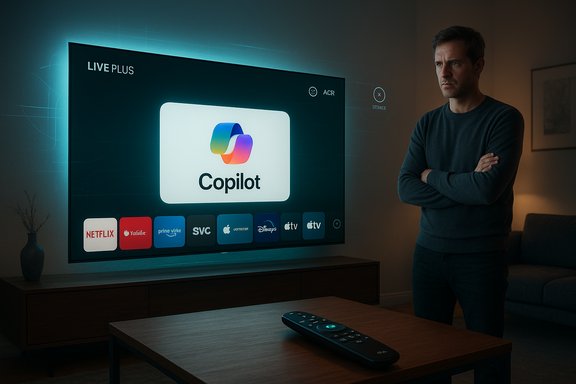
LG smart‑TV owners are reporting that a recent webOS firmware update pushed Microsoft’s Copilot onto their home screens as a persistent tile — and in many cases the Copilot tile cannot be uninstalled through the TV’s normal app-management UI, only hidden or disabled, leaving owners with limited workarounds and rising privacy and ownership concerns.
LG and Microsoft publicly positioned Copilot as a major feature for 2025 smart TVs, promising conversational search, contextual show recaps, and easier content discovery delivered through webOS and the AI‑focused "AI Remote" concept. Those partnerships and trade‑show demos set the expectation that Copilot would arrive on living‑room screens, but the method of distribution — a background firmware‑over‑the‑air (FOTA) push that added a Copilot tile directly to owners’ home screens — has created an unexpected backlash.
Multiple community reports indicate that, after applying a routine webOS update, owners found a Copilot icon pinned to their TV’s app ribbon or AI section. When attempting to remove it via the TV’s Edit/App Manager workflow, many owners did not see the usual uninstall (trash‑can) affordance; the UI offered only hide or disable. In several documented cases a factory reset restored the Copilot tile, strongly suggesting the component was delivered as a system‑level package or baked into the firmware image rather than as a removable user app.
This article summarizes the observable facts from the field, verifies technical claims where possible, analyzes the privacy and consumer‑rights implications, offers practical mitigations for affected owners, and critiques the product and update practices that turned a plausible convenience feature into a flashpoint.
If OEMs want broad acceptance of assistants on living‑room screens, they must pair technical innovations with clear consent models, easy removal paths, and privacy‑first defaults. Failing that, expect more consumers to rely on external streamers or to demand stronger regulatory limits on post‑sale software changes.
The practical reality for affected owners is blunt: hide the tile, disable AI toggles, use network controls, or switch to an external streamer. The durable fix requires vendor action — transparent technical disclosures, privacy‑minimal defaults, and a supported removal or rollback mechanism. Until LG and Microsoft address those steps publicly, Copilot’s arrival on webOS will remain a cautionary case in how not to deliver AI to purchased hardware.
Source: Mashable LG forces Copilot onto smart TVs, and there's no way to delete it
Source: Mashable SEA LG forces Copilot onto smart TVs, and there's no way to delete it
 Background / Overview
LG and Microsoft publicly positioned Copilot as a major feature for 2025 smart TVs, promising conversational search, contextual show recaps, and easier content discovery delivered through webOS and the AI‑focused "AI Remote" concept. Those partnerships and trade‑show demos set the expectation that Copilot would arrive on living‑room screens, but the method of distribution — a background firmware‑over‑the‑air (FOTA) push that added a Copilot tile directly to owners’ home screens — has created an unexpected backlash.Multiple community reports indicate that, after applying a routine webOS update, owners found a Copilot icon pinned to their TV’s app ribbon or AI section. When attempting to remove it via the TV’s Edit/App Manager workflow, many owners did not see the usual uninstall (trash‑can) affordance; the UI offered only hide or disable. In several documented cases a factory reset restored the Copilot tile, strongly suggesting the component was delivered as a system‑level package or baked into the firmware image rather than as a removable user app.
This article summarizes the observable facts from the field, verifies technical claims where possible, analyzes the privacy and consumer‑rights implications, offers practical mitigations for affected owners, and critiques the product and update practices that turned a plausible convenience feature into a flashpoint.
What happened — the observable facts
How the Copilot tile appeared
- Owners reported receiving a routine webOS FOTA update.
- After the update and reboot, a Copilot tile appeared in the home ribbon or AI section.
- Launching the tile typically opens a web‑based Copilot interface inside the TV’s browser shell and accepts voice input through the remote’s mic button in many reported cases.
Removal attempts and behavior
- When users opened the TV’s app management or Edit App List flows, the uninstall option was absent for Copilot; only hide or disable were shown.
- Several owners performed factory resets; the Copilot tile reappeared after reset in multiple reports, indicating firmware‑baked or privileged system packaging.
Scale and public reaction
- The issue surfaced rapidly across Reddit, enthusiast forums, and tech outlets, with high‑visibility threads amassing thousands of interactions. Owners described their frustration in stark terms — “forced AI,” “bloatware,” and a loss of control over devices they paid for.
Technical anatomy — why Copilot can feel “unremovable”
Understanding why a tile can’t be deleted from a smart TV requires a brief look at two common firmware and packaging patterns used by OEMs.1. Privileged system package
Manufacturers can install a component outside the normal user app sandbox and mark it as a system app. The app manager typically limits actions for such packages to avoid breaking platform functionality — hide or disable might be permitted, whereas uninstall is blocked. This is standard for DRM, low‑level agents, or tightly integrated services. Reports from affected owners match this behavior: Copilot appearing as a system/preinstalled app with restricted management actions.2. Firmware‑baked component
A FOTA update can include a firmware image that contains preinstalled packages. A factory reset often re‑applies that firmware image, restoring baked‑in components. Users who perform factory resets only to see Copilot return strongly suggest this mechanism was used in some instances.Native app vs. web wrapper
Available evidence points to many Copilot launches acting as a web wrapper — an embedded browser view that points to Microsoft’s Copilot web interface — rather than a deeply native webOS app. That packaging is lighter to deploy but can still be treated as a privileged home‑screen object, giving it permanent placement with limited removal options.Privacy, telemetry, and security implications
The presence of a conversational assistant on a living‑room device raises a distinct set of privacy questions beyond generic preinstalled bloatware.Expanded telemetry surface
LG’s webOS already includes features such as Automatic Content Recognition (ACR) — branded as Live Plus — which harvests viewing metadata for personalization and advertising. An assistant that benefits from on‑screen context or accepts voice input logically expands the range of signals available for personalization, recommendations, or ad targeting. Without clear vendor disclosures, owners reasonably worry about new or broader telemetry flows.Microphone and ambient audio concerns
Copilot on TV can be summoned via a remote mic button; the fundamental concern is whether background or ambient audio capture has changed, or whether conversational data are retained differently after installation. Community reports highlight that LG provides toggles to disable certain AI features, but those switches do not remove the Copilot tile and may not address all telemetry pathways. These audio‑capture claims require vendor confirmation or independent forensic analysis to verify. Until LG or Microsoft publishes technical notes, telemetry and audio‑capture assertions remain unverified.Data retention and cross‑provider access
Key questions remain unanswered in public reporting: how long conversational logs are retained, where they’re stored, whether personalizing Copilot requires a Microsoft account, and which corporate entities (LG, Microsoft, ad partners) can access the data. These are material privacy issues; community reporting has flagged them but cannot definitively answer them without vendor transparency.Attack surface and supply‑chain changes
Any privileged, persistent service added to device firmware increases the attack surface and becomes a potential target for supply‑chain or privilege‑escalation exploits. The more a vendor bakes third‑party services into firmware, the more complicated security patching and isolation become — a risk for both consumers and enterprise deployments using TVs in public spaces.Consumer‑facing impact: ownership, trust, and UX
For many buyers, a TV is a durable consumer product: once purchased, users expect core software to be under their control. The Copilot episode erodes that expectation in three overlapping ways.- Loss of device autonomy: Forced, non‑removable software diminishes the psychological and practical sense of ownership.
- Opaque updates: Firmware updates are expected to patch security issues and improve stability; surprise feature additions that can’t be easily removed undermine trust.
- UI pollution and persistence: A persistent home‑screen tile consumes valuable real estate and attention, and hiding is an imperfect solution for users who value a minimal interface.
What LG and Microsoft likely considered — the corporate rationale
Several business drivers could explain why LG pushed Copilot in this manner:- Feature differentiation: An assistant on a TV is a headline‑friendly differentiator in a market with converging hardware specs.
- Partnership value: A deep integration with Microsoft amplifies Copilot’s footprint and potentially includes commercial or co‑marketing arrangements.
- Ecosystem control and monetization: Preinstalling a branded assistant increases the chance of routing users through vendor and partner monetization funnels, from promoted content to personalized ads.
Practical steps for affected owners — immediate mitigations
For owners who found Copilot on their LG TV and want to regain control or mitigate privacy exposure, these steps — ordered from simplest to most advanced — reflect the community’s tested options.- Hide the Copilot tile using the Edit/App List flow to declutter the home screen. This does not remove the software but reduces visual presence.
- In Settings, disable AI features such as Live Plus / ACR, voice personalization, and ad personalization toggles to reduce telemetry surface. These toggles may not remove Copilot but can limit data sharing.
- Perform a factory reset if you suspect corrupted behavior — note many users reported Copilot reappearing after reset, so this may not be a permanent fix. Backup preferences beforehand.
- Disconnect the TV from the network (turn off Wi‑Fi or unplug Ethernet) to prevent Copilot from loading and to stop outbound telemetry while you investigate. This is a blunt instrument that disables most smart features.
- Use router‑level blocking or DNS filtering to block known Copilot endpoints. This requires network skill and up‑to‑date endpoint knowledge; it is effective if you can identify the addresses Copilot uses.
- Use an external streaming device (Apple TV, Fire TV, Chromecast, etc. as the primary UI and ignore the native webOS layer to sidestep continued updates and baked‑in services.
- Contact LG support and file a formal complaint; persist in seeking a supported removal or rollback, and document case numbers. Collective pressure often motivates vendor action.
Legal, regulatory, and consumer‑rights considerations
The incident raises questions about consumer protection and the legal expectations for purchased hardware.- Consumer‑protection view: Permanently altering a device post‑sale by installing non‑removable third‑party services may run afoul of consumer expectations or local laws about product modifications and disclosure.
- Privacy regulation: In jurisdictions with strong privacy laws, undisclosed expansion of telemetry or behavioral profiling via preinstalled services could attract regulatory attention unless clear opt‑outs and transparent data‑sharing notices are provided.
- Warranty and returns: Consumers who perceive the device as materially changed by enforced software may explore return or warranty remedies; returning recent purchases within the vendor’s return window can be an effective short‑term remedy.
Evaluating strengths and potential risks
Notable strengths of Copilot on TV
- Convenience and discovery: A well‑implemented assistant can meaningfully improve content discovery and cross‑service search on large screens.
- Accessibility: Voice interactions and summary features can help viewers with visual or mobility limitations.
- Ecosystem value: For Microsoft and LG, extending Copilot to TVs broadens service reach and creates new cross‑device synergies.
Significant risks and weaknesses
- Erosion of trust: Forcing a non‑removable assistant via firmware updates damages the vendor–consumer trust relationship.
- Privacy uncertainty: Absent detailed vendor disclosures, the presence of a conversational AI raises unresolved questions about audio capture, telemetry retention, and cross‑provider access to data. These are serious for living‑room devices.
- User control deficits: Hiding a tile is not removal. The inability to uninstall a third‑party service on purchased hardware is a fundamental UX and rights problem.
- Security surface: Privileged, baked‑in services complicate isolation and patching and can introduce new attack vectors.
Recommendations — what LG, Microsoft, and consumers should do next
For LG (product & update teams)
- Publish clear technical documentation explaining how Copilot is packaged, what data flows it initiates, and which controls disable telemetry. Public transparency is the fastest way to rebuild trust.
- Ship a supported removal or rollback path for owners who want Copilot off their devices, or explicitly mark the component as removable in a forthcoming update. Providing a documented uninstall option would resolve the core ownership complaint.
- Default to privacy‑minimal settings on first boot and require explicit opt‑in for account‑backed personalization or data sharing.
For Microsoft
- Clarify Copilot’s data lifecycle when used on TVs: retention windows, whether data is tied to Microsoft accounts, and how contextual on‑screen signals are handled. Transparent privacy documentation reduces fear and speculation.
For consumers
- Document and escalate: Log interactions with support, save screenshots, and share case numbers. Collective reports accelerate vendor responses.
- Use network segmentation: Place smart TVs on a guest VLAN with limited outbound access to reduce cross‑device leakage.
- Vote with purchases: If persistent lack of control is unacceptable, prioritize TVs and streaming devices that let you opt out of preinstalled services or rely on external streamers to preserve user control.
Broader implications for the smart‑TV ecosystem
This episode is emblematic of a larger industry tension: hardware commoditization pushes vendors to differentiate via services and AI features, but embedding third‑party services deeply into platform firmware risks alienating customers when those services are perceived as forced. The balance between feature innovation and consumer control will shape whether “AI TV” becomes a welcomed convenience or an ongoing battleground over bloatware and privacy.If OEMs want broad acceptance of assistants on living‑room screens, they must pair technical innovations with clear consent models, easy removal paths, and privacy‑first defaults. Failing that, expect more consumers to rely on external streamers or to demand stronger regulatory limits on post‑sale software changes.
Conclusion
Deploying Copilot to TVs is a logically consistent step in the era of cross‑device AI, and the feature could deliver useful search, discovery, and accessibility benefits. The controversy is not simply about the assistant’s capabilities — it’s about how it arrived. A firmware push that places Copilot on the home screen as a system‑level tile with no straightforward uninstall path broke an implicit promise of consumer control and provoked a predictable backlash.The practical reality for affected owners is blunt: hide the tile, disable AI toggles, use network controls, or switch to an external streamer. The durable fix requires vendor action — transparent technical disclosures, privacy‑minimal defaults, and a supported removal or rollback mechanism. Until LG and Microsoft address those steps publicly, Copilot’s arrival on webOS will remain a cautionary case in how not to deliver AI to purchased hardware.
Source: Mashable LG forces Copilot onto smart TVs, and there's no way to delete it
Source: Mashable SEA LG forces Copilot onto smart TVs, and there's no way to delete it