

Microsoft’s original Surface RT, announced in June 2012 and released that October, is finally getting mainline Linux battery and charger reporting through a new
The new driver does not turn the first Surface RT into a modern Linux laptop. It does something more modest and arguably more revealing: it lets Linux talk to the tablet’s embedded controller well enough to expose battery and charger state through the standard power-supply framework. Users should be able to see charge level, voltage, current, manufacturer and model information, serial number details, and whether external power is connected.
That sounds mundane until you remember what kind of device this was. The first Surface RT was not just an early Surface; it was Microsoft’s first serious attempt to fuse Windows, ARM, tablet computing, and its own hardware design into a single strategic answer to the iPad. It shipped with Windows RT, ran on Nvidia’s Tegra 3, carried 2GB of RAM, and lived in the awkward space between tablet appliance and PC promise.
Fourteen years later, nobody is confusing it for a practical daily driver. A Tegra 3 tablet with 2GB of RAM is not going to make GNOME, Chromium, Teams, and a dozen browser tabs feel like 2026. But that is precisely why this driver matters: mainline support is not only about mainstream utility. It is about whether the kernel can describe and operate real hardware without requiring a private fork, a forum treasure hunt, or a half-broken out-of-tree module.
The headline is charmingly absurd. A first-generation Microsoft tablet, built for a locked-down ARM variant of Windows, is getting better Linux support long after Windows RT itself became a cautionary footnote. Yet beneath the retro-computing novelty is a serious engineering point: old hardware often becomes most interesting after the original business case has expired.
That was a radical move for a company whose Windows empire had been constructed through partners. Surface was a declaration that Microsoft could define the hardware experience end to end. The kickstand, the magnetic keyboard cover, the widescreen display, and the Office bundle were all part of the pitch: this was not a toy tablet, Microsoft insisted, but a new kind of PC.
The problem was Windows RT. It looked enough like Windows to invite PC expectations, but it could not run traditional x86 desktop software. Users got the Windows desktop, but mostly as a stage for bundled Microsoft apps. For consumers who thought they were buying a cheaper Surface that behaved like a normal Windows machine, the distinction between Windows 8 and Windows RT was not always clear until after purchase.
In retrospect, Surface RT was less a failed tablet than an unresolved argument. Microsoft was right that ARM mattered, that thin keyboard covers mattered, that tablets could become productivity devices, and that first-party hardware would give Windows a design language. It was wrong about how much platform friction users would tolerate, how quickly developers would fill a constrained app store, and how much the Windows brand could stretch before it snapped back.
Linux arriving with a battery driver in 2026 does not redeem that commercial bet. It does, however, underline the hardware’s peculiar historical status. The first Surface RT was both a dead end and a prototype for ideas Microsoft would spend the next decade refining.
On many laptops and tablets, the embedded controller is the small management brain that tracks or brokers information about power, charging, thermal behavior, buttons, sensors, and other platform-specific details. The operating system may be portable; the EC interface often is not. If a vendor documents it cleanly, life is easier. If not, community developers reverse-engineer, test, and slowly turn “it boots” into “it behaves like a computer.”
The
Without that integration, a tablet running Linux can be caught in a strangely primitive state. It may display a desktop, accept input, and launch software, while still being unable to tell the user whether it is about to die. That makes the machine feel less like a repurposed computer and more like a board on a bench.
Mainlining the driver changes the maintenance model. An out-of-tree module can work for people who know where to find it, how to build it, and how to fix it when kernel internals move. A mainline driver becomes part of the normal kernel review, distribution packaging, regression tracking, and long-term archival memory. For obscure hardware, that is often the difference between a clever hack and a durable platform.
That long tail is easy to mock until you need it. A school lab, a museum, a repair shop, a retrocomputing hobbyist, an embedded developer, or a security researcher may all care about hardware that the market abandoned years ago. Vendor lifecycle charts usually end at support expiration. Kernel support often begins with someone refusing to accept that expiration as the end of the story.
The Surface RT driver is a particularly vivid example because the device came from Microsoft, the company whose commercial operating system once defined the PC compatibility universe. The irony is almost too neat: a machine designed for a constrained Windows-on-ARM future receives a better second life through the operating system ecosystem that treats hardware enablement as a shared commons.
That does not mean every old device deserves infinite engineering time. Kernel maintainers have to care about code quality, security, build coverage, maintainability, and whether a driver imposes costs on everyone else. But the bar for a compact, device-specific driver that exposes real hardware through an established subsystem is different from the bar for a sprawling new architecture port.
Mainline also preserves knowledge. The patch history records what registers matter, what properties are exposed, who tested the interface, and how the device behaves under different boot methods. Even if only a handful of Surface RT owners ever use it, the information is no longer trapped in a private repository or a disappearing wiki page.
The better framing is that Linux is making the device more completely itself. A Surface RT with mainline battery reporting is still old, but it is less opaque. It becomes easier to experiment with lightweight userspaces, kiosk roles, digital signage, terminal use, retro demos, educational projects, or simply the satisfaction of running a contemporary kernel on hardware that was never meant to have this kind of afterlife.
That is valuable because much of computing history is trapped behind missing drivers. A device can have a working CPU, screen, storage, and battery, yet become practically inaccessible because one support chip is undocumented or one boot chain is hostile. The difference between e-waste and a usable artifact is often a driver no normal buyer ever thinks about.
The Surface RT was also an unusually symbolic locked garden. Windows RT constrained software installation by design, and the hardware sat at the intersection of secure boot, ARM platform quirks, and Microsoft’s transitional app strategy. Linux support for such a device therefore has an archival flavor: it demonstrates that a product’s original software politics need not remain its final technical boundary.
For Windows enthusiasts, that should feel familiar rather than alien. The PC tradition has always included after-market life: upgraded RAM, swapped disks, unsigned drivers, hacked BIOSes, unofficial service packs, community ISOs, and stubborn people keeping “unsupported” machines useful. Linux on Surface RT is not the opposite of Windows culture. It is one of its old instincts expressed through a different kernel.
That history matters because the original Surface RT was not simply underpowered. It violated a psychological contract. A Windows device that cannot run Windows software is a hard sell unless the alternative app ecosystem is strong enough to replace that expectation. In 2012 and 2013, it was not.
Microsoft eventually returned to Windows on Arm with more patience, better silicon partners, translation layers, and a clearer understanding of compatibility as the central issue rather than an implementation detail. The modern Windows-on-Arm push is still judged by performance, app compatibility, battery life, drivers, and enterprise manageability. Those were the same categories that haunted RT, only now the industry has had another decade to make ARM laptops plausible.
The Surface RT battery driver therefore lands at a moment when Microsoft’s old ARM gamble looks less ridiculous than it once did, even if that specific implementation failed. The premise that thin, efficient, always-mobile computers would matter was sound. The execution lacked the compatibility bridge and ecosystem maturity to make the premise feel safe.
Linux’s role in this story is not to dunk on Microsoft for being wrong. It is to show how hardware outlives strategy. A product can fail in the market, influence successors, disappear from support pages, and still remain a concrete machine whose components can be understood, documented, and supported by someone with enough patience.
Enterprises already understand this in the server room. A machine without firmware updates, storage driver support, or management-controller reliability becomes risky even if the CPUs still benchmark fine. Client devices are now similar. Modern laptops and tablets are bundles of specialized controllers, sensors, security processors, and power-management logic. If the operating system cannot see those pieces correctly, the device is compromised as a manageable endpoint.
Battery and charger status are not cosmetic in fleet management. They affect sleep behavior, health monitoring, user support, remote diagnostics, and replacement planning. A laptop that cannot report power state correctly is a ticket generator. A tablet that cannot tell whether it is charging is not a reliable field device.
The Surface RT case is extreme because of its age, but the pattern is current. Administrators evaluating hardware should ask not only whether Windows supports it today, but how much of that support depends on vendor-specific software, opaque firmware, and components unlikely to receive community attention. The more specialized the device, the more its future depends on the vendor staying interested.
That does not mean every organization should buy only hardware with perfect Linux support. It means Linux support is a useful proxy for openness, documentation, and ecosystem resilience. If a device can be supported outside the vendor’s preferred stack, it is less likely to become useless the moment a product manager closes the book.
That process can take years not because the code is always huge, but because obscure hardware lacks the convenience of a large tester base. Developers have to prove that a driver is specific enough not to break other machines, generic enough to fit kernel conventions, and useful enough to justify its place. The result is a kind of slow institutionalization of knowledge.
The power-supply subsystem is a good home for this work because it gives user space predictable interfaces. Desktop environments, monitoring tools, scripts, and distributions do not need to know the romance of the Surface RT’s long post-Windows journey. They need a battery device in the expected place with expected properties. That is what good kernel plumbing does: it hides the weirdness without erasing it.
There is also a maintenance humility here. A driver like this is not pretending that the Surface RT will become a mass-market Linux tablet. It is narrowly scoped, which makes it more plausible. It solves a real missing piece without dragging the kernel into a grand revival project.
Open source is often criticized for chasing developer itch rather than market demand. Sometimes that criticism is fair. But market demand is also a poor mechanism for preserving hardware knowledge, especially once devices age out of profitability. The itch, in this case, is how a forgotten Microsoft tablet gets a better operating-system afterlife than the market would have provided.
The Surface RT began life as Microsoft’s attempt to define the post-PC Windows future on its own terms, and it now reappears as a small victory for the opposite idea: that hardware should remain understandable after the original platform story has ended. Linux 7.2’s new battery and charger support will not make many people buy a used Surface RT, but it will make the machines already out there a little less sealed, a little more legible, and a little harder to write off. That is how old devices become more than e-waste, and it is why the next generation of locked-down hardware should be judged not only by what it can do on launch day, but by who will still be able to make it work when the launch story is gone.
surface-rt-ec power-supply driver queued for Linux 7.2. That is a small patch for a very old tablet, but it is not a small story. It is a reminder that hardware support is not finished when a product leaves the marketing stage, when Windows Update stops caring, or when the vendor’s strategy moves on. In the Linux world, the afterlife of a device can be longer, stranger, and more useful than its commercial life.
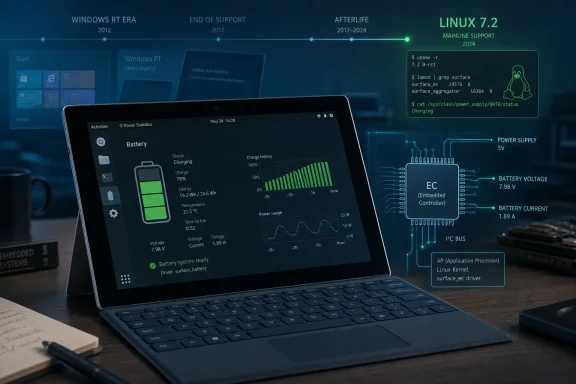 A Battery Gauge Arrives After the Platform War Ended
The new driver does not turn the first Surface RT into a modern Linux laptop. It does something more modest and arguably more revealing: it lets Linux talk to the tablet’s embedded controller well enough to expose battery and charger state through the standard power-supply framework. Users should be able to see charge level, voltage, current, manufacturer and model information, serial number details, and whether external power is connected.That sounds mundane until you remember what kind of device this was. The first Surface RT was not just an early Surface; it was Microsoft’s first serious attempt to fuse Windows, ARM, tablet computing, and its own hardware design into a single strategic answer to the iPad. It shipped with Windows RT, ran on Nvidia’s Tegra 3, carried 2GB of RAM, and lived in the awkward space between tablet appliance and PC promise.
Fourteen years later, nobody is confusing it for a practical daily driver. A Tegra 3 tablet with 2GB of RAM is not going to make GNOME, Chromium, Teams, and a dozen browser tabs feel like 2026. But that is precisely why this driver matters: mainline support is not only about mainstream utility. It is about whether the kernel can describe and operate real hardware without requiring a private fork, a forum treasure hunt, or a half-broken out-of-tree module.
The headline is charmingly absurd. A first-generation Microsoft tablet, built for a locked-down ARM variant of Windows, is getting better Linux support long after Windows RT itself became a cautionary footnote. Yet beneath the retro-computing novelty is a serious engineering point: old hardware often becomes most interesting after the original business case has expired.
Surface RT Was Microsoft’s First Hardware Thesis, Not Just a Tablet
The Surface RT launched at a moment when Microsoft was trying to prove that Windows could remain the center of personal computing even if the PC stopped looking like a beige box, a clamshell laptop, or an x86 machine. The iPad had made tablets commercially obvious. Android tablets were everywhere, if not always loved. Microsoft’s answer was not merely to license Windows to OEMs; it built the thing itself.That was a radical move for a company whose Windows empire had been constructed through partners. Surface was a declaration that Microsoft could define the hardware experience end to end. The kickstand, the magnetic keyboard cover, the widescreen display, and the Office bundle were all part of the pitch: this was not a toy tablet, Microsoft insisted, but a new kind of PC.
The problem was Windows RT. It looked enough like Windows to invite PC expectations, but it could not run traditional x86 desktop software. Users got the Windows desktop, but mostly as a stage for bundled Microsoft apps. For consumers who thought they were buying a cheaper Surface that behaved like a normal Windows machine, the distinction between Windows 8 and Windows RT was not always clear until after purchase.
In retrospect, Surface RT was less a failed tablet than an unresolved argument. Microsoft was right that ARM mattered, that thin keyboard covers mattered, that tablets could become productivity devices, and that first-party hardware would give Windows a design language. It was wrong about how much platform friction users would tolerate, how quickly developers would fill a constrained app store, and how much the Windows brand could stretch before it snapped back.
Linux arriving with a battery driver in 2026 does not redeem that commercial bet. It does, however, underline the hardware’s peculiar historical status. The first Surface RT was both a dead end and a prototype for ideas Microsoft would spend the next decade refining.
The Embedded Controller Is Where the Real Device Lives
Battery reporting looks simple from the desktop. A little icon fills, drains, warns, and sleeps. Underneath that icon is a chain of device-specific plumbing that has to be taught how to ask the hardware the right questions and interpret the answers without lying to the user.On many laptops and tablets, the embedded controller is the small management brain that tracks or brokers information about power, charging, thermal behavior, buttons, sensors, and other platform-specific details. The operating system may be portable; the EC interface often is not. If a vendor documents it cleanly, life is easier. If not, community developers reverse-engineer, test, and slowly turn “it boots” into “it behaves like a computer.”
The
surface-rt-ec driver lands in that world. It is not a graphics stack, not a Wi-Fi breakthrough, not a new boot chain. It is the unglamorous layer that makes the system honest about whether it is charging and how much battery remains. For a mobile device, that distinction is basic usability.Without that integration, a tablet running Linux can be caught in a strangely primitive state. It may display a desktop, accept input, and launch software, while still being unable to tell the user whether it is about to die. That makes the machine feel less like a repurposed computer and more like a board on a bench.
Mainlining the driver changes the maintenance model. An out-of-tree module can work for people who know where to find it, how to build it, and how to fix it when kernel internals move. A mainline driver becomes part of the normal kernel review, distribution packaging, regression tracking, and long-term archival memory. For obscure hardware, that is often the difference between a clever hack and a durable platform.
Mainline Is the Line Between Hobby and History
The Linux kernel is full of drivers for machines that most people will never touch. That is not a bug in the project’s priorities; it is one of its defining cultural features. Linux does not only chase the newest workstation, cloud server, or handheld console. It accumulates support for the long tail of computing.That long tail is easy to mock until you need it. A school lab, a museum, a repair shop, a retrocomputing hobbyist, an embedded developer, or a security researcher may all care about hardware that the market abandoned years ago. Vendor lifecycle charts usually end at support expiration. Kernel support often begins with someone refusing to accept that expiration as the end of the story.
The Surface RT driver is a particularly vivid example because the device came from Microsoft, the company whose commercial operating system once defined the PC compatibility universe. The irony is almost too neat: a machine designed for a constrained Windows-on-ARM future receives a better second life through the operating system ecosystem that treats hardware enablement as a shared commons.
That does not mean every old device deserves infinite engineering time. Kernel maintainers have to care about code quality, security, build coverage, maintainability, and whether a driver imposes costs on everyone else. But the bar for a compact, device-specific driver that exposes real hardware through an established subsystem is different from the bar for a sprawling new architecture port.
Mainline also preserves knowledge. The patch history records what registers matter, what properties are exposed, who tested the interface, and how the device behaves under different boot methods. Even if only a handful of Surface RT owners ever use it, the information is no longer trapped in a private repository or a disappearing wiki page.
The Surface RT Revival Is Useful Precisely Because It Is Limited
There is a temptation to oversell stories like this as “Linux saves abandoned Microsoft tablet.” That is too easy and not quite true. Linux 7.2 will not erase the physical limits of the Surface RT. The Tegra 3 was a 2011-era mobile chip. The 2GB RAM ceiling is brutal by modern desktop standards. Storage, browsers, certificates, codecs, and contemporary web bloat all conspire against nostalgia.The better framing is that Linux is making the device more completely itself. A Surface RT with mainline battery reporting is still old, but it is less opaque. It becomes easier to experiment with lightweight userspaces, kiosk roles, digital signage, terminal use, retro demos, educational projects, or simply the satisfaction of running a contemporary kernel on hardware that was never meant to have this kind of afterlife.
That is valuable because much of computing history is trapped behind missing drivers. A device can have a working CPU, screen, storage, and battery, yet become practically inaccessible because one support chip is undocumented or one boot chain is hostile. The difference between e-waste and a usable artifact is often a driver no normal buyer ever thinks about.
The Surface RT was also an unusually symbolic locked garden. Windows RT constrained software installation by design, and the hardware sat at the intersection of secure boot, ARM platform quirks, and Microsoft’s transitional app strategy. Linux support for such a device therefore has an archival flavor: it demonstrates that a product’s original software politics need not remain its final technical boundary.
For Windows enthusiasts, that should feel familiar rather than alien. The PC tradition has always included after-market life: upgraded RAM, swapped disks, unsigned drivers, hacked BIOSes, unofficial service packs, community ISOs, and stubborn people keeping “unsupported” machines useful. Linux on Surface RT is not the opposite of Windows culture. It is one of its old instincts expressed through a different kernel.
Microsoft Won the Surface Future by Leaving RT Behind
The Surface line did not die with RT because Microsoft learned from it. The company’s more durable Surface identity formed around x86 Surface Pro devices, detachable keyboards, pen input, premium industrial design, and eventually a broader family of laptops, studios, tablets, and dual-screen experiments. The RT branch, by contrast, became the cautionary path not taken.That history matters because the original Surface RT was not simply underpowered. It violated a psychological contract. A Windows device that cannot run Windows software is a hard sell unless the alternative app ecosystem is strong enough to replace that expectation. In 2012 and 2013, it was not.
Microsoft eventually returned to Windows on Arm with more patience, better silicon partners, translation layers, and a clearer understanding of compatibility as the central issue rather than an implementation detail. The modern Windows-on-Arm push is still judged by performance, app compatibility, battery life, drivers, and enterprise manageability. Those were the same categories that haunted RT, only now the industry has had another decade to make ARM laptops plausible.
The Surface RT battery driver therefore lands at a moment when Microsoft’s old ARM gamble looks less ridiculous than it once did, even if that specific implementation failed. The premise that thin, efficient, always-mobile computers would matter was sound. The execution lacked the compatibility bridge and ecosystem maturity to make the premise feel safe.
Linux’s role in this story is not to dunk on Microsoft for being wrong. It is to show how hardware outlives strategy. A product can fail in the market, influence successors, disappear from support pages, and still remain a concrete machine whose components can be understood, documented, and supported by someone with enough patience.
For Admins, the Lesson Is Lifecycle, Not Nostalgia
Most sysadmins are not about to deploy refurbished Surface RT tablets running Linux 7.2. The practical lesson is broader: the useful life of hardware is increasingly determined by software control, driver availability, boot policy, and community documentation. Specs alone are not the lifecycle.Enterprises already understand this in the server room. A machine without firmware updates, storage driver support, or management-controller reliability becomes risky even if the CPUs still benchmark fine. Client devices are now similar. Modern laptops and tablets are bundles of specialized controllers, sensors, security processors, and power-management logic. If the operating system cannot see those pieces correctly, the device is compromised as a manageable endpoint.
Battery and charger status are not cosmetic in fleet management. They affect sleep behavior, health monitoring, user support, remote diagnostics, and replacement planning. A laptop that cannot report power state correctly is a ticket generator. A tablet that cannot tell whether it is charging is not a reliable field device.
The Surface RT case is extreme because of its age, but the pattern is current. Administrators evaluating hardware should ask not only whether Windows supports it today, but how much of that support depends on vendor-specific software, opaque firmware, and components unlikely to receive community attention. The more specialized the device, the more its future depends on the vendor staying interested.
That does not mean every organization should buy only hardware with perfect Linux support. It means Linux support is a useful proxy for openness, documentation, and ecosystem resilience. If a device can be supported outside the vendor’s preferred stack, it is less likely to become useless the moment a product manager closes the book.
The Kernel Still Rewards Patient Reverse Engineering
The Surface RT driver also says something about the kind of work open-source communities reward. Not every contribution is a headline feature. Some are small, stubborn acts of hardware archaeology: figuring out an EC protocol, wiring it into an existing subsystem, revising the patch through review, and ensuring it behaves across boot environments.That process can take years not because the code is always huge, but because obscure hardware lacks the convenience of a large tester base. Developers have to prove that a driver is specific enough not to break other machines, generic enough to fit kernel conventions, and useful enough to justify its place. The result is a kind of slow institutionalization of knowledge.
The power-supply subsystem is a good home for this work because it gives user space predictable interfaces. Desktop environments, monitoring tools, scripts, and distributions do not need to know the romance of the Surface RT’s long post-Windows journey. They need a battery device in the expected place with expected properties. That is what good kernel plumbing does: it hides the weirdness without erasing it.
There is also a maintenance humility here. A driver like this is not pretending that the Surface RT will become a mass-market Linux tablet. It is narrowly scoped, which makes it more plausible. It solves a real missing piece without dragging the kernel into a grand revival project.
Open source is often criticized for chasing developer itch rather than market demand. Sometimes that criticism is fair. But market demand is also a poor mechanism for preserving hardware knowledge, especially once devices age out of profitability. The itch, in this case, is how a forgotten Microsoft tablet gets a better operating-system afterlife than the market would have provided.
The Small Patch That Says the Quiet Part Out Loud
The concrete facts here are modest, but the implications are durable. A mainline driver for a 2012 ARM tablet will matter most to a small group of owners, developers, and preservation-minded tinkerers. Still, it sharpens several lessons that apply well beyond one Microsoft device.- The Surface RT’s new Linux driver adds battery and charger visibility, not a full modern computing makeover.
- Mainline inclusion matters because it replaces fragile out-of-tree maintenance with normal kernel distribution and review paths.
- The device remains sharply constrained by its Nvidia Tegra 3 processor and 2GB of RAM, so realistic use cases are lightweight and experimental.
- The work highlights how embedded controllers and power-management chips can decide whether old mobile hardware is actually usable.
- The story is a reminder that vendor support lifecycles and technical hardware lifecycles are not the same thing.
- Microsoft’s failed Windows RT strategy still left behind hardware that open-source developers can document and extend long after the original platform faded.
The Surface RT began life as Microsoft’s attempt to define the post-PC Windows future on its own terms, and it now reappears as a small victory for the opposite idea: that hardware should remain understandable after the original platform story has ended. Linux 7.2’s new battery and charger support will not make many people buy a used Surface RT, but it will make the machines already out there a little less sealed, a little more legible, and a little harder to write off. That is how old devices become more than e-waste, and it is why the next generation of locked-down hardware should be judged not only by what it can do on launch day, but by who will still be able to make it work when the launch story is gone.
References
- Primary source: Phoronix
Published: Mon, 22 Jun 2026 14:09:00 GMT
Linux Finally Lands Battery/Charger Driver For 14 Year Old Microsoft Surface RT Tablet - Phoronix
It's been 14 years already since Microsoft announced the Surface RT hybrid tablet as their first-generation Surface device for going up against the Apple iPadwww.phoronix.com
- Official source: news.microsoft.com
Microsoft Announces New Surface Details - Source
Ahead of Oct. 26 launch, Microsoft outlines pricing, market availability and special limited quantity pre-order.news.microsoft.com - Related coverage: phonearena.com
Microsoft Surface RT Full Specifications - PhoneArena
Microsoft Surface RT specifications. Released Oct 26, 2012. Features 10.6-inch display, Single camera, 2GB RAM, 32GB storage, NVIDIA Tegra 3 T30, Windows RT.www.phonearena.com - Related coverage: open-rt.gitbook.io
- Related coverage: pcworld.com
Surface RT: Pricing details, spec updates, and impromptu Touch Cover testing | PCWorld
The waiting game is over. Surface RT makes the leap from hardware cipher to hardware reality. We answer all the open questions swirling around Microsoft's daring new tablet. www.pcworld.com
- Related coverage: igotoffer.com
Windows Surface 1st Gen (Mid 2012) | iGotOffer
Windows Surface 1st Gen (mid-2012). All the specs. If you are looking where to sell old Microsoft Surface online, check our prices, we pay top cash!igotoffer.com
- Related coverage: afterdawn.com
Microsoft Surface RT finally priced - AfterDawn
Four months after first unveiling the Surface, Microsoft has finally priced the tablet and begun pre-orders. The tablet goes on sale on October 26th, and will cost $499 ...www.afterdawn.com
- Related coverage: macrumors.com
Microsoft Releases Pricing on Surface Tablet, Ships October 26th
With an unfortunate sense of timing, Microsoft has released pricing and availability information for its new 'Surface' tablet that was...www.macrumors.com - Related coverage: techspot.com
Microsoft reveals Surface RT pricing, starts at $499 for 32GB | TechSpot
The lineup starts at $499 for the 32GB model or $599 with the addition of a black multi-touch TouchCover keyboard case, while a 64GB variant that already...www.techspot.com - Related coverage: hmc-tech.com
- Related coverage: techcrunch.com
Microsoft Surface RT Priced: 32GB For $499 Without Touch Cover, $599 With; 64GB For $699 | TechCrunch
Microsoft today detailed pricing for its Surface tablets, at least those running the scaled down RT version of its upcoming Windows 8 operating system designed for use on low-power processors. The Surface starts at $499 for an entry-level 32GB version without the Touch Cover with integrated...techcrunch.com - Related coverage: surfacetip.com
- Related coverage: docs.redhat.com
- Official source: download.microsoft.com
