

Malicious npm package
The package name is the first clever move.
The legitimate
The malicious package reportedly declared the real package as a dependency and re-exported legitimate functionality. That is an important detail because it gives the attacker a cover story: the install appears to work, the expected API may appear to exist, and the absence of immediate breakage reduces the chance that anyone goes hunting through the package contents.
This is the modern supply-chain compromise pattern in miniature. The malware is not trying to defeat npm by force. It is trying to look boring long enough to be cached, mirrored, built, and trusted.
Once decrypted, the blob behaved as JavaScript dropper code. Its job was not to perform the final theft immediately, but to write and launch a PowerShell script on the Windows host. That split matters because it keeps the npm-facing portion smaller and more deniable while pushing the messier operating-system behavior into a later stage.
PowerShell remains attractive to attackers because it is present on Windows, richly integrated with the operating system, and familiar enough in enterprise automation to blend into noisy environments. A script that bypasses execution policy is not exotic malware tradecraft; it is a well-worn abuse of a legitimate administrative tool. That is precisely why defenders have to treat script execution from package installs as a serious event, not as background build chatter.
The use of encrypted JavaScript also gives the package a better chance of slipping past casual static review. A scanner may flag opaque blobs and dynamic execution, but a human trying to decide whether to ship a hotfix may simply see an unreadable implementation detail and move on. Attackers build for that moment.
That is a reminder for development teams that npm risk is not confined to web servers or Linux containers. A Windows developer workstation is often the place where Git credentials, browser sessions, cloud CLIs, SSH keys, package tokens, VPN access, password managers, and internal documentation converge. It is a softer target than production, but it may hold keys to production.
The staging through
The reported VBS-like chain and command execution are part of the same camouflage. Windows has decades of compatibility surface, and malware authors continue to chain older scripting and shell mechanisms with newer payloads because the combination works. Each layer gives defenders another chance to catch the intrusion, but it also gives attackers another way to adapt.
The malware reportedly used Windows DPAPI and modern decryption approaches, including AES-GCM and ChaCha20-Poly1305 logic, to work around newer browser protections. That points to an attacker who understands that browsers have become credential vaults whether organizations admit it or not. The target is not merely passwords typed into forms; it is the authenticated developer identity.
This is where the distinction between a RAT and an infostealer starts to blur. Remote access gives an operator persistence and interactive control. Browser theft gives them portable access that may outlive the infected machine, especially if session tokens and saved credentials are not revoked quickly.
For Windows administrators, the operational lesson is uncomfortable. Reimaging the laptop is only the start. If a developer machine ran this package, incident response has to include token revocation, npm credential rotation, browser session invalidation, cloud access review, and audit-log inspection across source control and CI/CD systems.
That has two consequences. First, defenders cannot rely only on sandbox output to decide whether a suspicious package is harmless. If the payload is gated by environment checks, the clean result may mean only that the malware saw the lab before the lab saw the malware.
Second, this anti-analysis behavior increases the importance of telemetry from real developer endpoints. Process creation, script execution, network connections, archive extraction, registry writes, and browser database access tell a richer story than package metadata alone. The package manager is the starting point; the endpoint is where the truth appears.
The reported persistence mechanism under current-user run keys is similarly pragmatic. It avoids the need for admin rights while giving the malware a path to restart with the user session. That is enough for a developer-targeted operation, where the attacker may care more about user-level credentials than system-level domination.
The npm ecosystem is especially exposed because install and runtime paths can execute code in ways that feel normal to JavaScript developers. Build tools run scripts. Packages generate native bindings. Postinstall hooks fetch binaries. Frameworks compile, transform, and introspect. The convenience that makes npm productive also gives attackers a broad behavioral gray zone.
This is not an argument to abandon open source package managers. It is an argument to stop treating public registries as if they were low-risk file shares. Every dependency is executable content, and every executable dependency deserves policy.
Enterprises have been slower to apply mature controls to developer tooling than to email, browsers, and office documents. That gap is closing because attackers are forcing it closed. The developer workstation is now a first-class target, and npm is one of the delivery channels.
Package immaturity policies are one obvious control. Brand-new packages, newly published versions, and packages with thin metadata deserve a cooling-off period before automatic adoption. Many malicious packages are discovered within hours or days; a short delay can be the difference between being patient and being compromised.
Private registries and curated mirrors also matter. They give security teams a place to enforce allowlists, block known malicious packages, and inspect artifacts before developers install them. The goal is not to slow development for its own sake. The goal is to ensure that “npm install” does not become an unmonitored remote-code-execution event.
Endpoint controls should be tuned for the developer reality. A Node process spawning PowerShell with execution-policy bypass, writing scripts to temp directories, extracting archives, and touching browser credential stores is not normal package behavior for most projects. If a build pipeline needs that behavior, it should be explicitly documented and narrowly permitted.
None of those actions alone is guaranteed proof of compromise. Together, they are a story. Security teams should resist treating them as isolated alerts owned by separate tools.
The suspicious domain branding is also worth noting. Attackers continue to use names that borrow legitimacy from hardware vendors, drivers, and update workflows because Windows users are conditioned to accept background driver and patch activity. A domain that sounds like a GPU driver site should not get an automatic pass from a developer workstation.
The same is true for archive names. “winPatch” is not a sophisticated disguise, but it is plausible enough to disappear into logs unless someone is correlating events. Malware does not need perfect camouflage. It needs just enough ambiguity to survive the first glance.
If an attacker steals npm tokens, they may publish malicious updates. If they steal Git credentials, they may modify source code or workflow files. If they steal cloud credentials, they may enumerate infrastructure or access data. If they steal CI secrets, they may tamper with builds in ways that inherit the organization’s own signing and deployment trust.
That is why incident response for malicious packages must look beyond the endpoint. Teams should review package-lock changes, recent dependency additions, CI job logs, outbound network activity, newly created tokens, unusual repository access, and package publishing history. The question is not only “Which machine ran the malware?” but “Which trust relationships did that machine possess?”
This is also where least privilege becomes more than a compliance slogan. A developer should not have long-lived credentials for every environment sitting in a browser profile. CI tokens should be scoped. Publishing rights should be constrained. Administrative access should be time-bound. Those controls feel bureaucratic until the day a fake npm package turns one workstation into an attack platform.
A plausible package name can exploit that workflow better than a crude typo.
That raises a hard question for toolmakers. Package managers and registries should do more to warn when a package name closely resembles a vastly more popular package, especially when it appears suddenly, has sparse metadata, or depends on the package it resembles. Those are not definitive signs of malice, but they are strong enough to justify friction.
Developers also need better defaults in their tools. Dependency review should make suspicious deltas visible: new lifecycle scripts, encrypted blobs, dynamic evaluation, newly added network fetches, binary payloads, and high-risk child processes. The right UI can make the dangerous path feel unusual before it becomes disastrous.
That combination should make Windows administrators pay attention even if they do not write JavaScript. The infected asset may sit in an engineering department, but the blast radius can reach identity systems, cloud subscriptions, code-signing infrastructure, and production deployment paths. Developer endpoints deserve the same seriousness as finance laptops and domain admin workstations.
Microsoft has spent years adding security controls around script execution, browser encryption, application control, and endpoint detection. Attackers keep finding the seams between them. A package manager running inside a trusted user session can create behavior that looks like development until it suddenly looks like intrusion.
The practical answer is layered control. Block known indicators, yes. But also watch behavior, restrict token scope, limit script execution, harden browsers, curate dependencies, and assume that public package names are not proof of public goodness.
This campaign should be read as another marker in the steady professionalization of developer-focused malware: plausible names, legitimate dependencies as camouflage, encrypted payloads, native Windows staging, anti-analysis checks, persistence, and credential theft aimed at the machinery of software delivery. The attackers are no longer merely poisoning the well; they are studying how engineers drink from it. The organizations that fare best will be the ones that treat dependency installation as privileged behavior, developer endpoints as production-adjacent assets, and trust as something verified continuously rather than inherited from a familiar-looking package name.
postcss-minify-selector-parser was disclosed in June 2026 after researchers found that it impersonated the legitimate postcss-selector-parser package and used encrypted JavaScript, PowerShell, VBS-style execution, and Windows payload staging to deploy a remote access trojan against developer machines. The campaign matters because it does not merely abuse npm’s popularity; it abuses the mental shortcuts developers use when reviewing dependency names. In a Windows shop, that turns a routine JavaScript install into a credential-theft and persistence event. The lesson is blunt: package trust is now an endpoint security boundary.
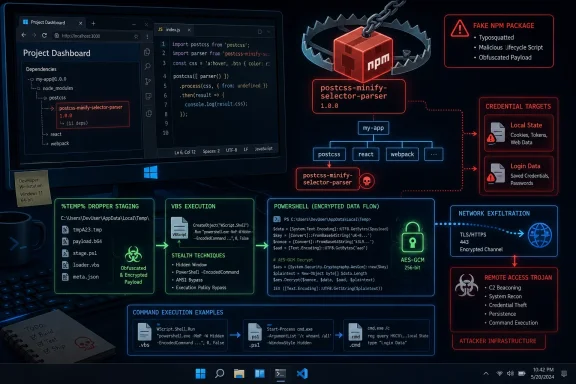 The Typosquat Was Designed for a Tired Human, Not a Broken Scanner
The package name is the first clever move. postcss-minify-selector-parser looks less like a cartoon typo and more like a plausible utility in the PostCSS ecosystem, where words such as “selector,” “parser,” “minify,” and “postcss” appear in endless combinations. That makes it more dangerous than the old one-letter swap trick, because a developer scanning a dependency tree may not see a mistake at all.The legitimate
postcss-selector-parser sits deep in the JavaScript build world, used by projects that transform, lint, bundle, and optimize CSS. Attackers do not need every developer to install the fake package directly. They need one maintainer, one hurried contributor, one internal tool, or one CI job to accept the wrong name.The malicious package reportedly declared the real package as a dependency and re-exported legitimate functionality. That is an important detail because it gives the attacker a cover story: the install appears to work, the expected API may appear to exist, and the absence of immediate breakage reduces the chance that anyone goes hunting through the package contents.
This is the modern supply-chain compromise pattern in miniature. The malware is not trying to defeat npm by force. It is trying to look boring long enough to be cached, mirrored, built, and trusted.
The Payload Hid in the Place Developers Least Want to Read
The reported first stage began inside what looked like a configuration path, where a large AES-GCM encrypted blob was embedded in the package. That choice is not accidental. Developers might skimpackage.json, glance at a README, or check whether a package has a repository link, but they are far less likely to reverse an encrypted blob in a helper file before adding a dependency.Once decrypted, the blob behaved as JavaScript dropper code. Its job was not to perform the final theft immediately, but to write and launch a PowerShell script on the Windows host. That split matters because it keeps the npm-facing portion smaller and more deniable while pushing the messier operating-system behavior into a later stage.
PowerShell remains attractive to attackers because it is present on Windows, richly integrated with the operating system, and familiar enough in enterprise automation to blend into noisy environments. A script that bypasses execution policy is not exotic malware tradecraft; it is a well-worn abuse of a legitimate administrative tool. That is precisely why defenders have to treat script execution from package installs as a serious event, not as background build chatter.
The use of encrypted JavaScript also gives the package a better chance of slipping past casual static review. A scanner may flag opaque blobs and dynamic execution, but a human trying to decide whether to ship a hotfix may simply see an unreadable implementation detail and move on. Attackers build for that moment.
Windows Was Not Collateral Damage; It Was the Target
This campaign is notable because the Windows portions are not incidental. The chain reportedly writes PowerShell, downloads an archive from a deceptive “driver” domain, extracts payloads under%TEMP%, and executes follow-on components using Windows-native process mechanisms. The naming choices — “driver,” “patch,” “winPatch” — are all designed to sound like the background noise of a Windows machine.That is a reminder for development teams that npm risk is not confined to web servers or Linux containers. A Windows developer workstation is often the place where Git credentials, browser sessions, cloud CLIs, SSH keys, package tokens, VPN access, password managers, and internal documentation converge. It is a softer target than production, but it may hold keys to production.
The staging through
%TEMP% also reflects a practical attacker’s mindset. Temporary directories are writable, noisy, and full of installer leftovers. In many environments, suspicious content under user temp paths generates less urgency than a binary dropped into System32 or a new service under Program Files.The reported VBS-like chain and command execution are part of the same camouflage. Windows has decades of compatibility surface, and malware authors continue to chain older scripting and shell mechanisms with newer payloads because the combination works. Each layer gives defenders another chance to catch the intrusion, but it also gives attackers another way to adapt.
Browser Password Theft Turns a Developer Box Into a Control Plane
The most alarming part of the reported RAT is its focus on browser data. Chrome’sLocal State and Login Data files are high-value targets because they can contain saved credentials, tokens, and metadata that map a user’s online work life. For developers and administrators, that can include access to GitHub, npm, cloud dashboards, CI systems, and internal tools.The malware reportedly used Windows DPAPI and modern decryption approaches, including AES-GCM and ChaCha20-Poly1305 logic, to work around newer browser protections. That points to an attacker who understands that browsers have become credential vaults whether organizations admit it or not. The target is not merely passwords typed into forms; it is the authenticated developer identity.
This is where the distinction between a RAT and an infostealer starts to blur. Remote access gives an operator persistence and interactive control. Browser theft gives them portable access that may outlive the infected machine, especially if session tokens and saved credentials are not revoked quickly.
For Windows administrators, the operational lesson is uncomfortable. Reimaging the laptop is only the start. If a developer machine ran this package, incident response has to include token revocation, npm credential rotation, browser session invalidation, cloud access review, and audit-log inspection across source control and CI/CD systems.
Anti-Analysis Checks Show the Attackers Expected Researchers
The RAT reportedly queried the Windows environment through WMI and checked indicators such as MAC addresses to detect virtual machines or sandboxes associated with VMware, VirtualBox, and QEMU. That does not make the malware uniquely advanced, but it does show a campaign built with security analysis in mind. The authors expected their package to be detonated, and they attempted to behave differently when watched.That has two consequences. First, defenders cannot rely only on sandbox output to decide whether a suspicious package is harmless. If the payload is gated by environment checks, the clean result may mean only that the malware saw the lab before the lab saw the malware.
Second, this anti-analysis behavior increases the importance of telemetry from real developer endpoints. Process creation, script execution, network connections, archive extraction, registry writes, and browser database access tell a richer story than package metadata alone. The package manager is the starting point; the endpoint is where the truth appears.
The reported persistence mechanism under current-user run keys is similarly pragmatic. It avoids the need for admin rights while giving the malware a path to restart with the user session. That is enough for a developer-targeted operation, where the attacker may care more about user-level credentials than system-level domination.
The npm Threat Model Has Outgrown “Don’t Install Weird Packages”
The standard advice to avoid obscure packages is still useful, but it is no longer sufficient. The package in this campaign was malicious precisely because it did not look obviously weird. It borrowed naming conventions from a real ecosystem, depended on a real package, and hid its behavior behind layers of encoded implementation.The npm ecosystem is especially exposed because install and runtime paths can execute code in ways that feel normal to JavaScript developers. Build tools run scripts. Packages generate native bindings. Postinstall hooks fetch binaries. Frameworks compile, transform, and introspect. The convenience that makes npm productive also gives attackers a broad behavioral gray zone.
This is not an argument to abandon open source package managers. It is an argument to stop treating public registries as if they were low-risk file shares. Every dependency is executable content, and every executable dependency deserves policy.
Enterprises have been slower to apply mature controls to developer tooling than to email, browsers, and office documents. That gap is closing because attackers are forcing it closed. The developer workstation is now a first-class target, and npm is one of the delivery channels.
The Defensive Line Moves to Policy, Not Heroic Code Review
No organization can manually reverse every transitive dependency. The answer is not to ask developers to become malware analysts between sprint planning and code review. The answer is to build a system where suspicious packages have to pass through multiple gates before reaching a workstation or CI runner.Package immaturity policies are one obvious control. Brand-new packages, newly published versions, and packages with thin metadata deserve a cooling-off period before automatic adoption. Many malicious packages are discovered within hours or days; a short delay can be the difference between being patient and being compromised.
Private registries and curated mirrors also matter. They give security teams a place to enforce allowlists, block known malicious packages, and inspect artifacts before developers install them. The goal is not to slow development for its own sake. The goal is to ensure that “npm install” does not become an unmonitored remote-code-execution event.
Endpoint controls should be tuned for the developer reality. A Node process spawning PowerShell with execution-policy bypass, writing scripts to temp directories, extracting archives, and touching browser credential stores is not normal package behavior for most projects. If a build pipeline needs that behavior, it should be explicitly documented and narrowly permitted.
The Windows Signal Is Hiding in Plain Sight
For Windows defenders, this campaign produces a recognizable chain of signals. A package import or Node process leads to PowerShell. PowerShell reaches out to an unfamiliar domain. A ZIP is downloaded and extracted under a temporary directory. Follow-on scripts or executables run. Registry persistence appears under the current user. Browser credential databases are accessed.None of those actions alone is guaranteed proof of compromise. Together, they are a story. Security teams should resist treating them as isolated alerts owned by separate tools.
The suspicious domain branding is also worth noting. Attackers continue to use names that borrow legitimacy from hardware vendors, drivers, and update workflows because Windows users are conditioned to accept background driver and patch activity. A domain that sounds like a GPU driver site should not get an automatic pass from a developer workstation.
The same is true for archive names. “winPatch” is not a sophisticated disguise, but it is plausible enough to disappear into logs unless someone is correlating events. Malware does not need perfect camouflage. It needs just enough ambiguity to survive the first glance.
The Damage Radius Runs Through CI/CD
The nightmare scenario is not a single developer losing a browser password. It is a developer machine becoming the bridge into source control, package publishing, cloud deployment, or CI secrets. Modern software delivery is a chain of delegated trust, and developer credentials often sit near the top.If an attacker steals npm tokens, they may publish malicious updates. If they steal Git credentials, they may modify source code or workflow files. If they steal cloud credentials, they may enumerate infrastructure or access data. If they steal CI secrets, they may tamper with builds in ways that inherit the organization’s own signing and deployment trust.
That is why incident response for malicious packages must look beyond the endpoint. Teams should review package-lock changes, recent dependency additions, CI job logs, outbound network activity, newly created tokens, unusual repository access, and package publishing history. The question is not only “Which machine ran the malware?” but “Which trust relationships did that machine possess?”
This is also where least privilege becomes more than a compliance slogan. A developer should not have long-lived credentials for every environment sitting in a browser profile. CI tokens should be scoped. Publishing rights should be constrained. Administrative access should be time-bound. Those controls feel bureaucratic until the day a fake npm package turns one workstation into an attack platform.
The Package Name Is a Warning About How Developers Actually Work
Security advice often assumes a developer calmly evaluates each dependency in isolation. Real development rarely looks that way. Dependencies arrive through Stack Overflow answers, AI-generated suggestions, copied snippets, old internal docs, hurried migrations, and transitive chains nobody reads line by line.A plausible package name can exploit that workflow better than a crude typo.
postcss-minify-selector-parser is believable because the JavaScript ecosystem contains thousands of similarly named micro-packages. The attack succeeds in the space between familiarity and attention.That raises a hard question for toolmakers. Package managers and registries should do more to warn when a package name closely resembles a vastly more popular package, especially when it appears suddenly, has sparse metadata, or depends on the package it resembles. Those are not definitive signs of malice, but they are strong enough to justify friction.
Developers also need better defaults in their tools. Dependency review should make suspicious deltas visible: new lifecycle scripts, encrypted blobs, dynamic evaluation, newly added network fetches, binary payloads, and high-risk child processes. The right UI can make the dangerous path feel unusual before it becomes disastrous.
This Is a Windows Security Story Disguised as a JavaScript Story
It is tempting to file this campaign under “npm malware” and move on. That would miss the point. The registry was the delivery mechanism, but Windows was the operating environment, PowerShell was the execution bridge, the browser was the credential store, and the developer identity was the prize.That combination should make Windows administrators pay attention even if they do not write JavaScript. The infected asset may sit in an engineering department, but the blast radius can reach identity systems, cloud subscriptions, code-signing infrastructure, and production deployment paths. Developer endpoints deserve the same seriousness as finance laptops and domain admin workstations.
Microsoft has spent years adding security controls around script execution, browser encryption, application control, and endpoint detection. Attackers keep finding the seams between them. A package manager running inside a trusted user session can create behavior that looks like development until it suddenly looks like intrusion.
The practical answer is layered control. Block known indicators, yes. But also watch behavior, restrict token scope, limit script execution, harden browsers, curate dependencies, and assume that public package names are not proof of public goodness.
The Clues This Campaign Leaves for Defenders
This campaign is valuable not just because it names a malicious package, but because it exposes a repeatable pattern defenders can hunt for. A short-lived npm typosquat may vanish from the registry, but the behaviors it used will appear again in other names and ecosystems.- Organizations should search dependency manifests and lockfiles for
postcss-minify-selector-parser, then determine whether any developer workstation or CI runner installed or imported it. - Security teams should hunt for Node or npm-related processes spawning PowerShell,
cmd.exe, script hosts, archive tools, or unexpected Python components. - Windows telemetry should be reviewed for downloads or connections involving the reported deceptive driver domain and the associated command-and-control infrastructure.
- Incident responders should rotate developer credentials, npm tokens, Git credentials, browser sessions, and cloud access tokens if there is evidence the package executed.
- Build systems should enforce package age, provenance, and script-execution policies rather than relying on developers to notice suspicious names during manual review.
- Browser-saved credentials on developer machines should be treated as high-risk secrets, especially where those browsers authenticate to source control, cloud consoles, or package registries.
This campaign should be read as another marker in the steady professionalization of developer-focused malware: plausible names, legitimate dependencies as camouflage, encrypted payloads, native Windows staging, anti-analysis checks, persistence, and credential theft aimed at the machinery of software delivery. The attackers are no longer merely poisoning the well; they are studying how engineers drink from it. The organizations that fare best will be the ones that treat dependency installation as privileged behavior, developer endpoints as production-adjacent assets, and trust as something verified continuously rather than inherited from a familiar-looking package name.
References
- Primary source: cyberpress.org
Published: 2026-06-22T11:10:09.869452
- Related coverage: docs.jfrog.com
Malicious Package Detection
JFrog’s Xray detects malicious software packages based on artifact scanning. This feature is based on a robust package scanning mechanism automatically scans packages uploaded to public open-source software repositories. It is designed to detect potential security risks and malicious code in...docs.jfrog.com - Related coverage: jfrog.com
8 Malicious npm Packages: Chrome Browser Information Stealer
Learn about 8 highly sophisticated malicious npm packages recently discovered by the JFrog Security Research team, targeting Windows Chrome users. jfrog.com
