

Microsoft Threat Intelligence disclosed on May 29, 2026, that malicious npm packages published on May 28 and May 29 under three maintainer aliases used dependency confusion across nine organizational scopes to impersonate internal corporate modules and run obfuscated reconnaissance code during npm install. The immediate damage appears limited to profiling, but that is the wrong comfort to take from the report. The more important story is that attackers are treating developer workstations, build runners, and private package conventions as a reconnaissance surface before choosing where to detonate. For Windows-heavy enterprises, this is another reminder that software supply-chain defense now begins long before code reaches production.
The campaign’s cleverness was not in inventing a new exploit. It was in exploiting a familiar enterprise habit: internal software names leak into manifests, documentation, build scripts, and developer muscle memory, while package managers remain perfectly happy to fetch something from the public internet if configuration allows it.
Microsoft says the packages were registered under scopes that resembled real corporate namespaces, including names such as
That is the essence of dependency confusion. An attacker publishes a public package that matches a private dependency name, often with a version number designed to outrank the private one. If the victim’s package manager or registry proxy is misconfigured, the public package can win resolution and execute in a trusted build or development environment.
The social engineering went further. The malicious packages included fabricated internal metadata in
That detail matters because it collapses the distinction between “using” a package and merely “installing” it. In a modern JavaScript workflow, packages are installed constantly: on laptops, ephemeral CI runners, container build stages, preview environments, dependency-update branches, and test harnesses. A malicious lifecycle script turns all of those into execution opportunities.
According to Microsoft, the attack chain was straightforward once the dependency was resolved. The victim ran
That is not exotic malware tradecraft. It is the normal developer tooling path, turned inside out. The stager took advantage of the fact that build systems already trust Node.js to run arbitrary scripts as part of dependency setup.
A developer workstation is a map of the enterprise. It can reveal cloud accounts, internal service names, package scopes, Git remotes, Kubernetes contexts, local credentials, VPN details, CI conventions, and the naming grammar of private systems. A build runner can reveal even more: deployment tokens, artifact signing flows, environment variables, and secrets that were never meant to be exposed to a public package.
The most ominous part of Microsoft’s analysis is the two-phase design. The stager reportedly set a
That is how serious supply-chain operations increasingly behave. They do not spray payloads loudly and hope for impact. They profile, deduplicate, sort, and return when the victim is worth the operational risk.
The campaign also used cache-based deduplication. Microsoft says the stager created cache directories under paths such as
The payload delivery was platform-aware, with Windows, macOS, and Linux variants selected by the stager. For WindowsForum readers, the important point is not that Windows was uniquely targeted. It is that Windows developer environments were first-class targets alongside macOS and Linux, reflecting the reality of cross-platform JavaScript development inside Microsoft 365, Azure, Electron, React, Node.js, and internal enterprise apps.
The defensive implication is uncomfortable: a Windows laptop with Node.js, npm, Git, cloud CLIs, and cached credentials is not merely an endpoint. It is a build-system satellite.
The crude high-number tactic is designed to win resolution. The more subtle tactic is designed to win trust. A package at
The staged timing matters too. Microsoft says two scopes,
This is where enterprise controls tend to fail in mundane ways. Private registry routing is assumed rather than verified. Lockfiles are trusted without provenance review. Internal scopes are treated as secret, even though names leak through documentation, error logs, public repositories, and job postings. Version numbers become a resolver decision instead of a security decision.
The chronology is striking. The
The most interesting thread is the older
Bug bounty history can even become camouflage. A name that once looked like a researcher’s proof of concept can later become a launchpad, especially if organizations do not clean up stale package exposure after a report is closed.
The affected scopes are a useful hunting list, not the whole lesson. Microsoft’s named scopes include
The mitigation most likely to prevent a repeat is scope locking. In npm terms, that means configuring
The second hard truth is that lifecycle scripts deserve more suspicion than they usually get. Running installs with
That is valuable, especially for Windows estates where developer machines are enrolled and monitored. Endpoint telemetry can catch what package review misses: a Node process creating odd files in temporary directories, npm spawning a detached process, or a developer workstation connecting to infrastructure it has no reason to contact.
But detection is the second line of defense. The first line is dependency governance. If an organization’s build path can accidentally prefer a public package over a private one, then endpoint protection is being asked to clean up after a preventable control failure.
This is the recurring tension in software supply-chain security. Vendors can detect payloads, registries can remove packages, and threat intelligence teams can publish indicators. Yet the enterprise still owns the configuration that decides whether a random package on the public internet gets to run code inside a developer environment.
This campaign shows why that model is brittle. A developer workstation can be the first place a malicious package lands, the place where secrets are easiest to enumerate, and the place where internal naming conventions are richest. If the operator’s goal is to decide which organizations are worth deeper exploitation, a developer laptop is a superb reconnaissance platform.
Windows environments add their own wrinkles. Many enterprise developers now work across PowerShell, Windows Terminal, WSL, npm, Git Credential Manager, Azure tooling, and browser-based authentication flows. That hybrid convenience creates a wide telemetry field for defenders, but also a wide context field for attackers.
The right mental model is not “developer devices are special.” It is “developer devices are production-adjacent.” They may not serve customers directly, but they can influence what reaches customers, what gets signed, what gets deployed, and which secrets are exposed along the way.
Organizations should begin with the affected scopes and package versions Microsoft identified, especially anything installed on or after May 28, 2026, plus the pre-staged May 4 releases for
Credential rotation is prudent for systems that installed the packages, particularly where npm ran with access to cloud credentials, CI secrets, npm tokens, SSH keys, or environment variables containing service credentials. The point is not to assume full exploitation occurred. The point is that reconnaissance of secrets and developer context is enough to invalidate trust in exposed credentials.
The healthiest organizations will use this incident to run a broader tabletop exercise. Pick a private scope. Confirm it cannot resolve publicly. Confirm package managers fail closed. Confirm CI does not expose unnecessary secrets during dependency installation. Confirm endpoint monitoring sees npm lifecycle abuse as something worth investigating.
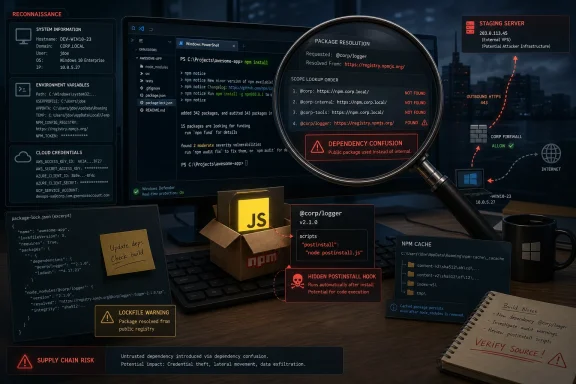 The Attack Worked Because It Looked Like the Enterprise
The campaign’s cleverness was not in inventing a new exploit. It was in exploiting a familiar enterprise habit: internal software names leak into manifests, documentation, build scripts, and developer muscle memory, while package managers remain perfectly happy to fetch something from the public internet if configuration allows it.Microsoft says the packages were registered under scopes that resembled real corporate namespaces, including names such as
@cloudplatform-single-spa, @payments-widget, @t-in-one, @capibar.chat, and @sber-ecom-core. The package names were equally targeted: logging services, VPNs, SSH keys, payment widgets, AI agents, internal UI kits, and token-themed modules that would not look out of place in a large company’s monorepo.That is the essence of dependency confusion. An attacker publishes a public package that matches a private dependency name, often with a version number designed to outrank the private one. If the victim’s package manager or registry proxy is misconfigured, the public package can win resolution and execute in a trusted build or development environment.
The social engineering went further. The malicious packages included fabricated internal metadata in
package.json: fake GitHub Enterprise-style repositories, Jira-style issue trackers, documentation portals, and “Platform Engineering” author fields. None of this needed to withstand deep scrutiny. It only needed to survive the few seconds between a developer seeing a package name and assuming it belonged to the organization.Npm Install Was the Execution Primitive
The decisive move was thepostinstall hook. Every package in the cluster used npm lifecycle behavior to execute code automatically during installation, without requiring the victim application to import the package or call a function.That detail matters because it collapses the distinction between “using” a package and merely “installing” it. In a modern JavaScript workflow, packages are installed constantly: on laptops, ephemeral CI runners, container build stages, preview environments, dependency-update branches, and test harnesses. A malicious lifecycle script turns all of those into execution opportunities.
According to Microsoft, the attack chain was straightforward once the dependency was resolved. The victim ran
npm install, npm invoked postinstall, an obfuscated scripts/postinstall.js ran, the stager contacted an attacker-controlled endpoint, wrote a platform-specific payload into a temporary directory, and spawned it as a detached process.That is not exotic malware tradecraft. It is the normal developer tooling path, turned inside out. The stager took advantage of the fact that build systems already trust Node.js to run arbitrary scripts as part of dependency setup.
Reconnaissance Is Not a Harmless Mode
Microsoft describes the payload as operating in “reconnaissance-only” mode, collecting system information, hostnames, environment variables, installed package context, and developer environment details. That phrase can sound less alarming than credential theft or ransomware, but in a supply-chain campaign it may be the most valuable phase.A developer workstation is a map of the enterprise. It can reveal cloud accounts, internal service names, package scopes, Git remotes, Kubernetes contexts, local credentials, VPN details, CI conventions, and the naming grammar of private systems. A build runner can reveal even more: deployment tokens, artifact signing flows, environment variables, and secrets that were never meant to be exposed to a public package.
The most ominous part of Microsoft’s analysis is the two-phase design. The stager reportedly set a
RECON_ONLY flag by default, while the architecture allowed that mode to be changed later. In plain English, the attackers appeared to be building an inventory first and reserving the option to exploit selected victims later.That is how serious supply-chain operations increasingly behave. They do not spray payloads loudly and hope for impact. They profile, deduplicate, sort, and return when the victim is worth the operational risk.
The Operator Hid From the Places Defenders Watch Most Closely
The stager reportedly checked for CI-related environment variables and scope-specific “no telemetry” switches, then exited silently in some cases. That is a telling design choice. The attacker understood that CI/CD systems are often more heavily monitored than developer laptops, even if they are also more valuable.The campaign also used cache-based deduplication. Microsoft says the stager created cache directories under paths such as
~/.cache/._cloudplatform-single-spa_init/, generated keys from package name, version, and project root, and avoided repeated execution when a marker already existed. That reduces noisy repeated beacons, which are exactly the sort of anomaly that can turn a stealthy campaign into an incident ticket.The payload delivery was platform-aware, with Windows, macOS, and Linux variants selected by the stager. For WindowsForum readers, the important point is not that Windows was uniquely targeted. It is that Windows developer environments were first-class targets alongside macOS and Linux, reflecting the reality of cross-platform JavaScript development inside Microsoft 365, Azure, Electron, React, Node.js, and internal enterprise apps.
The defensive implication is uncomfortable: a Windows laptop with Node.js, npm, Git, cloud CLIs, and cached credentials is not merely an endpoint. It is a build-system satellite.
The Version Numbers Were a Weapon
One of the oldest tricks in dependency confusion is still one of the most effective: publish the malicious package at an absurdly high version. Microsoft says themr.4nd3r50n account used 100.100.100, while another persona used the more plausible 3.5.22. The t-in-one wave mixed both approaches, with some packages at ordinary-looking versions and others at inflated 99.x releases.The crude high-number tactic is designed to win resolution. The more subtle tactic is designed to win trust. A package at
100.100.100 may look ridiculous to a human reviewer, but a package manager does not care whether a version number feels plausible. A package at 3.5.22, meanwhile, may slide past a review because it resembles the kind of mature internal component that has existed for years.The staged timing matters too. Microsoft says two scopes,
@capibar.chat/ui-kit and @sber-ecom-core/sberpay-widget, had earlier 99.0.7 releases on May 4 before the main bursts later in the month. That looks less like a one-off prank and more like infrastructure preparation.This is where enterprise controls tend to fail in mundane ways. Private registry routing is assumed rather than verified. Lockfiles are trusted without provenance review. Internal scopes are treated as secret, even though names leak through documentation, error logs, public repositories, and job postings. Version numbers become a resolver decision instead of a security decision.
Three Maintainers, One Operational Fingerprint
Microsoft attributes the campaign to a single operator using three npm maintainer aliases:mr.4nd3r50n, ce-rwb, and t-in-one. The company’s evidence is not based on vibes. It points to shared C2 infrastructure, a shared hardcoded secret value sent in outbound requests, nearly identical publishing toolchains, matching package templates, and tightly correlated publishing windows.The chronology is striking. The
mr.4nd3r50n account reportedly published 26 packages in a burst on May 28. Minutes later, ce-rwb published seven more. The following day, t-in-one returned with another automated-looking wave, including credential-themed package names and packages impersonating an internal UI kit and SberPay-related payment widget.The most interesting thread is the older
@cloudplatform-single-spa/logaas package. Microsoft says earlier versions in 2024 carried bug bounty markers, before malicious obfuscated payloads appeared in 2026. That does not prove a clean moral arc from researcher to criminal, but it does illustrate a persistent problem in dependency confusion: the boundary between “testing whether this resolves” and “weaponizing the resolution path” is operationally thin.Bug bounty history can even become camouflage. A name that once looked like a researcher’s proof of concept can later become a launchpad, especially if organizations do not clean up stale package exposure after a report is closed.
The Packages Are Gone, but the Condition Remains
Microsoft says the repositories and users were taken down after investigation and feedback to npm. That is necessary, but it is not a fix. Takedown removes the known artifacts; it does not repair the resolver behavior, registry fallback, or dependency hygiene that made installation possible.The affected scopes are a useful hunting list, not the whole lesson. Microsoft’s named scopes include
@cloudplatform-single-spa, @wb-track, @data-science, @ce-rwb, @payments-widget, @travel-autotests, @t-in-one, @capibar.chat, and @sber-ecom-core. Organizations should search for those names, but they should also ask why any private scope could fall through to the public npm registry in the first place.The mitigation most likely to prevent a repeat is scope locking. In npm terms, that means configuring
.npmrc so internal scopes resolve only to the private registry and never fall back to the public one. This is not glamorous security engineering, but it is the sort of boring control that breaks an entire class of attacks.The second hard truth is that lifecycle scripts deserve more suspicion than they usually get. Running installs with
--ignore-scripts is not always practical for every workflow, because some legitimate packages rely on install-time compilation or setup. But high-trust environments should not treat automatic package scripts as harmless plumbing.Defender’s Role Is Useful, but It Is Not the Whole Story
Microsoft’s report naturally emphasizes Defender coverage. The company says Microsoft Defender Antivirus detects the obfuscated stager and payload, while Defender for Endpoint can identify suspicious Node.js process behavior, detached child processes, temporary file creation, outbound connections, and credential-access patterns.That is valuable, especially for Windows estates where developer machines are enrolled and monitored. Endpoint telemetry can catch what package review misses: a Node process creating odd files in temporary directories, npm spawning a detached process, or a developer workstation connecting to infrastructure it has no reason to contact.
But detection is the second line of defense. The first line is dependency governance. If an organization’s build path can accidentally prefer a public package over a private one, then endpoint protection is being asked to clean up after a preventable control failure.
This is the recurring tension in software supply-chain security. Vendors can detect payloads, registries can remove packages, and threat intelligence teams can publish indicators. Yet the enterprise still owns the configuration that decides whether a random package on the public internet gets to run code inside a developer environment.
Windows Shops Should Treat Dev Boxes Like Production Adjacent Systems
For many Windows administrators, developer endpoints have long lived in an awkward exception zone. They need admin tools, interpreters, package managers, local build systems, Docker or WSL, cloud CLIs, SSH keys, and access to internal repositories. They are too flexible to lock down like call-center desktops and too numerous to manage like production servers.This campaign shows why that model is brittle. A developer workstation can be the first place a malicious package lands, the place where secrets are easiest to enumerate, and the place where internal naming conventions are richest. If the operator’s goal is to decide which organizations are worth deeper exploitation, a developer laptop is a superb reconnaissance platform.
Windows environments add their own wrinkles. Many enterprise developers now work across PowerShell, Windows Terminal, WSL, npm, Git Credential Manager, Azure tooling, and browser-based authentication flows. That hybrid convenience creates a wide telemetry field for defenders, but also a wide context field for attackers.
The right mental model is not “developer devices are special.” It is “developer devices are production-adjacent.” They may not serve customers directly, but they can influence what reaches customers, what gets signed, what gets deployed, and which secrets are exposed along the way.
The Practical Test Is Whether Your Registry Rules Are Boring
The best response to this campaign is not panic over 45 package names. It is a disciplined audit of how packages resolve, where scripts execute, and which secrets are available during installation.Organizations should begin with the affected scopes and package versions Microsoft identified, especially anything installed on or after May 28, 2026, plus the pre-staged May 4 releases for
@capibar.chat/ui-kit and @sber-ecom-core/sberpay-widget. They should review lockfiles, build logs, package caches, proxy logs, endpoint alerts, and CI job histories for evidence of installation or outbound traffic to the reported C2 infrastructure.Credential rotation is prudent for systems that installed the packages, particularly where npm ran with access to cloud credentials, CI secrets, npm tokens, SSH keys, or environment variables containing service credentials. The point is not to assume full exploitation occurred. The point is that reconnaissance of secrets and developer context is enough to invalidate trust in exposed credentials.
The healthiest organizations will use this incident to run a broader tabletop exercise. Pick a private scope. Confirm it cannot resolve publicly. Confirm package managers fail closed. Confirm CI does not expose unnecessary secrets during dependency installation. Confirm endpoint monitoring sees npm lifecycle abuse as something worth investigating.
The Lesson Hidden Inside the Fake Jira Links
This campaign’s most concrete lessons are not exotic. They are the security basics that become urgent only after attackers demonstrate how much leverage they still have.- Organizations should verify that every private npm scope is pinned to an internal registry and cannot fall back to the public npm registry.
- Teams should hunt for the nine affected scopes and the specific malicious versions in manifests, lockfiles, build logs, package caches, and software inventory.
- Any developer workstation or CI runner that installed the affected packages should be treated as potentially exposed until relevant tokens, cloud credentials, npm tokens, and CI secrets are rotated.
- Security teams should monitor npm lifecycle scripts, detached Node.js child processes, temporary JavaScript payloads, and unusual outbound connections from developer tooling.
- Build pipelines should minimize which secrets are present during dependency installation, because install-time code execution is now a routine attacker assumption.
- Developers should treat realistic package metadata, internal-looking URLs, and mature version numbers as weak signals, not proof that a package belongs to the organization.
References
- Primary source: Microsoft
Published: Sat, 30 May 2026 01:25:47 GMT
Malicious npm packages abuse dependency confusion to profile developer environments | Microsoft Security Blog
A dependency confusion campaign leveraged 33 malicious npm packages to collect reconnaissance data from developer and build environments. This report details the attack chain, observed tradecraft, and detection opportunities to help organizations identify and disrupt related activity.www.microsoft.com - Related coverage: arstechnica.com
New type of supply-chain attack hit Apple, Microsoft and 33 other companies - Ars Technica
Researcher who got targets to automatically install his code gets $130,000 payout.arstechnica.com - Related coverage: bram.us
Dependency Confusion: How I Hacked Into Apple, Microsoft and Dozens of Other Companies – Bram.us
While looking at a package.json from a public project from PayPal, Alex Birsan noticed that it held some references to private NPM packages used internally by PayPal. Birsan noticed some of the manifest file packages were not present on the public npm repository but were instead PayPal’s...www.bram.us - Related coverage: blog.includesecurity.com
Dependency Confusion: When Are Your npm Packages Vulnerable? - Include Security Research Blog
This post follows up on the recent blog post by Alex Birsan which highlighted serious problems with how some programming language package managers (npm, RubyGems, and Python’s pip) resolve and install dependencies. Alex described possible causes for pip and RubyGems, but the details regarding...blog.includesecurity.com - Related coverage: cybersecuritydive.com
Open source blind trust the culprit in ethical breach of 35 companies | Cybersecurity Dive
Microsoft, one of the breached companies, encourages organizations to use controlled scopes, namespaces or prefixes to protect package names.www.cybersecuritydive.com
- Related coverage: malwarebytes.com
Researcher's audacious hack demonstrates new type of supply-chain attack | Malwarebytes Labs
Researcher Alex Birsan came up with a method to breach 35 big tech companies and earned $130,000 in bug bounties.www.malwarebytes.com
- Related coverage: itpro.com
‘The build pipeline is becoming the new frontline’: Axios npm compromise highlights growing software supply chain risks, experts warn | IT Pro
Attackers have compromised an Axios nom account and published malicious versions to spread remote access trojans (RATs) to millions of developers.www.itpro.com
