

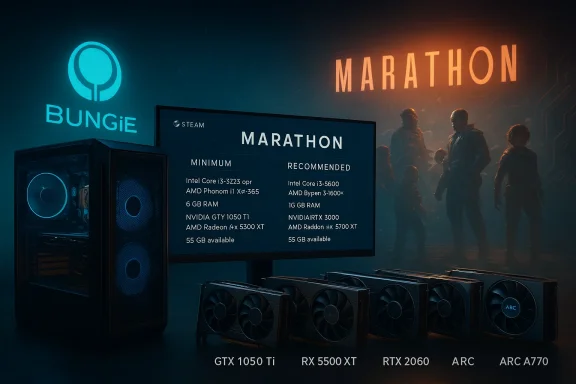
Bungie has published surprisingly modest PC system requirements for Marathon, its upcoming PvPvE extraction shooter, signaling an explicit design choice to keep the player base broad rather than gated by high-end hardware. The minimum spec lists an NVIDIA GeForce GTX 1050 Ti or AMD Radeon RX 5500 XT (and Intel Arc A580 with Resizable BAR), while the recommended tier names a GeForce “GTX 2060” (widely reported as RTX 2060 in some outlets), Radeon RX 5700 XT or Intel Arc A770 — all paired with 8 GB minimum and 16 GB recommended system memory. These details were updated on the Steam store and have been reiterated across press outlets and Bungie’s own alpha documentation, underscoring that Marathon is intended to run comfortably on many PCs built in the last six to nine years.
Bungie’s Marathon is an extraction-focused, competitive team experience from the studio that created Halo and Destiny. After showing early footage and conducting alpha playtests, Bungie updated Marathon’s Steam storefront and developer resources with the official PC system requirements. The published table sets a low entry bar: an Intel Core i5-6600 or Ryzen 5 2600 and 8 GB RAM for minimum; an i5-10400 or Ryzen 5 3500 and 16 GB for recommended. On the GPU side, Bungie includes legacy and midrange options across NVIDIA, AMD and Intel Arc — an explicit signal that cross-vendor, broad compatibility mattered during the build. This move echoes Bungie’s long-standing PC-friendly posture (notably with Destiny 2), and it’s consistent with a design goal to maximize the addressable install base for a multiplayer title that depends on active matchmaking and a healthy population. The Steam store lists Marathon’s system block in plain terms, while the closed-alpha FAQ and multiple outlets reprinted the same numbers during the prelaunch rollout.
Comparing Marathon and Destiny 2 system targets helps make the intent clear: Destiny 2’s historical minimums were themselves conservative by AAA standards, and Bungie is keeping Marathon similarly accessible while modernizing rendering, network and shell systems. For reference, Destiny 2’s Steam listing shows a minimum memory of 6 GB and recommended 8 GB (with GPUs like the GTX 660 on the minimum side and GTX 970 / GTX 1060 on recommended), a notably modest baseline for a major online shooter. Marathon raises the recommended RAM to 16 GB, reflecting modern multitasking and streaming patterns among players.
Key strengths:
Marathon’s specs are a reminder that modern multiplayer design can prioritize access as much as fidelity. The published requirements place the game within reach of a large slice of Windows gamers, and they reduce the immediate hardware pressure many competitive live-service titles have introduced in recent years. That said, the community should expect refinement: naming inconsistencies, day-one patches, anti-cheat iterations and independent testing will determine the real-world experience players have on the broad set of hardware Bungie has targeted. Keep an eye on Bungie’s official channels and independent benchmarks once the game reaches broader testing and review stages.
Source: Wccftech Bungie Reveals Mild Marathon PC System Requirements
 Background / Overview
Bungie’s Marathon is an extraction-focused, competitive team experience from the studio that created Halo and Destiny. After showing early footage and conducting alpha playtests, Bungie updated Marathon’s Steam storefront and developer resources with the official PC system requirements. The published table sets a low entry bar: an Intel Core i5-6600 or Ryzen 5 2600 and 8 GB RAM for minimum; an i5-10400 or Ryzen 5 3500 and 16 GB for recommended. On the GPU side, Bungie includes legacy and midrange options across NVIDIA, AMD and Intel Arc — an explicit signal that cross-vendor, broad compatibility mattered during the build. This move echoes Bungie’s long-standing PC-friendly posture (notably with Destiny 2), and it’s consistent with a design goal to maximize the addressable install base for a multiplayer title that depends on active matchmaking and a healthy population. The Steam store lists Marathon’s system block in plain terms, while the closed-alpha FAQ and multiple outlets reprinted the same numbers during the prelaunch rollout. What Bungie published: the official PC tiers
Below is a clear, paraphrased presentation of Bungie’s two-tier PC guidance as shown on Steam and in their alpha documentation. Bungie did not specify a target resolution or framerate in the published table.Minimum (playable)
- OS: Windows 10 64-bit (latest Service Pack).
- CPU: Intel Core i5-6600 / AMD Ryzen 5 2600.
- Memory: 8 GB RAM.
- Graphics: NVIDIA GeForce GTX 1050 Ti (4 GB) / AMD Radeon RX 5500 XT (4 GB) / Intel Arc A580 (8 GB, with Resizable BAR on).
- DirectX: Version 12.
- Network: Broadband Internet connection.
These minimums were also used for the closed alpha qualification.
Recommended (comfortable)
- OS: Windows 10 64-bit (latest Service Pack).
- CPU: Intel Core i5-10400 / AMD Ryzen 5 3500.
- Memory: 16 GB RAM.
- Graphics: NVIDIA GeForce “GTX 2060” (6 GB) / AMD Radeon RX 5700 XT (8 GB) / Intel Arc A770 (16 GB, with Resizable BAR on).
- DirectX: Version 12.
Note: multiple outlets reproduced that NVIDIA entry exactly as “GTX 2060” while some reporting and translation streams list it as RTX 2060. Steam’s product table currently shows the GTX wording, which appears inconsistent with standard NVIDIA product names and other coverage. That discrepancy is flagged later in this article.
Background: why these numbers matter (engine, reach and live-service design)
Bungie’s Marathon is being built on an evolved variant of the internal Destiny 2 engine (commonly referred to in the press as the “Tiger” engine). Destiny 2 historically aimed for broad compatibility on PC and console, and Marathon’s numbers follow that philosophy by avoiding high hardware ceilings that fragment potential players. A lower minimum requirement supports quick matchmaking, shorter queue times for competitive modes, and better long-term retention — all essential for the health of live-service multiplayer games.Comparing Marathon and Destiny 2 system targets helps make the intent clear: Destiny 2’s historical minimums were themselves conservative by AAA standards, and Bungie is keeping Marathon similarly accessible while modernizing rendering, network and shell systems. For reference, Destiny 2’s Steam listing shows a minimum memory of 6 GB and recommended 8 GB (with GPUs like the GTX 660 on the minimum side and GTX 970 / GTX 1060 on recommended), a notably modest baseline for a major online shooter. Marathon raises the recommended RAM to 16 GB, reflecting modern multitasking and streaming patterns among players.
Technical analysis: what the minimum and recommended GPUs imply for real-world performance
Bungie’s GPU selections reveal both a conservative target and the engine optimizations likely present in the build.- The GTX 1050 Ti and RX 5500 XT represent entry-to-lower-midrange silicon from the 2016–2019 era. These cards generally run modern titles at 1080p on low-to-medium settings and are capable of stable 30–60 FPS depending on the title and settings. Their inclusion as minimums suggests Marathon’s baseline settings will be tuned for smooth play on older hardware.
- The listed recommended GPU — shown on Steam as a “GTX 2060” in some store text — aligns with a midrange GPU class that most outlets (and product naming conventions) would expect to be labeled RTX 2060. The RTX 2060 (and the similarly capable GTX/RTX 20-series middle tier) are proven 1080p 60 FPS cards for many multiplayer shooters. If Bungie intended an RTX 2060-level target, that gives players a realistic expectation of 1080p/60 on medium-to-high presets with some headroom for vendor upscalers.
- The inclusion of Intel Arc A580/A770 with explicit ReBAR notes is notable. Intel’s discrete GPUs require Resizable BAR (ReBAR) to reach parity in some workloads; Bungie specifying “with ReBAR on” shows testing and optimization were performed against vendor-specific feature sets. That’s a positive sign for cross-vendor parity and indicates Bungie prioritized a consistent experience across GPU ecosystems.
- If your rig meets the minimum (i5-6600 / GTX 1050 Ti / 8 GB), expect playable sessions at lower presets and sensible matchmaking performance.
- If your rig meets the recommended (i5-10400 / “2060” / 16 GB), expect a comfortable 1080p experience; higher resolutions or ultra presets will still require stronger hardware.
- Owners of Steam Deck-class handhelds or modern integrated GPUs should temper expectations but may still get an approachable experience at reduced settings, depending on optimization and Proton support.
The Nintendo Switch 2 question: feasible, but not planned (yet)
Media discussion immediately connected Marathon’s modest PC minimums to the possibility of a Nintendo Switch 2 port. On paper, the Switch 2’s reveal and its performance headroom (including DLSS-like vendor upscalers in some hardware designs) make a port technically feasible for a game targeting GTX 1050 Ti-class minimums. However, Bungie’s Game Director Joseph Ziegler told Famitsu that there are no current plans to add new compatible hardware but that the team would consider it in the future — a measured, noncommittal answer that leaves the door open while acknowledging the resources a major port requires. That quote has been carried by multiple outlets. From a technical perspective, a Switch 2 port would require substantive platform work: control remapping, networking adjustments, performance tuning, and possibly asset streaming reductions. Bungie’s stated ReBAR notes, vendor-specific optimizations and crossplay ambitions suggest the studio is thinking cross-platform by design, but a Switch 2 release would still be a major engineering and certification effort — not just a simple recompile.Strengths of Bungie’s approach
- Accessibility: Lower minimums mean more players can try Marathon without immediate hardware upgrades. That’s vital for multiplayer matchmaking and retention.
- Cross-vendor testing: Explicit Intel Arc entries (with ReBAR caveats) demonstrate cross-vendor QA, reducing the chance of one GPU family being left behind. That’s an engineering win for an era of heterogeneous GPU adoption.
- Engine continuity: Running on an evolved Destiny 2 engine allows Bungie to reuse lessons, tools and delivery pipelines. That helps keep performance predictable across a wide hardware range.
- Public transparency: Bungie published specs alongside alpha/test documentation, reducing rumor and confusion and letting players assess upgrade needs early. The closed alpha FAQ mirrors the public minimums, reinforcing credibility.
Risks, unknowns and practical concerns
- Naming inconsistency (GTX vs RTX): Steam’s table currently references a “GTX 2060”, which is inconsistent with NVIDIA’s product naming (the correct model family is RTX 2060). Some outlets reproduced Steam’s exact wording, while others refer to RTX 2060. This mismatch raises an editorial/verification flag and should be treated cautiously until Bungie or NVIDIA clarifies. For readers deciding on upgrades, assume the modern midrange class (RTX 2060 or equivalent) is the intended target.
- No explicit framerate/resolution targets: Bungie didn’t publish a 1080p/60 or 1440p/60 target in the requirements. Without that, players must infer performance expectations from GPU tiers — an imprecise science until independent benchmarks appear after launch.
- Anti-cheat and system-level drivers: The Steam product and press coverage mention kernel-level anti-cheat elements for Marathon. Kernel-level components can increase risk surface (drivers, system stability, and compatibility issues), and the community reaction to similar policies in other live-service games has been mixed. Players with older hardware or custom kernel setups (virtualized environments, Linux/Proton users) should watch Bungie’s anti-cheat guidance closely.
- Day-one variability: Bungie notes that storage and other requirements are subject to change. Live-service titles routinely increase install footprints or introduce features that alter performance. The published specs are a developer snapshot, not an immutable guarantee.
- Localization and reporting errors: Multiple outlets reproduced the same Steam block; some press sites translated or normalized vendor names in ways that produce minor contradictions. Readers should consult the official Steam/Bungie pages for the authoritative table and be aware that editorial echo can amplify small errors.
Practical upgrade and readiness guidance for Windows gamers
If you’re reading these specs and wondering what to do next, here’s a pragmatic checklist.- Verify your current hardware:
- Check CPU model and thread count; an i5-6600 / Ryzen 5 2600 or better covers the minimum.
- Confirm system RAM; 8 GB is minimum but 16 GB is recommended for comfortable play.
- GPU decision matrix:
- If you have an older GTX 1050 Ti / RX 5500 XT, expect playable sessions at lower presets. Consider a midrange upgrade only if you want higher fidelity or want to future-proof for other titles.
- If you own an RTX 2060-class or RX 5700 XT-class card, you should meet the recommended expectations for 1080p. Treat Bungie’s “2060” entry as a midrange target.
- Enable vendor features:
- If you use Intel Arc hardware, enable Resizable BAR (ReBAR) and updated drivers — Bungie explicitly tested Arc cards with ReBAR on.
- Anti-cheat and OS:
- Keep Windows up to date and follow Bungie’s anti-cheat instructions at launch. Expect driver updates and possible required kernel-level components; read Bungie’s documentation before full release.
- Wait for benchmarks:
- Reserve large hardware purchases until independent benchmarks appear after Marathon’s launch or in early review windows. In many cases, software updates and driver improvements can materially change performance profiles in the weeks after release.
Cross-checks and verification: what we validated
- Bungie’s Steam product page lists the minimum and recommended PC hardware tiers and is the immediate public source for the system guidance. The Steam listing shows the exact GPU strings reproduced in the store fields.
- Bungie’s own Closed Alpha FAQ repeats the minimum GPU entries (GTX 1050 Ti / RX 5500 XT / Arc A580) used to qualify testers, which corroborates Bungie’s minimum guidance beyond the storefront text.
- Coverage in multiple outlets (GameSpot, KitGuru and others) echoed those tables in their reporting, while some region-specific outlets used native product names (for example, translating or clarifying “RTX 2060” in place of the Steam “GTX 2060” wording). That mix of repetition and minor editorial normalization is the source of the GTX/RTX naming ambiguity noted above.
- The Destiny 2 Steam page remains a useful baseline for Bungie’s historical PC posture and provides a point of comparison for Marathon’s higher recommended RAM. Destiny 2’s published minimums and recommended targets show Bungie historically tends toward accessibility, which Marathon continues.
Final assessment: strengths, risks and what to watch next
Bungie’s Marathon system requirements are intentionally welcoming. By targeting mainstream midrange GPUs and keeping the minimum CPU/RAM bar modest, Bungie reduces the friction for new players and supports the matchmaking and population health that make extraction shooters viable long-term.Key strengths:
- Broad accessibility helps player population and lowers upgrade churn.
- Cross-vendor acknowledgment (AMD, NVIDIA, Intel Arc with ReBAR notes) indicates thoughtful optimization across ecosystems.
- Consistency with Bungie’s prior PC posture (an engine evolved from Destiny 2) gives confidence the requirements reflect engineering choices rather than marketing spin.
- Inconsistent vendor naming (GTX vs RTX 2060) should be clarified to remove confusion for buyers.
- Kernel-level anti-cheat and system-level components warrant attention: they can produce stability and compatibility issues in diverse PC environments and have historically triggered community reaction; track Bungie’s anti-cheat documentation closely.
- No explicit framerate/resolution target leaves performance expectations open; independent benchmarks after launch will be decisive for upgrade advice.
Marathon’s specs are a reminder that modern multiplayer design can prioritize access as much as fidelity. The published requirements place the game within reach of a large slice of Windows gamers, and they reduce the immediate hardware pressure many competitive live-service titles have introduced in recent years. That said, the community should expect refinement: naming inconsistencies, day-one patches, anti-cheat iterations and independent testing will determine the real-world experience players have on the broad set of hardware Bungie has targeted. Keep an eye on Bungie’s official channels and independent benchmarks once the game reaches broader testing and review stages.
Source: Wccftech Bungie Reveals Mild Marathon PC System Requirements
