
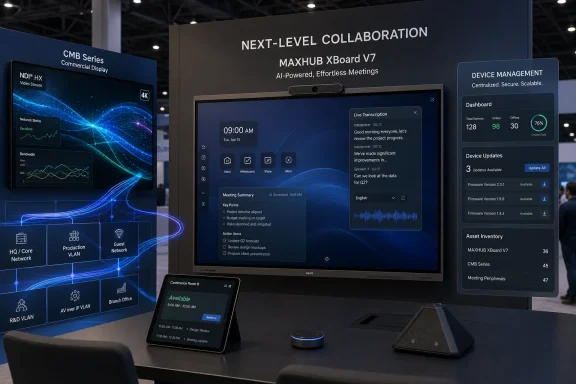
MAXHUB used InfoComm 2026, held June 17–19 at the Las Vegas Convention Center in Las Vegas, to showcase AI-driven meeting, display, device-management, and Microsoft Teams Rooms hardware from Booth C7036, led by its XBoard V7 collaboration board and CMB Series commercial displays. The announcement is not just another AV vendor’s booth itinerary. It is a useful snapshot of where workplace technology is heading: fewer separate boxes, more embedded intelligence, and a sharper attempt to make meeting rooms behave like managed IT endpoints. For WindowsForum readers, the important story is not whether one vendor’s demo looked polished under trade-show lights, but whether this class of hardware is finally becoming manageable enough for enterprise reality.
For years, the meeting room was the place where otherwise competent IT organizations looked strangely helpless. A user could authenticate into a cloud desktop from a coffee shop, but walking into a conference room still meant wrestling with cables, remotes, input selectors, missing dongles, dead microphones, and the mysterious local PC nobody wanted to patch. MAXHUB’s InfoComm 2026 pitch lands directly in that gap.
The company’s central demo, the AI Meeting Experience on the XBoard V7, bundles camera, audio, display, compute, transcription, controls, and summaries into a single collaboration surface. The headline features are familiar: intelligent audio and video optimization, real-time transcription, AI-assisted meeting controls, and automated meeting summaries. But the packaging matters because the enterprise pain point is not simply “meetings need AI.” It is that hybrid meetings require many small systems to work simultaneously, and every seam becomes a support ticket.
That is why the XBoard V7 matters less as a shiny interactive screen than as a sign of consolidation. A collaboration board that runs a Windows-powered meeting environment, captures room audio, frames participants, supports bring-your-own-meeting workflows, and presents itself as an appliance-like endpoint is much easier for IT to reason about than a conference room assembled from an aging mini PC, third-party camera, ceiling microphone, USB extender, and a forgotten display controller.
The danger, of course, is that “AI meeting experience” becomes the new “smart board”: a phrase broad enough to mean everything and nothing. The useful test is practical. Does it reduce setup time? Does it improve remote-participant comprehension? Does it produce meeting records that are accurate enough to trust? Does it integrate with the management and identity systems organizations already use? MAXHUB’s booth pitch answers those questions in the language of demos; buyers will need to answer them in pilots.
NDI, widely used for IP-based video production and distribution, allows video signals to move across standard networks instead of relying only on point-to-point cabling. For a corporate campus, university, operations center, or event space, the appeal is obvious. A meeting feed, announcement, training stream, or executive broadcast can be routed to displays without treating every destination as a bespoke wiring project.
This is where the AV and IT worlds have been colliding for more than a decade. AV teams care about latency, signal integrity, room experience, and control. IT teams care about network segmentation, device inventory, security posture, firmware lifecycle, and supportability. Products like MAXHUB’s CMB Series sit right in the middle, and their success depends on whether the two cultures can stop treating each other as obstacles.
A display with built-in NDI is not merely a better monitor. It is another network device that can receive valuable content, potentially sit in public or semi-public spaces, and require management over time. That makes it useful, but it also makes it part of the security perimeter. The trade-show demo is about seamlessness; the deployment conversation must be about governance.
Microsoft Teams Rooms has become a default path for organizations standardized on Microsoft 365, Entra ID, Exchange calendaring, Intune-style endpoint thinking, and Windows-based administration habits. The room is no longer an isolated AV island; it is an extension of the collaboration tenant. That gives hardware vendors a clear incentive to build around Teams certification, room scheduling, touch consoles, microphone expansion, and manageable device states.
The SP10 scheduling panel addresses the old problem of conference-room ownership. A room may be physically empty but digitally booked, or physically occupied but not properly reserved. Door-side panels do not solve office politics, but they reduce ambiguity by making availability visible at the threshold.
The Mic Pod DM30 and TCP33T console speak to another mundane but important enterprise truth: most meeting problems are audio problems, control problems, or both. Remote participants can forgive imperfect video more easily than muffled speech, missing speakers, or a host who cannot find the mute button. The room console has become the cockpit, and microphone coverage is the difference between a hybrid meeting and a group of people accidentally excluding everyone dialing in.
AI transcription depends on clean audio. Speaker identification depends on microphone placement, room acoustics, and camera context. Automated summaries depend on accurate capture, which depends on user consent models, language support, retention settings, and whether the system knows when the meeting actually started. AI-assisted controls depend on the underlying device stack being reliable enough that automation does not become another source of confusion.
MAXHUB’s integrated approach is therefore both sensible and vulnerable. Sensible, because controlling more of the hardware stack gives the vendor more opportunity to optimize the experience. Vulnerable, because all-in-one systems concentrate failure modes. If the board is the display, microphone array, camera system, compute surface, whiteboard, and meeting endpoint, downtime affects everything at once.
This is familiar territory for Windows administrators. Consolidation simplifies support until the consolidated thing breaks. The question is whether the vendor’s management layer, update process, support model, and hardware redundancy options are mature enough for the environments being targeted. A huddle room can tolerate a reboot. A boardroom, lecture hall, medical consultation space, or executive briefing center may not.
Centralized management promises the ability to push content, monitor device status, organize fleets, and reduce truck rolls. For IT pros, those are not nice-to-have features. They are the basic conditions under which hardware can be deployed at scale. If a device cannot be inventoried, updated, configured, secured, and monitored remotely, it belongs in a consumer electronics aisle, not a managed enterprise environment.
The content-management angle also matters. Commercial displays increasingly carry more than static signage. They show dashboards, wayfinding, emergency notices, room schedules, production feeds, training content, and internal communications. That makes the display layer part of business operations, not décor.
Still, centralized management platforms create their own dependency. Buyers should ask how authentication works, whether role-based access is granular, whether logs are exportable, how updates are staged, what happens if cloud management is unavailable, and how devices behave when network connectivity is degraded. A management portal can be a force multiplier, but only if it is designed with enterprise failure modes in mind.
The complication is that seamless experiences are rarely seamless behind the scenes. Wireless sharing needs network policies. Meeting-room devices need identity. Displays need firmware. AI summaries need data governance. NDI traffic needs bandwidth planning. Teams Rooms devices need tenant configuration, resource accounts, conditional access decisions, and update windows.
This is why modern AV procurement increasingly resembles endpoint procurement. The purchasing committee can no longer be limited to facilities, executive admins, and an AV integrator. Security, networking, desktop engineering, collaboration services, privacy, compliance, and support operations all have a stake.
MAXHUB is hardly alone in pushing this integrated message. Cisco, Logitech, Yealink, Neat, Lenovo, Poly, DTEN, and others have been moving in the same direction, building hardware around platform ecosystems and AI-enhanced room behavior. The differentiation is increasingly not “does the camera follow the speaker?” but “does the entire system remain understandable after procurement?”
The collaboration board began life as a digital whiteboard with aspirations. In schools, it replaced chalkboards and projectors. In corporate spaces, it promised brainstorming without dry-erase markers. But the hybrid-work era changed the assignment. A collaboration board is now expected to be a display, whiteboard, video endpoint, content-sharing surface, annotation tool, and sometimes the room’s primary computer.
That is a heavy burden for one device class. It also explains why all-in-one boards are attractive: they reduce the number of separately purchased and separately supported components. For smaller IT teams, that reduction can be meaningful. The best room system is often not the most technically flexible one; it is the one ordinary employees can use without calling the help desk.
But collaboration boards also raise lifecycle questions. Displays tend to have longer replacement cycles than PCs. Cameras, microphones, and AI features may evolve faster than panels. Operating systems need patching. Meeting platforms change requirements. A buyer who treats an all-in-one board as furniture may be unpleasantly surprised to discover that it behaves more like a managed computer.
This has advantages. Windows-based meeting systems can fit into existing patching, driver, peripheral, and management mental models. Administrators understand the tradeoffs of Windows endpoints, including their strengths and their annoyances. Microsoft Teams Rooms on Windows is a known quantity for many organizations that already live inside Microsoft 365.
It also carries responsibilities. A Windows-powered room device is not exempt from update hygiene, security baselines, account governance, and recovery planning simply because it is mounted on a wall. If anything, meeting rooms deserve extra scrutiny because they are shared spaces, often used by guests, executives, and high-value internal teams.
The best implementations treat these devices as part of the managed estate from day one. That means naming conventions, asset records, network segmentation, local admin policy, update rings, service accounts, physical access controls, and documented recovery procedures. The worst implementations treat them as AV gear until the first security review or outage reveals that they were endpoints all along.
The risk is that AI becomes a distraction from the harder problem of reliability. A meeting room that automatically summarizes a discussion but fails to join the call quickly is not an improvement. A camera that intelligently frames participants but confuses the whiteboard presenter is not magical. A display network that routes content elegantly until a VLAN rule changes is not enterprise-ready.
MAXHUB’s announcement works best when read as part of a broader industry correction. The goal is not to make rooms futuristic for demo videos. The goal is to make them boringly dependable for employees who have ten minutes between calls and no patience for troubleshooting.
That is why the AI features should be evaluated as operational features, not novelties. Noise cancellation is valuable if it consistently improves speech intelligibility in poor rooms. Transcription is valuable if it helps absent team members and supports accessibility. Meeting summaries are valuable if users trust them enough to act on them but not so much that they stop thinking. AI controls are valuable if they remove friction without creating ambiguity.
An enterprise buyer should begin with the room types. A small huddle room has different needs from a boardroom, training room, divisible conference space, lobby signage installation, or command center. One platform may stretch across those scenarios, but the configuration should not be assumed.
Then comes the platform decision. If Microsoft Teams is the collaboration standard, Teams Rooms compatibility and administration become central. If the organization uses Zoom, Webex, Google Meet, or a mixed environment, bring-your-own-meeting support and peripheral behavior become more important. If guest presenters are common, wireless sharing and input flexibility matter more than they do in a locked-down internal meeting room.
Finally, there is the network. NDI and other IP video workflows can be powerful, but they should be planned rather than sprinkled across production networks. Bandwidth, multicast behavior, segmentation, monitoring, and failure handling are not secondary details. They are the architecture.
Consolidation has obvious appeal. Fewer vendors can mean fewer compatibility arguments, fewer support escalations, and a cleaner purchasing path. It can also mean tighter integration between AI features, display distribution, device management, and meeting-room controls. For organizations that do not want to become AV systems integrators, that simplicity is attractive.
But consolidation shifts leverage to the vendor. If one supplier owns the room experience, buyers need confidence in roadmap stability, support responsiveness, security practices, spare-parts availability, and openness. Proprietary convenience can become lock-in if interoperability is weak.
The healthiest version of this model is an ecosystem that is integrated but not sealed shut. Support for Microsoft Teams Rooms, NDI workflows, wireless sharing, and centralized management suggests MAXHUB understands that enterprise environments are heterogeneous. The proof will be in the edge cases: mixed fleets, phased rollouts, older rooms, unusual network policies, and organizations that do not standardize everything at once.
 MAXHUB Turns the Meeting Room Into an AI Endpoint
For years, the meeting room was the place where otherwise competent IT organizations looked strangely helpless. A user could authenticate into a cloud desktop from a coffee shop, but walking into a conference room still meant wrestling with cables, remotes, input selectors, missing dongles, dead microphones, and the mysterious local PC nobody wanted to patch. MAXHUB’s InfoComm 2026 pitch lands directly in that gap.The company’s central demo, the AI Meeting Experience on the XBoard V7, bundles camera, audio, display, compute, transcription, controls, and summaries into a single collaboration surface. The headline features are familiar: intelligent audio and video optimization, real-time transcription, AI-assisted meeting controls, and automated meeting summaries. But the packaging matters because the enterprise pain point is not simply “meetings need AI.” It is that hybrid meetings require many small systems to work simultaneously, and every seam becomes a support ticket.
That is why the XBoard V7 matters less as a shiny interactive screen than as a sign of consolidation. A collaboration board that runs a Windows-powered meeting environment, captures room audio, frames participants, supports bring-your-own-meeting workflows, and presents itself as an appliance-like endpoint is much easier for IT to reason about than a conference room assembled from an aging mini PC, third-party camera, ceiling microphone, USB extender, and a forgotten display controller.
The danger, of course, is that “AI meeting experience” becomes the new “smart board”: a phrase broad enough to mean everything and nothing. The useful test is practical. Does it reduce setup time? Does it improve remote-participant comprehension? Does it produce meeting records that are accurate enough to trust? Does it integrate with the management and identity systems organizations already use? MAXHUB’s booth pitch answers those questions in the language of demos; buyers will need to answer them in pilots.
The Display Is No Longer Just a Display
The second half of MAXHUB’s InfoComm showing is arguably more interesting than the AI branding. The company paired live meeting scenarios with CMB Series commercial displays using built-in NDI technology, showing low-latency content distribution across meeting and display environments. That is a very AV-industry sentence, but it describes an IT-relevant shift: screens are becoming networked participants in the workflow.NDI, widely used for IP-based video production and distribution, allows video signals to move across standard networks instead of relying only on point-to-point cabling. For a corporate campus, university, operations center, or event space, the appeal is obvious. A meeting feed, announcement, training stream, or executive broadcast can be routed to displays without treating every destination as a bespoke wiring project.
This is where the AV and IT worlds have been colliding for more than a decade. AV teams care about latency, signal integrity, room experience, and control. IT teams care about network segmentation, device inventory, security posture, firmware lifecycle, and supportability. Products like MAXHUB’s CMB Series sit right in the middle, and their success depends on whether the two cultures can stop treating each other as obstacles.
A display with built-in NDI is not merely a better monitor. It is another network device that can receive valuable content, potentially sit in public or semi-public spaces, and require management over time. That makes it useful, but it also makes it part of the security perimeter. The trade-show demo is about seamlessness; the deployment conversation must be about governance.
Microsoft Teams Rooms Has Become the Enterprise Gravity Well
MAXHUB also used InfoComm to highlight an expanded Microsoft Teams Rooms portfolio, including the Scheduling Panel SP10, Mic Pod DM30, and Universal Console TCP33T. That part of the announcement may sound less glamorous than AI transcription, but it is probably where many enterprise buyers will pay closest attention. In the real world, the meeting platform often determines the hardware shortlist.Microsoft Teams Rooms has become a default path for organizations standardized on Microsoft 365, Entra ID, Exchange calendaring, Intune-style endpoint thinking, and Windows-based administration habits. The room is no longer an isolated AV island; it is an extension of the collaboration tenant. That gives hardware vendors a clear incentive to build around Teams certification, room scheduling, touch consoles, microphone expansion, and manageable device states.
The SP10 scheduling panel addresses the old problem of conference-room ownership. A room may be physically empty but digitally booked, or physically occupied but not properly reserved. Door-side panels do not solve office politics, but they reduce ambiguity by making availability visible at the threshold.
The Mic Pod DM30 and TCP33T console speak to another mundane but important enterprise truth: most meeting problems are audio problems, control problems, or both. Remote participants can forgive imperfect video more easily than muffled speech, missing speakers, or a host who cannot find the mute button. The room console has become the cockpit, and microphone coverage is the difference between a hybrid meeting and a group of people accidentally excluding everyone dialing in.
The AI Layer Is Useful Only If the Room Layer Works
The industry’s temptation is to sell AI as a magic overlay. Put transcription, summaries, and camera intelligence into the room, and suddenly meetings become productive. That is the fantasy version. The operational version is more demanding.AI transcription depends on clean audio. Speaker identification depends on microphone placement, room acoustics, and camera context. Automated summaries depend on accurate capture, which depends on user consent models, language support, retention settings, and whether the system knows when the meeting actually started. AI-assisted controls depend on the underlying device stack being reliable enough that automation does not become another source of confusion.
MAXHUB’s integrated approach is therefore both sensible and vulnerable. Sensible, because controlling more of the hardware stack gives the vendor more opportunity to optimize the experience. Vulnerable, because all-in-one systems concentrate failure modes. If the board is the display, microphone array, camera system, compute surface, whiteboard, and meeting endpoint, downtime affects everything at once.
This is familiar territory for Windows administrators. Consolidation simplifies support until the consolidated thing breaks. The question is whether the vendor’s management layer, update process, support model, and hardware redundancy options are mature enough for the environments being targeted. A huddle room can tolerate a reboot. A boardroom, lecture hall, medical consultation space, or executive briefing center may not.
Pivot⁺ Is the Quiet Part of the Pitch
MAXHUB’s Pivot⁺ platform for centralized device and content management deserves attention because management software is often the difference between a successful AV refresh and an expensive collection of screens. A single impressive display is easy to demo. A hundred displays across offices, campuses, classrooms, and lobbies are a different problem entirely.Centralized management promises the ability to push content, monitor device status, organize fleets, and reduce truck rolls. For IT pros, those are not nice-to-have features. They are the basic conditions under which hardware can be deployed at scale. If a device cannot be inventoried, updated, configured, secured, and monitored remotely, it belongs in a consumer electronics aisle, not a managed enterprise environment.
The content-management angle also matters. Commercial displays increasingly carry more than static signage. They show dashboards, wayfinding, emergency notices, room schedules, production feeds, training content, and internal communications. That makes the display layer part of business operations, not décor.
Still, centralized management platforms create their own dependency. Buyers should ask how authentication works, whether role-based access is granular, whether logs are exportable, how updates are staged, what happens if cloud management is unavailable, and how devices behave when network connectivity is degraded. A management portal can be a force multiplier, but only if it is designed with enterprise failure modes in mind.
The Press Release Says “Seamless”; IT Hears “Integration Debt”
The word “seamless” appears so often in collaboration technology that it has nearly lost meaning. Yet it points to a real ambition: remove friction from meetings, content sharing, scheduling, device control, and display distribution. MAXHUB’s InfoComm portfolio is built around that promise, from the WT15S wireless screen sharing dongle to XBoard V7’s collaboration features and CMB displays with NDI.The complication is that seamless experiences are rarely seamless behind the scenes. Wireless sharing needs network policies. Meeting-room devices need identity. Displays need firmware. AI summaries need data governance. NDI traffic needs bandwidth planning. Teams Rooms devices need tenant configuration, resource accounts, conditional access decisions, and update windows.
This is why modern AV procurement increasingly resembles endpoint procurement. The purchasing committee can no longer be limited to facilities, executive admins, and an AV integrator. Security, networking, desktop engineering, collaboration services, privacy, compliance, and support operations all have a stake.
MAXHUB is hardly alone in pushing this integrated message. Cisco, Logitech, Yealink, Neat, Lenovo, Poly, DTEN, and others have been moving in the same direction, building hardware around platform ecosystems and AI-enhanced room behavior. The differentiation is increasingly not “does the camera follow the speaker?” but “does the entire system remain understandable after procurement?”
Collaboration Boards Are Growing Up, But They Still Need Adult Supervision
MAXHUB says it holds the No. 1 global market share in collaboration boards and all-in-one LED displays, citing Futuresource and TrendForce. Market-share claims in vendor announcements should always be read with some caution because category definitions matter. Still, MAXHUB’s broad international footprint and focus on integrated boards are real signals that the category has moved beyond novelty.The collaboration board began life as a digital whiteboard with aspirations. In schools, it replaced chalkboards and projectors. In corporate spaces, it promised brainstorming without dry-erase markers. But the hybrid-work era changed the assignment. A collaboration board is now expected to be a display, whiteboard, video endpoint, content-sharing surface, annotation tool, and sometimes the room’s primary computer.
That is a heavy burden for one device class. It also explains why all-in-one boards are attractive: they reduce the number of separately purchased and separately supported components. For smaller IT teams, that reduction can be meaningful. The best room system is often not the most technically flexible one; it is the one ordinary employees can use without calling the help desk.
But collaboration boards also raise lifecycle questions. Displays tend to have longer replacement cycles than PCs. Cameras, microphones, and AI features may evolve faster than panels. Operating systems need patching. Meeting platforms change requirements. A buyer who treats an all-in-one board as furniture may be unpleasantly surprised to discover that it behaves more like a managed computer.
Windows Still Sits in the Middle of the Room
For WindowsForum readers, the interesting detail in MAXHUB’s XBoard V7 positioning is that it is described as running MAXHUB OS 7.0 powered by Windows. That places the product in a familiar administrative universe, even if the appliance experience abstracts much of the OS away from end users. Windows remains the quiet substrate for a large share of meeting-room infrastructure.This has advantages. Windows-based meeting systems can fit into existing patching, driver, peripheral, and management mental models. Administrators understand the tradeoffs of Windows endpoints, including their strengths and their annoyances. Microsoft Teams Rooms on Windows is a known quantity for many organizations that already live inside Microsoft 365.
It also carries responsibilities. A Windows-powered room device is not exempt from update hygiene, security baselines, account governance, and recovery planning simply because it is mounted on a wall. If anything, meeting rooms deserve extra scrutiny because they are shared spaces, often used by guests, executives, and high-value internal teams.
The best implementations treat these devices as part of the managed estate from day one. That means naming conventions, asset records, network segmentation, local admin policy, update rings, service accounts, physical access controls, and documented recovery procedures. The worst implementations treat them as AV gear until the first security review or outage reveals that they were endpoints all along.
InfoComm’s AI Boom Is Really a Reliability Contest
InfoComm 2026 put AI across the show floor, keynotes, education tracks, and vendor booths. That is not surprising. Every technology trade show now has an AI layer, and the AV industry has legitimate use cases: camera framing, noise suppression, transcription, summarization, translation, environmental sensing, content routing, analytics, and control automation. Meeting rooms are full of signals that software can interpret.The risk is that AI becomes a distraction from the harder problem of reliability. A meeting room that automatically summarizes a discussion but fails to join the call quickly is not an improvement. A camera that intelligently frames participants but confuses the whiteboard presenter is not magical. A display network that routes content elegantly until a VLAN rule changes is not enterprise-ready.
MAXHUB’s announcement works best when read as part of a broader industry correction. The goal is not to make rooms futuristic for demo videos. The goal is to make them boringly dependable for employees who have ten minutes between calls and no patience for troubleshooting.
That is why the AI features should be evaluated as operational features, not novelties. Noise cancellation is valuable if it consistently improves speech intelligibility in poor rooms. Transcription is valuable if it helps absent team members and supports accessibility. Meeting summaries are valuable if users trust them enough to act on them but not so much that they stop thinking. AI controls are valuable if they remove friction without creating ambiguity.
The Best Demo Is the One That Survives Procurement
MAXHUB’s Booth C7036 story is polished: AI Meeting Experience on XBoard V7, live streams to NDI-enabled CMB commercial displays, Pivot⁺ management, Teams Rooms accessories, FA27 indoor LED displays, and WT15S wireless sharing. It is a coherent portfolio. The harder question is how that portfolio behaves when procurement, security, networking, facilities, and support all get a vote.An enterprise buyer should begin with the room types. A small huddle room has different needs from a boardroom, training room, divisible conference space, lobby signage installation, or command center. One platform may stretch across those scenarios, but the configuration should not be assumed.
Then comes the platform decision. If Microsoft Teams is the collaboration standard, Teams Rooms compatibility and administration become central. If the organization uses Zoom, Webex, Google Meet, or a mixed environment, bring-your-own-meeting support and peripheral behavior become more important. If guest presenters are common, wireless sharing and input flexibility matter more than they do in a locked-down internal meeting room.
Finally, there is the network. NDI and other IP video workflows can be powerful, but they should be planned rather than sprinkled across production networks. Bandwidth, multicast behavior, segmentation, monitoring, and failure handling are not secondary details. They are the architecture.
MAXHUB’s Real Bet Is That Buyers Want Fewer Vendors
The most revealing thing about MAXHUB’s InfoComm showcase is its breadth. The company is not merely selling a board or a display. It is selling a room ecosystem: collaboration boards, LED walls, commercial displays, wireless sharing, management software, scheduling panels, microphone pods, and room consoles. That is a bet on consolidation.Consolidation has obvious appeal. Fewer vendors can mean fewer compatibility arguments, fewer support escalations, and a cleaner purchasing path. It can also mean tighter integration between AI features, display distribution, device management, and meeting-room controls. For organizations that do not want to become AV systems integrators, that simplicity is attractive.
But consolidation shifts leverage to the vendor. If one supplier owns the room experience, buyers need confidence in roadmap stability, support responsiveness, security practices, spare-parts availability, and openness. Proprietary convenience can become lock-in if interoperability is weak.
The healthiest version of this model is an ecosystem that is integrated but not sealed shut. Support for Microsoft Teams Rooms, NDI workflows, wireless sharing, and centralized management suggests MAXHUB understands that enterprise environments are heterogeneous. The proof will be in the edge cases: mixed fleets, phased rollouts, older rooms, unusual network policies, and organizations that do not standardize everything at once.
The Booth C7036 Checklist for Windows-Centric IT Shops
MAXHUB’s InfoComm 2026 announcement is best read as a buying signal, not a verdict. The company is pointing toward a future in which the conference room is a managed, AI-assisted, network-distributed collaboration endpoint. Before anyone signs a purchase order, the practical questions should be sharper than the booth demo.- Organizations should treat AI meeting features as workflow infrastructure, not as decorative add-ons to a display purchase.
- Windows-powered collaboration boards should enter the same asset, update, identity, and security processes as other managed endpoints.
- NDI-enabled displays can simplify content distribution, but they require deliberate network planning before deployment.
- Microsoft Teams Rooms accessories matter because room scheduling, audio pickup, and control surfaces often determine whether users trust the system.
- Centralized management platforms should be evaluated for authentication, logging, update control, fleet visibility, and degraded-network behavior.
- All-in-one hardware can reduce integration pain, but buyers should still plan for lifecycle mismatch between panels, compute, cameras, microphones, and AI features.
References
- Primary source: ANTARA News
Published: 2026-06-22T08:42:07.921732
Loading…
en.antaranews.com - Related coverage: maxhub.com
Loading…
www.maxhub.com - Related coverage: expostandzone.com
Loading…
www.expostandzone.com - Related coverage: avixa.org
Loading…
www.avixa.org - Related coverage: libertyonline.com
Liberty - InfoComm 2026
Join Liberty at InfoComm 2026 in Las Vegas to experience simple, high-performance AV solutions. Visit booth C7248 to explore BYOM, USB‑C workflows, control systems, and more.www.libertyonline.com - Related coverage: uctoday.com
Loading…
www.uctoday.com
- Related coverage: webex.com
Loading…
www.webex.com - Related coverage: techtimes.com
InfoComm 2026 Opens Today in Las Vegas: Agentic AI and IPMX Drive 750-Exhibitor Pro AV Show
InfoComm 2026 opened today in Las Vegas as education sessions began at the Las Vegas Convention Center, launching a seven-day pro AV trade show with 750-plus exhibitors, 46 AI sessions, free IPMXwww.techtimes.com - Related coverage: streetinsider.com
MAXHUB Showcases AI-Powered Collaboration and Display Solutions at InfoComm 2026
LAS VEGAS, June 18, 2026 /PRNewswire/ -- As MAXHUB takes part in InfoComm 2026, the trusted...www.streetinsider.com - Related coverage: itpro.com
InfoComm 2026 Best of Show Awards entry deadline has been extended | IT Pro
Submissions will now be accepted until 23:59 PST on Friday June 12www.itpro.com - Related coverage: cdn.asp.events
- Related coverage: builders.intel.com
Intel® Core™ 11th-14th Gen Processor Badge
Intel® Core™ 11th-14th gen processor badge. Includes embedded 16x9, 4x3, 1x1 renditionsbuilders.intel.com
- Related coverage: sgp-cstore-pub.maxhub.com
Loading…
sgp-cstore-pub.maxhub.com
