

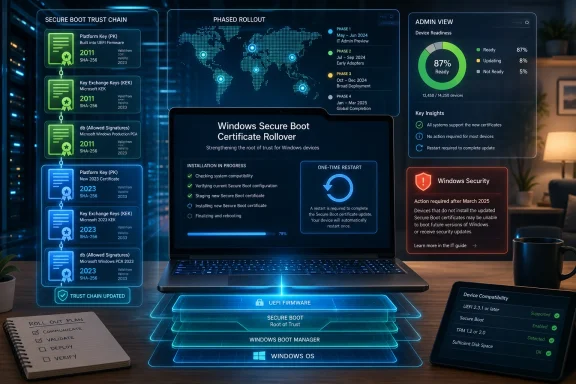
That distinction matters because this is the kind of change users experience as nuisance while administrators experience it as risk. A single unexpected reboot is irritating on a home laptop. Across a school district, hospital, factory floor, or fleet of aging Windows 10 machines, it becomes a reminder that Secure Boot was never a “set it and forget it” feature.
Microsoft’s Small Restart Is Attached to a Very Large Clock
The phrase “one-time restart” makes the story sound minor, almost apologetic. In consumer terms, that is probably right. A Windows 11 PC receiving normal monthly updates may install the new Secure Boot material, reboot one additional time during servicing, and then carry on as if nothing interesting happened.
But Microsoft’s maintenance window is not about convenience. It is about time. The Secure Boot certificates that anchored the Windows PC ecosystem in the early 2010s are reaching the end of their designed lifespan, and the replacement certificates have to be distributed widely enough that the ecosystem does not split into old-trust and new-trust machines.
Secure Boot works by allowing firmware to verify that bootloaders, option ROMs, and other pre-operating-system components are signed by trusted authorities. That trust does not live only inside Windows. It lives in firmware variables, OEM defaults, Microsoft signing infrastructure, recovery media, enterprise deployment images, and the occasionally dusty laptop sitting in a cupboard waiting to be redeployed.
That is why this story has a strange dual character. For many users, the change will appear as nothing more than an update oddity. For Microsoft, OEMs, and IT departments, it is one of the largest coordinated security plumbing jobs Windows has had to perform since Secure Boot became mainstream.
Secure Boot’s 2011 Bet Finally Comes Due
Secure Boot arrived in the Windows 8 era as part of the broader UEFI transition, when Microsoft and hardware partners were trying to harden the PC against bootkits and other malware that could load before the operating system had a chance to defend itself. The design was never just a Windows feature. It was a compact between firmware vendors, Microsoft, OEMs, Linux distributions, peripheral makers, and anyone else whose code needed to run before an OS kernel.
That compact depended on certificates. Microsoft provided certificates used to validate Windows boot components and, through the Microsoft UEFI CA, third-party boot software. Those certificates were issued in 2011, a date that now looks less like ancient history and more like a debt instrument reaching maturity.
The problem is not that PCs will all suddenly brick the moment the calendar reaches June 2026. Certificate expiration in this layer is more complicated than the familiar web-browser panic over an expired HTTPS certificate. Existing signed components may continue to boot in many scenarios, but the ability to keep updating trust, validating newer boot components, and maintaining a clean Secure Boot chain depends on getting the ecosystem onto the 2023 certificate generation.
That is the maintenance job now surfacing through Windows Update. Microsoft has been preparing the transition for months, and newer PCs are more likely to have the replacement material already. Older but still supported devices are supposed to receive the certificates through normal servicing, subject to phased rollout, hardware readiness, firmware behavior, and the messy diversity of the Windows installed base.
The remarkable thing is not that Microsoft is doing this. The remarkable thing is that it has to do it across a platform whose greatest strength and greatest weakness are the same: nearly endless hardware variety.
The Extra Reboot Is the Consumer-Friendly Symptom
Microsoft’s warning that some systems may see an additional restart is carefully framed. It says a limited number of consumer and business devices may restart one more time during installation after a Secure Boot certificate update is applied. That is the kind of wording designed to calm users who interpret every extra reboot as a failed update.
For home users, the practical advice is boring and correct: install monthly security updates, do not interrupt firmware or boot-related servicing, and check Windows Security if Windows reports that action is needed. If a PC was purchased in the last couple of years, it may already be carrying the newer certificates or may be in a state that requires little visible intervention.
The update experience may still feel strange. Windows updates already suffer from a trust problem because users have been trained by years of cumulative updates, driver surprises, and failed installation loops to treat every unexpected restart as suspicious. When Microsoft says “one-time restart,” users hear “another thing Windows did without asking.”
That skepticism is not irrational. Windows Update has become the mechanism through which Microsoft ships not only security fixes but feature changes, servicing stack behavior, driver packages, Copilot-related additions, and occasionally policy nudges. Even when a specific update is justified, the channel carries baggage.
This time, though, the restart is not the story. The restart is the receipt.
Windows 10 Turns a Certificate Rollover Into a Support Test
The most uncomfortable part of the Secure Boot transition is not Windows 11. It is Windows 10. Microsoft’s older operating system still runs on a vast number of PCs, including machines that are perfectly functional but not eligible for Windows 11 because of CPU, TPM, or other hardware requirements.
Windows 10’s support status makes the certificate rollover more consequential. Devices eligible for security updates can receive the relevant updates through supported servicing paths. Devices outside support, or devices not enrolled in Microsoft’s Extended Security Updates program where applicable, are in a more precarious position.
That does not mean every unsupported Windows 10 PC will abruptly fail. But it does mean owners of those machines cannot assume that a foundational security mechanism will keep being maintained by ordinary Windows Update. A PC can remain useful while becoming progressively harder to trust, especially when the trust issue sits below the operating system itself.
This is where Microsoft’s policy and Microsoft’s security engineering collide. The company wants to move the ecosystem to Windows 11 and newer hardware baselines. At the same time, the real world is full of Windows 10 systems attached to point-of-sale terminals, lab equipment, CNC machines, home offices, backup roles, and family members who do not know or care what Secure Boot is.
The certificate deadline therefore becomes another pressure point in the Windows 10 retirement story. Microsoft can say, accurately, that supported devices have a path. Users can say, also accurately, that a security architecture promoted as foundational should not become another lever pushing otherwise working PCs toward replacement.
The PC Ecosystem Is Learning That Firmware Has a Lifecycle
For decades, many users treated PC firmware as something that came with the machine and stayed there forever. BIOS updates were scary, rare, and often reserved for enthusiasts fixing a specific compatibility issue. UEFI, Secure Boot, TPMs, and modern device security have changed that bargain.
A modern PC’s security posture depends on firmware that can receive updates, store new trust anchors, revoke old ones, and coordinate with the operating system. That is a healthier model than the old world, but it also means the lowest layers of the machine now have a lifecycle that ordinary users and procurement teams must understand.
The Secure Boot rollover exposes the weak points in that lifecycle. Some devices may need OEM firmware updates before Microsoft’s certificate updates can be applied cleanly. Some machines in storage may miss the normal rollout cadence. Some specialized systems may be managed through tools that deliberately suppress or delay firmware changes. Some organizations may discover that their inventory tells them the OS build but not the boot-trust state.
This is why administrators are treating the June deadline as more than a patch Tuesday item. A monthly cumulative update is easy to count. A firmware-dependent certificate transition across multiple OEMs, models, BIOS revisions, boot configurations, and deployment histories is harder.
The issue also reaches beyond Windows itself. Secure Boot affects recovery media, imaging workflows, dual-boot configurations, Linux distributions, hypervisors, anti-cheat systems, security tools, and hardware with UEFI option ROMs. The more a machine does before Windows loads, the more reason there is to verify that every component in that chain will remain trusted under the newer certificate regime.
Microsoft’s Phased Rollout Is Sensible, but It Makes Visibility Harder
Microsoft is not simply blasting the new Secure Boot certificates to every PC at once. That would be reckless. The company is using a phased approach because firmware diversity makes confidence checks essential, and because boot-level failures are among the worst failures a software update can cause.
The downside is ambiguity. If one Windows 11 laptop in a household has already received the new certificates and another has not, that may be normal. If one enterprise model progresses and another waits, that may reflect bucketed rollout logic rather than a misconfiguration. If Windows Security displays a warning, users may not know whether they need a Microsoft update, an OEM firmware update, a configuration change, or simply patience.
This is a familiar Microsoft tradeoff. Phased deployment reduces the probability of a catastrophic broad failure, but it also makes the system less legible. Users and admins can struggle to distinguish “not yet offered” from “blocked,” “installed” from “staged,” and “reboot required” from “firmware intervention required.”
The Windows Security app is supposed to make the consumer side easier by surfacing Secure Boot status and warnings. In enterprise environments, administrators will lean on event logs, registry state, Intune, management scripts, OEM tooling, and update compliance reporting. That is powerful, but it is also a sign that Secure Boot’s trust chain is no longer an invisible platform promise. It is an asset to be inventoried.
Microsoft’s challenge is communication as much as code. The company has to persuade users that an extra restart is expected while persuading IT pros that the issue is serious enough to audit. Those are opposite messages delivered to overlapping audiences.
Unsupported Does Not Always Mean Broken, but It Does Mean Alone
One of the traps in this story is overstating the cliff. Security coverage is rarely a movie-style countdown where everything explodes at midnight. Secure Boot certificate expiration is more likely to create uneven degradation than universal collapse.
Some machines will update cleanly and never trouble their owners. Some will continue booting but lose access to future Secure Boot updates or newer trusted components. Some will require OEM firmware updates. Some legacy workflows may break only when an organization tries to boot newer media, deploy a newer OS image, or rotate more of the boot chain to 2023-signed components.
That nuance matters because panic helps nobody. But neither does complacency. A machine that “still boots” is not necessarily a machine with a healthy security posture, particularly if it can no longer receive or apply trust updates at the firmware boundary.
This is especially relevant for small businesses and power users who run older Windows 10 machines outside formal management. They may not have an Intune dashboard, a vulnerability management platform, or a procurement team tracking OEM firmware advisories. Their first warning may be a Windows Security message, a failed update, or a sudden incompatibility with boot media.
The practical lesson is simple: the further a PC is from a supported, updated, mainstream configuration, the less Microsoft can make this transition invisible. That is not unique to Secure Boot. It is the reality of modern platform security.
The Security Case Is Stronger Than the User Experience
It is easy to mock certificate rollover as bureaucratic plumbing, but the security case is real. Boot-level malware is dangerous because it can compromise the system before Windows, antivirus tools, endpoint agents, and user-mode protections begin operating. Secure Boot is not a magic shield, but it raises the cost of persistence below the OS.
Certificate renewal is part of that model. Long-lived trust anchors are convenient until they become stale. A platform that cannot rotate trust eventually becomes brittle, because old assumptions remain embedded long after the threat environment changes.
The awkwardness is that trust rotation on PCs is harder than trust rotation in a cloud service. Microsoft cannot simply update a server fleet it owns. It has to coordinate with OEM firmware, enterprise policy, offline machines, dual-boot users, recovery environments, and hardware released across more than a decade.
That is the price of the open PC ecosystem. Apple can move trust boundaries through a narrower hardware and software stack. Microsoft has to do it through a vast federation of manufacturers and configurations, many of which were never designed with graceful certificate rollover as a routine operation.
In that sense, the Secure Boot refresh is a stress test for the whole Windows servicing philosophy. If Microsoft can make it boring, that is success. If it becomes a wave of warnings, firmware hunts, and forum posts about machines in degraded states, it will show how much hidden complexity still sits beneath Windows’ polished security slogans.
Enterprises Should Treat This Like a Fleet Readiness Drill
For managed environments, the right response is not to wait for users to report restart oddities. The right response is to inventory. Organizations should know which devices have Secure Boot enabled, which certificate generation is present, which models need OEM firmware, which devices are out of support, and which machines are offline often enough to miss staged updates.
That work is unglamorous, but it is exactly the kind of hygiene that separates a manageable security transition from a surprise incident. The worst cases are not likely to be standard laptops on current Windows 11 builds receiving updates directly from Microsoft. The worst cases are edge machines, shared workstations, lab systems, loaner fleets, kiosks, old images, and devices managed by processes nobody has reviewed in years.
There is also a deployment media problem lurking here. Enterprises that rely on older Windows installation media, recovery drives, PXE workflows, or custom boot images should verify that those images remain compatible with the Secure Boot trust state they are moving toward. A boot chain is only as current as its oldest operational dependency.
Administrators should also be cautious about treating firmware as an afterthought. OEM BIOS and UEFI updates are sometimes the missing link in these transitions, and many organizations historically avoid them unless something is broken. Secure Boot certificate rollover is a reason to revisit that habit.
If this all sounds like more work than one extra restart should justify, that is the point. The extra restart is just the consumer artifact of an infrastructure-level change.
Microsoft’s Messaging Walks a Narrow Line
Microsoft has to thread a needle here. If it makes the Secure Boot transition sound dramatic, users may fear that updates will brick their PCs. If it makes the change sound trivial, admins may not prepare. If it emphasizes Windows 10 risk too bluntly, critics will see another upgrade scare campaign.
The company’s current language leans toward reassurance for consumers and action for IT professionals. That is probably the correct balance. But Microsoft has earned the burden of skepticism because Windows update messaging has often blurred security necessity, product strategy, and user nudging.
The Secure Boot rollover deserves to be separated from that noise. It is not Copilot appearing in a place where users did not ask for it. It is not a Start menu experiment. It is not an ad dressed as a recommendation. It is a trust-chain maintenance event with a real deadline.
Still, the Windows 10 overlap complicates the purity of that message. When users hear that unsupported systems may not receive the update, they reasonably connect it to the broader push off Windows 10. Microsoft may be technically right and politically vulnerable at the same time.
That tension will define the next several months. The more quietly the rollout proceeds, the more Microsoft can point to it as evidence that Windows security servicing has matured. The more users see red warnings, failed updates, or unclear firmware requirements, the more the story becomes another chapter in Windows’ long-running struggle to make necessary maintenance feel respectful.
The June Deadline Turns Patch Tuesday Into a Firmware Story
The concrete advice is not complicated, but it is more urgent than the phrase “one-time restart” suggests. Users should let supported Windows machines install current security updates, avoid interrupting restarts, and pay attention to Secure Boot warnings in Windows Security. Administrators should validate rather than assume.
The certificate refresh is also a reminder that Windows maintenance now extends below the operating system. Patch Tuesday may deliver the payload, but firmware decides whether parts of the trust chain can accept and retain it. That makes OEM support, hardware age, and management tooling part of the same security conversation.
For Windows enthusiasts, the interesting part is philosophical. The PC remains open, configurable, and messy. Secure Boot tries to impose a chain of trust on that mess without destroying the flexibility that made the PC valuable in the first place.
That bargain was always going to require maintenance. June 2026 is simply the moment when a 2011 decision becomes visible.
The Part Windows Users Should Not Ignore
The safe reading of Microsoft’s change is neither panic nor dismissal. The Secure Boot certificate update is routine in purpose, unusual in scale, and potentially uneven in practice.
- Most supported Windows 11 PCs should receive the new Secure Boot certificates through normal Windows Update, though some may restart one extra time during installation.
- PCs bought recently are more likely to already be prepared for the 2023 certificate generation, but users should still check Windows Security if warnings appear.
- Windows 10 machines outside supported servicing paths are the biggest consumer concern because they may not receive the same certificate maintenance automatically.
- Organizations should inventory Secure Boot status, firmware versions, certificate state, and old deployment media before treating the June deadline as solved.
- The real risk is not that every unprepared PC instantly stops working, but that unsupported or unpatched systems drift into a degraded boot-security state.
Microsoft’s Secure Boot rollover is the sort of change that should disappear when it works and dominate help desks when it does not. The best outcome is a forgettable extra restart, followed by years in which PCs keep validating boot software without users thinking about certificates at all. But the lesson should last longer than the reboot: in modern Windows, security depends not just on the operating system you can see, but on the trust machinery beneath it — and that machinery has deadlines.