

Microsoft’s May 2026 Teams update added agent-focused developer features, faster chat navigation, improved unread-message handling, AI video recaps, organizer-controlled deletion of meeting artifacts, Windows Do Not Disturb awareness, and a new batch of Teams-certified room and meeting devices across desktop, mobile, and workplace scenarios. The timing matters because Microsoft did not treat this as a routine monthly cleanup. By aligning the roundup with Build 2026, the company effectively recast Teams as a front door for workplace agents, not merely a chat and meetings client. That shift will excite developers, annoy some administrators, and quietly change how much business context flows through Teams every day.
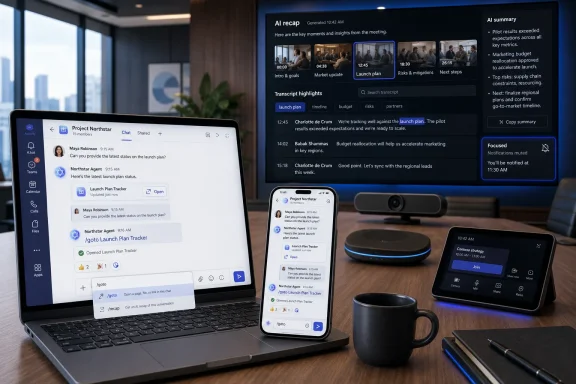
The most important May addition is not a prettier badge, a better search box, or even AI-generated meeting video. It is the way Microsoft is pushing agents deeper into ordinary Teams behavior without making the product feel like a separate Copilot surface. Slash commands for agent invocation, quoted replies for agents, and message reactions for agents sound small, but they are the grammar of a new interface.
Teams has always been a place where work is discussed. Microsoft now wants it to be the place where work is delegated. That is a much larger ambition, because delegation changes Teams from a collaboration layer into an execution layer.
The public-preview agent features are designed to make bots feel less like bolted-on apps and more like participants in the conversation. An agent that can be invoked inline, respond to a quoted message, and react in a thread is no longer waiting behind an app icon. It is sitting in the channel, ready to be pulled into the flow of work.
That is the Build 2026 story in miniature. Microsoft’s agent pitch is not only about building more intelligent assistants; it is about putting those assistants where employees already negotiate tasks, decisions, approvals, and handoffs. Teams is the obvious place to do it, and May’s update shows Microsoft knows the interface has to become more conversational before agentic work can become routine.
This is the right move if Microsoft wants Teams agents to survive contact with enterprise IT. Developers need repeatable setup, configuration, versioning, and automation. Admins need to know that the next wave of agents will not be handcrafted snowflakes scattered across tenants with inconsistent permissions and unclear ownership.
The CLI also signals that Microsoft is trying to meet developers where they already work. The mention of Teams agents for Cursor, Linear, and Atlassian Rovo is not accidental. Those are not traditional office-productivity endpoints; they are part of the modern engineering and work-management stack.
That matters because Teams has sometimes felt like the place developers are forced to attend meetings, not the place they choose to do work. By plugging into tools such as Cursor and Linear, Microsoft is trying to make Teams relevant to the agentic software workflow rather than simply asking engineers to come back to chat after the real work happens elsewhere.
The new slash commands, including
Line numbers in code blocks are another small but welcome fix. Teams is not GitHub, Visual Studio Code, or a full technical review environment, but developers and admins paste code into it constantly. Line numbers make those conversations less sloppy, especially when a troubleshooting thread turns into a debate over exactly which command, JSON field, or script line is wrong.
The revised badging experience and unread-focused mobile interface are also Microsoft acknowledging a basic truth: Teams fatigue is often notification fatigue. People do not need more red dots; they need better confidence that the red dots mean something. A mobile “Catch up” flow that lets users swipe through unread items and mark them read is not glamorous, but it attacks one of the client’s most persistent annoyances.
The improved Find experience in chats and channels, with new filters, continues that same theme. Teams is not just competing with Slack or Zoom; it is competing with memory. The faster a user can answer “where did we decide that?” or “who sent the file?” the more Teams justifies its central place in the Microsoft 365 stack.
This is also where the agent story loops back into ordinary productivity. Agents are only as useful as the context they can retrieve and act on. If Microsoft improves human search and machine-readable context at the same time, Teams becomes more valuable both to users and to the automation layer Microsoft is building around them.
There is a risk here, of course. Better retrieval also means more sensitive material is easier to locate, summarize, and potentially expose through poorly governed workflows. That does not make the search improvements bad; it makes governance more important than ever.
By honoring Windows DND, Teams is behaving more like a first-class Windows citizen. That is especially important because Microsoft keeps selling Windows, Teams, Outlook, and Copilot as parts of a coherent productivity environment. Coherence is hard to believe when one Microsoft app ignores another Microsoft setting meant to protect focus.
This change will not transform Teams on its own. But it is symbolically important because it treats user attention as a system-level resource rather than an app-level prize. In a workplace where AI agents are about to generate even more updates, nudges, summaries, requests, and approvals, that principle needs to harden quickly.
The irony is that Microsoft’s agent future depends on restraint. If Teams becomes the place where every agent speaks whenever it wants, users will rebel. If it becomes the place where humans can summon agents intentionally, silence them predictably, and review their output efficiently, Microsoft has a much stronger case.
That may be genuinely useful for long meetings, especially when the important moments are visual. A transcript can capture words, but it does not always capture the slide being discussed, the demo being shown, or the tone of a decision point. Video recap is Microsoft’s answer to that gap.
But it also deepens the compliance stakes around recorded meetings. Once Teams can generate more polished and accessible meeting artifacts, those artifacts become more attractive to share, forward, store, and reuse. The convenience is obvious; so is the risk.
That is why the companion feature allowing organizers to delete meeting recordings, AI summaries, and transcripts themselves is more than administrative cleanup. It gives meeting owners a faster way to reduce exposure when sensitive material has been captured. In regulated environments, however, self-service deletion will need to coexist with retention, eDiscovery, legal hold, and internal policy.
That does not mean Microsoft is handing over the keys without consequences. Organizations will need to review how this behavior interacts with retention labels, audit logs, compliance boundaries, and user training. The wrong implementation could create confusion between deleting a visible artifact and eliminating a discoverable record.
Still, the direction is sensible. Microsoft has spent years encouraging users to record, transcribe, summarize, and revisit meetings. Giving organizers more immediate control over those outputs is the counterweight that should have arrived alongside the AI meeting boom.
This is the pattern IT pros should watch: every AI convenience creates a corresponding governance demand. A smarter recap needs clearer deletion rules. A more human-like agent needs stricter identity and permission controls. Faster search needs better data hygiene.
The newly certified devices include Barco ClickShare Hub Core with Logitech Meetup 2, Jabra Scheduler, Neat Pad Pro, Jabra Speak2 40, and Owl Labs Meeting Owl 5 Pro. That mix spans room control, scheduling, audio, video, and hybrid meeting capture. It is the physical underside of Microsoft’s collaboration strategy.
This matters because hybrid work has entered its less glamorous phase. The emergency pandemic-era scramble is over, but organizations are still trying to make rooms behave consistently for remote attendees, in-office participants, and support teams. Certified hardware does not guarantee perfection, but it gives IT departments a narrower support matrix and a clearer procurement path.
It also reinforces Microsoft’s platform leverage. Teams is not just an app installed on PCs; it is a certification target for workplace hardware vendors. Every new certified device extends the gravitational field around Teams in offices that may otherwise be standardizing on a patchwork of meeting platforms.
For frontline scenarios, the value of Teams is often not chat novelty but operational consistency. Scheduling, task handoff, shared devices, walkie-talkie-style communication, and simplified mobile workflows are where Microsoft can make Teams sticky outside the office-worker population. Those users do not care whether an agent can react with an emoji if the app is slow, noisy, or hard to use on a shared device.
For Teams Rooms, the story is reliability and manageability. New meeting intelligence features are useful only if the room joins correctly, the camera behaves, the audio is intelligible, and the device estate can be monitored. Microsoft’s hardware certification pipeline is therefore not an accessory to the Teams roadmap; it is part of the product’s enterprise credibility.
This is where WindowsForum readers should be appropriately skeptical. Monthly feature lists tend to present everything as progress, but enterprise value depends on whether the features reduce tickets, shorten meetings, improve security posture, or simply add more toggles to explain.
That framing helps explain why platform enhancements led the update. Microsoft wants developers, admins, and partners to see Teams as a place where agents can be discovered, invoked, configured, and woven into actual collaboration. The monthly roundup became a stage prop in a larger developer narrative.
There is nothing inherently wrong with that. Teams has always been more than a chat app, and Microsoft has every incentive to make it the collaboration shell for Microsoft 365 and beyond. The question is whether the user experience can absorb the ambition.
Teams already carries meetings, calls, channels, chats, files, apps, workflows, approvals, webinars, rooms, phone features, and Copilot experiences. Adding a richer agent layer may be powerful, but it also risks making the product feel like the enterprise equivalent of a junk drawer. Microsoft’s challenge is not adding capability; it is preserving legibility.
Tenant owners should be looking at agent permissions, app governance, retention policies, meeting recording defaults, transcript handling, mobile notification behavior, and device certification together. Treating each Teams feature as a separate toggle misses how users actually experience the platform. A user does not care whether a confusing behavior came from Teams, Copilot, Windows notifications, a room device, or a third-party integration; they just blame Teams.
The new agent capabilities especially deserve scrutiny before broad adoption. Public preview is not a synonym for harmless. Once agents can participate more naturally in chats and channels, organizations need clarity about identity, auditability, data access, and who is responsible when an agent’s output becomes part of a business workflow.
The healthiest deployments will be the ones that start with specific use cases. An agent that helps triage engineering work from Linear or Atlassian context is easier to justify than a vague mandate to “bring AI into Teams.” The same is true for video recap, unread-message workflows, and organizer deletion controls: each needs a policy story, not just a rollout date.
 Teams Is Becoming Microsoft’s Agent Console by Stealth
The most important May addition is not a prettier badge, a better search box, or even AI-generated meeting video. It is the way Microsoft is pushing agents deeper into ordinary Teams behavior without making the product feel like a separate Copilot surface. Slash commands for agent invocation, quoted replies for agents, and message reactions for agents sound small, but they are the grammar of a new interface.Teams has always been a place where work is discussed. Microsoft now wants it to be the place where work is delegated. That is a much larger ambition, because delegation changes Teams from a collaboration layer into an execution layer.
The public-preview agent features are designed to make bots feel less like bolted-on apps and more like participants in the conversation. An agent that can be invoked inline, respond to a quoted message, and react in a thread is no longer waiting behind an app icon. It is sitting in the channel, ready to be pulled into the flow of work.
That is the Build 2026 story in miniature. Microsoft’s agent pitch is not only about building more intelligent assistants; it is about putting those assistants where employees already negotiate tasks, decisions, approvals, and handoffs. Teams is the obvious place to do it, and May’s update shows Microsoft knows the interface has to become more conversational before agentic work can become routine.
The Command Line Arrives Because Agents Need Plumbing, Not Theater
The new Teams CLI is less flashy than AI video recap, but it may matter more to the people who actually build and govern Teams experiences. Microsoft says developers can use it to spin up and configure Teams agents more quickly. That positions agent creation as something closer to normal software delivery, not a one-off demo built in a portal.This is the right move if Microsoft wants Teams agents to survive contact with enterprise IT. Developers need repeatable setup, configuration, versioning, and automation. Admins need to know that the next wave of agents will not be handcrafted snowflakes scattered across tenants with inconsistent permissions and unclear ownership.
The CLI also signals that Microsoft is trying to meet developers where they already work. The mention of Teams agents for Cursor, Linear, and Atlassian Rovo is not accidental. Those are not traditional office-productivity endpoints; they are part of the modern engineering and work-management stack.
That matters because Teams has sometimes felt like the place developers are forced to attend meetings, not the place they choose to do work. By plugging into tools such as Cursor and Linear, Microsoft is trying to make Teams relevant to the agentic software workflow rather than simply asking engineers to come back to chat after the real work happens elsewhere.
Chat Gets Faster Because Teams Still Has to Win the Mundane Minutes
For all the agent talk, Teams lives or dies in the mundane moments: finding a message, clearing unread noise, jumping to the right place, formatting a code snippet, and not being nagged while Windows is already in Do Not Disturb. May’s chat and collaboration improvements are aimed at precisely that daily friction.The new slash commands, including
/goto, are a good example. Microsoft is slowly turning Teams into something more keyboard-driven and command-aware, which is overdue for a product used by people who spend entire days in it. If agents are going to be invoked by slash command, ordinary navigation and workflow commands need to feel just as natural.Line numbers in code blocks are another small but welcome fix. Teams is not GitHub, Visual Studio Code, or a full technical review environment, but developers and admins paste code into it constantly. Line numbers make those conversations less sloppy, especially when a troubleshooting thread turns into a debate over exactly which command, JSON field, or script line is wrong.
The revised badging experience and unread-focused mobile interface are also Microsoft acknowledging a basic truth: Teams fatigue is often notification fatigue. People do not need more red dots; they need better confidence that the red dots mean something. A mobile “Catch up” flow that lets users swipe through unread items and mark them read is not glamorous, but it attacks one of the client’s most persistent annoyances.
Search Is Finally Being Treated Like a Live Interface
The update to instantly surface search results without requiring users to press Enter is the kind of feature that sounds obvious only after it arrives. Teams search has long carried the burden of being both essential and faintly irritating. When the conversation history is the record of work, slow or clumsy search becomes an organizational tax.The improved Find experience in chats and channels, with new filters, continues that same theme. Teams is not just competing with Slack or Zoom; it is competing with memory. The faster a user can answer “where did we decide that?” or “who sent the file?” the more Teams justifies its central place in the Microsoft 365 stack.
This is also where the agent story loops back into ordinary productivity. Agents are only as useful as the context they can retrieve and act on. If Microsoft improves human search and machine-readable context at the same time, Teams becomes more valuable both to users and to the automation layer Microsoft is building around them.
There is a risk here, of course. Better retrieval also means more sensitive material is easier to locate, summarize, and potentially expose through poorly governed workflows. That does not make the search improvements bad; it makes governance more important than ever.
Respecting Windows Do Not Disturb Is a Small Admission of Past Sin
Teams finally respecting the Windows Do Not Disturb setting is one of those changes that prompts a weary reaction: why was this not already the default? Users have spent years dealing with overlapping notification systems, presence states, focus modes, calendar signals, and app-specific alert behavior. The result has often been less like intelligent assistance and more like a cockpit full of blinking lights.By honoring Windows DND, Teams is behaving more like a first-class Windows citizen. That is especially important because Microsoft keeps selling Windows, Teams, Outlook, and Copilot as parts of a coherent productivity environment. Coherence is hard to believe when one Microsoft app ignores another Microsoft setting meant to protect focus.
This change will not transform Teams on its own. But it is symbolically important because it treats user attention as a system-level resource rather than an app-level prize. In a workplace where AI agents are about to generate even more updates, nudges, summaries, requests, and approvals, that principle needs to harden quickly.
The irony is that Microsoft’s agent future depends on restraint. If Teams becomes the place where every agent speaks whenever it wants, users will rebel. If it becomes the place where humans can summon agents intentionally, silence them predictably, and review their output efficiently, Microsoft has a much stronger case.
AI Video Recaps Turn Meetings Into Media Objects
AI-powered video recaps are the most visibly futuristic May feature, and they fit neatly into Microsoft’s broader attempt to make meeting artifacts more useful after the call ends. A transcript is searchable. A summary is skimmable. A video recap tries to be something else: a compressed version of the meeting that feels closer to a highlight reel.That may be genuinely useful for long meetings, especially when the important moments are visual. A transcript can capture words, but it does not always capture the slide being discussed, the demo being shown, or the tone of a decision point. Video recap is Microsoft’s answer to that gap.
But it also deepens the compliance stakes around recorded meetings. Once Teams can generate more polished and accessible meeting artifacts, those artifacts become more attractive to share, forward, store, and reuse. The convenience is obvious; so is the risk.
That is why the companion feature allowing organizers to delete meeting recordings, AI summaries, and transcripts themselves is more than administrative cleanup. It gives meeting owners a faster way to reduce exposure when sensitive material has been captured. In regulated environments, however, self-service deletion will need to coexist with retention, eDiscovery, legal hold, and internal policy.
Microsoft Gives Organizers More Power Because Admins Cannot Be Everywhere
The ability for meeting organizers to quickly delete recordings, AI summaries, and transcripts reflects a practical truth about Teams at enterprise scale. Admins cannot be the first responder for every accidental recording, every sensitive transcript, or every AI-generated summary that should not linger. The person who ran the meeting is often the person who knows fastest that something needs to be removed.That does not mean Microsoft is handing over the keys without consequences. Organizations will need to review how this behavior interacts with retention labels, audit logs, compliance boundaries, and user training. The wrong implementation could create confusion between deleting a visible artifact and eliminating a discoverable record.
Still, the direction is sensible. Microsoft has spent years encouraging users to record, transcribe, summarize, and revisit meetings. Giving organizers more immediate control over those outputs is the counterweight that should have arrived alongside the AI meeting boom.
This is the pattern IT pros should watch: every AI convenience creates a corresponding governance demand. A smarter recap needs clearer deletion rules. A more human-like agent needs stricter identity and permission controls. Faster search needs better data hygiene.
Certified Hardware Keeps Teams Anchored in the Room
May’s certified hardware list is a reminder that Teams is not only a software feed full of AI previews. It is also the conference room, the huddle space, the shared desk, the scheduler panel, the speaker puck, and the owl-shaped camera in the middle of the table. Microsoft’s Teams ecosystem depends on those rooms working reliably enough that nobody thinks about them.The newly certified devices include Barco ClickShare Hub Core with Logitech Meetup 2, Jabra Scheduler, Neat Pad Pro, Jabra Speak2 40, and Owl Labs Meeting Owl 5 Pro. That mix spans room control, scheduling, audio, video, and hybrid meeting capture. It is the physical underside of Microsoft’s collaboration strategy.
This matters because hybrid work has entered its less glamorous phase. The emergency pandemic-era scramble is over, but organizations are still trying to make rooms behave consistently for remote attendees, in-office participants, and support teams. Certified hardware does not guarantee perfection, but it gives IT departments a narrower support matrix and a clearer procurement path.
It also reinforces Microsoft’s platform leverage. Teams is not just an app installed on PCs; it is a certification target for workplace hardware vendors. Every new certified device extends the gravitational field around Teams in offices that may otherwise be standardizing on a patchwork of meeting platforms.
The Frontline and Rooms Story Is Still the Quiet Enterprise Story
Microsoft’s monthly Teams roundups often bury frontline worker and Teams Rooms details behind the headline user features. That is understandable for general readers, but it can distort what matters to large organizations. The everyday Teams experience is only one layer of a much bigger deployment puzzle.For frontline scenarios, the value of Teams is often not chat novelty but operational consistency. Scheduling, task handoff, shared devices, walkie-talkie-style communication, and simplified mobile workflows are where Microsoft can make Teams sticky outside the office-worker population. Those users do not care whether an agent can react with an emoji if the app is slow, noisy, or hard to use on a shared device.
For Teams Rooms, the story is reliability and manageability. New meeting intelligence features are useful only if the room joins correctly, the camera behaves, the audio is intelligible, and the device estate can be monitored. Microsoft’s hardware certification pipeline is therefore not an accessory to the Teams roadmap; it is part of the product’s enterprise credibility.
This is where WindowsForum readers should be appropriately skeptical. Monthly feature lists tend to present everything as progress, but enterprise value depends on whether the features reduce tickets, shorten meetings, improve security posture, or simply add more toggles to explain.
Build 2026 Casts a Long Shadow Over the May Roundup
Microsoft’s explanation that the Teams roundup was delayed to align with Build 2026 is plausible, and it also reveals the hierarchy of the announcement. This was not just “what shipped in Teams.” It was “how Teams fits into Microsoft’s agent platform story.”That framing helps explain why platform enhancements led the update. Microsoft wants developers, admins, and partners to see Teams as a place where agents can be discovered, invoked, configured, and woven into actual collaboration. The monthly roundup became a stage prop in a larger developer narrative.
There is nothing inherently wrong with that. Teams has always been more than a chat app, and Microsoft has every incentive to make it the collaboration shell for Microsoft 365 and beyond. The question is whether the user experience can absorb the ambition.
Teams already carries meetings, calls, channels, chats, files, apps, workflows, approvals, webinars, rooms, phone features, and Copilot experiences. Adding a richer agent layer may be powerful, but it also risks making the product feel like the enterprise equivalent of a junk drawer. Microsoft’s challenge is not adding capability; it is preserving legibility.
The May Update Rewards Admins Who Treat Teams as Infrastructure
The practical lesson from this release is that Teams should no longer be managed as a simple communications app. It is infrastructure for collaboration, automation, meeting records, developer workflows, room systems, and increasingly AI-mediated action. That requires a different administrative posture.Tenant owners should be looking at agent permissions, app governance, retention policies, meeting recording defaults, transcript handling, mobile notification behavior, and device certification together. Treating each Teams feature as a separate toggle misses how users actually experience the platform. A user does not care whether a confusing behavior came from Teams, Copilot, Windows notifications, a room device, or a third-party integration; they just blame Teams.
The new agent capabilities especially deserve scrutiny before broad adoption. Public preview is not a synonym for harmless. Once agents can participate more naturally in chats and channels, organizations need clarity about identity, auditability, data access, and who is responsible when an agent’s output becomes part of a business workflow.
The healthiest deployments will be the ones that start with specific use cases. An agent that helps triage engineering work from Linear or Atlassian context is easier to justify than a vague mandate to “bring AI into Teams.” The same is true for video recap, unread-message workflows, and organizer deletion controls: each needs a policy story, not just a rollout date.
The May 2026 Teams Release Is Really a Governance Test
Microsoft’s May update is best understood as a bundle of practical improvements wrapped around a strategic pivot toward agents. The chat changes make Teams less irritating. The meeting changes make Teams more useful after the call. The platform changes make Teams more central to Microsoft’s AI ambitions.- Microsoft added public-preview agent features that let agents be invoked and interact more naturally inside Teams conversations.
- Developers received a new Teams CLI intended to make agent setup and configuration faster and more repeatable.
- Users gained quality-of-life improvements including
/goto, line numbers in code blocks, faster search results, better unread handling, and Windows Do Not Disturb support. - Meeting organizers can now delete recordings, AI summaries, and transcripts more directly, reducing dependence on admins for some sensitive-content cleanup.
- AI-powered video recaps make meeting records more consumable, but they also increase the importance of retention and sharing policies.
- Newly certified Teams hardware shows Microsoft is still investing in the physical meeting-room ecosystem, not just AI software features.
References
- Primary source: Neowin
Published: 2026-06-03T12:42:18.512879
Here are all the new features Microsoft added to Teams in May 2026 | Neowin
Microsoft Teams gained new AI agent features, mobile chat improvements, and meeting tools in May 2026, alongside fresh certified hardware. www.neowin.net
- Official source: support.microsoft.com
Novità in Microsoft Teams | Microsoft Support
Queste note di rilascio vengono aggiornate regolarmente con le informazioni più recenti sulle nuove funzionalità per Microsoft Teams.support.microsoft.com - Related coverage: windowscentral.com
4 new Microsoft Teams features coming in April 2026 | Windows Central
Four new features are headed to Teams next month, including AI-powered video recaps and a UI tweak that finally lets you hide the meeting toolbar.www.windowscentral.com - Official source: techcommunity.microsoft.com
What’s New in Microsoft Teams | March 2026 | Microsoft Community Hub
Welcome once again to everyone in our Microsoft Tech Community! We’re glad you’ve joined us to check out a fresh lineup of Teams features designed to keep... techcommunity.microsoft.com
- Related coverage: techriver.com
- Official source: cdn.techcommunity.microsoft.com
