

Microsoft’s May 2026 Windows update begins a broad Secure Boot certificate transition for most Windows devices ahead of June 2026 expirations, adding new deployment machinery and, on Windows 11, a visible
Secure Boot has always been one of those Windows technologies users benefit from mostly by never seeing it. It runs before Windows loads, checking that early boot components are signed by trusted authorities and helping block bootkits, rootkits, and tampered pre-OS code from getting a privileged foothold. The user experience, when everything works, is silence.
That silence is now ending because the original Microsoft Secure Boot certificates issued in the Windows 8 era are reaching the end of their planned life. Some begin expiring in June 2026, with other related certificates following later in the year. Certificates are not magic talismans; they are dated credentials, and Microsoft is now doing what every sane security architecture eventually has to do: rotate trust before old trust becomes stale.
The problem is scale. Secure Boot lives at the intersection of Windows, firmware, OEM implementation, BitLocker, recovery media, third-party bootloaders, and enterprise management tools. Updating an app certificate is one thing. Updating the trust material used before the operating system is fully awake is another.
That is why Microsoft’s language has sounded simultaneously urgent and careful. The company says most Windows devices are affected, but it is not saying most PCs will fail to boot on June 1. The more accurate reading is less dramatic and more operationally important: devices that do not transition to the 2023 Secure Boot certificates may continue running, but they risk losing the ability to receive future protections for boot-level components.
The real story is not the folder. The real story is that Microsoft has chosen to ship enterprise-oriented Secure Boot tooling broadly enough that Windows Home users can see the plumbing. That tells us the company wants one servicing pipeline to cover as much of the installed base as possible, even if the tooling is mainly useful to administrators.
For IT departments, the folder is more interesting. Reports indicate it includes scripts for detecting whether the newer certificates are present, enabling the scheduled task that applies updates, exporting state, and supporting Group Policy-oriented deployment. In plain English, Microsoft is trying to give administrators a local toolkit for answering the question that matters most: which machines are actually ready?
That matters because Secure Boot readiness is not just a Windows Update checkbox. A device can be fully patched at the OS level and still have firmware or configuration constraints that complicate the certificate transition. Microsoft’s controlled rollout language, including references to “high confidence” targeting and successful update signals, is corporate fog over a real engineering concern: the company does not want to push boot-trust changes onto machines that look likely to choke on them.
That does not mean users should panic-reboot their machines in loops. It means the normal consumer pattern of installing updates and postponing restarts for weeks is a bad fit for this transition. A machine that has downloaded the relevant package but not completed its reboot phase may look updated in one place and unfinished in another.
For home users, the practical instruction is boring but important: install the May 2026 cumulative update, restart when prompted, and do not delete the SecureBoot folder because it looks unfamiliar. If Windows Security later reports a Secure Boot certificate problem, that is the moment to investigate firmware updates from the PC maker or motherboard vendor.
For administrators, “reboot your PC” is not a plan. Fleets need maintenance windows, BitLocker recovery-key hygiene, pilot rings, OEM firmware tracking, and validation telemetry. The same action that is trivial on a single laptop becomes a staged change-management exercise when multiplied across 5,000 encrypted endpoints.
That distinction matters. The risk is less like a cliff at midnight and more like a security foundation that stops being maintainable. A machine may look normal to its owner while drifting into a degraded trust state, unable to consume future boot-manager protections, Secure Boot database changes, revocation updates, or mitigations for newly discovered pre-OS attacks.
There are, however, higher-risk scenarios where the consequences can become much more visible. Older firmware, incomplete OEM support, BitLocker interactions, unusual boot configurations, dual-boot setups, third-party bootloaders, and devices that have missed months of updates can all make the transition less predictable. Some users may see warnings; some administrators may find event logs and registry state out of line; a smaller subset may encounter boot or recovery prompts.
The nuance is frustrating because it is harder to put in a headline. But it is also the difference between useful preparation and counterproductive alarm. Users should update because the security chain needs refreshing, not because every unpatched PC is guaranteed to brick itself the moment June arrives.
Secure Boot trust lives in UEFI firmware variables. Microsoft can deliver updated components and orchestrate a staged rollout, but the firmware still has to accept and correctly use the new trust anchors. That is why OEM firmware updates remain part of the story, particularly for older business PCs, servers, appliances, industrial systems, and machines that have not been consistently maintained.
This is where the Windows world’s great strength becomes a liability. The PC ecosystem offers variety, upgradeability, and long hardware life. It also means Microsoft is trying to rotate foundational boot certificates across devices built by many vendors, shipped across many years, configured under many policies, and managed with uneven discipline.
Apple can move trust chains across a tightly controlled hardware fleet with fewer variables. Microsoft has to do it across laptops, desktops, workstations, gaming rigs, tablets, servers, and forgotten conference-room PCs that have not rebooted since the last office renovation. The new SecureBoot folder is one tiny artifact of that sprawling coordination problem.
Administrators do not merely need to know whether Windows is patched. They need to know whether endpoints have the 2023 certificates, whether the right scheduled tasks have run, whether firmware is compatible, whether BitLocker recovery keys are escrowed, whether boot media has been updated, and whether the same model behaves differently across BIOS revisions. This is the kind of change that punishes asset inventories built on vibes.
The timing is also inconvenient. Windows 10’s mainstream end-of-support date in October 2025 is already behind us, pushing many organizations into Windows 11 migrations, extended security updates, hardware refreshes, or uncomfortable exception lists. Secure Boot certificate expiration now adds another axis to endpoint readiness, and it lands close enough to those migration projects to compete for the same maintenance windows and political capital.
The best-run organizations will treat this as a fleet-health exercise rather than a one-off patch. The weakest will wait for a dashboard to turn red and then discover that the real problem is not the certificate package but firmware drift, unmanaged devices, stale boot media, and undocumented exceptions.
Phrases like “high confidence device targeting data” and “sufficient successful update signals” may make sense inside Microsoft’s servicing organization. To a user staring at a new folder on the system drive, they sound like the machine is participating in an experiment. To an administrator, they imply a phased rollout whose precise gates may not be fully transparent.
There is a tension here Microsoft cannot entirely escape. If it over-simplifies, it creates panic or false certainty. If it explains every dependency, it loses the audience. But the May update’s visible folder shows that hidden infrastructure sometimes needs plain-language accompaniment, especially when the infrastructure is literally called
The company could have headed off some confusion by foregrounding the folder and scripts in release notes from the start. When users discover unexplained security-related artifacts through third-party reporting, the trust problem becomes larger than the technical one. Windows does not need less complexity, but it does need better narration when complexity leaks into view.
That matters because boot-level compromise is unusually powerful. Malware that runs before the operating system can undermine the assumptions of endpoint detection, disk encryption, kernel integrity, and measured boot. Secure Boot is not a perfect shield, but it is one of the layers that raises the cost of pre-OS attacks.
Rotating certificates also creates risk. Revoking or replacing boot trust too aggressively can strand recovery media, older bootloaders, niche hardware, or systems with unusual configurations. Moving too slowly leaves the ecosystem anchored to aging trust. Microsoft is trying to thread that needle through controlled rollout, device targeting, and staged enforcement.
This is why the story should not be reduced to “Microsoft added a folder.” The folder is a user-visible breadcrumb from a much deeper operation: retiring trust created when Windows 8 was new, tablets were supposed to redefine the PC, and many of today’s still-working machines were not yet landfill candidates or beloved lab hardware.
The second-worst thing is disabling Secure Boot because warnings or online chatter make it sound troublesome. Secure Boot is not flawless, and some Linux or specialist configurations require careful handling, but turning it off as a first response weakens a protection that exists for a reason. The better path is to update Windows, reboot, check Windows Security, and look for firmware updates from the device maker if Windows reports an issue.
Users with custom-built PCs should pay special attention to motherboard vendor firmware. Many desktops live long lives with BIOS versions that were never updated after purchase. That is fine until a transition like this arrives and the weakest link is no longer Windows itself but the firmware trust database the motherboard shipped with years ago.
Gamers should also avoid assuming this is irrelevant because the machine “works fine.” Anti-cheat systems, kernel protections, and modern Windows security features increasingly care about boot integrity. A PC can be fast, stable, and still be behind on the trust plumbing that newer software expects.
That distinction should shape how people respond. Home users should complete updates promptly and reboot. Small businesses should make sure every machine has checked in, installed current Windows updates, and received available OEM firmware. Larger organizations should already be inventorying certificate status and validating representative hardware groups.
The phrase “most Windows devices” sounds sweeping because it is. But “affected” does not mean “doomed.” It means part of the installed base still depends on trust material from 2011, and Microsoft is now forcing the ecosystem to finish a rotation that cannot be postponed indefinitely.
The safest reading is this: if your PC is maintained, standard, and supported, the transition should be routine. If your PC is old, unmanaged, dual-booted, firmware-stale, encrypted without recovery discipline, or part of a tightly controlled enterprise fleet, you need to pay attention before Windows Security or your help desk makes you pay attention later.
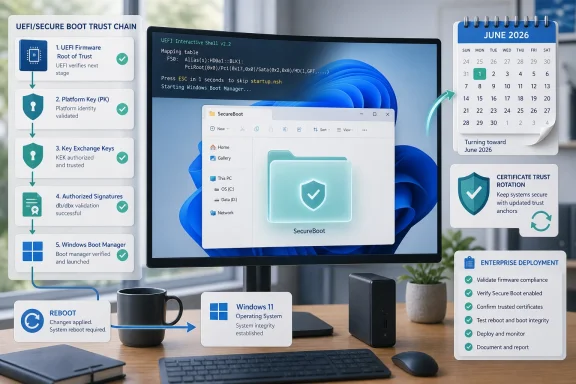
SecureBoot folder that has startled users who were not expecting it. This is not a cosmetic file-system change or another random Windows directory sprouting in the root of the system drive. It is Microsoft trying to move the trust foundation under hundreds of millions of PCs without turning the exercise into a boot-time disaster. The oddity is that one of Windows’ most invisible security systems has suddenly become visible at exactly the moment ordinary users are least equipped to judge whether that visibility is reassuring or alarming.
 Microsoft’s Certificate Clock Finally Reaches the Desktop
Secure Boot has always been one of those Windows technologies users benefit from mostly by never seeing it. It runs before Windows loads, checking that early boot components are signed by trusted authorities and helping block bootkits, rootkits, and tampered pre-OS code from getting a privileged foothold. The user experience, when everything works, is silence.That silence is now ending because the original Microsoft Secure Boot certificates issued in the Windows 8 era are reaching the end of their planned life. Some begin expiring in June 2026, with other related certificates following later in the year. Certificates are not magic talismans; they are dated credentials, and Microsoft is now doing what every sane security architecture eventually has to do: rotate trust before old trust becomes stale.
The problem is scale. Secure Boot lives at the intersection of Windows, firmware, OEM implementation, BitLocker, recovery media, third-party bootloaders, and enterprise management tools. Updating an app certificate is one thing. Updating the trust material used before the operating system is fully awake is another.
That is why Microsoft’s language has sounded simultaneously urgent and careful. The company says most Windows devices are affected, but it is not saying most PCs will fail to boot on June 1. The more accurate reading is less dramatic and more operationally important: devices that do not transition to the 2023 Secure Boot certificates may continue running, but they risk losing the ability to receive future protections for boot-level components.
The New Folder Is a Symptom of a Bigger Deployment Problem
The newly noticedSecureBoot folder in Windows 11’s May 2026 update is not malware, not a botched install, and not something home users should rush to delete. It is Microsoft placing Secure Boot update resources on systems, including PowerShell scripts intended to help detect certificate status and automate rollout steps. That folder appearing on consumer PCs is awkward, but not inherently suspicious.The real story is not the folder. The real story is that Microsoft has chosen to ship enterprise-oriented Secure Boot tooling broadly enough that Windows Home users can see the plumbing. That tells us the company wants one servicing pipeline to cover as much of the installed base as possible, even if the tooling is mainly useful to administrators.
For IT departments, the folder is more interesting. Reports indicate it includes scripts for detecting whether the newer certificates are present, enabling the scheduled task that applies updates, exporting state, and supporting Group Policy-oriented deployment. In plain English, Microsoft is trying to give administrators a local toolkit for answering the question that matters most: which machines are actually ready?
That matters because Secure Boot readiness is not just a Windows Update checkbox. A device can be fully patched at the OS level and still have firmware or configuration constraints that complicate the certificate transition. Microsoft’s controlled rollout language, including references to “high confidence” targeting and successful update signals, is corporate fog over a real engineering concern: the company does not want to push boot-trust changes onto machines that look likely to choke on them.
Rebooting Is Not Folklore This Time
The advice to reboot once or twice sounds like the oldest joke in Windows support, but in this case it is not just ritual. Secure Boot certificate changes touch parts of the system that are not meaningfully updated while Windows is simply sitting at the desktop. The work often needs a restart so firmware-facing state, scheduled tasks, and update phases can complete.That does not mean users should panic-reboot their machines in loops. It means the normal consumer pattern of installing updates and postponing restarts for weeks is a bad fit for this transition. A machine that has downloaded the relevant package but not completed its reboot phase may look updated in one place and unfinished in another.
For home users, the practical instruction is boring but important: install the May 2026 cumulative update, restart when prompted, and do not delete the SecureBoot folder because it looks unfamiliar. If Windows Security later reports a Secure Boot certificate problem, that is the moment to investigate firmware updates from the PC maker or motherboard vendor.
For administrators, “reboot your PC” is not a plan. Fleets need maintenance windows, BitLocker recovery-key hygiene, pilot rings, OEM firmware tracking, and validation telemetry. The same action that is trivial on a single laptop becomes a staged change-management exercise when multiplied across 5,000 encrypted endpoints.
The Scary Version of This Story Is Too Simple
It is tempting to frame the June deadline as “update or your PC will not boot.” That is not the most precise warning, and imprecision helps nobody. Microsoft’s own guidance has been more nuanced: systems may continue to start and receive regular Windows updates, but may not receive future Secure Boot protections for early boot components if they remain on outdated certificates.That distinction matters. The risk is less like a cliff at midnight and more like a security foundation that stops being maintainable. A machine may look normal to its owner while drifting into a degraded trust state, unable to consume future boot-manager protections, Secure Boot database changes, revocation updates, or mitigations for newly discovered pre-OS attacks.
There are, however, higher-risk scenarios where the consequences can become much more visible. Older firmware, incomplete OEM support, BitLocker interactions, unusual boot configurations, dual-boot setups, third-party bootloaders, and devices that have missed months of updates can all make the transition less predictable. Some users may see warnings; some administrators may find event logs and registry state out of line; a smaller subset may encounter boot or recovery prompts.
The nuance is frustrating because it is harder to put in a headline. But it is also the difference between useful preparation and counterproductive alarm. Users should update because the security chain needs refreshing, not because every unpatched PC is guaranteed to brick itself the moment June arrives.
Windows Update Can Carry the Payload, but Firmware Still Owns the Door
Microsoft’s broadest bet is that Windows Update can handle most of the transition automatically. That is probably true for a large share of modern consumer devices, especially machines with current firmware and standard Secure Boot settings. The Windows ecosystem, however, has never been a single hardware platform.Secure Boot trust lives in UEFI firmware variables. Microsoft can deliver updated components and orchestrate a staged rollout, but the firmware still has to accept and correctly use the new trust anchors. That is why OEM firmware updates remain part of the story, particularly for older business PCs, servers, appliances, industrial systems, and machines that have not been consistently maintained.
This is where the Windows world’s great strength becomes a liability. The PC ecosystem offers variety, upgradeability, and long hardware life. It also means Microsoft is trying to rotate foundational boot certificates across devices built by many vendors, shipped across many years, configured under many policies, and managed with uneven discipline.
Apple can move trust chains across a tightly controlled hardware fleet with fewer variables. Microsoft has to do it across laptops, desktops, workstations, gaming rigs, tablets, servers, and forgotten conference-room PCs that have not rebooted since the last office renovation. The new SecureBoot folder is one tiny artifact of that sprawling coordination problem.
Enterprise IT Will See the Mess Before Consumers Do
For most home users, the Secure Boot certificate transition should be uneventful if Windows Update is working and the machine is not ancient, heavily modified, or firmware-neglected. Enterprise IT will have a rougher time because enterprises are where Windows’ boot diversity becomes operational reality.Administrators do not merely need to know whether Windows is patched. They need to know whether endpoints have the 2023 certificates, whether the right scheduled tasks have run, whether firmware is compatible, whether BitLocker recovery keys are escrowed, whether boot media has been updated, and whether the same model behaves differently across BIOS revisions. This is the kind of change that punishes asset inventories built on vibes.
The timing is also inconvenient. Windows 10’s mainstream end-of-support date in October 2025 is already behind us, pushing many organizations into Windows 11 migrations, extended security updates, hardware refreshes, or uncomfortable exception lists. Secure Boot certificate expiration now adds another axis to endpoint readiness, and it lands close enough to those migration projects to compete for the same maintenance windows and political capital.
The best-run organizations will treat this as a fleet-health exercise rather than a one-off patch. The weakest will wait for a dashboard to turn red and then discover that the real problem is not the certificate package but firmware drift, unmanaged devices, stale boot media, and undocumented exceptions.
Microsoft’s Communication Has Been Technically Correct and Humanly Clumsy
Microsoft has published guidance, support material, blog posts, and deployment advice for this transition. The company has not buried the issue. But the public messaging still has a familiar Windows problem: technically accurate wording that makes ordinary users feel as if they have wandered into a firmware standards meeting.Phrases like “high confidence device targeting data” and “sufficient successful update signals” may make sense inside Microsoft’s servicing organization. To a user staring at a new folder on the system drive, they sound like the machine is participating in an experiment. To an administrator, they imply a phased rollout whose precise gates may not be fully transparent.
There is a tension here Microsoft cannot entirely escape. If it over-simplifies, it creates panic or false certainty. If it explains every dependency, it loses the audience. But the May update’s visible folder shows that hidden infrastructure sometimes needs plain-language accompaniment, especially when the infrastructure is literally called
SecureBoot.The company could have headed off some confusion by foregrounding the folder and scripts in release notes from the start. When users discover unexplained security-related artifacts through third-party reporting, the trust problem becomes larger than the technical one. Windows does not need less complexity, but it does need better narration when complexity leaks into view.
The Ghost of BlackLotus Still Haunts the Boot Chain
This certificate transition is not only about dates on old credentials. It sits in the larger post-BlackLotus era of Windows boot security, where Microsoft and the industry have been tightening how boot managers, revocations, and Secure Boot databases are handled. The 2023 certificate authorities are part of a broader modernization of trust at the earliest stage of system startup.That matters because boot-level compromise is unusually powerful. Malware that runs before the operating system can undermine the assumptions of endpoint detection, disk encryption, kernel integrity, and measured boot. Secure Boot is not a perfect shield, but it is one of the layers that raises the cost of pre-OS attacks.
Rotating certificates also creates risk. Revoking or replacing boot trust too aggressively can strand recovery media, older bootloaders, niche hardware, or systems with unusual configurations. Moving too slowly leaves the ecosystem anchored to aging trust. Microsoft is trying to thread that needle through controlled rollout, device targeting, and staged enforcement.
This is why the story should not be reduced to “Microsoft added a folder.” The folder is a user-visible breadcrumb from a much deeper operation: retiring trust created when Windows 8 was new, tablets were supposed to redefine the PC, and many of today’s still-working machines were not yet landfill candidates or beloved lab hardware.
Home Users Should Resist the Urge to Tinker
The worst thing a typical user can do is treat the SecureBoot folder as clutter. Deleting unfamiliar system folders has always been a bad Windows habit, but here the stakes are higher because the contents may be tied to detection and remediation steps. If the folder appeared after the May 2026 update, assume it is intentional.The second-worst thing is disabling Secure Boot because warnings or online chatter make it sound troublesome. Secure Boot is not flawless, and some Linux or specialist configurations require careful handling, but turning it off as a first response weakens a protection that exists for a reason. The better path is to update Windows, reboot, check Windows Security, and look for firmware updates from the device maker if Windows reports an issue.
Users with custom-built PCs should pay special attention to motherboard vendor firmware. Many desktops live long lives with BIOS versions that were never updated after purchase. That is fine until a transition like this arrives and the weakest link is no longer Windows itself but the firmware trust database the motherboard shipped with years ago.
Gamers should also avoid assuming this is irrelevant because the machine “works fine.” Anti-cheat systems, kernel protections, and modern Windows security features increasingly care about boot integrity. A PC can be fast, stable, and still be behind on the trust plumbing that newer software expects.
The June Date Is a Deadline, Not a Detonation
June 2026 is real, but it should be understood as the beginning of certificate expiration pressure, not a universal shutdown date. Some related certificates expire later, and the operational consequences depend on device state, firmware, configuration, and update history. The danger is not that every old PC stops cold on the first morning of June; it is that unremediated machines become progressively harder to protect at the boot layer.That distinction should shape how people respond. Home users should complete updates promptly and reboot. Small businesses should make sure every machine has checked in, installed current Windows updates, and received available OEM firmware. Larger organizations should already be inventorying certificate status and validating representative hardware groups.
The phrase “most Windows devices” sounds sweeping because it is. But “affected” does not mean “doomed.” It means part of the installed base still depends on trust material from 2011, and Microsoft is now forcing the ecosystem to finish a rotation that cannot be postponed indefinitely.
The safest reading is this: if your PC is maintained, standard, and supported, the transition should be routine. If your PC is old, unmanaged, dual-booted, firmware-stale, encrypted without recovery discipline, or part of a tightly controlled enterprise fleet, you need to pay attention before Windows Security or your help desk makes you pay attention later.
The Practical Meaning of Microsoft’s Quiet Secure Boot Push
The Windows Secure Boot change is less dramatic than the scariest headlines suggest and more important than the folder jokes imply. It is a maintenance event for the root of trust, and root-of-trust maintenance is exactly the kind of work that looks boring until it fails. The immediate task is simple, but the ecosystem lesson is larger.- Windows users should install the May 2026 update and complete the required restart cycle rather than leaving the machine half-updated.
- The new
SecureBootfolder in Windows 11 is expected behavior and should not be deleted simply because it appeared without much fanfare. - Devices that miss the certificate transition may continue to run, but they risk losing future Secure Boot protections for early boot components.
- Administrators should verify certificate status across fleets instead of assuming a successful cumulative update means the boot trust transition is complete.
- Firmware updates from OEMs and motherboard vendors may be decisive for older or more complex systems.
- BitLocker recovery readiness, updated boot media, and pilot testing matter because Secure Boot changes happen before the comfortable part of Windows is in control.
References
- Primary source: Forbes
Published: Mon, 18 May 2026 19:02:59 GMT
‘Reboot Your PC’—Microsoft Changes ‘Most Windows Devices’ In June
Microsoft starts expiring critical Secure Boot certificates in just 2 weeks.www.forbes.com - Official source: learn.microsoft.com
Update Secure Boot Certificates for Windows Devices - Windows Client | Microsoft Learn
Update your Windows devices to maintain Secure Boot protection with 2023 certificates before they expire in June 2026.learn.microsoft.com - Official source: support.microsoft.com
Surface Secure Boot Certificates | Microsoft Support
Secure Boot in UEFI firmware verifies pre-boot software using trusted certificates. Microsoft will update expiring Windows Secure Boot certificates starting June 2026 to maintain device protection.support.microsoft.com - Official source: microsoft.com
Prepare your servers for Secure Boot certificate updates | Microsoft Windows Server Blog
The original Secure Boot certificates introduced in 2011 are approaching the end of their planned lifecycle, with expirations beginning in late June 2026.www.microsoft.com - Related coverage: windowslatest.com
Microsoft confirms the new Secure Boot folder in Windows 11 isn't a bug, you don't need to delete it
New “SecureBoot” folder created by Windows 11 KB5089549 is expected behavior for Secure Boot certificates update and not a known issue. www.windowslatest.com
- Related coverage: windowscentral.com
Microsoft warns Secure Boot certificates will expire in 2026 | Windows Central
After 15 years, the original Secure Boot certificates that keep your PC secure during boot are expiring. Here's what you need to know.www.windowscentral.com
- Official source: techcommunity.microsoft.com
Secure Boot playbook for certificates expiring in 2026
Explore tools and step-by-step guidance to help you proactively update your Secure Boot certificates. techcommunity.microsoft.com
- Related coverage: tomshardware.com
Microsoft is refreshing Secure Boot certificates to plug security holes before they happen — if you bought a PC last year, you should be set | Tom's Hardware
Be sure to keep Windows 11 systems updated to get refreshed security certificates.www.tomshardware.com - Related coverage: techradar.com
Still using Windows 10? Microsoft is automatically replacing Secure Boot certificates on older PCs ahead of expiration, so you might want to update ASAP | TechRadar
Secure Boot certificate upgrades is bad news for Windows 10www.techradar.com - Related coverage: pcgamer.com
Secure Boot certificates used by anti-cheat software are set to expire in June but new ones are already in the mail | PC Gamer
You shouldn't have to worry about expired certificates if you keep your PC up-to-date.www.pcgamer.com - Related coverage: tomsguide.com
Windows 10 users warned to upgrade now or risk a ‘degraded security state’ as Microsoft ends Secure Boot support | Tom's Guide
Support for Windows 10 officially ended in October 2025, and Microsoft says devices that don’t upgrade could enter a degraded security state — leaving them vulnerable to threats. Here’s what it means for your PC and how to protect it.www.tomsguide.com - Related coverage: cisco.com
- Related coverage: bd.com
whitelisted microsoft and third party patches bd alaris products november 2025
PDF documentwww.bd.com
