Mitsubishi Electric disclosed on June 30, 2026, that MELSOFT Update Manager SW1DND-UDM-M versions 1.000A through 1.014Q contain multiple vulnerabilities in the bundled 7-Zip component, with fixed version 1.015R or later now designated as the remediation. The narrow version range makes this look like a routine vendor patch, but the underlying lesson is broader: industrial Windows workstations are increasingly exposed not only through control protocols and PLC firmware, but through the mundane helper libraries embedded in their management tools. For WindowsForum readers, the practical question is not whether 7-Zip is useful; it is whether every copy of it hiding inside an engineering utility is tracked, patched, and treated as part of the attack surface.
The Mitsubishi advisory centers on MELSOFT Update Manager, a Windows-based utility used in the company’s factory automation ecosystem. The affected model is SW1DND-UDM-M, and Mitsubishi lists vulnerable versions from 1.000A to 1.014Q. The fixed branch begins at 1.015R.
That version boundary matters because this is not a vague “check your software” warning. It gives administrators a concrete inventory task: open MELSOFT Update Manager, check the version information from the menu, and determine whether the workstation is still running a build before 1.015R. In industrial environments where engineering laptops and maintenance PCs can sit untouched between outages, that small act of checking may be the difference between a theoretical advisory and a reachable weak point.
The vulnerable component is 7-Zip, the widely used compression and decompression engine. Mitsubishi’s advisory describes four separate CVEs affecting the 7-Zip component included with MELSOFT Update Manager: two denial-of-service issues, one information-tampering issue, and one malicious-code-execution issue. The common trigger is deceptively ordinary: a user decompresses a specially crafted archive file using the bundled component.
That should sound familiar to anyone who has followed desktop security for the last two decades. Archive handling has always been a favorite place for attackers because it sits at the intersection of user trust, file parsing complexity, and routine administrative behavior. In an industrial Windows environment, that intersection becomes more consequential because the PC opening the archive may not be an office endpoint; it may be the workstation used to maintain automation software.
The more serious items sit further down the table. CVE-2025-55188 is an improper link resolution issue, described as an information tampering vulnerability, scored 6.9. Mitsubishi warns that an attacker may be able to tamper with or destroy information, and that if affected files are required for PC operation, the PC itself may enter a denial-of-service condition.
The standout is CVE-2025-11001, a path traversal flaw that Mitsubishi rates at 9.3 under CVSS 4.0. This is the bug that turns the advisory from “a decompression crash” into a workstation compromise concern. Mitsubishi says a specially crafted archive could lead to malicious code execution through the 7-Zip component included in MELSOFT Update Manager, with potential consequences including information theft, information tampering, denial of service, and other impacts.
That distinction is important for defenders. A denial-of-service bug in an engineering utility is still disruptive, especially during a maintenance window. But a code execution path in a trusted industrial software updater is a different category of risk. It means the attacker’s goal may not be to crash the tool; it may be to use the tool’s archive-handling workflow as a bridge onto a PC that has privileged access, specialized software, and often a trusted relationship with automation assets.
That comfort is only partial. Engineering environments routinely exchange project files, firmware packages, configuration exports, vendor support bundles, and compressed archives. A malicious archive does not have to arrive with a flashing red warning label; it can be disguised as a patch package, diagnostic log set, commissioned project, or troubleshooting bundle.
Industrial support workflows also create trust shortcuts. Plant staff may receive files from system integrators, OEM support teams, contractors, and regional vendor representatives. During an outage, the pressure to restore production can compress judgment. The archive that would be suspicious on a corporate laptop may be opened quickly on a maintenance PC if it appears to contain the file needed to bring a line back online.
This is why “requires user interaction” is not the same as “low risk.” In many ICS and operational technology environments, the human interaction path is the path. Attackers do not always need a remote unauthenticated exploit when they can exploit a maintenance process built around file exchange and urgency.
A Windows administrator may know whether 7-Zip itself is installed on a workstation. They may even have a software inventory rule for the main 7-Zip application. But the vulnerable parser here lives inside MELSOFT Update Manager, which means the fix comes through Mitsubishi’s software update path, not through a generic 7-Zip update deployed by package manager or endpoint management.
This is a classic supply-chain maintenance problem at the component level. Vendors embed common libraries and utilities because they are useful, stable, and familiar. Years later, when the embedded copy needs a security fix, customers must depend on the vendor to identify the exposure, rebuild the product, publish a new version, and communicate the remediation clearly.
For IT pros, the takeaway is uncomfortable but unavoidable: endpoint inventories that only track top-level applications are incomplete. The real attack surface includes bundled open-source components, redistributable runtimes, compression engines, browser controls, PDF parsers, database drivers, and other pieces that do not always show up as separate installed products. The archive utility you patched on Monday may still exist inside five other applications on Tuesday.
That split is more than a localization footnote. Global industrial organizations often standardize on vendor software but receive support through regional channels. If the fixed build is not equally easy to obtain everywhere, patch timing may vary by geography, support contract, and local representative responsiveness.
The irony is hard to miss: the remediation itself involves downloading and decompressing an archive to update a tool whose vulnerable component is used for archive handling. That does not mean the update process is unsafe, but it does reinforce the need to obtain the update from the vendor’s official channel and to keep the process inside controlled administrative procedures. A spoofed “MELSOFT update” archive is exactly the sort of lure defenders should be expecting after an advisory like this becomes public.
For Windows administrators, the cleanest path is to treat this as a managed software update rather than an ad hoc technician task. Identify the affected hosts, confirm the installed version, obtain the fixed build through the appropriate Mitsubishi channel, preserve the installer hash or package provenance if your process allows, and document the update outcome. The value is not just in getting to 1.015R; it is in making the update auditable.
None of those controls fixes the vulnerable 7-Zip component. They reduce the chance that an attacker can deliver the archive, reach the user, remotely log into the PC, or pivot through the network after something goes wrong. In other words, the mitigations assume the workstation matters beyond the application itself.
That is the right assumption. A MELSOFT Update Manager workstation may be a normal Windows PC from the operating system’s point of view, but operationally it can be a privileged maintenance console. It may store project files, connect to engineering networks, hold vendor tools, or be used by staff with elevated rights. The compromise of that host can matter even if the vulnerable product is not directly connected to the internet.
This is where enterprise IT and OT teams often talk past each other. IT sees a local user-assisted archive bug and ranks it below internet-facing VPNs, identity systems, and email gateways. OT sees a maintenance PC that cannot be casually reimaged, patched during production, or replaced without vendor coordination. Both perspectives are valid, but the latter is why these advisories deserve attention even when the exploit chain is not flashy.
A crafted archive sent to an engineering user is not exotic. A technician opening a ZIP file is not exotic. A vendor tool bundling a compression library is not exotic. The risk emerges from the ordinary nature of each step.
This is especially relevant for Windows shops that support both corporate and industrial endpoints. Corporate workstations are often enrolled in mature endpoint management, email security, browser isolation, and EDR telemetry. Engineering workstations can be more uneven: sometimes domain-joined, sometimes local-admin-heavy, sometimes frozen at a validated configuration, sometimes shared between teams, and sometimes connected intermittently.
The vulnerability, then, is only one part of the exposure. The surrounding management model decides whether it becomes a nuisance, a near miss, or an incident.
The new June 2026 advisory suggests the maintenance burden is not a one-time cleanup. When a third-party component is embedded in an industrial tool, the vendor and customer inherit the component’s future vulnerability stream. Every newly discovered parsing bug, path handling mistake, or security metadata flaw can become an advisory for the larger product.
For customers, this argues for treating MELSOFT Update Manager as a managed asset with a recurring security review, not a static utility installed once and forgotten. The fact that it is an updater does not make it self-maintaining from a security standpoint. In this case, the updater itself needs updating.
It also argues for tighter procurement and vendor-management questions. Does the vendor publish component-level security advisories promptly? Are fixed versions available through predictable channels? Are customers outside the vendor’s home market given clear access to updates? These questions sound bureaucratic until the vulnerable component is sitting on the one workstation needed for a production change.
Email remains the obvious delivery channel, but not the only one. File-sharing portals, contractor handoffs, USB media, remote support sessions, and ticket attachments can all carry compressed files. In industrial operations, where external parties often support specialized equipment, the trust boundary around “who can send us a ZIP file” is frequently wider than defenders realize.
That means the patch plan should include process controls while software deployment catches up. If affected versions remain in use, organizations should route support archives through a safer staging process. At minimum, files from external parties should be scanned, provenance-checked, and opened first on a less-privileged analysis machine rather than directly on the engineering workstation.
This is not about blaming users. It is about designing a workflow that does not require users to make perfect trust decisions under operational pressure. If the affected PC is important enough to isolate on a LAN and protect with VPN controls, it is important enough not to use as the first stop for random compressed files.
A denial-of-service condition on a Windows engineering PC can disrupt maintenance windows, delay recovery, and complicate change management. If files required for PC operation are tampered with or destroyed, the result may not be a dramatic ransomware note; it may be a workstation that no longer behaves reliably when staff need it most.
The path traversal issue raises the stakes further because code execution can enable persistence, data theft, or manipulation beyond the original archive extraction event. Even if the attacker cannot directly reach a PLC or controller from the compromised host, stealing project files, credentials, connection profiles, or documentation can support later activity. An engineering workstation is often a map of the environment.
That is why defenders should avoid treating this as merely “MELSOFT crashes when opening bad ZIP.” The advisory’s most serious scenario is not a crash. It is a malicious archive becoming a foothold in a Windows environment that bridges IT habits and OT consequences.
That sounds simple until you consider where these machines live. Some may be in engineering offices, some in plant-floor cabinets, some in vendor-managed environments, and some in images used by contractors. The systems most likely to be missed are the ones used infrequently: spare laptops, commissioning kits, lab machines, and older maintenance PCs kept because they work with legacy equipment.
Once the affected machines are identified, the mitigation advice becomes a temporary risk-control layer. Keep them on trusted LANs where possible. Block untrusted remote login paths. Use VPN and firewall controls when remote access is necessary. Restrict physical access. Reduce untrusted archive handling. Keep antivirus or endpoint protection active where operationally supported.
Those steps are not substitutes for the vendor fix, but they are sensible guardrails while change windows, vendor access, or validation requirements are worked through. In industrial Windows support, “patch now” is often the correct security advice and an incomplete operational plan. The useful answer is patch with a path that does not break production discipline.
That may sound obvious to software engineers, but it still runs against the way many industrial environments are managed. Tools are often treated as part of a validated operational stack, where stability is prized and change is minimized. That is understandable, but static software does not stay static in the threat model. A component that was safe enough at installation can become the weak link years later.
The Windows angle is equally plain. These are not esoteric embedded-device bugs buried in ladder logic or fieldbus implementations. They are Windows workstation risks involving archive extraction, local users, remote logins, antivirus, firewalls, VPNs, and email attachments. The fix may come from Mitsubishi, but the defensive muscle is familiar Windows administration.
The best organizations will use this advisory to improve more than one package. They will update MELSOFT, yes, but they will also ask where else bundled archive handlers live, how engineering PCs receive files, which machines lack regular inventory, and how quickly vendor utilities can be patched when the vulnerable code is not a standalone application.
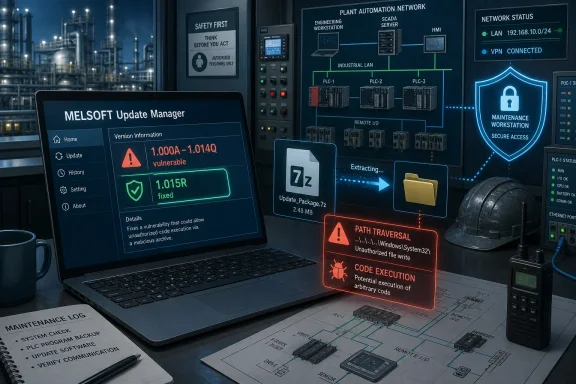 The Archive Utility Became the Industrial Attack Surface
The Mitsubishi advisory centers on MELSOFT Update Manager, a Windows-based utility used in the company’s factory automation ecosystem. The affected model is SW1DND-UDM-M, and Mitsubishi lists vulnerable versions from 1.000A to 1.014Q. The fixed branch begins at 1.015R.That version boundary matters because this is not a vague “check your software” warning. It gives administrators a concrete inventory task: open MELSOFT Update Manager, check the version information from the menu, and determine whether the workstation is still running a build before 1.015R. In industrial environments where engineering laptops and maintenance PCs can sit untouched between outages, that small act of checking may be the difference between a theoretical advisory and a reachable weak point.
The vulnerable component is 7-Zip, the widely used compression and decompression engine. Mitsubishi’s advisory describes four separate CVEs affecting the 7-Zip component included with MELSOFT Update Manager: two denial-of-service issues, one information-tampering issue, and one malicious-code-execution issue. The common trigger is deceptively ordinary: a user decompresses a specially crafted archive file using the bundled component.
That should sound familiar to anyone who has followed desktop security for the last two decades. Archive handling has always been a favorite place for attackers because it sits at the intersection of user trust, file parsing complexity, and routine administrative behavior. In an industrial Windows environment, that intersection becomes more consequential because the PC opening the archive may not be an office endpoint; it may be the workstation used to maintain automation software.
Mitsubishi’s Highest-Rated Bug Is Not the One in the Headline
The user-facing summary of this advisory may emphasize a heap-based buffer overflow that can cause a denial-of-service condition, but Mitsubishi’s own security notice describes a larger cluster. CVE-2025-53816 is the heap-based buffer overflow issue, scored 5.1 under CVSS 4.0, and CVE-2025-53817 is a NULL pointer dereference issue with the same 5.1 score. Both can lead to denial of service if a legitimate user decompresses a malicious archive.The more serious items sit further down the table. CVE-2025-55188 is an improper link resolution issue, described as an information tampering vulnerability, scored 6.9. Mitsubishi warns that an attacker may be able to tamper with or destroy information, and that if affected files are required for PC operation, the PC itself may enter a denial-of-service condition.
The standout is CVE-2025-11001, a path traversal flaw that Mitsubishi rates at 9.3 under CVSS 4.0. This is the bug that turns the advisory from “a decompression crash” into a workstation compromise concern. Mitsubishi says a specially crafted archive could lead to malicious code execution through the 7-Zip component included in MELSOFT Update Manager, with potential consequences including information theft, information tampering, denial of service, and other impacts.
That distinction is important for defenders. A denial-of-service bug in an engineering utility is still disruptive, especially during a maintenance window. But a code execution path in a trusted industrial software updater is a different category of risk. It means the attacker’s goal may not be to crash the tool; it may be to use the tool’s archive-handling workflow as a bridge onto a PC that has privileged access, specialized software, and often a trusted relationship with automation assets.
User Interaction Is a Weak Comfort in Engineering Environments
Mitsubishi’s exploit scenario requires a legitimate user to decompress a specially crafted archive. In a conventional enterprise risk meeting, that might reduce the perceived urgency. The vector is local, user interaction is involved, and the attacker has to convince someone to open the wrong file.That comfort is only partial. Engineering environments routinely exchange project files, firmware packages, configuration exports, vendor support bundles, and compressed archives. A malicious archive does not have to arrive with a flashing red warning label; it can be disguised as a patch package, diagnostic log set, commissioned project, or troubleshooting bundle.
Industrial support workflows also create trust shortcuts. Plant staff may receive files from system integrators, OEM support teams, contractors, and regional vendor representatives. During an outage, the pressure to restore production can compress judgment. The archive that would be suspicious on a corporate laptop may be opened quickly on a maintenance PC if it appears to contain the file needed to bring a line back online.
This is why “requires user interaction” is not the same as “low risk.” In many ICS and operational technology environments, the human interaction path is the path. Attackers do not always need a remote unauthenticated exploit when they can exploit a maintenance process built around file exchange and urgency.
The Bundled Component Problem Keeps Repeating Itself
The most revealing part of this advisory is that 7-Zip is not necessarily being attacked as a standalone application. It is a component embedded in a larger vendor tool. That changes how patching works.A Windows administrator may know whether 7-Zip itself is installed on a workstation. They may even have a software inventory rule for the main 7-Zip application. But the vulnerable parser here lives inside MELSOFT Update Manager, which means the fix comes through Mitsubishi’s software update path, not through a generic 7-Zip update deployed by package manager or endpoint management.
This is a classic supply-chain maintenance problem at the component level. Vendors embed common libraries and utilities because they are useful, stable, and familiar. Years later, when the embedded copy needs a security fix, customers must depend on the vendor to identify the exposure, rebuild the product, publish a new version, and communicate the remediation clearly.
For IT pros, the takeaway is uncomfortable but unavoidable: endpoint inventories that only track top-level applications are incomplete. The real attack surface includes bundled open-source components, redistributable runtimes, compression engines, browser controls, PDF parsers, database drivers, and other pieces that do not always show up as separate installed products. The archive utility you patched on Monday may still exist inside five other applications on Tuesday.
The Fix Is Simple; The Deployment Path May Not Be
Mitsubishi’s remediation is straightforward for Japanese customers: download MELSOFT Update Manager version 1.015R or later from the company’s Japanese factory automation download site, decompress the downloaded ZIP file, and runsetup.exe from the extracted folder. For customers outside Japan, Mitsubishi directs users to contact a local Mitsubishi Electric representative for installation information.That split is more than a localization footnote. Global industrial organizations often standardize on vendor software but receive support through regional channels. If the fixed build is not equally easy to obtain everywhere, patch timing may vary by geography, support contract, and local representative responsiveness.
The irony is hard to miss: the remediation itself involves downloading and decompressing an archive to update a tool whose vulnerable component is used for archive handling. That does not mean the update process is unsafe, but it does reinforce the need to obtain the update from the vendor’s official channel and to keep the process inside controlled administrative procedures. A spoofed “MELSOFT update” archive is exactly the sort of lure defenders should be expecting after an advisory like this becomes public.
For Windows administrators, the cleanest path is to treat this as a managed software update rather than an ad hoc technician task. Identify the affected hosts, confirm the installed version, obtain the fixed build through the appropriate Mitsubishi channel, preserve the installer hash or package provenance if your process allows, and document the update outcome. The value is not just in getting to 1.015R; it is in making the update auditable.
CISA’s Mitigations Read Like a Map of the Real Risk
The mitigation guidance is conventional, but the collection tells a story. Mitsubishi recommends keeping affected PCs inside a LAN, blocking remote logins from untrusted networks, using firewalls or VPNs when internet access is required, restricting physical access, warning users against untrusted links and attachments, and installing antivirus software.None of those controls fixes the vulnerable 7-Zip component. They reduce the chance that an attacker can deliver the archive, reach the user, remotely log into the PC, or pivot through the network after something goes wrong. In other words, the mitigations assume the workstation matters beyond the application itself.
That is the right assumption. A MELSOFT Update Manager workstation may be a normal Windows PC from the operating system’s point of view, but operationally it can be a privileged maintenance console. It may store project files, connect to engineering networks, hold vendor tools, or be used by staff with elevated rights. The compromise of that host can matter even if the vulnerable product is not directly connected to the internet.
This is where enterprise IT and OT teams often talk past each other. IT sees a local user-assisted archive bug and ranks it below internet-facing VPNs, identity systems, and email gateways. OT sees a maintenance PC that cannot be casually reimaged, patched during production, or replaced without vendor coordination. Both perspectives are valid, but the latter is why these advisories deserve attention even when the exploit chain is not flashy.
Windows Defenders Should Look Beyond the CVSS Score
CVSS is useful, but it is not a maintenance plan. The two denial-of-service CVEs in this advisory are scored 5.1, the tampering issue is 6.9, and the path traversal code execution issue is 9.3. Those numbers help prioritize, but they do not describe how the vulnerable workflow appears inside a real plant.A crafted archive sent to an engineering user is not exotic. A technician opening a ZIP file is not exotic. A vendor tool bundling a compression library is not exotic. The risk emerges from the ordinary nature of each step.
This is especially relevant for Windows shops that support both corporate and industrial endpoints. Corporate workstations are often enrolled in mature endpoint management, email security, browser isolation, and EDR telemetry. Engineering workstations can be more uneven: sometimes domain-joined, sometimes local-admin-heavy, sometimes frozen at a validated configuration, sometimes shared between teams, and sometimes connected intermittently.
The vulnerability, then, is only one part of the exposure. The surrounding management model decides whether it becomes a nuisance, a near miss, or an incident.
The Earlier MELSOFT 7-Zip Advisory Was a Warning Shot
This is not the first recent MELSOFT Update Manager advisory involving 7-Zip. Mitsubishi previously published a 2025 notice for multiple arbitrary code execution vulnerabilities in the 7-Zip component included in MELSOFT Update Manager, affecting earlier versions and involving CVEs such as CVE-2024-11477 and CVE-2025-0411. That earlier episode should have prompted many organizations to inventory MELSOFT Update Manager installations and tighten their update process.The new June 2026 advisory suggests the maintenance burden is not a one-time cleanup. When a third-party component is embedded in an industrial tool, the vendor and customer inherit the component’s future vulnerability stream. Every newly discovered parsing bug, path handling mistake, or security metadata flaw can become an advisory for the larger product.
For customers, this argues for treating MELSOFT Update Manager as a managed asset with a recurring security review, not a static utility installed once and forgotten. The fact that it is an updater does not make it self-maintaining from a security standpoint. In this case, the updater itself needs updating.
It also argues for tighter procurement and vendor-management questions. Does the vendor publish component-level security advisories promptly? Are fixed versions available through predictable channels? Are customers outside the vendor’s home market given clear access to updates? These questions sound bureaucratic until the vulnerable component is sitting on the one workstation needed for a production change.
The Email Attachment Angle Belongs in the Patch Plan
Mitsubishi’s mitigation list explicitly warns against clicking links in untrusted emails or opening attachments from untrusted emails. That may sound like generic awareness training, but it is directly relevant here. The exploit path depends on a crafted archive reaching someone who will decompress it.Email remains the obvious delivery channel, but not the only one. File-sharing portals, contractor handoffs, USB media, remote support sessions, and ticket attachments can all carry compressed files. In industrial operations, where external parties often support specialized equipment, the trust boundary around “who can send us a ZIP file” is frequently wider than defenders realize.
That means the patch plan should include process controls while software deployment catches up. If affected versions remain in use, organizations should route support archives through a safer staging process. At minimum, files from external parties should be scanned, provenance-checked, and opened first on a less-privileged analysis machine rather than directly on the engineering workstation.
This is not about blaming users. It is about designing a workflow that does not require users to make perfect trust decisions under operational pressure. If the affected PC is important enough to isolate on a LAN and protect with VPN controls, it is important enough not to use as the first stop for random compressed files.
The Quiet Risk Is Operational Downtime, Not Just Malware
Security advisories often frame impact in terms of confidentiality, integrity, and availability. Mitsubishi does the same: information theft, information tampering, denial of service, and other impacts. In industrial settings, availability is rarely abstract.A denial-of-service condition on a Windows engineering PC can disrupt maintenance windows, delay recovery, and complicate change management. If files required for PC operation are tampered with or destroyed, the result may not be a dramatic ransomware note; it may be a workstation that no longer behaves reliably when staff need it most.
The path traversal issue raises the stakes further because code execution can enable persistence, data theft, or manipulation beyond the original archive extraction event. Even if the attacker cannot directly reach a PLC or controller from the compromised host, stealing project files, credentials, connection profiles, or documentation can support later activity. An engineering workstation is often a map of the environment.
That is why defenders should avoid treating this as merely “MELSOFT crashes when opening bad ZIP.” The advisory’s most serious scenario is not a crash. It is a malicious archive becoming a foothold in a Windows environment that bridges IT habits and OT consequences.
The Practical WindowsForum Read Is Inventory First, Then Isolation
For WindowsForum’s audience, the operational response should start with asset discovery. Find every Windows host with MELSOFT Update Manager installed, then determine whether the version is between 1.000A and 1.014Q. If it is, the target state is version 1.015R or later.That sounds simple until you consider where these machines live. Some may be in engineering offices, some in plant-floor cabinets, some in vendor-managed environments, and some in images used by contractors. The systems most likely to be missed are the ones used infrequently: spare laptops, commissioning kits, lab machines, and older maintenance PCs kept because they work with legacy equipment.
Once the affected machines are identified, the mitigation advice becomes a temporary risk-control layer. Keep them on trusted LANs where possible. Block untrusted remote login paths. Use VPN and firewall controls when remote access is necessary. Restrict physical access. Reduce untrusted archive handling. Keep antivirus or endpoint protection active where operationally supported.
Those steps are not substitutes for the vendor fix, but they are sensible guardrails while change windows, vendor access, or validation requirements are worked through. In industrial Windows support, “patch now” is often the correct security advice and an incomplete operational plan. The useful answer is patch with a path that does not break production discipline.
The Lesson Mitsubishi Did Not Need to Say Out Loud
The strongest signal in this advisory is not the product name or even the CVE list. It is the reminder that industrial software is software in the ordinary, messy, dependency-laden sense. It ships with third-party components. It parses untrusted data. It depends on user workflows. It accumulates maintenance obligations.That may sound obvious to software engineers, but it still runs against the way many industrial environments are managed. Tools are often treated as part of a validated operational stack, where stability is prized and change is minimized. That is understandable, but static software does not stay static in the threat model. A component that was safe enough at installation can become the weak link years later.
The Windows angle is equally plain. These are not esoteric embedded-device bugs buried in ladder logic or fieldbus implementations. They are Windows workstation risks involving archive extraction, local users, remote logins, antivirus, firewalls, VPNs, and email attachments. The fix may come from Mitsubishi, but the defensive muscle is familiar Windows administration.
The best organizations will use this advisory to improve more than one package. They will update MELSOFT, yes, but they will also ask where else bundled archive handlers live, how engineering PCs receive files, which machines lack regular inventory, and how quickly vendor utilities can be patched when the vulnerable code is not a standalone application.
The Patch Note That Should Change the Maintenance Checklist
Mitsubishi’s June 2026 advisory gives defenders a concrete set of actions, but the real value is in turning those actions into a repeatable maintenance pattern.- Organizations should identify every Windows PC running MELSOFT Update Manager SW1DND-UDM-M and verify whether it is on versions 1.000A through 1.014Q.
- Affected installations should be updated to MELSOFT Update Manager version 1.015R or later through Mitsubishi’s official distribution or regional support channel.
- Engineering workstations that cannot be updated immediately should be kept on trusted LANs, protected from untrusted remote logins, and accessed remotely only through controlled VPN or firewall paths.
- Compressed files from external parties should not be opened directly on affected engineering PCs while remediation is pending.
- Security teams should treat bundled components such as 7-Zip as part of the software inventory problem, not as invisible implementation details.
- The recurrence of 7-Zip-related MELSOFT advisories should prompt a broader review of vendor utilities that parse archives, project files, or support bundles.
References
- Primary source: CISA
Published: 2026-06-30T12:00:00+00:00
- Related coverage: incibe.es
Múltiples vulnerabilidades en MELSOFT Update Manager de Mitsubishi Electric | INCIBE-CERT | INCIBE
Mitsubishi Electric ha informado sobre 2 vulnerabilidades de severidad alta que podrían permitir a unwww.incibe.es
- Related coverage: euskadi.eus
Múltiples vulnerabilidades en MELSOFT Update Manager de Mitsubishi Electric - Gobierno Vasco - Euskadi.eus
<span class='hidden-content'> <strong>Aviso SCI</strong> Importancia: Alta<br> </span> Mitsubishi Electric ha informado sobre 2 vulnerabilidades de severidad alta que podrían permitir a un atacante ejecutar código arbitrario, divulgar información, alterar información o provocar una...www.euskadi.eus - Related coverage: tisalabs.com
- Related coverage: community.itbible.org
Mitsubishi Electric MELSOFT Update Manager - Security Bulletins - I.T. Bible - Community
View CSAF 1. EXECUTIVE SUMMARY CVSS v3 8.1 ATTENTION: Exploitable remotely/low attack complexity Vendor: Mitsubishi Electric Equipment: MELSOFT Update Manager Vulnerabilities: Integer Underflow (Wrap or Wraparound), Pr&hellip; community.itbible.org