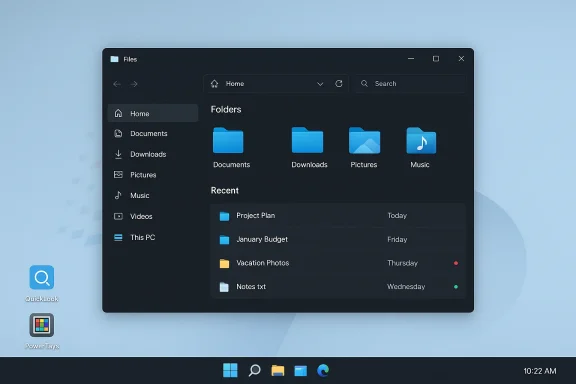
Google appears to be closing a small but persistent UX gap in Chrome on Windows by adding support for dragging and downloading multiple files from web apps directly into File Explorer — a change spotted in a recent Chromium code update that would let one drag action represent a group download instead of a single file.
For many Windows users, the simplest workflow for saving content from cloud services and web apps has long been broken: select several files in a web UI (Google Drive, Dropbox, GitHub, Outlook web attachments, etc., drag them to the desktop or a File Explorer folder, and expect them to save as a group. In current Chrome behavior on Windows, that drag operation often results in only a single file being saved — forcing users to repeat the drag for each file or rely on the web app’s download-as-zip options.
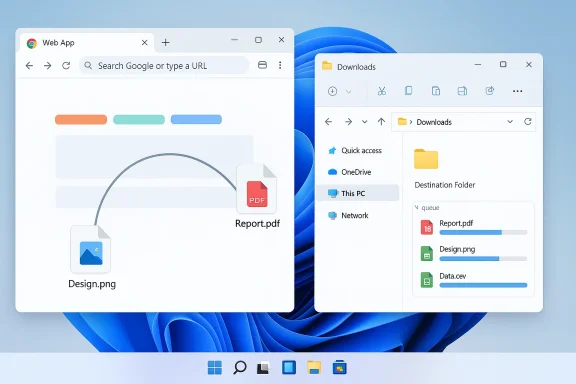
A recent Chromium change aims to alter that behavior by letting Chrome treat a drag operation as a bundle of file downloads. In practice, that means a web application — if it chooses to signal multiple files — can hand Chrome metadata for several downloadable items in a single drag. Once dropped into File Explorer, Chrome would queue and start each file’s download automatically so the user receives all the selected files in one action. This work is currently focused on Windows and appears to be implemented in Chromium’s downloads/drag handling code; the exact commit and low-level details were reported alongside the initial write-up. Chromium already contains a number of localized strings and UI controls that handle multiple automatic downloads (for blocking prompts, allowlists and warnings), indicating the project has been managing multi-file download scenarios in other contexts for some time.
Key phrases included for visibility: Chrome drag multiple files, download multiple files Windows 11, drag and drop downloads, File Explorer, Chrome Canary testing, grouped file downloads, web apps to File Explorer.
Source: Windows Report https://windowsreport.com/chrome-on...ultiple-files-from-web-apps-to-file-explorer/
 Background / Overview
For many Windows users, the simplest workflow for saving content from cloud services and web apps has long been broken: select several files in a web UI (Google Drive, Dropbox, GitHub, Outlook web attachments, etc., drag them to the desktop or a File Explorer folder, and expect them to save as a group. In current Chrome behavior on Windows, that drag operation often results in only a single file being saved — forcing users to repeat the drag for each file or rely on the web app’s download-as-zip options.A recent Chromium change aims to alter that behavior by letting Chrome treat a drag operation as a bundle of file downloads. In practice, that means a web application — if it chooses to signal multiple files — can hand Chrome metadata for several downloadable items in a single drag. Once dropped into File Explorer, Chrome would queue and start each file’s download automatically so the user receives all the selected files in one action. This work is currently focused on Windows and appears to be implemented in Chromium’s downloads/drag handling code; the exact commit and low-level details were reported alongside the initial write-up. Chromium already contains a number of localized strings and UI controls that handle multiple automatic downloads (for blocking prompts, allowlists and warnings), indicating the project has been managing multi-file download scenarios in other contexts for some time.
Why this matters: real-world friction and productivity gains
Drag-and-drop is a muscle memory interaction in desktop workflows. When it works, it’s fast and intuitive. When it doesn’t, it’s a repeated annoyance that chips away at productivity.- Many users expect web apps to behave like native desktop file managers. Being able to select several files and drag them to File Explorer is a fundamental mental model for desktop users.
- Office workers, students, designers, and developers frequently need to pull groups of attachments, assets or code files from cloud storage into a local folder. Saving these items one-by-one wastes time and attention.
- Fixing this behavior improves parity between native apps and web apps, making the browser a more natural place to manage files on Windows.
Technical context: how and where this fits in the stack
HTML5 drag-and-drop and browser limitations
Web apps implement drag-and-drop via the HTML5 DataTransfer API and related events (dragstart, dragover, drop). Historically, browsers and operating systems differ in how they bridge the web DataTransfer model to OS-level file operations.- On the web side, sites can offer a list of downloadable items during a drag by placing specially formatted entries into the DataTransfer object.
- On the OS side, browsers translate those entries into a drag that the OS can understand. That translation includes mapping MIME types, file names, and either providing bytes or a URL that the OS can use to fetch the file.
Chromium’s download controls and multi-download UX
Chromium already implements several controls around multiple automatic downloads — UI for blocking, prompting, and allowing per-site policies — so the browser is used to reasoning about more-than-one file per site action. The new drag behavior builds on those concepts but re-maps the semantics from "site-initiated multiple downloads" to "user drag-initiated grouped downloads," which is a subtly different trust model and user intent signal. The Chromium source tree contains strings and settings related to multiple-download management, highlighting the project’s existing attention to multi-file download policy and user prompts.What users can expect (and what remains unknown)
- Expected behavior: Select multiple files in a web app, drag them to a File Explorer folder or the desktop, and all selected files begin saving there as distinct downloads.
- Platform: The initial work is Windows-focused; Mac and Linux support are not explicitly announced, so behavior may remain platform-specific initially.
- Testing channel: Features like this usually land first in Chrome Canary (experimental/testing builds) before moving to Dev, Beta, and Stable channels. There is no confirmed release date or Chrome version number yet.
Strengths and likely benefits
- Improved usability and parity: Web apps that mimic desktop file managers will behave more like native apps, making Chrome a more natural environment for file-heavy workflows.
- Reduced friction: Eliminates the repetitive manual step of downloading files one at a time — a real time-saver for users with many attachments or assets.
- Better integration: Supports developers who want to implement a better drag experience in their web UIs, enabling richer interactions between web apps and the Windows desktop.
- Predictable user intent: A single drag operation represents a clear user intent to move or copy multiple items — treating that as a grouped download aligns browser behavior with user expectations.
Risks, edge cases and enterprise considerations
While the feature is straightforward in concept, there are several practical and security-oriented considerations that deserve attention.1. Security and malware risk
Multiple-file downloads could be abused by malicious sites to flood a user’s disk with unwanted files or deliver bundles containing malware. Chromium already has protections and prompts for automatic multiple downloads; however, this change introduces a new channel (drag-to-desktop) that will need careful policy treatment.- Expect Chrome to apply the same or similar multiple-download safeguards for drag-initiated grouped downloads to ensure user prompts and enterprise policies are respected.
- Administrators should evaluate existing GPO/MDM policies around automatic downloads and content restrictions to control behavior in managed environments.
2. Inconsistent web app support
Not all web apps will immediately advertise multi-file drag payloads. Developers need to explicitly include the metadata in the DataTransfer payload to indicate multiple files; older apps or those using older libraries may not do so.- Until adoption increases, the real-world impact will be limited to sites that choose to signal grouped drags.
3. UX clarity and accidental drops
Users dragging large bundles to the desktop may inadvertently drop many files into the wrong folder, especially if they expect a single archive (ZIP) rather than multiple separate files. This could create clutter or confusion.- Web apps or Chrome could provide visual feedback (drop badges, list of files about to download) before committing to several downloads. If Chrome opts for immediate downloads with no confirmation, the UX could occasionally feel jarringng.
4. Performance / bandwidth concerns
Bulk downloads started simultaneously by drag-drop may saturate bandwidth or launch many simultaneous requests to a server. Chrome will need to manage concurrency and queuing to avoid network overload or server rate-limits.5. Accessibility and assistive tech
Drag-and-drop interactions are challenging for many assistive technology users. Any change to drag behavior should maintain accessible alternatives (keyboard commands, context menus, explicit “Download selected” buttons) so users who cannot drag still get the improved multi-file download experience.Developer guidance: what web app authors should do
For web developers who want to support the new grouped drag behavior when it reaches Chrome for Windows, here’s a practical checklist:- Ensure your drag code populates the DataTransfer object with entries for each downloadable item. These entries should include file names, MIME types, and either URLs or data blobs.
- Use standard HTML5 drag events (dragstart, dragend) and test on the latest Chromium-based browsers to see how the browser maps DataTransfer entries to the OS drag payload.
- Provide a fallback download method (zip export or "Download selected as ZIP") for older browsers and assistive users.
- Throttle or batch server responses when multiple simultaneous downloads are likely — or implement a server-side zip-on-demand endpoint that returns a ZIP for grouped selections to reduce concurrency issues.
Short-term workarounds for users
Until the feature ships broadly, users who regularly need to download multiple files from web apps can continue to rely on these proven workarounds:- Use the web app’s “Download as ZIP” or "Export" option where available (common in Google Drive and many cloud services).
- Select files and use a site-provided bulk-download button if present.
- Use a trusted download manager or browser extension that supports multi-file queuing or “download all links” actions.
- For email attachments, use “Save all attachments” into a folder (in webmail clients that provide it).
How IT admins should prepare
Enterprises should consider the following as Chrome updates to Canary/Dev/Beta:- Review and, if needed, adjust policies that control automatic or multiple downloads.
- Update acceptable-use guidance for end users if elevated bulk-download behavior will be allowed by default.
- Test web apps and intranet services in Chrome Canary/Dev before broad deployment to ensure grouped drags are handled properly and do not violate corporate download rules.
- Monitor traffic patterns during pilot testing, since simultaneous downloads may interact with bandwidth management or content scanning appliances.
Timeline and release expectations
There is no confirmed stable-release date for the feature. Historically, Chromium features follow this path:- Implementation lands in Chromium source (commit).
- Feature appears behind flags or in Canary builds for early testing.
- If stable, feature rolls through Dev and Beta channels for broader validation.
- Formal release to Stable channel after telemetry and QA.
Broader trends: browsers first, then platform parity
This work is part of a longer trend: browsers are increasingly bridging web and native desktop paradigms. From drag-and-drop uploads to reverse drag-to-desktop and improved Filesystem APIs, modern web apps want to feel native.- Past examples show browsers introducing drag-to-desktop features for attachments and images (Gmail’s attachment drag features in Chrome were a precursor to the richer behaviors we see today).
- OS vendors have introduced features that emulate mobile sharing metaphors on desktop (Windows “Drag Tray” previews and Share Sheet changes in recent Windows 11 betas), signaling a convergence in UX expectations between mobile and desktop.
What to watch for next
- Canary builds: When the change appears in a Chrome Canary build, hands-on tests will reveal the UX details: whether Chrome shows a pre-drop confirmation, how Chrome queues downloads, and how multiple-download prompts behave during the drag flow.
- Developer documentation: Expecdeveloper docs to provide guidance on how web apps should populate drag data for grouped downloads.
- Security policy clarifications: Watch for Chrome’s handling of MIME checks, Safe Browsing integration, and enterprise policy interactions for grouped drag downloads.
- Cross-platform adoption: If the feature proves valuable on Windows, Chrome engineers may add support for macOS and Linux, but that requires OS-level integration changes specific to each platform.
Conclusion
The reported Chromium change to let Chrome on Windows treat a drag as a group download is a practical, user-facing improvement that addresses a long-standing desktop expectation: select many files in a web app, drag once, and receive them locally. It promises real productivity wins for people who manage batches of files from cloud services, while keeping within Chromium’s broader multi-download policy framework. Early evidence comes from a Chromium commit spotted in reporting and Chromium’s codebase that already contains multi-download UI strings, suggesting the team is conscious of the security and policy surface area this feature touches. This feature will likely land first in testing channels where developers and IT teams should validate behavior and plan policy adjustments. Until then, web apps and users will rely on zip exports, download managers, and browser extensions — but once fully implemented, the drag-and-download multiple-files flow could become one of those small changes that silently saves users countless clicks every week.Key phrases included for visibility: Chrome drag multiple files, download multiple files Windows 11, drag and drop downloads, File Explorer, Chrome Canary testing, grouped file downloads, web apps to File Explorer.
Source: Windows Report https://windowsreport.com/chrome-on...ultiple-files-from-web-apps-to-file-explorer/