

VR.org’s updated children’s VR buying guide recommends Meta’s Quest 3S as the default family headset, citing its standalone design, $349 US price, and parent-managed accounts for younger users. The recommendation is aimed at children old enough to use VR under each vendor’s rules—not at turning headsets into unsupervised babysitters.
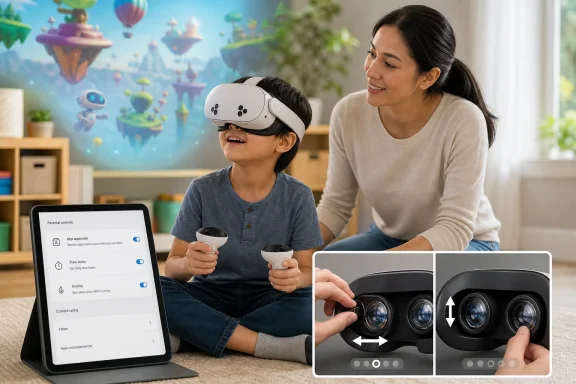
Meta permits Quest use from age 10, with accounts for 10- to 12-year-olds created and managed by a parent or guardian. Meta’s Family Center can approve apps, enforce time limits, and manage access. Children under 10 should not be set up on Quest, while older teens can use standard accounts with optional supervision.
The guide’s main point is practical: a Quest 3S does not require a gaming PC, Windows setup, or PS5, so it is the least complicated route to managed VR for a household. It also shares the current Quest software library with the pricier Quest 3.
VR.org identifies lens fit as the most important limitation of the cheaper headset. Quest 3S uses three fixed interpupillary-distance settings, while Quest 3 has a continuous IPD adjustment. That matters for children with narrower eye spacing: a poor match can leave the image blurry or uncomfortable even when the headset otherwise fits.
The step-up Quest 3 now costs $599 for its 512GB model, following Meta’s April price increase. Its better lenses and wider fit range may justify the extra outlay for a headset shared among several family members, but the 3S remains the lower-cost entry point.
Sony’s PlayStation VR2 is presented as the alternative for existing PS5 households, not as a general recommendation for younger children. Sony says PS VR2 is not for children under 12, requires a PS5 and compatible software, and relies on PS5 family and parental-control settings. Its wired connection can be a benefit for supervision in a shared room, though it also makes it a less flexible option than a standalone Quest.
Apple Vision Pro is effectively outside this category. Apple specifies that the device is designed for users aged 13 and over and says children should be supervised.
For parents buying a Quest, the useful checklist is short:
For most families with an eligible child, the immediate decision is between the cheaper Quest 3S and the better-fitting Quest 3, with account setup and supervision mattering more than the badge on the headset.
Meta permits Quest use from age 10, with accounts for 10- to 12-year-olds created and managed by a parent or guardian. Meta’s Family Center can approve apps, enforce time limits, and manage access. Children under 10 should not be set up on Quest, while older teens can use standard accounts with optional supervision.
The guide’s main point is practical: a Quest 3S does not require a gaming PC, Windows setup, or PS5, so it is the least complicated route to managed VR for a household. It also shares the current Quest software library with the pricier Quest 3.
 The fit caveat
VR.org identifies lens fit as the most important limitation of the cheaper headset. Quest 3S uses three fixed interpupillary-distance settings, while Quest 3 has a continuous IPD adjustment. That matters for children with narrower eye spacing: a poor match can leave the image blurry or uncomfortable even when the headset otherwise fits.The step-up Quest 3 now costs $599 for its 512GB model, following Meta’s April price increase. Its better lenses and wider fit range may justify the extra outlay for a headset shared among several family members, but the 3S remains the lower-cost entry point.
Sony’s PlayStation VR2 is presented as the alternative for existing PS5 households, not as a general recommendation for younger children. Sony says PS VR2 is not for children under 12, requires a PS5 and compatible software, and relies on PS5 family and parental-control settings. Its wired connection can be a benefit for supervision in a shared room, though it also makes it a less flexible option than a standalone Quest.
Apple Vision Pro is effectively outside this category. Apple specifies that the device is designed for users aged 13 and over and says children should be supervised.
Set it up properly
The guide is right to caution against cheap phone-insert viewers. Those products generally lack tracked controllers, proper positional tracking, platform-level child accounts, and meaningful parental controls. They are not equivalent substitutes for a modern standalone headset.For parents buying a Quest, the useful checklist is short:
- Create a separate, age-accurate child account rather than lending over an adult account.
- Confirm the headset’s lens-spacing setting before play.
- Approve apps individually and set time limits in Family Center.
- Start with short, seated sessions in a clear play area, with an adult nearby.
For most families with an eligible child, the immediate decision is between the cheaper Quest 3S and the better-fitting Quest 3, with account setup and supervision mattering more than the badge on the headset.
References
- Primary source: vr.org
Published: 2026-06-04T00:00:00+00:00
Best VR Headset for Kids 2026: Safe, Age-Appropriate Picks | VR.org
The best VR headset for kids in 2026, with the age ratings, parental controls, and safety factors that matter. Our top pick is the Quest 3S, plus what to avoid for younger children.vr.org - Related coverage: gamesradar.com
The best VR headset in 2026: All the latest devices compared | GamesRadar+
PSVR 2, the Meta Quest 3, or something from HTC Vive? It's an interesting year to shop around for the best VR headsets.www.gamesradar.com - Related coverage: tomsguide.com
Best VR headsets in 2026 — tested by someone who lives in VR | Tom's Guide
Looking to dive into virtual reality? Here are the best VR headsets worth your money, tested by VR experts.www.tomsguide.com - Related coverage: techradar.com
Best VR headsets in 2026 | TechRadar
We've rounded up the best VR headsets you should consider buying for an optimal virtual reality experience.www.techradar.com
