

The Meta Quest 3S has quietly become the most compelling, cost‑effective bridge between Xbox gaming and Windows productivity — a headset that pairs solid hardware, cloud streaming, and a freshly matured Windows integration into a single, surprisingly affordable package.
Meta designed the Quest 3S as a value‑first mixed‑reality headset: it uses the Qualcomm Snapdragon XR2 Gen 2 SoC, ships in 128 GB and 256 GB configurations, and targets a mainstream audience with a sub‑$300 MSRP that has dipped to deals around $249 during promotions. These specs place the 3S squarely beneath the higher‑end Meta Quest 3 while preserving the core processing and most software features that matter for VR gaming and MR productivity. The headset’s quoted battery life is roughly up to 2.5 hours depending on workload, and the display delivers a lower per‑eye resolution than the Quest 3 in exchange for cost and power efficiency. Multiple reviews and spec summaries confirm the general trade‑offs: lower optics complexity, slightly smaller battery capacity than the flagship Quest 3, but often a similar or marginally better advertised runtime due to a less demanding optical stack. Real‑world testing tends to center around the two‑hour mark under mixed usage. Why does that matter? Because the Quest 3S’s combination of price, hardware, and software makes it an ideal gateway device for two important Microsoft ecosystems: Xbox Cloud Gaming and Windows 11’s new Mixed Reality Link. Both integrations move VR from a hobbyist novelty to a practical accessory for gaming and productivity — and the Quest 3S is positioned as the most affordable on‑ramp.
The biggest takeaway is practical: the Quest 3S lowers the barrier to trying mixed reality as a useful tool rather than an expensive experiment. That matters: affordability + mature software integrations = adoption. The trade‑offs are real — visual fidelity, battery endurance, and the need for robust networking — but these are manageable edge cases for a large group of users who will find the value proposition compelling. If your priorities are value, cloud‑first gaming, and portable multi‑monitor productivity, the Quest 3S is the pragmatic pick — and with Microsoft and Meta leaning into each other’s ecosystems, the headset is unlikely to remain a novelty for long.
Conclusion
The Meta Quest 3S’s arrival as a sensible Xbox and Windows companion is the result of a rare alignment: capable silicon at a low price, first‑party cloud gaming support, and a fully supported Windows streaming solution. Each alone would be notable; together they create a multipurpose headset that suits modern, hybrid lifestyles. For consumers and IT buyers who balance price with capability, the Quest 3S represents one of the clearest “get one and try it” propositions in XR today — with the usual caveats about networks, battery, and enterprise governance that come with streaming everything from console games to corporate desktops.
Source: Windows Central https://www.windowscentral.com/hard...-it-an-essential-xbox-cloud-gaming-companion/
 Background / Overview
Meta designed the Quest 3S as a value‑first mixed‑reality headset: it uses the Qualcomm Snapdragon XR2 Gen 2 SoC, ships in 128 GB and 256 GB configurations, and targets a mainstream audience with a sub‑$300 MSRP that has dipped to deals around $249 during promotions. These specs place the 3S squarely beneath the higher‑end Meta Quest 3 while preserving the core processing and most software features that matter for VR gaming and MR productivity. The headset’s quoted battery life is roughly up to 2.5 hours depending on workload, and the display delivers a lower per‑eye resolution than the Quest 3 in exchange for cost and power efficiency. Multiple reviews and spec summaries confirm the general trade‑offs: lower optics complexity, slightly smaller battery capacity than the flagship Quest 3, but often a similar or marginally better advertised runtime due to a less demanding optical stack. Real‑world testing tends to center around the two‑hour mark under mixed usage. Why does that matter? Because the Quest 3S’s combination of price, hardware, and software makes it an ideal gateway device for two important Microsoft ecosystems: Xbox Cloud Gaming and Windows 11’s new Mixed Reality Link. Both integrations move VR from a hobbyist novelty to a practical accessory for gaming and productivity — and the Quest 3S is positioned as the most affordable on‑ramp. What Meta and Microsoft have shipped: the technical baseline
Hardware highlights (verified)
- Processor: Qualcomm Snapdragon XR2 Gen 2 — the same class of VR SoC powering Meta’s newer headsets.
- Storage: 128 GB and 256 GB as the base Quest 3S SKUs; 128 GB is sufficient for a modest library of titles but heavy AAA collectors will want more.
- Battery: ~4,324 mAh with manufacturer‑rated runtime near 2.5 hours under “average” conditions; reviewers report closer to ~2 hours in gaming sessions. Treat the 2.5‑hour figure as an optimistic average, not a guaranteed session length.
Software integrations (verified)
- Xbox Cloud Gaming on Quest: Official Xbox app availability and a dedicated Xbox Edition Quest 3S bundle signal first‑party support for streaming Game Pass titles into Quest headsets; streaming requires a compatible Bluetooth controller and an Xbox Game Pass subscription for cloud streaming scenarios.
- Mixed Reality Link / Windows App for Quest: Microsoft’s Mixed Reality Link (Windows App for Meta Quest) now enables Quest 3 and 3S headsets to pair with Windows 11 PCs or Windows 365 Cloud PCs to create high‑resolution virtual monitors and an immersive ultrawide environment. This capability moved from preview into general availability as the coordinated Meta Horizon OS updates matured.
Why the Quest 3S is a near‑perfect Xbox companion
1) Value + streaming: a console‑less Xbox experience
Meta and Microsoft’s collaboration means Quest owners can now stream a large portion of the Xbox library via Xbox Cloud Gaming directly on the headset. The effect is simple and powerful: Xbox games play on a virtual, very large 2D screen in front of the user, removing the need for a living‑room display and offering a private, oversized “TV” experience. For many players, the Quest 3S’s lower price makes this an accessible way to get a console‑scale experience without a console.- The Xbox Edition Quest 3S demonstrated the depth of the partnership: the bundle included a pre‑paired Xbox Wireless Controller, three months of Game Pass Ultimate, and cosmetic design cues that show Microsoft intends the Quest platform to be a first‑class cloud gaming target. That bundle underlines the message: Quest is now a viable Xbox streaming device.
2) Controller support and the input story
Cloud streaming needs a gamepad. Quest supports Bluetooth pairing for Xbox Wireless Controllers, Elite controllers, and other popular pads; many reviewers and official notes emphasize that the standard Touch controllers are not suitable for Xbox Cloud Gaming — you’ll want a handheld gamepad for seated, 2D cloud titles. Android Central and Microsoft’s materials both confirm controller pairing workflows.3) Practical implications for Xbox fans
- Play console games on a “giant screen” while on the couch or on the road with solid Wi‑Fi.
- Avoid the purchase of additional console hardware if you already subscribe to Xbox Game Pass Ultimate.
- The Quest experience is portable: your virtual TV travels with the headset.
Why the Quest 3S is a genuine Windows productivity partner
Mixed Reality Link: turning the headset into a virtual Windows workstation
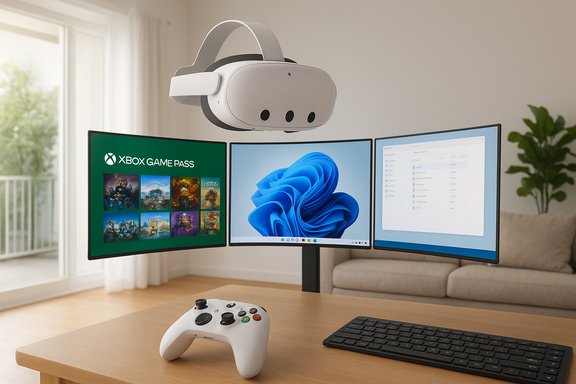
Microsoft’s Mixed Reality Link lets a Quest 3 or 3S stream a full Windows 11 desktop — local PC or Windows 365 Cloud PC — into the headset as one or more high‑resolution virtual monitors. The feature supports multi‑monitor layouts, an immersive ultrawide curved workspace, and passthrough-aware workflows so you can still see your keyboard and desk. Microsoft published the GA announcement and user guidance as the feature left preview. Key capabilities:- Multiple independent virtual monitors, rearrangeable in 3D space.
- Choice between immersive and passthrough modes; quick Full Passthrough gestures to check the real world.
- Support for local rendering (your PC does the heavy lifting) or cloud‑hosted Windows 365 sessions, which is critical for mobility and managed enterprise scenarios.
Real requirements and realistic expectations
Mixed Reality Link is not “Windows running on the headset.” It streams frames rendered by a PC or cloud VM, so the experience is only as good as the rendering source and the network between host and headset. Microsoft and testing reports point to Windows 11 22H2 or later, GPU guidance for better fidelity, and strongly recommend robust Wi‑Fi (5 GHz minimum, Wi‑Fi 6E preferred) or wired server connections for low latency. Enterprises should note specific port and QoS requirements disclosed in setup guides. Practical consequence: with a good local network and a decently powered host PC or a Windows 365 Cloud PC in a nearby data center, the Quest 3S can be a true portable multi‑monitor station — think three floating 4K monitors without buying physical displays. But you’ll need to plan for bandwidth, GPU headroom, and the small but real latency of remote rendering.Strengths — why the 3S beats expectations
- Outstanding price/value ratio. The Quest 3S keeps high‑end SoC performance while cutting cost in optics and materials — an excellent trade when the goal is cloud streaming or virtual desktops.
- Unified software ecosystem. Access to Meta’s app store, Xbox Cloud Gaming, and now Microsoft’s Mixed Reality Link makes the headset useful for both gaming and productivity without complicated hacks.
- Portability and comfort. For mobile workers and travelers who need a temporary multi‑monitor workstation, Quest 3S’s weight and strap options make it practical for short to moderate sessions.
- Battery consistency. Despite hardware compromises, the headset’s simpler optics can yield steadier battery figures in practice; reviewers consistently report reliable session lengths for typical VR play or productivity bursts.
Risks and limitations — what you must consider
1) Bandwidth and latency are real constraints
Both Xbox Cloud Gaming and Mixed Reality Link require dependable low‑latency networking. Microsoft’s guidance recommends 5 GHz or ideally 6 GHz Wi‑Fi, and many real‑world tests stress the need for a strong local router and possibly wired backhaul for the PC. If your home network is congested or your ISP latency is high, the experience will degrade.2) Visual fidelity and peripheral trade‑offs
The Quest 3S uses a less expensive optical design than the flagship Quest 3. That impacts resolution and field of view relative to premium spatial computers (e.g., devices with denser panels or pancake optics). For text‑dense productivity tasks, the Quest 3S is serviceable — but it’s not the same pixel‑clarity as the highest‑end headsets. Expect to scale fonts and tweak monitor placement.3) Battery life limits extended work sessions
Two to two‑and‑a‑half hours is a realistic expectation for mixed use. For prolonged workdays, the headset may need external battery options, or a hybrid approach where the headset is used for meetings, presentations, or bursts of focused work rather than full eight‑hour days.4) Cloud costs and subscription models
Xbox streaming often requires Game Pass Ultimate for the most seamless access, and Windows 365 entails additional cloud compute and licensing costs in enterprise contexts. Those ongoing subscription fees are part of the total cost of ownership and should be included in procurement planning.5) Privacy, security, and enterprise policy concerns
Streaming Windows into a headset creates new surface areas for corporate risk: device pairing, network discovery, and cloud PC access must be governed by IT policy. Microsoft’s Mixed Reality Link includes enterprise scenarios (Windows 365), but organizations must validate device compliance, authentication methods, and data‑exfiltration controls before large deployments. Treat early rollouts as pilots and require written security assessments for broader adoption.Practical setup and buying advice
Who should buy the Quest 3S?
- Gamers who want the cheapest, easiest way to stream Xbox Game Pass titles on a huge virtual screen.
- Mobile professionals who need a portable multi‑monitor environment for short sessions and are comfortable relying on their Windows PC or a Windows 365 Cloud PC.
- Early adopters curious about mixed reality productivity without paying flagship Vision‑class prices.
Who should avoid it?
- Users who need native, laptop‑class battery life for all‑day use.
- Visual professionals who need uncompromising text clarity and color accuracy for long editing workflows.
- Organizations that cannot meet network and security prerequisites for cloud PC streaming.
Setup checklist (ordered steps)
- Update your Quest 3S to the latest Horizon OS release (v81+ recommended if you want mixed reality Windows integration).
- On Windows 11, install the Mixed Reality Link client from the Microsoft Store and confirm host PC requirements (Windows 11 22H2 or later, recommended GPU, open ports if needed).
- Pair your Xbox or preferred controller to the Quest via Bluetooth for Xbox Cloud Gaming or use the included controller if buying an Xbox Edition bundle.
- Optimize your home network: 5 GHz or 6 GHz Wi‑Fi, router QoS for low jitter, and wired backhaul for the host PC if possible.
- Evaluate battery extension options or plan charging breaks for multi‑hour sessions.
Business and enterprise implications
Mixed Reality Link’s support for Windows 365 makes the Quest platform an interesting candidate for thin‑client or secure work‑from‑anywhere scenarios. Because compute and storage can stay in the cloud, sensitive data need not reside on the headset. That’s attractive for regulated environments — but it places greater responsibility on identity, session management, and cloud segmentation. Enterprises must also evaluate device lifecycle support, policy enforcement, and endpoint management for Meta headsets before wider adoption. The GA move from preview to production signals stability, but it does not eliminate the need for careful pilot projects.Final verdict: an ecosystem multiplier
The Meta Quest 3S is not the most luxurious mixed‑reality headset available, but its combination of price, performance, and now first‑party integrations with Xbox Cloud Gaming and Windows 11 make it an unusually powerful multiplier for both gaming and productivity. For Xbox players, it turns cloud Game Pass into a portable, gigantic TV. For Windows users, Microsoft’s Mixed Reality Link converts the headset into an on‑demand multi‑monitor workstation — provided you accept network and battery constraints.The biggest takeaway is practical: the Quest 3S lowers the barrier to trying mixed reality as a useful tool rather than an expensive experiment. That matters: affordability + mature software integrations = adoption. The trade‑offs are real — visual fidelity, battery endurance, and the need for robust networking — but these are manageable edge cases for a large group of users who will find the value proposition compelling. If your priorities are value, cloud‑first gaming, and portable multi‑monitor productivity, the Quest 3S is the pragmatic pick — and with Microsoft and Meta leaning into each other’s ecosystems, the headset is unlikely to remain a novelty for long.
Conclusion
The Meta Quest 3S’s arrival as a sensible Xbox and Windows companion is the result of a rare alignment: capable silicon at a low price, first‑party cloud gaming support, and a fully supported Windows streaming solution. Each alone would be notable; together they create a multipurpose headset that suits modern, hybrid lifestyles. For consumers and IT buyers who balance price with capability, the Quest 3S represents one of the clearest “get one and try it” propositions in XR today — with the usual caveats about networks, battery, and enterprise governance that come with streaming everything from console games to corporate desktops.
Source: Windows Central https://www.windowscentral.com/hard...-it-an-essential-xbox-cloud-gaming-companion/
