

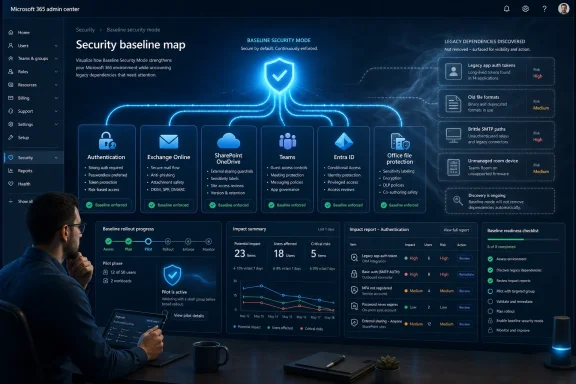
Microsoft 365 Baseline Security Mode is an opt-in security bundle in the Microsoft 365 admin center that centralizes recommended controls across authentication, files, Exchange Online, SharePoint, OneDrive, Teams, and Entra ID for tenant administrators. That sounds like a switch, and Microsoft has every reason to make it look like one. But the more useful way to read the feature is as a destination: a map of where Microsoft thinks most tenants need to end up. The danger is treating the map as if it has already surveyed every legacy dependency, exception, and half-forgotten workflow inside your own estate.
The arrival of Baseline Security Mode is part of a larger Microsoft pattern: move security configuration out of scattered admin portals and PowerShell-only settings, then wrap it in a friendlier Microsoft 365 admin center experience. That is a good instinct. The average tenant has accumulated years of identity exceptions, old Office habits, Exchange compatibility choices, and Teams Rooms improvisations. If Microsoft can bring some of that sprawl into a single view, it gives admins a better starting point than the old hunt-and-peck model.
But secure-by-default is not the same thing as risk-free-by-default. A tenant is not a clean-room architecture diagram. It is a living record of acquisitions, departed admins, line-of-business systems, scanner appliances, forgotten app registrations, finance spreadsheets, executive meeting rooms, and workarounds that became policy because nobody had time to unwind them. Baseline Security Mode is valuable precisely because it exposes that mess. It is not valuable because it makes the mess disappear.
For years, Microsoft 365 security has suffered from a mismatch between where the controls lived and where many administrators actually worked. Some settings were in Entra. Some lived in Exchange Online. Others were SharePoint tenant switches, Office policy baselines, Teams device controls, or PowerShell incantations known mostly to specialists and consultants. Microsoft could publish excellent security guidance, but guidance scattered across portals has a way of becoming optional in real environments.
Baseline Security Mode is an attempt to make the recommended path more visible. The feature appears under Org settings in the Microsoft 365 admin center, specifically in the Security and privacy area. Its scope spans Microsoft 365 apps, SharePoint and OneDrive, Exchange Online, Teams, and the Entra identity platform. That cross-workload framing matters because attackers do not respect product boundaries, while Microsoft’s admin experience historically has.
The baseline also reflects a maturing view of tenant security. The old model often asked admins to assemble their own posture from defaults, Secure Score recommendations, Conditional Access templates, service-specific hardening, and third-party checklists. The new model says, in effect, here is a coherent minimum Microsoft believes broadly applies. That does not eliminate judgment, but it changes the conversation from “which setting did we miss?” to “what dependency prevents us from adopting this?”
That shift is especially important for smaller IT teams and managed service providers. In those environments, the same administrator may be responsible for endpoints, identity, mail flow, collaboration, and user support. A centralized baseline gives them a defensible reference point. It also creates organizational leverage: if a business unit wants an exception, the burden can move from the security team explaining why a control exists to the requester explaining why they cannot meet it.
Still, centralization has a psychological cost. A neatly packaged baseline can make security look tidier than it is. The admin center becomes the stage; the real drama remains backstage, in the dependencies the tenant has quietly carried for years.
The temptation, however, will be to mistake a guided experience for a completed migration plan. Admins love wizards because wizards reduce ambiguity. They offer a button, a status, a progress bar, and the satisfying feeling that complexity has been converted into workflow. But a wizard can only evaluate what Microsoft can observe and model. It cannot know that the ancient multifunction printer on the third floor still uses a brittle SMTP configuration, or that the tax team has a spreadsheet model built around old file formats and data exchange behavior nobody has documented since 2014.
This is why the “flip switch” framing is dangerous. The setting may be exposed as a switch, but the organizational change behind it is not binary. The correct sequence is discovery, remediation, policy rationalization, exception design, pilot, enforcement, and monitoring. Baseline Security Mode can assist with parts of that sequence. It cannot repeal the sequence.
The point is not to fear the baseline. The point is to stop treating Microsoft 365 hardening as a cosmetic admin-center exercise. If a recommended control breaks something, that does not automatically mean the control is wrong. It may mean the tenant has finally found a dependency that should have been retired years ago.
The problem is that legacy authentication is rarely just a technical setting. It is an archaeological layer. Exchange Web Services integrations, older SMTP workflows, unattended scripts, backup products, scanners, line-of-business applications, and stale app registrations all tend to outlive the people who first configured them. When an admin sees “legacy auth” in a portal, the business may hear “the invoice system stopped sending mail.”
This is where Baseline Security Mode performs a useful diagnostic function. If enabling the authentication controls threatens to break something, the tenant has learned something important. The right response is not to permanently exempt the dependency and move on. The right response is to identify ownership, determine whether the workflow is still needed, and migrate it to a modern authentication pattern or a supported service design.
App registrations deserve special scrutiny. Password credentials attached to applications are easy to create and easy to forget. In many tenants, they become a shadow inventory of non-human access. Blocking or limiting new password credentials is a reasonable security move, but cleaning up the existing population is often where the real work lives. Certificates, managed identities, workload identity federation, or vendor-supported modern auth paths may be the answer, depending on the application. The important thing is to treat app authentication as an asset-management problem, not just an identity toggle.
Microsoft has spent years pushing customers away from basic authentication and older access patterns. Baseline Security Mode is another lever in that campaign. The difference is that it packages the lever in a form more admins will see. That visibility is useful, but it also means more organizations will discover how many exceptions were hiding in plain sight.
Two sources of truth are not merely untidy. They are operationally dangerous. When a user is blocked, challenged, or exempted, the help desk needs to understand why. When an auditor asks how privileged access is protected, the security team needs a coherent answer. When an incident occurs, responders need to know which policy actually governed the session. A Conditional Access estate that accretes policies without a design model becomes a fog machine.
Microsoft-managed policies also alter the control relationship. Some baseline-driven policies may expose only high-level on/off or exclusion choices, while the underlying conditions and grant controls are fixed by Microsoft. That can be a strength for tenants that lack mature identity engineering. It can also be a constraint for tenants that have already built a carefully layered Conditional Access architecture.
The correct answer is not reflexively rejecting Microsoft-managed policy. Microsoft has enormous telemetry and threat intelligence, and its managed recommendations will often track the direction of travel better than hand-rolled tenant policies written years earlier. But adoption should force a rationalization exercise. If the baseline provides a Microsoft-maintained equivalent to an existing custom rule, decide which one owns that requirement. If the custom policy remains necessary, document why. If it no longer serves a distinct purpose, retire it.
Conditional Access is now one of the primary security control planes for Microsoft 365. That makes it too important to manage as a pile of historical intentions. Baseline Security Mode can be a catalyst for cleanup, but only if administrators resist the urge to simply stack it on top of everything already there.
The trouble is that Office is where security theory meets departmental muscle memory. Finance teams may have old Excel models that depend on legacy formats or external data exchange behavior. Operations groups may use templates created years ago and copied forward rather than rebuilt. Small businesses may have inherited
This is why Office hardening feels more disruptive than identity hardening in some organizations. Users often understand a multifactor prompt as a security measure, even if they complain about it. They are less forgiving when a workbook opens in Protected View, an embedded object fails, or an old template no longer behaves like it did yesterday. To the user, the file is the work. To the attacker, the file is also the delivery mechanism.
The baseline’s Office settings should therefore be treated as a document modernization program hiding inside a security feature. Admins need to identify departments with legacy file dependencies, test representative workflows, and give users a path to convert, rebuild, or retire old artifacts. The worst rollout is one where the security team discovers critical spreadsheet behavior at the same moment the CFO does.
That does not mean delaying forever. “We have old files” cannot be an indefinite veto over basic hardening. It means sequencing the change intelligently. Open ancient formats in Protected View. Restrict editing where the risk justifies it. Block dangerous embedded technologies. Then help the business understand that old Office functionality is no longer neutral compatibility; it is attack surface with a file extension.
Enterprises rarely remove old tools because they performed a clean cost-benefit analysis and decided the time had come. They remove them after a security incident, a support deadline, a licensing change, or a forced migration. Until then, old tools survive because they are familiar and because no single team owns the consequences of keeping them. Publisher is just one visible example of a larger pattern.
Baseline Security Mode gives Microsoft a way to make those product lifecycle realities operational. Instead of relying on every tenant to follow every retirement notice and translate it into controls, Microsoft can surface a recommended setting where admins are already making security decisions. That is efficient. It is also paternalistic in the way cloud administration increasingly is: Microsoft is not just shipping software; it is shaping the acceptable use of that software.
For many tenants, that trade-off is fine. The alternative is leaving obscure and declining features enabled indefinitely because removing them requires someone to start a fight. A baseline can give security teams the backing they need to say the platform itself has moved on. In a world where attackers routinely exploit forgotten corners, that backing has real value.
But Microsoft should be careful not to overplay the convenience. The more the company centralizes and manages baseline decisions, the more transparent it needs to be about what is changing, why it is changing, and how tenants can see the blast radius. Admins do not need every recommendation to be negotiable. They do need every recommendation to be intelligible.
Resource accounts are especially sensitive. They exist to make rooms work, not to become general-purpose identities. If a room account can sign in broadly to Microsoft 365 clients or access files beyond what is needed, it becomes a weird little side door in the tenant. Baseline controls that restrict how room accounts and devices authenticate are therefore not edge-case hardening. They are basic hygiene for modern meeting infrastructure.
The implementation pain comes from the real world of conference rooms. Executive boardrooms often have custom AV stacks. Regional offices may use older devices. Partner-provided spaces may not align neatly with central management. Facilities teams may own the room hardware while IT owns the identity. When the meeting fails five minutes before a board call, the pressure to create an exception can overwhelm the security argument.
Those exceptions are where the baseline can quietly lose its value. A temporary bypass for a critical meeting can become a permanent configuration because nobody wants to revisit it. A single unmanaged room can become the precedent for a fleet. A resource account exclusion can outlive the device it was created for. This is how secure-by-default erodes into insecure-by-exception.
Admins need to treat meeting rooms like managed endpoints, not sacred spaces exempt from normal controls. That means inventory, ownership, lifecycle planning, compliance requirements, and a process for emergency exceptions that includes expiration. If a room is important enough to disrupt the business when it fails, it is important enough to manage properly.
The feature also arrives at a time when Microsoft is under pressure to prove that security is not just a premium add-on or a documentation exercise. Customers want defaults that reduce exposure. Governments and regulators want cloud providers to take baseline hardening seriously. Attackers continue to exploit exactly the kinds of weak configurations that large platforms are capable of detecting and discouraging. Microsoft has strategic reasons to make baseline security feel like part of the product, not a consulting engagement.
That is why this should be read as a direction of travel. Today’s baseline may cover a specific set of controls across authentication, files, and room devices. Tomorrow’s version will almost certainly change. Microsoft-managed policies are likely to expand as the company gains confidence in its telemetry and as customers become more comfortable letting the platform carry more of the security model.
For admins, that means the question is not whether to memorize the current baseline. The question is how to build an operating model that can absorb baseline evolution. Tenants need policy ownership, change review, testing rings, exception governance, and documentation. Otherwise, every Microsoft improvement becomes a surprise.
The organizations that benefit most will be the ones that align with Microsoft’s direction without surrendering their own architectural thinking. Let Microsoft define the minimum where it makes sense. Then decide deliberately where your tenant needs stricter controls, slower rollout, or documented exceptions. That is not resistance to the cloud model. It is competent administration inside it.
That can improve customer outcomes. Many small and midsize organizations have never made a deliberate decision to allow legacy Office behavior or weak authentication patterns. They simply inherited defaults and exceptions. Baseline Security Mode creates an opportunity for MSPs to run structured reviews, show impact, and propose remediation as a project rather than an abstract best practice.
But it also raises the bar for MSP discipline. Providers managing multiple tenants cannot simply enable the baseline everywhere and hope impact reports catch everything important. They need tenant-specific dependency mapping, standard operating procedures, change windows, rollback plans, and exception registers. If the baseline becomes another checkbox in a monthly security bundle, it will reproduce the same superficiality it was meant to fix.
There is also a commercial temptation. “We enabled Microsoft’s baseline” sounds like a clean deliverable. “We spent weeks finding brittle workflows, removing duplicate Conditional Access policies, modernizing app authentication, and negotiating with business units about legacy files” sounds messier and more expensive. Unfortunately, the messy version is the real work.
The providers that do this well will turn Baseline Security Mode into a maturity conversation. The providers that do it poorly will turn it into a support-ticket generator.
That is not a criticism of the feature. It is a reminder that cloud administration has not eliminated asset management. In some ways, it has made asset management more abstract and therefore easier to neglect. Identities, apps, policies, and service settings are assets too. They need owners, review cycles, and retirement paths.
The baseline also rewards tenants that distinguish between temporary and permanent exceptions. A temporary exception is a bridge to remediation. A permanent exception is a policy decision. Too many organizations pretend the former while operating the latter. Baseline Security Mode will not stop that habit by itself, but it gives admins a moment to challenge it.
A useful rollout should therefore start before the first setting is enabled. Export and review app registrations. Analyze sign-in logs for legacy protocols. Map existing Conditional Access policies to the baseline’s intended outcomes. Identify Office workflows likely to depend on old formats or embedded technologies. Inventory Teams Rooms devices and resource accounts. Decide who can approve an exception and when that exception expires.
The work sounds old-fashioned because it is. Good administration has always been mostly about knowing what you have, why it exists, and what will break if you change it. The cloud did not change that. It merely made the consequences faster.
Baseline Security Mode is Microsoft’s bet that the minimum acceptable security posture for Microsoft 365 can be made visible, manageable, and increasingly standardized. That bet is mostly right, but it does not absolve tenants from understanding themselves. The future of Microsoft 365 administration will likely include more Microsoft-managed baselines, more secure defaults, and fewer tolerated legacy paths. The organizations that thrive in that future will be the ones that start treating today’s baseline not as a shortcut, but as the clearest migration plan Microsoft has put in front of them yet.
The arrival of Baseline Security Mode is part of a larger Microsoft pattern: move security configuration out of scattered admin portals and PowerShell-only settings, then wrap it in a friendlier Microsoft 365 admin center experience. That is a good instinct. The average tenant has accumulated years of identity exceptions, old Office habits, Exchange compatibility choices, and Teams Rooms improvisations. If Microsoft can bring some of that sprawl into a single view, it gives admins a better starting point than the old hunt-and-peck model.
But secure-by-default is not the same thing as risk-free-by-default. A tenant is not a clean-room architecture diagram. It is a living record of acquisitions, departed admins, line-of-business systems, scanner appliances, forgotten app registrations, finance spreadsheets, executive meeting rooms, and workarounds that became policy because nobody had time to unwind them. Baseline Security Mode is valuable precisely because it exposes that mess. It is not valuable because it makes the mess disappear.
 Microsoft Finally Admits the Admin Center Is Where Security Decisions Get Made
For years, Microsoft 365 security has suffered from a mismatch between where the controls lived and where many administrators actually worked. Some settings were in Entra. Some lived in Exchange Online. Others were SharePoint tenant switches, Office policy baselines, Teams device controls, or PowerShell incantations known mostly to specialists and consultants. Microsoft could publish excellent security guidance, but guidance scattered across portals has a way of becoming optional in real environments.Baseline Security Mode is an attempt to make the recommended path more visible. The feature appears under Org settings in the Microsoft 365 admin center, specifically in the Security and privacy area. Its scope spans Microsoft 365 apps, SharePoint and OneDrive, Exchange Online, Teams, and the Entra identity platform. That cross-workload framing matters because attackers do not respect product boundaries, while Microsoft’s admin experience historically has.
The baseline also reflects a maturing view of tenant security. The old model often asked admins to assemble their own posture from defaults, Secure Score recommendations, Conditional Access templates, service-specific hardening, and third-party checklists. The new model says, in effect, here is a coherent minimum Microsoft believes broadly applies. That does not eliminate judgment, but it changes the conversation from “which setting did we miss?” to “what dependency prevents us from adopting this?”
That shift is especially important for smaller IT teams and managed service providers. In those environments, the same administrator may be responsible for endpoints, identity, mail flow, collaboration, and user support. A centralized baseline gives them a defensible reference point. It also creates organizational leverage: if a business unit wants an exception, the burden can move from the security team explaining why a control exists to the requester explaining why they cannot meet it.
Still, centralization has a psychological cost. A neatly packaged baseline can make security look tidier than it is. The admin center becomes the stage; the real drama remains backstage, in the dependencies the tenant has quietly carried for years.
The Wizard Is Useful Because It Is Not Magic
Microsoft’s best decision with Baseline Security Mode is not simply bundling controls. It is acknowledging, through impact reporting and staged evaluation, that tenants need to understand consequences before enforcement. The feature is designed to let organizations review settings, assess impact, and avoid blindly turning on controls that would break critical workflows. That is the right posture for something that touches authentication, Office behavior, and device access.The temptation, however, will be to mistake a guided experience for a completed migration plan. Admins love wizards because wizards reduce ambiguity. They offer a button, a status, a progress bar, and the satisfying feeling that complexity has been converted into workflow. But a wizard can only evaluate what Microsoft can observe and model. It cannot know that the ancient multifunction printer on the third floor still uses a brittle SMTP configuration, or that the tax team has a spreadsheet model built around old file formats and data exchange behavior nobody has documented since 2014.
This is why the “flip switch” framing is dangerous. The setting may be exposed as a switch, but the organizational change behind it is not binary. The correct sequence is discovery, remediation, policy rationalization, exception design, pilot, enforcement, and monitoring. Baseline Security Mode can assist with parts of that sequence. It cannot repeal the sequence.
The point is not to fear the baseline. The point is to stop treating Microsoft 365 hardening as a cosmetic admin-center exercise. If a recommended control breaks something, that does not automatically mean the control is wrong. It may mean the tenant has finally found a dependency that should have been retired years ago.
Legacy Authentication Is Where the Future Usually Hits the Wall
Authentication is the most obvious place where Baseline Security Mode turns from dashboard into migration project. The baseline includes recommendations around blocking insecure legacy paths, restricting unsafe app behavior, limiting older authentication prompts, and tightening how applications and users can access Microsoft 365 resources. These are not exotic ideas. They are the basics of surviving in an environment where password spray, token theft, consent abuse, and legacy protocol exposure remain stubbornly useful to attackers.The problem is that legacy authentication is rarely just a technical setting. It is an archaeological layer. Exchange Web Services integrations, older SMTP workflows, unattended scripts, backup products, scanners, line-of-business applications, and stale app registrations all tend to outlive the people who first configured them. When an admin sees “legacy auth” in a portal, the business may hear “the invoice system stopped sending mail.”
This is where Baseline Security Mode performs a useful diagnostic function. If enabling the authentication controls threatens to break something, the tenant has learned something important. The right response is not to permanently exempt the dependency and move on. The right response is to identify ownership, determine whether the workflow is still needed, and migrate it to a modern authentication pattern or a supported service design.
App registrations deserve special scrutiny. Password credentials attached to applications are easy to create and easy to forget. In many tenants, they become a shadow inventory of non-human access. Blocking or limiting new password credentials is a reasonable security move, but cleaning up the existing population is often where the real work lives. Certificates, managed identities, workload identity federation, or vendor-supported modern auth paths may be the answer, depending on the application. The important thing is to treat app authentication as an asset-management problem, not just an identity toggle.
Microsoft has spent years pushing customers away from basic authentication and older access patterns. Baseline Security Mode is another lever in that campaign. The difference is that it packages the lever in a form more admins will see. That visibility is useful, but it also means more organizations will discover how many exceptions were hiding in plain sight.
Conditional Access Becomes Dangerous When Nobody Owns the Model
The most subtle risk in Baseline Security Mode is not that Microsoft-managed Conditional Access policies are bad. It is that they can coexist awkwardly with Conditional Access strategies that tenants have already built. Many organizations already have policies to block legacy authentication, require multifactor authentication for privileged roles, restrict risky sign-ins, enforce device compliance, or segment access by location and app. Adding Microsoft-managed baseline policies alongside those controls can create two sources of truth.Two sources of truth are not merely untidy. They are operationally dangerous. When a user is blocked, challenged, or exempted, the help desk needs to understand why. When an auditor asks how privileged access is protected, the security team needs a coherent answer. When an incident occurs, responders need to know which policy actually governed the session. A Conditional Access estate that accretes policies without a design model becomes a fog machine.
Microsoft-managed policies also alter the control relationship. Some baseline-driven policies may expose only high-level on/off or exclusion choices, while the underlying conditions and grant controls are fixed by Microsoft. That can be a strength for tenants that lack mature identity engineering. It can also be a constraint for tenants that have already built a carefully layered Conditional Access architecture.
The correct answer is not reflexively rejecting Microsoft-managed policy. Microsoft has enormous telemetry and threat intelligence, and its managed recommendations will often track the direction of travel better than hand-rolled tenant policies written years earlier. But adoption should force a rationalization exercise. If the baseline provides a Microsoft-maintained equivalent to an existing custom rule, decide which one owns that requirement. If the custom policy remains necessary, document why. If it no longer serves a distinct purpose, retire it.
Conditional Access is now one of the primary security control planes for Microsoft 365. That makes it too important to manage as a pile of historical intentions. Baseline Security Mode can be a catalyst for cleanup, but only if administrators resist the urge to simply stack it on top of everything already there.
Office Hardening Turns Old Documents Into Security Debt
The file protections in Baseline Security Mode are easy to agree with in principle. Microsoft 365 apps have been abused for decades through old file formats, embedded objects, ActiveX controls, DDE behavior, and document features that were created for a very different computing era. Blocking or constraining those paths is exactly what a modern productivity suite should do. The fact that these settings are being surfaced in a more accessible baseline is welcome.The trouble is that Office is where security theory meets departmental muscle memory. Finance teams may have old Excel models that depend on legacy formats or external data exchange behavior. Operations groups may use templates created years ago and copied forward rather than rebuilt. Small businesses may have inherited
.xls workflows from vendors that never modernized. Legal, HR, and accounting departments are often full of documents that are “business critical” precisely because nobody wants to touch them.This is why Office hardening feels more disruptive than identity hardening in some organizations. Users often understand a multifactor prompt as a security measure, even if they complain about it. They are less forgiving when a workbook opens in Protected View, an embedded object fails, or an old template no longer behaves like it did yesterday. To the user, the file is the work. To the attacker, the file is also the delivery mechanism.
The baseline’s Office settings should therefore be treated as a document modernization program hiding inside a security feature. Admins need to identify departments with legacy file dependencies, test representative workflows, and give users a path to convert, rebuild, or retire old artifacts. The worst rollout is one where the security team discovers critical spreadsheet behavior at the same moment the CFO does.
That does not mean delaying forever. “We have old files” cannot be an indefinite veto over basic hardening. It means sequencing the change intelligently. Open ancient formats in Protected View. Restrict editing where the risk justifies it. Block dangerous embedded technologies. Then help the business understand that old Office functionality is no longer neutral compatibility; it is attack surface with a file extension.
Publisher’s Decline Is a Warning About Yesterday’s Productivity Stack
One of the more telling settings in the baseline concerns Microsoft Publisher, a product Microsoft has already placed on a retirement path. Blocking Publisher may sound niche, but it represents a broader point: the productivity stack contains software and features whose original business value no longer matches their security cost. That mismatch is where baselines become politically uncomfortable.Enterprises rarely remove old tools because they performed a clean cost-benefit analysis and decided the time had come. They remove them after a security incident, a support deadline, a licensing change, or a forced migration. Until then, old tools survive because they are familiar and because no single team owns the consequences of keeping them. Publisher is just one visible example of a larger pattern.
Baseline Security Mode gives Microsoft a way to make those product lifecycle realities operational. Instead of relying on every tenant to follow every retirement notice and translate it into controls, Microsoft can surface a recommended setting where admins are already making security decisions. That is efficient. It is also paternalistic in the way cloud administration increasingly is: Microsoft is not just shipping software; it is shaping the acceptable use of that software.
For many tenants, that trade-off is fine. The alternative is leaving obscure and declining features enabled indefinitely because removing them requires someone to start a fight. A baseline can give security teams the backing they need to say the platform itself has moved on. In a world where attackers routinely exploit forgotten corners, that backing has real value.
But Microsoft should be careful not to overplay the convenience. The more the company centralizes and manages baseline decisions, the more transparent it needs to be about what is changing, why it is changing, and how tenants can see the blast radius. Admins do not need every recommendation to be negotiable. They do need every recommendation to be intelligible.
Teams Rooms Prove That Endpoints Are No Longer Just PCs
The inclusion of meeting room device protections is one of the smarter parts of Baseline Security Mode because it reflects how collaboration infrastructure has changed. A Teams Rooms device is not just a conference phone with a screen. It is an endpoint with identity, network access, cameras, microphones, calendar visibility, and a privileged position inside the physical workplace. Treating those devices as special-but-unmanaged is no longer defensible.Resource accounts are especially sensitive. They exist to make rooms work, not to become general-purpose identities. If a room account can sign in broadly to Microsoft 365 clients or access files beyond what is needed, it becomes a weird little side door in the tenant. Baseline controls that restrict how room accounts and devices authenticate are therefore not edge-case hardening. They are basic hygiene for modern meeting infrastructure.
The implementation pain comes from the real world of conference rooms. Executive boardrooms often have custom AV stacks. Regional offices may use older devices. Partner-provided spaces may not align neatly with central management. Facilities teams may own the room hardware while IT owns the identity. When the meeting fails five minutes before a board call, the pressure to create an exception can overwhelm the security argument.
Those exceptions are where the baseline can quietly lose its value. A temporary bypass for a critical meeting can become a permanent configuration because nobody wants to revisit it. A single unmanaged room can become the precedent for a fleet. A resource account exclusion can outlive the device it was created for. This is how secure-by-default erodes into insecure-by-exception.
Admins need to treat meeting rooms like managed endpoints, not sacred spaces exempt from normal controls. That means inventory, ownership, lifecycle planning, compliance requirements, and a process for emergency exceptions that includes expiration. If a room is important enough to disrupt the business when it fails, it is important enough to manage properly.
Security Essentials Was the Sketch; Baseline Security Mode Is the Product Bet
Microsoft has tried versions of this idea before. Security Defaults, Secure Score, template policies, and other guided experiences all attempted to move tenants toward safer configurations. Some helped. Some were too blunt. Some were useful for small tenants but awkward for more mature environments. Baseline Security Mode looks like a more serious attempt because it combines cross-workload scope, admin-center visibility, and a more explicit adoption path.The feature also arrives at a time when Microsoft is under pressure to prove that security is not just a premium add-on or a documentation exercise. Customers want defaults that reduce exposure. Governments and regulators want cloud providers to take baseline hardening seriously. Attackers continue to exploit exactly the kinds of weak configurations that large platforms are capable of detecting and discouraging. Microsoft has strategic reasons to make baseline security feel like part of the product, not a consulting engagement.
That is why this should be read as a direction of travel. Today’s baseline may cover a specific set of controls across authentication, files, and room devices. Tomorrow’s version will almost certainly change. Microsoft-managed policies are likely to expand as the company gains confidence in its telemetry and as customers become more comfortable letting the platform carry more of the security model.
For admins, that means the question is not whether to memorize the current baseline. The question is how to build an operating model that can absorb baseline evolution. Tenants need policy ownership, change review, testing rings, exception governance, and documentation. Otherwise, every Microsoft improvement becomes a surprise.
The organizations that benefit most will be the ones that align with Microsoft’s direction without surrendering their own architectural thinking. Let Microsoft define the minimum where it makes sense. Then decide deliberately where your tenant needs stricter controls, slower rollout, or documented exceptions. That is not resistance to the cloud model. It is competent administration inside it.
The MSP Angle Is Bigger Than the Feature Itself
Managed service providers should pay particular attention to Baseline Security Mode because it changes the conversation with customers. A baseline surfaced by Microsoft in the admin center is easier to explain than a custom checklist assembled from years of practitioner experience. It gives MSPs a common language for minimum posture, and it makes insecure configurations harder to dismiss as merely the provider’s preference.That can improve customer outcomes. Many small and midsize organizations have never made a deliberate decision to allow legacy Office behavior or weak authentication patterns. They simply inherited defaults and exceptions. Baseline Security Mode creates an opportunity for MSPs to run structured reviews, show impact, and propose remediation as a project rather than an abstract best practice.
But it also raises the bar for MSP discipline. Providers managing multiple tenants cannot simply enable the baseline everywhere and hope impact reports catch everything important. They need tenant-specific dependency mapping, standard operating procedures, change windows, rollback plans, and exception registers. If the baseline becomes another checkbox in a monthly security bundle, it will reproduce the same superficiality it was meant to fix.
There is also a commercial temptation. “We enabled Microsoft’s baseline” sounds like a clean deliverable. “We spent weeks finding brittle workflows, removing duplicate Conditional Access policies, modernizing app authentication, and negotiating with business units about legacy files” sounds messier and more expensive. Unfortunately, the messy version is the real work.
The providers that do this well will turn Baseline Security Mode into a maturity conversation. The providers that do it poorly will turn it into a support-ticket generator.
The New Baseline Rewards Tenants That Already Know Themselves
Baseline Security Mode’s impact reporting and simulation-style thinking are helpful, but the best-prepared tenants will be those that already maintain inventories and ownership models. If you know your app registrations, mail-sending systems, privileged roles, Teams Rooms fleet, document dependencies, and Conditional Access architecture, the baseline becomes a validation exercise. If you do not, it becomes a discovery project with security consequences.That is not a criticism of the feature. It is a reminder that cloud administration has not eliminated asset management. In some ways, it has made asset management more abstract and therefore easier to neglect. Identities, apps, policies, and service settings are assets too. They need owners, review cycles, and retirement paths.
The baseline also rewards tenants that distinguish between temporary and permanent exceptions. A temporary exception is a bridge to remediation. A permanent exception is a policy decision. Too many organizations pretend the former while operating the latter. Baseline Security Mode will not stop that habit by itself, but it gives admins a moment to challenge it.
A useful rollout should therefore start before the first setting is enabled. Export and review app registrations. Analyze sign-in logs for legacy protocols. Map existing Conditional Access policies to the baseline’s intended outcomes. Identify Office workflows likely to depend on old formats or embedded technologies. Inventory Teams Rooms devices and resource accounts. Decide who can approve an exception and when that exception expires.
The work sounds old-fashioned because it is. Good administration has always been mostly about knowing what you have, why it exists, and what will break if you change it. The cloud did not change that. It merely made the consequences faster.
The Baseline Is a Mirror Before It Is a Guardrail
The practical lesson is that Microsoft 365 Baseline Security Mode should be adopted with intent, not awe. It is a strong signal of where Microsoft wants tenant security to go, and most organizations should move in that direction. But the baseline’s greatest early value may be diagnostic: it shows where a tenant’s accumulated exceptions no longer fit the platform’s security assumptions.- Baseline Security Mode is best treated as a migration target because its controls can expose hidden dependencies in authentication, files, and meeting room infrastructure.
- Tenants should review legacy protocols, app registrations, and service accounts before enforcing authentication-related baseline settings.
- Microsoft-managed Conditional Access policies should be reconciled with existing tenant policies so administrators do not create competing sources of truth.
- Office hardening should be paired with a plan to modernize old templates, legacy file formats, embedded objects, and fragile spreadsheet workflows.
- Teams Rooms and resource accounts need lifecycle management, not open-ended exceptions created during meeting-room emergencies.
- Exceptions should have owners, reasons, review dates, and expiration paths, or they will become the new weak defaults.
Baseline Security Mode is Microsoft’s bet that the minimum acceptable security posture for Microsoft 365 can be made visible, manageable, and increasingly standardized. That bet is mostly right, but it does not absolve tenants from understanding themselves. The future of Microsoft 365 administration will likely include more Microsoft-managed baselines, more secure defaults, and fewer tolerated legacy paths. The organizations that thrive in that future will be the ones that start treating today’s baseline not as a shortcut, but as the clearest migration plan Microsoft has put in front of them yet.
References
- Primary source: Petri IT Knowledgebase
Published: Tue, 09 Jun 2026 11:02:04 GMT
Why Microsoft 365 Baseline Security Mode Isn't a Flip Switch
The secure-by-default model makes sense, but most tenants still need dependency cleanup, policy rationalization, and tighter exception control. petri.com
- Official source: learn.microsoft.com
Baseline security mode settings | Microsoft Learn
Discover how to configure Baseline Security Mode settings in Microsoft 365 to enhance security, protect data, and ensure safe collaboration.learn.microsoft.com - Official source: support.microsoft.com
Access your Account Privacy Settings | Microsoft Support
Access your Account Privacy Settingssupport.microsoft.com - Official source: microsoft.com
Deploying Microsoft Baseline Security Mode at Microsoft: Our virtuous learning cycle - Inside Track Blog
Learn how we implemented Microsoft Baseline Security Mode internally here at Microsoft.www.microsoft.com - Related coverage: techdocweb.com
Baseline Security Mode (BSM) in Microsoft 365 - TechDocWeb.com
BSM is a secure-by-default, opt-in feature introduced at Microsoft Ignite 2025, now generally available. It simplifies tenant hardening by applying 18 initial settings across Authentication, File protection, and Room devices spanning Exchange, Teams, SharePoint, OneDrive, and Entra while... techdocweb.com
- Official source: techcommunity.microsoft.com
Ignite’25 Spotlight: Announcing Microsoft Baseline security mode | Microsoft Community Hub
Enable Security by default for Frontier Organizations techcommunity.microsoft.com
- Related coverage: ide-solutions.com
Baseline Security Mode for Microsoft 365 | IDE Solutions
Microsoft Baseline Security Mode is now fully rolled out. Learn how this dashboard helps you meet security standards across all Microsoft 365 apps. ide-solutions.com
- Related coverage: ebisuda.net
Microsoft、M365全テナントに「Baseline Security Mode」展開開始——Office・SharePoint・Exchange・Teams・Entraのセキュリティ設定を一元管理 | ebisuda.net
MicrosoftがM365管理センターに推奨セキュリティ設定を一括適用できる「Baseline Security Mode」を全テナントへ順次展開中。www.ebisuda.net
- Related coverage: office365itpros.com
Microsoft Baseline Security Mode Rolls Out
Microsoft has released a set of security benchmark recommendations that it calls baseline security mode for Microsoft 365 tenants.office365itpros.com - Security advisory: cisa.gov
Defender for Office 365 Minimum Viable Secure Configuration Baseline
</rdf:Alt> </dc:description> <dc:creator> <rdf:Seq> <rdf:li>Troy Stevenswww.cisa.gov
- Related coverage: tminus365.com
