

Microsoft is preparing to add organization-level Microsoft 365 Copilot Chat adoption metrics for users who do not have Microsoft 365 Copilot licenses, and most IT teams should keep that visibility unless privacy, labor, compliance, or internal-policy requirements demand otherwise. The urgent decision is not whether Copilot Chat remains available; it is whether its usage should be measured, grouped, filtered, and surfaced in the Copilot Dashboard when the planned rollout begins in November 2026.
Microsoft 365 Roadmap item 499899 describes the feature as “Microsoft Viva: Copilot Dashboard - M365 Copilot Chat adoption metrics.” Microsoft says administrators will be able to disable the insights in the Microsoft 365 admin center, but it has not published a verified, step-by-step navigation path for that specific switch. AI administrators should therefore make the policy decision now, identify populations that may require exclusion, and watch the admin center and Message center for the actual control rather than following speculative instructions.
The roadmap chronology matters because some references to this change frame September 2026 as the rollout deadline. Microsoft’s current roadmap entry does not support that date: preview availability is listed as October 2025, while general rollout is scheduled to begin in November 2026.
Roadmap item 499899 was added on August 6, 2025, and last modified on October 1, 2025. It remains an advance notice rather than a complete deployment guide, and Microsoft could still change the schedule before November. Administrators should track the roadmap ID directly and treat any earlier date as an internal preparation target—not Microsoft’s published rollout start.
The feature is aimed specifically at Copilot Chat users who lack Microsoft 365 Copilot licenses. That distinction turns a seemingly routine Viva reporting update into a broader governance issue: employees do not necessarily need the premium Copilot license for their Chat activity to become part of organization-level adoption analysis.
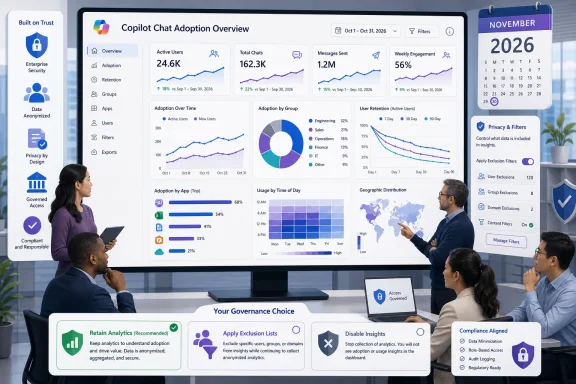
Microsoft says the resulting insights will cover usage trends over time, adoption by group, retention, app-level breakdowns, and filters based on organizational attributes. These are not merely service-health counters. They can help management see where Copilot Chat is gaining traction, where usage falls away, and how adoption differs across parts of the organization.
That can be useful for licensing plans, training, support, and AI strategy. It also means a larger population may become visible through aggregated adoption reporting than administrators, employees, or governance teams previously assumed.
The practical procedure today is a governance workflow rather than a completed user-interface walkthrough:
Administrators must also avoid confusing the future insights control with controls for Copilot Chat access, application pinning, harmful-content protection, or Copilot Dashboard access. Turning off adoption insights is not described as turning off Chat. Conversely, blocking or unpinning an entry point is not evidence that existing reporting populations or dashboard data have been removed.
For broader context on how Microsoft’s business chatbot branding and access model evolved, WindowsForum previously examined the transition in Microsoft 365 Copilot Chat: What You Need to Know About the Rebranding. The reporting change is another example of why administrators need to separate the Copilot product users see from the management and analytics systems operating around it.
Trend and retention reporting could distinguish a short-lived trial from sustained usage. Group and app-level breakdowns could help administrators determine whether adoption is concentrated in one business unit or occurring across multiple Microsoft 365 surfaces. Organizational-attribute filters could support targeted training rather than a tenant-wide campaign based on anecdotal demand.
The strongest case for retaining the metrics exists where the organization has approved Copilot Chat, communicates that aggregated usage may be analyzed, and has a defined owner for interpreting the dashboard. In that environment, the reporting can help answer whether Chat is being adopted before the business buys more expensive licenses or launches formal training.
Visibility is not automatically valuable, however. A dashboard without ownership can become a source of misleading conclusions. A low retention figure could reflect limited employee need, insufficient training, policy uncertainty, or an unsuitable workflow; it does not by itself establish that Copilot Chat failed.
Administrators should document which decisions the metrics are expected to inform. If no team can name a licensing, training, support, or governance decision that the data will influence, collecting another dashboard may add more organizational risk than operational value.
This approach fits tenants that want broad adoption visibility but need exceptions for legal, ethical, compliance, or employment-policy reasons. Potential exclusion categories must be selected by the organization’s own governance teams; Microsoft’s roadmap does not prescribe which populations should be omitted.
Microsoft Learn says changes made through an exclusion list can take up to three days to take effect. Admins should build that delay into validation plans and avoid promising immediate removal from dashboard analysis.
The exclusion list must also be treated as a maintained control, not a one-time CSV exercise. Employee transfers, new organizational units, uploaded cohorts, licensing changes, and identity-management processes can all affect who belongs in an approved reporting population. The list needs an owner, a review interval, and a test procedure.
Microsoft Learn further warns that, without an exclusion list, eligible employees can be included in Copilot Dashboard and Agent Dashboard insights based on licensing or uploaded cohorts. That makes cohort management part of the Chat Insights review: administrators should inventory not only Copilot licenses but also populations introduced through administrative uploads.
This middle path is likely to suit regulated or multinational organizations better than a blanket decision. It preserves a view of general adoption while preventing defined populations from appearing in the analysis, subject to Microsoft’s processing delay and the organization’s ability to keep exclusions current.
The important distinction is that the roadmap describes a switch for insights, not a kill switch for Copilot Chat. IT should not represent disabling the reporting as disabling the service, nor assume it will erase historical information. Microsoft has not provided verified details about retroactive deletion, data already processed, re-enablement, or whether previously generated trends return after the setting is switched back on.
That uncertainty should shape the approval record. A defensible decision should specify whether the objective is to stop future dashboard analysis, remove particular users, or prevent access to Copilot Chat entirely. Those are three different administrative outcomes and may require different controls.
Disabling insights may also sacrifice useful evidence. Without organization-level trends, administrators could lose an early signal that unlicensed Copilot Chat use is expanding, creating demand for support, policy clarification, or premium licensing. The privacy benefit and operational cost should therefore be evaluated together.
WindowsForum’s earlier coverage of Microsoft 365 Copilot’s admin-facing changes highlighted how quickly new controls and deployment choices can accumulate. Roadmap item 499899 adds measurement to that burden: organizations now need a policy not only for who can use AI, but also for who can be counted in AI-adoption reporting.
The roadmap also does not explain the granularity of retention measurements, the exact applications included in app-level breakdowns, who can see each view, or how organizational attributes will interact with minimum group protections. Administrators should resist filling these gaps with assumptions based on other Viva Insights features.
There is likewise no verified statement about the default position of the disable control. Until Microsoft confirms whether insights arrive enabled or require activation, IT teams should plan for both outcomes and prioritize checking the tenant as rollout approaches.
The three-day exclusion-processing window creates another operational gotcha. If a sensitive population must not appear, administrators should not wait until the expected rollout date to prepare the exclusion data. Validation should occur after Microsoft exposes the feature and before dashboards are shared broadly with analysts, managers, or adoption teams.
Roadmap item 499899 gives IT enough information to make the policy decision, but not enough to finish the technical implementation. By November 2026, every affected tenant should have selected one of three positions: retain the insights with a defined business purpose, retain them with maintained exclusions, or disable them as soon as Microsoft exposes the control.
Microsoft 365 Roadmap item 499899 describes the feature as “Microsoft Viva: Copilot Dashboard - M365 Copilot Chat adoption metrics.” Microsoft says administrators will be able to disable the insights in the Microsoft 365 admin center, but it has not published a verified, step-by-step navigation path for that specific switch. AI administrators should therefore make the policy decision now, identify populations that may require exclusion, and watch the admin center and Message center for the actual control rather than following speculative instructions.
 The Deadline Is November, Not September
The roadmap chronology matters because some references to this change frame September 2026 as the rollout deadline. Microsoft’s current roadmap entry does not support that date: preview availability is listed as October 2025, while general rollout is scheduled to begin in November 2026.Roadmap item 499899 was added on August 6, 2025, and last modified on October 1, 2025. It remains an advance notice rather than a complete deployment guide, and Microsoft could still change the schedule before November. Administrators should track the roadmap ID directly and treat any earlier date as an internal preparation target—not Microsoft’s published rollout start.
The feature is aimed specifically at Copilot Chat users who lack Microsoft 365 Copilot licenses. That distinction turns a seemingly routine Viva reporting update into a broader governance issue: employees do not necessarily need the premium Copilot license for their Chat activity to become part of organization-level adoption analysis.
Microsoft says the resulting insights will cover usage trends over time, adoption by group, retention, app-level breakdowns, and filters based on organizational attributes. These are not merely service-health counters. They can help management see where Copilot Chat is gaining traction, where usage falls away, and how adoption differs across parts of the organization.
That can be useful for licensing plans, training, support, and AI strategy. It also means a larger population may become visible through aggregated adoption reporting than administrators, employees, or governance teams previously assumed.
Make the Reporting Decision Before Looking for the Toggle
Microsoft’s roadmap confirms that an admin disable control will exist in the Microsoft 365 admin center, but the currently verified material does not provide its exact menu location, required role, licensing conditions, tenant prerequisites, default state, or rollback behavior. Any purported click-by-click path for “Chat Insights” would therefore be guesswork.The practical procedure today is a governance workflow rather than a completed user-interface walkthrough:
- Record Microsoft 365 Roadmap ID 499899 in the tenant’s change-management or Microsoft 365 release-tracking process.
- Decide whether the organization wants Copilot Chat adoption by unlicensed users included in Copilot Dashboard reporting.
- Identify departments, jurisdictions, employee categories, or special populations that may require exclusion.
- Review any existing Copilot Dashboard and Agent Dashboard cohorts because Microsoft Learn says eligible employees may already be included through licensing or uploaded cohorts.
- Prepare and validate an exclusion list if the organization wants reporting overall but must omit defined users.
- Assign an owner to check the Microsoft 365 admin center and Message center for the documented Chat Insights control before November 2026.
- Capture the tenant’s selected setting, effective date, exclusions, approval authority, and reason in the organization’s AI governance records.
- After applying exclusions or disabling the feature, allow for processing time and verify the dashboard rather than assuming an immediate change.
Administrators must also avoid confusing the future insights control with controls for Copilot Chat access, application pinning, harmful-content protection, or Copilot Dashboard access. Turning off adoption insights is not described as turning off Chat. Conversely, blocking or unpinning an entry point is not evidence that existing reporting populations or dashboard data have been removed.
For broader context on how Microsoft’s business chatbot branding and access model evolved, WindowsForum previously examined the transition in Microsoft 365 Copilot Chat: What You Need to Know About the Rebranding. The reporting change is another example of why administrators need to separate the Copilot product users see from the management and analytics systems operating around it.
Keep the Metrics When Visibility Solves a Real Problem
For many enterprises, retaining the insights will be the more useful default. Copilot Chat can spread without a premium Microsoft 365 Copilot license deployment, leaving IT with support demand and governance questions but little organizational context.Trend and retention reporting could distinguish a short-lived trial from sustained usage. Group and app-level breakdowns could help administrators determine whether adoption is concentrated in one business unit or occurring across multiple Microsoft 365 surfaces. Organizational-attribute filters could support targeted training rather than a tenant-wide campaign based on anecdotal demand.
The strongest case for retaining the metrics exists where the organization has approved Copilot Chat, communicates that aggregated usage may be analyzed, and has a defined owner for interpreting the dashboard. In that environment, the reporting can help answer whether Chat is being adopted before the business buys more expensive licenses or launches formal training.
Visibility is not automatically valuable, however. A dashboard without ownership can become a source of misleading conclusions. A low retention figure could reflect limited employee need, insufficient training, policy uncertainty, or an unsuitable workflow; it does not by itself establish that Copilot Chat failed.
Administrators should document which decisions the metrics are expected to inform. If no team can name a licensing, training, support, or governance decision that the data will influence, collecting another dashboard may add more organizational risk than operational value.
Exclusions Offer the Middle Ground
Organizations do not have to choose only between measuring everyone and disabling the feature tenant-wide. Microsoft Learn documents exclusion lists that can remove specified Microsoft 365 licensed users from Copilot Dashboard analysis for Copilot Chat web usage.This approach fits tenants that want broad adoption visibility but need exceptions for legal, ethical, compliance, or employment-policy reasons. Potential exclusion categories must be selected by the organization’s own governance teams; Microsoft’s roadmap does not prescribe which populations should be omitted.
Microsoft Learn says changes made through an exclusion list can take up to three days to take effect. Admins should build that delay into validation plans and avoid promising immediate removal from dashboard analysis.
The exclusion list must also be treated as a maintained control, not a one-time CSV exercise. Employee transfers, new organizational units, uploaded cohorts, licensing changes, and identity-management processes can all affect who belongs in an approved reporting population. The list needs an owner, a review interval, and a test procedure.
Microsoft Learn further warns that, without an exclusion list, eligible employees can be included in Copilot Dashboard and Agent Dashboard insights based on licensing or uploaded cohorts. That makes cohort management part of the Chat Insights review: administrators should inventory not only Copilot licenses but also populations introduced through administrative uploads.
This middle path is likely to suit regulated or multinational organizations better than a blanket decision. It preserves a view of general adoption while preventing defined populations from appearing in the analysis, subject to Microsoft’s processing delay and the organization’s ability to keep exclusions current.
Disable Insights When Measurement Creates the Bigger Risk
Disabling Copilot Chat insights is the cleaner option when the organization permits access but has not approved centralized adoption analysis for unlicensed users. It may also be appropriate where employee communications, works council agreements, privacy assessments, or internal AI policies cover service availability but not usage analytics.The important distinction is that the roadmap describes a switch for insights, not a kill switch for Copilot Chat. IT should not represent disabling the reporting as disabling the service, nor assume it will erase historical information. Microsoft has not provided verified details about retroactive deletion, data already processed, re-enablement, or whether previously generated trends return after the setting is switched back on.
That uncertainty should shape the approval record. A defensible decision should specify whether the objective is to stop future dashboard analysis, remove particular users, or prevent access to Copilot Chat entirely. Those are three different administrative outcomes and may require different controls.
Disabling insights may also sacrifice useful evidence. Without organization-level trends, administrators could lose an early signal that unlicensed Copilot Chat use is expanding, creating demand for support, policy clarification, or premium licensing. The privacy benefit and operational cost should therefore be evaluated together.
WindowsForum’s earlier coverage of Microsoft 365 Copilot’s admin-facing changes highlighted how quickly new controls and deployment choices can accumulate. Roadmap item 499899 adds measurement to that burden: organizations now need a policy not only for who can use AI, but also for who can be counted in AI-adoption reporting.
The Unpublished Details Still Matter
Several details remain unverified in the roadmap entry. Microsoft has not defined the precise eligible population for this specific rollout beyond users without Microsoft 365 Copilot licenses, nor has it documented the licensing and tenant prerequisites for the new insights.The roadmap also does not explain the granularity of retention measurements, the exact applications included in app-level breakdowns, who can see each view, or how organizational attributes will interact with minimum group protections. Administrators should resist filling these gaps with assumptions based on other Viva Insights features.
There is likewise no verified statement about the default position of the disable control. Until Microsoft confirms whether insights arrive enabled or require activation, IT teams should plan for both outcomes and prioritize checking the tenant as rollout approaches.
The three-day exclusion-processing window creates another operational gotcha. If a sensitive population must not appear, administrators should not wait until the expected rollout date to prepare the exclusion data. Validation should occur after Microsoft exposes the feature and before dashboards are shared broadly with analysts, managers, or adoption teams.
Roadmap item 499899 gives IT enough information to make the policy decision, but not enough to finish the technical implementation. By November 2026, every affected tenant should have selected one of three positions: retain the insights with a defined business purpose, retain them with maintained exclusions, or disable them as soon as Microsoft exposes the control.
References
- Primary source: learn.microsoft.com
Manage harmful content protection settings for Microsoft 365 Copilot Chat | Microsoft Learn
Learn how to set up a policy that enables users to disable harmful content protection in Microsoft 365 Copilot Chat as appropriate.learn.microsoft.com - Independent coverage: microsoft.com
Microsoft 365 Roadmap | Microsoft 365
The Microsoft 365 Roadmap lists updates that are currently planned for applicable subscribers. Check here for more information on the status of new features and updates.www.microsoft.com
- Primary source: WindowsForum
Microsoft 365 Copilot August 2025 Updates: Enhanced AI Tools for Admins and Users | Windows Forum
Microsoft 365 Copilot has introduced a suite of enhancements in July 2025, aimed at improving both administrative oversight and user experience. These...windowsforum.com
