

JD Supra is promoting a legal-technology webinar on discovery challenges created by Microsoft 365 Copilot, focusing on how AI-generated prompts, summaries, Copilot Pages, memory data, personalization signals, and audio recaps complicate preservation and production across Word, Excel, Teams, Outlook, SharePoint, and OneDrive. The premise is not merely that lawyers need another continuing-education session on artificial intelligence. It is that Microsoft has turned the productivity suite into a live evidentiary system, and enterprise discovery practice is still catching up. For Windows shops, the issue lands squarely in the overlap between compliance, identity, endpoint governance, and the messy reality of how people now work.
For decades, enterprise discovery inside Microsoft 365 was difficult but at least conceptually familiar. Email lived in Exchange. Documents lived in SharePoint or OneDrive. Teams messages, meeting recordings, and chat transcripts created their own headaches, but each category could be explained to a court, mapped to a retention policy, and handed to outside counsel with a reasonable story about where it came from.
Copilot changes the shape of that story. It does not merely create a new file type or a new chat stream. It sits across the platform, reads from existing stores, synthesizes material, and then leaves traces in places that may not match the mental model of the employee, the attorney, or even the administrator who turned it on.
That is why the JD Supra webinar framing matters. The most important discovery problem created by Copilot is not the familiar fear that AI might hallucinate. It is that AI interactions create derivative records whose legal significance depends on context: what the user asked, what data Copilot consulted, what it generated, where that output was saved, whether memory influenced the response, and whether any of that is preserved when litigation or investigation begins.
Enterprise IT has spent years telling users that Microsoft 365 is one coherent cloud. Discovery professionals now have to explain that the same coherence is a liability. When Word, Outlook, Teams, SharePoint, and OneDrive all become surfaces for the same AI assistant, evidence no longer follows the neat boundaries of the app icons on the taskbar.
A prompt to Copilot can be an instruction, a disclosure, a hypothesis, a request for synthesis, or a confession of what the user thinks matters. “Summarize the issues in the acquisition documents” is different from “Find the weakest point in our termination rationale,” even if both produce a tidy paragraph. In litigation, the prompt may reveal intent or knowledge in a way the generated response does not.
The response has its own evidentiary character. It may draw on emails, Teams chats, SharePoint files, OneDrive content, calendar items, meeting transcripts, and other work data that the user was allowed to access. That does not mean Copilot changes permissions, but it does mean it can accelerate the discovery of information that was previously buried under poor naming, stale folder structures, or organizational drift.
This is where Microsoft’s security promise and legal reality diverge. Microsoft emphasizes that Copilot respects existing permissions. That is important, and it is materially better than an unmanaged AI tool where employees paste confidential records into a public chatbot. But permissions were never designed to answer every discovery question. A user may have access to a document they rarely read, inherited access to a SharePoint site they forgot existed, or visibility into a Teams channel whose membership was never pruned.
For administrators, the compliance question becomes brutally practical: if Copilot produced a response based on ten items spread across the tenant, does the organization need the prompt, the response, the referenced materials, the audit record, the saved output, or all of the above? The answer will vary by matter, but the workflow cannot be invented after a preservation duty has attached.
The problem is that most tenants do not operate Purview like a mature records-management system. They operate it like a cabinet full of useful tools that only a few people understand. eDiscovery Premium, audit search, retention labels, sensitivity labels, data loss prevention, communication compliance, and insider-risk features often live under different owners, budgets, and levels of operational maturity.
Copilot raises the cost of that fragmentation. A legal team asking for “all Copilot activity related to Project Atlas” is not asking a single technical question. It may require mailbox searches, audit review, Teams and SharePoint collection, examination of Copilot Pages, review of generated files, and analysis of whether memory or personalization influenced subsequent responses.
The risk is not that Microsoft has no controls. The risk is that organizations assume the controls are automatically aligned with their legal obligations. A retention policy that covers one kind of interaction may not capture every artifact an attorney cares about. A discovery search that finds prompts and responses may not, by itself, preserve the source documents that shaped the answer. A deleted chat may still have consequences if it produced a saved document, a copied paragraph, or a memory-derived personalization effect.
This is a familiar Microsoft 365 pattern. The platform acquires a capability before the average enterprise has operationalized the governance layer. SharePoint sharing, Teams sprawl, guest access, retention labels, and sensitivity labeling all followed that path. Copilot compresses the same governance cycle because its output looks polished enough to be trusted and informal enough to be forgotten.
That may be a productivity win. It is also a discovery event.
When AI-generated material enters a collaborative workspace, its status changes. It may become a record of team thinking, a draft of a decision, or a convenient summary that later shapes official action. The fact that Copilot helped create it does not make it less discoverable. If anything, it may make the provenance more contested.
The practical question is not whether Copilot Pages are “documents” in the everyday sense. The question is whether the organization can identify where they live, who owns them, who accessed them, what they contain, and how they relate to the underlying material Copilot used. If a page is stored in a user-owned or service-managed location that admins rarely inspect, legal hold workflows must account for that before a matter goes live.
The deeper issue is cultural. Users treat AI canvases as scratchpads, but courts and regulators may treat them as records. That mismatch has always existed with drafts, notes, chats, and whiteboards. Copilot makes it worse by lowering the friction of turning every half-formed thought into polished text.
That makes memory legally and operationally awkward. It may contain facts about user preferences, recurring projects, writing style, or work context. It may influence Copilot’s answer without being visible in the final response. It may be deletable or manageable through user and admin controls, but its relationship to retention, auditability, and production is not as intuitive as a document or message.
For IT pros, memory should trigger the same instincts as roaming profiles, autocomplete caches, browser history, and recommendation systems. It is not the primary document, but it can affect what the user sees and does next. In some matters, that influence will be irrelevant. In others, it may matter very much whether Copilot “remembered” a project, a preference, or a recurring instruction that shaped later work.
The hard part is that memory feels personal while living inside an enterprise context. Employees may view it as a convenience feature. Legal may view it as potentially responsive data. Security may view it as a governance surface. Administrators are stuck reconciling all three interpretations.
Organizations that turn on personalization without a policy discussion are borrowing trouble. The right question is not whether memory is good or bad. It is whether the business understands what is being remembered, who can manage it, how it is searched, when it is deleted, and how those answers change under legal hold or regulatory request.
That repackaging is the point of the feature. Busy employees want a summary. Managers want action items. People who missed the meeting want the gist. But discovery is rarely satisfied with the gist.
A Copilot-generated meeting summary may omit nuance, compress disagreement, or frame a discussion in language no participant actually used. An audio recap may make a meeting feel like a finished narrative rather than a messy collaboration. If that recap is consumed by decision-makers, forwarded into a thread, or used to justify action, it can become important even if the original recording or transcript remains the authoritative source.
This is not an argument against summaries. It is an argument against treating summaries as harmless conveniences. In a dispute, the difference between “what was said,” “what Copilot summarized,” and “what management relied on” may become central.
The Windows administrator’s instinct may be to ask where the data is stored and which toggle controls it. That matters, but the legal challenge is broader. Organizations need meeting policies that define when transcription is allowed, when recordings are retained, how recap artifacts are handled, and whether sensitive meetings should use AI features at all.
That does not mean Copilot violates access controls. It means Copilot makes existing access controls matter more. A file that once sat unnoticed in a poorly governed site can become part of a persuasive AI-generated answer. A stale permissions group can become a discovery accelerant. A sensitive spreadsheet shared broadly “just for now” can become part of an executive summary months later.
This matters because many enterprises have treated Microsoft 365 permissions as a collaboration problem rather than a records problem. The usual pain was accidental access, awkward search results, or embarrassing oversharing. With Copilot, the same weakness can affect what AI-generated work product is created, who sees it, and what must later be collected.
The least glamorous work becomes the most important. Site ownership, access reviews, sensitivity labels, retention labels, guest controls, sharing defaults, and lifecycle management are not side quests. They are the foundation of defensible AI deployment.
This is where WindowsForum readers should resist the vendor-demo version of Copilot adoption. The demo begins with a prompt and ends with a polished answer. The enterprise version begins with identity, permissions, information architecture, and retention. The prompt is just the visible tip of a governance stack.
AI breaks that rhythm because relevant material can be created, transformed, and redistributed quickly. A custodian may ask Copilot to summarize a set of documents, paste the response into Outlook, edit it in Word, discuss it in Teams, move it into a Copilot Page, and later rely on a memory-shaped answer in a separate chat. By the time legal hold begins, the evidence trail may be scattered across interaction logs, generated content, collaborative pages, referenced documents, and downstream communications.
The answer is not to preserve everything forever. That would be expensive, risky, and contrary to defensible deletion practices. The answer is to define in advance which AI artifacts matter for which categories of legal or regulatory work.
This requires lawyers and administrators to speak more precisely. “Preserve Copilot data” is too vague. Does it mean prompts and responses? Referenced files? Audit logs? Copilot Pages? Meeting summaries? Audio recaps? User-uploaded files? Memory items? Output copied into Office documents? The scope must be operational, not aspirational.
There is also a timing issue. If retention settings delete certain AI interactions after a defined period, and the organization later realizes those interactions were relevant, good intentions will not reconstruct the evidence. Discovery readiness has to happen before the subpoena, complaint, investigation, or internal crisis.
A Word document written with Copilot may be partly AI-generated, partly human-edited, and partly pasted from another source. An email drafted by Copilot may reflect the user’s instruction but not the user’s original wording. A Teams recap may represent an algorithmic condensation rather than a transcript. These distinctions may matter in employment disputes, contract negotiations, investigations, and regulatory responses.
The enterprise should not pretend it can solve every authorship question. Modern productivity tools have long blurred authorship through templates, autocorrect, suggested replies, shared editing, and reused language. Copilot is different in degree, not kind. But the degree matters.
Metadata, version history, audit logs, and review-set workflows become more important as a result. If an organization cannot show when an AI artifact was created, who interacted with it, what source material was referenced, and how it changed, then it may struggle to explain the record confidently.
This is also where over-retention can backfire. Keeping everything may seem safe, but it increases exposure and review burden. The better posture is not maximal hoarding. It is intentional retention backed by clear policy, technical controls, and a documented explanation of why some data is kept and some is deleted.
Microsoft has an advantage here because Copilot is integrated into Microsoft 365 and Purview. Compared with unmanaged AI tools, that integration gives enterprises more control, more auditability, and a better chance of defensible governance. But the same integration also means Copilot’s footprint is broad from day one.
This is why the issue belongs on WindowsForum, not just in a legal newsletter. Copilot discovery is not a niche legal problem that can be outsourced to outside counsel. It is a systems problem. The people who manage Entra ID groups, SharePoint sites, Teams policies, Windows endpoints, Office deployments, retention settings, and Purview roles are the people whose decisions will determine whether discovery is manageable or chaotic.
There is a temptation to view this as yet another compliance tax on innovation. That is too easy. The better argument is that governance is what makes enterprise AI deployable at scale. If users cannot trust that Copilot operates inside defensible boundaries, adoption will either slow or move into shadow tools where the risks are worse.
That maturity starts with ownership. Legal cannot govern Copilot alone, because it does not administer the platform. IT cannot govern it alone, because it does not define legal relevance. Security cannot govern it alone, because not every discovery issue is a breach. Records teams cannot govern it alone, because the artifacts are being created inside fast-moving collaboration workflows.
A serious Copilot program needs a cross-functional operating model. That sounds bureaucratic, but the alternative is worse: every matter becomes a custom archaeology project. The first time a regulator asks for AI-assisted communications around a sensitive decision should not be the first time the organization discovers where Copilot interactions live.
Training also has to become more honest. Users do not need a law-school seminar on eDiscovery, but they do need to understand that prompts, summaries, pages, recaps, and AI-assisted drafts may be business records. They need to know when not to use Copilot, when to label sensitive material, and when a generated summary should be treated as a convenience rather than an authority.
Administrators need their own training. The Copilot era makes Purview literacy a core Microsoft 365 operations skill, not a specialty reserved for rare legal events. If an organization cannot explain its retention and eDiscovery posture for AI interactions, it is not ready to claim mature Copilot adoption.
The next phase of enterprise AI will not be decided only by model quality or licensing bundles. It will be decided by whether companies can make AI-assisted work defensible after the fact. Copilot may become a genuine productivity layer across Microsoft 365, but for administrators and counsel, the winning posture is clear: treat every new AI convenience as a potential record, every product update as a discovery change, and every governance gap as something the assistant may surface at machine speed.
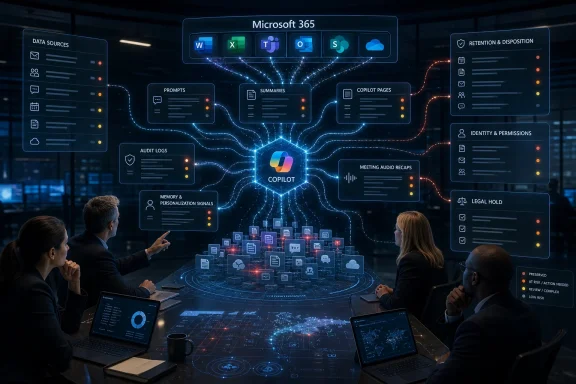 Copilot Turns Microsoft 365 Into a Moving Evidence Factory
For decades, enterprise discovery inside Microsoft 365 was difficult but at least conceptually familiar. Email lived in Exchange. Documents lived in SharePoint or OneDrive. Teams messages, meeting recordings, and chat transcripts created their own headaches, but each category could be explained to a court, mapped to a retention policy, and handed to outside counsel with a reasonable story about where it came from.Copilot changes the shape of that story. It does not merely create a new file type or a new chat stream. It sits across the platform, reads from existing stores, synthesizes material, and then leaves traces in places that may not match the mental model of the employee, the attorney, or even the administrator who turned it on.
That is why the JD Supra webinar framing matters. The most important discovery problem created by Copilot is not the familiar fear that AI might hallucinate. It is that AI interactions create derivative records whose legal significance depends on context: what the user asked, what data Copilot consulted, what it generated, where that output was saved, whether memory influenced the response, and whether any of that is preserved when litigation or investigation begins.
Enterprise IT has spent years telling users that Microsoft 365 is one coherent cloud. Discovery professionals now have to explain that the same coherence is a liability. When Word, Outlook, Teams, SharePoint, and OneDrive all become surfaces for the same AI assistant, evidence no longer follows the neat boundaries of the app icons on the taskbar.
The Prompt Is No Longer Just a Search Query
The simplest way to misunderstand Copilot discovery is to treat a prompt as a fancy search term. In consumer AI, that comparison is already weak. In Microsoft 365, it is actively misleading.A prompt to Copilot can be an instruction, a disclosure, a hypothesis, a request for synthesis, or a confession of what the user thinks matters. “Summarize the issues in the acquisition documents” is different from “Find the weakest point in our termination rationale,” even if both produce a tidy paragraph. In litigation, the prompt may reveal intent or knowledge in a way the generated response does not.
The response has its own evidentiary character. It may draw on emails, Teams chats, SharePoint files, OneDrive content, calendar items, meeting transcripts, and other work data that the user was allowed to access. That does not mean Copilot changes permissions, but it does mean it can accelerate the discovery of information that was previously buried under poor naming, stale folder structures, or organizational drift.
This is where Microsoft’s security promise and legal reality diverge. Microsoft emphasizes that Copilot respects existing permissions. That is important, and it is materially better than an unmanaged AI tool where employees paste confidential records into a public chatbot. But permissions were never designed to answer every discovery question. A user may have access to a document they rarely read, inherited access to a SharePoint site they forgot existed, or visibility into a Teams channel whose membership was never pruned.
For administrators, the compliance question becomes brutally practical: if Copilot produced a response based on ten items spread across the tenant, does the organization need the prompt, the response, the referenced materials, the audit record, the saved output, or all of the above? The answer will vary by matter, but the workflow cannot be invented after a preservation duty has attached.
Microsoft Has Given Purview a Bigger Job Than Many Tenants Realize
Microsoft has been steadily extending Purview to handle Copilot and other AI interactions. Prompts and responses can be discoverable through eDiscovery, retention policies can apply to AI app interactions, audit records can show Copilot activity, and referenced cloud attachments may be retained under the right policies. On paper, this is exactly what enterprise customers should want: AI governance folded into the compliance platform they already use.The problem is that most tenants do not operate Purview like a mature records-management system. They operate it like a cabinet full of useful tools that only a few people understand. eDiscovery Premium, audit search, retention labels, sensitivity labels, data loss prevention, communication compliance, and insider-risk features often live under different owners, budgets, and levels of operational maturity.
Copilot raises the cost of that fragmentation. A legal team asking for “all Copilot activity related to Project Atlas” is not asking a single technical question. It may require mailbox searches, audit review, Teams and SharePoint collection, examination of Copilot Pages, review of generated files, and analysis of whether memory or personalization influenced subsequent responses.
The risk is not that Microsoft has no controls. The risk is that organizations assume the controls are automatically aligned with their legal obligations. A retention policy that covers one kind of interaction may not capture every artifact an attorney cares about. A discovery search that finds prompts and responses may not, by itself, preserve the source documents that shaped the answer. A deleted chat may still have consequences if it produced a saved document, a copied paragraph, or a memory-derived personalization effect.
This is a familiar Microsoft 365 pattern. The platform acquires a capability before the average enterprise has operationalized the governance layer. SharePoint sharing, Teams sprawl, guest access, retention labels, and sensitivity labeling all followed that path. Copilot compresses the same governance cycle because its output looks polished enough to be trusted and informal enough to be forgotten.
Copilot Pages Make Draft Work Look More Permanent Than Users Expect
Copilot Pages are especially important because they blur a line enterprise lawyers have long relied on: the distinction between transient assistance and saved work product. A user can ask Copilot for a synthesis, move it into a collaborative page, edit it with colleagues, and turn it into a shared object that looks less like a chat response and more like a living document.That may be a productivity win. It is also a discovery event.
When AI-generated material enters a collaborative workspace, its status changes. It may become a record of team thinking, a draft of a decision, or a convenient summary that later shapes official action. The fact that Copilot helped create it does not make it less discoverable. If anything, it may make the provenance more contested.
The practical question is not whether Copilot Pages are “documents” in the everyday sense. The question is whether the organization can identify where they live, who owns them, who accessed them, what they contain, and how they relate to the underlying material Copilot used. If a page is stored in a user-owned or service-managed location that admins rarely inspect, legal hold workflows must account for that before a matter goes live.
The deeper issue is cultural. Users treat AI canvases as scratchpads, but courts and regulators may treat them as records. That mismatch has always existed with drafts, notes, chats, and whiteboards. Copilot makes it worse by lowering the friction of turning every half-formed thought into polished text.
Memory Is the Most Awkward Artifact Because It Is Both Data and Behavior
Copilot memory and personalization introduce a different kind of discovery problem. Prompts and responses are recognizable records. Memory is subtler. It is information derived from user interactions and then used to shape future answers.That makes memory legally and operationally awkward. It may contain facts about user preferences, recurring projects, writing style, or work context. It may influence Copilot’s answer without being visible in the final response. It may be deletable or manageable through user and admin controls, but its relationship to retention, auditability, and production is not as intuitive as a document or message.
For IT pros, memory should trigger the same instincts as roaming profiles, autocomplete caches, browser history, and recommendation systems. It is not the primary document, but it can affect what the user sees and does next. In some matters, that influence will be irrelevant. In others, it may matter very much whether Copilot “remembered” a project, a preference, or a recurring instruction that shaped later work.
The hard part is that memory feels personal while living inside an enterprise context. Employees may view it as a convenience feature. Legal may view it as potentially responsive data. Security may view it as a governance surface. Administrators are stuck reconciling all three interpretations.
Organizations that turn on personalization without a policy discussion are borrowing trouble. The right question is not whether memory is good or bad. It is whether the business understands what is being remembered, who can manage it, how it is searched, when it is deleted, and how those answers change under legal hold or regulatory request.
Teams Recaps and Audio Summaries Extend the Meeting Record
Teams has already transformed discovery by making more conversations searchable, replayable, and persistent. Meeting chats, transcripts, recordings, reactions, attendance, shared files, and recap features created a richer record of collaboration than the old conference room ever produced. Copilot adds another layer: generated summaries and audio recaps that repackage meetings into digestible artifacts.That repackaging is the point of the feature. Busy employees want a summary. Managers want action items. People who missed the meeting want the gist. But discovery is rarely satisfied with the gist.
A Copilot-generated meeting summary may omit nuance, compress disagreement, or frame a discussion in language no participant actually used. An audio recap may make a meeting feel like a finished narrative rather than a messy collaboration. If that recap is consumed by decision-makers, forwarded into a thread, or used to justify action, it can become important even if the original recording or transcript remains the authoritative source.
This is not an argument against summaries. It is an argument against treating summaries as harmless conveniences. In a dispute, the difference between “what was said,” “what Copilot summarized,” and “what management relied on” may become central.
The Windows administrator’s instinct may be to ask where the data is stored and which toggle controls it. That matters, but the legal challenge is broader. Organizations need meeting policies that define when transcription is allowed, when recordings are retained, how recap artifacts are handled, and whether sensitive meetings should use AI features at all.
The Old Microsoft 365 Permission Problem Becomes an AI Problem
Copilot’s most consequential governance issue may still be the oldest one in Microsoft 365: oversharing. If users have excessive access to SharePoint sites, Teams channels, or OneDrive folders, Copilot can make that excess more visible and more useful.That does not mean Copilot violates access controls. It means Copilot makes existing access controls matter more. A file that once sat unnoticed in a poorly governed site can become part of a persuasive AI-generated answer. A stale permissions group can become a discovery accelerant. A sensitive spreadsheet shared broadly “just for now” can become part of an executive summary months later.
This matters because many enterprises have treated Microsoft 365 permissions as a collaboration problem rather than a records problem. The usual pain was accidental access, awkward search results, or embarrassing oversharing. With Copilot, the same weakness can affect what AI-generated work product is created, who sees it, and what must later be collected.
The least glamorous work becomes the most important. Site ownership, access reviews, sensitivity labels, retention labels, guest controls, sharing defaults, and lifecycle management are not side quests. They are the foundation of defensible AI deployment.
This is where WindowsForum readers should resist the vendor-demo version of Copilot adoption. The demo begins with a prompt and ends with a polished answer. The enterprise version begins with identity, permissions, information architecture, and retention. The prompt is just the visible tip of a governance stack.
Legal Hold Is No Longer a Button Press at the End
In the pre-Copilot world, too many organizations already treated legal hold as a late-stage administrative act. A matter arose, counsel identified custodians, IT placed mailboxes or sites on hold, and collection proceeded from known repositories. That model was imperfect, but it had a rhythm.AI breaks that rhythm because relevant material can be created, transformed, and redistributed quickly. A custodian may ask Copilot to summarize a set of documents, paste the response into Outlook, edit it in Word, discuss it in Teams, move it into a Copilot Page, and later rely on a memory-shaped answer in a separate chat. By the time legal hold begins, the evidence trail may be scattered across interaction logs, generated content, collaborative pages, referenced documents, and downstream communications.
The answer is not to preserve everything forever. That would be expensive, risky, and contrary to defensible deletion practices. The answer is to define in advance which AI artifacts matter for which categories of legal or regulatory work.
This requires lawyers and administrators to speak more precisely. “Preserve Copilot data” is too vague. Does it mean prompts and responses? Referenced files? Audit logs? Copilot Pages? Meeting summaries? Audio recaps? User-uploaded files? Memory items? Output copied into Office documents? The scope must be operational, not aspirational.
There is also a timing issue. If retention settings delete certain AI interactions after a defined period, and the organization later realizes those interactions were relevant, good intentions will not reconstruct the evidence. Discovery readiness has to happen before the subpoena, complaint, investigation, or internal crisis.
AI Output Forces Enterprises to Revisit Authenticity
Discovery is not only about finding data. It is about proving what the data is. Copilot complicates authenticity because it can generate text that looks like human-authored analysis, summarize sources without preserving every inference, and create drafts that evolve through human editing.A Word document written with Copilot may be partly AI-generated, partly human-edited, and partly pasted from another source. An email drafted by Copilot may reflect the user’s instruction but not the user’s original wording. A Teams recap may represent an algorithmic condensation rather than a transcript. These distinctions may matter in employment disputes, contract negotiations, investigations, and regulatory responses.
The enterprise should not pretend it can solve every authorship question. Modern productivity tools have long blurred authorship through templates, autocorrect, suggested replies, shared editing, and reused language. Copilot is different in degree, not kind. But the degree matters.
Metadata, version history, audit logs, and review-set workflows become more important as a result. If an organization cannot show when an AI artifact was created, who interacted with it, what source material was referenced, and how it changed, then it may struggle to explain the record confidently.
This is also where over-retention can backfire. Keeping everything may seem safe, but it increases exposure and review burden. The better posture is not maximal hoarding. It is intentional retention backed by clear policy, technical controls, and a documented explanation of why some data is kept and some is deleted.
The Webinar Signals a Larger Market Shift
The JD Supra webinar is part of a broader pattern: legal, compliance, and governance professionals are moving from abstract AI risk to platform-specific AI discovery. That shift is overdue. The interesting question is no longer whether generative AI might create discoverable material. It plainly does. The question is how that material behaves inside the systems enterprises already use.Microsoft has an advantage here because Copilot is integrated into Microsoft 365 and Purview. Compared with unmanaged AI tools, that integration gives enterprises more control, more auditability, and a better chance of defensible governance. But the same integration also means Copilot’s footprint is broad from day one.
This is why the issue belongs on WindowsForum, not just in a legal newsletter. Copilot discovery is not a niche legal problem that can be outsourced to outside counsel. It is a systems problem. The people who manage Entra ID groups, SharePoint sites, Teams policies, Windows endpoints, Office deployments, retention settings, and Purview roles are the people whose decisions will determine whether discovery is manageable or chaotic.
There is a temptation to view this as yet another compliance tax on innovation. That is too easy. The better argument is that governance is what makes enterprise AI deployable at scale. If users cannot trust that Copilot operates inside defensible boundaries, adoption will either slow or move into shadow tools where the risks are worse.
The Enterprises That Win Will Treat Copilot as Infrastructure
The organizations best positioned for Copilot are not necessarily the ones with the biggest AI budgets. They are the ones that already know where their data is, who can access it, how long they keep it, and how quickly they can produce it. Copilot rewards boring maturity.That maturity starts with ownership. Legal cannot govern Copilot alone, because it does not administer the platform. IT cannot govern it alone, because it does not define legal relevance. Security cannot govern it alone, because not every discovery issue is a breach. Records teams cannot govern it alone, because the artifacts are being created inside fast-moving collaboration workflows.
A serious Copilot program needs a cross-functional operating model. That sounds bureaucratic, but the alternative is worse: every matter becomes a custom archaeology project. The first time a regulator asks for AI-assisted communications around a sensitive decision should not be the first time the organization discovers where Copilot interactions live.
Training also has to become more honest. Users do not need a law-school seminar on eDiscovery, but they do need to understand that prompts, summaries, pages, recaps, and AI-assisted drafts may be business records. They need to know when not to use Copilot, when to label sensitive material, and when a generated summary should be treated as a convenience rather than an authority.
Administrators need their own training. The Copilot era makes Purview literacy a core Microsoft 365 operations skill, not a specialty reserved for rare legal events. If an organization cannot explain its retention and eDiscovery posture for AI interactions, it is not ready to claim mature Copilot adoption.
The Real Copilot Risk Is the Evidence Trail Nobody Planned
The immediate lesson from the JD Supra webinar announcement is that Copilot discovery is no longer theoretical. The practical lesson is that organizations should inventory the AI artifacts they are creating before a dispute forces them to do it under pressure.- Enterprises should identify which Microsoft 365 Copilot artifacts are enabled in their tenant, including prompts, responses, Pages, meeting recaps, audio recaps, uploaded files, and personalization data.
- Legal and IT teams should define preservation playbooks that specify which AI artifacts are collected for different matter types.
- Administrators should review SharePoint, OneDrive, and Teams permissions because Copilot amplifies the consequences of oversharing without necessarily changing access rights.
- Purview retention, audit, and eDiscovery settings should be tested with real Copilot workflows rather than assumed from documentation.
- Users should be trained that AI-generated summaries and drafts can become records when they are saved, shared, relied upon, or incorporated into business decisions.
- Organizations should decide in advance how memory and personalization fit into their privacy, records, and discovery obligations.
The next phase of enterprise AI will not be decided only by model quality or licensing bundles. It will be decided by whether companies can make AI-assisted work defensible after the fact. Copilot may become a genuine productivity layer across Microsoft 365, but for administrators and counsel, the winning posture is clear: treat every new AI convenience as a potential record, every product update as a discovery change, and every governance gap as something the assistant may surface at machine speed.
References
- Primary source: JD Supra
Published: Tue, 09 Jun 2026 16:18:45 GMT
[Webinar] AI Meets the Enterprise Platform: Discovery Challenges at the Intersection of Copilot and Microsoft 365 - June 23rd, 1:00 pm - 2:00 pm ET | EDRM - Electronic Discovery Reference Model - JDSupra
As Copilot interacts with Word, Excel, Teams, Outlook, SharePoint, and OneDrive, it generates new categories of artifacts — prompts, AI-generated...www.jdsupra.com - Official source: support.microsoft.com
Personalize what Microsoft 365 Copilot remembers | Microsoft Support
Learn how to personalize what Microsoft 365 Copilot remembers about you and your preferencessupport.microsoft.com - Official source: techcommunity.microsoft.com
Introducing Copilot Memory: A More Productive and Personalized AI for the Way You Work | Microsoft Community Hub
At Microsoft, we believe AI should work for you—not the other way around. That’s why we’re introducing memory in Copilot, a new capability that makes your... techcommunity.microsoft.com
- Official source: microsoft.com
Microsoft 365 Copilot: Your window into the world of agents | Microsoft 365 Blog
Check out the Copilot Wave 2 spring release, including AI-powered Search, Create, Notebooks, and a new Agent Store.www.microsoft.com - Official source: info.microsoft.com
Drive user enablement in the era of Microsoft Copilot
info.microsoft.com
- Related coverage: windowscentral.com
Microsoft Copilot Wave 3 adds AI agents and E7 Frontier Suite | Windows Central
Microsoft Copilot is rolling out more agentic AI control and model support in a new subscription tier for Microsoft 365.www.windowscentral.com
- Related coverage: techradar.com
Your favorite Microsoft 365 apps are getting a load more Copilot AI Agents - Word, Excel, Outlook, PowerPoint all get a boost | TechRadar
More AI agents are coming to Microsoft 365www.techradar.com - Related coverage: tomsguide.com
Forget Clippy — meet Mico, Microsoft's friendlier face for Copilot's Fall Release | Tom's Guide
Microsoft is rolling out roughly a dozen new features for Copilot across Edge, Windows and the Copilot iOS app. Here's what they'll let you do, from learning new languages to planning group trips.www.tomsguide.com - Related coverage: documents.jdsupra.com
- Related coverage: events.techversions.com
1416048929
Woman working on laptop online, checking emails and planning on the internet while sitting in an office alone at work. Business woman, corporate professional or manager searching the internetevents.techversions.com
- Official source: microsoft.ai
