

Microsoft is testing Windows 11 widget changes in 2026 that make the board quieter by default, shifting the first view toward user-selected widgets, reducing taskbar alerts, disabling hover launch behavior, and continuing the replacement of the old MSN-style news feed with Copilot-branded discovery. The move is not a retreat from widgets so much as an admission that Windows 11 has confused usefulness with interruption. After years of trying to make the desktop feel “alive,” Microsoft is now discovering that the most valuable desktop surface may be the one that knows when to stay out of the way.
The Windows 11 Widgets board has always had a split personality. On paper, it is a lightweight dashboard for glanceable information: weather, calendar events, stock prices, traffic, sports scores, reminders, and app cards. In practice, for many users, it has behaved like a side door into Microsoft Start, MSN content, engagement funnels, and taskbar nagging.
That tension matters because widgets occupy one of the most sensitive places in an operating system: the taskbar. The taskbar is not just decoration. It is muscle memory, workspace control, and attention management compressed into a strip of pixels. When Microsoft puts weather, news, badges, animations, and hover-triggered panels there, it is not merely adding a feature. It is competing with the user’s current task.
The newest previewed changes suggest Microsoft has finally absorbed the basic complaint. Users did not necessarily hate the idea of widgets. They hated the way widgets arrived wrapped in feed content, motion, notification badges, and accidental activation. The problem was not that Windows had a dashboard. The problem was that the dashboard kept behaving like an ad-supported news surface with operating-system privileges.
This is the real significance of the current change. Microsoft is not deleting Widgets from Windows 11. It is trying to make Widgets less presumptuous.
Microsoft has spent years experimenting with ways to bring web content into Windows surfaces. Windows 10 had News and Interests. Windows 11 elevated the idea into a dedicated Widgets board. Edge has its new tab feed. Search has web suggestions. Start has recommended content. Copilot now appears across the operating system in different forms, from taskbar buttons to app integrations to contextual prompts.
Each of these may have a defensible product rationale when viewed alone. Together, they have created a sense among power users that Windows is no longer merely the environment in which work happens. It has become an environment that constantly tries to suggest something.
The Widgets board became a flashpoint because it mixed genuinely useful information with algorithmic content in the same pane. A user who wanted to check the weather could be pulled into headlines. A user who wanted a calendar glance could be shown entertainment stories. A user who accidentally hovered near the taskbar could suddenly have a panel slide into view with news content they never asked to see.
Microsoft’s planned shift to open first into user-selected widgets changes the default posture. Instead of assuming the feed deserves center stage, the system now appears to assume the user’s chosen cards deserve priority. That sounds small, but defaults are product philosophy made visible. If Windows opens the board to your widgets first, Microsoft is conceding that the feature’s legitimacy depends on personal utility before content distribution.
The Copilot Discover feed complicates that concession. Replacing MSN-style presentation with an AI-branded discovery surface may reduce some of the old clutter, but it does not eliminate the underlying question. Is the feed there to serve the user, or to keep the user inside Microsoft’s engagement loop? The answer will depend less on branding than on control, transparency, and whether the feed can truly be ignored.
This may improve the interface. A cleaner layout, larger cards, fewer visual collisions, and faster scrolling would all be welcome. The old feed too often felt like a cramped portal page squeezed into an operating-system flyout. If the new version is calmer and better structured, users who actually like at-a-glance news may prefer it.
But AI curation is not the same thing as user control. A feed can be prettier and still be a distraction. It can be more personalized and still be manipulative. It can use Copilot branding and still route users through the same content economy that made the previous implementation unpopular.
That is why the tab separation matters more than the Copilot label. Putting widgets into their own dedicated tab gives the board a chance to become modular. Users who want a dashboard can have a dashboard. Users who want discovery can go looking for discovery. The crucial improvement is not that Microsoft has found a smarter feed. It is that Microsoft appears to be making the feed less unavoidable.
Hover activation is dangerous on the taskbar because the taskbar is a high-traffic zone. Users sweep across it constantly while switching apps, reaching for Start, managing windows, or moving between monitors. When a large panel opens because the pointer paused in the wrong place, the user experiences that not as convenience but as interruption.
Microsoft did eventually provide controls for hover behavior, but burying a control after shipping an annoying default is not the same as picking the right default. The important change now is that hover opening is being disabled by default in the quieter configuration. Click-to-open restores a basic boundary: Windows should not expand a surface unless the user intentionally asks it to.
That is a subtle but meaningful design correction. It says the desktop is not a theme park ride. Not every edge needs to react. Not every icon needs to bloom into a panel. Sometimes the most respectful interaction is the one that requires a deliberate click.
Widgets taskbar badges and announcements have sat uncomfortably in that gray zone. Weather alerts can be genuinely useful. Breaking news alerts can be important in rare circumstances. But many users encountered the badges as visual bait: dots, numbers, and signals that created a sense of unfinished business without a clear obligation behind them.
The new controls to limit announcements and disable badges are therefore not cosmetic. They are part of a broader fight over attention. Windows has to decide which surfaces earn the right to interrupt the user. A widget panel that mixes utility and content cannot be allowed to behave like a mission-critical notification channel by default.
For IT administrators, this matters at scale. One distracting panel on a home PC is annoying. Thousands of PCs with unsolicited badges, feed prompts, or hover surfaces become a support and productivity issue. The more Microsoft treats these behaviors as opt-in or at least easily suppressible, the easier it becomes for organizations to tolerate consumer-facing features in business builds.
A quieter Widgets board is one piece of a broader reputational repair job. Microsoft wants Windows 11 to feel modern, cloud-connected, and AI-ready. But it also needs Windows to feel like an operating system rather than a promotional surface. That balance has become harder as Microsoft’s business increasingly rewards services engagement layered on top of the OS.
The phrase “quiet by default” is doing a lot of work here. It suggests Microsoft understands that users should not need to perform a cleanup ritual after installing Windows. The best version of Windows 11 should not require immediately disabling half a dozen attention-grabbing elements before it becomes tolerable.
Still, the test will be whether this philosophy survives beyond one feature. Widgets are an easy place to retreat because the backlash is obvious and the utility case is mixed. The harder challenge is applying the same discipline to Start recommendations, Edge integration, Copilot prompts, account sign-in flows, and bundled app surfaces. If quiet by default becomes a system-wide principle, Windows 11 could age better than its critics expect. If it remains limited to Widgets, it will feel like damage control.
The risk for Microsoft is that Windows users have long memories. They remember the mandatory-feeling feeds. They remember the taskbar regressions at Windows 11 launch. They remember Start menu changes that removed familiar affordances. They remember Microsoft asking for feedback, making partial changes, and then introducing new annoyances elsewhere.
That history means the company does not get much credit for saying it is listening. It gets credit when users install a build and find fewer things to undo. The distinction is important. Windows enthusiasts are not asking for a press release about calm design. They are asking for defaults that respect the way they actually use their PCs.
For ordinary users, the measure will be simpler. Does the Widgets panel open only when clicked? Does it show the cards they care about first? Does it stop lighting up the taskbar for marginal reasons? Can the news or discovery feed be ignored without constant reappearance? If the answer to those questions is yes, Microsoft will have fixed much of the day-to-day annoyance.
Widgets sit directly inside that tension. A good widget surface is personal by definition. It should show your weather, your calendar, your watchlist, your commute, your photos, your package tracking, or your preferred app integrations. But the more personal it becomes, the more important it is that users trust the surface.
Trust requires refusal. A user must be able to say no to the feed, no to hover behavior, no to badges, no to announcements, and no to the taskbar entry point entirely. The presence of a full disable path through taskbar settings is therefore essential. It keeps Widgets from becoming another mandatory layer of Windows personality.
That may sound counterintuitive for product growth. Why give users an easy way out? Because Windows is not a single-purpose app fighting for daily active usage. It is infrastructure. If Microsoft treats every OS surface as a growth channel, it will train its most technical users to strip the system down, block features through policy, and distrust new integrations by default.
The more Microsoft allows refusal, the more likely users are to experiment voluntarily.
For administrators, the picture is more complicated. Windows 11’s consumer and commercial personalities continue to overlap in awkward ways. Features that may be harmless or even pleasant on a personal laptop can be inappropriate on a managed endpoint. A news and discovery surface, especially one branded around AI curation, raises questions about distraction, data handling, user training, and compliance culture.
Many organizations already manage or suppress consumer experiences in Windows through policy, provisioning, and image customization. The Widgets changes may reduce the urgency of that work, but they do not eliminate it. IT teams will still want predictable controls for whether Widgets appear, whether feeds are enabled, whether Copilot-related experiences are exposed, and whether taskbar behavior changes after updates.
The broader lesson for Microsoft is that enterprise trust depends on boring consistency. Admins do not want a feature to become “less annoying” in one Insider build and then behave differently in the next cumulative update. They want documented controls, stable defaults, and a clear separation between productivity features and engagement surfaces.
If Microsoft can provide that, Widgets could become just another manageable Windows component. If not, the feature will remain something many admins disable before users ever see it.
Instead, the user experience has too often been dominated by Microsoft’s own content strategy. When a platform surface launches with limited third-party depth but prominent feed content, users infer the real priority. They see not a dashboard waiting for developers, but a delivery mechanism for Microsoft-controlled engagement.
This is where Microsoft still has work to do. Quieter defaults make Widgets less offensive, but they do not automatically make Widgets indispensable. For the feature to graduate from tolerated to valued, Microsoft needs a richer ecosystem of cards that feel native, fast, privacy-conscious, and worth checking.
That requires developer confidence. Developers need stable APIs, predictable distribution, good documentation, and evidence that users actually open the board for utility rather than closing it out of annoyance. Ironically, making Widgets quieter could help. A board that users do not resent is a better platform for third-party innovation than one associated with accidental news popups.
But the Widgets problem was never primarily a lack of intelligence. It was a lack of restraint. AI cannot solve that by itself. In fact, if applied carelessly, it can make the problem worse by giving Microsoft more confidence to insert suggestions into places where users want silence.
The best use of AI in Widgets would be quiet, contextual, and subordinate to user intent. A travel widget that summarizes a delayed flight is useful. A calendar widget that warns about a conflict is useful. A system health widget that explains battery drain or storage pressure could be useful. A feed that guesses which stories will keep you clicking is merely the old problem with a newer label.
That distinction will define whether Copilot Discover feels like progress or rebranding. Microsoft has to show that AI in Windows can reduce cognitive load rather than add another layer of content to process. If the company gets that right, Widgets could become one of the more natural homes for ambient AI. If it gets it wrong, the Copilot name will inherit the resentment once aimed at MSN.
In Windows 11, users can still right-click the taskbar, open taskbar settings, and turn off Widgets under taskbar items. That is the nuclear option for people who want no weather icon, no board, no feed, no accidental surface, and no ongoing negotiation. Microsoft should resist the temptation to make that harder.
There is a long-running pattern in software design where companies treat disabling a feature as failure. For an operating system, it can be the opposite. A visible, reliable off switch is a trust mechanism. It tells users the feature is an invitation rather than an imposition.
The same applies to notification settings and hover behavior. Controls should be easy to find, plain in language, and durable across updates. A user who turns off announcements should not have to rediscover the setting after a feature refresh. A user who disables hover opening should not be surprised by a new interaction model under a different name.
Microsoft’s challenge is not merely to add toggles. It is to honor them.
That would be a major improvement precisely because it is unglamorous. Operating systems win trust through thousands of small non-events: the panel that does not open accidentally, the badge that does not cry wolf, the setting that does not reset, the feed that does not shove itself into the foreground.
Windows 11 has often struggled with that kind of restraint. Its best features are frequently undermined by the sense that Microsoft cannot resist cross-promoting the next service, surfacing the next recommendation, or testing the next engagement pattern. The Widgets rethink is encouraging because it addresses one of the clearest examples of that overreach.
Still, users should watch the rollout carefully. Preview behavior can change. Regional differences may matter. Insider builds do not always translate neatly into stable releases. Microsoft’s experiments often arrive in phases, and not every PC sees the same configuration on the same day.
The direction, however, is unmistakable. Microsoft is trying to make Windows feel less like it is tapping the user on the shoulder.
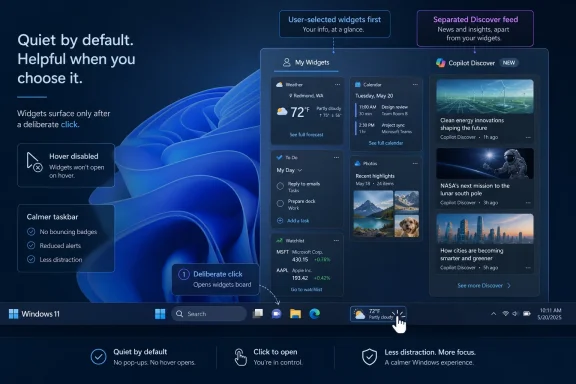 Microsoft Finally Treats Widgets as a Utility, Not a Billboard
The Windows 11 Widgets board has always had a split personality. On paper, it is a lightweight dashboard for glanceable information: weather, calendar events, stock prices, traffic, sports scores, reminders, and app cards. In practice, for many users, it has behaved like a side door into Microsoft Start, MSN content, engagement funnels, and taskbar nagging.That tension matters because widgets occupy one of the most sensitive places in an operating system: the taskbar. The taskbar is not just decoration. It is muscle memory, workspace control, and attention management compressed into a strip of pixels. When Microsoft puts weather, news, badges, animations, and hover-triggered panels there, it is not merely adding a feature. It is competing with the user’s current task.
The newest previewed changes suggest Microsoft has finally absorbed the basic complaint. Users did not necessarily hate the idea of widgets. They hated the way widgets arrived wrapped in feed content, motion, notification badges, and accidental activation. The problem was not that Windows had a dashboard. The problem was that the dashboard kept behaving like an ad-supported news surface with operating-system privileges.
This is the real significance of the current change. Microsoft is not deleting Widgets from Windows 11. It is trying to make Widgets less presumptuous.
The Feed Was Always the Argument
The most controversial part of the Widgets board was never the weather card. It was the feed.Microsoft has spent years experimenting with ways to bring web content into Windows surfaces. Windows 10 had News and Interests. Windows 11 elevated the idea into a dedicated Widgets board. Edge has its new tab feed. Search has web suggestions. Start has recommended content. Copilot now appears across the operating system in different forms, from taskbar buttons to app integrations to contextual prompts.
Each of these may have a defensible product rationale when viewed alone. Together, they have created a sense among power users that Windows is no longer merely the environment in which work happens. It has become an environment that constantly tries to suggest something.
The Widgets board became a flashpoint because it mixed genuinely useful information with algorithmic content in the same pane. A user who wanted to check the weather could be pulled into headlines. A user who wanted a calendar glance could be shown entertainment stories. A user who accidentally hovered near the taskbar could suddenly have a panel slide into view with news content they never asked to see.
Microsoft’s planned shift to open first into user-selected widgets changes the default posture. Instead of assuming the feed deserves center stage, the system now appears to assume the user’s chosen cards deserve priority. That sounds small, but defaults are product philosophy made visible. If Windows opens the board to your widgets first, Microsoft is conceding that the feature’s legitimacy depends on personal utility before content distribution.
The Copilot Discover feed complicates that concession. Replacing MSN-style presentation with an AI-branded discovery surface may reduce some of the old clutter, but it does not eliminate the underlying question. Is the feed there to serve the user, or to keep the user inside Microsoft’s engagement loop? The answer will depend less on branding than on control, transparency, and whether the feed can truly be ignored.
Copilot Discover Is Cleaner, But It Is Not Neutral
The Copilot Discover feed is being positioned as a more modern, more personalized successor to the old feed experience. That tracks with Microsoft’s broader 2025 and 2026 playbook: where there was once a generic web feed, there is now an AI-curated surface; where there was once a recommendation engine, there is now Copilot language wrapped around discovery.This may improve the interface. A cleaner layout, larger cards, fewer visual collisions, and faster scrolling would all be welcome. The old feed too often felt like a cramped portal page squeezed into an operating-system flyout. If the new version is calmer and better structured, users who actually like at-a-glance news may prefer it.
But AI curation is not the same thing as user control. A feed can be prettier and still be a distraction. It can be more personalized and still be manipulative. It can use Copilot branding and still route users through the same content economy that made the previous implementation unpopular.
That is why the tab separation matters more than the Copilot label. Putting widgets into their own dedicated tab gives the board a chance to become modular. Users who want a dashboard can have a dashboard. Users who want discovery can go looking for discovery. The crucial improvement is not that Microsoft has found a smarter feed. It is that Microsoft appears to be making the feed less unavoidable.
The Hover Trigger Was a Tiny Interaction With Outsized Annoyance
Few Windows 11 behaviors generated as much low-grade irritation as the Widgets board opening on hover. It was the kind of feature that probably looked elegant in a demo: move the pointer to the weather area, get instant information, no click required. In daily use, it often felt like the OS was spring-loaded.Hover activation is dangerous on the taskbar because the taskbar is a high-traffic zone. Users sweep across it constantly while switching apps, reaching for Start, managing windows, or moving between monitors. When a large panel opens because the pointer paused in the wrong place, the user experiences that not as convenience but as interruption.
Microsoft did eventually provide controls for hover behavior, but burying a control after shipping an annoying default is not the same as picking the right default. The important change now is that hover opening is being disabled by default in the quieter configuration. Click-to-open restores a basic boundary: Windows should not expand a surface unless the user intentionally asks it to.
That is a subtle but meaningful design correction. It says the desktop is not a theme park ride. Not every edge needs to react. Not every icon needs to bloom into a panel. Sometimes the most respectful interaction is the one that requires a deliberate click.
Badges Turn Glanceable Information Into Chores
Notification badges are another example of a feature that makes sense until it multiplies. A badge can be useful when it tells you something time-sensitive: a missed call, a message, a security action, a pending update. But a badge attached to a content surface is more ambiguous. Is it alerting you to something important, or simply trying to get you to look?Widgets taskbar badges and announcements have sat uncomfortably in that gray zone. Weather alerts can be genuinely useful. Breaking news alerts can be important in rare circumstances. But many users encountered the badges as visual bait: dots, numbers, and signals that created a sense of unfinished business without a clear obligation behind them.
The new controls to limit announcements and disable badges are therefore not cosmetic. They are part of a broader fight over attention. Windows has to decide which surfaces earn the right to interrupt the user. A widget panel that mixes utility and content cannot be allowed to behave like a mission-critical notification channel by default.
For IT administrators, this matters at scale. One distracting panel on a home PC is annoying. Thousands of PCs with unsolicited badges, feed prompts, or hover surfaces become a support and productivity issue. The more Microsoft treats these behaviors as opt-in or at least easily suppressible, the easier it becomes for organizations to tolerate consumer-facing features in business builds.
The Quiet Desktop Is a Strategic Reversal
The current Widgets changes fit into a wider shift in Microsoft’s Windows posture. The company has been under sustained pressure from users who feel Windows 11 has accumulated too many prompts, recommendations, ads, account nudges, Edge pushes, OneDrive reminders, and Copilot entry points. Some of that criticism is exaggerated in the way online Windows criticism often is. But enough of it is grounded in real defaults that Microsoft could not ignore it forever.A quieter Widgets board is one piece of a broader reputational repair job. Microsoft wants Windows 11 to feel modern, cloud-connected, and AI-ready. But it also needs Windows to feel like an operating system rather than a promotional surface. That balance has become harder as Microsoft’s business increasingly rewards services engagement layered on top of the OS.
The phrase “quiet by default” is doing a lot of work here. It suggests Microsoft understands that users should not need to perform a cleanup ritual after installing Windows. The best version of Windows 11 should not require immediately disabling half a dozen attention-grabbing elements before it becomes tolerable.
Still, the test will be whether this philosophy survives beyond one feature. Widgets are an easy place to retreat because the backlash is obvious and the utility case is mixed. The harder challenge is applying the same discipline to Start recommendations, Edge integration, Copilot prompts, account sign-in flows, and bundled app surfaces. If quiet by default becomes a system-wide principle, Windows 11 could age better than its critics expect. If it remains limited to Widgets, it will feel like damage control.
Windows K2 Sounds Like a Reset, But Users Will Judge the Defaults
The Guiding Tech report frames these changes as part of “Windows K2,” a broader effort to improve the Windows experience and answer negative sentiment around the platform. Whether K2 becomes a durable public shorthand or simply another internal-style label, the direction is clear enough: Microsoft is trying to sand down the rough edges that make Windows 11 feel busier than it needs to be.The risk for Microsoft is that Windows users have long memories. They remember the mandatory-feeling feeds. They remember the taskbar regressions at Windows 11 launch. They remember Start menu changes that removed familiar affordances. They remember Microsoft asking for feedback, making partial changes, and then introducing new annoyances elsewhere.
That history means the company does not get much credit for saying it is listening. It gets credit when users install a build and find fewer things to undo. The distinction is important. Windows enthusiasts are not asking for a press release about calm design. They are asking for defaults that respect the way they actually use their PCs.
For ordinary users, the measure will be simpler. Does the Widgets panel open only when clicked? Does it show the cards they care about first? Does it stop lighting up the taskbar for marginal reasons? Can the news or discovery feed be ignored without constant reappearance? If the answer to those questions is yes, Microsoft will have fixed much of the day-to-day annoyance.
Personalization Is Only Useful When Refusal Is Allowed
Microsoft’s modern Windows strategy relies heavily on personalization. The OS learns interests, surfaces content, syncs settings, offers cloud files, recommends apps, and increasingly presents AI-powered suggestions. This can be helpful when it is accurate, restrained, and reversible. It becomes grating when personalization is used to justify taking over space the user considers private.Widgets sit directly inside that tension. A good widget surface is personal by definition. It should show your weather, your calendar, your watchlist, your commute, your photos, your package tracking, or your preferred app integrations. But the more personal it becomes, the more important it is that users trust the surface.
Trust requires refusal. A user must be able to say no to the feed, no to hover behavior, no to badges, no to announcements, and no to the taskbar entry point entirely. The presence of a full disable path through taskbar settings is therefore essential. It keeps Widgets from becoming another mandatory layer of Windows personality.
That may sound counterintuitive for product growth. Why give users an easy way out? Because Windows is not a single-purpose app fighting for daily active usage. It is infrastructure. If Microsoft treats every OS surface as a growth channel, it will train its most technical users to strip the system down, block features through policy, and distrust new integrations by default.
The more Microsoft allows refusal, the more likely users are to experiment voluntarily.
Home Users Get Relief, Administrators Get a Policy Problem
For home users, the immediate benefit is obvious. A quieter Widgets board means fewer accidental interruptions and less visual noise. People who like the weather readout can keep it without feeling as though they have invited a news panel onto the desktop. People who dislike the whole idea can still remove Widgets from the taskbar.For administrators, the picture is more complicated. Windows 11’s consumer and commercial personalities continue to overlap in awkward ways. Features that may be harmless or even pleasant on a personal laptop can be inappropriate on a managed endpoint. A news and discovery surface, especially one branded around AI curation, raises questions about distraction, data handling, user training, and compliance culture.
Many organizations already manage or suppress consumer experiences in Windows through policy, provisioning, and image customization. The Widgets changes may reduce the urgency of that work, but they do not eliminate it. IT teams will still want predictable controls for whether Widgets appear, whether feeds are enabled, whether Copilot-related experiences are exposed, and whether taskbar behavior changes after updates.
The broader lesson for Microsoft is that enterprise trust depends on boring consistency. Admins do not want a feature to become “less annoying” in one Insider build and then behave differently in the next cumulative update. They want documented controls, stable defaults, and a clear separation between productivity features and engagement surfaces.
If Microsoft can provide that, Widgets could become just another manageable Windows component. If not, the feature will remain something many admins disable before users ever see it.
The Third-Party Widget Dream Still Hasn’t Arrived
One reason Widgets attracted disappointment is that the concept has obvious potential. A mature Windows widget ecosystem could be genuinely useful. Imagine fast, compact cards from Teams, Outlook, GitHub, Jira, ServiceNow, system monitoring tools, finance apps, smart home platforms, package trackers, note apps, and security dashboards. That kind of board could become a real productivity layer.Instead, the user experience has too often been dominated by Microsoft’s own content strategy. When a platform surface launches with limited third-party depth but prominent feed content, users infer the real priority. They see not a dashboard waiting for developers, but a delivery mechanism for Microsoft-controlled engagement.
This is where Microsoft still has work to do. Quieter defaults make Widgets less offensive, but they do not automatically make Widgets indispensable. For the feature to graduate from tolerated to valued, Microsoft needs a richer ecosystem of cards that feel native, fast, privacy-conscious, and worth checking.
That requires developer confidence. Developers need stable APIs, predictable distribution, good documentation, and evidence that users actually open the board for utility rather than closing it out of annoyance. Ironically, making Widgets quieter could help. A board that users do not resent is a better platform for third-party innovation than one associated with accidental news popups.
AI Curation Cannot Be the Whole Product
Microsoft’s Copilot-era instinct is to add AI wherever there is a surface that can display text, summarize content, or recommend actions. Widgets are an obvious candidate. A feed can be curated. A card can be summarized. A calendar can be explained. A document can be surfaced. A system state can be interpreted.But the Widgets problem was never primarily a lack of intelligence. It was a lack of restraint. AI cannot solve that by itself. In fact, if applied carelessly, it can make the problem worse by giving Microsoft more confidence to insert suggestions into places where users want silence.
The best use of AI in Widgets would be quiet, contextual, and subordinate to user intent. A travel widget that summarizes a delayed flight is useful. A calendar widget that warns about a conflict is useful. A system health widget that explains battery drain or storage pressure could be useful. A feed that guesses which stories will keep you clicking is merely the old problem with a newer label.
That distinction will define whether Copilot Discover feels like progress or rebranding. Microsoft has to show that AI in Windows can reduce cognitive load rather than add another layer of content to process. If the company gets that right, Widgets could become one of the more natural homes for ambient AI. If it gets it wrong, the Copilot name will inherit the resentment once aimed at MSN.
The Settings Escape Hatch Is Now Part of the Feature
The ability to disable Widgets from the taskbar remains important because it changes the relationship between Microsoft and the user. A feature that can be removed is easier to tolerate. A feature that cannot be removed becomes a political argument.In Windows 11, users can still right-click the taskbar, open taskbar settings, and turn off Widgets under taskbar items. That is the nuclear option for people who want no weather icon, no board, no feed, no accidental surface, and no ongoing negotiation. Microsoft should resist the temptation to make that harder.
There is a long-running pattern in software design where companies treat disabling a feature as failure. For an operating system, it can be the opposite. A visible, reliable off switch is a trust mechanism. It tells users the feature is an invitation rather than an imposition.
The same applies to notification settings and hover behavior. Controls should be easy to find, plain in language, and durable across updates. A user who turns off announcements should not have to rediscover the setting after a feature refresh. A user who disables hover opening should not be surprised by a new interaction model under a different name.
Microsoft’s challenge is not merely to add toggles. It is to honor them.
The Real Victory Is Boredom
If Microsoft succeeds, the next version of Widgets should be almost boring. You click the taskbar weather area. A board opens. It shows the widgets you chose. If you want discovery, you go to a feed tab. If you do not, it stays out of your way. Badges appear rarely, for reasons that feel justified. Hovering near the taskbar does nothing dramatic.That would be a major improvement precisely because it is unglamorous. Operating systems win trust through thousands of small non-events: the panel that does not open accidentally, the badge that does not cry wolf, the setting that does not reset, the feed that does not shove itself into the foreground.
Windows 11 has often struggled with that kind of restraint. Its best features are frequently undermined by the sense that Microsoft cannot resist cross-promoting the next service, surfacing the next recommendation, or testing the next engagement pattern. The Widgets rethink is encouraging because it addresses one of the clearest examples of that overreach.
Still, users should watch the rollout carefully. Preview behavior can change. Regional differences may matter. Insider builds do not always translate neatly into stable releases. Microsoft’s experiments often arrive in phases, and not every PC sees the same configuration on the same day.
The direction, however, is unmistakable. Microsoft is trying to make Windows feel less like it is tapping the user on the shoulder.
The Windows 11 Widget Fix Is Really a Test of Microsoft’s Restraint
The concrete changes are easy to summarize, but the larger stakes are about whether Microsoft can rebuild confidence in Windows defaults. A quieter Widgets board will not settle every argument about Windows 11, Copilot, ads, or account integration. It does, however, give Microsoft a practical place to prove that it understands the difference between useful presence and ambient pressure.- Windows 11 Widgets are being reshaped so the board opens first to user-selected widgets rather than foregrounding the news-style feed by default.
- Microsoft is reducing taskbar noise by giving users more control over announcements and badge notifications tied to Widgets.
- Hover-to-open behavior is being disabled by default in the quieter experience, making the board less likely to appear accidentally.
- The old MSN-style feed is being replaced or reframed through Copilot Discover, but the real improvement depends on whether that feed remains optional in practice.
- Users who want none of it can still remove Widgets from the taskbar through Windows 11 taskbar settings.
- For IT departments, the key issue is not the redesign itself but whether Microsoft provides stable, manageable controls across commercial deployments.
References
- Primary source: Guiding Tech
Published: Sat, 06 Jun 2026 12:26:06 GMT
Here’s How Microsoft Plans to Fix Distracting Widgets in Windows 11 - Guiding Tech
Windows is cleaning up its widgets menu. We take a look at how Windows 11 widgets are changing for the better.www.guidingtech.com
- Related coverage: windowscentral.com
Microsoft tests redesigned Widgets Board on Windows 11 with Copilot | Windows Central
A redesigned widgets panel on Windows 11 replaces the MSN feed with a new Copilot Discover layout, which curates topics based on your likes using AI.www.windowscentral.com - Official source: blogs.windows.com
Copilot App on Windows: Opening web links alongside your conversations begins rolling out to Windows Insiders
Hello Windows Insiders, In today's update, we are introducing a new way to get things done in the Copblogs.windows.com - Official source: support.microsoft.com
Customize the Taskbar in Windows | Microsoft Support
Learn how to use the taskbar features in Windows. Hide the taskbar, pin an app, change the location, and more with taskbar settings.support.microsoft.com - Related coverage: windowslatest.com
Microsoft won't give up on Windows 11's Widgets board as it gets another UI makeover
Windows 11 Widgets board is getting a new Discover feed design with redesigned widgets, Copilot curated stories, and personalized news feed. www.windowslatest.com
- Related coverage: techdows.com
How to disable Widgets board open on hover in Windows 11 - Techdows
Widgets in Windows 11 may be useful that serve feed on news, sports, entertainment, stock market, and weather conditions, but when you unintentionally hover over the Weather widget on the taskbar, the Widgets board comes in your way, here is you can disable that if you found the behavior pretty...techdows.com
- Related coverage: pureinfotech.com
How to disable Widgets on hover on Windows 11 - Pureinfotech
To disable open Widgets board on icon Taskbar hover, you need to open the Widgets settings and turn off the feature. Here's how. pureinfotech.com
- Related coverage: windowsarea.de
Windows 11: Microsoft testet neues Widget-Board mit "Copilot Discover"-Feed
Nachdem große Teile der MSN-Redaktion ohnehin 2020 bereits durch KI ersetzt worden sind, wird auch der Widget-Newsfeed in Windows 11 bald einem personalisierten, KI-basierten Angebot weichen.windowsarea.de - Related coverage: pcworld.com
Microsoft gives Windows 11's Widgets panel a much-needed makeover | PCWorld
Users have long criticized the Widgets panel for being cluttered and difficult to customize.www.pcworld.com - Related coverage: geekrewind.com
How to Enable or Disable Open Widgets Board on Hover in Windows 11 | Geek Rewind
Stop Windows 11 widgets from opening on hover. Learn how to disable this feature for a smoother, more controlled experience. Get it done now!geekrewind.com - Related coverage: windowsnews.ai
Windows 11 Insider Build Tests Quieter Widgets: No Hover, No Badges by Default - Windows News
A new Windows 11 Insider experimental build disables Widgets board hover activation, reduces taskbar badging, and changes first-launch feed behavior for a...windowsnews.ai - Related coverage: elevenforum.com
Enable or Disable Open Widgets Board on Hover in Windows 11 | Windows 11 Forum
This tutorial will show you how to turn on or off show widgets on hover for your account in Windows 11. Widgets in Windows are interactive elements that...www.elevenforum.com - Related coverage: allthings.how
How to Disable Widgets in Windows 11
If you aren’t a fan of Windows 11 Widgets, you can easily hide, disable, or remove them from your computer with this guide.allthings.how - Related coverage: techradar.com
Microsoft continues the good work on Windows 11, with tweaks to 'quiet' ads — and that big taskbar change is 'coming soon' | TechRadar
Useful changes for the widgets panel are in testingwww.techradar.com - Related coverage: fullcirclecomputing.com
What's New in Windows 11 Quick Reference
Handy What's New in Windows 11 with commonly used shortcuts, tips and tricks. Free for personal and professional training.www.fullcirclecomputing.com
- Related coverage: teachucomp.com
