

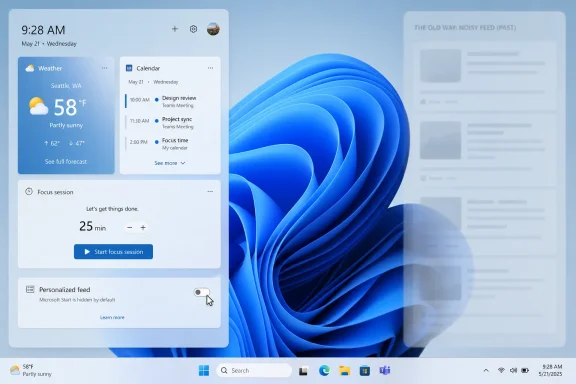
Microsoft Start is Microsoft’s personalized news and content feed that appears across Windows 11 Widgets, Edge, MSN, and Microsoft’s consumer web surfaces, and as of mid-2026 Microsoft is testing a quieter Windows 11 Widgets experience that hides that feed by default. That sounds like a small interface tweak, but it lands after years of user frustration with a panel that was sold as glanceable productivity and too often behaved like a traffic funnel. The change matters because Microsoft is tacitly admitting that one of Windows 11’s most visible consumer surfaces has been too noisy. It also raises the harder question: whether Microsoft is really de-cluttering Windows, or merely learning to make its engagement machinery less obvious.
Microsoft Start has always been a branding problem wrapped around a product problem. On paper, it is a personalized feed: weather, finance, sports, entertainment, local news, and algorithmically selected stories attached to a Microsoft account. In practice, for many Windows 11 users, it became the part of the Widgets board that turned a potentially useful system panel into something closer to a web portal from another era.
That distinction matters. A widget is supposed to be glanceable, lightweight, and task-adjacent. A feed is different. It wants attention, scrolling, personalization data, clicks, and return visits. Microsoft put those two ideas in the same panel and then acted surprised when users judged the whole experience by the noisiest part.
Windows 11 shipped with a design language that asked users to accept a cleaner, centered, more modern desktop. But alongside that visual restraint came commercial surfaces that often felt anything but restrained. The Widgets button could show weather, yes, but opening it frequently meant stepping into Microsoft Start’s endless river of headlines, recommendations, and content cards. The operating system became the front door to a feed.
This is why the current change is more important than the feature itself. Microsoft is not killing Microsoft Start. It is not abandoning MSN-style aggregation. It is changing the default posture of Windows 11 so the widget layer begins with widgets rather than the feed. In Windows terms, that is a quiet but meaningful concession.
That is why the Microsoft Start feed became shorthand for a broader Windows 11 complaint: the feeling that the OS had become too eager to promote Microsoft’s own services. Edge prompts, OneDrive nudges, Microsoft account pressure, Start menu recommendations, Settings banners, Copilot entry points, and Widgets all occupy different technical buckets, but users experience them as one thing. They experience them as Windows asking for something.
The Widgets board was especially irritating because it had an obvious good version hiding inside it. Weather, calendar, traffic, stocks, photos, sports scores, To Do, and device information all make conceptual sense in a glanceable side panel. Sysadmins may not care about the family calendar on a fleet device, but consumers do. Enthusiasts may remove the icon immediately, but the idea itself is not foolish.
The problem was that Microsoft treated the feed as the gravity well. Widgets were the justification; Microsoft Start was the payload. Even when users could customize cards, remove sources, or tune interests, the experience still told them that Microsoft’s preferred default was engagement first and utility second.
That is how a small panel became a reputational problem. Every accidental hover and every tabloid-ish headline reinforced the same suspicion: Windows 11 was not merely an operating system but an attention surface.
For years, the company’s answer to complaints about Windows content surfaces was usually framed around control. Users could customize this, turn off that, change a setting, or manage interests. The implicit bargain was that Microsoft could ship noisy defaults as long as an escape hatch existed somewhere. That bargain has worn thin.
A quieter Widgets board flips the moral burden. Instead of making users disable the feed, Microsoft makes users opt into it. That is the correct direction for an operating system surface. The desktop should not assume that news aggregation belongs in the foreground of everyone’s workflow.
But this is not the same as removing the commercial incentive. Microsoft Start still exists. MSN still exists. Feed providers still exist. The company still has every reason to route users through Microsoft-controlled content and advertising channels. The difference is that Microsoft appears to have learned that forcing the feed into the default Windows experience damages the perceived quality of Windows itself.
That is the trade Microsoft is now trying to manage: it wants distribution without resentment. Windows gives Microsoft unmatched reach, but every aggressive placement spends a little of the platform’s trust. The Widgets change suggests Redmond has noticed the account balance.
That regional limitation is not accidental. Europe’s regulatory environment has pushed platform owners to separate first-party services from platform defaults, or at least to make those defaults more contestable. Windows has a long history here, from browser choice battles to modern questions about search, app stores, and bundled services. Widgets now sits in that same lineage.
The result is awkward but revealing. In the EEA, Microsoft has to think about Widgets as a platform. Elsewhere, it can still think about Widgets as a Microsoft distribution channel. That split undercuts the company’s own design argument. If third-party feed providers make the Widgets board more user-centric and competitive in Europe, why should users in the United States or elsewhere settle for less?
This is where Microsoft’s product instincts and platform obligations collide. A true widget platform would allow users to pick feeds and mini-apps from the services they already use. It would let publishers, productivity apps, calendar providers, weather services, and enterprise tools compete for space. It would make Microsoft Start one option among many.
Instead, Windows users outside Europe are still largely living with a Microsoft-first model. The current move to hide the feed by default helps, but it does not fully answer the platform question. A quieter monopoly surface is still a monopoly surface.
Microsoft does provide policy controls for Widgets and related experiences. Organizations can disable the Widgets board through policy, and Windows management tooling gives administrators ways to reduce or remove these consumer-facing elements. That is useful, but it also illustrates the gap between consumer Windows defaults and enterprise expectations.
The enterprise instinct is to strip away anything that is not clearly tied to productivity, security, compliance, or supportability. Widgets can be defended in that context only if they become a controlled dashboard. A panel with calendar, tasks, service health, approvals, security notices, or line-of-business updates could be valuable. A panel with algorithmic news is much harder to justify.
This is why Microsoft’s feed-provider model could eventually matter more to businesses than to consumers. If Widgets becomes a surface where approved apps can present lightweight, policy-governed information, it has a role. If it remains a consumer feed with administrative kill switches, it will continue to be one of the first things IT disables.
Microsoft has spent years telling customers that Windows is both a consumer OS and an enterprise platform. The Widgets board is a reminder that those identities do not always coexist peacefully. What feels like engagement to one product team feels like unmanaged content injection to an IT department.
That is where the product struggled. Microsoft’s feed surfaces have often felt inconsistent in quality: useful weather and finance cards sitting beside sensational stories, thin aggregation, entertainment bait, and ads that made the whole experience feel cheaper than Windows deserves. The issue was not that Microsoft offered news. The issue was that the feed often looked misaligned with the premium hardware and productivity story Microsoft tells elsewhere.
This matters because Windows is not a free social app. Even when bundled with a PC, Windows carries the expectations of paid software, professional tooling, and long-term platform stewardship. Users tolerate advertising and engagement loops differently inside an operating system than they do inside a website. The OS is supposed to be the neutral ground on which other things happen.
Microsoft Start blurred that boundary. It made the shell feel like a portal. For some users, that may have been convenient. For many others, it was another reason to right-click, hide, disable, or search for registry and policy fixes.
The new default does not erase that history. It simply shows that Microsoft now understands the feed’s reputation is a liability when it leads the experience.
But credibility is earned through repetition. Microsoft has a habit of improving a default in one release while introducing a new promotional surface in another. Users remember when settings stayed changed only until the next feature update, when Edge prompts reappeared, when OneDrive nudges returned, and when “recommended” sections became a polite word for Microsoft’s priorities.
That history makes every cleanup effort provisional. The question is not whether Microsoft can hide the feed by default in a preview build. The question is whether it can resist the temptation to reintroduce the same engagement model through another label, another panel, or another AI-powered surface.
Copilot complicates this. Microsoft’s AI ambitions need prominent placement, contextual awareness, and persistent user attention. Those needs can easily reproduce the same tension that made Microsoft Start unpopular. If Widgets becomes quieter while Copilot becomes louder, users will see the pattern immediately.
The lesson of Microsoft Start should be simple: users do not hate useful information. They hate feeling harvested by their desktop.
That means Microsoft needs to make Widgets less like a feed and more like a dashboard. The hierarchy should be obvious: user-selected widgets first, optional feeds second, promotional content nowhere unless explicitly enabled. The board should respect the default browser where practical, minimize background resource usage, and avoid surprise behavior such as hover activation that users did not intentionally choose.
There is also an opportunity here for developers. Windows still lacks a truly beloved glanceable information layer. Live Tiles tried and faded. Desktop gadgets came and went. The Widgets board could succeed where those efforts failed if Microsoft treats it as a restrained platform rather than a distribution pipe.
The design challenge is not technical alone. It is editorial. Microsoft has to decide what kind of experience deserves to live one click from the taskbar. The answer cannot be “whatever drives engagement.” That answer is how Windows 11 got into this mess.
A boring Widgets board would be a victory. In operating systems, boring often means respectful.
 Microsoft Start Was Never Just a News Feed
Microsoft Start has always been a branding problem wrapped around a product problem. On paper, it is a personalized feed: weather, finance, sports, entertainment, local news, and algorithmically selected stories attached to a Microsoft account. In practice, for many Windows 11 users, it became the part of the Widgets board that turned a potentially useful system panel into something closer to a web portal from another era.That distinction matters. A widget is supposed to be glanceable, lightweight, and task-adjacent. A feed is different. It wants attention, scrolling, personalization data, clicks, and return visits. Microsoft put those two ideas in the same panel and then acted surprised when users judged the whole experience by the noisiest part.
Windows 11 shipped with a design language that asked users to accept a cleaner, centered, more modern desktop. But alongside that visual restraint came commercial surfaces that often felt anything but restrained. The Widgets button could show weather, yes, but opening it frequently meant stepping into Microsoft Start’s endless river of headlines, recommendations, and content cards. The operating system became the front door to a feed.
This is why the current change is more important than the feature itself. Microsoft is not killing Microsoft Start. It is not abandoning MSN-style aggregation. It is changing the default posture of Windows 11 so the widget layer begins with widgets rather than the feed. In Windows terms, that is a quiet but meaningful concession.
The Widgets Board Became a Symbol of Windows 11’s Attention Economy
The backlash against Windows 11 Widgets was never only about widgets. It was about trust. Users can forgive a mediocre feature that stays out of the way. They are less forgiving when a mediocre feature is pinned to the taskbar, opens accidentally on hover, consumes memory, and then greets them with low-value content they did not ask for.That is why the Microsoft Start feed became shorthand for a broader Windows 11 complaint: the feeling that the OS had become too eager to promote Microsoft’s own services. Edge prompts, OneDrive nudges, Microsoft account pressure, Start menu recommendations, Settings banners, Copilot entry points, and Widgets all occupy different technical buckets, but users experience them as one thing. They experience them as Windows asking for something.
The Widgets board was especially irritating because it had an obvious good version hiding inside it. Weather, calendar, traffic, stocks, photos, sports scores, To Do, and device information all make conceptual sense in a glanceable side panel. Sysadmins may not care about the family calendar on a fleet device, but consumers do. Enthusiasts may remove the icon immediately, but the idea itself is not foolish.
The problem was that Microsoft treated the feed as the gravity well. Widgets were the justification; Microsoft Start was the payload. Even when users could customize cards, remove sources, or tune interests, the experience still told them that Microsoft’s preferred default was engagement first and utility second.
That is how a small panel became a reputational problem. Every accidental hover and every tabloid-ish headline reinforced the same suspicion: Windows 11 was not merely an operating system but an attention surface.
Hiding the Feed by Default Is an Admission, Not a Revolution
The latest preview behavior, which prioritizes the widgets dashboard and hides the MSN/Microsoft Start feed unless the user chooses it, is a welcome change. It is also a revealing one. Defaults are policy. When Microsoft changes a default, it is acknowledging that the old default was producing the wrong outcome.For years, the company’s answer to complaints about Windows content surfaces was usually framed around control. Users could customize this, turn off that, change a setting, or manage interests. The implicit bargain was that Microsoft could ship noisy defaults as long as an escape hatch existed somewhere. That bargain has worn thin.
A quieter Widgets board flips the moral burden. Instead of making users disable the feed, Microsoft makes users opt into it. That is the correct direction for an operating system surface. The desktop should not assume that news aggregation belongs in the foreground of everyone’s workflow.
But this is not the same as removing the commercial incentive. Microsoft Start still exists. MSN still exists. Feed providers still exist. The company still has every reason to route users through Microsoft-controlled content and advertising channels. The difference is that Microsoft appears to have learned that forcing the feed into the default Windows experience damages the perceived quality of Windows itself.
That is the trade Microsoft is now trying to manage: it wants distribution without resentment. Windows gives Microsoft unmatched reach, but every aggressive placement spends a little of the platform’s trust. The Widgets change suggests Redmond has noticed the account balance.
Europe Forced Open a Door Microsoft Should Have Opened Everywhere
The most interesting part of Microsoft’s Widgets strategy is not only the consumer-facing toggle. It is the architecture behind feed providers. Microsoft’s documentation describes a model in which third-party applications can provide content feeds inside the Windows Widgets board, with user controls to enable or disable them. For now, that capability is tied to the European Economic Area.That regional limitation is not accidental. Europe’s regulatory environment has pushed platform owners to separate first-party services from platform defaults, or at least to make those defaults more contestable. Windows has a long history here, from browser choice battles to modern questions about search, app stores, and bundled services. Widgets now sits in that same lineage.
The result is awkward but revealing. In the EEA, Microsoft has to think about Widgets as a platform. Elsewhere, it can still think about Widgets as a Microsoft distribution channel. That split undercuts the company’s own design argument. If third-party feed providers make the Widgets board more user-centric and competitive in Europe, why should users in the United States or elsewhere settle for less?
This is where Microsoft’s product instincts and platform obligations collide. A true widget platform would allow users to pick feeds and mini-apps from the services they already use. It would let publishers, productivity apps, calendar providers, weather services, and enterprise tools compete for space. It would make Microsoft Start one option among many.
Instead, Windows users outside Europe are still largely living with a Microsoft-first model. The current move to hide the feed by default helps, but it does not fully answer the platform question. A quieter monopoly surface is still a monopoly surface.
The Enterprise View Is Simpler: Fewer Surprises, Please
For IT administrators, Microsoft Start is not a philosophical problem. It is an operational one. Consumer content surfaces on managed Windows devices create training issues, distraction risks, policy questions, and help desk noise. The average administrator does not want to explain why a corporate laptop is showing celebrity news next to a weather card.Microsoft does provide policy controls for Widgets and related experiences. Organizations can disable the Widgets board through policy, and Windows management tooling gives administrators ways to reduce or remove these consumer-facing elements. That is useful, but it also illustrates the gap between consumer Windows defaults and enterprise expectations.
The enterprise instinct is to strip away anything that is not clearly tied to productivity, security, compliance, or supportability. Widgets can be defended in that context only if they become a controlled dashboard. A panel with calendar, tasks, service health, approvals, security notices, or line-of-business updates could be valuable. A panel with algorithmic news is much harder to justify.
This is why Microsoft’s feed-provider model could eventually matter more to businesses than to consumers. If Widgets becomes a surface where approved apps can present lightweight, policy-governed information, it has a role. If it remains a consumer feed with administrative kill switches, it will continue to be one of the first things IT disables.
Microsoft has spent years telling customers that Windows is both a consumer OS and an enterprise platform. The Widgets board is a reminder that those identities do not always coexist peacefully. What feels like engagement to one product team feels like unmanaged content injection to an IT department.
The Rebrand From MSN to Microsoft Start Did Not Fix the Underlying Product
Microsoft Start was supposed to modernize MSN’s image. The name suggested freshness, personalization, and integration with the Microsoft account era. But users do not judge a feed by its brand architecture. They judge it by what appears on screen.That is where the product struggled. Microsoft’s feed surfaces have often felt inconsistent in quality: useful weather and finance cards sitting beside sensational stories, thin aggregation, entertainment bait, and ads that made the whole experience feel cheaper than Windows deserves. The issue was not that Microsoft offered news. The issue was that the feed often looked misaligned with the premium hardware and productivity story Microsoft tells elsewhere.
This matters because Windows is not a free social app. Even when bundled with a PC, Windows carries the expectations of paid software, professional tooling, and long-term platform stewardship. Users tolerate advertising and engagement loops differently inside an operating system than they do inside a website. The OS is supposed to be the neutral ground on which other things happen.
Microsoft Start blurred that boundary. It made the shell feel like a portal. For some users, that may have been convenient. For many others, it was another reason to right-click, hide, disable, or search for registry and policy fixes.
The new default does not erase that history. It simply shows that Microsoft now understands the feed’s reputation is a liability when it leads the experience.
Microsoft’s De-Cluttering Campaign Has a Credibility Problem
The Widgets change fits a broader 2026 theme around Windows 11: Microsoft appears to be trying to reduce friction, improve performance, and give users more control over noisy parts of the shell. Reports and preview builds have pointed to Start menu customization, quieter defaults, and a renewed focus on responsiveness. After years of Windows 11 feeling like a product constantly negotiating with its own service strategy, that is good news.But credibility is earned through repetition. Microsoft has a habit of improving a default in one release while introducing a new promotional surface in another. Users remember when settings stayed changed only until the next feature update, when Edge prompts reappeared, when OneDrive nudges returned, and when “recommended” sections became a polite word for Microsoft’s priorities.
That history makes every cleanup effort provisional. The question is not whether Microsoft can hide the feed by default in a preview build. The question is whether it can resist the temptation to reintroduce the same engagement model through another label, another panel, or another AI-powered surface.
Copilot complicates this. Microsoft’s AI ambitions need prominent placement, contextual awareness, and persistent user attention. Those needs can easily reproduce the same tension that made Microsoft Start unpopular. If Widgets becomes quieter while Copilot becomes louder, users will see the pattern immediately.
The lesson of Microsoft Start should be simple: users do not hate useful information. They hate feeling harvested by their desktop.
The Better Widgets Board Is Boring, and That Is the Point
A successful Widgets board should not be exciting. It should be boring in the way good system utilities are boring. You open it, glance at what you need, maybe act on one item, and leave. It should not be a destination competing with the browser, the Start menu, Teams, Outlook, or your phone.That means Microsoft needs to make Widgets less like a feed and more like a dashboard. The hierarchy should be obvious: user-selected widgets first, optional feeds second, promotional content nowhere unless explicitly enabled. The board should respect the default browser where practical, minimize background resource usage, and avoid surprise behavior such as hover activation that users did not intentionally choose.
There is also an opportunity here for developers. Windows still lacks a truly beloved glanceable information layer. Live Tiles tried and faded. Desktop gadgets came and went. The Widgets board could succeed where those efforts failed if Microsoft treats it as a restrained platform rather than a distribution pipe.
The design challenge is not technical alone. It is editorial. Microsoft has to decide what kind of experience deserves to live one click from the taskbar. The answer cannot be “whatever drives engagement.” That answer is how Windows 11 got into this mess.
A boring Widgets board would be a victory. In operating systems, boring often means respectful.
The Practical Read for Windows Users and Admins Is Finally Less Grim
The direction of travel is now clearer than it has been for most of Windows 11’s life. Microsoft is not abandoning Microsoft Start, but it is reducing the feed’s privileged position in at least some current Windows 11 testing. That gives users and administrators a more hopeful baseline, even if the rollout path and final behavior still need watching.- Users who ignored Widgets because of the news feed may finally have a reason to try the panel again if the quieter default reaches stable Windows 11 builds.
- People who want Microsoft Start can still use it, but the healthier model is one where the feed is chosen rather than imposed.
- Administrators should continue managing Widgets through policy on corporate devices instead of assuming consumer defaults will match enterprise needs.
- Developers should watch Microsoft’s feed-provider work closely, because a genuinely open Widgets board would be more interesting than another Microsoft-only content surface.
- Microsoft’s larger Windows cleanup effort will be judged by whether quiet defaults remain quiet after the next wave of service integrations arrives.
References
- Primary source: thurrott.com
Published: 2026-06-20T20:26:23.106300
microsoft-start - Thurrott.com
 www.thurrott.com
- Related coverage: windowscentral.com
I dug through the Windows 11 Insider builds for June 2026 and found 7 features worth paying attention to | Windows Central
Microsoft's June Insider preview builds show a growing focus on polishing the OS experience across accessibility, updates, and performance.www.windowscentral.com - Related coverage: windowslatest.com
Microsoft is finally turning off the MSN feed and ads in Windows 11 Widgets by default
Microsoft is making Windows 11 Widgets quiet by default. The update disables open-on-hover and hides the MSN feed for a cleaner taskbar. www.windowslatest.com
- Related coverage: ninjaone.com
How to Disable Feeds on Widgets Board in Windows 11 | NinjaOne
Optimize your Windows 11 device by removing the news feed from the Widgets panel. Streamline your device to reduce distractions and boost productivity.www.ninjaone.com - Related coverage: yourwindowsguide.com
How to Disable the News Feed in Widgets of Windows 11 (Easy Steps)
This article explains how to disable the news feed in Widgets Board of Windows 11, which is now available as an option in the Windows 11.www.yourwindowsguide.com - Official source: support.microsoft.com
Stay Up to Date With News and Interests - Microsoft Support
Discover how to use the news and interests feature in Windows 10. Learn how to personalize your feed, select your interests, and follow your favorite publishers.support.microsoft.com
- Related coverage: allthings.how
How to Disable News in Windows 11 Widgets
If you don’t like the news widgets on your Windows 11 PC, here are all the ways you can easily get rid of them.allthings.how - Related coverage: pureinfotech.com
How to disable news feed from Widgets on Windows 11 - Pureinfotech
To disable the news feed on Widgets, open the "Show or hide feeds" setting and turn off the "My Feed" toggle switch. Here's how. pureinfotech.com
- Official source: learn.microsoft.com
how to stop show trending and news and interests? - Microsoft Q&A
I have tried to delete these intrusions by sliding over the buttons but they keep coming back.learn.microsoft.com - Related coverage: techbloat.com
How to Disable News Feed on Windows 11 Widgets Board - TechBloat
Hello! How can I assist you today? www.techbloat.com
- Related coverage: tomsguide.com
Microsoft reportedly redesigning Start Menu in Windows 11 after actually listening to user complaints | Tom's Guide
Microsoft is reportedly working on yet another redesign of the Start Menu in Windows.www.tomsguide.com - Related coverage: tomshardware.com
Microsoft announces first test build for Windows 11 26H1, aimed at 'specific silicon' — Rumor mill suggests first "H1" release in Windows 11's history might be reserved for upcoming Arm PCs | Tom's Hardware
It's available for testing right now.www.tomshardware.com - Related coverage: techradar.com
Windows 11 is finally getting the Start menu changes we all wanted — and a surprise bonus | TechRadar
The new Start menu looks excellent, and Microsoft is tackling issues with rusty old parts of the Windows 11 interfacewww.techradar.com - Related coverage: scscc.club
