

Microsoft's recent expansion of Microsoft 365 Copilot transforms it from a contextual chat helper into a platform-level assistant that can reach across an organization’s data landscape, ingesting third-party and tenant-specific sources, publishing reusable agents, and exporting AI telemetry into security tooling — all while Microsoft layers governance and observability into the mix. This is not a simple feature update; it is a strategic pivot that makes Copilot a first-class integration point for enterprise workflows, security operations, and custom automation — with clear productivity upsides and material operational risks that IT teams must address now.
Microsoft 365 Copilot began as an assistive layer inside Word, Excel, PowerPoint, and Teams. Recent announcements and rollouts extend that assistance into three broad areas: deeper data integration, agentization and automation, and security/telemetry integration. The company has added the ability for Copilot to reference Microsoft Graph Connectors and other tenant data when answering prompts, introduced Copilot Studio and publishable agents (including document-bundling .agent files on OneDrive), and delivered a Copilot telemetry connector for Microsoft Sentinel so SOC teams can ingest AI activity directly into their SIEM workflows. These changes are being positioned as enterprise-first: tenant grounding, scoped web access, Purview-based governance, and admin controls are woven into the release.
This is a significant change versus previous Copilot behavior (relying only on tenant search indexes or generic web grounding). Organizations can now fold line-of-business data into generative responses in a controlled way, which raises both opportunity (better, contextual answers) and responsibility (who manages connector access, and how are outputs audited?).
Key characteristics of agents:
Operational benefits include:
Mitigations:
Mitigations:
Mitigations:
Mitigations:
Vendors and SI partners should:
Recommended next steps for organizations:
Conclusion: Microsoft 365 Copilot’s new data-integration and agent features are a major step toward practical, enterprise-grade AI. The technical building blocks are in place, but the burden now shifts to IT, security, and compliance teams to govern, monitor, and operationalize these capabilities responsibly.
Source: BornCity Microsoft 365 Copilot: KI-Assistent erhält massive Daten-Integration - BornCity
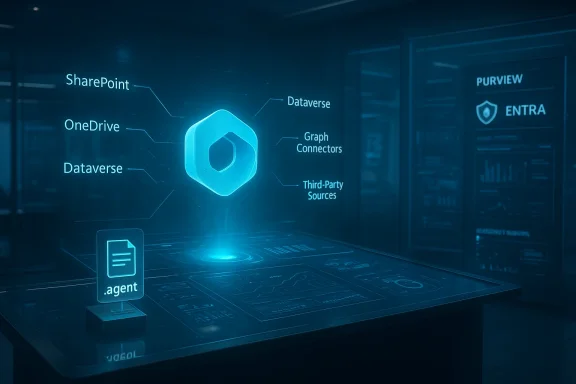 Background / Overview
Microsoft 365 Copilot began as an assistive layer inside Word, Excel, PowerPoint, and Teams. Recent announcements and rollouts extend that assistance into three broad areas: deeper data integration, agentization and automation, and security/telemetry integration. The company has added the ability for Copilot to reference Microsoft Graph Connectors and other tenant data when answering prompts, introduced Copilot Studio and publishable agents (including document-bundling .agent files on OneDrive), and delivered a Copilot telemetry connector for Microsoft Sentinel so SOC teams can ingest AI activity directly into their SIEM workflows. These changes are being positioned as enterprise-first: tenant grounding, scoped web access, Purview-based governance, and admin controls are woven into the release.What “massive data integration” actually means
Graph Connectors and contextual grounding
At the core of this update is the extension of Copilot’s grounding options so it can optionally draw from Microsoft Graph Connectors and other indexed sources when answering prompts. That means Copilot can be directed to include results from third-party systems — CRMs, ticketing platforms, proprietary file stores — that are already connected to your Microsoft 365 tenant through Graph Connectors and indexing pipelines. For users this appears as the ability to select which connectors or sources to include when composing a prompt in Business Chat or Copilot experiences.This is a significant change versus previous Copilot behavior (relying only on tenant search indexes or generic web grounding). Organizations can now fold line-of-business data into generative responses in a controlled way, which raises both opportunity (better, contextual answers) and responsibility (who manages connector access, and how are outputs audited?).
Tenant grounding and scoped public web access
Microsoft adds two complementary grounding modes: tenant grounding (trusted internal data: SharePoint, OneDrive, Dataverse, custom Graph Connectors) and scoped public web grounding (makers can constrain agent access to specific external URLs). This narrows the model’s knowledge sources to auditable, intended inputs and reduces unexpected behavior from unbounded web crawling. The combination allows makers to balance relevance and safety.Copilot Studio, Agents and OneDrive .agent bundles
Agents as modular, auditable automation
A standout capability is Copilot Studio, an authoring environment for building, testing, and publishing agents — encapsulated AI behaviors that can read from tenant sources, perform multi-step tasks, and be published into Microsoft 365 Copilot Chat for end users. Agents can be constrained by grounding rules and deployed with lifecycle management and analytics, allowing organizations to treat them as versioned automation artifacts rather than ephemeral prompts. This marks a move from one-off generative responses to reusable, auditable AI components.Key characteristics of agents:
- Reusable behaviors that can be published and surfaced to end users.
- Access to tenant data via Graph and SharePoint connectors.
- Ability to operate across multiple steps and hand off between agents.
- Versioning, analytics, and observability via Copilot Studio tooling.
OneDrive .agent bundles: project-level context
Microsoft introduced a new unit of work: the OneDrive .agent bundle. Up to 20 documents can be bundled into a single .agent file stored on OneDrive; Copilot consumes that bundle as a single, project-level context. This is powerful for tasks that require reasoning across a dossier — contract sets, research portfolios, multi-document project artifacts — because it avoids repetitive, brittle prompts and provides a canonical, shareable context that collaborators can update. For knowledge workers, this can reduce friction and improve the quality of generated outputs; for IT, it introduces a new artifact type to govern and audit.Office-specific agents: Word, Excel, PowerPoint
Agents can be specialized for Office workloads:- Word Agents can generate structured drafts, long-form summaries, and coaching suggestions on tone and structure.
- Excel Agents are increasingly capable of creating Python-based analyses inserted directly into the workbook, going beyond formula-only automation.
- PowerPoint Agents can produce near-finished decks from prompts and support view-only interactions where users have read access but still want the assistant to summarize or explain slides.
Security, governance and observability: Purview, Entra, and Sentinel integration
Purview and admin-facing controls
Microsoft recognizes that bringing AI into the center of everyday workflows requires enterprise-grade governance. Copilot features integrate with Microsoft Purview schemas and Entra identity controls, enabling admins to apply classification, retention, and access policies to the data Copilot can use. Memory/Personalization features remain opt‑in and user‑controllable. These integrations aim to make AI-enabled workflows compliant with organizational policies, though the onus remains on admins to map those policies to Copilot’s new surfaces.Copilot telemetry in Microsoft Sentinel
For security teams, Microsoft released a Copilot data connector (public preview) that writes Copilot activity telemetry into Microsoft Sentinel’s CopilotActivity table, ingesting events published to the Purview Unified Audit Log. This lets SOC analysts hunt and build detections based on AI activity — anomalous prompt volumes, unexpected plugin lifecycle events, or unusual agent actions — within their existing SIEM workflows instead of pivoting between multiple consoles. The connector is single-tenant, requires Copilot to be active in the tenant, and is enabled via Defender/Sentinel configuration (Global Admin or Security Admin privileges required).Operational benefits include:
- Reduced context switching (Copilot telemetry within Sentinel workspaces).
- AI-aware detection engineering (analytic rules, playbooks, and enrichment for Copilot incidents).
- Long-term retention options via Sentinel data lake for forensic analysis.
Technical details and prerequisites (what IT should verify)
- Licensing and feature gates: Copilot capabilities are feature-gated and require relevant Microsoft 365 Copilot licenses to be active in the tenant. Some features may be available earlier in the US and roll out globally over weeks to months.
- Graph Connectors and indexing: To feed third-party sources into Copilot, you need properly configured Microsoft Graph Connectors and indexing pipelines. Verify connector schemas and what metadata is indexed.
- Purview/Entra configuration: Ensure data classification, sensitivity labels, and conditional access policies are mapped to Copilot surfaces. Memory/personalization must be configured and communicated to users.
- Sentinel deployment (if SOC requires telemetry): The Copilot connector for Sentinel is single-tenant and requires permissions to deploy. Validate workspace sizing, retention policies, and playbook capacity before enabling.
- Copilot Studio and agent lifecycle: Provision Copilot Studio authoring access to development teams, define agent publishing workflows, and integrate analytics to detect performance regressions or misuse.
Practical benefits and business scenarios
- Faster knowledge work: Copilot can synthesize insights from internal CRMs, support ticketing systems, or legal repositories directly in Business Chat, reducing manual data hunting. Graph Connectors enable queries such as “Summarize open high-priority Salesforce opportunities for Q2” that are grounded in tenant data.
- Project-level briefings: A project lead can bundle contracts, email threads, and project plans into a OneDrive .agent and ask Copilot to produce an executive briefing, saving hours of manual extraction.
- Automated follow-ups and actions: Copilot Actions and agents can orchestrate meeting follow-ups, create task lists, and run multi-step browser-based research journeys via Edge Actions, turning passive suggestions into active workflows.
- Security visibility: Security operations can detect anomalous agent behavior (e.g., an agent that suddenly requests external plugin creation) and trigger automated playbooks in Sentinel, closing the loop on AI-driven risks.
Risks, blind spots, and mitigation strategies
Risk 1 — Data leakage and over-broad grounding
Opening Copilot to Graph Connectors and third-party datasets amplifies the risk that sensitive information will be surfaced inadvertently in generated outputs. Grounding mitigations (tenant-only grounding, scoped web access) help, but they rely on correct configuration.Mitigations:
- Enforce strict connector scopes and index schemas.
- Use Purview sensitivity labels and apply them to connectors/OneDrive artifacts.
- Enable logging and audit trails; require review for agents that access highly sensitive scopes.
Risk 2 — Hallucination compounded by domain complexity
Generative models can still hallucinate. When they synthesize across multiple internal systems and create deliverables (contracts, legal language, financial summaries), hallucinations become high-stakes.Mitigations:
- Implement human-in-the-loop approvals for high-impact outputs.
- Use RAG (Retrieval-Augmented Generation) best practices: present supporting evidence snippets and link to the original artifacts in prompts.
- Version and test agents in Copilot Studio with acceptance criteria.
Risk 3 — Automation failures and supply-chain risk
Agents that execute multi-step tasks (book meetings, publish documents, create plugins) can have unexpected side effects — duplicated communications, incorrect permissions, or inadvertent data exports.Mitigations:
- Use least-privilege agents and run non-destructive sandbox tests.
- Introduce an approvals workflow for actions that modify systems.
- Maintain robust rollback playbooks and incident-runbooks in Sentinel.
Risk 4 — Compliance and regional data residency
Many organizations require strict data residency and regulatory controls. Graph Connectors and Copilot queries must honor those constraints, yet Microsoft’s rollout is often staged by region.Mitigations:
- Validate the precise data residency guarantees for Copilot features under your commercial agreement.
- Pilot features in controlled tenant segments before global deployment.
- Map agent capabilities to compliance requirements and lock out disallowed features.
A practical implementation checklist for IT teams
- Inventory current Graph Connectors and map sensitive data flows.
- Define a Copilot governance policy: allowed data sources, agent approval process, retention and telemetry rules.
- Provision Copilot Studio to a small authoring team and create a secure dev/test tenant for agent development.
- Configure Purview labels and Entra controls to enforce scope and access.
- Enable Sentinel’s Copilot connector in a SOC trial and build initial analytic rules for:
- abnormal prompt frequency,
- unexpected agent creation or plugin lifecycle events,
- large-scale exports or downloads initiated by agents.
- Run user training focusing on “grounded prompt” techniques and explain Memory/Personalization policies.
- Monitor usage metrics and agent analytics; iterate policy and agent behavior based on findings.
Developer and vendor implications
For developers and system integrators, the Microsoft 365 Agents SDK (now including JavaScript in addition to C#) and Copilot Studio change the game: you can build, test, and publish agents that behave predictably and are callable by end users without extra plumbing. That means faster time-to-value for tailored workflows, but also increased responsibility for secure coding, observability, and version control.Vendors and SI partners should:
- Build agent catalogs for common verticals (legal, HR, sales) with clearly documented grounding and data requirements.
- Provide hardened templates that include compliance constraints and test harnesses.
- Offer managed monitoring to spot performance regressions or misuse.
UX and change-management: what users will notice
- Users will see richer, data-grounded responses inside Business Chat and Copilot experiences; prompts can explicitly reference connectors or .agent bundles.
- Collaboration will become more frictionless: share an .agent bundle and get a single contextual summary rather than stitching information manually.
- New permissions cues and consent flows will appear as Copilot requests access to tenant resources; expect training needs around consent and Memory usage.
Critical appraisal: strengths and where Microsoft must be pushed harder
Strengths:- Microsoft’s approach aligns generative AI with enterprise tooling: connectors, SIEM integration, Purview governance, and formal authoring via Copilot Studio are concrete steps toward enterprise readiness. This integration lowers the barrier for organizations to realize real productivity gains.
- Agents and .agent bundles solve real-world collaboration problems by enabling project-level reasoning and reusable automation.
- Transparency and explainability: organizations need clearer, guaranteed trails showing exactly which sources informed a given Copilot response and why. While grounding and RAG help, Microsoft should provide standardized “evidence panes” or provenance metadata for every generated output.
- Global availability and residency clarity: staged rollouts and fragmented feature availability complicate planning for multinational organizations. Microsoft should publish explicit, dated rollouts and residency boundaries for each feature.
- Operational tooling maturity: Copilot Studio analytics and Sentinel playbooks are promising, but vendors and early adopters must collaborate to create community-drafted analytic rules and agent-testing standards to reduce risk.
- Any absolute statements about “no data storage” or model training exclusions must be treated cautiously unless Microsoft provides explicit contractual language. Administrators should seek written clarifications for regulated industries.
Final thoughts and recommended next steps
Microsoft’s data-integration push for Microsoft 365 Copilot is a pivotal moment: it moves Copilot from occasional assistant to an integrated automation and knowledge orchestration layer across Microsoft 365. The productivity upside is substantial — faster briefings, richer project synthesis, and automated follow-ups — but the operational and compliance burden increases in lockstep.Recommended next steps for organizations:
- Start a controlled pilot with a single business unit, instrumenting Copilot usage and Sentinel telemetry from day one.
- Harden Graph Connector deployments and map sensitivity labels to connector scopes.
- Create an agent approval board (security + legal + business owners) and a staging pipeline in Copilot Studio.
- Build initial Sentinel analytic rules for Copilot telemetry and retain logs for forensics.
- Train end users on grounded prompt techniques and explain Memory/privacy settings.
Conclusion: Microsoft 365 Copilot’s new data-integration and agent features are a major step toward practical, enterprise-grade AI. The technical building blocks are in place, but the burden now shifts to IT, security, and compliance teams to govern, monitor, and operationalize these capabilities responsibly.
Source: BornCity Microsoft 365 Copilot: KI-Assistent erhält massive Daten-Integration - BornCity
